Our first choice for a video-editing desk is the Sonnet Echo 20, because Sonnet documents an internal M.2 slot, a full-size UHS-II SD reader, 2.5GbE, HDMI, downstream Thunderbolt 4, and plenty of 10Gbps USB connections. If a qualifying Thunderbolt 5 host and a 10GbE network are already part of the plan, the CalDigit TS5 Plus is the stronger fit. Want the SSD inside the dock but on Thunderbolt 5? That is the Razer Thunderbolt 5 Dock Chroma. And if card ingestion and fast storage are not your deciding requirements, start with our broader USB-C docking station guide instead.
One caveat before the picks. A connector list cannot promise editing performance, because the laptop, operating system, GPU, storage device, cable, display, and shared upstream link all affect the result. Everything below rests on manufacturer-stated interfaces and topology. Nothing below claims measured transfer speed, color accuracy, or timeline performance.
Quick picks
- Sonnet Echo 20: Best overall mix for removable media, internal storage, wired networking, displays, and USB devices.
- CalDigit TS5 Plus: Best for a Thunderbolt 5 workstation that can use 10GbE and many fast USB ports.
- Plugable TBT-UDT3: Best when downstream Thunderbolt 5 expansion matters more than built-in video connectors.
- OWC 11-Port Thunderbolt 5 Dock: Best for two UHS-II card formats and several downstream Thunderbolt branches.
- Razer Thunderbolt 5 Dock Chroma: Best Thunderbolt 5 option with an empty internal M.2 slot.
Compare the best USB-C docks for video editors
| Image | Product | Details | Check Price |
|---|---|---|---|
 | Sonnet Echo 20 Thunderbolt 4 SuperDock | Required host path: Thunderbolt 4 Editing-side I/O: Internal M.2 slot, UHS-II SD, 2.5GbE Display route: HDMI plus downstream Thunderbolt 4 Laptop charging: Not stated Buyer check: SSD supplied by buyer; shared host path | Check Price on Amazon |
 | CalDigit TS5 Plus | Required host path: Qualifying Thunderbolt 5 host Editing-side I/O: UHS-II SD/microSD, ten 10Gbps USB, 10GbE Display route: DisplayPort 2.1 plus Thunderbolt Laptop charging: Up to 140W Buyer check: Host and shared upstream path control results | Check Price on Amazon |
 | Plugable TBT-UDT3 | Required host path: Thunderbolt 5; not Thunderbolt 3 Editing-side I/O: Dual UHS-II readers and 2.5GbE Display route: Three downstream Thunderbolt 5 ports Laptop charging: Up to 140W Buyer check: No native HDMI or DisplayPort | Check Price on Amazon |
 | OWC 11-Port Thunderbolt 5 Dock | Required host path: Qualifying Thunderbolt 5 host Editing-side I/O: Dual UHS-II readers, 2.5GbE, audio Display route: Three downstream Thunderbolt 5 branches Laptop charging: Up to 140W Buyer check: Windows Ethernet driver and SDXC caveats | Check Price on Amazon |
 | Razer Thunderbolt 5 Dock Chroma | Required host path: Qualifying Thunderbolt 5 host Editing-side I/O: Empty M.2 2280 slot and UHS-II SD Display route: Three downstream Thunderbolt 5 paths Laptop charging: Up to 140W Buyer check: Active cooling; SSD supplied by buyer | Check Price on Amazon |
1. Sonnet Echo 20 Thunderbolt 4 SuperDock — best overall editing I/O mix
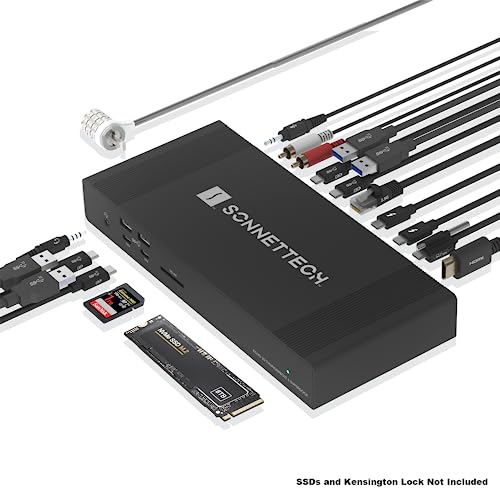
No other dock here documents this much editing-side hardware in a single enclosure. Sonnet states that the Echo 20 has a user-accessible internal M.2 NVMe slot, a fast full-size UHS-II SD reader, 2.5GbE, HDMI, two downstream Thunderbolt 4 connections, four USB-A 10Gbps ports, and four USB-C 10Gbps ports. For a fixed editing system, that layout can collapse several separate boxes into one and end the daily hunt for a card-reader dongle.
Read the internal bay for what it is: an expansion slot, not an included drive. The buyer supplies the SSD, and Sonnet’s description places it on a PCIe x1 NVMe path, so treat it as a defined internal storage route rather than an unconstrained Thunderbolt storage connection. Storage, displays, network traffic, and every other peripheral also share the same host connection. One gap worth closing yourself: the published Sonnet information does not establish an exact laptop-charging figure, so confirm charging on Sonnet’s current specification before ordering.
Our Take
The Echo 20 earns its place when ingest, local working storage, network access, and several USB devices all need permanent homes on the desk. If that internal drive bay would sit empty, a simpler dock does the same job for less complexity.
- Internal M.2 slot and full-size UHS-II SD
- 2.5GbE plus extensive 10Gbps USB
- HDMI and downstream Thunderbolt routes
- SSD is supplied by the buyer
- Charging figure is unknown
2. CalDigit TS5 Plus — best TB5 and 10GbE expansion
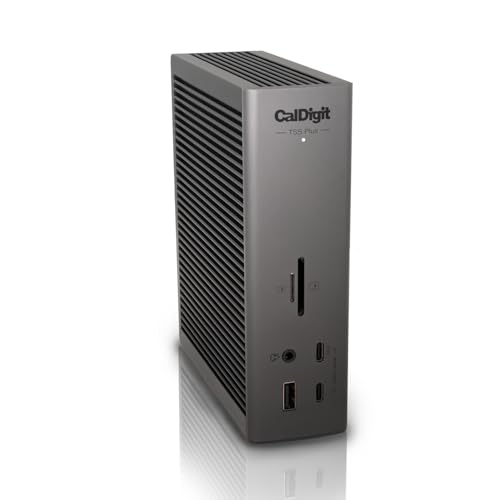
For plenty of editors, a fast wired storage network matters more than an internal SSD bay. CalDigit specifies Thunderbolt 5, 20 total ports, ten 10Gbps USB ports, 10GbE, full-size SD and microSD UHS-II readers, DisplayPort 2.1, and up to 140W host charging for the TS5 Plus. That is the shape of a workstation dock for someone whose projects already live on a NAS or who runs a shelf of external devices.
None of that describes what any given laptop will expose at once; it describes a ceiling. Full Thunderbolt 5 capability requires a qualifying host, and display results still answer to the host GPU, operating system, cable, adapter, and monitor. Every port on the dock ultimately funnels back through one upstream connection. CalDigit also warns that demanding laptops may need their proprietary power adapter even when the dock supplies host power.
Our Take
For a current Thunderbolt 5 editing system with a genuine use for 10GbE, the TS5 Plus is the buy. Without a laptop and a network that can use those paths, it is money spent on headroom nothing reaches.
- 10GbE and ten 10Gbps USB ports
- Full-size and microSD UHS-II readers
- Up to 140W host charging
- Full capability needs a qualifying Thunderbolt 5 host
- Demanding laptops may still need direct power
3. Plugable TBT-UDT3 — best downstream TB5 flexibility

Plugable takes a different approach: the specification centers on three downstream Thunderbolt 5 ports rather than fixed HDMI or DisplayPort outputs. Alongside those, Plugable documents 2.5GbE, separate full-size SD and microSD UHS-II readers, and up to 140W host charging. It suits a desk where the displays and the fast external storage already speak USB-C or Thunderbolt and the dock simply needs to be the branching point.
The tradeoff is right there in the port list. With no native HDMI or DisplayPort connector, a monitor that only accepts one of those inputs needs an appropriate cable or adapter, and the manufacturer information excludes Thunderbolt 3 hosts. Three visible downstream sockets also say nothing about display count and resolution, which stay properties of the exact host and connected display chain. Anyone running conventional HDMI displays will be happier with the connector already built in.
Our Take
Pick the TBT-UDT3 when downstream Thunderbolt 5 ports are the plan rather than an afterthought. Skip it the moment direct HDMI or DisplayPort becomes a must-have.
- Three downstream Thunderbolt 5 ports
- Two UHS-II card-reader formats
- 2.5GbE and up to 140W charging
- No native HDMI or DisplayPort
- Manufacturer information excludes Thunderbolt 3 hosts
4. OWC 11-Port Thunderbolt 5 Dock — best TB5 dock with two card formats
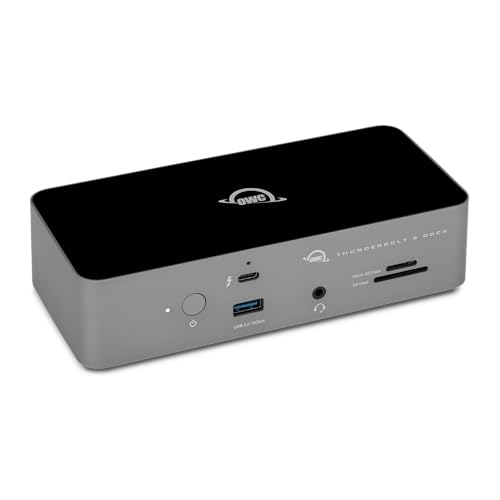
OWC documents three downstream Thunderbolt 5 branches, separate SD and microSD UHS-II readers, 2.5GbE, audio, and up to 140W host charging. If your cameras between them use both card formats, having a physical reader for each is a small daily convenience that adds up. The downstream ports leave room besides for Thunderbolt storage or a compatible display route.
The reader figures in OWC’s manual are interface ceilings, not measured copy speeds with a particular card, and nothing in the manual establishes that both readers sustain those ceilings simultaneously. Display ceilings, once again, depend on the host. Two setup notes deserve attention before this becomes the ingest center of a Windows desk: the manual says Windows Ethernet requires a Realtek driver, and it records an SDXC re-recognition caveat after safe removal.
Our Take
When two card formats and several Thunderbolt branches belong in the same setup, the OWC is the natural answer. Just read the Windows notes first if you plan to standardize a workstation around it.
- Separate SD and microSD UHS-II readers
- Three downstream Thunderbolt 5 branches
- 2.5GbE and up to 140W charging
- Reader figures are bus ceilings, not measured transfers
- Windows driver and SDXC caveats apply
5. Razer Thunderbolt 5 Dock Chroma — best TB5 dock with an internal M.2 slot

Razer documents an empty M.2 2280 PCIe Gen4x4 slot, a full-size UHS-II SD reader, three downstream Thunderbolt 5 paths, 10Gbps USB, audio, and up to 140W host charging. For editing, the internal bay is the whole argument: working storage lives inside the dock, and the downstream Thunderbolt ports stay free for everything else.
Razer states an M.2 capacity ceiling up to 8TB, though the buyer supplies the SSD. The design also uses active cooling. As with the rest of the Thunderbolt 5 group, capability and display modes require a suitable host, and a demanding laptop may still need its usual adapter. Gaming branding, meanwhile, is not evidence of editing performance, color behavior, noise, or sustained storage speed.
Our Take
Buy the Razer when an internal M.2 bay and Thunderbolt 5 expansion are both firm requirements rather than nice extras. On a Thunderbolt 4 host, the Sonnet remains the broader creator-I/O choice.
- Empty M.2 2280 PCIe Gen4x4 slot
- UHS-II SD and downstream Thunderbolt 5
- Up to 140W host charging
- SSD is supplied by the buyer
- Active cooling and host requirements add conditions
How to choose an editing dock
Start with the host and native display path
Confirm whether the editing laptop actually has Thunderbolt 4 or Thunderbolt 5, then check the maker’s display table for that host and operating system. A downstream Thunderbolt connector cannot manufacture an extra GPU stream out of nothing, and the monitor, cable, adapter, and Apple processor limit can each change the active display result. Our dual-monitor docking guide covers that branch in more detail.
For the primary editing display, prefer a native GPU path. DisplayLink has its uses in office applications, but a software-display route is not the basis for the color-critical recommendation here. See the DisplayLink dock guide when extra productivity screens, rather than the editing display, are the requirement.
Separate interface ceilings from workflow results
UHS-II, 10Gbps USB, Thunderbolt 5, and 10GbE are interface names and ceilings. What a particular card, SSD, enclosure, network target, or shared workload actually delivers is a separate question, and running several transfers and displays at once means they all share the upstream host connection anyway. Buy the topology you need, then size your expectations around the slowest device and path in the chain.
Decide where project storage should live
An internal M.2 bay cuts cable clutter, and in exchange it ties that drive to the dock’s internal path and enclosure. A downstream Thunderbolt port keeps storage modular instead. Either way, the Sonnet and Razer both require the buyer to supply the SSD, and no dock should be assumed to bundle a drive unless the exact current package says so.
Match networking to the editing desk
Only the TS5 Plus carries manufacturer-stated 10GbE among these picks; Sonnet, Plugable, and OWC document 2.5GbE. Where wired storage is the deciding feature, compare the exact network infrastructure as closely as you compare the dock, because a faster dock port cannot upgrade the switch or server behind it. Our 2.5GbE USB-C dock guide covers that narrower purchase.
Final recommendation
When Thunderbolt 4, internal M.2 expansion, UHS-II SD, 2.5GbE, and a wall of USB ports are all useful to you, the Sonnet Echo 20 is the most complete editing-desk choice. Move up to the CalDigit TS5 Plus for a qualifying Thunderbolt 5 host and a real 10GbE need. From there it comes down to one deciding feature each: Plugable for downstream TB5 flexibility, OWC for two UHS-II card formats, Razer for Thunderbolt 5 alongside an internal M.2 bay. Whichever you land on, confirm the host path, display branch, power requirement, and storage package before buying.