The home office is often one room farther from the router than the floor plan suggests. A mesh kit uses several nodes under one network name, so a work laptop can move between rooms without manually selecting another access point. The connection between nodes, called backhaul, is as important as the radio class advertised on the box. If you can run Ethernet to the office, that wired path is usually the first thing to plan.
These six distinct three-node systems range from Wi-Fi 6 to Wi-Fi 7, with different port speeds, 6 GHz availability, app features, and subscription boundaries. Home performance was not independently measured. Coverage square footage and device counts are maker estimates. Walls, placement, clients, and your Internet plan determine the actual result.
Buy the node count your layout needs, then check the ports and backhaul. A Wi-Fi 7 badge does not guarantee a faster work call through two walls and a wireless hop.Home-Office Mesh Systems Compared
| Image | Product | Details | Check Price |
|---|---|---|---|
 | TP-Link Deco X55 | Pack: 3 nodes Radio: Wi-Fi 6 dual-band Wired ports: 3 Gigabit each Office fit: Wired backhaul + desk ports | Check Price on Amazon |
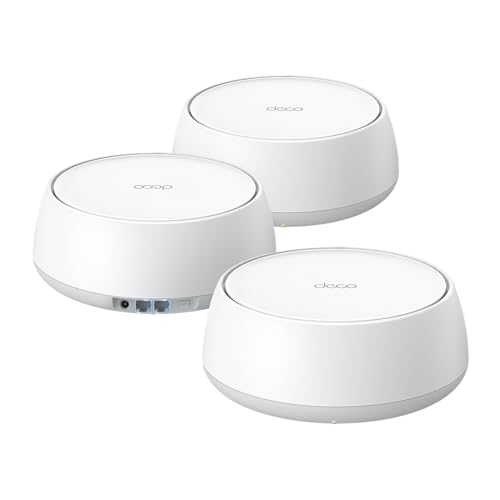 | TP-Link Deco BE5000 | Pack: 3 nodes Radio: Wi-Fi 7 dual-band Wired ports: 2 × 2.5G each Office fit: Multi-gig wired path | Check Price on Amazon |
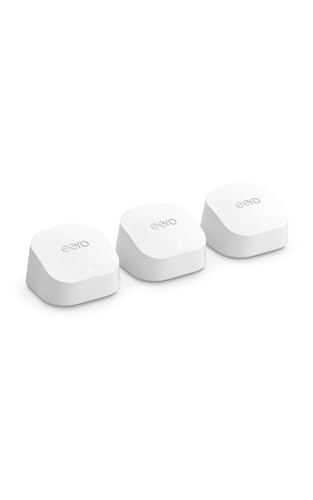 | Amazon eero 6+ | Pack: 3 nodes Radio: Wi-Fi 6 dual-band Wired ports: Check exact topology Office fit: Simple eero app | Check Price on Amazon |
 | TP-Link Deco XE75 | Pack: 3 nodes Radio: Wi-Fi 6E tri-band Wired ports: Check exact topology Office fit: 6 GHz option | Check Price on Amazon |
 | Amazon eero 7 | Pack: 3 nodes Radio: Wi-Fi 7 dual-band Wired ports: 2 × 2.5G each Office fit: eero multi-gig upgrade | Check Price on Amazon |
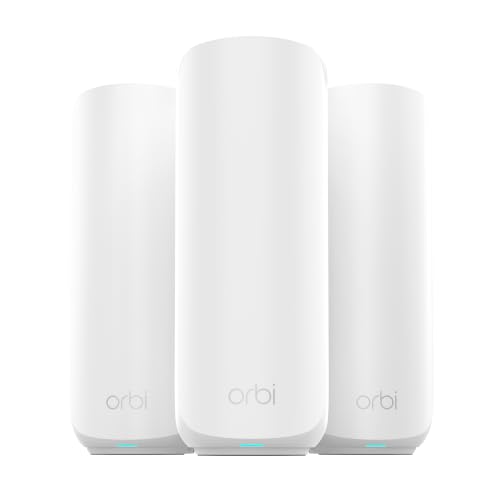 | NETGEAR Orbi 370 | Pack: Router + 2 satellites Radio: Wi-Fi 7 dual-band Wired ports: 2.5G path stated Office fit: Expandable Orbi layout | Check Price on Amazon |
1. TP-Link Deco X55 — Best Gigabit Wired-Backhaul Layout
Deco X55 is a three-unit Wi-Fi 6 AX3000 kit. Its checked listing says each node has three Gigabit Ethernet ports and supports Ethernet backhaul. The port count is practical for a home office. One cable can feed the remote node while a second port connects a desktop or dock, depending on the topology. Plan the main node’s modem or router connection as well, because not every port remains free once the system is wired.
You set up and manage the system in the Deco app. TP-Link also lists HomeShield security features, but the listing separates basics at no cost from a premium service. Do not assume every advertised security option is free. The 6,500-square-foot and 150-device figures are seller coverage and capacity claims, not measured office results. X55 remains a system with Gigabit ports even though its wireless AX number is higher. Gigabit ports are fine for many Internet plans, but they limit a multi-gig wired workflow.
Our Take Choose Deco X55 for an office with wired backhaul that does not need multi-gig Ethernet. Its three Gigabit ports per node make desk placement easier.
- Three Gigabit ports per unit stated.
- Ethernet backhaul supported.
- Three nodes in checked offer.
- No multi-gig wired port.
- Some HomeShield functions may require payment.
2. TP-Link Deco BE5000 — Best 2.5G Deco Path
This Deco 7 BE5000 offer is a dual-band Wi-Fi 7 three-pack. TP-Link’s US product specification lists two 2.5Gbps auto-sensing WAN or LAN ports per unit and optional Ethernet backhaul. Those ports give a direct path to a multi-gig switch or wired office client when the rest of the network supports it. A 2.5G label on a node does not speed up a Gigabit modem, slow switch, or distant wireless client.
Its Wi-Fi bands are 2.4 and 5 GHz, not 6 GHz. The band choice is important if you expected a separate 6 GHz radio for clients or backhaul. The checked listing describes a mix of wired and wireless node links, VPN functions, and setup in the Deco app. Confirm the exact kit count and feature availability in the app before relying on a particular network design. The maker’s 6,600-square-foot coverage claim is a planning clue, not a guarantee for thick interior walls.
Our Take Choose Deco BE5000 if the office already has or will get 2.5GbE wiring. It has no 6 GHz band.
- Two 2.5G ports per node in maker spec.
- Wired and wireless backhaul options.
- No 6 GHz band.
- Only two wired sockets per node.
3. Amazon eero 6+ — Best Simple Wi-Fi 6 App Setup
The eero 6+ offer includes three Wi-Fi 6 nodes and setup through an app. The listing says it supports 160 MHz channels on compatible clients and is backward-compatible with previous eero generations. Compatibility with earlier generations makes this kit a plausible refresh for an existing eero home where the office needs another node. Its TrueMesh routing claim describes how the system chooses paths. Path selection is not proof of a particular call or upload speed in your floor plan.
The listing also mentions a Thread and Zigbee smart-home hub and automatic updates. The hub and automatic updates can be useful, but neither is the reason to choose office networking hardware. Advanced security and additional management features are a separate subscription according to the seller. Confirm which settings you need before paying for the kit. The 4,500-square-foot and 75-device statements are claims for the three-pack, not a promise that one node will cover a detached workspace.
Our Take Choose eero 6+ if you want an easy app and already have an eero household. Check the subscription boundary and the room-to-room link before declaring the office fixed.
- Three Wi-Fi 6 nodes in exact offer.
- Works with earlier eero generations.
- App-guided setup.
- Advanced management/security is subscription-gated.
- Coverage numbers are unverified for your layout.
4. TP-Link Deco XE75 — Best 6 GHz Choice
Deco XE75 is a three-pack of tri-band Wi-Fi 6E nodes, with 2.4, 5, and 6 GHz bands listed. TP-Link says the 6 GHz band can serve as backhaul by default or be switched to a client Wi-Fi network for compatible devices. Using the band for node-to-node traffic and offering it to nearby clients are different priorities, so you decide which use the band gets. In an office with a 6E laptop and clean short-range signal, the extra band may be useful.
Radio in the six gigahertz band does not travel through obstacles as if walls were absent. The maker’s 7,200-square-foot figure depends on layout and placement. Check whether the office node will use wired or wireless backhaul and whether you want the 6 GHz band for a client. You manage the system in the app, and HomeShield has free and premium features. XE75 is not simply “faster” than every Wi-Fi 7 dual-band kit, because it offers a different way to plan radio use.
Our Take Choose Deco XE75 if a usable 6 GHz link is important to you. Put the nodes close enough to use the band, or use Ethernet where the distance is too great.
- Tri-band Wi-Fi 6E with listed 6 GHz option.
- Choice of 6 GHz backhaul or client use.
- 6 GHz benefit is placement- and client-dependent.
- Premium HomeShield features may cost extra.
5. Amazon eero 7 — Best eero Multi-Gig Upgrade
This eero 7 listing is a three-node, dual-band Wi-Fi 7 kit. Each node is described with two auto-sensing 2.5GbE ports. A wired multi-gig connection is possible when the upstream router or modem, switch, cables, and client can match it. The seller says it works with previous eero generations. Compatibility with earlier generations can ease staged upgrades, though performance with mixed generations still depends on the nodes and their placement.
The listing advertises Internet plans up to 2.5Gbps but also a wireless speed claim of up to 1.8Gbps. The two figures are different limits on different links, not a promise of 2.5Gbps over Wi-Fi to every laptop. Optional eero Plus features include security, ad blocking, and other services. Review their current terms before counting them as included. A three-pack may be more than a small apartment needs, while a long house may need the third unit near the work room.
Our Take Choose eero 7 if you want 2.5GbE ports and have newer local clients. Keep wired and wireless speed claims separate.
- Two 2.5GbE ports per node stated.
- Backward compatibility with earlier eero units.
- Dual-band, with no 6 GHz stated.
- Optional security bundle requires subscription.
6. NETGEAR Orbi 370 — Best Expandable Orbi Layout
The Orbi 370 listing describes a router plus two satellites, all in the same Wi-Fi 7 family. The kit is meant to expand to a larger home, with add-on 370-series satellites sold separately. NETGEAR’s support page lists RBE370 for Ethernet backhaul, and its 370-series page describes 2.5G wired ports on router and satellites. Ethernet backhaul gives you a way to wire the far office node when a cable route exists. Verify the exact package and satellite model rather than assuming an older Orbi satellite will join it.
The listing’s coverage and 70-device figures are seller claims, not a speed result. Orbi app setup and automatic updates are described, while NETGEAR Armor is a 30-day trial with a separate subscription afterward. If you do not want the Armor service, assess the basic router and Wi-Fi features on their own. Because the kit is dual-band, node placement and backhaul deserve attention when multiple devices are working far from the main unit.
Our Take Choose Orbi 370 if you want a router and two satellites, with a wired option for the office node. Its security trial should not be the reason for the purchase.
- Router plus two satellites in checked kit.
- 370-series wired-backhaul path documented.
- Can add a matching satellite later.
- Armor trial becomes paid service if continued.
- Dual-band node placement needs care.
Buying Guide: Cover the Office Without Guessing
Pick node count from rooms, not advertised square feet
Draw the path from modem to office. Three nodes make sense when there are multiple difficult rooms or floors, but crowding three units into a small apartment can add interference rather than help. The six checked offers are all three-packs. Each maker’s square-foot figure assumes conditions your home may not share. Put the main unit at the Internet handoff and the office node near the work area, with a middle node only where it improves the connection path.
Before mounting anything, test a work call in the office and a large file transfer near each candidate spot. Walls, cabinets, and neighbor networks change usable signal more than a packaging number. If only one room is weak and Ethernet already reaches it, a single wired access point may be simpler than replacing the whole router. If the entire home has patchy Wi-Fi, a mesh kit can replace the router with nodes that work together.
Decide whether the office node gets Ethernet
With wired backhaul, an Ethernet cable carries node-to-node traffic so Wi-Fi is left for clients. Deco X55 lists wired backhaul clearly. Deco BE5000 and Orbi 370 also document a wired path. If a cable cannot be run, place wireless nodes so each has a strong connection to the next. A satellite at the very edge of coverage cannot relay a strong link just because it has a new radio. The 6 GHz band of XE75 is a short-range option, not a fix for walls.
Count usable ports after the backhaul cable is connected. Deco X55 has three Gigabit ports per unit, and Deco BE5000 and eero 7 list 2.5G ports. A wired desk machine may need another port or a local switch. Our USB-C docking station guide covers a fixed laptop connection, and the USB-C hub guide covers portable devices. Check switch port speed if the goal is multi-gig local file movement.
Keep radio class, app features, and subscriptions separate
Wi-Fi 6E includes a 6 GHz band, but dual-band Wi-Fi 7 does not automatically include one. Deco XE75 lists 6 GHz, while Deco BE5000 and eero 7 list 2.4 and 5 GHz. A client needs the matching radio and local signal to benefit. Likewise, an AX or BE aggregate number is not the speed of one device, one Internet plan, or a long wireless backhaul. Start with the work task that actually fails today.
Review the control app and recurring costs. eero Plus, NETGEAR Armor, and some TP-Link HomeShield features are paid or optional beyond basic functions. Confirm what the current software offers for free if guest Wi-Fi, controls, or security reports are essential. Also decide whether a new mesh router should replace your existing router or run in an appropriate access point or bridge mode, to avoid accidental double NAT for work VPNs and calls.
Frequently Asked Questions
Is a three-pack always better than two nodes?
No. The right count depends on layout and backhaul strength. A third node can fill a gap upstairs or in a distant office, but putting nodes too close may increase overlap without improving Internet service. All six offers checked here are three-packs, so evaluate the exact home shape rather than treating that pack size as a requirement.
Place the first two nodes and measure the office connection. Add or move the third only if it improves the weak area. If the office has Ethernet, using it for backhaul may count for more than adding another wireless hop.
Can I keep my current modem or router?
Usually the modem or ISP gateway remains the Internet handoff. A mesh main node can often act as the router, but running it behind an existing router without planning may create double NAT. Double NAT can affect remote access, some calls, and company VPNs. Check the mesh kit’s supported bridge or access point mode and your provider’s equipment settings.
TP-Link says Deco models can also operate in access point mode. Other brands have their own configuration rules. Do not unplug the ISP equipment until you know whether it is also the modem or fiber terminal. The simplest setup is the one you can describe and troubleshoot.
Does Wi-Fi 7 guarantee better video calls?
No. Call quality depends on upload capacity, latency, interference, and the node’s upstream link. A Wi-Fi 7 phone connected to a weak satellite or congested Internet plan can still drop packets. Wired backhaul and sensible placement can count for more than a newer radio label.
Test the exact call application from the office after setup. Keep an Ethernet option for a critical workstation if possible, and compare the result with the original router before deciding the upgrade solved the problem.
Bottom Line
Deco X55 is the practical three-pack with Gigabit ports. Deco BE5000 and eero 7 add 2.5G wired options. Deco XE75 offers a different advantage with 6 GHz. Match the kit to your home’s cable path and work room before you look at the advertised coverage number.