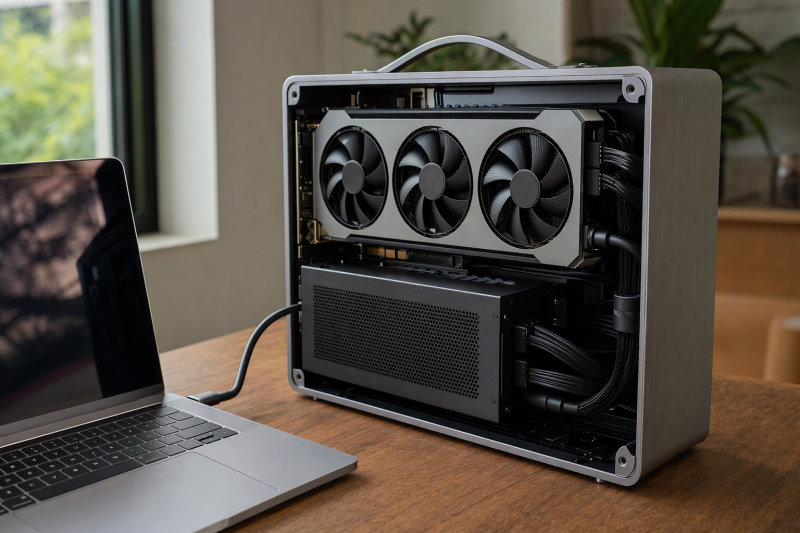
Our best eGPU enclosure with a 750W-or-larger power supply is the Sonnet Breakaway Box 850 T5, which pairs an included 850W PSU with an enclosed chassis, exact graphics-card dimensions, documented power connectors, and published Thunderbolt 5 host guidance. The Plugable TBT5-AI also includes an 850W supply, though it caps its GPU allocation at 600W. Sonnet’s 750ex and 750 are older 750W options with different hub roles, and the Razer Core X V2 lets the buyer install a compatible standard ATX supply. Our Thunderbolt 5 eGPU enclosure guide covers the wider enclosure market.
PSU wattage does not establish graphics-card compatibility. Verify the exact board’s length, height, thickness, connectors, recommended supply, transient behavior, cooling, and retention. Keep a mechanical x16 slot separate from its electrical lane count and from the external host link as well. No enclosure here promises desktop-internal performance, universal USB4 compatibility, Apple Silicon graphics support, or safe hot-plug behavior.
Quick picks
- Sonnet Breakaway Box 850 T5: Best complete Thunderbolt 5 enclosure with an included 850W PSU.
- Plugable TBT5-AI: Best included-850W option with a documented 600W GPU allocation.
- Sonnet Breakaway Box 750ex: Best included-750W legacy enclosure with USB and Ethernet.
- Sonnet Breakaway Box 750: Best simpler included-750W enclosure without the 750ex hub.
- Razer Core X V2: Best enclosed bring-your-own-ATX-PSU option.
Compare 750W-or-larger eGPU power options
| Image | Product | Details | Check Price |
|---|---|---|---|
 | Sonnet Breakaway Box 850 T5 | PSU status: Included 850W PSU GPU power/connector boundary: 3x 8-pin or 1x 16-pin 12VHPWR GPU fit: Up to 345 x 155 x 70 mm Host/OS path: Windows 11 2024H2; TB5/TB4/qualified USB4 Buyer check: Fit, connectors, transients, drivers all required | Check Price on Amazon |
 | Plugable TBT5-AI | PSU status: Included 850W ATX 3.1 PSU GPU power/connector boundary: 600W GPU allocation; 6+2-pin and 12VHPWR GPU fit: Up to 346 x 170 x 77 mm and 3.5 slots Host/OS path: Windows 11; TB5/TB4/eGPU-capable USB4 Buyer check: No TB3, plain USB-C, macOS, Linux, ChromeOS | Check Price on Amazon |
 | Sonnet Breakaway Box 750ex | PSU status: Included 750W PSU GPU power/connector boundary: Exact card connectors/transients must match GPU fit: Retained 312 x 160 x 55 mm; double-width wording Host/OS path: Match exact Sonnet 750ex host matrix Buyer check: Adds USB/Ethernet hub; not interchangeable with 750 | Check Price on Amazon |
 | Sonnet Breakaway Box 750 | PSU status: Included 750W PSU GPU power/connector boundary: Exact card connectors/transients must match GPU fit: Retained 312 x 160 x 55 mm; double-width wording Host/OS path: Match exact Sonnet 750 host matrix Buyer check: Plain enclosure; no 750ex USB/Ethernet hub | Check Price on Amazon |
 | Razer Core X V2 | PSU status: Buyer supplies standard ATX PSU GPU power/connector boundary: GPU requirement plus 230W PSU overhead GPU fit: Maximum 360 x 82 x 170 mm; up to 3.5 slots Host/OS path: Windows 11; TB5/TB4/eGPU-capable USB4 Buyer check: PSU must fit 150 x 160 x 86 mm envelope | Check Price on Amazon |
1. Sonnet Breakaway Box 850 T5 — best complete Thunderbolt 5 850W enclosure
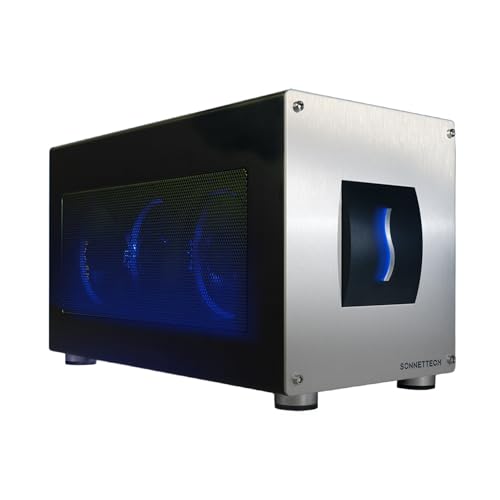
Sonnet supplies the Breakaway Box 850 T5 with an 850W PSU. The enclosed chassis accepts cards up to 345 x 155 x 70mm and documents either three 8-pin power connectors or one 16-pin 12VHPWR connector. A concrete fit-and-power packet like that beats a generic claim that the box supports large graphics cards, though the exact board-partner model still has to satisfy every dimension and connector condition.
The conventional graphics path requires Windows 11 24H2 or later and a Thunderbolt 5, Thunderbolt 4, or compatible USB4 host, and a USB4 port qualifies only when it supports external-GPU PCIe tunneling. Sonnet describes a PCIe 4 path on Thunderbolt 5 and a PCIe 3 path on Thunderbolt 4 or USB4; neither is a desktop x16 promise. Beyond graphics, the enclosure provides up to 100W host charging, three USB-A 10Gbps ports, and multi-gigabit Ethernet.
Our Take
Choose the 850 T5 for an included high-capacity PSU backed by the cleanest retained host, fit, connector, and enclosure evidence here. Confirm the exact GPU against Sonnet’s list and dimensions first.
- Included 850W PSU
- Exact 345 x 155 x 70mm card envelope
- Published Thunderbolt 5 path plus USB and 5GbE
- Windows 11 24H2 or later for conventional graphics
- USB4 requires explicit eGPU PCIe tunneling
2. Plugable TBT5-AI — best included-850W enclosure with a defined GPU allocation
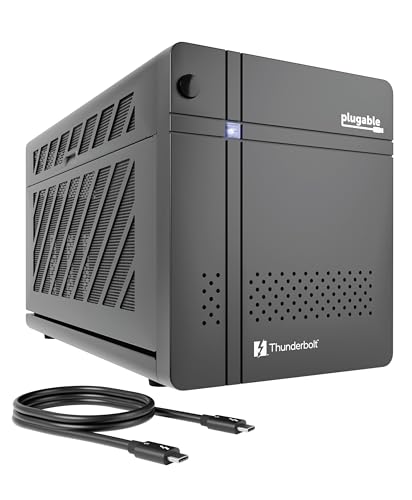
Plugable includes an 850W ATX 3.1 PSU and separately specifies a 600W GPU allocation. That lower figure is the design limit worth planning around, because the PSU label does not turn the entire 850W into graphics-card capacity. The enclosure provides three 6+2-pin connectors plus 12VHPWR and accepts cards up to 346 x 170 x 77mm, 3.5 slots, and 600W. A GPU is not included.
The slot is mechanically x16 and electrically four PCIe 4 lanes. Plugable supports Windows 11 systems with Thunderbolt 5, Thunderbolt 4, or eGPU-capable USB4, subject to retained CPU floors of 11th-generation Intel or AMD Zen 4. It excludes Thunderbolt 3, plain USB-C, macOS, Linux, and ChromeOS. The host path supplies up to 96W, and the enclosure adds USB-C, three USB-A ports, downstream Thunderbolt 5, and 2.5GbE.
Our Take
Pick Plugable when the exact GPU stays inside its 600W, connector, size, OS, and CPU limits. The 850W PSU headline alone is not a reason to buy it.
- Included 850W ATX 3.1 PSU
- Explicit 600W GPU allocation and fit envelope
- USB expansion and 2.5GbE
- Strict Windows, CPU, and host exclusions
- Mechanical x16 slot carries four PCIe lanes electrically
3. Sonnet Breakaway Box 750ex — best included-750W enclosure with a hub

The Sonnet Breakaway Box 750ex includes a 750W PSU and adds four USB-A ports plus Gigabit Ethernet. That hub is the one thing separating it from the plain Breakaway Box 750. The retained mechanical evidence allows a card up to 312 x 160 x 55mm and uses double-width wording, so check the intended board-partner GPU against those exact limits.
Several fields stay open on this legacy model. The frozen packet does not preserve a complete host and operating-system matrix, detailed PSU connector allocation, charging figure, or a published approved-GPU list, so read Sonnet’s 750/750ex overview and specifications before purchase. Do not transfer Thunderbolt 5 behavior, dimensions, connectors, or Windows floor from the newer 850 T5. The 750ex name establishes its included PSU and hub role, not parity with the new enclosure.
Our Take
Choose the 750ex when its exact host and GPU matrices qualify and four USB-A ports plus Gigabit Ethernet earn their keep. Otherwise the simpler 750 saves you paying for a hub you will not use.
- Included 750W PSU
- Four USB-A ports and Gigabit Ethernet
- Enclosed chassis with retained fit dimensions
- Complete host and GPU matrices must be checked
- Smaller retained fit envelope than newer picks
4. Sonnet Breakaway Box 750 — best simpler included-750W enclosure

Sonnet states the plain Breakaway Box 750 includes a 750W PSU but omits the four-port USB and Ethernet branch found on the 750ex. Where the system already has a dock or a direct network connection and the eGPU enclosure only needs to house and power the card, that makes it the cleaner Sonnet legacy choice.
Sonnet lists its retained card ceiling at the same cautious 312 x 160 x 55mm and double-width wording used for this 750-series evidence. The frozen packet does not preserve the complete host/OS, GPU connector, charging, or approved-board matrix, so verify each one on Sonnet’s exact page. Do not describe this product as a 750ex without the hub or as an 850 T5 at a lower wattage; each has a distinct generation, port inventory, and compatibility record.
Our Take
Buy the Breakaway Box 750 when an included 750W supply and enclosure cover the job and Sonnet confirms the exact GPU and host. Step up to the 750ex only if its hub ports matter.
- Included 750W PSU
- Simpler GPU-enclosure role
- No duplicate USB and Ethernet hub
- No 750ex USB or Ethernet branch
- Exact compatibility details require confirmation
5. Razer Core X V2 — best bring-your-own-750W-or-larger ATX option

Razer sells the Core X V2 without a PSU or GPU. It accepts a standard ATX power supply up to 150 x 160 x 86mm, which leaves the buyer to choose a compatible 750W-or-larger unit. Razer tells buyers to add 230W of overhead to the graphics card’s power requirement. Whatever you choose still has to fit the enclosure, provide the exact connectors, and satisfy the GPU maker’s guidance.
Razer’s manual gives the conservative card ceiling: 360 x 82 x 170mm and up to 3.5 slots. That exact manual limit controls over broader four-slot marketing. The host must run Windows 11 and provide Thunderbolt 5, Thunderbolt 4, or USB4 with eGPU capability; Mac is excluded. The internal link is PCIe 4 x4, host charging can reach 140W, and there are no downstream hub ports.
Our Take
Choose the Core X V2 only if selecting the ATX PSU yourself is something you actually want to do. Budget and qualify the PSU, GPU, connectors, thermal path, and host as one build.
- Buyer can select a fitting standard ATX PSU
- Exact GPU and PSU dimension ceilings
- Thunderbolt 5-class enclosure with up to 140W host power
- PSU and GPU are both sold separately
- No downstream USB or Ethernet ports
How to size an eGPU power system
Start with included versus buyer supplied
The two 850W picks and both Sonnet 750-series picks include their stated supply. Razer does not. Choosing your own PSU buys flexibility and costs you dimension, connector, cable-routing, cooling, and warranty checks. Never compare the Razer chassis-only purchase as though a power supply were already inside it.
Use the enclosure’s GPU allocation
An 850W supply may reserve capacity for enclosure electronics, charging, and attached peripherals. Plugable explicitly limits the GPU allocation to 600W. Sonnet and Razer publish their own connector and fit rules. Follow the lowest relevant limit across the GPU, PSU, enclosure, host, and cable rather than the largest wattage printed on any one component.
Match the exact board, not the GPU family
Two cards built on the same GPU can differ in cooler, height, thickness, connectors, and transient behavior. Compare the exact manufacturer part number against the enclosure dimensions. Our graphics-card specifications guide explains the board-level fields that matter.
Qualify the host PCIe route
Thunderbolt or USB4 branding alone establishes no external-graphics support at all. USB4 has to expose the required PCIe tunneling, and Plugable adds CPU and OS floors on top of that. A mechanical x16 slot may carry only four electrical lanes. Read whether USB4 can be used with external GPUs before assuming a laptop port qualifies.
Plan power and startup conservatively
Follow the enclosure maker’s shutdown, installation, cable, and driver sequence, and do not infer hot-plug or hot-swap safety from anywhere. Host charging is a separate figure from GPU power and may not cover a performance laptop under sustained load. Our best laptops for eGPU use helps narrow the host side.
Final recommendation
The Sonnet Breakaway Box 850 T5 is the best complete Thunderbolt 5 option because the included 850W supply arrives with the strongest retained fit, connector, and host packet. Plugable becomes the pick once its 600W GPU allocation and strict Windows/CPU matrix qualify. From there: the 750ex for legacy hub I/O, the plain 750 for a simpler legacy enclosure, and the Razer Core X V2 when you deliberately want to supply a fitting 750W-or-larger ATX PSU yourself.