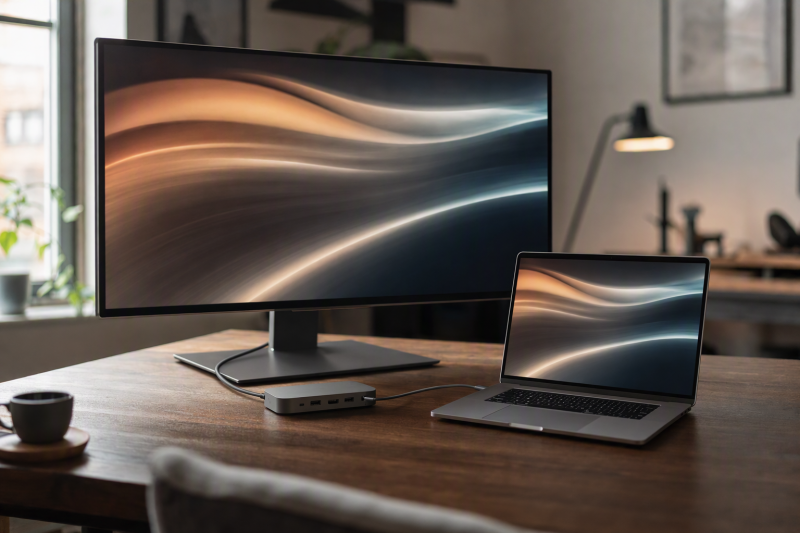
For one 4K120-or-higher MacBook Pro display, the Plugable TBT-UDT3 is the overall pick when the Mac appears in Plugable’s high-refresh table; its three downstream Thunderbolt 5 ports provide the display route. Match the Mac chip, macOS, port, cable or active adapter, DSC condition, and monitor. Need two high-refresh displays rather than one? That is a separate and much narrower host qualification. Our MacBook Pro dock guide covers more ordinary setups.
Running one high-refresh display simplifies the topology without making 4K120 universal. Each dock has a model-specific display route that needs matching to the MacBook Pro, monitor, cable or adapter, and system software. A 4K120 label alone does not establish VRR, HDR, HDCP, color depth, chroma, color accuracy, gaming performance, or cable capability.
Quick picks
- Plugable TBT-UDT3: Best overall for a matched downstream Thunderbolt 5 single-display route.
- Razer Thunderbolt 5 Dock Chroma: Best when one high-refresh display shares the dock with an internal M.2 bay.
- Plugable TBT-UDH2: Best for native HDMI 2.1 on documented 4K144 Mac branches.
- CalDigit TS5: Best for 15-port M5 Pro or M5 Max Thunderbolt 5 expansion.
- Anker Prime A83B5: Best conventional-output alternative on its named M5 Max branch.
Compare MacBook Pro docks for one 4K120 display
| Image | Product | Details | Check Price |
|---|---|---|---|
 | Plugable TBT-UDT3 | Mac qualification: Only Apple-silicon groups named by Plugable Display evidence: High-refresh Mac branches clear 4K120 floor Physical route: Downstream TB5; no HDMI or DisplayPort Laptop charging: Up to 140W Buyer check: Confirm chip/OS/cable/adapter/DSC | Check Price on Amazon |
 | Razer Thunderbolt 5 Dock Chroma | Mac qualification: Mac support listed; exact chip not stated Display evidence: Generic high-refresh dock ceiling Physical route: Downstream Thunderbolt 5 Laptop charging: Up to 140W Buyer check: Final Mac route confirmation required | Check Price on Amazon |
 | Plugable TBT-UDH2 | Mac qualification: Named Mac branches in Plugable's table Display evidence: Up to two 4K144 displays on listed Macs; Thunderbolt 4 hosts dual 4K120 Physical route: Two HDMI 2.1 ports; downstream TB5 Laptop charging: Up to 140W Buyer check: Match macOS, display, cable, adapter, and configuration | Check Price on Amazon |
 | CalDigit TS5 | Mac qualification: M5 Pro or M5 Max for three 4K144 displays Display evidence: Three 4K144 displays on M5 Pro or M5 Max Physical route: Spare downstream Thunderbolt 5 port Laptop charging: Up to 140W Buyer check: Match Mac, cable or adapter, monitor, and DSC | Check Price on Amazon |
 | Anker Prime A83B5 | Mac qualification: Named M5 Max path Display evidence: Dual 4K144 ceiling on named branch Physical route: HDMI and DisplayPort mutually exclusive Laptop charging: Up to 140W Buyer check: Confirm exact one-display route | Check Price on Amazon |
1. Plugable TBT-UDT3 — best overall downstream TB5 route

Plugable documents high-refresh Mac branches for named Apple-silicon groups and gives the TBT-UDT3 three downstream Thunderbolt 5 ports. With a single monitor, you follow one documented downstream route and skip the second-output coordination that dual 4K120 demands. The dock also includes 2.5GbE, separate SD and microSD UHS-II readers, and an up-to-140W host-charging path.
The TBT-UDT3 uses a downstream Thunderbolt route instead of a built-in HDMI or DisplayPort output. Match the Mac model, macOS version, cable or active adapter, DSC condition, and monitor input to Plugable’s display guide. A downstream port alone does not guarantee 4K120 on every Mac.
Our Take
Choose the TBT-UDT3 when your Mac appears in Plugable’s high-refresh table and the monitor can follow its downstream TB5 route. Where direct HDMI is required, skip it.
- Apple-silicon high-refresh display guidance
- Three downstream Thunderbolt 5 ports
- 2.5GbE and up to 140W charging
- No native HDMI or DisplayPort
- Mac chip and adapter path need matching
2. Razer Thunderbolt 5 Dock Chroma — best 4K120 and internal-M.2 combination

Razer documents a generic high-refresh dock ceiling and Mac support for the Thunderbolt 5 Dock Chroma, then adds three downstream TB5 paths, an empty M.2 2280 PCIe Gen4x4 slot, a UHS-II SD reader, 10Gbps USB, audio, and up to 140W host charging. One monitor plus internal user-installed storage as a firm requirement is exactly the shape this dock fits.
The display mode depends on the MacBook Pro chip, macOS version, downstream display route, cable or adapter, DSC state, and monitor mode. Three more conditions come with the hardware: the SSD is supplied by the buyer, the dock uses active cooling, and a demanding laptop may need its normal adapter. The article makes no claim about gaming behavior or measured display performance.
Our Take
Buy the Razer for TB5 branching plus an internal M.2 bay after matching the one-display Mac route. Plugable better suits a buyer whose Mac matches its high-refresh table.
- Generic high-refresh dock ceiling and Mac support
- Empty M.2 2280 slot
- Three downstream TB5 paths and up to 140W charging
- Mac display path needs matching
- SSD is not included and active cooling applies
3. Plugable TBT-UDH2 — best native HDMI high-refresh route
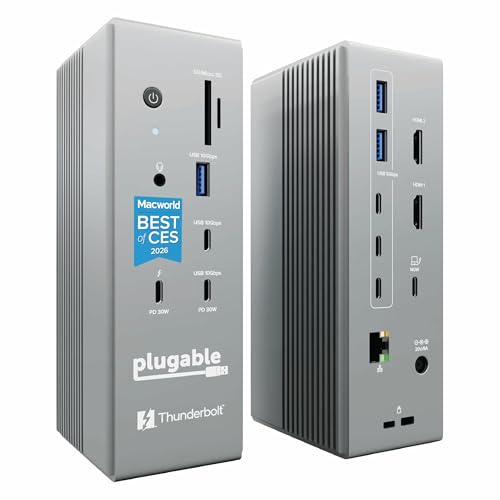
Plugable lists the TBT-UDH2 with two HDMI 2.1 ports, one downstream Thunderbolt 5 port, 2.5Gbps Ethernet, UHS-II readers, and up to 140W host charging. Its display capabilities list gives up to two 6K60 or 4K144 displays for M5 Pro, M4 Pro, M3 Pro or Max, M2 Pro or Max, base M5 or M4, and base M3 in clamshell mode with macOS 26 or later. The same Plugable page describes 4K144 for Thunderbolt 5 hosts and dual 4K120 for Thunderbolt 4 hosts, so a Mac with Thunderbolt 4 ports may stop at 4K120.
One 4K120-or-higher display uses a matching HDMI 2.1 or downstream Thunderbolt route. Plugable says the exact display limit depends on the host model, operating system, display, cable, adapter, and overall display configuration. The stated display mode does not establish HDR, VRR, HDCP, chroma, bit depth, or color behavior.
Our Take
Choose the TBT-UDH2 when your Mac appears in Plugable’s display capabilities list and the monitor uses HDMI. Its two native HDMI 2.1 ports avoid a video adapter for a matching HDMI monitor.
- Plugable lists 4K144 Mac display branches.
- Two native HDMI 2.1 ports support matching HDMI monitors.
- Plugable specifies 2.5Gbps Ethernet and up to 140W host charging.
- Plugable limits the high-refresh Mac path to named chips and macOS 26 or later.
- Plugable says the exact mode depends on the complete display configuration.
4. CalDigit TS5 — best 15-port M5 Pro or M5 Max TB5 expansion
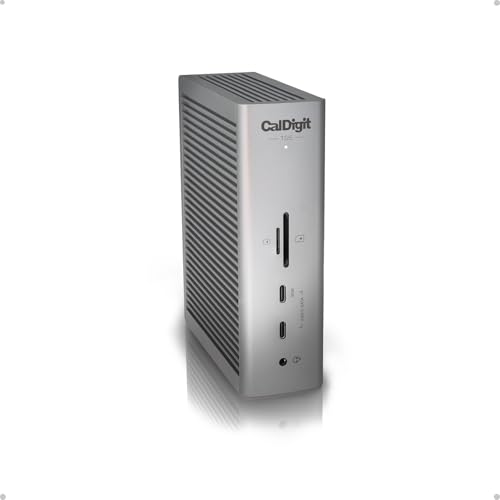
CalDigit lists 15 ports on the TS5, including one host and three downstream Thunderbolt 5 ports, three USB-C ports, two USB-A ports, 2.5GbE, UHS-II SD and microSD readers, and audio connections. CalDigit’s TS5 comparison chart marks it for three 4K144 displays on M5 Pro and M5 Max Macs. A single display connects through a spare downstream Thunderbolt 5 port.
The exact display mode depends on the Mac, macOS version, connection type, cable or adapter, monitor, and DSC support. CalDigit specifies up to 140W host charging and says higher refresh rates may require DSC support on the monitor and host GPU. The article makes no claim about measured display or charging results.
Our Take
Choose the TS5 when an M5 Pro or M5 Max MacBook Pro needs a broad port set and three downstream Thunderbolt 5 ports.
- CalDigit marks the TS5 for three 4K144 displays on M5 Pro and M5 Max Macs.
- CalDigit lists 15 ports, including three downstream Thunderbolt 5 ports for peripherals.
- CalDigit specifies up to 140W host charging for a connected MacBook Pro.
- The TS5 routes each connected display through a spare downstream Thunderbolt 5 port.
- CalDigit says higher refresh rates may require DSC support on the monitor and host GPU.
5. Anker Prime A83B5 — best conventional-output alternative

Anker documents dual 4K144 on a named M5 Max branch, plus Thunderbolt 5, 2.5GbE, audio, dual-format UHS-I readers, and up to 140W host charging. For one 4K120 monitor, the draw is conventional video connections instead of a downstream-only TB5 route.
Anker says HDMI and DisplayPort are mutually exclusive, which one screen can live with, though it determines which physical route is active. Match the M5 Max configuration, macOS version, selected output, cable or adapter, DSC state, and monitor. A dual 4K144 ceiling does not automatically describe the one-monitor path or other display features.
Our Take
Choose the A83B5 when one documented HDMI or DisplayPort route lines up with a named M5 Max configuration. For a one-screen buyer, its output exclusivity is a condition rather than a problem.
- Named M5 Max high-refresh display configuration
- Conventional HDMI or DisplayPort route
- 2.5GbE and up to 140W charging
- HDMI and DisplayPort are mutually exclusive
- Exact one-screen route must be confirmed
Qualify one 4K120 display without overbuying
Find the exact one-display matrix row
A dual-high-refresh headline never substitutes for a one-display row. Match the MacBook Pro chip, macOS version, one active output, required cable or adapter, DSC state, and monitor mode. Razer, TBT-UDH2, TS5, and Anker each use their own display route.
Choose the physical connection
Plugable TBT-UDT3, Razer, and TS5 center on downstream Thunderbolt 5. The TBT-UDH2 provides two native HDMI 2.1 ports and a downstream Thunderbolt 5 port, while Anker offers conventional outputs but makes HDMI and DisplayPort mutually exclusive. Start from the route your monitor accepts, then match the cable or active adapter. Connector shape alone proves nothing about 4K120.
Keep one and two displays separate
One high-refresh external display does not require the Mac to expose two native streams, which is precisely why this page helps a buyer who does not need the more demanding dual topology. Where two 4K120 screens are non-negotiable, build from the dual-monitor dock guide and require a complete dual-high-refresh manufacturer row.
Do not add unstated display features
Refresh rate alone establishes none of the following: variable refresh, HDR, HDCP, bit depth, chroma, color accuracy, or gaming suitability. Nor does it prove that a cable already in the drawer can carry the named mode. Each of those is an independent specification and must remain unknown unless the exact manufacturer record states it.
Check the rest of the dock after the display
Plugable, Razer, TS5, and Anker document up-to-140W host paths. Read that ceiling as a ceiling, not a universal Mac result. Plugable, TS5, and Anker document 2.5GbE. Our 2.5GbE dock guide covers network-first decisions.
Final recommendation
Choose Plugable TBT-UDT3 when the Apple-silicon configuration and downstream TB5 route match its display guidance. From there, one requirement selects each alternative: Razer for internal M.2 expansion, TBT-UDH2 for native HDMI 2.1, TS5 for three downstream Thunderbolt 5 ports on M5 Pro or M5 Max, and Anker for one conventional output on a named M5 Max path. Match the chip, operating system, output, cable or adapter, DSC, and monitor before buying.