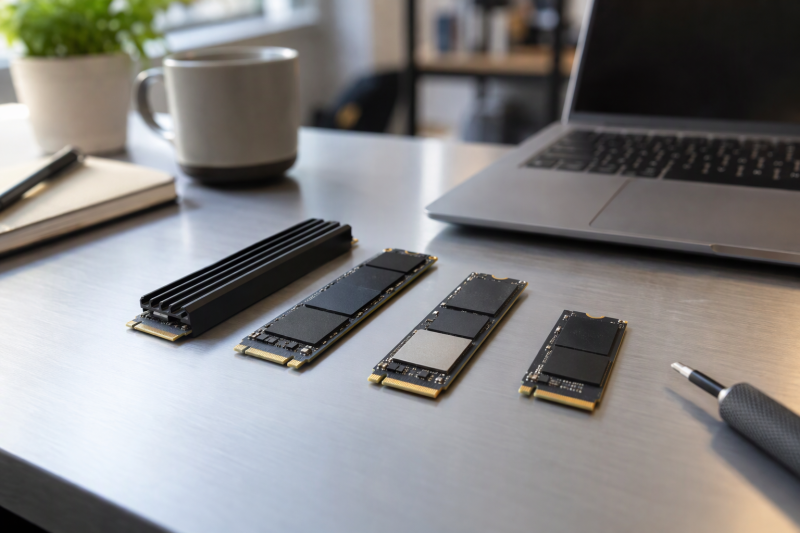
Kingston’s NVMe line runs from the PCIe 4.0 NV2 to the PCIe 5.0 FURY Renegade G5, and two NV3 drives can need different physical slots. Kingston’s datasheet gives the NV3 in 2280 (22 x 80mm) and 2230 (22 x 30mm) sizes, so board length, heatsink height and your computer’s NVMe support are the first things to compare, ahead of any sequential speed figure.
Check the computer’s M.2 length, NVMe support and clearance before choosing a drive.| Image | Product | Best fit | Capacity | Interface and size | Sequential read/write | Limit | Check Price |
|---|---|---|---|---|---|---|---|
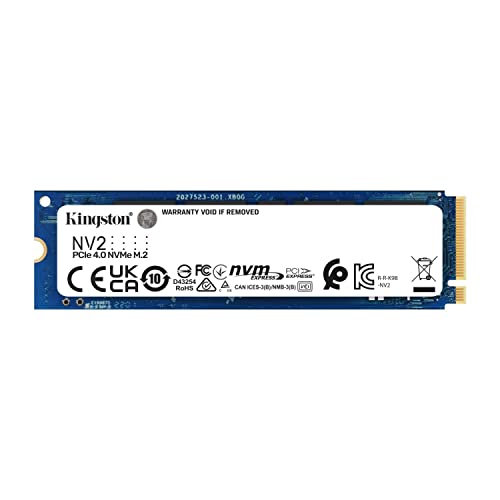 | Kingston NV2 1TB | Everyday 2280 upgrade | 1TB | M.2 2280; PCIe 4.0 x4 | 3,500/2,100MB/s | 2280 NVMe slot | Check Price on Amazon |
 | Kingston NV3 1TB 2280 | 2280 with cloning software | 1TB | M.2 2280; PCIe 4.0 x4 | 6,000/4,000MB/s | 2280 NVMe slot | Check Price on Amazon |
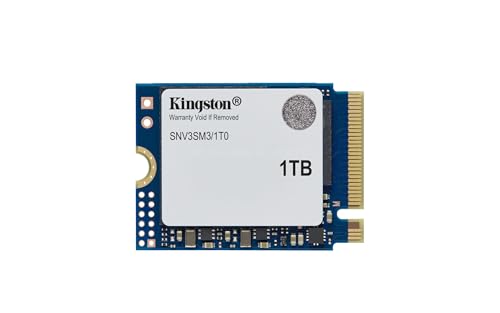 | Kingston NV3 1TB 2230 | Short compatible slot | 1TB | M.2 2230; PCIe 4.0 x4 | 6,000/4,000MB/s | 2230 mounting point | Check Price on Amazon |
 | Kingston KC3000 1024GB | Faster Gen 4 with heat spreader | 1024GB | M.2 2280; PCIe 4.0 x4 | 7,000/6,000MB/s | 2280 NVMe slot | Check Price on Amazon |
 | Kingston FURY Renegade 2TB Heatsink | 2TB with heatsink | 2TB | M.2 2280; PCIe 4.0 x4 | 7,300/7,000MB/s | Heatsink clearance | Check Price on Amazon |
 | Kingston FURY Renegade G5 4096GB | PCIe 5.0 capacity | 4096GB | M.2 2280; PCIe 5.0 x4 | 14,800/14,000MB/s | Gen 5 host and cooling | Check Price on Amazon |
1. Kingston NV2 1TB — Best Everyday PCIe 4.0 Upgrade
Kingston’s datasheet lists the NV2 SNV2S/1000G as a 1TB M.2 2280 PCIe 4.0 x4 NVMe drive rated at up to 3,500MB/s read and 2,100MB/s write, and the Amazon listing repeats the 3,500MB/s read figure. Kingston describes the board as single-sided and 2.2mm thick, and ties it to thinner notebooks and small-form-factor PCs.
Kingston states the speeds come from out-of-box tests on a PCIe 4.0 motherboard and may vary with host hardware, software and usage. The Amazon listing also states lower power requirements and minimal heat. Kingston’s NV2 datasheet gives a limited 3-year warranty, while the Kingston datasheets for the other drives compared here give a limited 5-year warranty.
Slot: The NV2 is an M.2 2280 NVMe drive, not a 2.5-inch SATA drive.Our Take The NV2 fits a laptop with an M.2 2280 NVMe slot when you want 1TB and do not need the speeds Kingston rates for the NV3 or KC3000.
- If NV3 or KC3000 speeds are more than you need, Kingston’s datasheet lists the 1TB NV2 at up to 3,500MB/s read and 2,100MB/s write.
- If space is tight, note that Kingston describes the NV2’s single-sided 2.2mm board as suited to thinner notebooks and small-form-factor PCs.
- For buyers watching power draw and heat, the Amazon listing states lower power requirements and minimal heat for the NV2.
- Warranty coverage is shorter on the NV2, since Kingston gives it a limited 3-year term and gives the other drives here 5 years.
- A buyer who wants faster reads needs a different drive. Kingston rates the NV2 at 3,500MB/s read and gives the other five drives 6,000MB/s or higher.
2. Kingston NV3 1TB 2280 — Best 2280 Drive With Cloning Software
Kingston’s datasheet lists the NV3 SNV3S/1000G as the 1TB M.2 2280 version of its PCIe 4.0 x4 NVMe drive, rated at up to 6,000MB/s read and 4,000MB/s write. The Amazon listing gives the same speeds and says the drive includes Acronis cloning software. Kingston’s datasheet and the Amazon listing’s bullets both state a limited 5-year warranty.
Kingston gives the board as 22 x 80mm and 2.3mm thick, a different size from the NV3 2230 below even though both carry the NV3 name. Kingston also advises consulting the device maker before installing an SSD. Cloning software does not replace a backup before a drive swap.
Our Take Pick the 2280 NV3 for a 1TB upgrade in a laptop with an NVMe 2280 slot when you want Kingston’s 6,000MB/s read rating and the cloning software the Amazon listing includes.
- Kingston’s datasheet and the Amazon listing both give the NV3 up to 6,000MB/s read and 4,000MB/s write for your 1TB upgrade.
- For a drive swap, the Amazon listing says the NV3 comes with Acronis cloning software.
- Coverage is longer than on the NV2, with Kingston’s datasheet giving the NV3 a limited 5-year warranty against 3 years.
- If your computer’s slot accepts only 2230 drives, Kingston’s 22 x 80mm NV3 board does not fit it.
- Check with your device maker before installing the NV3, as Kingston advises. The Amazon listing does not name the laptops it fits.
3. Kingston NV3 1TB 2230 — Best Short M.2 Slot
Kingston’s datasheet lists the NV3 SNV3SM3/1T0 as a 1TB M.2 2230 drive, 22 x 30mm, 2.3mm thick and 2.8g, with the same 6,000MB/s read and 4,000MB/s write it gives the 2280 version. The Amazon listing points to compatible handheld gaming devices and small-form-factor PCs, and Kingston’s datasheet names laptops and handheld gaming consoles.
Kingston’s datasheet lists 2230 capacities up to 2TB, while the 2280 NV3 reaches 4TB. A 2230 drive needs a socket with a 2230 mounting position, and choosing a matching capacity does not make a 2280-only mount accept it. For compatible handhelds, our guide to 2230 NVMe SSDs for handheld PCs covers more choices.
Length: Kingston’s datasheet gives M.2 2230 as 30mm long and M.2 2280 as 80mm.Our Take Pick the 2230 NV3 when the handheld or compact PC maker names M.2 2230 as supported. Kingston gives it the same 6,000/4,000MB/s ratings as the 2280 version.
- For a short slot, Kingston gives the 2230 board as 22 x 30mm and 2.8g, against 22 x 80mm for the 2280 NV3.
- Choosing the short board costs no rated speed at this capacity, because Kingston’s datasheet rates the 1TB 2230 at up to 6,000MB/s read and 4,000MB/s write, the same as the 2280 NV3.
- Handheld and small PC owners are the audience, since the Amazon listing names compatible handheld gaming devices and small-form-factor PCs.
- The short size offers less capacity, with Kingston’s datasheet listing the 2230 NV3 in capacities up to 2TB, half the 4TB it lists for the 2280 NV3.
- Before buying Kingston’s short NV3, check your socket for a 2230 mounting position. A 2230 drive needs one.
4. Kingston KC3000 1024GB — Best PCIe 4.0 Drive With a Heat Spreader
Kingston’s datasheet lists the KC3000 SKC3000S/1024G as a 1024GB M.2 2280 PCIe 4.0 x4 NVMe drive rated at up to 7,000MB/s read and 6,000MB/s write, with a Phison E18 controller, 3D TLC NAND and a DRAM cache. The Amazon listing titles it 1TB, gives the same 7,000MB/s and 6,000MB/s figures, and names notebooks as compatible devices.
Kingston’s datasheet describes a low-profile graphene aluminum heat spreader and gives the 1024GB board as 80 x 22 x 2.21mm. It rates the 1024GB model at 800TBW of endurance, against 320TB for the 1TB NV3 in Kingston’s NV3 datasheet. The heat spreader, controller and endurance figures come from Kingston, since the Amazon listing’s other bullets say only “Quality tested products” and “Discover useful products for you”.
Our Take Pick the KC3000 for a laptop with an M.2 2280 NVMe slot when you want Kingston’s 7,000MB/s read and 6,000MB/s write ratings at 1TB.
- If rated speed decides your choice, Kingston rates the 1024GB KC3000 at up to 7,000MB/s read and 6,000MB/s write, above the 6,000MB/s and 4,000MB/s it gives the 1TB NV3.
- Buyers comparing endurance get a higher rating from Kingston’s datasheet, which gives the 1024GB KC3000 800TBW against 320TB for the 1TB NV3.
- For built-in heat spreading, Kingston describes a low-profile graphene aluminum heat spreader on the KC3000, plus a DRAM cache.
- Check Kingston’s datasheet for the KC3000’s heat spreader, controller and endurance. The Amazon listing does not mention them.
- Confirm that your computer has the M.2 2280 slot the KC3000 needs. The Amazon listing names only notebooks as compatible devices.
5. Kingston FURY Renegade 2TB With Heatsink — Best Heatsink-Equipped Gen 4 Drive
Kingston’s datasheet lists the FURY Renegade SFYRDK/2000G as a 2TB M.2 2280 PCIe 4.0 x4 drive with a heatsink, rated at up to 7,300MB/s read and 7,000MB/s write, with a Phison E18 controller and a DRAM cache. The Amazon listing gives the 7,300MB/s read speed and a PS5 Ready label, and Kingston says the heatsink is what makes the drive PS5 ready.
Kingston gives the 2TB model 80 x 23.67 x 10.5mm and 34.9g, against the 2.3mm thickness and 7g it gives the 2280 NV3. Compare that height with the space above your M.2 slot, and see our guide to M.2 SSD heatsinks for coolers on bare drives. The Amazon listing says the line also comes with a low-profile heat spreader, and the SFYRDK/2000G drive compared here is the heatsink model. Kingston’s datasheet gives the 2TB model 2.0PB of endurance and a limited 5-year warranty.
Our Take Pick the 2TB heatsink FURY Renegade for a desktop or PS5 M.2 slot with room for a 10.5mm-tall drive, when you want Kingston’s 7,300MB/s read and 7,000MB/s write ratings.
- Buyers moving up from the 1TB NV3 get higher ratings, with Kingston’s datasheet giving the 2TB FURY Renegade 7,300MB/s read and 7,000MB/s write against 6,000MB/s and 4,000MB/s.
- For a PS5, Kingston says the heatsink is what makes the FURY Renegade PS5 ready, and the Amazon listing carries the PS5 Ready label.
- On endurance and coverage, Kingston’s datasheet gives the 2TB model 2.0PB and a limited 5-year warranty.
- Check the space in a laptop or compact case first, because Kingston gives the heatsink model a 10.5mm height, against 2.3mm for the 2280 NV3 board.
- The 2TB heatsink model is the heavier choice, at 34.9g in Kingston’s figures against 7g for the 2280 NV3.
6. Kingston FURY Renegade G5 4096GB — Best PCIe 5.0 Capacity Pick
Kingston’s datasheet lists the FURY Renegade G5 SFYR2S/4T0 as a 4,096GB M.2 2280 PCIe 5.0 x4 NVMe drive with an SM2508 controller, 3D TLC NAND and a DRAM cache, rated at up to 14,800MB/s read and 14,000MB/s write. The Amazon listing gives the same speeds, names a DDR4 cache, and describes the board as fitting desktops and motherboards with Gen 5×4 support.
Kingston’s footnote says it measured the sequential figures fresh out of the box on a PCIe 5.0 AMD Ryzen 5 7600X system with an X670E motherboard, and that speed may vary with host hardware, software and usage. Kingston gives the 4,096GB board as 80 x 22 x 2.3mm and 7.7g, with 4.0PB of endurance and DirectStorage support. Kingston’s datasheet and the Amazon listing both describe an advanced thermal design, and neither names a heatsink.
Host: Kingston measured the 14,800MB/s read figure on a PCIe 5.0 board, and the Amazon listing describes the drive as fitting desktops and motherboards with Gen 5×4 support.Our Take Pick the 4,096GB G5 for a desktop with a PCIe 5.0 M.2 slot when you need 4,096GB of capacity and Kingston’s 14,800MB/s read rating.
- For read speed, Kingston rates the 4,096GB G5 at up to 14,800MB/s read and 14,000MB/s write, more than double the 7,300MB/s read it gives the 2TB FURY Renegade.
- Beyond speed, Kingston’s datasheet gives the 4,096GB model a DRAM cache, DirectStorage support and 4.0PB of endurance.
- Shoppers comparing parts get the SM2508 controller and a DDR4 cache by name in the Amazon listing for the G5.
- Treat the 14,800MB/s read figure with care on a different computer, because Kingston measured it on a PCIe 5.0 Ryzen 5 7600X system with an X670E motherboard.
- Don’t count on an included heatsink. Neither Kingston’s datasheet nor the Amazon listing names one for the G5.
Buying Guide: Choosing a Kingston NVMe SSD
Check M.2 length and interface
Kingston’s datasheets give the NV3 2230 as 22 x 30mm and the other five drives here as M.2 2280, a size Kingston gives as 22 x 80mm. Check the mounting position and the space inside the computer before ordering.
M.2 is the physical format, while NVMe over PCIe is the interface Kingston lists for every drive compared here. A laptop’s M.2 socket must support NVMe, and a SATA-only socket is not an NVMe socket. Kingston advises consulting the device maker before installing an SSD.
Match PCIe generation to the host
Kingston’s datasheets list PCIe 4.0 x4 for the NV2, NV3, KC3000 and heatsink FURY Renegade. Kingston states its speeds come from out-of-box tests on a PCIe 4.0 motherboard and may vary with host hardware, software and usage.
The FURY Renegade G5 is the only PCIe 5.0 x4 drive in this comparison. Kingston measured its 14,800MB/s read figure on a PCIe 5.0 system, and its footnote says speed may vary with the host.
Compare capacity before speed
Kingston’s datasheet rates the 1TB NV3 at 6,000/4,000MB/s sequential read/write and gives the 2TB and 4TB NV3 drives 5,000MB/s write. Because Kingston rates write speed by capacity, compare the capacity you plan to buy.
The KC3000 here is 1024GB, the heatsink FURY Renegade is 2TB and the G5 is 4,096GB. The drives differ in capacity, so the figures are a spec-sheet comparison, not a same-capacity benchmark.
Allow room for cooling
Kingston’s datasheet gives the 2TB FURY Renegade a 10.5mm height with its attached heatsink, against 2.3mm for the 2280 NV3 and 2.21mm for the 1024GB KC3000. Compare that height with the space above your M.2 slot.
For the G5, Kingston describes an advanced thermal design and does not name a heatsink in its datasheet. Check the host’s cooling guidance for a PCIe 5.0 drive.
Plan the migration
The Amazon listing says the 1TB 2280 NV3 includes Acronis cloning software. Check the software’s supported systems and the connection you plan to use before removing the old drive.
Keep a separate backup of important files before any storage swap, and confirm the computer recognizes the new NVMe drive before wiping the old one.
Frequently Asked Questions
Will an M.2 NVMe drive fit any M.2 slot?
No. Kingston’s datasheets list M.2 2280 for five of the drives compared here and M.2 2230 for the NV3 2230, and all six use a PCIe x4 NVMe interface.
An M.2 SATA-only slot is not an NVMe slot, and Kingston advises consulting the device maker before installing an SSD. Some systems support more than one length, and the computer’s manual says which ones.
Is the 2230 NV3 slower than the 2280 NV3?
Kingston’s datasheet gives the 1TB 2230 and the 1TB 2280 NV3 the same ratings of up to 6,000MB/s read and 4,000MB/s write.
Kingston’s footnote says the speeds come from out-of-box tests on a PCIe 4.0 motherboard and may vary with host hardware, software and usage.
Can I use the heatsink FURY Renegade in a laptop?
Only if the laptop has an M.2 2280 NVMe slot and room for the heatsink. Kingston’s datasheet gives the heatsink drive a 10.5mm height.
The Amazon listing says the FURY Renegade line also comes with a low-profile heat spreader, and the 2TB drive compared here is the SFYRDK/2000G with the heatsink. Check the model code in the listing before ordering.
Does a higher sequential rating make every task faster?
No. Kingston’s datasheets give sequential read and write ratings measured out of the box on a test motherboard, and the footnotes say speed may vary with host hardware, software and usage.
The drives compared here also differ in capacity, and Kingston rates write speed by capacity, so the ratings are not a controlled comparison.
Do I need to clone my old drive?
Cloning is one way to move an installation, and a clean install with files restored from backup is another. Check the laptop maker’s instructions and the software’s own instructions for your situation.
The Amazon listing says the 1TB 2280 NV3 includes Acronis cloning software. Keep a separate backup either way.
How We Compared
For other drive choices, see our guide to PCIe 4.0 NVMe SSDs.