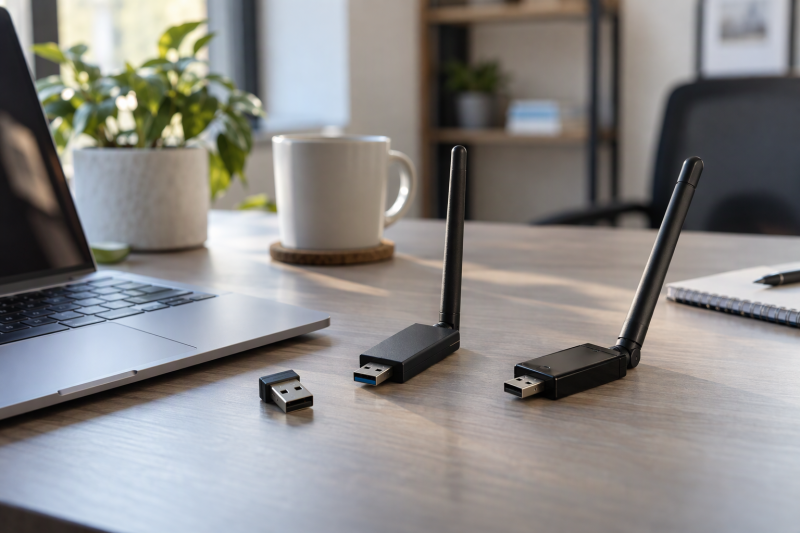
A USB Wi-Fi adapter adds a wireless connection without opening the computer. The right choice depends on your operating system, your router, your free USB port and whether you want a small dongle, folding antennas or a cable. An AX or BE class number adds band rates together. For example, TP-Link’s TX50U page gives its 3000 Mbps as 2402 Mbps on 5 GHz plus 574 Mbps on 2.4 GHz. TP-Link’s footnote on that page says actual throughput and coverage are not guaranteed.
| Image | Product | Best fit | Wireless class and bands | Connection and form | Supported systems | Watch-outs | Check Price |
|---|---|---|---|---|---|---|---|
 | TP-Link Archer TX20U Nano AX1800 | Small laptop adapter | AX1800 Wi-Fi 6; 2.4 and 5 GHz | USB 2.0; compact nano body | Windows 10 and 11 | 2.4 and 5 GHz only; USB 2.0 | Check Price on Amazon |
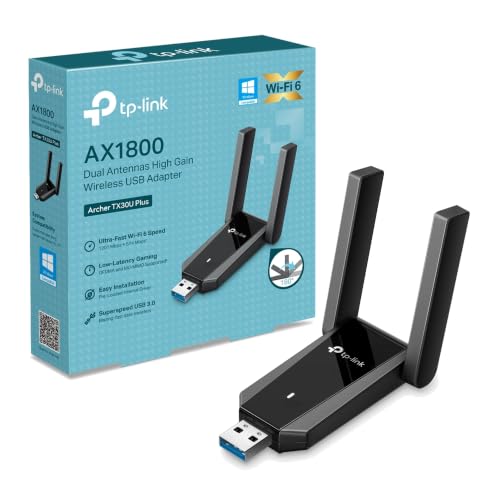 | TP-Link Archer TX30U Plus AX1800 | Folding antennas | AX1800 Wi-Fi 6; 2.4 and 5 GHz | USB 3.0; two folding antennas | Windows 11 and 10 only | Larger body; Windows only | Check Price on Amazon |
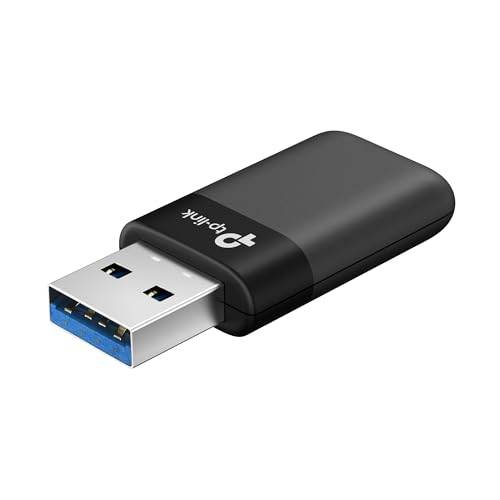 | TP-Link Archer TX50U AX3000 | Faster 5 GHz Wi-Fi 6 | AX3000 Wi-Fi 6; 2.4 and 5 GHz | USB 3.0; internal antennas | Windows 10 and 11 listed | 2.4 and 5 GHz only | Check Price on Amazon |
 | TP-Link Archer TXE50UH AXE3000 | Desk placement with Wi-Fi 6E | AXE3000 Wi-Fi 6E; tri-band | USB 3.0; 1.2 m cable; adjustable antennas | Windows 10 and 11 | Listing: 6 GHz needs Windows 11 | Check Price on Amazon |
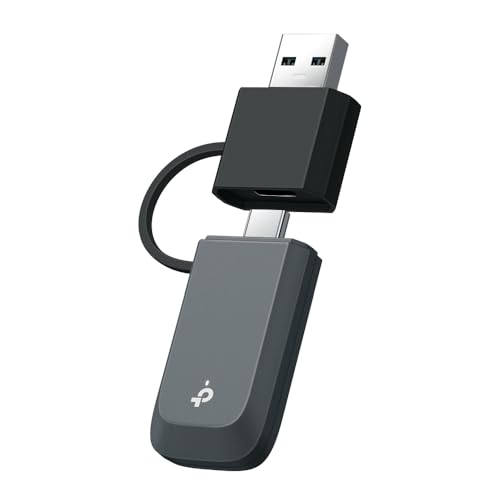 | TP-Link Archer TBE400U BE6500 | Wi-Fi 7 and USB-C or USB-A | BE6500 Wi-Fi 7; tri-band | USB 3.0; USB-C with USB-A adapter | Windows 11 and 10 only | MLO needs Windows 11 24H2 or later | Check Price on Amazon |
1. TP-Link Archer TX20U Nano AX1800 — Best for a Small Laptop Adapter
The Archer TX20U Nano is a dual-band Wi-Fi 6 adapter for Windows 11 and 10. TP-Link gives its length as 1.06 inches. For comparison, TP-Link gives 1.73 inches for the TX50U and 2.83 inches for the TBE400U. The Amazon listing says the adapter can be plugged in and left in its place, and TP-Link lists two dual-band antennas, a preloaded driver and WPA3.
TP-Link lists 1,201 Mbps on 5 GHz and 574 Mbps on 2.4 GHz, and its page says Wi-Fi 6 features such as OFDMA and MU-MIMO need an access point that supports them. TP-Link specifies a USB 2.0 interface, while the Amazon listings for the other four adapters here give USB 3.0. TP-Link’s page lists 2.4 and 5 GHz only.
Limit: TP-Link specifies USB 2.0 for this adapter and lists only the 2.4 and 5 GHz bands.Our Take Pick the TX20U Nano for a Windows laptop that needs the shortest adapter and does not need 6 GHz.
- TP-Link gives the TX20U Nano body as 1.06 by 0.62 by 0.30 inches, the pick for a laptop that needs the shortest adapter here.
- For a Windows 11 and 10 computer, TP-Link states support and a preloaded driver for the Nano.
- According to the Amazon listing, you can plug in the TX20U Nano and leave it in its port.
- TP-Link specifies USB 2.0 for the Nano, while the Amazon listings for the other four adapters give USB 3.0.
- TP-Link lists only 2.4 and 5 GHz for the TX20U Nano. Skip the adapter if you need a third band.
2. TP-Link Archer TX30U Plus AX1800 — Best for Wi-Fi 6 with Folding Antennas
The Archer TX30U Plus pairs AX1800 dual-band Wi-Fi 6 with two high-gain antennas that TP-Link says adjust to find the best signal angle and store compactly. The Amazon listing says they fold, and TP-Link’s page gives the body as 3.07 by 1.69 by 0.53 inches. TP-Link’s page says the high-gain antennas and beamforming concentrate the signal toward your router.
The Amazon listing states up to 1,201 Mbps on 5 GHz and 574 Mbps on 2.4 GHz and says performance varies with conditions, distance and walls. TP-Link describes a USB 3.0 connection and notes that the computer must also support USB 3.0. The Amazon listing says the adapter supports Windows 11 and 10 only, and TP-Link’s page says drivers may need an update after an operating system update.
Limit: The Amazon listing says this adapter supports Windows 11 and 10 only, and TP-Link gives its length as 3.07 inches, against 1.06 inches for the TX20U Nano.Our Take Choose the TX30U Plus for a Windows computer where adjustable antennas fit the desk and the port.
- TP-Link says the two high-gain antennas on the TX30U Plus adjust to find the best signal angle and store compactly.
- The Amazon listing gives the TX30U Plus USB 3.0, and the TP-Link page describes a USB 3.0 connection. TP-Link notes that your computer must support it as well.
- For buyers who look for particular features, TP-Link states OFDMA, MU-MIMO and WPA3 on its TX30U Plus page.
- TP-Link gives a 3.07-inch length for the TX30U Plus, against the 1.06 inches it gives for the TX20U Nano. Check that the longer adapter fits your desk and port.
- The Amazon listing says the TX30U Plus supports Windows 11 and 10 only, a limit for a computer on another system.
3. TP-Link Archer TX50U AX3000 — Best for Faster 5 GHz Wi-Fi 6
The Archer TX50U is an AX3000 dual-band Wi-Fi 6 adapter. TP-Link’s page gives 2,402 Mbps on 5 GHz, twice the 1,201 Mbps TP-Link gives for the TX20U Nano and TX30U Plus, plus 574 Mbps on 2.4 GHz. The Amazon listing states the same two rates.
TP-Link lists two internal dual-band antennas and a body 1.73 inches long, and the Amazon listing says it fits laptops and desktops without blocking nearby ports. TP-Link says the computer must also support USB 3.0 for that interface. For 6 GHz, see the TXE50UH or TBE400U.
Limit: TP-Link lists 2.4 and 5 GHz only, and its footnote says Wi-Fi 6 features such as OFDMA and MU-MIMO need matching support from the connected device.Our Take Choose the TX50U for a short Windows adapter when you want TP-Link’s 2,402 Mbps 5 GHz rate and do not need 6 GHz.
- TP-Link gives the TX50U 2,402 Mbps on 5 GHz, twice its 1,201 Mbps figure for the Wi-Fi 6E TXE50UH. Pick the TX50U when you want the higher of the two rates.
- TP-Link lists a 1.73-inch body with internal antennas and USB 3.0 for the TX50U, and the Amazon listing says it fits laptops and desktops without blocking nearby ports.
- The Amazon listing and TP-Link both name a preloaded driver for setting up the TX50U on Windows 11 and 10.
- TP-Link lists only 2.4 and 5 GHz for the TX50U. For a third band, look at the TXE50UH or TBE400U.
- TP-Link’s TX50U footnote says Wi-Fi 6 features need matching support from the connected device, a condition to check before counting on them.
4. TP-Link Archer TXE50UH AXE3000 — Best for Wi-Fi 6E with a 1.2-Meter Cable
The Archer TXE50UH adds the 6 GHz band to 2.4 and 5 GHz through tri-band Wi-Fi 6E. TP-Link gives 1,201 Mbps on 6 GHz and 5 GHz and 574 Mbps on 2.4 GHz, while the Amazon listing gives 1,202 Mbps on 6 GHz and 5 GHz. TP-Link’s page describes a 1.2-meter USB 3.0 cable for finding a spot in your workspace, and two multi-angle adjustable high-gain tri-band antennas.
The Amazon listing says that to use 6 GHz you need Windows 11, although both the listing and TP-Link name Windows 11 and 10 as supported. TP-Link’s page describes installation from the included disk with a utility, and the Amazon listing does not mention a preloaded driver. TP-Link also says features may be restricted on some operating systems and that a driver update may help.
Limit: The Amazon listing says 6 GHz needs Windows 11, and TP-Link’s page describes disk installation.Our Take Pick the TXE50UH when you want 6 GHz and a cable that lets you put the adapter off to the side of a Windows 11 desk.
- TP-Link lists 2.4, 5 and 6 GHz bands for the TXE50UH, a choice if you want the third band.
- For placing the TXE50UH off to the side of a desk, TP-Link describes a 1.2-meter USB 3.0 cable and adjustable high-gain antennas.
- The Amazon listing and TP-Link both state a USB 3.0 connection for the TXE50UH.
- The Amazon listing says 6 GHz needs Windows 11. Check the Windows version on your computer before buying the TXE50UH for that band.
- TP-Link’s page describes installation from the included disk, and the Amazon listing does not mention a preloaded driver for the TXE50UH.
5. TP-Link Archer TBE400U BE6500 — Best for Wi-Fi 7 and Two USB Connectors
The Archer TBE400U is a BE6500 tri-band Wi-Fi 7 adapter. TP-Link lists up to 2,882 Mbps on 6 GHz, 2,882 Mbps on 5 GHz and 688 Mbps on 2.4 GHz, internal antennas and a 2.83-inch body. The Amazon listing says to plug it directly into a USB-C laptop or attach the included USB-A adapter for an older PC or desktop, and TP-Link’s guide shows both ways.
TP-Link’s guide lists Windows 10 and 11 as supported and Windows 11 version 24H2 and later for MLO. TP-Link’s page says MLO is being developed on some Wi-Fi 7 models and will come in later driver updates. The Amazon listing says Windows only and not compatible with macOS. TP-Link’s guide recommends a USB 3.0 port and asks that the router or access point support Wi-Fi 7 and WPA3.
Limit: TP-Link’s guide lists Windows 11 version 24H2 and later for MLO and says the router must support Wi-Fi 7.Our Take Choose the TBE400U when you move an adapter between a USB-C laptop and a USB-A desktop and have a Wi-Fi 7 router.
- TP-Link lists 2.4, 5 and 6 GHz bands and Wi-Fi 7 for the TBE400U, and its guide asks for a router that supports the standard.
- The Amazon listing says the TBE400U plugs into a USB-C laptop directly or uses the included USB-A adapter, handy if you move it between a laptop and a desktop.
- Before counting on MLO with the TBE400U, check your PC against the Windows version that TP-Link’s guide lists for it.
- TP-Link’s guide lists Windows 11 version 24H2 and later for MLO on the TBE400U. An earlier version is outside the listed support.
- The Amazon listing says the TBE400U is Windows only and not compatible with macOS, leaving Mac users to look elsewhere.
Buying Guide: Choosing a USB Wi-Fi Adapter
Check your operating system first
The Amazon listings for all five adapters name Windows 11 and 10, and the TX30U Plus and TBE400U listings say Windows only. The TXE50UH listing says 6 GHz needs Windows 11, and TP-Link’s guide for the TBE400U lists Windows 11 version 24H2 and later for MLO. The TBE400U listing also says it is not compatible with macOS.
TP-Link states a preloaded driver for the TX20U Nano, TX30U Plus, TX50U and TBE400U, while its TXE50UH page describes disk installation. TP-Link’s pages for the TX30U Plus, TX50U and TBE400U say a driver update may be needed after an operating system update, so check TP-Link’s download page for your adapter before buying for a managed work computer.
Match bands to your router
TP-Link lists 2.4 and 5 GHz for the TX20U Nano, TX30U Plus and TX50U, and adds 6 GHz for the TXE50UH and TBE400U. TP-Link’s TXE50UH page says Wi-Fi 6E features need the access point to support them as well, so check your router for 6 GHz before relying on that band.
TP-Link’s TBE400U page says MLO and other Wi-Fi 7 features need support from the access point and the PC operating system. For more Wi-Fi 7 USB choices, see our Wi-Fi 7 USB adapters for older laptops. Confirm your router model and its settings first.
Understand the advertised class
AX1800, AX3000 and BE6500 are class labels built from band rates. The TX50U page gives 2,402 Mbps on 5 GHz plus 574 Mbps on 2.4 GHz for AX3000, and the TBE400U page gives 2,882, 2,882 and 688 Mbps for BE6500. TP-Link’s footnotes say these are physical rates from the 802.11 specifications and that actual throughput is not guaranteed.
TP-Link’s TX20U Nano page specifies USB 2.0, and the Amazon listings for the other four adapters give USB 3.0. TP-Link’s TX30U Plus, TX50U and TBE400U footnotes say the computer must also support USB 3.0 for that interface.
Consider placement and portability
TP-Link gives the TX20U Nano as 1.06 inches long, and the Amazon listing says it can be plugged in and left in place. TP-Link’s TX30U Plus page gives 3.07 inches with two high-gain antennas, and its TXE50UH page gives 4.4 inches plus a 1.2-meter cable.
TP-Link says the TX30U Plus antennas adjust and store compactly, and the TXE50UH page describes multi-angle adjustable antennas. TP-Link’s TBE400U page describes internal antennas and a 2.83-inch body. The Amazon listing for the TX30U Plus and TP-Link’s footnotes say coverage varies with conditions and obstacles, so try the placement in your own room.
Plan the USB connection and alternatives
The Amazon listing for the TBE400U says it plugs into a USB-C laptop directly or attaches to a USB-A port through the included adapter. TP-Link’s guide recommends a USB 3.0 port, so check which ports your computer has before ordering.
For wireless coverage beyond one computer, compare mesh Wi-Fi systems for a home office. A USB-C hub can add ports, but check its data and power capabilities and the space around any attached adapter.
Frequently Asked Questions
Does AX3000 mean a 3 Gbps internet connection?
No. TP-Link’s TX50U page gives AX3000 as 2402 Mbps on 5 GHz plus 574 Mbps on 2.4 GHz, and its footnote says actual throughput and coverage are not guaranteed.
TP-Link’s footnote on the same page lists internet service provider factors, network conditions, client limitations and obstacles as reasons actual speed varies.
Does a Wi-Fi 7 USB adapter need a Wi-Fi 7 router?
TP-Link’s TBE400U page says Wi-Fi 7 features, including MLO, need the access point and the PC operating system to support them. Its guide asks for a router or access point that supports Wi-Fi 7 and WPA3. TP-Link’s spec table also lists 11ax, 11ac and 11n rates for the adapter.
TP-Link’s guide lists Windows 11 version 24H2 and later for MLO on the TBE400U. Check software and router support before buying for that feature.
Can every listed adapter use 6 GHz on Windows 10?
No. The TXE50UH listing says Windows 11 is needed for 6 GHz, although the listing and TP-Link name Windows 11 and 10 as supported. TP-Link lists only 2.4 and 5 GHz for the TX20U Nano, TX30U Plus and TX50U.
TP-Link’s TBE400U page lists 6 GHz and Windows 10 and 11, and its guide gives the Windows 11 version for MLO. TP-Link’s TBE400U page says MLO is being developed on some Wi-Fi 7 models, so check TP-Link’s driver page for the feature you need.
Is a USB-A adapter as fast as a USB-C one?
USB-A and USB-C describe connector shapes. TP-Link’s TBE400U page gives USB 3.0 for the adapter, and the Amazon listing says USB-C directly or an included USB-A adapter. TP-Link’s guide recommends a USB 3.0 port.
The TX20U Nano is the one adapter whose maker specifies USB 2.0, and the Amazon listings for the other four give USB 3.0. Check the USB generation of the computer port you plan to use.
Do external antennas guarantee better coverage?
No. TP-Link says the TX30U Plus high-gain antennas and beamforming concentrate the signal toward your router, and its footnote says coverage is not guaranteed and varies with walls and other obstacles. The router and where you place the adapter also affect the result.
TP-Link’s TXE50UH page describes multi-angle adjustable antennas and a 1.2-meter cable for positioning. Weigh the TXE50UH against the TX20U Nano based on your desk and travel needs.