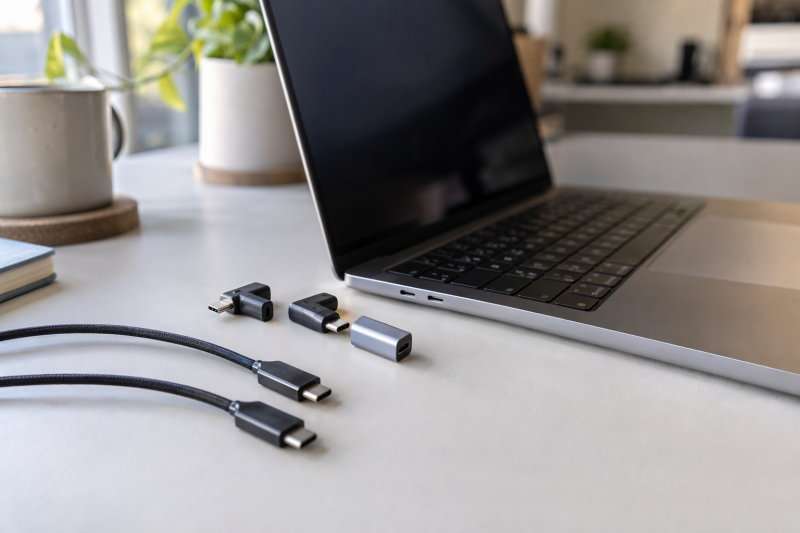
A right-angle adapter redirects a USB-C connection at the laptop port, and a female-to-female coupler joins two cable ends. Both change the physical path of a connection. Their power, data and display claims differ by listing, and the laptop and cables have to support the job.
Choose the connector shape first, then check the wattage, data rate and video mode across the complete connection.| Image | Product | Best fit | Connector | Power | Data/video | Limit | Check Price |
|---|---|---|---|---|---|---|---|
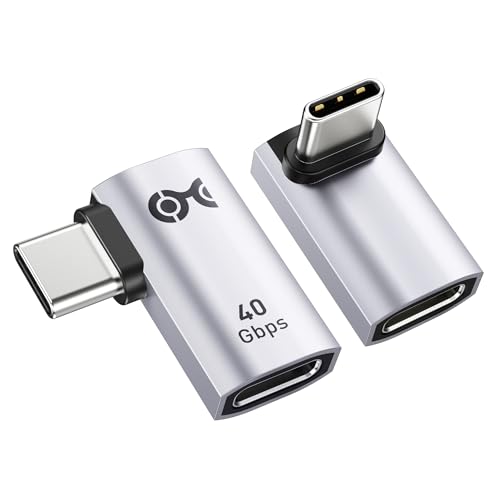 | Cable Matters 201313 Combo Pack | Two adapter orientations | Right-angle male to female | 240W | 40Gbps; 4K 240Hz or 8K 60Hz | One of each angle | Check Price on Amazon |
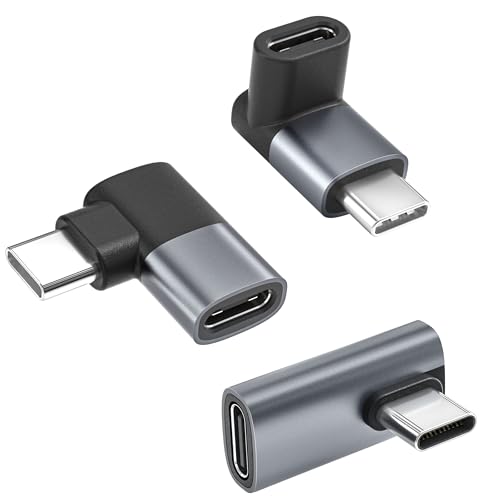 | Basesailor Three-Angle Adapter Set | Multiple cable directions | Right-angle male to female | 100W | 40Gbps; 4K 60Hz | 100W maximum | Check Price on Amazon |
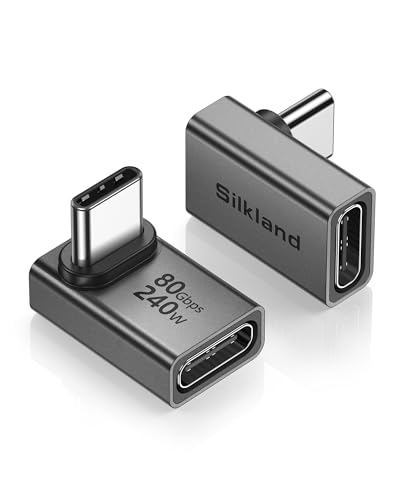 | Silkland S3629 80Gbps Adapter | Higher-bandwidth host | Right-angle male to female | 240W | 80Gbps; up to 16K claimed | 120Gbps is video bandwidth | Check Price on Amazon |
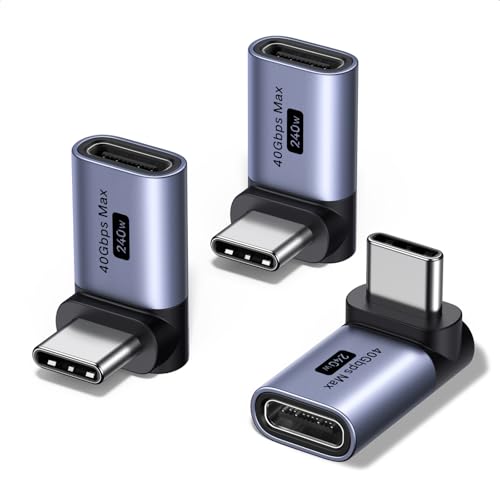 | UGREEN 85234 Right-Angle Adapter | Three 240W adapters | Right-angle male to female | 240W | 40Gbps; 8K 60Hz | Direction not stated | Check Price on Amazon |
 | AuviPal USBC240FF Coupler | Join two compatible cables | Female to female | 240W | 40Gbps; 8K 60Hz | Two cables needed | Check Price on Amazon |
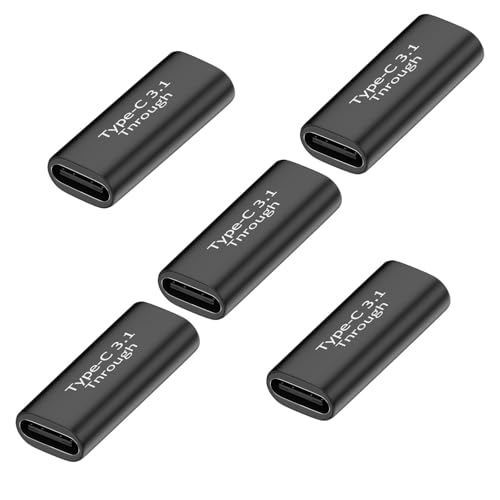 | Pastall Five-Pack USB-C Coupler | Several cable joins | Female to female | 100W | 10Gbps; 8K 60Hz | Two cables needed | Check Price on Amazon |
1. Cable Matters 201313 Combo Pack — Best for Two Different Angles
Cable Matters includes two right-angle male-to-female adapters, one described as top/bottom and the other as left/right. The pack includes one adapter in each orientation, for routing a cable either way around a laptop port or the edge of a handheld. The Amazon listing and the Cable Matters product page for 201313 both state that the pack mixes the two orientations. The listing describes an aluminum shell and gold-plated connectors.
The Amazon listing and Cable Matters both state up to 240W charging, up to 40Gbps data and video up to 4K at 240Hz or 8K at 60Hz. Cable Matters says the 40Gbps rate applies with USB4 or Thunderbolt 3/4 devices and cables. It also says the 240W depends on the device and charger and the video modes need compatible devices and cables.
Orientation: One top/bottom and one left/right adapter are included, so the pack offers two physical routing options.Our Take Choose the 201313 kit when you need to try two directions and want the listed 240W and 40Gbps capabilities for a compatible setup.
- Cable Matters packs one top/bottom and one left/right adapter for routing a cable in two directions.
- Cable Matters specifies up to 240W charging and 40Gbps data for a compatible setup.
- Cable Matters states video up to 4K at 240Hz or 8K at 60Hz when the devices and cables are compatible.
- The Amazon listing describes an aluminum shell and gold-plated connectors.
- Cable Matters supplies two different orientations, not identical spares.
- Cable Matters says the 40Gbps data rate and the video modes need compatible devices and cables.
2. Basesailor Three-Angle Adapter Set — Best for Routing Choices
Basesailor’s Amazon listing describes three right-angle adapters for different cable directions, such as against a wall, at a desk edge or in tight spaces like sofas and bedside tables. It says the angled design keeps cables aligned and reduces pulling on device ports. The listing also describes a compact aluminum alloy shell with a male-to-female arrangement. Check the laptop’s port placement before deciding which orientation leaves room for adjacent connections.
The Amazon listing rates the set for up to 100W Power Delivery (20V/5A) with a compatible charger and cable, up to 40Gbps data, and video up to 4K at 60Hz on compatible devices. Basesailor says the full 40Gbps needs a device and cable that support USB4 or Thunderbolt 3/4. The 100W figure is lower than the 240W the Cable Matters, Silkland, UGREEN and AuviPal listings state.
Charging ceiling: Basesailor’s listing states up to 100W, so a laptop that needs more power needs a different adapter.Our Take Pick the Basesailor set when physical routing is the main problem and 100W charging plus the listed 4K video mode cover the setup.
- Basesailor lists three right-angle options for matching the adapter to the direction the cable needs to run.
- Basesailor states up to 40Gbps data when the device and cable both support USB4 or Thunderbolt 3/4.
- The Amazon listing says Basesailor’s angled design reduces pulling on device ports.
- Basesailor describes a compact aluminum alloy shell with a male-to-female arrangement.
- Basesailor states up to 100W, below the 240W the UGREEN listing states, so a laptop that needs more power needs a different adapter.
- Basesailor states video up to 4K at 60Hz, below the 8K at 60Hz the UGREEN listing states.
3. Silkland S3629 80Gbps Adapter — Best for a Higher-Bandwidth Host
The Silkland S3629 listing describes two 90-degree USB-C adapters with up to 80Gbps data and up to 240W charging. The male-to-female design changes the cable direction at the laptop rather than joining two male cable ends. The listing identifies USB4 version 2 performance and compatibility with Thunderbolt 5 and 4 equipment, and it names USB PD 3.1. It also describes a slim aluminum alloy shell that it says makes plugging easier without blocking nearby ports.
The seller also claims up to 120Gbps dynamically allocated display bandwidth, but explicitly limits that figure to video transmission. The listed data rate is up to 80Gbps. The listing describes up to 16K and multi-screen configurations depending on the device, cable and display, and says video requires a USB-C port with DisplayPort Alt Mode.
Our Take Consider the S3629 for a compatible higher-bandwidth host when its right-angle shape clears nearby ports and the complete display chain supports the intended mode.
- Silkland’s listing claims up to 80Gbps data and 240W charging for the S3629.
- The Silkland pack contains two right-angle adapters that change the cable direction at the laptop.
- Silkland’s listing describes up to 120Gbps of dynamic bandwidth for video, separate from its data rate.
- Silkland’s listing names USB4 version 2 and Thunderbolt 5 compatibility.
- Silkland’s 120Gbps figure applies to video transmission, not to the data rate.
- Silkland’s listing ties its video configurations to the device, cable and display, so the highest mode needs the device, cable and display to support it.
4. UGREEN 85234 Right-Angle Adapter — Best Three-Pack for 240W Charging
UGREEN’s model 85234 is a three-pack of 90-degree USB-C male-to-female adapters. The Amazon listing says the right-angle design reduces cable bending and stress on ports, and it names handheld gaming and laptops on desks as uses.
The Amazon listing specifies up to 240W USB-C PD 3.1 charging, up to 40Gbps USB4 data and 8K at 60Hz video on monitors or TVs. UGREEN says the aluminum alloy body was tested for 10,000+ plug cycles. Amazon’s product data gives dimensions of 0.83 by 0.47 by 0.24 inches, useful for checking the space beside a port.
Our Take Choose the UGREEN three-pack when you need several right-angle connectors and UGREEN’s stated 240W charging ceiling.
- UGREEN includes three right-angle adapters, which suits a buyer who needs several right-angle connectors.
- The Amazon listing specifies up to 240W USB-C PD charging for the UGREEN adapters.
- UGREEN’s listing gives up to 40Gbps data and 8K at 60Hz video on monitors or TVs.
- UGREEN says the aluminum alloy body was tested for 10,000+ plug cycles.
- UGREEN’s 40Gbps data figure is half the 80Gbps the Silkland listing states.
- UGREEN’s listing says 90-degree but does not name the direction each adapter turns.
5. AuviPal USBC240FF Coupler — Best for Joining Two USB-C Cables
The AuviPal USBC240FF is a female-to-female USB-C coupler, supplied as a two-pack. Each coupler joins two USB-C male cable ends, rather than plugging directly into the laptop as a right-angle adapter would. The listing describes an LED signal indicator and an aluminum alloy housing. It also describes ports tested for 10,000+ plug-and-unplug cycles.
AuviPal’s listing states up to 240W charging, 40Gbps data and 8K at 60Hz video. It tells buyers to use cables that support video for display pass-through and to try reversing a cable plug if a connection does not work at first. AuviPal also says no drivers or software are required.
Our Take Choose the AuviPal coupler when two compatible USB-C cables need to meet and the separate-cable arrangement suits your desk.
- AuviPal supplies two couplers, and a coupler joins two USB-C cable ends.
- AuviPal’s listing specifies up to 240W charging and 40Gbps data.
- AuviPal lists 8K at 60Hz video with suitable cables.
- AuviPal’s listing describes an LED signal indicator.
- AuviPal’s coupler joins cable ends and does not plug into the laptop directly, so it needs two separate USB-C male cables.
- AuviPal advises reversing a plug if the connection does not work at first.
- AuviPal says cables must support video transmission for video pass-through.
6. Pastall Five-Pack USB-C Coupler — Best for Multiple Cable Joins
Pastall supplies five female-to-female USB-C couplers for joining male cable ends. The listing suggests keeping adapters at home, in the office or in the car, and describes a metal alloy shell.
The listing states up to 100W charging, 10Gbps data and 8K at 60Hz video, and notes that both ends must support 10Gbps for that data speed. It also suggests flipping the adapter 180 degrees if a connection does not work. Pastall’s 10Gbps rating is lower than the 40Gbps the AuviPal listing states.
Our Take Consider the Pastall set when several cable joins are useful and its listed 100W and 10Gbps ceilings meet the devices involved.
- Pastall’s package contains five female-to-female couplers, enough for several cable joins.
- Pastall’s listing specifies up to 100W charging and 10Gbps data.
- Pastall lists video output up to 8K at 60Hz.
- Pastall’s 10Gbps figure is below the 40Gbps the AuviPal listing states.
- Pastall’s couplers are female-to-female, so each one needs two male cable ends.
- Pastall’s listing advises flipping the adapter 180 degrees if the connection does not work.
Buying Guide: Choosing a USB-C Adapter
Decide whether to turn or join
A male-to-female right-angle adapter plugs into a device port and presents a female socket at an angle. Cable Matters and Basesailor supply several orientations, so consider where the cable will point relative to the laptop’s edge.
A female-to-female coupler joins the male ends of two cables. AuviPal and Pastall provide this type. A coupler does not turn the laptop connection through 90 degrees.
Match the power requirement
The Basesailor and Pastall listings state up to 100W, while the Cable Matters, Silkland, UGREEN and AuviPal listings state up to 240W. A 100W adapter may be sufficient for a laptop designed around that input. A higher-power machine requires the entire charging path to support its intended power level.
The UGREEN listing names USB-C PD 3.1 at up to 240W. Cable Matters says its 240W depends on the device and charger, and the Basesailor listing says actual charging power depends on the charger, cable and device.
Read data and display claims separately
The Cable Matters, Basesailor, UGREEN and AuviPal listings state up to 40Gbps data, whereas the Silkland seller claims up to 80Gbps data and describes 120Gbps dynamically allocated bandwidth for video. The Silkland listing says the 120Gbps applies to video only and the data rate is up to 80Gbps, so the two figures are not interchangeable.
The Pastall listing gives 10Gbps data and 8K at 60Hz video as separate claims. A display mode depends on the source, cables and monitor, so the USB-C connector shape alone does not establish video support.
Check clearance and orientation
A 90-degree connection can move a cable along the side of a laptop. The Silkland listing says its compact design makes plugging easier without blocking nearby ports. Check the port location and any case on your own laptop.
A coupler can also depend on plug orientation. The AuviPal and Pastall listings suggest reversing or flipping a connection if it does not initially work. Keep the cable path open enough to make that adjustment.
Count the pieces and cables
The Cable Matters kit contains two differently oriented adapters, while the Basesailor listing offers three angle choices. A mixed pack helps solve routing problems, but it differs from buying several identical spares.
The AuviPal and Pastall packs have two and five couplers, respectively. The couplers need separate cables, and AuviPal says cables must support video transmission for video pass-through.
Frequently Asked Questions
Does a right-angle USB-C adapter add a port?
It redirects a connection, rather than creating an additional independent USB-C port. The male end plugs into a device and the female end accepts an existing cable.
Check the shape against the neighboring ports and case before buying. Cable Matters states one top/bottom and one left/right adapter in its pack, while the Basesailor listing describes three angle options.
Can I join two USB-C cables with a coupler?
Yes, a female-to-female coupler is designed to join two USB-C male cable ends. The AuviPal and Pastall products both describe that use.
Each cable and device needs to support the required charging, data or video function. Pastall says both ends must support 10Gbps for that data speed, and AuviPal says cables must support video transmission.
Will 240W charging work on every laptop?
No. The 240W the Cable Matters, UGREEN, Silkland and AuviPal listings state is a stated maximum, and Cable Matters says it depends on the device and charger.
Match the laptop’s input needs to the charger and every component in the path. A 100W-rated part can constrain a higher-power arrangement.
Does 40Gbps data mean an adapter supports every display?
No. Data bandwidth and video support are different specifications, and a laptop’s USB-C port must support the required display signal.
Check the stated resolution and refresh rate, the cable and the monitor. The Silkland listing describes dynamic video bandwidth separately from its maximum data rate.
What should I do if the coupler does not work?
First check that both cables and devices support the intended function. AuviPal’s listing says to use cables that support video transmission for video pass-through.
The AuviPal and Pastall listings suggest reversing a plug or flipping the adapter if the connection does not work at first. Avoid forcing any connector into a socket.
How We Compared
For related connection choices, see our guides to USB-C cables and Thunderbolt 4 cables.