Tenkeyless keyboards drop the number pad. SteelSeries says that frees space for large mouse swipes, and Cherry’s Amazon listing says mouse and keyboard sit closer together without it. The five boards here share a layout and differ in switch type, connection, polling rate and extras.
Tenkeyless TKL keyboards compared
| Image | Product | Details | Check Price |
|---|---|---|---|
 | Razer BlackWidow V4 Tenkeyless HyperSpeed | Best fit: Wireless hot-swap mechanical Switches: Orange Tactile Gen-3, 3-pin and 5-pin sockets Connection: 2.4GHz HyperSpeed, Bluetooth Polling rate: 1,000Hz on Amazon; 4K with separate dongle Controls: Roller and 3 control buttons | Check Price on Amazon |
 | Logitech G PRO X TKL RAPID | Best fit: Wired rapid trigger Switches: Magnetic analog, 35g actuation Connection: Wired Polling rate: 1 ms report rate Controls: Rapid trigger, adjustable actuation | Check Price on Amazon |
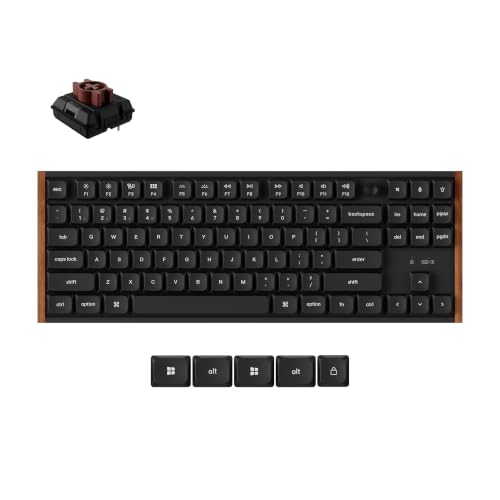 | Keychron K1 Ultra 8K | Best fit: Slim wireless 80% with knob Switches: Milk POM low-profile, hot-swappable Connection: 2.4GHz, Bluetooth 5.2, wired Polling rate: 8,000Hz wired and 2.4GHz; 125Hz Bluetooth Controls: Rotary knob, ZMK firmware | Check Price on Amazon |
 | SteelSeries Apex 3 TKL | Best fit: Quiet, water-resistant Switches: Whisper-quiet gaming switches Connection: Cabled, no wireless listed Polling rate: Not stated Controls: Volume roller, media keys, 8-zone RGB | Check Price on Amazon |
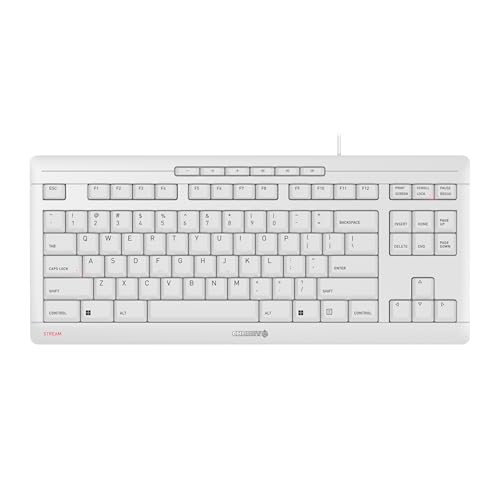 | Cherry Stream Keyboard TKL | Best fit: Slim, quiet wired typing Switches: SX scissor Connection: Wired Polling rate: Not stated Controls: 6 multimedia keys, 2 status LEDs | Check Price on Amazon |
1. Razer BlackWidow V4 Tenkeyless HyperSpeed — Best for Wireless Hot-swap Customization
Razer lists this keyboard as a wireless, hot-swappable tenkeyless mechanical keyboard with Orange Tactile Gen-3 switches pre-installed. Razer’s page says the socketed PCB takes 3-pin or 5-pin switches, and its FAQ says most standard 3-pin or 5-pin mechanical switches are compatible. Razer lists two wireless modes, 2.4GHz HyperSpeed and Bluetooth, and says hotkeys toggle between three Bluetooth devices.
Razer states up to 980 hours of battery life in either wireless mode, while the Amazon listing gives that figure for Bluetooth mode. The listing adds a 1,000Hz polling rate, N-key rollover and up to five onboard profiles. Razer’s page describes 4K polling only with the HyperPolling Wireless Dongle, which it sells separately. The page also lists a multi-function roller with three control buttons for audio, media and battery settings.
Typing sound: Razer lists a top-mounted stainless-steel plate, a tape-enhanced PCB, lubricated stabilizers and two layers of sound-dampening foam, and says the result is a clean typing sound and feel.Our Take Choose the Razer when you want wireless use and replaceable switches rather than rapid trigger. Logitech covers the rapid-trigger case, and Keychron covers slim low-profile typing.
- Razer lists 2.4GHz HyperSpeed and Bluetooth, and its hotkeys switch the keyboard among three Bluetooth devices.
- Razer’s socketed PCB takes 3-pin and 5-pin switches, and its FAQ says most standard switches of those types are compatible.
- Razer states up to 980 hours of battery life in either wireless mode, while the Amazon listing gives that figure for Bluetooth mode.
- Razer’s page describes 4K polling only with the HyperPolling Wireless Dongle, a separate purchase from the keyboard.
- Razer’s page lists mechanical switches and does not list rapid trigger or magnetic analog switches.
2. Logitech G PRO X TKL RAPID — Best for Wired Rapid-trigger Input
Logitech lists the PRO X TKL RAPID as a wired tenkeyless keyboard with magnetic analog switches, rapid trigger and adjustable actuation. Its page says actuation can be customized on every key and lists actuation at 35g of force. The Amazon listing describes the switches as Hall-Effect and says rapid trigger allows a key to reactivate without a full release.
Logitech’s page also describes KEYCONTROL, which assigns commands or multi-action combos to any key across multiple layers, and multi-point action, which sets two commands per key depending on how far the key is pressed. Logitech’s spec data lists LIGHTSYNC RGB, onboard lighting profiles and a 1 ms report rate.
Software: Logitech says its advanced features require Logitech G HUB software, and the Amazon listing says each key’s parameters are tailored in G HUB.Our Take Choose the Logitech for rapid trigger and per-key actuation on a wired desk. Razer and Keychron are wireless alternatives built around mechanical switches.
- Logitech lists magnetic analog switches with rapid trigger, and the Amazon listing says rapid trigger lets a key reactivate without a full release.
- Logitech’s page lets actuation be customized on every key and lists it at 35g of force.
- Logitech’s multi-point action assigns two commands to one key, chosen by how far the key is pressed.
- Logitech lists the keyboard as wired and does not list Bluetooth or 2.4GHz, which leaves Razer and Keychron as the wireless alternatives.
- Logitech says its advanced features require G HUB software, and the Amazon listing says each key’s parameters are tailored in G HUB.
3. Keychron K1 Ultra 8K — Best for Low-profile Tri-mode 8K Use
Keychron describes the K1 Ultra 8K as a low-profile wireless mechanical keyboard in an 80% TKL layout, with a natural wood and metal frame and LSA double-shot PBT keycaps. The switches are 11.9mm low-profile Keychron Milk POM switches, and Keychron says they can be swapped without soldering. The front edge is 20.0mm. The Amazon listing is the Brown switch option, and Keychron’s page also offers Red and Banana.
Keychron states 8,000Hz polling in wired and 2.4GHz modes and 125Hz over Bluetooth, and says Bluetooth 5.2 switches between up to three devices. The Amazon listing says up to 8K wired polling, so Keychron’s page gives the 2.4GHz figure. Keychron states a 2600 mAh battery with up to 490 hours of use at 8,000Hz with the backlight off. Keychron also lists ZMK firmware and the Keychron Launcher web app for remapping.
Knob: Keychron’s multi-function rotary knob controls volume by default and can be set to other commands in Keychron Launcher, such as screen brightness or backlight settings.Our Take Choose the Keychron for a slim wireless TKL with a knob and the 8,000Hz polling over 2.4GHz that Keychron states. Razer suits wireless hot-swapping of standard switches, and Logitech suits rapid trigger.
- Keychron states 8,000Hz polling for both the wired and the 2.4GHz connection.
- The battery figure Keychron states, up to 490 hours of use, applies at 8,000Hz with the backlight off.
- Keychron’s 11.9mm low-profile Milk POM switches are hot-swappable.
- Keychron states 125Hz polling over Bluetooth, which is lower than the 8,000Hz it states for the other two modes.
- Keychron’s page does not list rapid trigger or magnetic analog switches, and Logitech is the rapid-trigger pick here.
4. SteelSeries Apex 3 TKL — Best for Quiet, Water-resistant Gaming
SteelSeries says the Apex 3 TKL uses whisper-quiet gaming switches built from a durable low-friction material and designed for over 20 million silent keypresses. The page also lists water and dust resistance, and the Amazon listing describes the same resistance as protection against splashes and dust. The Amazon listing is the white version, and SteelSeries’ page shows the Amethyst color.
SteelSeries says the keys never lock out when several are pressed together, and it lists a clickable volume roller with media keys. SteelSeries lists eight lighting zones with 16.8 million colors that sync with other SteelSeries products, and SteelSeries Engine software lets you set lighting effects and macros.
Our Take Choose the Apex 3 TKL for quiet switches, water resistance and a volume roller. Cherry also lists whisper-quiet keys with a slim design, while Razer and Keychron are mechanical and wireless.
- SteelSeries lists whisper-quiet gaming switches designed for over 20 million keypresses.
- SteelSeries says the Apex 3 TKL is water and dust resistant, and the Amazon listing describes protection against splashes and dust.
- SteelSeries lists a clickable volume roller and media keys.
- SteelSeries and the Amazon listing give no polling rate, wireless mode or hot-swap sockets, and Razer and Keychron are the wireless picks here.
5. Cherry Stream Keyboard TKL — Best for Slim, Quiet Wired Typing
Cherry’s Amazon listing describes a wired keyboard without a number pad that uses CHERRY SX scissor technology and whisper-quiet keys. The listing says mouse and keyboard sit closer together without the number pad, in a more natural and ergonomic position. Its item dimensions give 0.71 inches for height and 14.84 by 6.42 inches for length and width.
The listing also names abrasion-resistant lettering, two rubberized fold-out feet and an integrated metal plate. The Amazon listing is the white-gray version, and it says the keyboard was awarded the GS mark, labeled Tested Safety.
Our Take Choose the Cherry for a slim wired keyboard with quiet scissor keys. Apex 3 adds RGB and water resistance, while Razer and Keychron add wireless use and replaceable switches.
- Cherry’s Amazon listing names whisper-quiet keys that use SX scissor technology.
- Cherry’s Amazon listing says mouse and keyboard sit closer together without the number pad, in a more natural and ergonomic position.
- The Amazon listing for Cherry names two rubberized fold-out feet and an integrated metal plate.
- Cherry’s Amazon listing does not state backlighting, a wireless mode or hot-swappable switches, and SteelSeries adds RGB while Razer and Keychron add wireless use and replaceable switches.
Buying Guide
1. Choose switch technology before layout
Logitech lists magnetic analog switches with rapid trigger, Razer and Keychron list mechanical switches, SteelSeries lists whisper-quiet gaming switches, and Cherry’s listing names SX scissor switches. The switch names differ, and only Logitech’s page lists rapid trigger and adjustable actuation.
A TKL layout describes only the missing number pad. Settle the switch type first, then compare lighting, case materials and extras.
2. Decide whether wireless changes the desk
Razer lists 2.4GHz HyperSpeed and Bluetooth, and Keychron lists 2.4GHz, Bluetooth 5.2 and wired use. Logitech’s page lists a wired keyboard, SteelSeries describes cable routing in its frame, and Cherry’s Amazon listing calls its keyboard wired.
Razer states up to 980 hours of battery life in either wireless mode, and Keychron states up to 490 hours at 8,000Hz with the backlight off. Choose wireless when the keyboard moves between devices, and a cabled board when one desk setup stays fixed.
3. Separate rapid trigger from report rate
Keychron states 8,000Hz polling over wired and 2.4GHz connections, while Logitech’s spec data lists a 1 ms report rate alongside rapid trigger and adjustable actuation. The Amazon listing for Razer gives 1,000Hz, and Razer’s page describes 4K polling only with its separately sold dongle.
Rapid trigger and report rate are separate features. Only Logitech’s page lists rapid trigger, so do not infer it from a high polling figure or from RGB lighting.
4. Check physical profile at the wrist
Keychron states 11.9mm low-profile switches and a 20.0mm front edge, and says the low-profile switch gives shorter key travel. Amazon’s item dimensions list a height of 0.71 inches for Cherry, against 1.71 inches for Razer and 1.5 inches for Logitech.
A slim body and a low-profile switch are different measurements. Only Keychron’s page gives a switch height, so compare how the board sits on the desk separately from how the keys feel.
5. Read hot-swap limits literally
Razer lists 3-pin and 5-pin sockets and says most standard switches of those types are compatible. Keychron says its Milk POM switches can be swapped without soldering.
Logitech, SteelSeries and Cherry do not list hot-swap sockets, so check the maker’s page for a hot-swap statement before planning to replace switches.
FAQ
Which TKL here has rapid trigger?
Logitech’s page lists rapid trigger, magnetic analog switches and adjustable actuation. The pages and listings for the other four do not state rapid trigger.
Keychron states 8,000Hz as a polling rate, and a polling rate does not indicate rapid trigger. Choose Logitech when adjustable actuation is the goal.
Which one supports three devices?
Razer says hotkeys toggle between 3 Bluetooth devices, and Keychron says Bluetooth 5.2 switches between up to three devices. Razer’s page lists 2.4GHz HyperSpeed alongside Bluetooth, and Keychron’s page lists 2.4GHz and wired use.
Razer is a hot-swap board with 3-pin and 5-pin sockets, while Keychron is an 80% low-profile board with a knob. Choose the layout and switches separately from the connection.
Are these all mechanical?
No. Razer and Keychron describe mechanical switches, Logitech lists magnetic analog switches, SteelSeries calls its switches whisper-quiet gaming switches without calling them mechanical, and Cherry’s listing names SX scissor switches.
A TKL label does not define the switch. Read each maker’s switch description before buying replacement switches or keycaps.
Which choices are quiet?
SteelSeries lists whisper-quiet gaming switches and Cherry’s Amazon listing names whisper-quiet keys. Razer’s page describes a clean typing sound from its plate, PCB tape and two foam layers.
None of the pages or listings gives a decibel figure. Compare the makers’ descriptions rather than a measured level.
Do any have a number pad?
No. Every keyboard here is described as tenkeyless, TKL or without a number pad. SteelSeries says dropping the pad leaves more space for large mouse swipes.
Choose a full-size board if dedicated numeric input is essential.
Bottom Line
Choose the Razer BlackWidow V4 Tenkeyless HyperSpeed for wireless hot-swapping and the Logitech G PRO X TKL RAPID for rapid trigger. Choose the Keychron K1 Ultra 8K for low-profile switches with the 8,000Hz polling over wired and 2.4GHz that Keychron states. The SteelSeries Apex 3 TKL suits whisper-quiet, water-resistant keys, and the Cherry Stream Keyboard TKL suits a slim wired board with scissor keys.
The rapid-trigger keyboard guide covers boards with rapid trigger, and the quiet mechanical keyboard guide covers mechanical boards for shared desks. Pick the switch and connection first, then use TKL to reclaim desk width.