Western Digital sells two portable hard-drive lines that differ in connector, software and encryption. WD’s Elements data sheet lists a 5Gbps USB-A cable, a quick install guide and no backup software or password protection. WD’s My Passport pages list password protection with 256-bit AES encryption and Acronis True Image for Western Digital backup software, and the My Passport Ultra adds a USB-C connector on the drive itself.
The five drives below run from 2TB to 6TB. Choose the connector first, then decide whether you want My Passport software and encryption, and pick the capacity last. WD’s pages put the same up to 5Gb/s rate on every drive it covers here, so speed is not what separates them.
WD lists 5Gbps for Elements and up to 5Gb/s for the My Passport models here, so the choice rests on connector, software and encryption.Western Digital Portable Hard Drives Compared
| Image | Product | Details | Check Price |
|---|---|---|---|
 | WD Elements 2TB Portable Hard Drive | Best fit: Laptop with a USB-A port Capacity: 2TB Connection: USB 3.2 Gen 1/USB 3.0, 5Gbps; USB-A cable in the box Dimensions: 4.35 x 3.23 x 0.60 inches, 0.30 pounds Format and extras: Windows 10 and later; no backup software or password protection listed by WD | Check Price on Amazon |
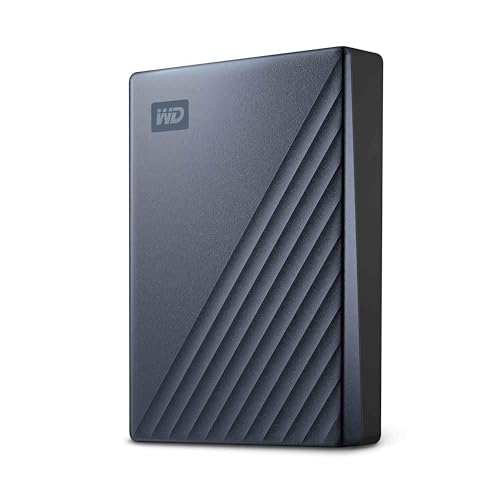 | WD My Passport Ultra 6TB | Best fit: USB-C laptop on Windows Capacity: 6TB Connection: USB-C connector, up to 5Gb/s; USB-C cable and USB-A adapter in the box Dimensions: 4.33 x 3.21 x 0.87 inches, 0.52 pounds Format and extras: Windows 10 and later; Acronis True Image for Western Digital; 256-bit AES encryption | Check Price on Amazon |
 | WD My Passport for Mac 6TB | Best fit: Mac that also meets a Windows PC Capacity: 6TB Connection: Micro-B connector, up to 5Gb/s; USB-A cable and USB-A to USB-C adapter in the box Dimensions: 4.22 x 2.95 x 0.81 inches, 0.46 pounds Format and extras: macOS 11 and later; HFS+ driver for Windows; 256-bit hardware encryption | Check Price on Amazon |
 | WD My Passport 5TB | Best fit: One drive for USB-C and USB-A computers Capacity: 5TB Connection: Micro-B connector, up to 5Gb/s; connects to USB-C or USB-A devices Dimensions: 4.22 x 2.95 x 0.76 inches Format and extras: No reformatting needed per WD; Acronis True Image for Western Digital; 256-bit AES encryption | Check Price on Amazon |
 | WD My Passport Ultra 2TB Red Dragon Drive | Best fit: USB-C laptop on Windows, small library Capacity: 2TB Connection: USB-C and USB 3.1 compatible, per Amazon Dimensions: 4.33 x 3.21 x 0.55 inches, 0.35 pounds, per Amazon Format and extras: Formatted for Windows 10; 256-bit AES encryption, per Amazon | Check Price on Amazon |
1. WD Elements 2TB Portable Hard Drive — Best Simple USB-A Portable Drive
WD’s Elements data sheet lists the 2TB model WDBU6Y0020BBK-WESN with USB 3.2 Gen 1/USB 3.0 at 5Gbps, a body of 4.35 by 3.23 by 0.60 inches and a weight of 0.30 pounds. The box holds the drive, a 5Gbps SuperSpeed USB-A cable and a quick install guide. Amazon’s title carries the same model number and names Windows, PC and Mac.
WD does not list backup software, password protection or encryption for Elements, so this drive is plain storage. It starts ready for Windows 10 and later, and WD says other operating systems may need reformatting. A laptop with only USB-C ports needs an adapter, because WD lists a USB-A cable and no USB-C cable.
WD’s Elements data sheet lists a 5Gbps USB-A cable in the box and a 2-year worldwide warranty.Our Take Elements is the drive with nothing extra. It has a USB-A cable, a light 2TB body and no software to install. Pick a My Passport when you want password protection or backup software.
- WD publishes the Elements 2TB body at 4.35 by 3.23 by 0.60 inches and 0.30 pounds, a light drive in WD’s own figures.
- WD packs a 5Gbps SuperSpeed USB-A cable in the Elements box for a laptop with a USB-A port.
- WD’s Elements data sheet gives the drive a 2-year warranty that applies worldwide.
- WD’s data sheet lists no backup software, password protection or encryption for Elements, so a buyer who wants password protection or backup software picks a My Passport.
- WD lists a USB-A cable and no USB-C cable in the Elements box, so a laptop with USB-C ports alone needs an adapter.
2. WD My Passport Ultra 6TB — Best High-Capacity USB-C Pick
WD’s My Passport Ultra page lists the 6TB model WDBEJA0060BBL-WESN with a USB-C connector, USB 3.2 Gen 1 and a transfer rate of up to 5Gb/s. WD gives it a body of 4.33 by 3.21 by 0.87 inches and a weight of 0.52 pounds. Amazon’s listing adds a metal design and the blue color.
The box differs from Elements. WD lists a USB-C to USB-C cable rated 5Gbps, a USB-C to USB-A adapter, and software for device and file management and backup with password protection. WD names that software as Acronis True Image for Western Digital, with protection against ransomware threats, and lists 256-bit AES encryption and a 3-year limited warranty. For macOS 11 and later, WD points to a downloadable NTFS driver and notes a need to reformat.
WD’s Ultra page lists a USB-C connector, a USB-C cable and a USB-A adapter in the box, and up to 5Gb/s.Our Take The 6TB Ultra suits a USB-C laptop on Windows when the cable and backup software should come from WD. A Mac owner plans around the NTFS driver or looks at the My Passport for Mac.
- WD lists a USB-C connector on the My Passport Ultra 6TB, a fit for a USB-C laptop on Windows.
- WD includes a 5Gbps USB-C to USB-C cable and a USB-C to USB-A adapter in the Ultra box, so the buyer gets the cable from WD.
- WD lists Acronis True Image for Western Digital for the Ultra, with protection against ransomware threats in WD’s wording.
- WD lists 256-bit AES encryption and a 3-year limited warranty for the Ultra, and its software includes password protection.
- WD lists Windows 10 and later as the Ultra’s starting platform and notes reformatting for macOS, so a Mac owner plans around the NTFS driver.
- WD’s 6TB Ultra is 0.87 inches thick and weighs 0.52 pounds, thicker and heavier than WD’s 2TB Elements at 0.60 inches and 0.30 pounds.
3. WD My Passport for Mac 6TB — Best Mac-Ready 6TB Choice
WD’s My Passport for Mac page lists the 6TB model WDBK6C0060BBL-WESN as Mac-ready and USB-C compatible. The connector on the drive is Micro-B on USB 3.2 Gen 1, rated up to 5Gb/s, and the box holds a 5Gbps USB-A cable and a USB-A to USB-C adapter. A Mac with USB-C ports connects through that adapter.
Amazon’s bullets for this drive name password protection and backup software and do not mention encryption. WD’s page does: password protection with 256-bit hardware encryption, plus Acronis True Image for Western Digital with ransomware-protection language. WD says the drive works out of the box with Macs on macOS 11 and later and lists a downloadable HFS+ driver for read and write access on Windows 10 and later without reformatting. WD lists the body at 4.22 by 2.95 by 0.81 inches and 0.46 pounds, with a 3-year limited warranty.
Our Take Choose this drive for a Mac that sometimes meets a Windows PC, since WD lists an HFS+ driver for that case. A laptop that wants USB-C on the drive itself goes to the Ultra.
- WD lists the 6TB My Passport for Mac as Mac-ready and USB-C compatible, and a USB-A to USB-C adapter in the box lets a Mac with USB-C ports connect.
- WD lists password protection with 256-bit hardware encryption for the My Passport for Mac, though Amazon’s bullets for it do not mention encryption.
- WD lists a downloadable HFS+ driver for read and write access on Windows 10 and later without reformatting, so the drive suits a Mac that sometimes meets a Windows PC.
- WD lists a Micro-B connector on the My Passport for Mac, so a Mac with USB-C ports connects through the adapter in the box.
- WD lists the 6TB My Passport for Mac at 0.81 inches thick, thicker than the 0.76 inches WD lists for the 5TB My Passport.
4. WD My Passport 5TB — Best USB-C and USB-A Flexibility
WD’s page for the 5TB model WDBRMD0050BGY-WESN says it connects to USB-C or USB-A devices without switching cables, and names Windows PCs, Macs, Chromebooks, game consoles, phones and tablets. The page lists a Micro-B connector on USB 3.2 Gen 1 at up to 5Gb/s, and says the drive works out of the box without reformatting. Amazon’s title and bullets use the same USB-C and USB-A wording.
WD lists password protection with 256-bit AES encryption and Acronis True Image for Western Digital with ransomware-protection language. The page gives a body of 4.22 by 2.95 by 0.76 inches and a 3-year limited warranty. The page does not list what cable or adapter comes in the box, so check that on the Amazon page before ordering.
Our Take Pick the 5TB My Passport when one drive has to serve a USB-C laptop and an older USB-A computer. The trade is 1TB less than the two 6TB drives above.
- WD says the 5TB My Passport connects to USB-C or USB-A devices without switching cables, so one drive suits a USB-C laptop and an older USB-A computer.
- WD’s page for this My Passport lists password protection with 256-bit AES encryption.
- WD lists Acronis True Image for Western Digital as the backup software for this model, with ransomware-protection language.
- WD lists the body at 4.22 by 2.95 by 0.76 inches, thinner than the 0.87 inches WD lists for the 6TB Ultra.
- WD’s page for the 5TB My Passport does not list the cable or adapter in the box, so the buyer checks the Amazon page before ordering.
- WD lists a Micro-B connector for this drive, while WD lists USB-C on the drive itself for the Ultra.
5. WD My Passport Ultra 2TB Red Dragon Drive — Best 2TB USB-C Ultra
Amazon lists this limited-edition red 2TB My Passport Ultra as model WDBRHB0020BRD-WESN with USB-C and USB 3.1 compatibility, a refined metal cover, password protection with 256-bit AES hardware encryption and a Windows 10 format. Amazon’s size fields give 4.33 by 3.21 by 0.55 inches and 0.35 pounds.
WD’s Ultra page lists those 2TB models in blue and silver, under model numbers WDBC3C0020BBL-WESN and WDBC3C0020BSL-WESN. It does not list the red model number, so WD states no transfer rate, box contents or warranty for the red edition. The slim body is the reason to look at it, at 0.55 inches in Amazon’s size fields against 0.87 inches WD lists for the 6TB Ultra.
Amazon lists the red edition with USB-C and a Windows 10 format, and WD’s Ultra page lists 2TB models in blue and silver.Our Take Pick this edition for a USB-C laptop on Windows with a small library and a liking for the red metal cover. Choose a model on WD’s Ultra page when you want the maker’s own box contents and rate.
- Amazon’s size fields give the red edition a body of 4.33 by 3.21 by 0.55 inches, thinner than the 0.87 inches WD lists for the 6TB Ultra.
- Amazon lists the red edition with USB-C and USB 3.1 compatibility, a match for a USB-C laptop.
- Amazon’s listing names password protection with 256-bit AES hardware encryption for this model.
- WD’s Ultra page does not list model WDBRHB0020BRD-WESN, so WD states no rate, box contents or warranty for it.
- Amazon lists a Windows 10 format for the red edition, and the drive starts set up for Windows.
Buying Guide
1. Start with the laptop port
WD lists a USB-A cable in the Elements box and a USB-C to USB-C cable plus a USB-C to USB-A adapter in the My Passport Ultra box. For the My Passport for Mac, WD lists a USB-A cable and a USB-A to USB-C adapter. WD’s page for the 5TB My Passport says the drive connects to USB-C or USB-A devices without switching cables.
The connector on the drive differs as well. WD lists USB-C for the My Passport Ultra 6TB and Micro-B for the My Passport for Mac and the 5TB My Passport, so the Ultra is the one with a USB-C connector on the drive.
2. Do not expect a speed difference
WD lists 5Gbps for Elements and up to 5Gb/s for the My Passport Ultra, My Passport for Mac and 5TB My Passport. WD lists no faster rate for any drive here, and a USB-C connector or a larger capacity does not change the figure WD states. The red 2TB Ultra sits outside WD’s pages, so WD states no rate for that model.
Choose by connector, software and encryption instead. WD’s pages for these drives differ from one another on those points.
3. Compare encryption and backup software
WD lists password protection with 256-bit AES encryption for the My Passport Ultra, My Passport for Mac and 5TB My Passport, along with Acronis True Image for Western Digital and its ransomware-protection language. Amazon’s bullets name encryption for the 5TB My Passport and the red 2TB Ultra but not for the My Passport for Mac, which WD’s page does list.
WD’s Elements data sheet lists neither backup software nor password protection, so a buyer who wants either picks a My Passport. Encryption controls who can open the drive and does not make a second copy, so keep important files in two places. For broader choices, see the portable hard drives for laptop backup guide and the external hard drives for Mac and Time Machine guide.
4. Compare thickness and capacity
WD lists the Elements 2TB at 0.60 inches thick and 0.30 pounds, the 5TB My Passport at 0.76 inches, the My Passport for Mac 6TB at 0.81 inches and 0.46 pounds, and the Ultra 6TB at 0.87 inches and 0.52 pounds. Amazon’s size fields for the red 2TB Ultra give 0.55 inches and 0.35 pounds.
The five drives come in 2TB, 5TB and 6TB. The two 2TB drives are the thinnest, and WD’s figures for the three larger drives run from 0.76 to 0.87 inches. Pick the capacity that holds your files and the backups you plan to keep.
5. Match the starting format to your computer
WD says Elements starts ready for Windows 10 and later, and other operating systems may need reformatting. For the My Passport Ultra, WD lists Windows 10 and later plus a downloadable NTFS driver for macOS 11 and later with a need to reformat. WD lists the My Passport for Mac as ready for macOS 11 and later, with a downloadable HFS+ driver for Windows 10 and later without reformatting.
WD says the 5TB My Passport works with computers and mobile devices without needing to reformat. Amazon lists the red 2TB Ultra as formatted for Windows 10. A Mac-only household starts with the My Passport for Mac, and a mixed household can start with the 5TB My Passport.
FAQ
Does the WD Elements portable drive use USB-C?
WD’s Elements data sheet lists USB 3.2 Gen 1/USB 3.0 at 5Gbps and a 5Gbps SuperSpeed USB-A cable in the box. The data sheet lists no USB-C cable.
A USB-C-only laptop connects through an adapter that you supply. The 5TB My Passport is the alternative when you want a drive WD says connects to USB-C or USB-A devices.
Which WD portable hard drive here has the most capacity?
The My Passport Ultra 6TB and the My Passport for Mac 6TB are the largest drives in this comparison. WD’s Ultra and My Passport for Mac pages each list 6TB model numbers.
The 5TB My Passport is 1TB smaller. WD lists the same up to 5Gb/s rate on all three pages, so the larger drives gain space and not speed.
Is the 5TB My Passport suitable for old and new laptop ports?
WD’s page says the 5TB My Passport connects to USB-C or USB-A devices without switching cables, and names Windows PCs, Macs and Chromebooks among them. The page lists a Micro-B connector on the drive.
Check the laptop’s ports and what ships in the box before buying, since WD’s page for this model does not list the cable or adapter.
Are the My Passport Ultra and My Passport for Mac the same drive?
They differ on the points WD lists. The Ultra has a USB-C connector and a USB-C cable in the box. The My Passport for Mac has a Micro-B connector with a USB-A cable and a USB-A to USB-C adapter.
WD lists Windows 10 and later as the Ultra’s starting platform and macOS 11 and later for the My Passport for Mac. WD lists up to 5Gb/s, 256-bit AES encryption and a 3-year limited warranty for both.
Does password protection replace another backup?
No. WD lists 256-bit AES encryption and password protection for its My Passport pages, and those features control access to the drive. They do not copy its files anywhere else.
Keep a second copy of anything important. WD’s Elements data sheet lists neither password protection nor backup software, which is a reason to pick a My Passport when you want both.
Bottom Line
WD Elements is the plain USB-A drive, with WD listing a 5Gbps USB-A cable and no software. The 5TB My Passport is the pick for mixed ports because WD says it connects to USB-C or USB-A devices. For the largest capacity, WD lists 6TB for the My Passport Ultra with a USB-C connector and for the My Passport for Mac with a Micro-B connector and adapter. Choose by connector and platform, not by speed.