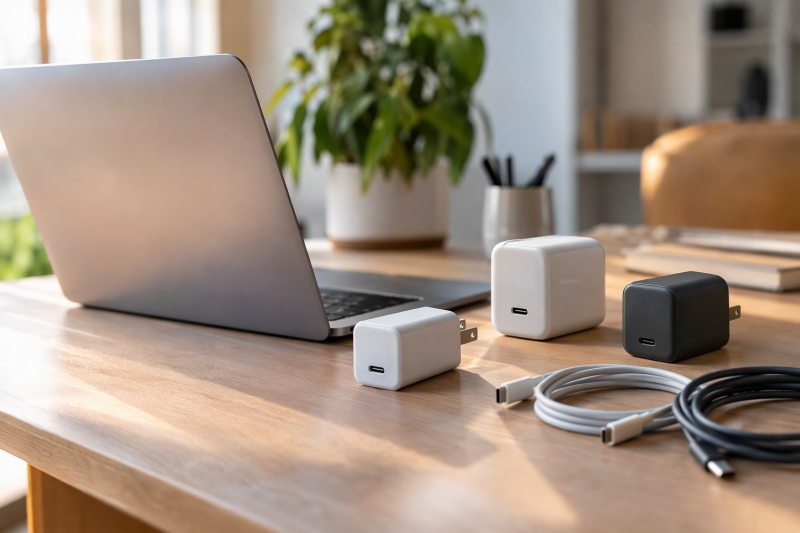
MacBook Pro charger shopping starts with the screen size. Apple’s support page lists a 140W adapter for 16-inch models from 2021 or later, and a 96W adapter as one of three choices for 14-inch models from 2021 or later. Anker, UGREEN, and MINIX sell multi-port USB-C chargers that their listings describe for MacBook Pro use, each with a different split between total output and what a single port delivers.
The 140W cases need the whole charging path to match. Apple’s fast-charge page pairs its 140W adapter with a USB-C to MagSafe 3 Cable, or with its 240W USB-C Charge Cable for MacBook Pro (16-inch, Nov 2023) or later. MINIX says its 140W USB-C1 output needs both a PD 3.1 compliant cable and a device that accepts 140W input.
MacBook Pro Chargers Compared
| Image | Product | Details | Check Price |
|---|---|---|---|
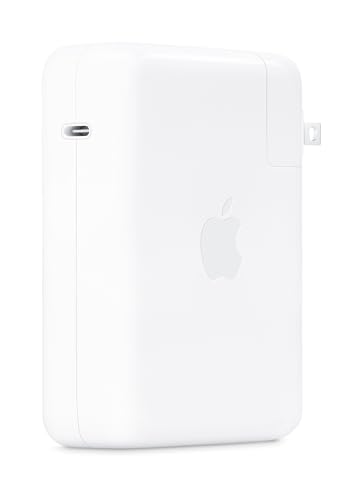 | Apple 140W USB-C Power Adapter | Best fit: 16-inch MacBook Pro, 2021 or later Output: 140W Ports: USB-C Cable: Sold separately Notable: Apple lists 0 to 50 percent in around 30 minutes with a MagSafe 3 cable | Check Price on Amazon |
 | Apple 96W USB-C Power Adapter | Best fit: 14-inch MacBook Pro, 2021 or later Output: 96W Ports: USB-C Cable: Sold separately Notable: Apple lists it with a MagSafe 3 or USB-C charge cable | Check Price on Amazon |
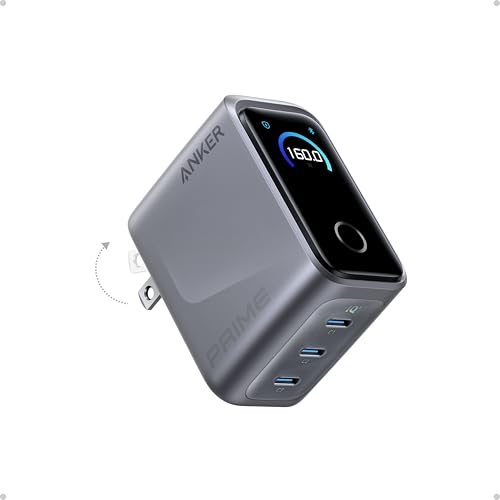 | Anker Prime 160W Charger | Best fit: 140W port on a three-port charger Output: 160W total, 140W from one port Ports: 3 ports Cable: None included Notable: Display shows power in real time | Check Price on Amazon |
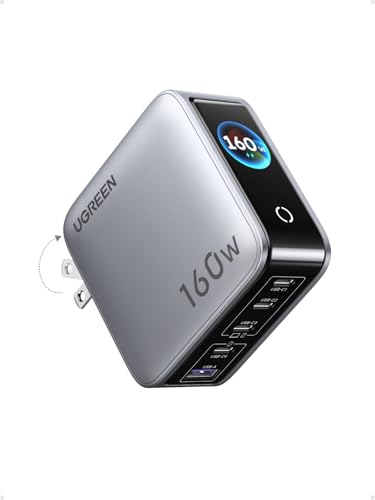 | UGREEN Nexode Pro 160W Charger | Best fit: Four USB-C ports plus USB-A Output: 160W total, C1 or C2 up to 140W Ports: 4 USB-C and 1 USB-A Cable: Not stated Notable: Touch display shows per-port power | Check Price on Amazon |
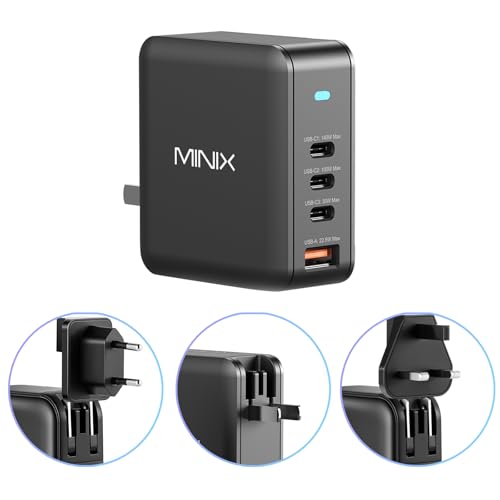 | MINIX P165 Charger | Best fit: 140W port with US, UK, and EU pins Output: 165W total, USB-C1 up to 140W Ports: 3 USB-C and 1 USB-A Cable: PD 3.1 compliant cable needed for 140W Notable: Includes US, UK, and EU pin converters | Check Price on Amazon |
1. Apple 140W USB-C Power Adapter — Best for a 16-Inch MacBook Pro
Apple’s support page names the 140W USB-C Power Adapter with a USB-C to MagSafe 3 Cable as the recommended adapter for 16-inch MacBook Pro models from 2021 or later. Apple’s fast-charge page says a 16-inch model charges to 50 percent in around 30 minutes with that adapter and a MagSafe 3 cable, or with the 240W USB-C Charge Cable for MacBook Pro (16-inch, Nov 2023) or later. Apple adds that the times come from drained laptops and vary with settings.
Apple’s Amazon listing calls the adapter compatible with numerous USB-C charging cables and names a USB-C to MagSafe 3 Cable or USB-C Charge Cable. The listing says the cable is sold separately. Apple’s fast-charge page is narrower than the listing about the USB-C option, so check the cable name before buying. The same page also lists this adapter for fast charging a 14-inch model from 2021 or later.
Pick this one when: you own a 16-inch MacBook Pro from 2021 or later and want the adapter Apple names for it.Our Take Apple’s 140W adapter is the one Apple names for the 16-inch model, and the buyer supplies the cable. Apple’s fast-charge page credits its 30-minute figure to a MagSafe 3 cable or to the 240W USB-C cable.
- Apple’s support page names this 140W adapter as its recommended choice for 16-inch MacBook Pro models from 2021 or later.
- Apple’s fast-charge page also lists it for fast charging a 14-inch model from 2021 or later.
- With a MagSafe 3 cable, Apple’s fast-charge page gives 0 to 50 percent in around 30 minutes.
- Apple’s listing says the charging cable is sold separately, so the buyer supplies it.
- On a 16-inch model, Apple’s fast-charge page names the 240W USB-C Charge Cable as its USB-C option, a narrower choice than the listing’s wording.
2. Apple 96W USB-C Power Adapter — Best for a 14-Inch MacBook Pro
Apple’s support page lists the 96W USB-C Power Adapter with a USB-C to MagSafe 3 Cable as one of three recommended adapters for 14-inch MacBook Pro models from 2021 or later, next to a 67W and a 70W adapter. Apple’s fast-charge page lists the 96W adapter with a MagSafe 3 or USB-C charge cable for the same 14-inch models, with the same around-30-minutes figure to 50 percent that it gives for the 140W adapter.
Apple’s Amazon listing says the adapter works with numerous USB-C devices and charging cables, and that the USB-C Charge Cable is sold separately. Apple’s support page also lists a 96W USB-C Power Adapter with a USB-C Charge Cable for the 16-inch MacBook Pro introduced in 2019.
Our Take The 96W adapter is the lower-wattage of the two Apple adapters that Apple’s fast-charge page lists for a 14-inch model. The same page lists only the 140W adapter for the 16-inch model.
- Apple’s support page lists this 96W adapter among three recommended choices for 14-inch MacBook Pro models from 2021 or later.
- Apple’s fast-charge page lists it with either a MagSafe 3 or a USB-C charge cable for those models.
- Apple’s support page also lists a 96W adapter with a USB-C Charge Cable for the 16-inch model introduced in 2019.
- The USB-C Charge Cable is sold separately, according to Apple’s listing.
- Apple’s fast-charge page lists only the 140W adapter, not this 96W adapter, for 16-inch models from 2021 or later.
3. Anker Prime 160W Charger — Best for a 140W Port on a Three-Port Charger
Anker’s listing gives the Prime charger 160W total output across three ports and says one port delivers 140W without derating. It says a 16-inch MacBook Pro goes from 0 to 50 percent in 25 minutes without choosing a particular port, and its title says the 140W figure is for one device.
For three devices, Anker’s listing says a 16-inch MacBook Pro, an iPhone 16 Pro Max, and an 11-inch iPad Pro charge in the same time as with three original chargers, and it puts 140W, 35W, and 35W next to that claim. The three figures add up to 210W, above the 160W total. The listing does not state per-port output when all three ports are in use.
Anker’s listing describes a display with live power readings and mode switching, and custom modes are set in an app over Bluetooth. Anker lists the size as 2.56 by 2.05 by 1.38 inches and the charger as sold with no cable.
Our Take Anker is the only listing here that says its charge time holds without choosing a port. Its three-device claim has no per-port output behind it.
- Anker states 160W total output and 140W from a single port without derating.
- Anker’s listing gives 0 to 50 percent in 25 minutes for a 16-inch MacBook Pro without choosing a port.
- Anker lists a display that shows live power readings.
- Anker lists the size as 2.56 by 2.05 by 1.38 inches.
- Anker’s listing says the charger is sold with no cable.
- Anker’s 25-minute figure is for one device, and its three-device figures add up to 210W against a 160W total.
- Anker’s custom modes need its app over Bluetooth.
4. UGREEN Nexode Pro 160W Charger — Best for Four USB-C Ports Plus USB-A
UGREEN’s listing gives 160W total output and says the C1 and C2 ports each support up to 140W as a single port. In all it lists four USB-C ports and one USB-A port, five ports for MacBook, iPhone, Galaxy, AirPods, and tablets.
UGREEN says an automatic power allocation system handles several devices and gives no numbered split for them. The 140W figure is for C1 or C2 as a single port. In the same sentence, the listing says the charger brings a 16-inch MacBook Pro with an M4 Max chip to 56 percent battery within 30 minutes.
UGREEN lists a rotatable touch display for total output, per-port power, the active protocol, and internal temperature, and a US AC plug that folds for travel.
Pick this one when: you want four USB-C ports and one USB-A port on a desk or in a bag.Our Take UGREEN has the most ports of the three multi-port chargers, five, and its display shows per-port power.
- UGREEN states 160W total output and up to 140W from C1 or C2 as a single port.
- UGREEN lists four USB-C ports and one USB-A port.
- UGREEN’s touch display shows total output, per-port power, protocol, and temperature.
- UGREEN’s listing gives 56 percent within 30 minutes for a 16-inch MacBook Pro with an M4 Max chip.
- UGREEN gives its 140W figure for C1 or C2 as a single port and no numbered split for several devices.
- UGREEN’s listing does not say whether a cable is included.
5. MINIX P165 Charger — Best for a 140W Port With US, UK, and EU Pins
MINIX’s listing gives 165W total output from three USB-C ports and one USB-A port, with up to 140W from USB-C1 over PD 3.1. It says a MacBook Pro charges to 50 percent in 30 minutes and is full in around 1.3 hours from that port.
MINIX says the 140W output needs both a PD 3.1 compliant cable and a device that accepts 140W input, and asks buyers to confirm the cable supports 140W. It also says it always recommends original charging cables.
The listing describes intelligent dynamic power allocation when several devices charge, without a numbered split. It states PD 3.1 and PD 3.0 support and says the charger comes with US, UK, and EU pin converters.
Our Take MINIX is the only one of the five listings that includes UK and EU pin converters. Its 140W port needs a matching cable and a laptop that accepts 140W.
- MINIX states 165W total output and up to 140W from USB-C1 over PD 3.1.
- MINIX lists three USB-C ports and one USB-A port.
- MINIX says the charger comes with US, UK, and EU pin converters.
- MINIX gives 50 percent in 30 minutes and a full charge in around 1.3 hours for a MacBook Pro on USB-C1.
- MINIX says 140W needs both a PD 3.1 compliant cable and a device that accepts 140W input.
- MINIX’s listing gives no numbered split when several devices charge.
Buying Guide
Match the charger to the screen size
Apple’s support page lists a 140W adapter for 16-inch MacBook Pro models from 2021 or later. For 14-inch models from 2021 or later it lists 67W, 70W, and 96W adapters, and Apple’s fast-charge page lists the 96W and 140W adapters for fast charging there.
Apple’s support page also says a MacBook that charges over USB-C can charge from any USB-C power adapter that supports USB Power Delivery. For the best charging experience it recommends an adapter with at least the minimum wattage of the one Apple recommends for the model.
Apple’s fast-charge page lists Apple adapters and displays and no third-party charger. A fast-charge figure for Anker, UGREEN, or MINIX is that maker’s own claim, given for the condition its listing names.
Read total output and single-port output separately
Anker and UGREEN each state 160W total output, and MINIX states 165W total. Each listing gives a 140W figure for one port. Anker gives it for a single port, UGREEN for C1 or C2, and MINIX for USB-C1.
A total describes the whole charger, and a single-port figure describes one output. Anker’s listing names 140W, 35W, and 35W for its three-device claim, and those add up to 210W against a 160W total. UGREEN and MINIX describe automatic or dynamic allocation without numbers.
Pick the port layout for the devices you charge
UGREEN lists four USB-C ports and one USB-A port, MINIX lists three USB-C ports and one USB-A port, and Anker calls its charger a three-port USB-C charger. UGREEN and MINIX are the two that list a USB-A port.
Read the allocation line before assuming the laptop keeps 140W while other ports are in use. UGREEN and MINIX state 140W for one port, and Anker states no per-port output for three ports in use.
Plan the cable before the charger
Apple’s Amazon listings say the cable is sold separately, and Anker’s says the charger comes with no cable. UGREEN’s and MINIX’s listings do not say whether a cable is included.
MINIX says 140W needs a PD 3.1 compliant cable and a device that accepts 140W input. Apple’s fast-charge page names the MagSafe 3 cable or the 240W USB-C Charge Cable for a 16-inch model.
Choose by how the charger will be used
Apple’s adapters are the ones Apple’s pages list for specific MacBook Pro screen sizes. The three multi-port chargers are the ones to compare when a phone or tablet charges beside the laptop: UGREEN’s five ports, Anker’s display, or MINIX’s travel pins.
Match the port count and the cable to the devices you own before comparing wattage. See the 140W USB-C charger guide and the MacBook Air charger guide for more Apple charging choices.
FAQ
Can a 160W charger always charge a MacBook Pro at 140W?
No. The Anker, UGREEN, and MINIX listings give their 140W figures for one port. UGREEN and MINIX describe allocation across several devices without numbers.
The cable and laptop also set the limit. MINIX says its 140W output needs a PD 3.1 compliant cable and a device that accepts 140W input.
Which Apple adapter does Apple list for each MacBook Pro?
Apple’s support page lists the 140W adapter with a USB-C to MagSafe 3 Cable for 16-inch models from 2021 or later. For 14-inch models from 2021 or later it lists 67W, 70W, and 96W adapters with the same cable.
Apple’s fast-charge page lists the 96W and 140W adapters for 14-inch models and only the 140W adapter for 16-inch models. It gives 0 to 50 percent in around 30 minutes and says charge time varies with settings.
Can a non-Apple charger charge a MacBook Pro?
Apple’s support page says a MacBook that charges over USB-C can charge from any USB-C power adapter, at higher or lower wattage than the one Apple recommends. It recommends at least the minimum wattage of the recommended adapter for the best charging experience.
Apple’s fast-charge page lists no third-party charger. The Anker, UGREEN, and MINIX listings each give their own charge figure for the condition they name.
Which charger has the most ports?
UGREEN lists four USB-C ports and one USB-A port, five in all. MINIX lists three USB-C ports and one USB-A port, and Anker calls its charger a three-port charger.
More ports help when several devices charge together. All three give a total output, so add up the devices before choosing.
Do these chargers include a cable?
Apple’s 96W and 140W listings say a charging cable is sold separately. Anker’s listing says its Prime charger is sold with no cable.
The UGREEN and MINIX listings do not say whether a cable is included. Confirm the cable’s rated charging power before buying, especially where MINIX makes 140W depend on a PD 3.1 compliant cable.
Bottom Line
Apple’s pages tie the 140W adapter to 16-inch MacBook Pro models and the 96W adapter to 14-inch models. Anker adds a 140W port and a display on a three-port charger, UGREEN adds five ports, and MINIX adds travel pins with a 140W port that needs a PD 3.1 compliant cable.