A Core Ultra Series 3 laptop is easiest to confirm by its processor number. The five laptops below name a Core Ultra 5 325, Core Ultra X7 358H, or Core Ultra 9 386H, and Intel’s Series 3 page lists all three. They cover 14-inch and 16-inch screens, with different ports, panels, and weights.
Only the HP ProBook writes Series 3 in its Amazon processor field. For the other four, the Series 3 link comes from the chip number matching Intel’s own list. Memory and storage that appear only in a listing title may be a seller configuration, and the HP section says so where it applies.
Core Ultra Series 3 Laptops Compared
| Image | Product | Details | Check Price |
|---|---|---|---|
 | HP ProBook 4 G2i 14 | Best fit: Series 3 written in the processor field Processor: Core Ultra 5 Series 3 325 Screen: 14-inch WUXGA, 1920 x 1200 Memory and storage: 16GB and 512GB, title only Ports: None named | Check Price on Amazon |
 | LG gram Pro 16 | Best fit: Light 16-inch OLED Processor: Core Ultra X7 358H Screen: 16-inch OLED, 30-120Hz variable refresh Memory and storage: 16GB and 1TB Ports: Thunderbolt 4, in the title | Check Price on Amazon |
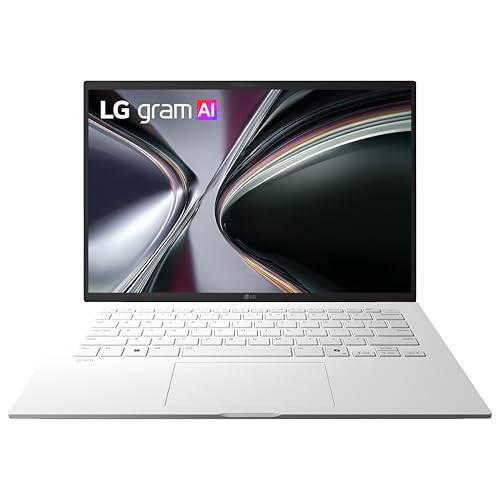 | LG gram 14 Light | Best fit: 2.5-pound 14-inch laptop Processor: Core Ultra 5 325 Screen: 14-inch, no panel type stated Memory and storage: 32GB and 512GB Ports: Thunderbolt 4, in the title | Check Price on Amazon |
 | ASUS Vivobook S16 | Best fit: 16-inch OLED with a stated port list Processor: Core Ultra 9 386H Screen: 16-inch 16:10 WUXGA OLED Memory and storage: 32GB and 1TB Ports: 2 USB-C, 2 USB-A, HDMI 2.1, audio | Check Price on Amazon |
 | ASUS Vivobook 14 Flip | Best fit: 14-inch OLED convertible Processor: Core Ultra 9 386H Screen: 14-inch 16:10 WUXGA OLED touch Memory and storage: 32GB and 1TB Ports: Thunderbolt 4, USB-C, USB-A, HDMI 2.1, microSD | Check Price on Amazon |
1. HP ProBook 4 G2i 14 — Best for a Stated Series 3 Processor
The Amazon listing for the HP ProBook gives its processor as Intel Core Ultra 5, model 325, series Series 3, which is the plainest Series 3 wording of the five. Intel’s Series 3 page lists the Core Ultra 5 325 with 8 cores and a turbo frequency of up to 4.5 GHz. The listing title adds a 14-inch WUXGA screen at 1920 x 1200, Windows 11 Pro, and Copilot+ PC.
The title also names 16GB of memory and a 512GB SSD. The listing has no bullet that repeats those figures, so they may be a seller configuration, and confirm the memory and storage on the product page before buying. Amazon’s item dimensions list the laptop at 3.06 pounds and 0.69 inch thick.
Pick this one when: a Series 3 processor field and a 14-inch WUXGA business laptop fit the need.Our Take The ProBook is the easiest way to confirm Series 3 from the product record, though it lists no ports, battery size, or panel type to compare against the others.
- The HP ProBook listing gives Series 3 as the processor series for its Core Ultra 5 325, so a buyer can confirm the series from the product record.
- The HP ProBook title names a 14-inch 1920 x 1200 WUXGA screen, Windows 11 Pro, and Copilot+ PC for a business-laptop buyer.
- Amazon’s item dimensions list the HP ProBook at 3.06 pounds, lighter than the ASUS Vivobook 14 Flip’s 3.46 pounds.
- The HP ProBook listing names no ports, so its connections cannot be compared with the other four laptops.
- The HP ProBook title is the only place the 16GB and 512GB figures appear, so they may be a seller configuration.
2. LG gram Pro 16 — Best for a Light 16-Inch OLED
LG’s gram Pro listing names a Core Ultra X7 358H, which Intel’s Series 3 page lists with 16 cores and a turbo frequency of up to 4.8 GHz. LG states a 2.6-pound weight and 0.5-inch profile, a 77Wh battery, and a variable refresh rate that adapts from 30Hz to 120Hz. The title names the 16-inch OLED screen, 16GB of memory, a 1TB SSD, and Thunderbolt 4.
LG describes an NPU capable of up to 50 TOPS and says the laptop supports up to 16GB LPDDR5x memory and up to 1TB NVMe storage. LG’s text is also specific about the build, and LG says the gram Pro uses an alloy it calls Aerominum and has passed seven military-grade durability tests. The title gives playback of up to 27 hours.
Our Take The gram Pro is the pick for a 16-inch screen that is easy to carry, as long as a full port list is not the deciding detail.
- The LG gram Pro title names a 16-inch OLED screen, and LG states variable refresh from 30Hz to 120Hz.
- LG states a 2.6-pound weight and 0.5-inch profile for the gram Pro, the lightest 16-inch laptop here and the easiest to carry.
- LG states a 77Wh battery and an NPU capable of up to 50 TOPS for the gram Pro.
- The LG gram Pro title names Thunderbolt 4, the only port detail the gram Pro listing gives.
- LG’s gram Pro bullets name no ports, so a buyer who needs a full port list has only the title’s Thunderbolt 4 to go on.
3. LG gram 14 Light — Best for a 2.5-Pound 14-Inch Laptop
The LG gram 14 listing uses the same Core Ultra 5 325 as the HP ProBook, with 32GB of memory and a 512GB SSD in the title. LG says it weighs 2.5 pounds with a 0.7-inch profile, and states a 72Wh battery and up to 36.5 hours of video playback. The title names Thunderbolt 4.
LG describes an NPU capable of up to 47 TOPS and says the laptop supports up to 32GB LPDDR5x memory and up to 512GB NVMe storage, so the title’s memory and storage match the bullets. As with the gram Pro, LG says the gram 14 has passed seven military-grade durability tests.
Our Take The gram 14 is the lightest 14-inch laptop here, and it lists twice the memory of the HP ProBook with the same Core Ultra 5 325.
- LG states a 2.5-pound weight and 0.7-inch profile for the gram 14, lighter than the HP ProBook’s 3.06 pounds and the ASUS Vivobook 14 Flip’s 3.46 pounds.
- LG states a 72Wh battery and up to 36.5 hours of video playback for the gram 14.
- LG says the gram 14 supports up to 32GB LPDDR5x memory, and the title’s 32GB matches that stated maximum.
- LG’s gram 14 bullets name no ports, so a buyer who needs a port list has only the title’s Thunderbolt 4 to go on.
- LG states up to 512GB of NVMe storage for the gram 14, half the 1TB it states for the gram Pro.
4. ASUS Vivobook S16 — Best for a 16-Inch OLED With Stated Ports
ASUS lists the Vivobook S16 with a Core Ultra 9 386H, which Intel’s Series 3 page lists with 16 cores and a turbo frequency of up to 4.9 GHz. ASUS states 32GB of memory, 1TB of storage, a 16-inch 16:10 WUXGA OLED display, a 70Wh battery, and an NPU rated at up to 50 TOPS. ASUS says the battery lasts up to 25 hours in a 1080p video playback test and charges to 60% in 49 minutes.
ASUS names two USB 3.2 Gen 1 Type-C ports, two USB 3.2 Gen 1 Type-A ports, an HDMI 2.1 TMDS port, and a 3.5mm audio jack, which makes it the only 16-inch laptop here with a stated port list. It does not call either Type-C port Thunderbolt, so this page does not treat the S16 as a Thunderbolt laptop. ASUS also lists an IR camera with a privacy shutter and US MIL-STD 810H durability.
ASUS gives the weight as 3.75 pounds and the thickness as starting at 0.63 inch. Amazon’s own weight field lists 6.0 pounds and its size field 0.70 inch, so confirm the weight and thickness before buying if either decides the purchase.
Pick this one when: a 16-inch OLED with two USB-C ports, two USB-A ports, and HDMI 2.1 is more useful than the gram Pro’s lighter build.Our Take The S16 is the 16-inch choice for a buyer who plugs in a USB-A device or an HDMI display directly, and it pairs that port list with a Core Ultra 9 386H and an OLED screen.
- ASUS states a 16-inch 16:10 WUXGA OLED display and a Core Ultra 9 386H for the Vivobook S16.
- ASUS lists two USB-C ports, two USB-A ports, HDMI 2.1, and a 3.5mm audio jack for the Vivobook S16, so USB-A devices and an HDMI display plug in directly.
- ASUS states 32GB of memory and 1TB of storage for the Vivobook S16.
- ASUS states a 70Wh battery for the Vivobook S16, with 60% charging in 49 minutes.
- ASUS does not name Thunderbolt for either Vivobook S16 USB-C port, and the connector shape alone does not show Thunderbolt.
- ASUS gives 3.75 pounds for the Vivobook S16 while Amazon’s weight field lists 6.0 pounds, so the carrying weight is uncertain.
5. ASUS Vivobook 14 Flip — Best for an OLED Convertible
ASUS states that the Vivobook 14 Flip has a 360-degree hinge that switches among laptop, tablet, stand, and tent modes. It lists a Core Ultra 9 386H, the same chip as the S16, with a 14-inch 16:10 WUXGA OLED touchscreen, 32GB of memory, a 1TB SSD, and Wi-Fi 7. Amazon’s item dimensions list it at 3.46 pounds and 0.67 inch thick.
ASUS names one USB 3.2 Gen 1 Type-A port, one USB 3.2 Gen 2 Type-C port, one Thunderbolt 4 port, an HDMI 2.1 TMDS port, a 3.5mm combo audio jack, and a microSD card reader. It states a 70Wh battery, up to 38 hours of battery life, and Microsoft Pluton security.
ASUS also says the Flip charges to 60% in 49 minutes, and ties that figure to a powered-off laptop and the adapter that ships with it. Treat the charging time as a best case when the laptop is in use.
Our Take The 14 Flip is the only laptop here that pairs a touchscreen and flip hinge with a named Thunderbolt 4 port in its bullets.
- ASUS states a 360-degree hinge with laptop, tablet, stand, and tent modes for the Vivobook 14 Flip, a feature none of the other four listings states.
- ASUS lists a 14-inch 16:10 WUXGA OLED touchscreen and a Core Ultra 9 386H for the Vivobook 14 Flip.
- ASUS names a Thunderbolt 4 port, a USB-C port, a USB-A port, HDMI 2.1, and a microSD reader for the Vivobook 14 Flip.
- ASUS states 32GB of memory, a 1TB SSD, and Wi-Fi 7 for the Vivobook 14 Flip.
- ASUS lists a 14-inch screen for the Vivobook 14 Flip, smaller than the screens on the LG gram Pro and ASUS Vivobook S16.
- ASUS ties the Vivobook 14 Flip’s 49-minute charge to a powered-off laptop and the included adapter.
- ASUS lists three USB ports for the Vivobook 14 Flip, one fewer than the four it lists for the Vivobook S16.
Buying Guide
Start with the processor number
Intel’s Series 3 page lists the Core Ultra 5 325, Core Ultra X7 358H, and Core Ultra 9 386H. The HP ProBook is the only listing that also writes Series 3 in its processor field, and it names the 325.
The LG gram 14 uses the same 325, and the two ASUS laptops use the 386H. Compare the number rather than the words Core Ultra, because a listing that gives only a generic name does not tell you which chip is inside.
Choose 14 or 16 inches around the work surface
The HP ProBook, LG gram 14, and ASUS Vivobook 14 Flip have 14-inch screens. The LG gram Pro and ASUS Vivobook S16 have 16-inch screens. Screen size sets the working area, and it also sets how much of a bag or desk the laptop takes up.
Panel type differs as well. The gram Pro title, the S16 bullets, and the Flip bullets state OLED, while the HP title says WUXGA and the gram 14 gives no panel type. For color-critical or high-contrast work, choose from the three OLED listings.
Treat memory and storage as the listed configuration
The five listings show 16GB or 32GB of memory and 512GB or 1TB of storage. LG and ASUS state their figures in the bullets, while the HP ProBook gives its 16GB and 512GB only in the title.
Because the HP figures appear in one place, they may be a seller configuration, and a different HP part number can carry different memory. Confirm the memory and storage on the product page if either is a firm requirement.
Check the port list against your dock or display
The Vivobook S16 names two USB-C ports, two USB-A ports, HDMI 2.1, and audio, and the Vivobook 14 Flip names a Thunderbolt 4 port, USB-C, USB-A, HDMI, and microSD. The two LG titles name Thunderbolt 4 but their bullets list no other ports, and the HP listing names none.
For a wider view of laptops with marked high-bandwidth ports, see the Thunderbolt laptop list and USB4 laptop list. Confirm the port list for the exact model before buying for a specific dock or display.
Compare weight with the stated figures
LG states 2.5 pounds for the gram 14 and 2.6 pounds for the gram Pro. Amazon’s item dimensions list the HP ProBook at 3.06 pounds and the Vivobook 14 Flip at 3.46 pounds.
ASUS gives 3.75 pounds for the S16, but Amazon’s weight field lists 6.0 pounds for the same listing. Thickness follows the same order, with LG stating 0.5 inch for the gram Pro and 0.7 inch for the gram 14.
FAQ
Which laptop writes Series 3 in its listing?
The Amazon processor field for the HP ProBook says Core Ultra 5 Series 3 325. The other four listings name their chips as 325, 358H, or 386H without the series name, and Intel’s Series 3 page lists all three numbers.
The chip number is the safest comparison term. A broad Core Ultra label does not tell you which processor a laptop uses.
Which laptop has a Thunderbolt 4 port?
The ASUS Vivobook 14 Flip is the only listing whose bullets name a Thunderbolt 4 port. The LG gram Pro and gram 14 name Thunderbolt 4 in their titles.
The S16 lists USB-C ports but does not name Thunderbolt in its title or bullets. Do not assume Thunderbolt from the connector shape.
Which laptop is lightest?
The LG gram 14 states 2.5 pounds, ahead of the LG gram Pro at 2.6 pounds. Amazon’s item dimensions list the HP ProBook at 3.06 pounds and the Vivobook 14 Flip at 3.46 pounds.
The S16 comes last under either of its figures, with ASUS stating 3.75 pounds and Amazon’s weight field listing 6.0 pounds.
Which laptop is a touchscreen convertible?
The ASUS Vivobook 14 Flip states a 14-inch OLED touchscreen and a 360-degree hinge with laptop, tablet, stand, and tent modes.
None of the other four listings states touch or a flip hinge. The Flip suits a buyer who wants tablet and stand modes, and the others are standard laptops.
Is a 16-inch laptop the better choice?
Not by default. The 16-inch pair has a larger screen, and the gram Pro is the lighter of the two at 2.6 pounds. The 14-inch group fits a smaller desk or bag, and the gram 14 is lighter, at 2.5 pounds.
Pick the screen size first, then compare ports, panel, memory, and weight within that size.
Bottom Line
The HP ProBook is the pick for a processor field that says Series 3, the two LG grams are the light options, the S16 has the longest port list, and the Vivobook 14 Flip adds a 14-inch OLED touchscreen with a Thunderbolt 4 port.