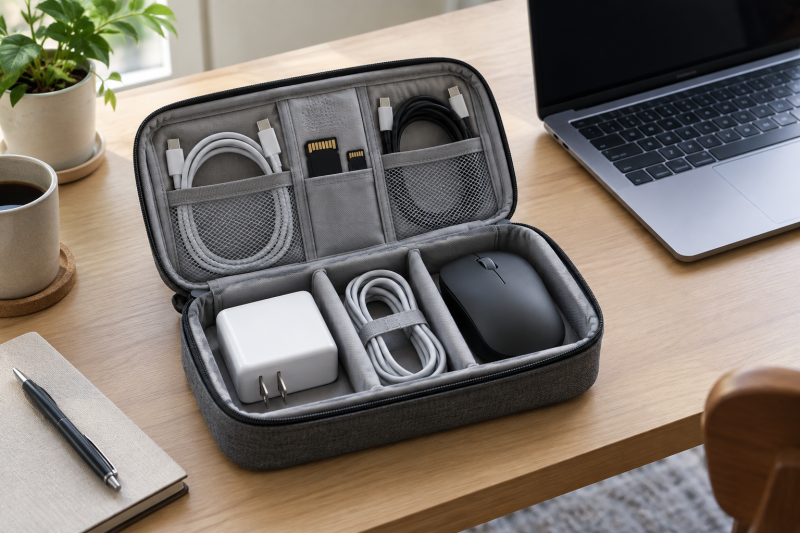
Use a tech organizer pouch to keep a laptop charger, cables, adapters, cards, and small accessories together in a work bag. The best choice depends on the charger size, cable length, pocket layout, and whether the pouch needs a hard shell or visible mesh.
Measure the largest charger before choosing a pouch, then assign each cable and adapter a specific pocket or loop.Best Tech Organizer Pouches Compared
| Image | Product | Details | Check Price |
|---|---|---|---|
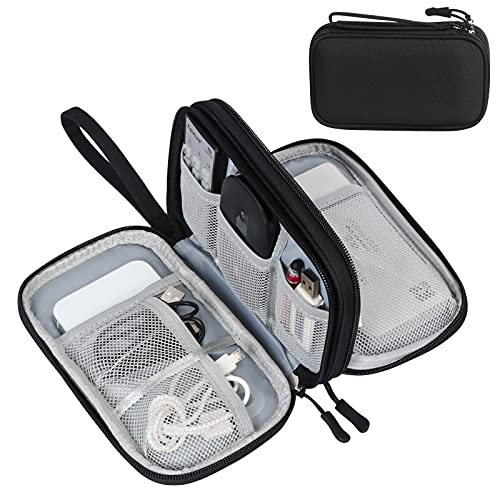 | FYY Double-Layer Organizer | Best fit: Compact double-layer Size: 7.5 by 4.3 by 2.2 inches Storage: 8 compartments Material: Waterproof Oxford | Check Price on Amazon |
 | tomtoc T12M1D1 Organizer | Best fit: Upright charger pouch Capacity: 1.8L Size: 9.65 by 2.76 by 5.12 inches Storage: Dual compartments | Check Price on Amazon |
 | Ginsco DDB01 Hard Shell Case | Best fit: Hard-shell protection Material: EVA hard shell and 1680D Oxford Storage: Mesh divider Feature: Cables up to 78 inches | Check Price on Amazon |
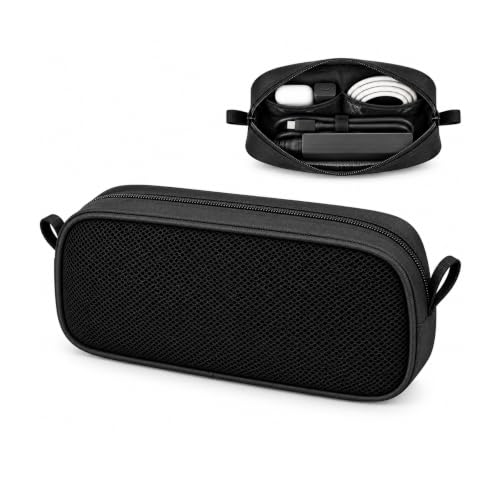 | Geliqiao B01 Tech Organizer | Best fit: Mesh-window charger pouch Size: 9.6 by 4.2 by 1.9 inches Storage: 2 inner mesh pockets Material: Mesh, nylon, foam | Check Price on Amazon |
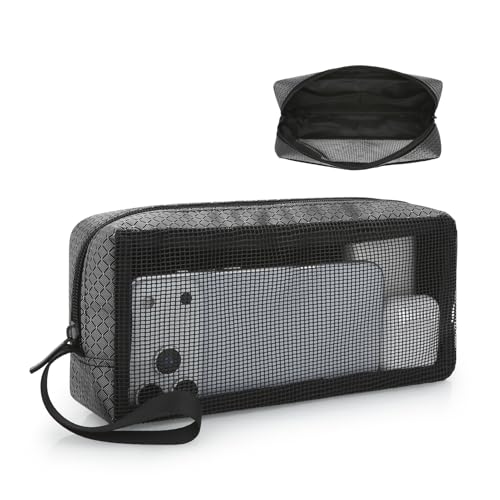 | E-Tree Mesh Tech Pouch | Best fit: Four-zone layout Size: 9 by 4 by 2 inches Storage: 4 zones Feature: Mesh window | Check Price on Amazon |
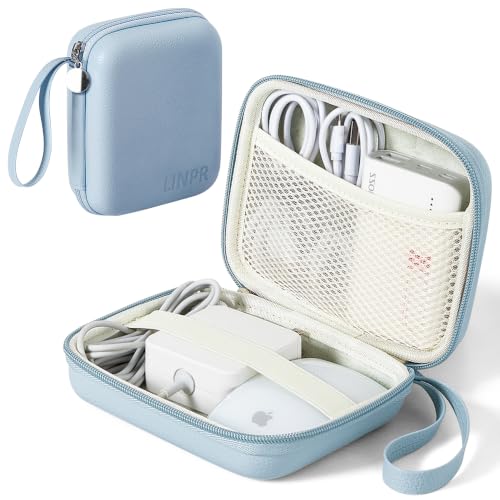 | Linpr Charger Case | Best fit: Small EVA charger case Size: 6.3 by 4.7 by 2.3 inches Material: Waterproof EVA and fleece Feature: Elastic band | Check Price on Amazon |
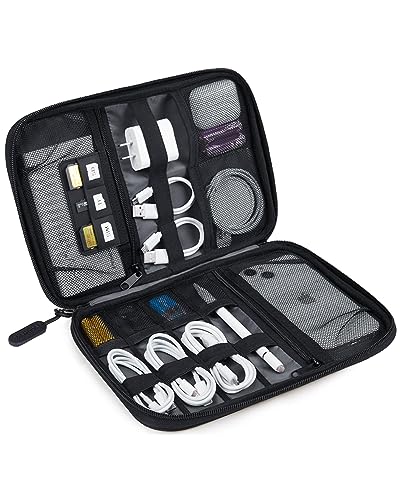 | BAGSMART Large Electronic Organizer | Best fit: Flat cable-and-card layout Size: 10.6 by 7.5 by 1.2 inches Storage: Mesh pockets, loops, SD slots Feature: Double zippers | Check Price on Amazon |
1. FYY Double-Layer Organizer — Best Compact Double-Layer
A compact pouch suits a kit of short cables and small accessories. FYY states a 7.5 by 4.3 by 2.2-inch pouch with a double-layer interior and eight compartments. Its listing names see-through mesh pockets, larger compartments, waterproof Oxford fabric, soft sponge inside, a hand strap, and zipper closure. Small mesh pockets are stated for cords no longer than 3 feet, while longer cables fit better in the larger compartments.
The stated cable-length rule makes this a practical compact pouch: short cords in mesh, longer cords in the larger compartment. Our TakeBuy FYY when a compact double-layer pouch is enough for short cables, a charger, and small accessories. The listing gives eight compartments and exact dimensions. Check the charger against the 7.5 by 4.3 by 2.2-inch body before packing.
- Eight stated compartments.
- Waterproof Oxford exterior and soft sponge interior.
- Specific short-cable guidance.
- Small mesh pockets suit only cords up to 3 feet.
- Compact size limits large charger space.
2. tomtoc T12M1D1 Organizer — Best Upright Charger Pouch
If the laptop charger is the biggest item in your kit, start with pouch capacity. tomtoc states external dimensions of 9.65 by 2.76 by 5.12 inches and 1.8L capacity. Its dual compartments are described as roomy for a MacBook or laptop charger, and the pouch can stand upright on a desk. The listing names RPET 600D polyester and a PFAS-free construction.
A stated 1.8L capacity and upright desk position make this the pouch to compare when the laptop charger is bigger than a cable-only organizer can hold. Our TakeBuy tomtoc when a larger charger and an upright desk pouch are the priority. Its listing gives dual compartments and 1.8L capacity. Choose the Ginsco below if the accessory kit needs the stated hard-shell protection.
- 1.8L stated capacity.
- Dual compartments for a laptop charger.
- Stands upright on a desk.
- Larger body than compact cable pouches.
- No hard shell is stated.
3. Ginsco DDB01 Hard Shell Case — Best Hard-Shell Protection
If your kit gets bumped in a bag, look for a hard shell. Ginsco combines 1680D Oxford fabric with a stated EVA hard shell. The listing says the case is water-resistant and wear-resistant and offers protection against bumps and drops. The case has multiple compartments and a mesh divider for adapters, chargers, data cables up to 78 inches, power banks, portable SSDs, flash disks, and SD cards.
Buy Ginsco when a hard-shell accessory case is the priority. Its listing gives a mesh divider, long-cable capacity, and hand strap. It is a case only, so the cables and accessories are not included.
- EVA hard shell is stated.
- 1680D Oxford exterior.
- Stores data cables up to 78 inches.
- Case only.
- Hard shell can take more bag space.
4. Geliqiao B01 Tech Organizer — Best Mesh-Window Charger Pouch
If you want to spot the charger without digging through pockets, choose a see-through pouch. Geliqiao uses a mesh and nylon body with soft foam padding and two inner mesh pockets. The listing states a 9.6 by 4.2 by 1.9-inch size, enough for a laptop power unit and two mice. Its see-through design lets you identify a charger, USB cables, power bank, or mouse without opening every pocket.
The mesh window is the reason to choose Geliqiao when quick visual identification matters more than a rigid shell. Our TakeBuy Geliqiao when you want to see the accessory kit before opening it. The listing gives exact dimensions, two mesh pockets, and foam padding. Use a hard-shell case if the bag contents need the stated bump protection.
- See-through mesh design.
- 9.6 by 4.2 by 1.9-inch dimensions.
- Soft foam padding and two mesh pockets.
- No hard shell is stated.
- Mesh does not conceal contents.
5. E-Tree Mesh Tech Pouch — Best Four-Zone Layout
A travel kit of earbuds, SD cards, and a power bank suits a pouch with separate zones. E-Tree states a 9 by 4 by 2-inch pouch with a mesh window, outer open pocket, main zippered compartment, and two inner small pockets. The listing calls this a four-zone layout and names chargers, USB-C cables, earbuds, power banks, SD cards, and pens as examples. The stated design also includes Oxford fabric, a heavy-duty zipper, and a carrying lanyard.
Four separate stated zones suit a small travel kit that needs one quick-access pocket and one closed main compartment. Our TakeBuy E-Tree for a simple four-zone pouch that keeps small accessories separated. Its listing gives a mesh window and carrying lanyard. Choose a larger organizer if the laptop charger is bulky.
- Four stated storage zones.
- 9 by 4 by 2-inch capacity.
- Mesh window and carrying lanyard.
- No hard shell is stated.
- Smaller than tomtoc or BAGSMART.
6. Linpr Charger Case — Best Small EVA Charger Case
For a small power adapter and a few small accessories, a compact case is enough. Linpr states a 6.3 by 4.7 by 2.3-inch charger case with thickened waterproof EVA material. The listing names drop-proof, pressure-resistant, and wear-resistant properties, fleece interior, see-through mesh pockets, an elastic band, full-opening design, and wristband. The elastic band is described as keeping the charger from shaking inside the compact interior.
Linpr is the compact structured-case option when a charger needs an elastic band and fleece-lined interior rather than loose pockets. Our TakeBuy Linpr for a small charger case with a stated EVA shell, fleece lining, and elastic retention. Its compact dimensions suit small accessories and a power adapter. Verify that the charger fits before relying on the 6.3-inch length.
- Waterproof EVA exterior and fleece interior.
- Elastic band for retention.
- Full-opening design.
- Compact 6.3-inch length.
- Less stated capacity than tomtoc.
7. BAGSMART Large Electronic Organizer — Best Flat Cable-and-Card Layout
For a kit of cables, cards, and small chargers, a flat organizer is an alternative to a deep pouch. BAGSMART states a 10.6 by 7.5 by 1.2-inch flat organizer with two zippered mesh pockets, four elastic loop pouches for small items, two loop pouches for headphones and small chargers, cable loops, and SD-card slots. The listing names double zippers and non-slip elastic loops and says the organizer can serve as a travel checklist.
Buy BAGSMART when the kit is mostly cables, cards, earbuds, and small chargers rather than one thick power brick. Its listing gives a wide, flat organizer with dedicated loops and pockets. Check the 1.2-inch depth against the largest accessory.
- Flat 10.6 by 7.5 by 1.2-inch layout.
- Dedicated SD-card slots and elastic loops.
- Double zippers for access.
- Only 1.2 inches deep.
- Not for a thick charger brick.
Buying Guide
Measure the largest charger first
Pouch depth depends on the charger. tomtoc states 1.8L capacity and room for a laptop charger, while BAGSMART is only 1.2 inches deep. FYY and Linpr give compact dimensions, so compare the brick before choosing pockets.
Use the largest power adapter as the first test item. A pouch that fits cables but not the charger leaves the charger loose in the bag. Leave room for the cable bend and plug shape, not only the charger body.
Compare the stated pouch dimensions with the charger in the orientation it will travel. Check depth when an adapter has a fixed plug or a thick cable exit, because the zipper needs to close without pressing sharply on either part. tomtoc is the only listing here that gives a 1.8L capacity and specifically calls its dual compartments roomy for a laptop charger. FYY, Geliqiao, E-Tree, and Linpr publish external measurements, which are the figures to use when deciding whether a compact shape will work. BAGSMART is flat at 1.2 inches, so it suits the listing’s cable, card, and small-charger layout better than an oversized power brick.
Choose visibility or protection
Mesh windows make accessories easier to identify. Geliqiao and E-Tree state see-through mesh designs, while Ginsco and Linpr state EVA protection. Choose visibility for quick checks and structured cases for the listed protective construction.
Where the pouch rides in the bag also affects the choice. A hard shell suits a crowded compartment, while mesh makes a day-to-day kit easier to inspect. Keep small cards and adapters in the pockets or loops that prevent them moving between cables.
Protection is not the same thing as organization. Ginsco states both a mesh divider and an EVA hard shell, while Linpr names a waterproof EVA exterior, fleece interior, and elastic band. The listings describe a case built to hold accessories in a more fixed arrangement. Geliqiao and E-Tree instead state mesh viewing panels, which let the user identify contents quickly. Choose the approach that matches the route. A packed luggage compartment suits the stated structured materials, while a work bag opened repeatedly during the day suits instant visibility.
Separate cables by length and job
Short cables work differently from long cables. FYY directs cords over 3 feet to larger compartments, and Ginsco states room for data cables up to 78 inches. Keep charging, display, and data cables separated so the kit stays usable.
Give each cable one repeatable location. A pouch becomes useful when a missing USB-C cable or card is obvious before leaving. See our guides to USB-C cables and USB-C chargers for what belongs in the kit.
Start with the items that would stop the laptop setup from working if they disappeared. A charger, its power cord, and the required display or data cable are different jobs, so they should not become one tangled bundle in the main compartment. FYY’s stated eight compartments, E-Tree’s four-zone design, and BAGSMART’s loops and card slots offer different ways to keep them apart. Do not fill every pocket simply because it exists. Leaving a little room helps the cable loops and zipper work without forcing an adapter against another accessory.
Use the pouch as a travel checklist
A pouch can reduce forgotten accessories when every item has a known place. BAGSMART states that its layout can serve as a travel checklist. Open it before leaving and compare the contents with the workday setup.
Keep loose items inside rather than around the laptop. A separate accessory pouch keeps chargers and cables away from the computer surface in a bag. For a wider setup, see our guides to cable management sleeves and laptop backpacks.
Use the final packing check to compare the contents with the next work session. BAGSMART specifically describes its organizer as a travel checklist, but the same habit works with each pouch on this page. Open the case, confirm the charger, essential cables, removable storage, and adapters are in their assigned places, then close it before the laptop goes into the bag. The final check reduces the need to empty a backpack at a desk or hotel. It also makes a missing item visible while there is time to replace it.
FAQ
What size tech pouch fits a laptop charger?
Measure the charger first. tomtoc states room for a MacBook or laptop charger, while Linpr is 6.3 inches long and BAGSMART is 1.2 inches deep.
Choose the pouch whose stated dimensions leave room for the charger and cable bend. A charger is often the largest fixed object in the kit.
Do not estimate from a product photo or the outside of a laptop bag. The stated tomtoc dimensions are 9.65 by 2.76 by 5.12 inches, while Linpr is 6.3 by 4.7 by 2.3 inches, so the two cases solve different charger-size problems. Geliqiao is long and slim at 9.6 by 4.2 by 1.9 inches, and FYY is shorter than both tomtoc and Geliqiao. Place the charger on a ruler and allow space for the cable leaving it before choosing one of these shapes.
Should I choose a hard shell?
Choose a hard shell when you need the stated structure. Ginsco and Linpr name EVA construction, with Ginsco specifically naming a hard shell.
Mesh pouches work better when quick visual identification is more useful than a rigid exterior. Match the pouch to where it will ride in the bag.
Sort the options by the listed materials. Ginsco pairs its EVA hard shell with 1680D Oxford fabric, and Linpr names thickened waterproof EVA, while FYY describes waterproof Oxford with a soft sponge interior. The listings describe the case construction. They do not promise that every item is safe in every packing situation. Put fragile or important small accessories in the section that is most secure for them, and keep the pouch away from loose heavy objects whenever possible.
How do I stop cables tangling?
Separate cables by length and use loops or pockets. BAGSMART has elastic loops and FYY has mesh and larger compartments.
Keep one cable type in each assigned pocket, which makes packing and unpacking simpler than putting every lead in one cavity.
The layout depends on cable length. FYY says cords over 3 feet fit better in larger compartments, and Ginsco states room for data cables up to 78 inches. Roll or fold only as far as the cable and pouch allow, then use the listed mesh pockets, loops, divider, or main compartment to hold that shape. A short charging cable can go in a small mesh pocket, but a display lead or longer data cable may need the pouch’s larger volume. Separate these roles before closing the zipper.
Is a mesh-window pouch useful for travel?
Yes, a mesh window can make a charger or cable visible without opening the pouch. Geliqiao and E-Tree state mesh viewing panels.
Choose mesh when you need to inspect contents quickly, and a hard case when stated structure is the priority.
Mesh does not make every pouch interchangeable. Geliqiao states two inner mesh pockets with soft foam padding, while E-Tree states one transparent mesh window plus a four-zone organization layout. The first is a slim charger pouch with a stated 9.6 by 4.2 by 1.9-inch body. The second is 9 by 4 by 2 inches with an open outer pocket and main zippered compartment. Use the layout facts to decide whether you need a visible charging kit or several separate small zones.
Bottom Line
FYY is the compact double-layer choice, tomtoc is the roomy upright pouch, and Ginsco is the hard-shell option. Geliqiao and E-Tree provide visible mesh layouts, Linpr is a compact EVA case, and BAGSMART is the flat cable-and-card organizer. Match pouch depth to the charger before packing.
Build the organizer around the routine you repeat. Put the laptop charger in first because it normally sets the depth and shape the pouch must fit. Then add the cable that connects the laptop to power, the cable used for a display or dock, and the small adapters that are easy to leave in a meeting room. Keep those items in the same locations each time. A visible pouch can help with a quick check before leaving a train, hotel desk, or shared office, while a hard shell can make more sense when the bag also carries heavier items.
The listings here describe several different ways to divide the same basic kit: mesh windows for identification, elastic loops for cable control, dedicated card slots, or a compartment sized around one larger charger. None of those layouts replaces measuring the items you carry. A compact pouch that fits a 30W wall charger may not fit a larger laptop adapter, and a flat organizer for cards and cables may not close around a tall power bank. Check the case depth, zipper path, and cable bend before adopting a new organizer for travel.
Keep small cards and USB drives in the stated loops or pockets rather than loose beside a charger. When a cable has no assigned place, it is the cable most likely to be forgotten, tangled, or pressed against another accessory. The best organizer is therefore the one that lets you identify a missing item at a glance and fits inside the bag you use every day.