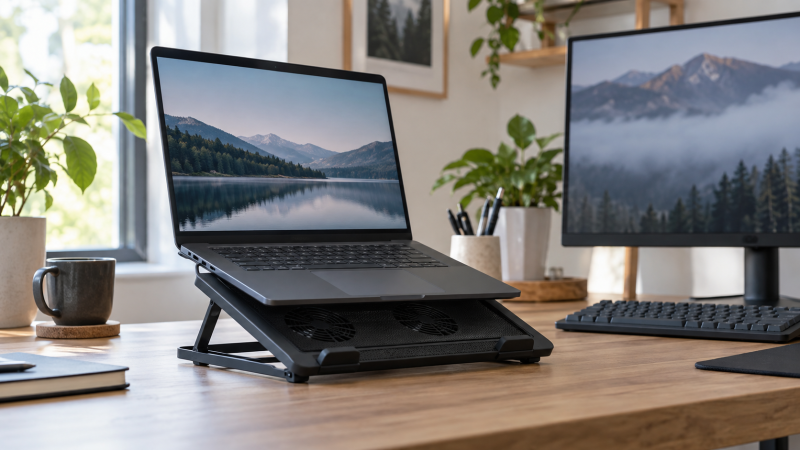
A cooling stand helps when a laptop runs long at a desk and needs clearance and moving air underneath. Start with the laptop size, height range, and USB connection, then decide whether a few quiet fans or a larger multi-fan pad fits the work you actually do.
These six cooling stands range from slim three-fan pads for 15.6-inch laptops to nine-fan models for wider gaming machines. Compare laptop size, stand positions, port arrangement, and useful extras. For related setup decisions, see our USB-C laptop stand guide, USB-C hub guide, and portable monitor guide.
A cooling stand has to fit the laptop first. Extra fans, USB ports, and lights come second, and only after the computer sits securely at a useful working angle.Laptop Cooling Stands Compared
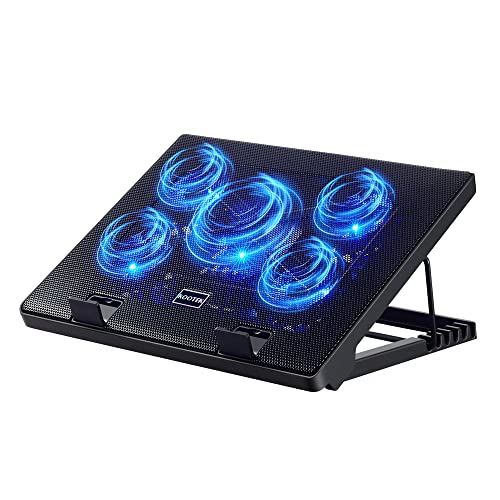


1. Kootek Laptop Cooling Pad Cooler Stand with 5 Quiet Fans for 12-17 Laptop — Best Flexible Five-Fan Stand
A desk laptop that alternates between writing, video calls, and heavier work benefits from choosing how much airflow it uses rather than running every fan constantly. Kootek builds five fans, including one 4.72-inch center fan and four 2.76-inch fans according to its specifications, into a stand for 12- to 17-inch laptops, while two switches select one fan, four fans, or all five together.
It also has six height settings, front stoppers, and a dual USB hub, which suit both smaller and larger laptops in its range. The supplied USB-A cable needs an adapter for a USB-C-only laptop.
Five fans are useful here because the switches let you choose one, four, or all five fans instead of running all of them for every desk task.Our Take Buy the Kootek if one 12- to 17-inch laptop needs several stand angles and selectable fan groups. Choose the LIANGSTAR instead if seven height positions and a phone holder count for more than switching between one, four, and five fans.
- Five fans split into one, four, or five active units, letting you choose airflow for the desk task.
- Six adjustable heights and front stoppers keep a 12- to 17-inch laptop raised without sliding forward.
- A dual USB hub can connect another peripheral while the cooling pad uses the laptop’s USB connection.
- The included USB-A-to-USB-A cable needs a separate adapter before it can connect to a USB-C-only laptop.
- The 12- to 17-inch fit excludes the wider 19.3-inch machines that ChillCore is designed to support.
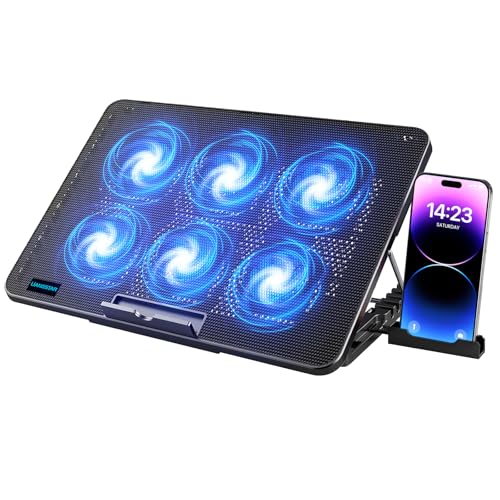
2. LIANGSTAR Laptop Cooling Pad — Best Seven-Height Desk Stand
If elbow height changes through the day, the stand adjustment can count for as much as the fans under the computer. LIANGSTAR specifies six quiet fans with two independent switch controls and seven height positions, and the company rates the pad for 12- to 17.3-inch notebooks. Its seven positions are more than Kootek, ICE COOREL, or KeiBn have.
According to the manufacturer, the pad includes two USB ports, metal mesh, a non-slip baffle, and a phone holder that stores on either side. It suits a fixed desk, although its USB-to-USB connection needs an adapter for a USB-C-only computer.
Our Take Buy the LIANGSTAR if your laptop sits at one desk and seven height options make posture easier to adjust. Pick the Kootek if selecting groups of one, four, or five fans is more useful than the wider stand range.
- Seven height positions give a desk more screen-angle adjustment than the five or six settings on nearby models.
- Six fans use two independent controls, so the stand can vary fan operation instead of running one fixed pattern.
- Two USB ports and a side-storing phone holder help keep a mouse, cable, and phone near the laptop.
- The USB-to-USB supplied cable needs an adapter for a laptop that exposes only USB-C ports.
- Its 12- to 17.3-inch range does not cover the 19.3-inch upper limit named by ChillCore.
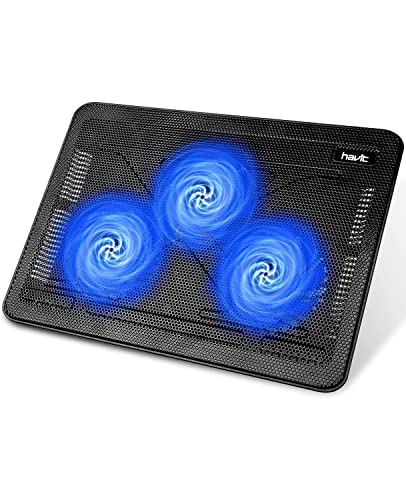
3. havit HV-F2056 Laptop Cooling Pad — Best Slim Three-Fan Travel Pad
Travel work calls for a cooling stand that can move with a larger laptop instead of claiming a permanent portion of the desk. havit specifies the HV-F2056 includes three ultra-quiet fans, a slim portable body, and support for 15.6- to 17-inch laptops, so it suits a bag and a larger notebook.
It has two height settings for a stable raised surface rather than a fully adjustable desk station. An extra USB port and power switch are included, although its supplied cable needs an adapter for USB-C-only machines.
havit trades LIANGSTAR’s seven positions and Kootek’s selectable fan groups for a thinner, simpler three-fan pad that is easier to carry beside a larger laptop.Our Take Buy the havit if a 15.6- to 17-inch laptop travels and needs a slim three-fan stand at each stop. Skip it for a desk where several height positions or a larger 17.3-inch machine are the priority.
- Three ultra-quiet fans and a slim portable body suit a 15.6- to 17-inch laptop that travels regularly.
- Two stand heights provide a raised typing angle without the bulk of a seven-position fixed-desk cooling pad.
- An extra USB port and power switch give the pad a simple peripheral connection and direct control.
- Only two height settings leave less screen-angle flexibility than the five, six, seven, or eight-position alternatives here.
- The USB-to-USB cable needs an adapter for USB-C-only laptops, just as with Kootek and LIANGSTAR.
4. ChillCore Laptop Cooling Pad — Best Nine-Fan Pad for Large Laptops
A wide gaming laptop needs a stand that reaches past the common 17-inch ceiling and keeps its underside above the desk. ChillCore specifies support for 15.6- to 19.3-inch laptops with nine fans and eight height settings, the broadest physical range and largest fan count in this group, so it is aimed at a larger stationary machine rather than a travel setup.
The LCD shows fan speed, you adjust fans and RGB modes by touch, and two USB ports connect peripherals. The manufacturer-rated 19.3-inch limit and eight stand positions count for more than the decorative lighting.
Our Take Buy the ChillCore if a 17.3- to 19.3-inch laptop needs nine fans and eight stand positions at a permanent desk. Pick the ICE COOREL for a similar multi-fan pad if the computer stays within its 17.3-inch limit.
- Nine fans and eight height positions give a large laptop more cooling hardware and stand adjustment together.
- The 15.6- to 19.3-inch fit reaches beyond every other pad in this comparison for wider laptops.
- An LCD speed display and touch controls make fan-speed changes visible without relying on a fixed switch position.
- The 19.3-inch size range and nine-fan platform make this a desk pad rather than the easiest travel option.
- RGB lighting adds controls and visual activity that a shared office may not need beside the laptop.
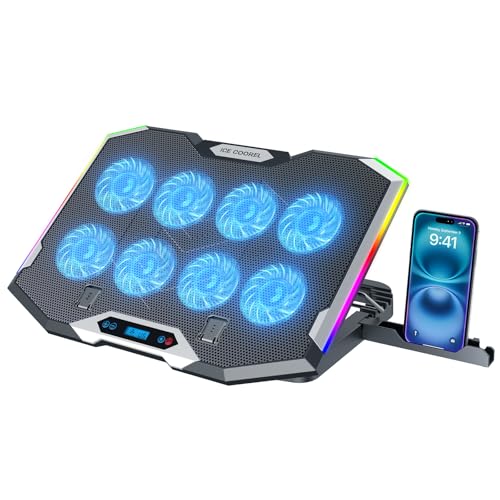
5. ICE COOREL Gaming Laptop Cooling Pad — Best Eight-Fan 17.3-Inch Stand
ICE COOREL is a middle option between the small portable stands and ChillCore’s widest nine-fan platform. The manufacturer provides eight fans, six height settings, and a 15- to 17.3-inch laptop range, so a full-size notebook gets a larger fan array than Kootek has without the 19.3-inch footprint intended for the widest machines.
Like ChillCore, the manufacturer includes an LCD fan-speed display, ten RGB modes, two USB ports, and a phone stand. havit is easier to pack when the laptop moves often.
Our Take Buy the ICE COOREL if a 15- to 17.3-inch laptop needs eight fans, six positions, and visible fan controls at one desk. Move to the ChillCore if the computer is wider than 17.3 inches or needs eight positions.
- Eight fans and six height settings give a 15- to 17.3-inch laptop a substantial adjustable platform.
- An LCD fan-speed display makes the selected setting easy to see from the desk while working.
- Two USB ports and a phone stand keep small desk accessories close to the laptop cooling pad.
- The 17.3-inch ceiling excludes the widest laptops that ChillCore supports through its 19.3-inch platform.
- Ten RGB modes add visual controls that are less useful for a quiet, straightforward office desk.
6. KeiBn Laptop Cooling Pad — Best Compact Stand for Smaller Laptops
Smaller laptops do not need a 17-inch platform just to gain a raised typing angle and a little airflow underneath. KeiBn specifies two fans, five height settings, and support for laptops up to 15.6 inches, so it suits a home office, a student desk, or a compact work laptop.
The manufacturer includes two rear USB 2.0 ports, front baffles, metal mesh, and a hideable phone holder for practical desk details. Its upper limit is the tradeoff, so 16- or 17-inch notebooks should move to one of the larger pads.
Our Take Buy the KeiBn if a laptop up to 15.6 inches needs five stand positions and two fans without the footprint of a large gaming pad. Skip it for a larger notebook, since its stated fit ends at 15.6 inches.
- Two fans and five height settings give a smaller laptop airflow and a raised viewing angle without excess bulk.
- Two rear USB 2.0 ports can keep a mouse or keyboard connected beside the cooling pad.
- Front baffles, metal mesh, and a hideable phone holder add stable desk details for everyday laptop work.
- The stated 15.6-inch limit rules out common 16- and 17-inch laptops before fan count becomes relevant.
- Two fans are fewer than the three, five, six, eight, or nine-fan designs used by the larger pads.
Buying Guide
Match the stand to the laptop’s actual footprint
Use the stated laptop range as the first filter. KeiBn stops at 15.6 inches, havit reaches 17 inches, Kootek reaches 17 inches, LIANGSTAR and ICE COOREL reach 17.3 inches, and ChillCore extends to 19.3 inches. A stand that is too narrow for the laptop loses stability, however many fans it has.
Choose a wider platform only when the notebook needs it. ChillCore’s 19.3-inch range suits a large gaming system, while a smaller laptop can use KeiBn without buying a broad nine-fan pad. The goal is secure support and useful clearance, not the largest possible tray under every computer.
Treat height adjustment and fan controls as separate decisions
Height positions change the screen and keyboard angle. LIANGSTAR has seven positions, ChillCore has eight, ICE COOREL has six, Kootek has six, KeiBn has five, and havit has two. A fixed desk benefits from several options, while a stand you carry can be simpler when you only need a consistent lift.
Fan controls set how the stand runs during different tasks. Kootek switches among one, four, and five active fans, LIANGSTAR uses two independent controls, and the multi-fan ChillCore and ICE COOREL pads show speed through an LCD. Use the control style you will actually adjust, rather than treating the largest stated fan count as a result by itself.
Check the connection before committing a USB port
Most of these pads use a USB connection for power and their extra ports. Kootek, LIANGSTAR, and havit manufacturer specifications include a USB-to-USB supplied cable, while some modern thin laptops provide USB-C only. Plan for an adapter where the product says one is needed, especially if the other port is already occupied by charging or a display.
Extra USB ports are useful only when the laptop still has a workable connection path. According to manufacturer data, Kootek, LIANGSTAR, ChillCore, ICE COOREL, and KeiBn include two ports, while havit adds one extra port. See our USB-C dock guide, USB-C monitor guide, and USB-C charging-station guide before assigning the same laptop port to too many desk accessories.
FAQ
Do more fans automatically make one cooling stand better?
No. More fans can mean a larger fan array, but the useful choice still depends on laptop fit, stand height, fan controls, and whether the pad suits a stationary desk or a bag. ChillCore has nine fans for a 19.3-inch laptop range, while havit has three fans in a slimmer travel pad for 15.6- to 17-inch laptops.
Compare the full desk setup instead of one number. A smaller laptop can be well served by KeiBn’s two fans and five height positions, while a wider computer needs a platform that actually supports its footprint. Fan count is one feature in a stand that must also sit securely under the machine.
Can a cooling stand replace a laptop stand with a USB-C hub?
No. A cooling stand raises the laptop and moves air underneath it, while a hub stand is primarily a tool for adding ports and connecting the desk. The USB ports on these cooling pads are separate from the video, data, or charging functions covered in our Thunderbolt dock guide and USB4 laptop list.
Choose the product that solves the missing function. A laptop that needs more displays or wired networking calls for a dock or hub, while a laptop that already has its connections but needs clearance and fan airflow calls for a cooling stand. Some desks need both, and each device does its own job.
Are RGB lights useful on a laptop cooling stand?
They can be useful if a desk benefits from adjustable lighting, but they are not necessary for the cooling or height functions. ChillCore and ICE COOREL are rated for ten RGB modes, while the stated features of Kootek, LIANGSTAR, havit, and KeiBn are fans, stand positions, ports, or phone holders.
Prioritize fit and adjustment before lighting controls. A 17.3-inch laptop has more to gain from the correct support range than from extra light patterns, while a quieter office setup may prefer the simpler pads. The practical purchase decision is the laptop’s footprint, port plan, and working angle.
Bottom Line
Choose Kootek for a five-fan stand with selectable fans for a 12- to 17-inch laptop, LIANGSTAR for seven height positions at a fixed desk, or ChillCore for a nine-fan, 19.3-inch platform that fits larger laptops. Pick the pad that matches laptop size, useful stand positions, and USB connection path, then treat lights and phone holders as secondary conveniences.