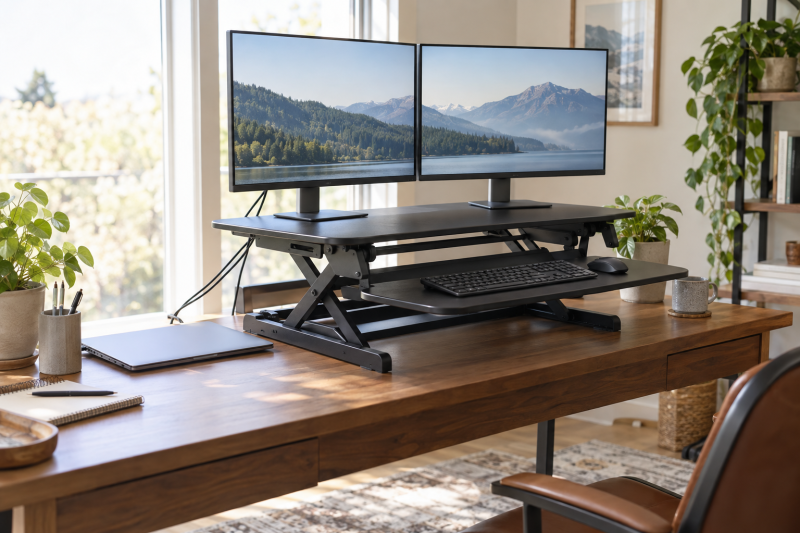
You can raise two monitors and a keyboard without replacing the desk beneath them. A desktop converter sits on the existing surface and lifts its upper deck and lower keyboard tray together. The hard part is choosing one that fits both monitor bases, the keyboard and mouse, and the desk’s remaining depth. A claimed “dual-monitor” fit does not tell you whether your particular stands will sit securely side by side.
These six converters have active New Amazon US offers and separate keyboard trays. They span compact manual risers, deeper and wider platforms, and one motorized option.
Measure the monitor bases, not just the screen diagonals. Then add the keyboard, mouse and anything you expect to move with the converter.Standing Desk Converters Compared
| Image | Product | Details | Check Price |
|---|---|---|---|
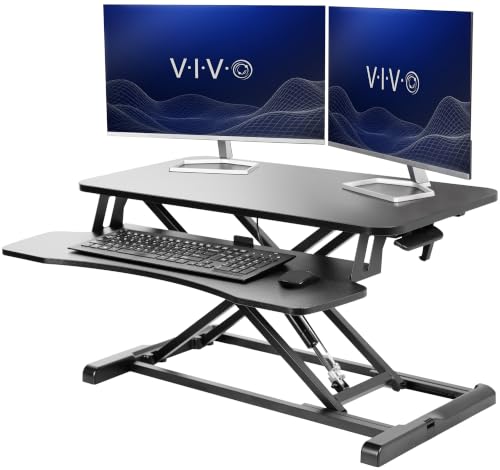 | VIVO DESK-V000K | Upper deck: 31.5 x 15.7 in Keyboard tray: 31.3 x 11.8 in; 10.5 in at center Lift: 4.5 to 20 in Stated limit: 33 lb lift Best fit: Compact dual screens | Check Price on Amazon |
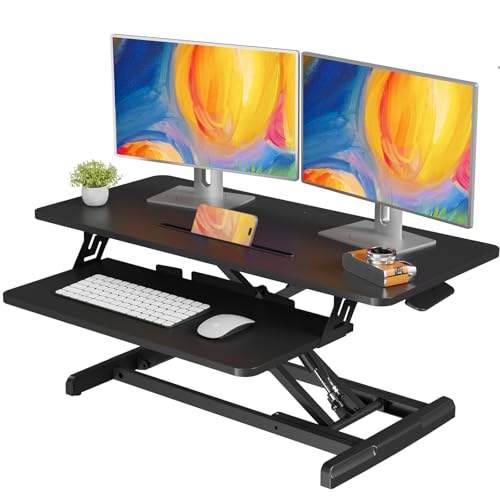 | JOY worker 35-inch | Upper deck: 34.6 x 15.7 in Keyboard tray: 24.4 x 11.8 in Lift: 4.9 to 19.3 in Stated limit: 28.6 lb top; 4.4 lb tray Best fit: Mid-width desk | Check Price on Amazon |
 | TechOrbits OF-S05-1 | Upper deck: 32 in wide Keyboard tray: Separate; exact size not stated Lift: 4.3 to 19.7 in Stated limit: 33 lb capacity Best fit: Compact height range | Check Price on Amazon |
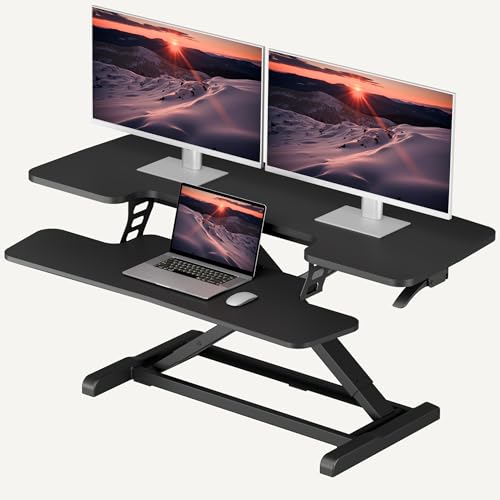 | SANODESK 42-inch | Upper deck: 41.7 x 16.3 in Keyboard tray: 34.6 x 12.2 in Lift: 4.7 to 19.6 in Stated limit: 33 lb top; 4.4 lb tray Best fit: Wide manual layout | Check Price on Amazon |
 | Mount-It! 48.5-inch Electric | Upper deck: 48.5 in wide Keyboard tray: 35.5 in wide Lift: 6 to 19.25 in Stated limit: 33 lb capacity Best fit: Powered wide platform | Check Price on Amazon |
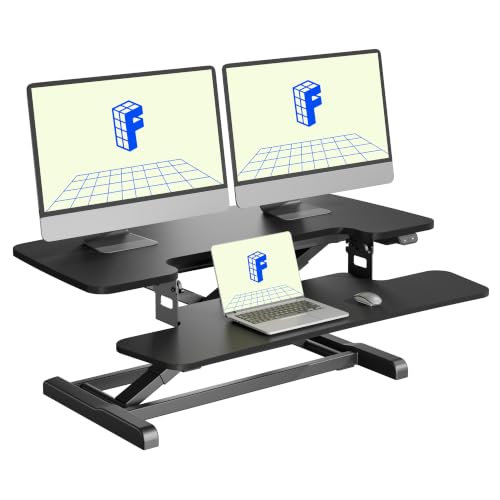 | FLEXISPOT 36-inch Electric | Upper deck: 36 x 16.3 in Keyboard tray: 34.6 in wide Lift: 4.9 to 19.7 in Stated limit: 44 lb top; 11 lb tray Best fit: Compact powered load | Check Price on Amazon |
1. VIVO 32-inch — Best Compact Dual-Screen Fit
When the desk cannot spare a wide top, the VIVO DESK-V000K gives you a 31.5-by-15.7-inch upper surface and a keyboard tray that rises with it. VIVO says the upper tier has room for dual monitors. The claim means two suitable bases can fit, not that every pair of 27-inch stands will. Measure each base and leave room for the lift controls and cable exits before committing to this narrower choice.
The listing gives a 33-pound lift rating and a 4.5-to-20-inch adjustment range. Its 31.3-by-11.8-inch tray has a center cutout that reduces local depth to 10.5 inches. A deep keyboard may need a different layout. Compared with SANODESK and Mount-It!, the VIVO fits a narrower work area but leaves less space for a laptop on the raised deck.
Sketch the upper-deck footprint on your existing desk before buying, because the 31.5-inch width is useful only if the two monitor bases actually fit.Our Take Choose the VIVO if your monitor bases are modest and the desk is too narrow for a 42-inch riser. Skip it if the laptop must rise beside two broad monitor stands.
- Compact upper deck for a dual-monitor layout.
- Keyboard tray rises with the monitor surface.
- Listing states a 4.5-to-20-inch adjustment range.
- Less lateral room for wide monitor bases.
- Tray center cutout limits depth for some keyboard layouts.
2. JOY worker 35-inch — Best Mid-Width Manual Riser
JOY worker specifies a 34.6-by-15.7-inch top, giving monitor stands more separation than the VIVO without jumping to a 42-inch platform. It describes a removable 24.4-by-11.8-inch keyboard tray. The tray’s short width is the constraint. Measure the keyboard and mouse area together rather than assuming a 35-inch upper deck means a 35-inch input shelf.
The seller states a 28.6-pound top-tier limit and 4.4 pounds for the lower tray, with height adjustment from 4.9 to 19.3 inches. If your screens have heavy factory stands, weigh them before choosing this over the 33-pound-rated VIVO or SANODESK. Its removable tray may help with placement.
The two tiers have different listed weight limits. Do not put the monitor load on the keyboard tray.Our Take Choose JOY worker when a 32-inch deck is tight but a 42-inch riser will dominate the desk. The narrow tray makes it a poor match for a full-size keyboard plus a large mouse pad.
- More top-deck width than the 32-inch choices.
- Removable keyboard tray.
- Stated top and tray load limits make planning clearer.
- 24.4-inch tray can feel cramped with a mouse.
- Lower stated top-tier load limit than some alternatives here.
3. TechOrbits 32-inch — Best Tall Compact Lift
If a 32-inch desktop riser fits your room, the TechOrbits OF-S05-1 is another compact candidate. Its listing says the platform can accommodate dual monitors, a laptop and desk accessories, but it does not give the same tray measurements as VIVO’s listing. Treat that broad fit statement as a starting point. Confirm the exact current dimensions with the seller before relying on space for three devices at once.
TechOrbits states a 4.3-to-19.7-inch adjustment range and a 33-pound capacity. The top uses a pneumatic lift and the tray attaches during setup. Compared with VIVO, its low position is slightly lower and its maximum slightly lower too, but those numbers count for less than keyboard position. Check the return policy if your monitor stands are close to the limit.
Our Take Pick TechOrbits for a compact lift when its height range suits both seated and standing positions. Choose the VIVO instead if you need published tray dimensions to plan a tight keyboard-and-mouse layout.
- Compact 32-inch format.
- Listed 4.3-to-19.7-inch height range.
- 33-pound stated capacity.
- Exact tray dimensions need checking.
- Less room for broad monitor bases than the wide models.
4. SANODESK 42-inch — Best Wide Manual Platform
Two monitor bases, a dock and a notebook can quickly fill a 32-inch top. SANODESK’s listed 41.7-by-16.3-inch upper tier gives more lateral room, while the 34.6-by-12.2-inch keyboard tray accommodates a wider keyboard and mouse setup than JOY worker’s shorter tray. The SANODESK still occupies substantial space on the existing desk. Confirm that the desk is deep enough for the riser’s feet and for any laptop you leave on the original surface.
The seller lists 33 pounds on the main tier and 4.4 pounds on the tray, with a 4.7-to-19.6-inch height range. Its mechanical spring lift differs from the powered Mount-It! below. The upper deck and tray move together, so monitor eye line and keyboard height may not both be ideal without changing screen stands.
Our Take Buy the SANODESK when two monitor bases need a wide platform but you prefer a manual lift. Skip it if your desk depth or equipment weight is already marginal.
- 41.7-inch upper width offers space between monitor bases.
- 34.6-inch keyboard tray leaves room for a mouse.
- Separate listed limits for top and tray.
- Large footprint on the original desk.
- 33-pound top limit still requires a weight check.
5. Mount-It! 48.5-inch Electric — Best Powered Wide Platform
For a fixed desk that is wide enough, Mount-It! offers a 48.5-inch upper surface and a 35.5-inch keyboard tray. The listing specifically presents it for two 27-inch monitors plus a laptop and accessories. The seller’s fit claims are not permission to ignore the equipment’s weight or the desk’s depth. Mark out the surface and leg positions before buying, because this converter can occupy most of a small desk.
The motorized lift spans a stated 6-to-19.25-inch range and the structure supports up to 33 pounds. Electric motion saves effort but adds a power requirement. If your seated keyboard is already high, the 6-inch minimum upper position may count for more than the motor. Compared with SANODESK, the Mount-It! gives width and powered adjustment, not a higher load rating.
A motor saves lifting effort but does not solve a too-high seated keyboard position or an undersized existing desk.Our Take Choose Mount-It! when a very wide converter and powered adjustment fit your desk and budget. Keep the SANODESK in view if the larger footprint or power cord is a nuisance.
- 48.5-inch platform for broad dual-screen layouts.
- 35.5-inch tray for keyboard and mouse.
- Electric height adjustment.
- Needs power and considerable desk space.
- Six-inch listed minimum lift may raise the seated screen position.
6. FLEXISPOT 36-inch Electric — Best Compact Powered Load
Two screens can be heavy even when their stands fit a desk. FLEXISPOT’s listing gives a 36-by-16.3-inch upper deck, enough for two suitable monitor bases if their footprints fit. Its 34.6-inch keyboard tray leaves more lateral room than the JOY worker tray. This is a narrower powered alternative to Mount-It!, not a claim that an open laptop will also fit beside both monitors.
The seller states a 44-pound top-deck limit, 11 pounds for the tray, and an electric 4.9-to-19.7-inch lift range. Those load figures are higher than Mount-It!’s stated 33-pound capacity, though neither claim is our own load test. Check the weight of the monitors and any dock before using that margin. The motor adds a power cord, so plan where it runs when the platform rises.
Our Take Choose FLEXISPOT when you want electric lift and a higher stated load limit without Mount-It!’s wide footprint. Keep the laptop off the raised deck unless you have measured room for it.
- 44-pound stated top-deck limit.
- 11-pound stated tray limit.
- Electric lift in a 36-inch format.
- Less width than Mount-It! for broad monitor stands.
- Requires a power outlet and cable routing.
Buying Guide
1. Measure two monitor bases and the desk beneath them
Start with base footprints, not panel diagonals. Measure both stands side by side, adding cable clearance and any hub that must rise with them. The home-office monitor guide helps with screen selection, but the deck must fit your stands. VIVO and TechOrbits suit tighter desks. SANODESK and Mount-It! give wider bases more separation.
Next, measure the existing desk’s usable depth. A riser needs support under its feet throughout the lift path, with room for the keyboard tray in front and cables behind. FLEXISPOT lists a 16.3-inch-deep top, but its feet and tray still need clearance. If the screens stay on a separate support, the monitor-arm and laptop-stand guide covers another way to free space. Do not assume an arm clamps safely to a converter.
2. Add equipment weight before choosing a lift
Weigh the two monitors with their stands, then add any laptop, dock or accessories on the upper tier. Compare that total with the listing’s upper-deck or overall limit. JOY worker lists 28.6 pounds for the top, SANODESK 33 pounds, and FLEXISPOT 44 pounds. A dual-monitor docking station may tidy cables, but its weight and cable slack still need a check when it travels with the platform.
Keep the keyboard tray’s separate limit in mind. JOY worker and SANODESK each list 4.4 pounds for the lower shelf. Place a keyboard and mouse there, not a display. A compact trackball may save tray area, though it still needs comfortable hand clearance. If a seller gives only one capacity figure, ask which surface it covers before putting heavy equipment on the tray.
3. Check seated and standing geometry
The collapsed height affects everyday seated comfort. An upper deck that starts several inches above the original desk may raise the monitors too high, while a tray can still land at a suitable typing level. Compare the product’s adjustment range with your elbow height in both positions. Mount-It!’s stated minimum is 6 inches, and VIVO’s is 4.5 inches. Those numbers describe the lift, not a complete ergonomic fit for every person or chair.
The maximum lift is a concern if you stand tall. Mount-It! lists 19.25 inches, while VIVO lists 20 inches. Mark both heights against the current desk. If you use a monitor light bar, check its cable and wall clearance at full lift. Fit counts for more than the highest published number.
4. Plan power, display cables and daily reach
Leave cable slack for the full travel of the riser. Two monitor leads, power cords, USB cables and a laptop dock can tug when the platform moves. A USB-C dock for dual 4K screens may reduce the laptop connections, but it does not lengthen the monitor leads. Route cables where they cannot catch on the frame or tray, and test the movement before leaving the desk unattended.
Finally, plan what stays at seated height. A cup, notebook or charger might remain on the original desk while screens move up. A USB-C desktop charging station can sit off the moving surface and keep weight and cords down. Mount-It!’s electric model adds a power cord of its own. If you share the desk or change positions often, make sure the lift control is reachable without leaning around the monitors.
FAQ
Will a 32-inch converter really fit two 27-inch monitors?
Possibly, but screen size does not determine base width. Two 27-inch panels can overhang the upper deck while their stands fit, or the bases can be too broad even when the panels look narrow. VIVO’s 31.5-inch and TechOrbits’ 32-inch formats require the most careful measurement of the exact monitor stands.
Check the combined weight and balance as well as width. The seller’s dual-monitor label is not a stability test of your setup. If the bases nearly touch, a wider SANODESK or Mount-It! platform may make positioning less awkward.
Can I keep my laptop open on the converter too?
Yes, if the upper tier has space and load capacity after two monitor stands are placed. Mount-It! describes a wide dual-monitor-plus-laptop layout; FLEXISPOT describes dual monitors or a laptop plus monitor, not necessarily all three. Use actual base and laptop measurements, not the listing image.
Check where the laptop screen sits relative to the external monitors. If the laptop remains on the original desk, a USB-C hub may help keep peripherals connected, but allow enough cable slack for the moving screens. Avoid setting an open laptop where the lift mechanism or a monitor base can strike it.
Is an electric lift automatically better than a manual one?
No. An electric lift saves the manual effort of moving the loaded platform, which can be valuable for frequent changes. Mount-It! and FLEXISPOT are the powered options here. The tradeoffs include a power cord and a minimum lift height that may not suit a high seated desk.
A manual model can be simpler to place where outlets are scarce. It still has to lift the weight you put on it, and the listing cannot tell you how it will feel with your exact monitors. Choose by load, geometry and daily use before choosing by motor type.
Bottom Line
Choose a converter by measured fit and load, not by the number of monitors in its title. VIVO is the compact starting point, JOY worker adds width, and TechOrbits offers another compact lift range. SANODESK gives wide manual workspace. Mount-It! offers the widest powered platform here; FLEXISPOT is narrower with a higher stated load limit. Any can be wrong for a shallow desk or broad monitor pair.