A conventional HDMI switch chooses one source for one display. An HDMI matrix adds routing. Each output can select an input, so one room screen can show the presentation laptop while another shows a camera feed, or both can show the same source. A matrix suits meeting rooms, AV desks and monitoring spaces where the destination is as important as the source.
These six matrices range from a compact 2×2 unit to an eight-input, eight-output rack box. The deciding questions are how many sources and screens you have, the video mode of each, mixed-resolution handling, and control location. A matrix cannot invent a second independent desktop image from a laptop with only one HDMI output.
A 4×2 matrix can route four existing HDMI inputs to two outputs. It does not make one laptop’s single HDMI feed into two different extended displays.HDMI Matrix Switches Compared
| Image | Product | Details | Check Price |
|---|---|---|---|
 | Portta 4x2 | Matrix: 4 in / 2 out Video: 4K60 4:4:4 stated Downscale: 4K to 1080p Best fit: Mixed two-screen room | Check Price on Amazon |
 | OREI 4x4 | Matrix: 4 in / 4 out Video: 4K60 stated Downscale: 4K to 1080p Best fit: Four displays | Check Price on Amazon |
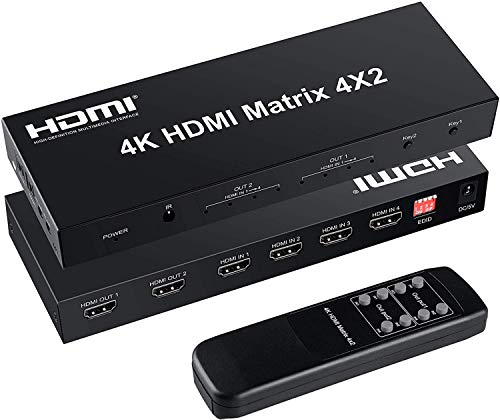 | FERRISA 4x2 | Matrix: 4 in / 2 out Video: Older HDMI 1.4 Downscale: Not established Best fit: Audio-output desk | Check Price on Amazon |
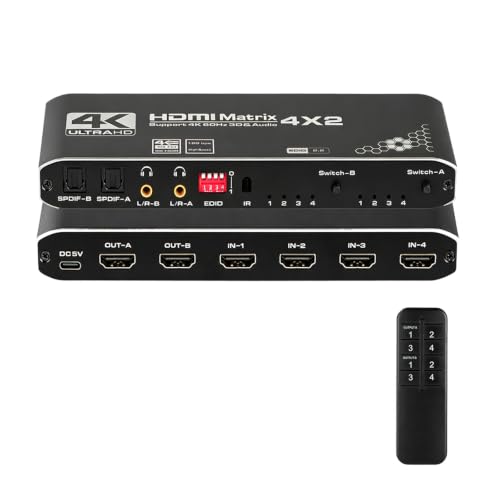 | Enbuer 4x2 | Matrix: 4 in / 2 out Video: 4K60 4:4:4 stated Downscale: Not established Best fit: Separate audio outputs | Check Price on Amazon |
 | Anber-Tech 2x2 | Matrix: 2 in / 2 out Video: 4K60 4:2:0 stated Downscale: Not established Best fit: Small two-source setup | Check Price on Amazon |
 | MT-VIKI HD88L | Matrix: 8 in / 8 out Video: 4K30 stated Downscale: Not established Best fit: Rack-scale routing | Check Price on Amazon |
1. Portta 4×2 — Best Two-Screen 4K60 Control
Portta’s four-input, two-output matrix states 4K60 at 4:4:4, HDMI 2.0b, HDR and HDCP 2.3/2.2 support. Output A and B can select the same or different HDMI input sources. The current listing also calls out 4K-to-1080p downscaling, useful when a 4K desk monitor and older 1080p projector need the same source without forcing both screens to the lower mode. The Portta maker page describes 16 manual EDID choices for troubleshooting format negotiations.
Audio extras are substantial but easy to misread. The listing says both HDMI outputs can provide optical and 3.5 mm extraction, while ARC is restricted to output A. It expressly excludes CEC. If your speaker system depends on TV-app return audio, verify that exact output and wiring rather than assuming every port behaves alike. The remote is useful when the box sits near the display, though neither source-switch timing nor actual downscale quality was measured here.
Our Take Buy this Portta when 4K60 and a 1080p destination must coexist on two screens. ARC belongs only to output A, and setup has many settings to check for a mixed room.
- Four inputs to two selectable outputs.
- 4K60 4:4:4 and downscale stated.
- 16 EDID modes and audio outputs.
- ARC only on output A.
- No CEC.
- Many settings to validate for a mixed room.
2. OREI 4×4 — Best Four-Display 4K60 Routing
This OREI matrix takes four HDMI source inputs to four selectable display outputs. Its listing states 4K60, HDR, HDCP 2.2, 18 Gbps and 4K-to-1080p downscaling. The four-by-four layout suits four room displays that may need different existing sources or may all need the same source for a presentation. It includes a power supply. Unlike a four-output splitter, it can route a different connected HDMI input to each output.
OREI’s UHD-404 maker page describes this product family and its scaling for individual outputs and EDID concepts, but the checked Amazon listing does not prove the exact maker model number. So confirm the unit’s specific controls from its own manual rather than borrowing them from a similar model. Test a mixed 4K/1080p layout with the exact screens, including sleep and source changes, before relying on it during a live presentation.
Our Take Buy this OREI for four-by-four routing with 4K60 and mixed-resolution claims, and confirm the exact unit’s controls and downscale behavior on your own displays.
- Four independently selectable outputs.
- 4K60 and downscale stated.
- Power supply included.
- Exact maker-model mapping not confirmed.
- More ports than a two-screen desk needs.
3. FERRISA 4×2 — Best Basic Audio-Output Option
FERRISA’s four-input, two-output matrix includes optical and 3.5 mm audio outputs, an IR remote and a 5 V adapter in the checked package. Its HDMI 1.4b and HDCP 1.4 generation is the key purchase limit. The seller calls it 4K but does not establish a 4K60 4:4:4 path. A competing switch comparison identifies this FERRISA 4×2 class as a 4K30 device. Treat it as a 1080p or modest 4K30 room choice, not a modern high-refresh desktop route.
The listing says both screens must use the same resolution when active together. The matrix can choose sources for separate outputs, but it cannot show one 4K source natively at 4K on one display and independently downscaled at 1080p on the other. Do not read its claims about surround formats as a promise that every codec becomes analog stereo through 3.5 mm. Check the audio source mode and the speaker input.
Our Take Buy this FERRISA if the workroom needs two screens of the same resolution plus separate audio outputs. Skip it for a mixed 4K/1080p 4K60 chain.
- Optical and 3.5 mm audio outputs.
- Remote and adapter included.
- HDMI/HDCP 1.4 generation.
- Same-resolution output requirement.
- No established 4K60 full-chroma path.
4. Enbuer 4×2 — Best Two-Screen 4K60 Alternative
The checked Enbuer listing names four inputs, two display outputs, 4K60 RGB 4:4:4, HDMI 2.0b and HDCP 2.2. It also describes optical and 3.5 mm outputs for each destination, so a two-screen desk has flexibility when both displays or nearby speakers have different audio needs. Its EDID setting applies to output A, and the seller instructs users to restart the matrix after changing that setting. Make that change before a meeting begins, not during it.
The listing makes broad compatibility and HDR claims, but does not clearly establish independent 4K-to-1080p downscaling as the Portta description does. If your two screens have different resolutions, use the exact manual and run a mixed-display rehearsal rather than assuming the 4K60 label solves EDID for both. Do not buy it just because two audio sockets are present. Verify the required audio format.
Our Take Buy this Enbuer as a two-screen 4K60 alternative with audio outputs for both destinations, if its weaker evidence for mixed-resolution downscaling fits your setup.
- 4K60 4:4:4 stated.
- Optical and 3.5 mm outputs per destination.
- EDID changes require restart.
- Independent downscale not established.
5. Anber-Tech 2×2 — Best Compact Two-Source Matrix
Anber-Tech’s two-input, two-output matrix is the compact option if only two source devices and two screens need routing. The listing includes an IR remote and power adapter, and its button and status LEDs are useful when the box stays within arm’s reach. It explicitly says it does not create an extended laptop desktop. A single computer HDMI signal can be repeated or selected. Two different screen images need two existing source signals.
Its stated 4K60 mode is YUV 4:2:0, not the same as a full-chroma 4K60 mode for a computer desktop. The HDMI 1.4 and HDCP 1.4 ceiling is another reason to choose it for simpler monitoring or presentation work rather than a modern protected 4K workflow. The seller explicitly excludes HDMI 2.0 and HDCP 2.2. If you need crisp small text at 4K60, select a model whose exact full-chroma mode is documented and test the final monitor settings.
Our Take Buy this Anber-Tech for two-by-two routing without excess ports, but note the hard 4:2:0/HDCP 1.4 boundary, which affects fine desktop text and protected media.
- Compact two-source, two-display topology.
- Remote and adapter included.
- 4K60 only at listed 4:2:0 mode.
- No HDMI 2.0 or HDCP 2.2.
6. MT-VIKI HD88L — Best Rack-Scale Eight by Eight
The MT-VIKI HD88L routes eight HDMI sources to eight HDMI destinations. Its Amazon listing and maker description put its video ceiling at 4K30 and describe front-panel, IR, RS-232, LAN and web-GUI control. Rack ears and power hardware are included. It is an installation-scale box for multiple meeting rooms or monitoring displays, not a sensible purchase to connect one laptop and two monitors.
Its 3.5 mm audio extraction is tied to output 8 only in the checked listing. Route the desired source to that output before expecting external audio, and do not read “audio extraction” as an eight-output feature. Check the maker’s cable guidance and HDMI 1.4 generation against the planned floor route. There is no 4K60 capability in the exact listing. An eight-by-eight project also needs labeled inputs and a saved routing plan, especially if several people operate it.
Our Take Buy this MT-VIKI for an eight-by-eight routing system with network and serial controls. Where it fits depends on its 4K30 ceiling and output 8 audio rule.
- Eight selectable sources and displays.
- LAN, web, RS-232, IR and panel control.
- Rack hardware included.
- 4K30, not 4K60.
- Analog audio only from output 8.
- Excessive for a small desk.
Buying Guide: Draw the Routing Map First
Count real HDMI inputs and destinations
A 4×2 matrix has four source inputs and two display outputs. Each output can select among the available inputs, and some models can send the same input to both outputs. A 2×2 is enough for two existing computers and two displays. A 4×4 offers four destinations. The HD88L’s 8×8 layout is for a much larger installation. Spare ports are useful, but do not pay for an AV rack if the desk needs one simple switch.
One HDMI input still represents one source image. If a laptop needs two independent extended desktops, it must generate two supported video streams before the matrix. A dual-HDMI USB-C adapter or other supported host outputs may provide that path. A matrix routes signals already present. It does not add laptop graphics capability. If you also need to move the keyboard and mouse, see our dual-monitor KVM guide.
Distinguish resolution support from per-output scaling
The video ceiling is not the same as mixed-resolution behavior. Portta and OREI list 4K60 and 4K-to-1080p downscaling. Enbuer lists 4K60 but does not clearly establish that same independent scaling. FERRISA and MT-VIKI are older-format 4K30 choices, while Anber-Tech’s 4K60 is specifically 4:2:0. If your desktop has fine text, check the chroma mode and not just the refresh number on the box.
EDID tells the source what a display accepts, and scaling changes an output image. The two solve related but different problems. A matrix with EDID options may help a laptop choose a stable signal, but only a documented scaler can be relied on for a different output resolution. When mixing a 4K monitor with a 1080p projector, set up both screens, power-cycle the chain and inspect each screen’s actual mode before an event.
Plan control and audio by output port
A remote is useful only if its sensor can see the operator. Portta, FERRISA, Enbuer and Anber-Tech list IR control, and the rack-scale MT-VIKI adds LAN, web and RS-232 options. Label each source and destination. For a permanent room, document which input number corresponds to each computer or camera so a substitute presenter can recover the setup without guessing.
Audio extraction may depend on the output port. Portta says ARC applies to output A, and MT-VIKI’s analog extraction is bound to output 8. FERRISA and Enbuer offer other optical or analog paths, with their own format limits. Do not infer that HDMI surround passthrough is decoded to a powered speaker’s stereo input. Check the source’s PCM setting and the exact output being routed before blaming the monitor.
Frequently Asked Questions
Can two matrix outputs show different laptop windows?
Two matrix outputs show different laptop windows only if the laptop supplies two distinct HDMI video signals through separate supported outputs or an appropriate dock. A matrix can send two different inputs to two screens, but one laptop HDMI cable carries one selected image. Duplicating that cable through a matrix repeats the image. It does not create a second operating-system display.
If your desk has two computers, route one computer to each output. If one computer needs two independent monitors, verify its external-display capability and connect both outputs into the routing system. Run that host check before buying any matrix.
Why does a 4K monitor fall back when a 1080p projector is connected?
The HDMI source may be seeing a common lower EDID mode shared by both displays. Some matrices negotiate a single source format, and some offer downscaling on individual outputs. Portta and OREI list downscale features. The FERRISA listing says both outputs use the same resolution when simultaneously active. The exact control mode changes what both displays show.
Read the exact model’s EDID instructions, then test both screens with the intended source. If the unit lacks independent scaling, choosing a common 1080p signal may be the stable compromise. A generic 4K label does not establish that one output remains native 4K while another is converted.
Does a matrix replace a KVM or an audio interface?
No. HDMI routing is its primary job. Some of these boxes expose analog or optical sound from a selected HDMI output, but none is presented as a KVM that shares USB peripherals. A keyboard and mouse still need their own plan for switching hosts, and analog audio may require a PCM source mode or specific output assignment.
For a simple two-computer desk with one screen and shared peripherals, a KVM may be less complicated. A matrix suits a desk when multiple display destinations need independently selectable source feeds, especially across a room.
Bottom Line
Portta 4×2 offers the clearest stated 4K60 two-screen mix, including downscaling and EDID controls. Choose OREI 4×4 for the same routing idea across four displays. Anber-Tech 2×2 is smaller but has an older-format 4:2:0 4K60 ceiling. Buy the topology and exact mode your diagram requires, not the largest port count available.