Our first choice is the UGREEN Revodok Max 2131, also identified as U715, and only for its named M4 Max branch. UGREEN documents a ceiling up to dual 4K240 on that path, which clears this page’s dual-4K120 requirement provided the exact macOS, dock outputs, cables or adapters, DSC conditions, and monitors also match. Behind it sits the Anker Prime A83B5 for a retained M5 Max dual-4K144 branch. Read both as narrow host-qualified recommendations rather than promises for every MacBook Pro. Where ordinary dual displays are enough, start with our MacBook Pro docking guide.
No dock creates native display engines. Base M1/M2 and any other one-native-display MacBook Pro path remain single-native. A headline such as 8K or dual 4K144 also cannot fill in an omitted OS, output, cable, adapter, DSC, or monitor requirement. This guide preserves those gaps instead of guessing them, and it makes no VRR, HDR, HDCP, bit-depth, chroma, color-accuracy, or gaming claim.
Quick picks
- UGREEN Revodok Max 2131 / U715: Best retained choice for the named M4 Max dual-high-refresh path.
- Anker Prime A83B5: Best retained M5 Max choice with a dual-4K144 ceiling.
- Plugable TBT-UDT3: Best downstream Thunderbolt 5 route for the Apple-silicon groups in Plugable’s matrix.
- CalDigit Element 5 Hub: Best compact TB5 branch hub after matching CalDigit’s macOS table.
- CalDigit TS5: Best full TB5 dock for its retained named M5 Max dual-high-refresh branch.
Compare dual-4K120 MacBook Pro docks
| Image | Product | Details | Check Price |
|---|---|---|---|
 | UGREEN Revodok Max 2131 / U715 | Named Mac branch: M4 Max Retained display ceiling: Up to dual 4K240 Physical output condition: Match exact U715 output matrix OS/cable/DSC check: Not retained; confirm all before purchase Power evidence: Up to 140W host path | Check Price on Amazon |
 | Anker Prime A83B5 | Named Mac branch: M5 Max Retained display ceiling: Dual 4K144 Physical output condition: HDMI and DisplayPort mutually exclusive OS/cable/DSC check: Exact branch not retained; confirm Power evidence: Up to 140W host path | Check Price on Amazon |
 | Plugable TBT-UDT3 | Named Mac branch: Apple-silicon groups named by Plugable Retained display ceiling: Dual or higher 4K144 branches Physical output condition: Downstream TB5; no HDMI or DisplayPort OS/cable/DSC check: Match exact Plugable matrix Power evidence: Up to 140W host path | Check Price on Amazon |
 | CalDigit Element 5 Hub | Named Mac branch: Exact chip not retained in frozen gate Retained display ceiling: CalDigit attributes dual 4K144 to macOS Physical output condition: Match exact Element 5 route OS/cable/DSC check: Exact branch must be confirmed Power evidence: Unknown in frozen gate | Check Price on Amazon |
 | CalDigit TS5 | Named Mac branch: M5 Max Retained display ceiling: Named dual-high-refresh path Physical output condition: Match exact TS5 matrix OS/cable/DSC check: Exact details not retained; confirm Power evidence: Unknown in frozen gate | Check Price on Amazon |
1. UGREEN Revodok Max 2131 / U715 — best retained M4 Max branch
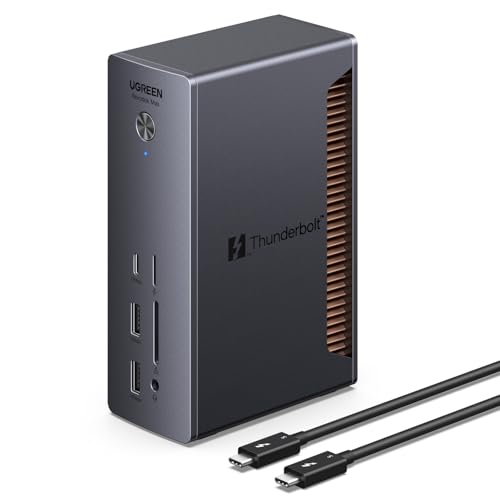
UGREEN documents a ceiling up to dual 4K240 for the named M4 Max path on the Revodok Max 2131/U715, the strongest retained dual-high-refresh figure in this slate. For an M4 Max owner whose exact setup appears in UGREEN’s output matrix, that makes it the first option worth pricing. The accepted Amazon identity is B0DCNZNCFH, and the manufacturer records use both the family name and U715 support identity.
Everything around that figure still needs closing. The frozen gate does not preserve the qualifying macOS version, physical output pair, cable or adapter specification, DSC state, monitor-input requirement, color format, or lid condition, and all of those remain mandatory checks. A connector that fits is not a qualification, so do not apply the M4 Max result to an M4, M4 Pro, older Max chip, or any other MacBook Pro. The documented dual 4K240 figure is a ceiling on a named route, not a measured or automatic setting.
Our Take
Buy the U715 only when your exact M4 Max, OS, outputs, cables or adapters, DSC branch, and monitor pair all match UGREEN’s matrix. Miss any one of those and its leading ceiling buys you nothing.
- Named M4 Max branch
- Retained ceiling up to dual 4K240
- UGREEN identifies it as a Thunderbolt 5 13-in-1 dock
- Exact OS and output route are not frozen
- Result cannot be generalized to other M4 chips
2. Anker Prime A83B5 — best retained M5 Max dual-4K144 branch

Anker documents dual 4K144 for the named M5 Max path in the frozen manager gate. That clears the dual-4K120 target while leaving less unused refresh headroom than UGREEN’s retained M4 Max ceiling. Around it, the A83B5 adds Thunderbolt 5 expansion, 2.5GbE, audio, dual-format UHS-I readers, and an up-to-140W host-charging path.
One topology condition governs the whole purchase. Anker states that HDMI and DisplayPort are mutually exclusive, so the two conventional connectors cannot both count as active high-refresh routes. The exact M5 Max macOS, port combination, cable or adapter, DSC condition, and monitor requirement are not retained in this package and must be matched against Anker’s published matrix. The 4K144 ceiling establishes neither VRR nor any other display feature.
Our Take
Choose the A83B5 for a named M5 Max branch, once you have verified how Anker builds the two-display path. Treat its HDMI/DisplayPort exclusivity as a hard topology condition, not a detail.
- Named M5 Max dual-4K144 ceiling
- TB5, 2.5GbE, and up to 140W charging
- Conventional video connections are present
- HDMI and DisplayPort are mutually exclusive
- Exact high-refresh route must be confirmed
3. Plugable TBT-UDT3 — best downstream TB5 route

Plugable retains dual or higher 4K144 branches for named Apple-silicon groups. Because the TBT-UDT3 provides three downstream Thunderbolt 5 ports, the display route is built around USB-C or Thunderbolt rather than fixed HDMI or DisplayPort. Plugable also documents 2.5GbE, separate SD and microSD UHS-II readers, and up to 140W host charging.
Which Apple-silicon groups those are is the open question, since the frozen gate does not enumerate them. Confirm that your chip appears in Plugable’s published table and that the listed macOS, downstream port group, cable or active adapter, DSC requirement, and monitors match. This model has no native HDMI or DisplayPort, and retained evidence excludes Thunderbolt 3 hosts. Three downstream sockets do not equal three active displays.
Our Take
Pick Plugable when the official table names your Mac and the planned monitors accept the documented downstream TB5 route. Expecting direct HDMI connections? Look elsewhere.
- Retained dual-or-higher 4K144 Apple-silicon branches
- Three downstream Thunderbolt 5 ports
- 2.5GbE and up to 140W charging
- No native HDMI or DisplayPort
- Named chip groups must be checked in Plugable’s matrix
4. CalDigit Element 5 Hub — best compact TB5 branch hub
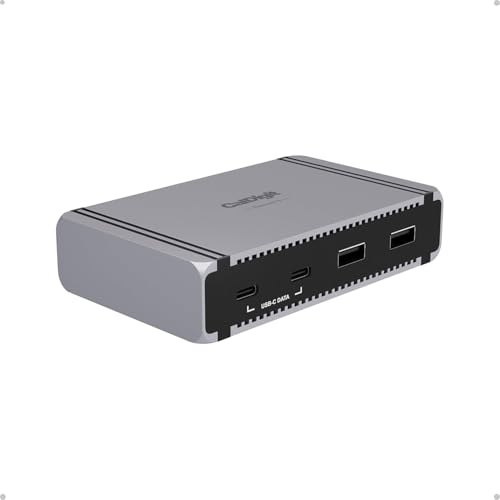
CalDigit attributes a dual 4K144 macOS ceiling to the Element 5 Hub, which makes it this page’s compact branch-hub option when the exact Mac appears in CalDigit’s compatibility matrix. Its job is not to lead with the broadest mix of legacy connectors the way a full desktop dock does. It branches a Thunderbolt 5 setup.
More is unknown here than on any other pick. The frozen manager gate does not retain the qualifying Mac chip, macOS version, physical output route, cable or adapter specification, DSC state, host-power figure, or monitor condition, so every one of those must be confirmed from CalDigit’s Element 5 table. Do not transfer the M4 Max qualification from UGREEN or M5 Max qualification from Anker to this hub. Manufacturer ceilings belong only to the named product path that publishes them.
Our Take
Choose the Element 5 when CalDigit’s exact macOS branch matches and compact downstream expansion is the goal. With the chip or route unnamed, it is blocked for this use.
- CalDigit-attributed dual 4K144 macOS ceiling
- Compact Thunderbolt 5 branch-hub role
- Suitable when legacy dock ports are unnecessary
- Exact qualifying chip and route are not retained
- Power figure is unknown in the frozen gate
5. CalDigit TS5 — best full TB5 dock with a named M5 Max path
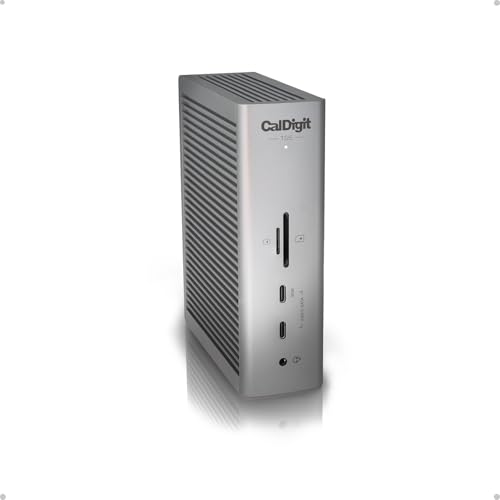
The retained TS5 matrix records a named M5 Max dual-high-refresh path. That path qualifies for this page’s two-display decision, which is why the manager froze it into the slate, and the TS5 format answers buyers who want a full dock rather than the Element 5 branch hub. Its exact identity is CalDigit TS5, ASIN B0F2GMPJYB.
Read the rest as open. The frozen gate does not retain the exact refresh ceiling, macOS version, physical outputs, cable or adapter requirement, DSC state, host charging, or monitor condition for this TS5 branch. Do not substitute TS5 Plus specifications, and do not assume a named M5 Max path applies to other M5 chips. This recommendation becomes actionable only after the complete TS5 matrix confirms two 4K displays at 120Hz or higher on the exact setup.
Our Take
Buy the TS5 when its full published M5 Max path matches every link in the dual-4K120 chain. Where a smaller branch hub covers the desk, Element 5 is the more compact answer.
- Retained named M5 Max dual-high-refresh path
- Full Thunderbolt 5 dock role
- Exact TS5 offer identity frozen
- Exact ceiling and route are not retained
- TS5 Plus specifications cannot be substituted
Build a complete dual-4K120 qualification
Start with native display count
Before any dock enters the conversation, the MacBook Pro has to expose two native external display streams in the exact configuration being used. Base M1/M2 and any other single-native path fail at this step. Where a chip’s supported count changes with lid state, follow the exact Apple and dock-vendor branch instead of assuming open-lid and closed-lid behavior are interchangeable.
Match the named chip, not the generation
M4 Max is the retained UGREEN qualification, and M5 Max is retained for Anker and TS5. Plugable names Apple-silicon groups in its own table, while Element 5’s exact chip is not preserved in this gate. M4, M4 Pro, and M4 Max are not synonyms, and neither are M5 variants. A family label on a product page never safely replaces the row for the exact chip.
Trace both physical outputs
Write down dock output one, dock output two, the required cable or adapter for each, and the monitor input each one reaches. Plugable has no native HDMI or DisplayPort. Anker makes HDMI and DisplayPort mutually exclusive. Any unknown output group has to be resolved from the official matrix. Our dual-monitor dock guide explains why visible connectors do not equal active streams.
Preserve OS, DSC, and cable conditions
Where the manufacturer table names a minimum macOS version, DSC requirement, specific output group, certified cable class, or active adapter, every one of those conditions belongs in the finished setup. A cable that carries a lower mode is not automatically qualified for two 4K120 signals. And none of these frozen records supports inferring HDR, VRR, HDCP, color depth, chroma, or gaming behavior from refresh rate.
Separate power and networking
UGREEN, Anker, and Plugable all appear in the up-to-140W cohort, though that ceiling proves nothing about what a given Mac negotiates. Element 5 and TS5 power figures are unknown in this gate. Plugable and Anker document 2.5GbE in the retained package, and no network port changes a display qualification. For network-first selection, see the 2.5GbE dock guide.
Final recommendation
UGREEN Revodok Max 2131/U715 leads only for its named M4 Max dual-4K240 ceiling. After that, each pick belongs to one branch: Anker for M5 Max dual-4K144, Plugable as the downstream-TB5 option for the Apple-silicon groups it names, Element 5 as the compact CalDigit hub, TS5 as the conditional full-dock M5 Max choice. Order none of them for dual 4K120 until the exact chip, native count, macOS, outputs, cables or adapters, DSC condition, and monitors all match one manufacturer row.