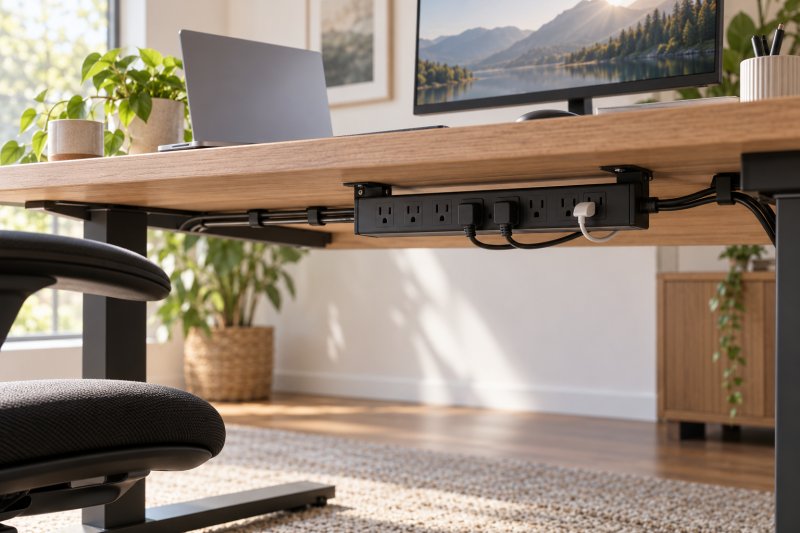
An under-desk power strip lets you keep chargers, adapters, and outlet blocks below the work surface, away from the keyboard, monitor stand, and laptop. The right one depends on how many AC outlets you need, which USB ports you use, how it mounts, and whether the extension cord reaches the wall socket without crossing the workspace.
These eight listings all state a mounting approach suitable for a desk, wall, cabinet, or furniture. Pick among a direct screw mount, a sliding tray, adjustable brackets, or a flexible clip design, then check the number and spacing of the outlets against the plugs you own.
A cable-clean workstation starts under the desk: choose the mount and cord length first, then count the outlets and USB ports your actual devices need.Best Under-Desk Power Strips Compared
| Image | Product | Details | Check Price |
|---|---|---|---|
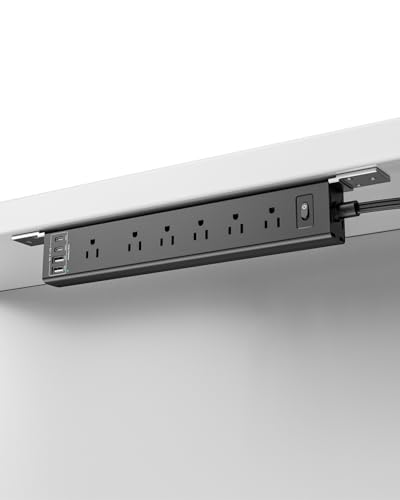 | vipwell 360 Mountable Power Strip | Best fit: Flexible mounting AC outlets: 6 USB ports: 2 USB-A and 2 USB-C Cord: 6 feet | Check Price on Amazon |
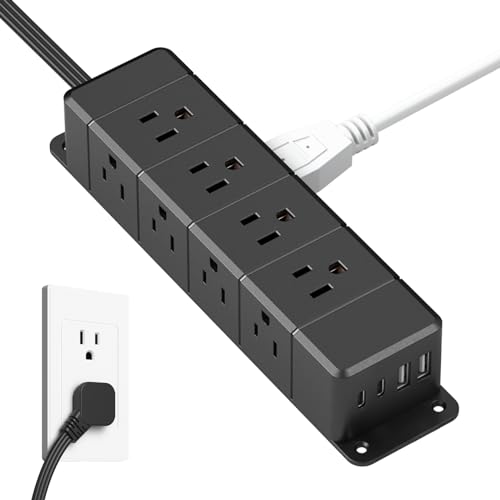 | ANNQUAN AC04K-BK Under-Desk Power Strip | Best fit: Many adapters AC outlets: 12 across four sides USB ports: 2 PD 20W USB-C and 2 QC 20W USB-A Cord: 6 feet | Check Price on Amazon |
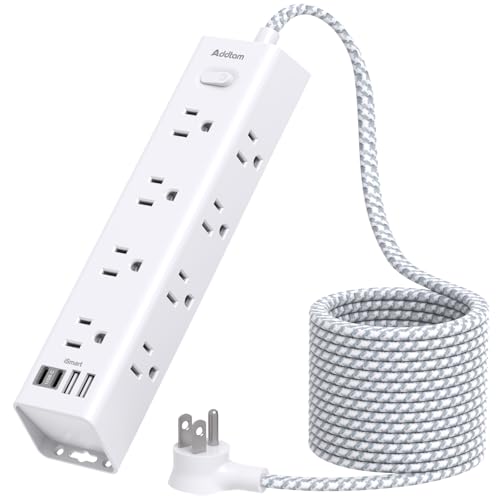 | Addtam AD12W3U Power Strip | Best fit: Long reach AC outlets: 12 USB ports: 4 Cord: 10 feet | Check Price on Amazon |
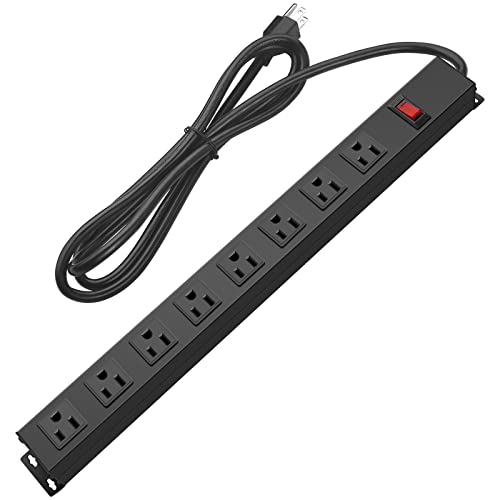 | HHSOET PDU-US8 Metal Power Strip | Best fit: Metal workbench strip AC outlets: 8 wide-spaced USB ports: None stated Cord: 6 feet, 14AWG | Check Price on Amazon |
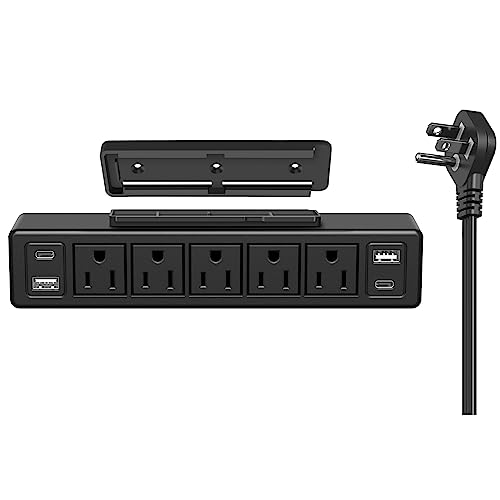 | ANNQUAN JN02-05-04 Power Strip | Best fit: Compact USB-C option AC outlets: 5 USB ports: 2 PD 20W USB-C and 2 QC 3.0 USB-A Cord: 6 feet | Check Price on Amazon |
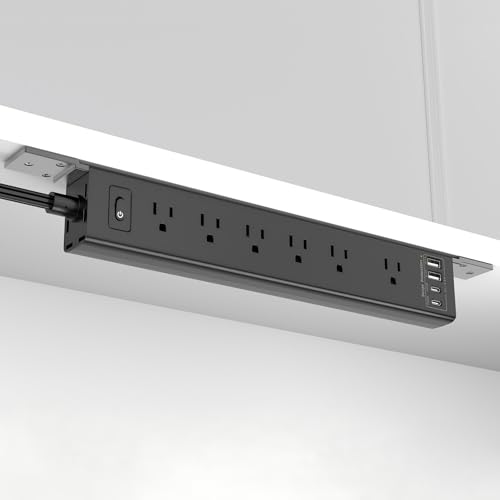 | Inhwatek Mountable Power Strip | Best fit: Adjustable brackets AC outlets: 6 widely spaced USB ports: 2 USB-A and 2 USB-C with 20W PD Cord: 6 feet | Check Price on Amazon |
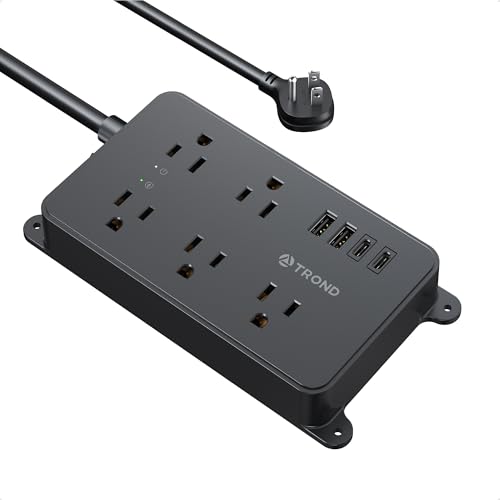 | TROND Prime III Power Strip | Best fit: Wide-spaced AC outlets AC outlets: 5, 1.5-inch spacing USB ports: 2 USB-A and 2 USB-C Cord: 5 feet, 14AWG | Check Price on Amazon |
 | Addtam AD313 Power Strip | Best fit: Simple USB-C desk mount AC outlets: 6 USB ports: 2 USB-C and 2 USB-A Cord: 5 feet | Check Price on Amazon |
1. vipwell 360 Mountable Power Strip — Best Flexible Mounting
When the desk frame or cable route is awkward, vipwell’s strip is built around a flexible clip design. Its listing says it can install vertically on a wall, horizontally under a desk, or around a table leg, with no extra brackets. The clip design gives it more stated placement options than a fixed screw-tab design.
The listing states six AC outlets, two USB-A ports, two USB-C ports, a 6-foot cord, and 1625W at 13A. It also gives dimensions of 12.8 by 2.2 by 1.3 inches and describes a 45-degree flat plug. The overload switch is stated to trip above 13A or 1625W.
The flexible clip design is the deciding feature when the strip needs to go under a desk, on a wall, or around a table leg without adding a separate bracket. Our TakeBuy the vipwell when the mounting surface is the hard part of the job. The listing states a flexible clip design for three distinct placements, plus six AC and four USB connections. Choose an option with a longer cord below if six feet cannot reach the wall outlet cleanly.
- States wall, under-desk, and table-leg placement with a flexible clip.
- Six AC outlets plus two USB-A and two USB-C ports.
- Names a 6-foot cord, 45-degree flat plug, and 1625W at 13A.
- The listing names a 6-foot cord, not the 10-foot reach of Addtam below.
- The flexible clip is a different mounting approach from a screw-fixed strip.
2. ANNQUAN AC04K-BK Under-Desk Power Strip — Best for Many Adapters
The ANNQUAN AC04K-BK is built for a workstation with many adapters. The listing states 12 AC outlets, two PD 20W USB-C ports, two QC 20W USB-A ports, and capacity for up to 16 devices. Its four-side design is intended to fit large adapters without blocking the other outlets.
The USB output is stated as 40W total, with a single PD USB-C port reaching 3A or 20W maximum. The strip also names a 1500W overload-protection on and off switch, a 6-foot cord, and a left-angled 45-degree flat plug only 0.35 inches thick.
Twelve AC outlets across four sides make this the practical choice when monitor bricks, laptop chargers, and dock adapters would crowd a flat row of sockets. Our TakeBuy the ANNQUAN AC04K-BK when a workstation has many adapters and each one needs physical room. Its listing gives 12 AC outlets spread across four sides and four USB ports with 40W total USB output. Choose the smaller ANNQUAN below if five AC outlets are enough.
- States 12 AC outlets and four USB ports for up to 16 devices.
- Four-side layout is stated to fit large adapters without blocking outlets.
- Names two PD 20W USB-C and two QC 20W USB-A ports.
- The stated 6-foot cord is shorter than Addtam AD12W3U’s.
- A larger 12-outlet body can be more than a small desk needs.
3. Addtam AD12W3U Power Strip — Best Long Reach
A longer cord helps when the outlet is behind furniture or on a wall beyond the desk. Addtam’s AD12W3U listing states a 10-foot extension cord, the longest named cord in this group. Its 45-degree right-angle flat plug is also described as fitting in tight spaces behind a desk, sofa, wardrobe, or bookshelf.
The strip states 12 widely spaced AC outlets, four USB ports, 1875W at 15A maximum, and 1050J surge protection. Its three-side layout is described as leaving room for 12 large plugs, and screw fixation points on both ends are supplied with four screws for wall or desk mounting.
Buy the Addtam AD12W3U when the wall outlet is farther from the desk than a 5- or 6-foot cord can comfortably reach. It combines a stated 10-foot cord with 12 AC outlets, four USB ports, and screw fixation at both ends. Use a smaller strip only when the outlet count and cord length are unnecessary.
- States a 10-foot extension cord, the longest stated here.
- Names 12 widely spaced AC outlets and four USB ports.
- Includes screw fixation on both ends with four screws.
- The 12-outlet layout can exceed the needs of a compact desk.
- Its USB ports are stated at 5V and 2.4A each, with 3A total.
4. HHSOET PDU-US8 Metal Power Strip — Best Metal Workbench Strip
For a desk or workbench that needs outlets and no USB ports, HHSOET’s PDU-US8 uses a metal shell and is the only listing here that names a metal construction. It states eight widely spaced outlets, a 6-foot 14AWG cord, a 1200J surge protector module, and a 15A, 125V, 60Hz, 1875W rating. The layout is simple, with AC outlets and no USB ports on its listing.
For mounting, the listing names screw holes and four included screws. It says the outlets have 0.55-inch spacing and describes the strip as suitable for a wall, workbench, office, garage, living room, or standing desk furniture. It also specifically says it is not compatible with rack equipment.
Choose the HHSOET when a metal AC-only strip and a stated 14AWG cord fit the desk or workbench better than built-in USB charging ports. Our TakeBuy the HHSOET PDU-US8 for a desk or workbench that needs AC outlets only, where metal construction is part of the brief. Its listing gives eight wide-spaced outlets, a 6-foot 14AWG cord, and four mounting screws. Choose another option if USB-A or USB-C ports need to live below the desk.
- Metal shell with eight widely spaced AC outlets.
- States 15A, 125V, 1875W and a 6-foot 14AWG cord.
- Screw holes and four included screws support mounting.
- No USB ports appear on the listing.
- The listing says it is not compatible with rack equipment.
5. ANNQUAN JN02-05-04 Power Strip — Best Compact USB-C Option
The smaller ANNQUAN JN02-05-04 is for a desk that needs USB charging but not 12 AC outlets. Its listing states five AC outlets, two PD 20W USB-C ports, two QC 3.0 USB-A ports, and 40W total USB charging. Its five AC outlets are the lowest count among the strips that state both USB-C and USB-A ports, level with the TROND Prime III.
The listing describes a sliding installation: screw the cover to a wall or desk and slide the power outlet body into the tray. It also names a 6-foot slim, soft extension cord with 0.15-inch thickness, a flat plug, and a 1200J surge protector in the product title.
The slide-in mounting tray is useful when you want the strip body removable after installation instead of permanently fixed to the desk underside. Our TakeBuy the ANNQUAN JN02-05-04 when a compact under-desk strip needs both USB-C and USB-A charging. The listing gives five AC outlets plus four USB ports and a slide-in mounting tray. Choose the 12-outlet ANNQUAN above when large adapters need more individual AC sockets.
- States five AC outlets, two PD 20W USB-C, and two QC 3.0 USB-A ports.
- Names 40W total USB charging.
- Uses a screw-on cover and slide-in outlet body.
- Five AC outlets are fewer than the 12-outlet models above.
- The listing states a 6-foot cord, shorter than Addtam AD12W3U’s.
6. Inhwatek Mountable Power Strip — Best Adjustable Brackets
Inhwatek uses detachable, adjustable mounting brackets rather than a fixed set of tabs, which suits a desk where a rail, monitor arm, or cable tray leaves no simple horizontal mounting face. Its listing says those brackets can install on walls, under desks, behind a TV, or sideways in tight spaces.
The stated connection layout is six widely spaced AC outlets, two USB-A ports, and two USB-C ports with 20W PD charging. The listing also names 1800J surge protection, 1625W at 13A, a 6-foot flat-plug cord, a 0.35-inch plug, and overload safety cut-off above 1625W or 16A.
Detachable adjustable brackets make this the choice when placement might change between a wall, desk underside, television area, or side-facing tight space. Our TakeBuy the Inhwatek when adjustable brackets are a bigger priority than the highest outlet count. Its listing states four USB ports, six widely spaced AC outlets, and several mounting orientations. Choose it for an unusual mounting surface rather than for its USB-C ports.
- Detachable, adjustable brackets are stated for four placement styles.
- Six widely spaced AC outlets plus two USB-A and two USB-C ports.
- Names 20W PD USB-C charging and a 6-foot flat-plug cord.
- The stated 6-foot cord is shorter than Addtam AD12W3U’s.
- It has fewer AC outlets than either 12-outlet model.
7. TROND Prime III Power Strip — Best Wide-Spaced AC Outlets
When chunky adapters block neighboring sockets, TROND’s Prime III is built around five widely spaced AC outlets. The listing gives 1.5 inches of outlet spacing, specifically for slightly larger power adapters without blocking adjacent outlets. It also states two USB-A ports and two USB-C ports for up to nine devices total.
The listing states 1875W, 125V, 15A, AC 100V to 250V, a 5-foot heavy-duty 14AWG cord, and 1300J surge protection. Four mounting tabs are screw-mountable for locations such as behind a TV, on a workbench, or under a desk or cabinet. The total USB output is stated as 3.0A or 15W.
Buy the TROND Prime III when adapter spacing is a bigger priority than the number of AC outlets. Its listing names five outlets separated by 1.5 inches, a 5-foot 14AWG cord, and four mounting tabs. Look to ANNQUAN or Addtam when you need 12 AC outlets rather than five.
- States 1.5 inches between five AC outlets.
- Names two USB-A and two USB-C ports for up to nine devices.
- Four mounting tabs and a 5-foot 14AWG cord.
- Five AC outlets are fewer than the larger strips here.
- Total USB output is stated as 3.0A or 15W.
8. Addtam AD313 Power Strip — Best Simple USB-C Desk Mount
For a desk that needs a midsize strip, Addtam’s AD313 has six AC outlets, two USB-C ports, and two USB-A ports in a 10-in-1 layout. The listing states 15A at 1875W, 900J surge protection, a 5-foot extension cord, and a 0.35-inch 45-degree flat plug. It sits between the five-outlet TROND and the 12-outlet models in outlet count.
For mounting, the listing names screw fixation at both ends with four included screws. It says the strip can mount on walls, desks, or furniture and can stay stable on a desktop or nightstand. The USB-C ports are stated at up to 5V and 3A, and USB-A at up to 5V and 2.4A.
Choose the AD313 when six AC outlets, four USB ports, and simple end-screw mounting are enough without stepping up to a 12-outlet body. Our TakeBuy the Addtam AD313 for a straightforward under-desk mount with six AC outlets and both USB-C and USB-A ports. Its listing gives four end screws and a 5-foot flat-plug cord. Move to the AD12W3U above when the desk needs a 10-foot reach or 12 AC outlets.
- States six AC outlets, two USB-C, and two USB-A ports.
- Names simple screw fixation at both ends with four screws.
- Lists 15A, 1875W, 900J, and a 5-foot flat-plug cord.
- The stated 5-foot cord is shorter than the 10-foot Addtam above.
- Six AC outlets are fewer than the two 12-outlet options.
Buying Guide
1. Count the AC outlets before the USB ports
The right outlet count depends on every brick that will live below the desk, not just the visible devices. Twelve AC outlets are stated by ANNQUAN AC04K-BK and Addtam AD12W3U, which suits a workstation with monitors, a dock, laptop power, speakers, and several chargers. HHSOET gives eight, while vipwell, Inhwatek, and Addtam AD313 each name six.
A smaller strip can be cleaner when the desk does not need a full outlet bank. ANNQUAN JN02-05-04 and TROND Prime III each state five AC outlets, so they suit a laptop, monitor, dock, and a few chargers. Extra empty outlets do not improve cable management if they make the strip too large for the mounting surface.
List each plug before you pick the strip, including the monitor power brick and the dock. Large adapters need physical outlet room as well as outlet count. For more devices that commonly sit on a desk, see our guides to Thunderbolt docks and USB-C chargers.
2. Make adapter spacing a separate decision
Power bricks can block adjacent sockets even when the strip has enough outlets. TROND states 1.5 inches between its five outlets, the widest stated spacing in this group. HHSOET gives 0.55-inch spacing, while ANNQUAN AC04K-BK relies on a four-side design to separate large plugs.
The Addtam AD12W3U listing also says its three-side design lets 12 large plugs fit without blocking one another. A multi-side layout changes how the adapters point, which can be useful when the strip mounts on the underside of a desk. Compare the adapter shapes and not only the number printed on the product title.
Leave room for the plugs to bend and for labels or switches to stay accessible. The best outlet layout is the one that lets every necessary plug seat fully. Our guide to under-desk cable trays covers the separate job of supporting the cable bundle after it leaves the strip.
3. Match the mount to the desk underside
Fixed screw mounting is direct and predictable when there is a flat wood or metal mounting face. Addtam and HHSOET each name screw fixation and four included screws, while TROND gives four screw-mountable tabs. ANNQUAN JN02-05-04 uses a cover fixed with screws and a body that slides into the tray.
Some desk frames do not provide a straightforward horizontal face. vipwell states a flexible clip design, while Inhwatek names detachable adjustable brackets for wall, under-desk, behind-TV, or side-facing placement. The clip and the brackets are useful when the strip needs to avoid a drawer, crossbar, or cable tray.
Measure the strip body and the clearance below the desk before installing anything. Mounting hardware only works when the strip can sit clear of knees, drawers, and moving desk parts. For routing after mounting, our cable management sleeves guide covers a complementary way to gather the cables.
4. Measure cord length from the actual outlet
The route to the wall socket is rarely a straight line. Addtam AD12W3U states a 10-foot cord, while vipwell, both ANNQUAN models, HHSOET, and Inhwatek state 6 feet. TROND and Addtam AD313 state 5-foot cords, so they suit a desk already close to the outlet.
Route the cord along the wall or desk frame in your measurement, not diagonally across open floor space. When a cord just reaches, you can end up with tension at the plug or sag under the desk. The flat plugs on these listings are meant to sit behind furniture, but the installation still depends on the available distance.
Avoid adding a second extension cord just to correct a short strip cord when one longer strip would fit the route. Cord length is a cable management decision. For another desk connection that benefits from planned cable reach, see our guide to USB-C monitor cables.
5. Choose USB ports by connector and stated output
With built-in USB ports, you can leave several small charging bricks off the desk. vipwell, Inhwatek, TROND, and Addtam AD313 each state two USB-A and two USB-C ports, while both ANNQUAN models state two USB-C and two USB-A ports. HHSOET names no USB ports on its listing.
The output statements differ even when the port count matches. ANNQUAN states two PD 20W USB-C ports and 40W total USB output, Inhwatek names USB-C with 20W PD charging, and TROND gives 15W total USB output. Addtam AD313 states USB-C up to 5V and 3A and USB-A up to 5V and 2.4A.
Use the built-in ports for devices that match their stated outputs, rather than assuming they replace every charger. A laptop charger, phone charger, and dock may have very different power needs. Our USB-C power meter tester guide explains a tool for checking the power a USB-C connection is actually delivering.
6. Keep the switch and reset access clear
An under-desk strip should be out of sight but not impossible to reach. vipwell states an overload switch that trips above 13A or 1625W, and ANNQUAN AC04K-BK names a 1500W overload-protection on and off switch. Inhwatek also names an overload safety cut-off above 1625W or 16A.
Staying out of sight does not mean the switch belongs buried behind a cable bundle. Leave a clear path to the power switch and any reset control when choosing the orientation. A side-facing mount can be better than a hidden rear mount if the strip is likely to need manual access.
Keep power cables separate from signal cables where the desk layout makes that easy. A workstation with a deliberate under-desk layout is easier to clean and change later. For equipment that can consolidate several display and USB connections, see our guides to laptop docking stations and USB-C hubs.
FAQ
How do I mount a power strip under a desk?
Mount it with the method the listing states for the desk material and shape. Screw fixation is named by Addtam and HHSOET, while TROND uses mounting tabs and ANNQUAN JN02-05-04 uses a screw-mounted slide-in cover.
For a less conventional surface, vipwell states a flexible clip design and Inhwatek states detachable adjustable brackets. Measure the clearance before mounting so the strip does not interfere with a drawer, chair, or desk frame.
How many outlets should an under-desk power strip have?
Count every device and power brick that needs permanent power. Five outlets can suit a compact desk, while the ANNQUAN AC04K-BK and Addtam AD12W3U each state 12 outlets for more crowded workstations.
Adapter size changes the answer. A wide-spaced five-outlet strip can be more useful than a crowded eight-outlet strip when monitor and laptop bricks occupy neighboring sockets.
Are USB-C ports on a power strip enough for a laptop?
Only if the stated USB-C output meets the laptop’s charging requirement. The ANNQUAN listings state PD 20W USB-C ports, and Inhwatek also names 20W PD USB-C charging.
Many laptops need more power than the stated output of a small built-in USB-C port. Check the laptop charger and the strip’s stated output together before replacing a dedicated laptop charger.
What cord length is best for an under-desk strip?
Choose the length based on the routed distance to the wall outlet. Addtam AD12W3U states a 10-foot cord, which gives more routing room than the 5-foot TROND and Addtam AD313 cords.
Measure along the desk frame and wall, not across open floor space. A clean cable path needs slack without a loose loop under the workstation.
Do I need a strip with widely spaced outlets?
Yes, when your monitor, dock, or laptop adapters are wider than a standard plug. TROND states 1.5-inch spacing, and HHSOET and Addtam describe layouts intended for larger adapters.
If most devices use slim plugs, a compact five- or six-outlet model can be easier to mount. Match the outlet geometry to the plugs you already own.
Can an under-desk power strip reduce desktop clutter?
Yes, moving the strip below the desk can move charger bricks and outlet blocks off the surface. All eight listings state an under-desk, wall, furniture, cabinet, or workbench mounting approach that can support that layout.
The strip itself is only one part of the setup. Plan the cord route, adapter spacing, and access to switches before fastening it so the result stays usable after the desk is full.
Bottom Line
For the most flexible mounting, choose vipwell’s clip design. ANNQUAN AC04K-BK is the choice for 12 AC outlets across four sides, Addtam AD12W3U is the answer when you need the 10-foot cord, and HHSOET is the metal option with AC outlets only. For a smaller mount with USB ports, compare ANNQUAN JN02-05-04, Inhwatek, TROND, and Addtam AD313 by their stated port arrangement, outlet spacing, and mounting hardware.