Apple lists both MacBook Air sizes with the Apple M5 chip, two Thunderbolt 4 ports, MagSafe 3 and a headphone jack, so the choice comes down to screen size, memory, storage and, on the 13-inch, graphics cores. Amazon.com sells six Apple configurations: a 13.6-inch or 15.3-inch screen, each with 16GB and 512GB, 16GB and 1TB, or 24GB and 1TB.
Apple’s page gives the 15-inch a 66.5Wh battery, six speakers and a 3.3-pound body, against 53.8Wh, four speakers and 2.7 pounds for the 13-inch. Apple’s table gives the 13-inch 16GB and 512GB model an 8-core GPU and every other configuration here a 10-core GPU.
All six are Midnight, sold by Amazon.com, and carry Apple’s one-year limited warranty in Amazon’s product details.MacBook Air M5 Configurations Compared
| Image | Product | Details | Check Price |
|---|---|---|---|
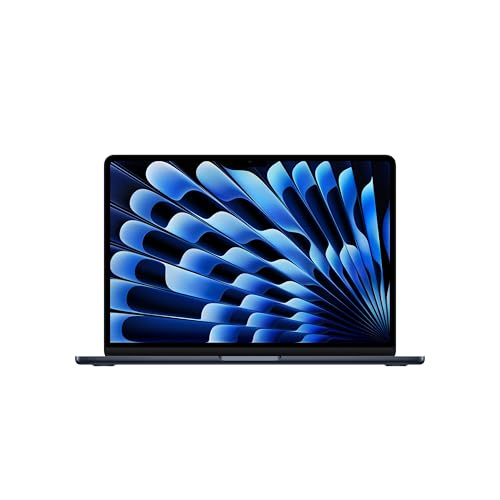 | MacBook Air 13-inch M5, 16GB and 512GB | Best fit: Lightest M5 Air Screen and weight: 13.6-inch, 2.7 lb Memory and storage: 16GB and 512GB Graphics: 8-core GPU Battery: 53.8Wh | Check Price on Amazon |
| MacBook Air 13-inch M5, 24GB and 1TB | Best fit: Most memory in 13 inches Screen and weight: 13.6-inch, 2.7 lb Memory and storage: 24GB and 1TB Graphics: 10-core GPU Battery: 53.8Wh | Check Price on Amazon |
| MacBook Air 13-inch M5, 16GB and 1TB | Best fit: 1TB storage in 13 inches Screen and weight: 13.6-inch, 2.7 lb Memory and storage: 16GB and 1TB Graphics: 10-core GPU Battery: 53.8Wh | Check Price on Amazon |
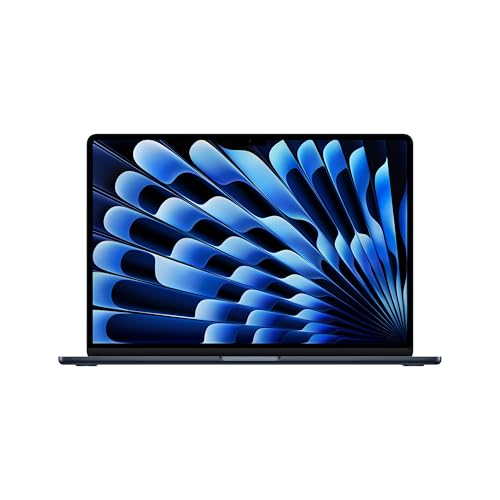 | MacBook Air 15-inch M5, 16GB and 512GB | Best fit: Larger screen, base configuration Screen and weight: 15.3-inch, 3.3 lb Memory and storage: 16GB and 512GB Graphics: 10-core GPU Battery: 66.5Wh | Check Price on Amazon |
| MacBook Air 15-inch M5, 24GB and 1TB | Best fit: Most memory on a 15-inch screen Screen and weight: 15.3-inch, 3.3 lb Memory and storage: 24GB and 1TB Graphics: 10-core GPU Battery: 66.5Wh | Check Price on Amazon |
| MacBook Air 15-inch M5, 16GB and 1TB | Best fit: 1TB storage on a 15-inch screen Screen and weight: 15.3-inch, 3.3 lb Memory and storage: 16GB and 1TB Graphics: 10-core GPU Battery: 66.5Wh | Check Price on Amazon |
1. MacBook Air 13-inch M5, 16GB and 512GB — Best for the Lightest M5 Air
When the laptop goes in a bag every day, start with the smaller Air. Apple gives the 13-inch Air a 2.7-pound body, 0.6 pounds lighter than Apple’s 15-inch Air. Its 13.6-inch display is 2560 by 1664, against 15.3 inches on the larger Air. Amazon’s title names the M5 chip, 16GB of unified memory and a 512GB SSD, and its bullets name two Thunderbolt 4 ports, MagSafe and a headphone jack. Apple’s weight note says weight varies by configuration, and Amazon’s product details list 2.71 pounds for this model.
Apple’s specifications page lists an 8-core GPU for the memory and storage pairing in Amazon’s title, where the other two 13-inch configurations and all three 15-inch ones have 10 cores. Amazon gives no GPU core count, so that figure comes from Apple’s page. The battery is 53.8Wh, rated by Apple for up to 18 hours of video streaming, and the 13-inch has four speakers where the 15-inch has six.
Check before you buy: the 8-core GPU is Apple’s figure for the 16GB and 512GB pairing, so confirm both numbers in the title. Our Take Buy this one if you carry the laptop daily and 16GB with 512GB covers your files. Step up to the 16GB and 1TB model when the extra storage or the 10-core GPU is the reason.- Apple gives the 13-inch Air a 2.7-pound body, the lighter of the two sizes.
- Apple rates the 53.8Wh battery for up to 18 hours of video streaming.
- Amazon’s bullets name two Thunderbolt 4 ports, MagSafe and a headphone jack for this MacBook Air.
- Apple’s table lists an 8-core GPU for this MacBook Air, two cores fewer than the other 13-inch models.
- Apple’s 13.6-inch Air has less screen room than the 15.3-inch panel on the larger Air.
2. MacBook Air 13-inch M5, 24GB and 1TB — Best for the Most Memory in 13 Inches
Amazon’s title names 24GB of unified memory and a 1TB SSD, the largest memory among these six and level with the 15-inch 24GB model, and 8GB more than the 16GB configurations. Apple’s specifications list the same 13.6-inch, 2.7-pound body as the base Air, where the larger Air has a 15.3-inch screen. Apple’s page shows 24GB and 1TB as the third standard 13-inch configuration, with the same 10-core M5 CPU as the others and a 10-core GPU.
Apple lists 32GB of memory as a configure-to-order option for this model, and none of the six Amazon titles names it. Amazon’s product details give this model its own part number, MDHG4LL/A, and the same Apple one-year limited warranty as the rest.
Part number check: MDHG4LL/A is the 13-inch 24GB and 1TB model, while the 15-inch one is MDVN4LL/A. Our Take Pick this when 24GB of memory is the requirement and a 13-inch screen is fixed. The 15-inch 24GB model has the same memory and storage for a larger body.- Apple’s page lists 24GB and 1TB with a 10-core GPU as a standard 13-inch configuration.
- Amazon’s title names 24GB, the most memory among the six listings.
- Amazon’s product details state Apple’s one-year limited warranty.
- Apple lists 32GB as a configure-to-order option, but none of the six Amazon titles names it.
- Apple’s 13.6-inch panel has less screen area than the larger Air, which Apple sells with the same 24GB and 1TB.
3. MacBook Air 13-inch M5, 16GB and 1TB — Best for 1TB Storage in 13 Inches
Storage is what separates this model from the base 13-inch Air in Amazon’s titles, which name 16GB of memory and a 1TB SSD against 512GB. Apple’s table adds a second change. The 13-inch model with 1TB has a 10-core GPU, where the 512GB model has 8, and Amazon gives no GPU core count, so the figure comes from Apple’s page. Compare it with the base 13-inch when you want the larger GPU without moving to 24GB of memory.
Apple lists the same M5 CPU and 13.6-inch display as on the other 13-inch Airs, and the same 2.7-pound weight and 53.8Wh battery. Against the 24GB model, it matches on storage and GPU, and the difference is 16GB or 24GB of memory, a gap of 8GB. Its part number is MDHF4LL/A.
- Apple’s table lists a 10-core GPU for this model, against 8 on the 13-inch 512GB model.
- Amazon’s title names a 1TB SSD alongside 16GB of memory.
- Apple lists the same weight and 53.8Wh battery as the other 13-inch models.
- Amazon gives no GPU core count for this model, so the 10-core figure depends on Apple’s page matching the 16GB and 1TB title.
- Amazon’s title names 16GB of memory, less than the 24GB models.
4. MacBook Air 15-inch M5, 16GB and 512GB — Best for a Larger Screen at the Base Configuration
The 15-inch Air gives up portability for screen room. Apple’s page gives the 15-inch a 15.3-inch display at 2880 by 1864, a 66.5Wh battery and a six-speaker system with force-cancelling woofers, compared with 2560 by 1664, 53.8Wh and four speakers on the 13-inch. Amazon’s bullets agree on the 15.3-inch panel and six speakers for MDVH4LL/A, and its title names 16GB of memory and a 512GB SSD, where the other two 15-inch models name 1TB.
Apple rates both sizes for up to 18 hours of video streaming, so the larger battery does not come with a longer rating. Apple gives the body 3.3 pounds, 0.6 pounds more than the 13-inch, and gives every 15-inch configuration a 10-core GPU, this one included, against 8 on the 13-inch 512GB model.
Screen first: the 15.3-inch Air at 16GB and 512GB has the same two Thunderbolt 4 ports and two-display support as the 13-inch. Our Take Pick this when you want the 15-inch screen and six speakers and 16GB with 512GB is enough. Take the 13-inch base instead when carrying weight comes first.- Apple’s page gives the 15-inch Air a 15.3-inch display at 2880 by 1864.
- Both Apple and Amazon’s bullets name six speakers for this model.
- Apple’s table gives this configuration a 10-core GPU, the same as the other two models with the larger screen.
- Apple lists the 15-inch Air at 3.3 pounds, 0.6 pounds heavier than the 13-inch.
- Amazon’s title names 512GB, half the storage on the other two larger-screen models.
5. MacBook Air 15-inch M5, 24GB and 1TB — Best for the Most Memory on a 15-Inch Screen
The largest configuration here pairs a 15.3-inch screen with 24GB of unified memory and a 1TB SSD, all named in Amazon’s title. Apple’s page shows the same pairing as its third standard 15-inch model, and the display, ports and 10-core GPU match the other 15-inch Airs. The part number is MDVN4LL/A.
Set it beside the 13-inch 24GB model and memory, storage and GPU are the same, so the decision is the body. The 15-inch adds a larger screen, six speakers instead of four and a 66.5Wh battery in place of 53.8Wh. It weighs 3.3 pounds, 0.6 pounds more. Apple’s 18-hour video streaming rating comes from tests on 16GB and 512GB systems, and Apple says battery life varies by configuration.
- Apple’s page shows 24GB and 1TB as its third standard 15-inch configuration.
- Amazon’s bullets state a 15.3-inch display and six speakers for this listing.
- Apple lists a 66.5Wh battery, larger than the 53.8Wh in the 13-inch Air.
- Apple lists this model 0.6 pounds heavier than the 13-inch 24GB model.
- Apple tested its 18-hour rating on 16GB and 512GB systems and says battery life varies by configuration.
6. MacBook Air 15-inch M5, 16GB and 1TB — Best for 1TB Storage on a 15-Inch Screen
In Amazon’s titles this model differs from the 15-inch base in one place, a 1TB SSD instead of 512GB. Because Apple gives every 15-inch configuration a 10-core GPU, the extra storage brings no graphics change here, unlike on the 13-inch.
The 15.3-inch display, six speakers and 66.5Wh battery are the same as on the other 15-inch Airs. The weight is the same 3.3 pounds, which is 0.6 pounds above the smaller Air. Amazon lists the same Midnight finish and Apple one-year limited warranty. The part number is MDVK4LL/A. Among the 15-inch configurations, it has more storage than the base and 8GB less memory than the 24GB model.
- Amazon’s title names a 1TB SSD, double the 512GB on the 15-inch base.
- Apple’s table gives this model a 10-core GPU, the same as the 15-inch base.
- Apple lists a 15.3-inch display, 66.5Wh battery and six speakers for the 15-inch body.
- Amazon’s title names 16GB of memory, less than the 24GB model.
- Apple lists this model at 3.3 pounds, heavier than any 13-inch model here.
Buying Guide
1. Choose the screen size first
Weight, battery size and speaker count depend on screen size, not on capacity. By Apple’s figures the 13.6-inch Air weighs 2.7 pounds and the 15.3-inch Air weighs 3.3 pounds, with 53.8Wh and 66.5Wh batteries and four and six speakers. Apple rates both sizes for up to 18 hours of video streaming.
Resolution differs too. Apple lists 2560 by 1664 on the 13-inch and 2880 by 1864 on the 15-inch, both at 224 pixels per inch, and 500 nits for both panels. The MacBook Neo, Air and Pro comparison covers the Neo and Pro if you are comparing lines.
2. Match memory, storage and graphics to the job
Amazon’s titles pair 16GB with 512GB, 16GB with 1TB and 24GB with 1TB at each size, which are the three standard configurations on Apple’s Air page. Of these six, only the 13-inch 16GB and 512GB model has an 8-core GPU in Apple’s table, and the other five have 10 cores.
Apple lists 32GB of memory and 2TB or 4TB of storage as configure-to-order options, and none of the six Amazon titles names them. Anyone who needs 32GB or 2TB should configure at Apple, since these listings stop at 24GB and 1TB.
3. Confirm the model code and finish
Each product’s details carry an Apple part number: MDHE4LL/A, MDHG4LL/A and MDHF4LL/A for the 13-inch 16GB and 512GB, 24GB and 1TB, and 16GB and 1TB models, and MDVH4LL/A, MDVN4LL/A and MDVK4LL/A for the 15-inch ones. Match the part number, memory and storage in the title before you order.
All six are Midnight, one of four finishes on Apple’s Air page, so another color means a different listing. Amazon’s product details state Apple’s one-year limited warranty on every one.
4. Plan the desk setup
Every configuration has two Thunderbolt 4 ports, MagSafe 3 and a headphone jack, and Apple states support for up to two external displays, either two at 6K and 60Hz or two at 4K and 144Hz. The Thunderbolt 4 dock guide and MacBook Air dock guide cover what to plug in.
Apple lists the Air as fast-charge capable with a 70W or higher USB PD power source. The MacBook Air charger guide compares chargers, and the MacBook Air monitor guide covers displays.
FAQ
Is the 15-inch MacBook Air more capable than the 13-inch?
No, the two sizes match in ports and processor. Apple lists the M5 with a 10-core CPU, two Thunderbolt 4 ports and up to two external displays for both sizes. The 15-inch adds a larger display, a larger battery and six speakers, and by Apple’s figures it weighs 0.6 pounds more.
Choose size for screen area and weight. Apple gives all three 15-inch configurations a 10-core GPU, against 8 on the 13-inch 16GB and 512GB model.
Is the chip different in the 24GB and 1TB models?
The CPU is the same. Apple lists the M5 with a 10-core CPU, a 16-core Neural Engine and 153GB/s memory bandwidth for every configuration here. Apple’s table gives the GPU 10 cores on five of the six and 8 on the 13-inch 16GB and 512GB model.
The extra memory and storage change capacity, not the processor. Amazon’s listings give no GPU core count, so confirm the memory and storage in the title.
Can I add 32GB or 2TB to one of these Amazon listings?
No. Each Amazon title names one memory and storage pair. Apple lists 32GB of memory and 2TB or 4TB of storage as configure-to-order options on apple.com.
Match the part number to the configuration you want and use Apple’s configure-to-order page for anything these six do not name.
Can either size run two external monitors?
Yes. Apple lists support for up to two external displays on both sizes, either two at 6K and 60Hz or two at 4K and 144Hz, and says both can run over a single Thunderbolt port. Amazon’s bullets say the same for each listing.
Check the dock’s own display specification against Apple’s modes before pairing them.
Bottom Line
By Apple’s figures and Amazon’s titles, choose 13.6 inches for the lightest body and 15.3 inches for the larger screen, then pick the memory and storage pair. The 13-inch 16GB and 512GB model is the base, the 1TB models add storage and a 10-core GPU on the 13-inch, and the 24GB models add memory.