Choose the Profile, Layout, and Connection First
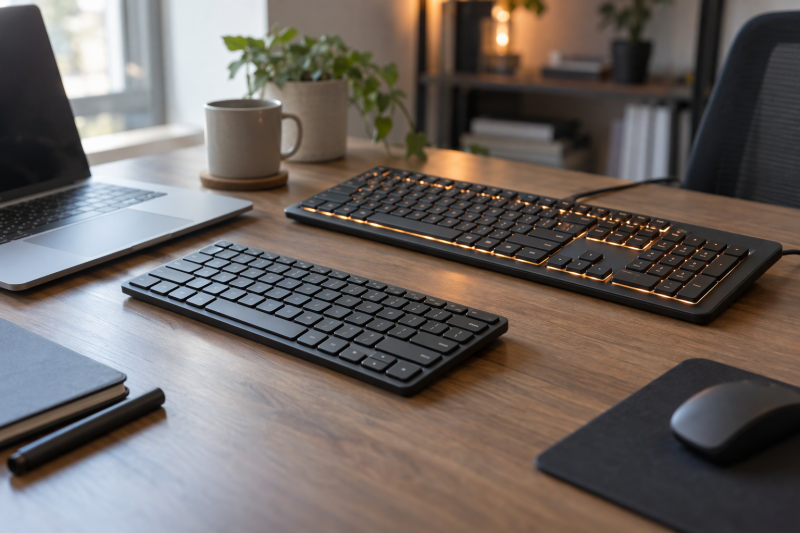
Low-profile keyboards differ in layout, connection, and key type, and the word slim in a product title says little about any of them. The comparison covers two compact Bluetooth boards, a wider backlit board with a receiver, a full-size board with a number pad on AAA batteries, and two low-profile mechanical keyboards. Check for a number pad, a backlight, a receiver, and how many devices you switch between first.
| Image | Product | Best fit | Layout | Connection | Power | Watch-outs | Check Price |
|---|---|---|---|---|---|---|---|
 | Logitech Pebble Keys 2 K380s | Compact Bluetooth typing across three devices | Compact and slim, with round low-profile scissor keys and no numeric keypad per Logitech | Bluetooth Low Energy for up to three devices; no USB receiver included | Logitech rates two pre-installed AAA batteries at up to 36 months | Logitech says it has no backlight and no number pad | Check Price on Amazon |
 | Logitech MX Keys S | Backlit desk typing with Bluetooth or an included Logi Bolt receiver | Dished keys and a laptop-like profile, 16.94 inches wide per Logitech | Bluetooth Low Energy or the included Logi Bolt receiver; up to three devices | USB-C; up to 10 days with backlighting or five months without, per Logitech | Wider than the compact boards; the number pad is not named on Logitech's page | Check Price on Amazon |
 | HP 230 Wireless Keyboard | A quiet number-pad keyboard on AAA batteries | Full-size low-profile chiclet keys with a numeric keypad and 12 shortcut keys | 2.4 GHz wireless with a receiver in the box, per HP | Up to 16 months on two AAA batteries, per HP | No backlight or Bluetooth device switching listed by HP | Check Price on Amazon |
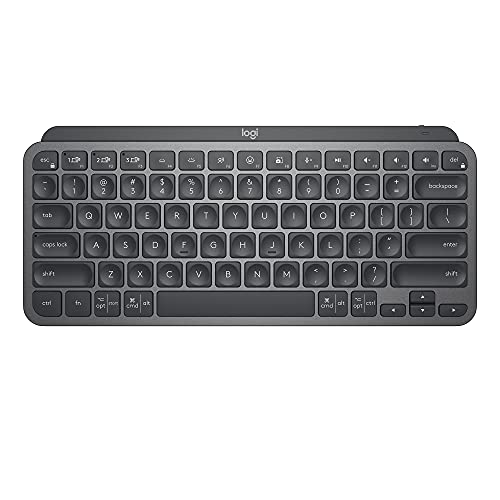 | Logitech MX Keys Mini | Compact backlit Bluetooth typing | Minimalist layout, 11.65 inches wide per Logitech, with dictation, mic mute, and emoji keys | Bluetooth Low Energy for up to three devices; Logi Bolt receiver not included | USB-C; up to 10 days with backlighting or five months without, per Logitech | No receiver in the box; Logitech points number-pad buyers to a full-size version | Check Price on Amazon |
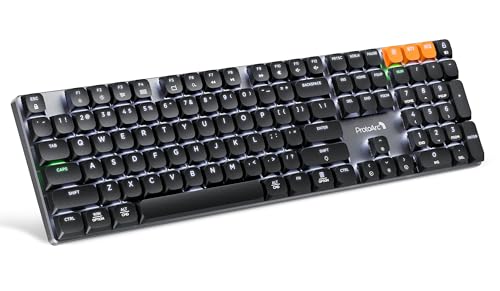 | ProtoArc K310 Pro | Full-size low-profile mechanical typing with a number pad | 108 keys, low-profile linear red switches, aluminum top case | Bluetooth 5.1 or the 2.4GHz USB-A receiver in the box; up to three devices | USB-C; 6 to 8 hour charge and up to 150 days of standby, per ProtoArc | ProtoArc limits macro editing to the 2.4GHz connection | Check Price on Amazon |
 | Keychron K3 Version 2 | A 75% low-profile mechanical keyboard with wired USB-C | 75% ANSI layout, Gateron mechanical brown switches, white backlight | Bluetooth 5.1 for up to three devices, or a Type-C wired mode | 1550 mAh battery; up to 34 hours at the lowest backlight, per Keychron | No number pad; Amazon lists QMK, and Keychron's Version 2 page does not name it | Check Price on Amazon |
Pebble Keys 2 K380s is the compact Bluetooth board, and MX Keys Mini adds a backlight in a compact layout. MX Keys S brings a backlight and an included receiver to a wider layout, HP 230 is the number-pad board, and ProtoArc K310 Pro and Keychron K3 Version 2 use low-profile mechanical switches. For a Bluetooth-first multi-device decision, see our multi-device keyboard guide, and for a mouse to pair with a desk keyboard, see our Logitech mice for laptops comparison.
1. Logitech Pebble Keys 2 K380s — Best for Compact Three-Device Bluetooth Typing
Logitech describes Pebble Keys 2 K380s as a minimalist, slim Bluetooth keyboard with round, quiet low-profile scissor keys and a laptop-like typing feel. It pairs with up to three devices and switches between them with the F1, F2, and F3 Easy-Switch keys. Amazon lists Windows, macOS, iPadOS, and ChromeOS support, while Logitech’s page lists Windows, macOS, iPadOS, iOS, and Android. Check your device against both lists.
Logitech rates the two pre-installed AAA batteries at up to 36 months, varying with use, and Amazon’s listing describes a three-year battery. Logitech’s page says the keyboard has no USB receiver, no backlight, and no numeric keypad. It connects over Bluetooth Low Energy and can pair with a Logi Bolt receiver that Logitech sells separately.
Pebble Keys 2 K380s is the board for a laptop, tablet, and phone rotation when you want a small footprint and no charging cable.Our Take Buy the Pebble Keys 2 K380s for a compact keyboard that pairs with up to three Bluetooth devices. Skip it if you want a number pad or a backlight, since Logitech’s page says it has neither.
- Logitech says the Pebble Keys 2 K380s pairs with up to three host devices and switches among them with Easy-Switch keys.
- Logitech describes round, quiet low-profile keys with a laptop-like typing feel.
- Logitech rates the two pre-installed AAA batteries at up to 36 months of use, which means no charging cable.
- Logitech says the Pebble Keys 2 K380s has no numeric keypad, which rules it out if you want a number pad.
- Logitech says the keyboard has no backlight and no included USB receiver, and it sells the Logi Bolt receiver separately.
2. Logitech MX Keys S — Best for a Backlit Desk Keyboard with an Included Receiver
MX Keys S has spherically dished keys, a laptop-like profile, and backlit keys that light up as your hands approach, according to the Amazon listing. Logitech’s page lists the keyboard at 16.94 inches wide, with the Logi Bolt USB receiver in the box alongside Bluetooth Low Energy. You can pair up to three devices over either connection, and Logitech says the keyboard does not work with other Logitech USB receivers.
Logitech rates the USB-C battery at up to 10 days on a full charge or up to five months with the backlight off, and both figures vary with use. The Amazon bullets describe a solid build and an optimum keyboard angle for wrist posture. Neither the Amazon bullets nor Logitech’s page uses the words number pad. Confirm the keypad on the product photos if you need one.
MX Keys S is the Logitech board in this group that comes with a receiver and a backlight.Our Take Buy the MX Keys S for a desk keyboard that connects over an included Logi Bolt receiver or Bluetooth and lights its keys. Skip it for a bag, since Logitech lists it at 16.94 inches wide against 11.65 inches for MX Keys Mini.
- Logitech includes a Logi Bolt receiver with MX Keys S and also supports Bluetooth Low Energy.
- Logitech says the backlit keys light up as hands approach and adapt to the environment.
- Logitech says MX Keys S pairs with up to three devices over either the receiver or Bluetooth.
- Logitech rates one USB-C charge at up to 10 days with backlighting or up to five months without it.
- Logitech lists MX Keys S at 16.94 inches wide, wider than the compact boards on this page.
- Logitech rates MX Keys S at up to 10 days on a full charge with backlighting on.
- Logitech does not describe MX Keys S as a mechanical keyboard.
3. HP 230 Wireless Keyboard — Best for a Low-Profile Number Pad on Batteries
HP 230 uses low-profile chiclet keys with a numeric keypad, and the Amazon listing says 12 popular functions run from single-press shortcut keys. HP’s page lists it as a full-size keyboard with a three-zone layout and tilt adjustment, measuring 440 by 146.2 by 27.6 millimeters, which matches the 17.32 by 5.76 by 1.09 inches on Amazon.
HP’s page lists a 2.4 GHz wireless connection with a receiver in the box and a range of up to 10 meters in open area, for Windows 11, Windows 10, and macOS. Amazon’s listing describes up to 16 months of use on two AAA batteries and says both batteries are included, while HP’s box contents list does not name batteries. Neither source describes a backlight, USB-C charging, or switching between devices.
HP 230 trades backlighting and device switching for a number pad, a receiver, and AAA battery life.Our Take Buy the HP 230 for a quiet, battery-powered desk keyboard with a number pad and a USB receiver. Skip it if you want a backlight or Bluetooth switching between devices.
- The HP 230 listing on Amazon includes a numeric keypad and 12 single-press shortcut keys.
- HP lists a 2.4 GHz wireless connection with a receiver in the box.
- HP rates battery life at up to 16 months on two AAA batteries.
- HP does not list a backlight for the HP 230, so skip it if you want one.
- HP lists a single 2.4 GHz receiver connection and does not list Bluetooth or multi-device switching.
4. Logitech MX Keys Mini — Best for a Compact Backlit Bluetooth Layout
Logitech calls MX Keys Mini a minimalist keyboard with fingertip-shaped keys, and its page lists the width at 11.65 inches. Logitech says the backlit keys light up as hands approach, and the Amazon listing adds dedicated dictation, mic mute, and emoji keys. Logitech’s page says the keyboard connects over Bluetooth Low Energy and pairs with up to three devices.
Logitech rates the USB-C battery at up to 10 days on a full charge or up to five months with the backlight off. Its page says the Logi Bolt receiver is compatible but not included. The page does not name a number pad on the Mini and points to a separate full-size version with an integrated numpad.
Our Take Buy the MX Keys Mini for a compact backlit Bluetooth keyboard when you do not need a number pad. Skip it if you want a receiver in the box, since Logitech does not include one.
- Logitech describes backlit keys that light up as hands approach the MX Keys Mini.
- Logitech says MX Keys Mini pairs with up to three devices over Bluetooth Low Energy.
- Logitech rates one USB-C charge at up to five months with the backlight off.
- The Amazon listing for MX Keys Mini names dictation, mic mute, and emoji keys.
- Logitech does not include a Logi Bolt receiver with MX Keys Mini.
- Logitech rates the MX Keys Mini battery at up to 10 days with backlighting on.
- Logitech points number-pad buyers to a different, full-size version.
5. ProtoArc K310 Pro — Best for Full-Size Low-Profile Mechanical Typing
ProtoArc describes the K310 Pro as a full-size, 108-key keyboard with low-profile linear red switches, a numeric keypad, an aluminum top case, and two-level tilt legs. Its page lists 17.64 by 6.1 by 1.77 inches and ten adjustable single-color backlight effects. Bluetooth 5.1 or the 2.4GHz USB-A receiver in the box connect up to three devices across Windows, Mac, iOS, and Android.
ProtoArc rates a 6 to 8 hour USB-C charge at up to 150 days of standby. Macro editing works over the 2.4GHz connection only, according to both ProtoArc’s page and the Amazon listing. The Amazon listing adds that a multi-port hub cannot detect the keyboard and that Safari is not supported, and ProtoArc’s page gives a two-year limited hardware warranty.
K310 Pro is the only full-size board here with low-profile mechanical switches and a number pad.Our Take Buy the K310 Pro for a full-size low-profile mechanical keyboard with a number pad and a receiver in the box. Skip it if you want to edit macros over Bluetooth, since ProtoArc limits macro editing to the 2.4GHz connection.
- ProtoArc describes low-profile linear red switches in a full-size 108-key layout with a numeric keypad.
- ProtoArc includes a 2.4GHz USB-A receiver and supports Bluetooth 5.1 for up to three devices.
- ProtoArc offers ten adjustable backlight effects and two-level tilt legs on the K310 Pro.
- ProtoArc rates a 6 to 8 hour USB-C charge at up to 150 days of standby.
- ProtoArc limits K310 Pro macro editing to the 2.4GHz connection.
- The Amazon listing for the K310 Pro says a multi-port hub cannot detect the keyboard.
- ProtoArc lists the K310 Pro at 17.64 inches long.
6. Keychron K3 Version 2 — Best for a 75% Low-Profile Mechanical Keyboard with Wired USB-C
Keychron lists the K3 Version 2 with the white backlight, low-profile Gateron mechanical brown switch combination under the SKU K3-A3, which matches the K3A3 model code on the Amazon listing. The page describes a 75% ANSI layout in an ABS and aluminum frame, 306 by 116 millimeters and about 483 grams. Bluetooth 5.1 connects up to three devices, and a Type-C cable gives a wired connection.
Keychron lists a 1550 mAh rechargeable battery with up to 34 hours of wireless working time at the lowest backlight setting. The Amazon listing says QMK firmware and the Keychron Launcher handle remapping, macros, and shortcuts, but Keychron’s Version 2 page names QMK only for the newer Version 3. Keychron also states a Mac layout with keycaps for both Windows and Mac, and the Amazon listing asks buyers to keep the keyboard within a reasonable distance of the device to limit interference.
K3 Version 2 is the 75% board here, with wired USB-C as a second connection.Our Take Buy the Keychron K3 Version 2 for a compact low-profile mechanical keyboard that also works over a USB-C cable. Skip it if you need a number pad or a long battery rating, since Keychron’s page gives up to 34 hours at the lowest backlight.
- Keychron lists Bluetooth 5.1 for up to three devices and a Type-C wired mode on the K3 Version 2.
- Keychron lists low-profile Gateron mechanical brown switches and a white backlight under SKU K3-A3.
- Keychron lists a 75% layout in an ABS and aluminum frame at about 483 grams.
- Keychron lists the K3 Version 2 with a 75% layout and no number pad.
- Keychron rates wireless working time at up to 34 hours with the lowest backlight.
- The Amazon listing says the K3 Version 2 runs QMK firmware, and Keychron’s Version 2 page does not name it.
Buying Guide: Choose a Low-Profile Keyboard
Start with the layout you need every day
The first divide is compact, 75%, or full-size. Logitech says Pebble Keys 2 K380s has no numeric keypad and calls MX Keys Mini minimalist, and Keychron lists the K3 Version 2 as a 75% layout. HP states that the 230 is full-size, ProtoArc lists the K310 Pro as a 108-key full-size board with a numeric keypad, and Logitech lists MX Keys S at 16.94 inches wide.
A number pad is a daily decision, not a detail to add later. Choose a full-size layout such as HP 230 or ProtoArc K310 Pro for repeated numeric entry. Choose a compact or 75% board when desk space and bag space come first, and keep in mind that a low-profile body does not make a full-size keyboard as portable as a smaller layout.
Choose laptop-style or mechanical keys on purpose
Logitech describes Pebble Keys 2 K380s with scissor switches and a laptop-like feel, and the Amazon listing describes MX Keys S with a laptop-like profile. HP calls the 230 keys low-profile chiclet keys, and Logitech calls MX Keys Mini keys fingertip-shaped. ProtoArc K310 Pro uses low-profile linear red mechanical switches, and Keychron K3 Version 2 uses low-profile Gateron mechanical brown switches.
Switch type is personal, and the maker pages describe the categories. Choose the laptop-style boards when a familiar, quiet feel is the goal. Choose ProtoArc or Keychron when the low-profile mechanical action, the lighting, or the remapping software is the priority.
Match the connection to your devices
Logitech lists three-device pairing for Pebble Keys 2 K380s, MX Keys S, and MX Keys Mini, and ProtoArc and Keychron list three-device Bluetooth 5.1 for the K310 Pro and K3 Version 2. HP lists only a 2.4 GHz receiver connection for the 230. The receiver choices differ: MX Keys S and K310 Pro include a receiver, HP 230 includes one per HP’s box list, and Logitech says Pebble Keys 2 K380s and MX Keys Mini do not.
Keychron adds a Type-C wired mode, and ProtoArc adds the 2.4GHz receiver for macro editing. Check your laptop’s ports before you choose. HP’s page says its receiver needs a USB-A port, ProtoArc lists a USB-A receiver, and the Bluetooth-only boards need Bluetooth on the host.
Decide whether a backlight is useful enough to charge for
Logitech describes backlit keys on MX Keys S and MX Keys Mini, Keychron lists a white backlight on the K3 Version 2, and ProtoArc lists ten backlight effects on the K310 Pro. Logitech says Pebble Keys 2 K380s has no backlight, and HP does not list one for the 230. A backlight helps at a dim desk, and it changes the battery figure.
Logitech rates both MX keyboards at up to 10 days with backlighting and up to five months with it off. Logitech rates Pebble Keys 2 K380s at up to 36 months on AAA batteries, and HP rates the 230 at up to 16 months. Keychron lists up to 34 hours at the lowest backlight setting, and ProtoArc rates up to 150 days of standby.
Check where the customization works
Keychron’s Amazon listing says QMK firmware and the Keychron Launcher support remapping, macros, and shortcuts, while Keychron’s Version 2 page names QMK only for Version 3. ProtoArc says macro editing works only over the 2.4GHz connection. Logitech says its Logi Options+ app customizes the Fn keys on Pebble Keys 2 K380s and the backlighting on MX Keys S and MX Keys Mini.
Read the condition on each feature. ProtoArc does not describe macro editing over Bluetooth, and the Amazon listing says a multi-port hub cannot detect the 2.4GHz receiver. Choose a keyboard whose customization works with the connection you plan to use.
FAQ
What is a low-profile keyboard?
A low-profile keyboard has a thinner body and lower keys than a conventional tall mechanical board. It can use laptop-style or chiclet keys, as Logitech describes for Pebble Keys 2 K380s and HP describes for the 230, or low-profile mechanical switches, as ProtoArc K310 Pro and Keychron K3 Version 2 use.
The label does not set the layout, connection, or backlight. A full-size low-profile keyboard such as HP 230, at 440 millimeters wide on HP’s page, takes more desk space than a compact one. Compare height, layout, and connection together.
Which low-profile keyboard here has a number pad?
HP lists the 230 as full-size, and the Amazon listing names its numeric keypad. ProtoArc lists a 108-key layout with a numeric keypad for the K310 Pro. Logitech does not use the words number pad for MX Keys S. Check the product photos.
Logitech says Pebble Keys 2 K380s has no numeric keypad, and Logitech points MX Keys Mini buyers to a separate full-size version for one. Keychron lists the K3 Version 2 as a 75% layout. A built-in number pad saves carrying a separate keypad, and a smaller board saves bag space.
Can these keyboards switch between a laptop and tablet?
Logitech says Pebble Keys 2 K380s, MX Keys S, and MX Keys Mini each pair with up to three devices. ProtoArc says the K310 Pro connects up to three devices over Bluetooth or its USB-A receiver, and Keychron says the K3 Version 2 connects up to three devices over Bluetooth 5.1.
HP lists only a 2.4 GHz receiver connection for the 230 and does not list device switching. A buyer who needs one-press switching should pick a model whose maker lists three-device pairing.
Are low-profile mechanical keyboards quieter?
Not necessarily. ProtoArc describes its low-profile linear red switches as quiet, while Keychron lists the K3 Version 2 with brown switches and does not give a noise figure. Switch design and typing force change the sound, and the mechanical label does not set the noise level.
Laptop-style boards can be quiet too. Logitech calls Pebble Keys 2 K380s keys quiet, HP describes the 230 as a keyboard for quiet typing, and the Amazon listing describes MX Keys S as a quieter typing experience. Choose from the maker’s own description of the keys.
Do backlit keyboards need frequent charging?
Logitech rates MX Keys S and MX Keys Mini at up to 10 days on a full charge with backlighting, against up to five months with it off. Keychron lists up to 34 hours of wireless working time for the K3 Version 2 at the lowest backlight setting, and ProtoArc rates the K310 Pro at up to 150 days of standby.
The two boards on AAA batteries show longer ratings. Logitech rates Pebble Keys 2 K380s at up to 36 months and HP rates the 230 at up to 16 months, and neither lists a backlight. Choose the light if it helps where you type.