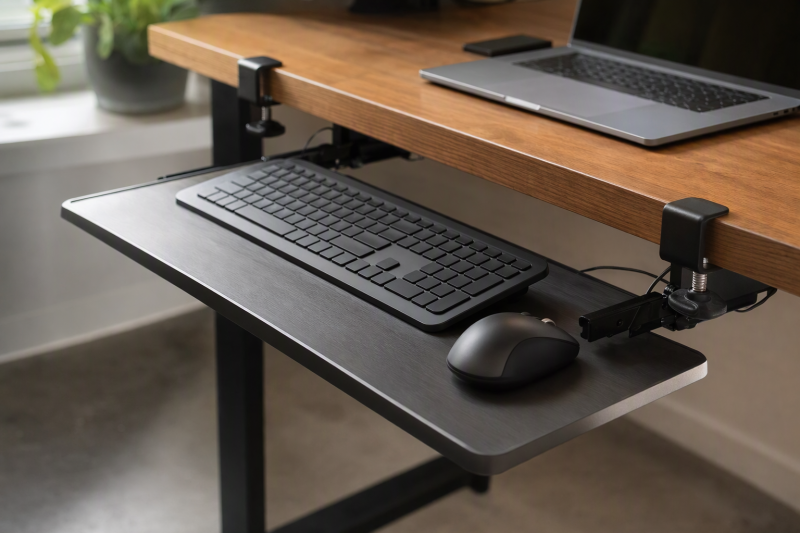
A pull-out keyboard tray can clear desktop space without holes in a desk, but “no drill” does not mean “fits every desk.” The edge thickness, flat clamp contact, underside clearance, and total clamp-to-clamp width decide whether it can attach at all. A desk with a beveled lip or a support rail under the front edge may rule out a tray that otherwise looks ideal.
These six exact Amazon US clamp-on trays include slide-out platforms and one single-clamp rotating model. None was independently installed or tested for typing, so claims of smooth gliding, finish protection and comfort are seller descriptions. For connections to a laptop at a fixed workstation, see our USB-C docking guide. The guide does not decide tray fit.
Measure the full clamp span and the unobstructed underside before buying. Desk thickness alone cannot reveal a support rail or beveled edge.Clamp-On Keyboard Trays Compared
| Image | Product | Details | Check Price |
|---|---|---|---|
 | VIVO MOUNT-KB05E | Tray claim: 26.8 x 11 in Clamp span: 32.5 in total Desk edge: Up to 1.25 in; not beveled Best fit: Full-width slide-out | Check Price on Amazon |
 | XINLEI DSF4 | Tray claim: 25.6 x 11.8 in Clamp span: 30 in total Desk edge: Up to 1.63 in with clamps Best fit: Deeper work surface | Check Price on Amazon |
 | VIVO MOUNT-KB04CB | Tray claim: 22.8 x 9.8 in Clamp span: Single clamp; 32-in rotation clearance Desk edge: Up to 2 in; not lipped/beveled Best fit: Swing-away placement | Check Price on Amazon |
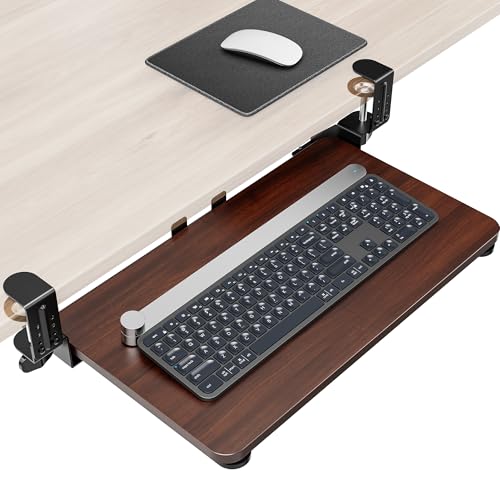 | Zontera compact tray | Tray claim: 20 x 11.8 in Clamp span: 25.9 in total Desk edge: Up to 2.76 in claimed Best fit: Thicker flat desk edge | Check Price on Amazon |
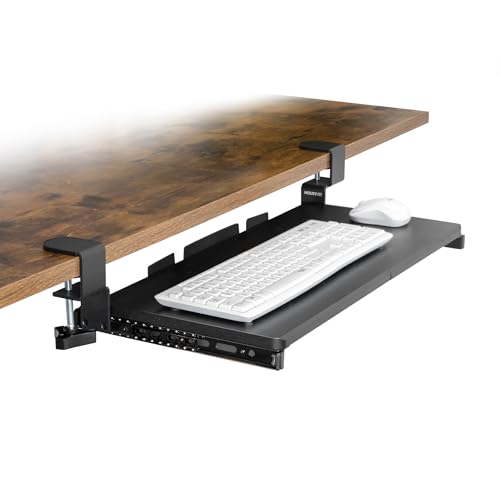 | Mount-It! 24-inch tray | Tray claim: 24 in wide Clamp span: Check current listing Desk edge: Flat 0-1.8 in; 6+ in below Best fit: Compact desk with underside space | Check Price on Amazon |
 | VIVO MOUNT-KB05ES | Tray claim: 20 x 11 in Clamp span: 27 in total Desk edge: Conservative max 2 in; listing conflicts Best fit: Smallest VIVO slider | Check Price on Amazon |
1. VIVO MOUNT-KB05E — Best Full-Width Slider
VIVO lists a 26.8-by-11-inch platform, but its two clamps make the total width 32.5 inches. That extra six inches is a concern on a narrow desk or one with legs near the front corners. VIVO states the tray slides out a maximum of 8.5 inches from the desk edge and supports up to 11 pounds. Measure a full-size keyboard and mouse together. The nominal platform width is not the same as clear mouse space beside the keys.
Its C-clamps require a desktop no thicker than 1.25 inches, and the listing explicitly rules out beveled edges. If your desk has a front skirt, crossbar, or cable tray where the rails would travel, check underside clearance before ordering. Effects on the desk finish and slider feel under a full load were not independently tested. Avoid over-tightening the clamps on a fragile laminate edge.
Our Take Check the MOUNT-KB05E first if you want a wide slider for a flat, thin desktop. Its 1.25-inch edge limit is a hard fit question, not a minor installation detail.
- Platform and overall clamp widths are stated.
- 11-pound limit and 8.5-inch extension are listed.
- Requires a flat edge no thicker than 1.25 inches.
- 32.5-inch total span may crowd small desks.
2. XINLEI DSF4 — Best Deeper Work Surface
The XINLEI tray lists a 25.6-by-11.8-inch platform with a 30-inch total span including clamps. That depth is slightly larger than VIVO’s 11-inch platform and may be useful for a keyboard with a wide palm rest or a mouse. Its rails are described as sliding in up to 12.24 inches and pulling out up to 7.75 inches. A rear baffle is intended to keep the keyboard from moving past the back edge.
The no-drill C-clamp path supports desktops up to a stated 1.63 inches thick. The same listing also describes an optional screw-mount installation. This guide concerns the clamp path only. It notes that thicker desktops leave less keyboard clearance below the top. Measure knee room after accounting for the tray and rail assembly, not just the typing surface. Rail noise and how securely the baffle holds different keyboards were not independently verified.
Our Take Check XINLEI when you need a little more platform depth without a full 32.5-inch clamp span. Confirm that the C-clamp method, not the screw option, fits your desk.
- 11.8-inch depth and 30-inch total span are listed.
- Rear baffle is described.
- Thicker top reduces space beneath the desk.
- Screw-mount alternative can confuse the no-drill fit check.
3. VIVO MOUNT-KB04CB — Best Swing-Away Tray
This VIVO model uses a single clamp and 360-degree rotation rather than a two-clamp sliding rail. The platform is listed as 22.8 by 9.8 inches, sized for a smaller or standard keyboard and mouse. The rotation can move the tray aside when the desk needs to be clear, but it also needs a claimed 32 inches of circular clearance. A wall, drawer unit, or chair arm may block that swing.
The clamp is listed for desks up to 2 inches thick, excluding lipped or beveled edges. Its claimed load is 11 pounds. Check whether a central clamp can grip a sufficiently flat, strong part of your desk. The listed load does not certify a hollow or delicate edge. Typing bounce and the pivot’s holding torque were not independently tested. A USB-C hub on the desk should have enough cable slack not to snag the moving tray.
Rotation needs clear space around the tray, not just enough width at the attachment point.Our Take Choose this rotating VIVO when stowing the tray sideways is more useful than a long sliding platform. Verify the full swing path and the exact clamp contact area.
- Single-clamp rotation is distinct from a slider.
- 2-inch maximum desk-thickness claim is stated.
- 32-inch rotation clearance may not exist near walls.
- Not listed for lipped or beveled desk edges.
4. Zontera Compact Tray — Best Thicker-Edge Claim
Zontera states a 20-by-11.8-inch platform and a total clamp-to-clamp span of 25.9 inches. The compact size could fit a smaller desktop where VIVO’s large model is too wide. Its two C-clamps claim to accept a desk edge as thick as 2.76 inches, the broadest figure among these picks. The slider is said to extend 7.8 inches from the desk edge and includes a rear baffle.
A thicker edge still needs a flat top and underside contact area. A heavy apron or cable channel can block the clamp. The listing calls the pads non-slip and protective of the finish, but desk marks and mechanism stability were not independently tested. Check that a 20-inch platform holds your keyboard and mouse side by side. Compact keyboards are much easier to fit than full-width boards with a number pad.
Our Take Zontera is a practical candidate for a thick, flat-edged small desk. The unusually broad thickness claim deserves a careful check against the current listing and your desk measurements.
- 25.9-inch total span suits narrower desks.
- 2.76-inch maximum thickness is listed.
- Rear baffle is described.
- 20-inch platform may not fit a full keyboard plus mouse.
- Finish protection was not verified.
5. Mount-It! 24-Inch Tray — Best Mid-Size Flat-Edge Fit
Mount-It! describes a 24-inch-wide sliding platform with C-clamps for flat desk edges from 0 to 1.8 inches thick. Its checked listing also requires at least six inches of clearance beneath the desktop. These two numbers are a useful first check before you think about glide quality. The model is not meant for beveled edges or the corner of an L-shaped desk, according to the seller.
The listing says a standard keyboard and mouse can fit, but it does not give the platform depth or total clamp span in the checked bullets. Measure those on the current product page, then compare them with your keyboard and the clear front edge. No-drill clamps avoid holes but can still leave pressure marks on delicate finishes. Quiet sliding and no-wobble descriptions were not independently tested.
Our Take The Mount-It! is a mid-size choice for a measured, flat-edged desk with enough underside space. Its six-inch clearance rule is more decisive than a promise of easy installation.
- Flat-edge thickness and underside clearance are stated.
- 24-inch tray fills a mid-size role.
- Depth and total clamp span need current-listing confirmation.
- Not listed for beveled or L-corner mounting.
6. VIVO MOUNT-KB05ES — Best Small VIVO Slider
The compact VIVO lists a 20-by-11-inch tray and 27-inch total width including clamps. It is another slide-out design, with up to 9.5 inches of claimed extension and an 11-pound support figure. These dimensions suit a small keyboard better than a wide gaming board, especially when a mouse needs to share the tray. The short platform can still extend far enough to place the keyboard in front of the desk edge.
Its listing bullets conflict on maximum desk thickness: one says 2.2 inches, another says 2 inches. Use 2 inches as the conservative ceiling until the current manual or seller confirms otherwise. That conflict is a reason to measure, not to guess. Clamp installation and the 9.5-inch glide were not independently verified. Check the under-desk path for drawers and the front edge for beveling before purchase.
The exact listing gives conflicting maximum desk thicknesses. Treat 2 inches as a conservative screen and verify before buying.Our Take Check the compact VIVO slider when the 27-inch clamp span suits your desk width. Its contradictory thickness figures make a current fit confirmation necessary.
- 20-inch tray and 27-inch total span are given.
- 9.5-inch maximum extension is listed.
- Listing conflicts on 2 versus 2.2-inch desk limit.
- Compact top may restrict mouse movement.
Buying Guide
1. Measure the Entire Clamp Zone
Measure desktop thickness and edge shape at both clamp positions. A stated maximum thickness does not help if the edge is beveled, lipped, rounded, or too fragile to grip. VIVO’s large model allows 1.25 inches. XINLEI lists 1.63 and Mount-It! 1.8, while Zontera claims 2.76. VIVO compact gives conflicting 2- and 2.2-inch figures, so verify before purchase.
Check the full width including clamps, not just the tray. A 26.8-inch VIVO platform occupies 32.5 inches across the desk front, while a 20-inch Zontera takes 25.9. Desk legs, drawer fronts, and cable grommets can interrupt that span. Confirm there is flat contact underneath as well as on top. Clamps can mark some finishes even when the seller calls them protective.
2. Check Knee Clearance and Travel
A keyboard tray lowers your input devices beneath the desk. Measure the gap from your knees to the under-desk rail assembly, including a support apron or drawer. Mount-It! specifically asks for six inches beneath the desktop. A very thick top can use up the clamp’s adjustment range and reduce usable leg room, as XINLEI notes.
Then map how far the tray extends into your sitting space. VIVO’s large slider lists 8.5 inches from the edge, and the compact lists 9.5. A rotating tray needs a clear arc rather than a straight line. Test the desk layout with a tape measure before assuming the chair can still pull close enough for comfortable work.
3. Fit the Keyboard and Cables
Measure keyboard width plus mouse travel on the actual tray, not the product title. A full-size board with number pad can crowd a 20-inch platform, while a compact keyboard may leave room. Check for a front or rear lip that changes usable depth. The stated 11-pound load on some models is a total support claim, not an invitation to lean on the tray.
Leave cable slack through the full slide or rotation and keep power cords out of rail tracks. A short keyboard cable can pull a USB-C hub or laptop toward the desk edge. If you regularly change laptops, route the cable so a disconnect does not require crawling under the desk.
FAQ
Will a clamp-on tray damage my desk?
Not necessarily, but “no drill” only means no mounting holes. Clamp pads can leave pressure marks, and overtightening can crush a weak or hollow edge. No selected tray was mounted here to check a particular desk finish.
Read the desk and tray instructions, avoid a beveled or unsupported edge, and inspect the contact area periodically. If the desk maker forbids clamping accessories, choose a different setup rather than relying on generic no-damage marketing.
Can a clamp tray work with a standing desk?
Possibly. The moving desk must have a flat, accessible front edge and enough room for the tray through its entire height range. Make sure the tray, knees, chair arms, and nearby drawers do not collide at any position. A listed “standing desk compatible” claim cannot confirm your specific frame.
Check cable slack at both lowest and highest settings. A motorized desk can tug a tightly routed keyboard or mouse cable, so test the movement with equipment disconnected before normal use.
Should I choose a rotating tray or a slider?
A slider moves straight in and out and can park the keyboard beneath the desk. A rotating tray can swing to the side, which may help a shared desk, but its arc needs extra free space. VIVO MOUNT-KB04CB claims 32 inches of rotation clearance.
Neither mechanism is automatically more comfortable. Choose by the desk geometry and whether you want a full keyboard and mouse on one surface, then verify the tray height and reach while seated.
Bottom Line
VIVO MOUNT-KB05E is a wide slider for a thin flat edge. Zontera offers a compact top with a much thicker claimed edge range, and VIVO MOUNT-KB04CB is the swing-away alternative. Measure the clamp contact, total span, rail path, and knee room before considering features.