You can move a Bluetooth keyboard between a Mac and an iPhone, but your experience depends on more than pairing. Layouts differ by number pad and phone holder, and four of the six Amazon listings describe switching among three devices. Charging ports differ even within Apple’s own range.
Choose the layout and device-switching method first, then check the keyboard’s system requirements.| Image | Product | Best fit | Layout | Connection | Power | Limit | Check Price |
|---|---|---|---|---|---|---|---|
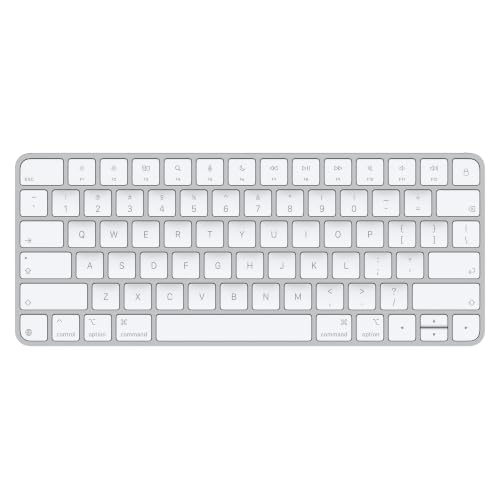 | Apple Magic Keyboard USB-C | Compact Apple desk | Compact, no number pad | Bluetooth | Rechargeable; USB-C | iPhone iOS 14.5 or later | Check Price on Amazon |
 | Apple Magic Keyboard With Numeric Keypad | Extended Apple layout | Number pad and navigation | Bluetooth | Rechargeable; Lightning | Wider; Lightning cable | Check Price on Amazon |
 | Logitech MX Keys S for Mac | Backlit Mac layout | Full-size Mac layout | Bluetooth, up to 3 devices | Rechargeable; USB-C | Maker page names Mac and iPad | Check Price on Amazon |
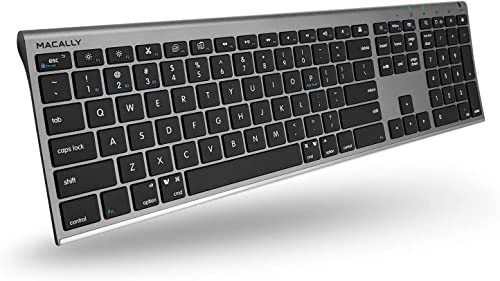 | Macally ACEBTKEYSG | Mac shortcuts and number pad | 110 keys, 20 shortcuts | Bluetooth, up to 3 devices | Rechargeable; USB-C | Full-width layout | Check Price on Amazon |
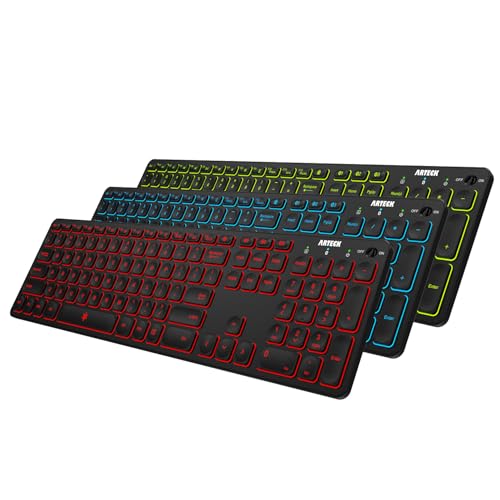 | Arteck HB305-3B | Colored backlighting | Full-size, 7 colors | Bluetooth, up to 3 devices | Rechargeable; USB-C | Battery estimate with lights off | Check Price on Amazon |
 | X9 Performance X9RBBLKBDOCKG | Phone holder on a desk | 110 keys and device dock | Two Bluetooth plus 2.4GHz | Rechargeable; USB-C | Wide, 110-key body | Check Price on Amazon |
1. Apple Magic Keyboard USB-C — Best Compact Apple Layout
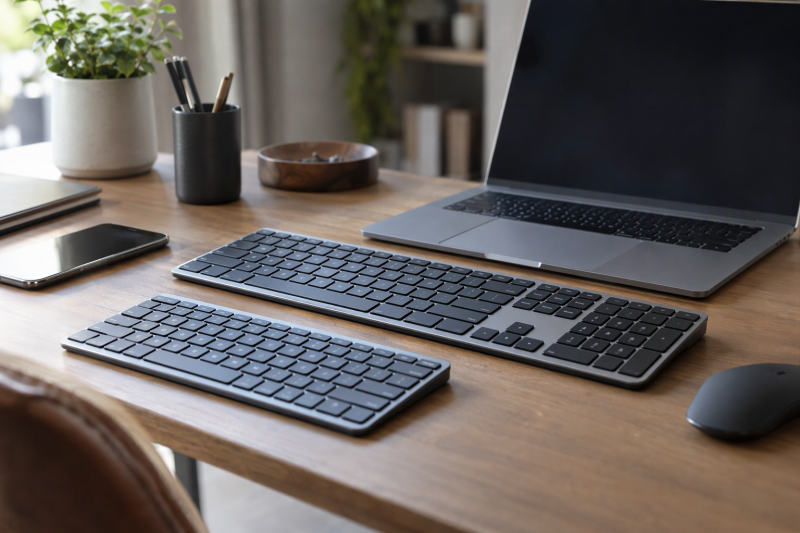
The Apple Magic Keyboard MJLX4LL/A is a compact US English keyboard with USB-C charging. Apple’s page gives it as 10.98 inches wide and 0.53 pound. The Amazon listing describes a rechargeable battery, an included woven USB-C charge cable and automatic pairing with a Mac. If you want a number pad, Apple sells it on a separate model, the Magic Keyboard with Numeric Keypad. Apple’s page gives that model as 16.48 inches wide.
Apple’s page lists Bluetooth and a USB-C port, and its system requirements include iPhone with iOS 14.5 or later and Mac with macOS 15.1 or later. The Amazon listing names Mac and Apple Vision Pro rather than iPhone, so the iPhone support comes from Apple’s page. Apple and the listing both give about a month or more between charges. Apple’s footnote ties the figure to its own testing with a paired Mac and says battery life depends on device settings and usage.
Compatibility: Apple’s page lists iPhone with iOS 14.5 or later for this USB-C model.Our Take Choose the compact Magic Keyboard when you want an Apple layout with USB-C charging and don’t need a separate number pad.
- Both of your devices have a stated minimum. Apple’s page lists iPhone with iOS 14.5 or later and Mac with macOS 15.1 or later.
- Apple’s keyboard takes less desk width, at 10.98 inches wide on Apple’s page, against 16.48 inches on its page for the numeric-keypad model.
- Charging uses USB-C, and Apple’s page lists a USB-C port on the keyboard and a USB-C charging cable in the box.
- On a Mac, the Amazon listing for Apple’s keyboard describes automatic pairing.
- Apple’s page for this model does not list a number pad, and Apple sells one on a separate model.
- Before buying for an iPhone, check Apple’s page. The Amazon listing names Mac and Apple Vision Pro, and iPhone appears only on Apple’s page.
2. Apple Magic Keyboard With Numeric Keypad — Best Extended Apple Layout
According to Apple’s page, the Apple MXCJ3LL/A has an extended layout with a numeric keypad, document-navigation controls and full-size arrow keys. Apple gives it as 16.48 inches wide and 0.86 pound, with Bluetooth and a Lightning port. The Amazon listing says it connects to a Mac, iPad or iPhone via Bluetooth and describes the numeric keypad as suited to spreadsheets and finance applications.
Apple’s page lists a Lightning to USB-A cable in the box, and the Amazon listing says the cable lets you pair and charge by connecting to a USB port on a Mac. Apple’s page lists macOS 10.12.4 or later and iOS 10.3 or later, and the listing adds iPadOS 13.4 or later. Apple’s page and the listing both give about a month or more between charges, and the listing adds that battery life varies by use. Apple lists a different port, USB-C, for the compact Magic Keyboard above.
Charging connector: Apple’s page lists a Lightning port and a Lightning to USB-A cable for this model, not the compact model’s USB-C port.Our Take Pick the extended Magic Keyboard for a compatible Apple setup when the number pad and navigation keys justify the wider layout for you.
- For spreadsheet work, Apple’s page lists a numeric keypad, along with document-navigation controls and full-size arrow keys.
- Apple’s page lists iOS 10.3 or later for this model, and the Amazon listing names Mac, iPad and iPhone as devices it connects to.
- Apple’s page and the Amazon listing both give about a month or more between charges, and the listing adds that battery life varies by use.
- Apple’s page lists a Lightning to USB-A cable in the box, and the Amazon listing says the cable lets you pair and charge from a USB port on a Mac.
- Plan for extra desk width. Apple’s page gives 16.48 inches wide, against 10.98 inches on its page for the compact model.
- Charging takes a Lightning cable here, because Apple’s page lists a Lightning port, where its page for the compact model lists USB-C.
3. Logitech MX Keys S for Mac — Best Backlit Mac Layout
The Logitech MX Keys S for Mac, part number 920-011621 in Space Gray, has a Mac key layout and backlit keys. Logitech’s page describes keys that light up as hands approach and adjust to the room. It also describes spherically dished keys, along with Smart Actions shortcuts and lighting settings through the Logi Options+ app on macOS. The page gives its size as 16.94 inches wide and 28.57 ounces.
Logitech’s page says it pairs with up to three devices over Bluetooth Low Energy and names Mac computers and iPads. The Amazon listing names macOS, iPadOS and iOS, so iPhone support comes from the listing. Logitech gives battery life for its USB-C rechargeable battery as up to 10 days, or up to 5 months with backlighting off. Logitech’s page also says FileVault on a Mac might prevent Bluetooth devices from connecting before login. For Macs with FileVault enabled, Logitech advises its Logi Bolt USB receiver, which is not included.
Our Take Choose MX Keys S for Mac when a backlit Mac layout and switching among Apple devices are more important to you than a compact travel size.
- Logitech’s page lists a Mac key layout for your desk, with matching Apple finishes in Space Gray and Pale Gray.
- To share one keyboard between devices, Logitech’s page lists easy switching among up to three devices.
- How long a charge lasts depends on the backlight. Logitech’s page gives up to 10 days of battery life, or up to 5 months with backlighting off.
- Logitech’s page describes backlit keys that light up as hands approach and adjust to the room around you.
- iPhone owners have less to go on. Logitech’s page names Mac computers and iPads for switching, and iPhone support appears only in the Amazon listing’s iOS wording.
- Measure a small desk first, because Logitech’s page gives 16.94 inches wide, against 10.98 inches on Apple’s page for the compact Magic Keyboard.
- If your Mac uses FileVault, Logitech’s page says it might prevent a Bluetooth connection before login.
4. Macally ACEBTKEYSG — Best Full-Size Mac Shortcuts
The Macally ACEBTKEYSG is a full-size Bluetooth keyboard with 110 scissor keys, a numeric keypad and 20 Mac shortcuts. The Amazon listing describes an aluminum body with thin black keys, and Macally’s page names Mac, iPad and iPhone for its three-device switching.
Macally’s page and the Amazon listing both give up to three months between charges at an average of three hours of use a day, with a one-hour recharge. Macally’s page describes plugging in USB-C to keep typing. The Amazon listing says the keyboard works with Mac, PC, iOS and Android, and its three-device example names a smart TV, laptop and tablet.
Our Take Consider the Macally keyboard for a full-size Mac desk setup with a number pad and quick switching among three devices.
- For number entry and Mac shortcuts, Macally’s page lists a 110-key layout with a numeric keypad and 20 Mac shortcuts.
- For a shared Mac and iPhone setup, Macally’s page names Mac, iPad and iPhone for three-device switching.
- At three hours of daily use, Macally’s page and the Amazon listing both give up to three months between charges.
- When the battery runs down, Macally’s page describes plugging in USB-C to keep typing.
- Before relying on Macally’s three-month estimate, compare your hours with the three hours of daily use it assumes.
- Check support first for an older Mac or iPhone. Macally’s page and the Amazon listing do not list a minimum iOS or macOS version.
5. Arteck HB305-3B — Best Color Backlighting
The Arteck HB305-3B Amazon listing describes a full-size Bluetooth keyboard with seven backlight colors and two brightness levels, plus an auto sleep feature. Its title names Windows, iOS, iPad OS and Android, and its compatibility bullet adds Mac OS and iPhone.
The listing says the keyboard connects to three devices at once and switches among them with a single key click. Its rechargeable battery is listed for up to six months based on two hours of daily use with the backlight off, and the package contents list a USB-C charging cable. The Amazon listing gives the size as 16.7 inches long by 4.5 inches wide.
Our Take Choose the Arteck when adjustable colored lighting and a full-size multi-device layout suit both your Mac desk and your iPhone use.
- You get a choice of lighting, with seven backlight colors and two brightness levels described in Arteck’s Amazon listing.
- For a Mac and iPhone pair, Arteck’s Amazon listing names Mac OS and iPhone among compatible systems and devices.
- For moving between devices, Arteck’s Amazon listing says it switches among three devices with a single key click.
- Arteck’s package contents list a USB-C charging cable for the rechargeable battery.
- If you type with the lights on, note that Arteck’s six-month estimate assumes the backlight is off.
- Check the key legends if you want a Mac layout. Arteck’s Amazon listing does not state a Mac-specific key layout.
6. X9 Performance X9RBBLKBDOCKG — Best Built-In Phone Holder
The X9 Performance keyboard has a full-size 110-key layout and a phone or tablet dock. The Amazon listing names iPad, iPhone, Android, Windows and Mac devices. It also describes white backlighting with three brightness levels and quiet scissor keys. X9’s page describes an extra-long dock that holds a phone or tablet upright, and its manuals index lists the model as X9RBBLKBDOCKG/S.
The Amazon listing describes dual Bluetooth plus 2.4GHz wireless for up to three devices, and a 1000 mAh battery with USB-C charging. X9’s FAQ also gives three devices, but another section of its page says up to 4, and the page lists Bluetooth 5.0, 2.4GHz and USB wired modes. X9’s page describes battery life as weeks on a single charge.
Our Take Pick X9 Performance when you want a built-in phone holder, a number pad and backlighting on one keyboard.
- X9’s page describes an extra-long dock that holds a phone or tablet upright while you type.
- Number entry has its own keys, since X9’s Amazon listing describes a 110-key layout with a number pad.
- For a choice of light levels, X9’s Amazon listing describes white backlighting with three brightness levels.
- Mac and iPhone owners find both named among compatible devices in X9’s Amazon listing.
- Confirm the device count if you need a fourth connection. X9’s page says up to 4 devices in one section and three in its FAQ, while the Amazon listing says three.
- For Mac or iPhone support, go by the Amazon listing. X9’s page does not name Mac or iPhone, and the listing does.
- Measure a large tablet before counting on the dock. X9’s page says the dock holds phones and tablets of virtually any size in one section and smartphones and smaller tablets in its FAQ.
Buying Guide: Bluetooth Keyboards for Apple Devices
Choose the layout
A compact layout keeps the keyboard narrower. Apple’s page gives the USB-C Magic Keyboard as 10.98 inches wide, against 16.48 inches on Apple’s page for the numeric-keypad model.
A numeric keypad adds width, and Apple’s page describes its keypad as suited to spreadsheets and finance applications. Apple’s numeric-keypad page, the Macally page and the X9 listing each list a number pad, so check their key legends as well as the space available.
Check device switching
The Amazon listings for Logitech, Macally, Arteck and X9 each describe up to three paired devices. Logitech’s page names Mac computers and iPads for that switching, and Macally’s page names Mac, iPad and iPhone.
Apple’s pages for both Magic Keyboard models list Bluetooth, and neither Apple’s pages nor the Amazon listings state three-device switching for them. Before treating all Bluetooth keyboards as equivalent, check that the way a keyboard pairs suits you. For more models, see our multi-device Bluetooth keyboard picks.
Match iPhone and Mac requirements
Apple’s page for the compact USB-C Magic Keyboard lists iPhone with iOS 14.5 or later and Mac with macOS 15.1 or later. Apple’s page for the numeric-keypad model lists macOS 10.12.4 or later and iOS 10.3 or later.
Logitech‘s page names Mac computers and iPads, while the Amazon listings for Logitech, Arteck and X9 name iOS or iPhone. Arteck’s and X9’s listings also name Windows and Android, so check Mac and iPhone compatibility and key behavior on the exact devices rather than assuming every shortcut transfers unchanged.
Compare charging and lighting
Apple’s page for the numeric-keypad model lists a Lightning port. For the other five, Apple’s, Logitech’s and Macally‘s pages and the Arteck and X9 Amazon listings name USB-C.
Battery figures carry conditions. Logitech‘s page gives up to 10 days, or up to 5 months with backlighting off. Arteck‘s listing gives six months at two hours of daily use with the backlight off, and Macally’s page gives up to three months at three hours of daily use.
Consider the phone position
X9’s page describes an extra-long built-in dock that holds a phone or tablet upright, and its FAQ names smartphones and smaller tablets.
Without a dock, a separate stand can hold the iPhone where you prefer. The Amazon listing gives the full-size X9 layout as 17.33 inches long, against 10.98 inches wide on Apple’s page for the compact Magic Keyboard, so measure both the desk and travel bag.
Frequently Asked Questions
Can one Bluetooth keyboard work with both a Mac and an iPhone?
Yes, if the keyboard’s maker or listing names support for the Mac and iPhone and both meet its system requirements. Apple’s page for the compact USB-C Magic Keyboard names both, with iOS 14.5 or later and macOS 15.1 or later.
The Amazon listings for Logitech and Macally describe switching among three paired devices. Apple’s pages for the two Magic Keyboard models do not state a way to switch between devices.
Does every keyboard switch between devices with one key?
No. Bluetooth compatibility alone does not establish multi-device switching. Look for a specific device-switching feature and the number of connections it supports.
The Logitech MX Keys S for Mac and Macally ACEBTKEYSG pages describe up to three devices, and the Arteck listing describes a single key click. Apple’s pages for both Magic Keyboard models do not state the same kind of switching.
Do I need a numeric keypad for an iPhone?
No. Apple’s page lists iPhone support for the compact USB-C Magic Keyboard, and the same page does not list a number pad. Your choice depends on the work you do and how much space you have.
Apple’s page describes the numeric keypad on its extended model as suited to spreadsheets and finance applications. The X9 listing describes a 110-key layout with a number pad, and X9’s page adds a phone dock.
Are both Apple keyboards charged with USB-C?
No. Apple’s page for the compact Magic Keyboard lists a USB-C port, while its page for the numeric-keypad model lists a Lightning port and a Lightning to USB-A cable.
Apple sells different configurations, so check the exact model and included cable rather than relying only on the Magic Keyboard name.
Does backlighting change battery life?
It can. Logitech‘s page gives up to 10 days, or up to 5 months with backlighting off, and the Arteck listing’s six-month figure assumes the backlight is off and two hours of use each day.
The X9 listing also describes backlighting and does not state a battery figure with it on or off. When you compare battery figures, check each product’s stated conditions and charging method.
How We Compared
For backlit models beyond these six, see our guide to backlit wireless keyboards.