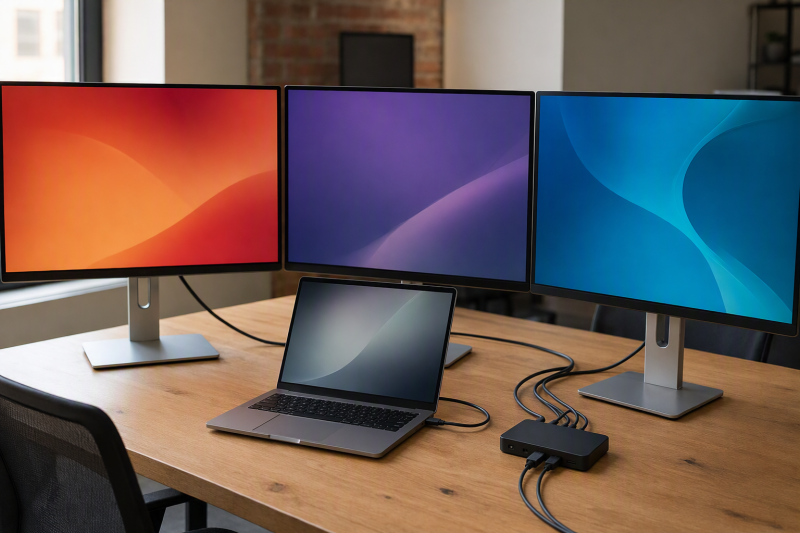
Our best DisplayLink dock for a triple-monitor Windows desk is the Plugable UD-6950PDZ, and the reason is that its topology is explicit: one display group uses the host’s native DP Alt Mode, while two groups use DisplayLink DL-6950 USB graphics. Knowing that split tells you what the laptop must supply and which screens depend on software. The StarTech 116N-USBC-DOCK follows the same broad native-plus-virtual idea with a different port layout, and Anker is the higher-power choice. Our full DisplayLink docking-station guide covers Mac, ChromeOS, dual-display, and travel decisions too.
Three sockets do not guarantee three extended displays. What settles it is the manufacturer’s simultaneous matrix, Windows version, DisplayLink driver, administrator policy, native-video requirement, cable, and each monitor. DisplayLink sends display data over USB through software; it is not another native GPU output. Do not infer protected-content support, color behavior, gaming, editing, high refresh, or a mode that the exact product table does not publish.
Quick picks
- Plugable UD-6950PDZ: Best overall hybrid triple-display office dock.
- StarTech 116N-USBC-DOCK: Best hybrid dock for mixed-device IT standardization.
- Anker Prime DL7400 A83B3: Best triple-output choice with a conditional up-to-140W host path.
- Plugable UD-3900PDZ: Best value setup when one 4K screen plus two lower-resolution screens is acceptable.
- Targus QV4K DOCK570USZ: Best enterprise dock when a fourth display may be added later.
Compare triple-monitor DisplayLink docks for Windows
| Image | Product | Details | Check Price |
|---|---|---|---|
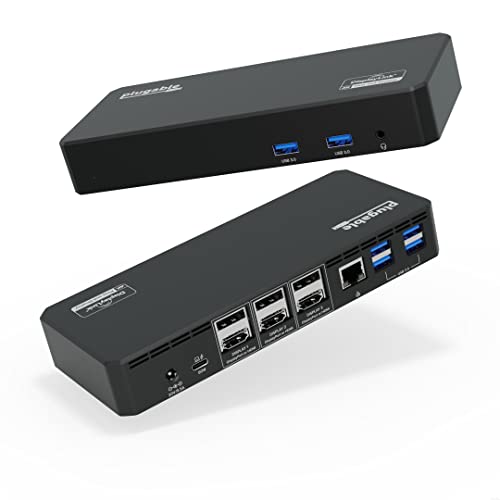 | Plugable UD-6950PDZ | Display topology: 1 native DP Alt Mode group + 2 DisplayLink groups three-display modes: Up to triple 4K60 under exact conditions Windows/host check: Windows 10/11; DP Alt Mode required for native group Laptop charging: Up to 100W negotiated USB-C PD Hard limitation: DP 1.2 limits native group to 4K30 | Check Price on Amazon |
 | StarTech 116N-USBC-DOCK | Display topology: 2 DisplayLink HDMI/DP groups + 1 native HDMI three-display modes: DL groups up to 4096x2160 60Hz; native up to 30Hz Windows/host check: USB-C DP Alt Mode and PD required for full function Laptop charging: 100W through included adapter; negotiated Hard limitation: Hybrid paths must not be relabeled | Check Price on Amazon |
 | Anker Prime DL7400 A83B3 | Display topology: DisplayLink DL7400; 1 DP 1.4 + 2 HDMI 2.1 three-display modes: Three outputs; complete simultaneous matrix not stated Windows/host check: Windows 10/11; latest DisplayLink driver Laptop charging: Up to 140W under Anker's PD 3.1/front-port rule Hard limitation: Do not promote catalog triple-4K as maker matrix | Check Price on Amazon |
 | Plugable UD-3900PDZ | Display topology: 1 native HDMI + 2 DisplayLink HDMI three-display modes: Native 4K30; DL outputs up to 1920x1200 60Hz Windows/host check: Host video + DisplayLink software required Laptop charging: Up to 100W negotiated USB-C PD Hard limitation: DisplayLink outputs do not support HDCP | Check Price on Amazon |
 | Targus QV4K DOCK570USZ | Display topology: Dual DisplayLink DL-6910; 4 outputs available three-display modes: Use exact Targus subset; no inferred triple mode Windows/host check: USB 3.2 Gen 1; DisplayLink software Laptop charging: Up to 100W PD 2.0 on compatible USB-C Hard limitation: Use conservative 4K50 HDMI wording | Check Price on Amazon |
1. Plugable UD-6950PDZ — best overall hybrid triple-display office dock

Plugable divides the video system into three groups, each selectable as HDMI or DisplayPort. Group 1 is native DP Alt Mode. Groups 2 and 3 use DisplayLink DL-6950 and require DisplayLink software. Plugable advertises up to three 4K60 displays when the host, software, cable, and monitors meet its matrix, and Windows 10 and 11 sit in the official scope.
Your laptop decides what the native group does. A DP 1.4 host path is required for 4K60 there, while DP 1.2 limits that group to 4K30. The two DisplayLink groups list HDCP as unsupported. Managed Windows systems may need administrator approval even when the driver would normally install automatically. Plugable positions this class for office and web use and warns that graphics applications, full-screen video, video editing, and games may not behave as expected.
Our Take
Choose the UD-6950PDZ when the Windows laptop brings the required native DP Alt Mode path and two software displays suit the workload. Its explicit hybrid diagram makes qualifying it far easier than qualifying a vague triple-output dock.
- Clear one-native plus two-DisplayLink topology
- Three HDMI-or-DisplayPort output groups
- Plugable specifies six USB-A ports, Gigabit Ethernet, and up to 100W charging
- Native group depends on host DP version
- DisplayLink output groups do not support HDCP
2. StarTech 116N-USBC-DOCK — best hybrid IT-standardization dock
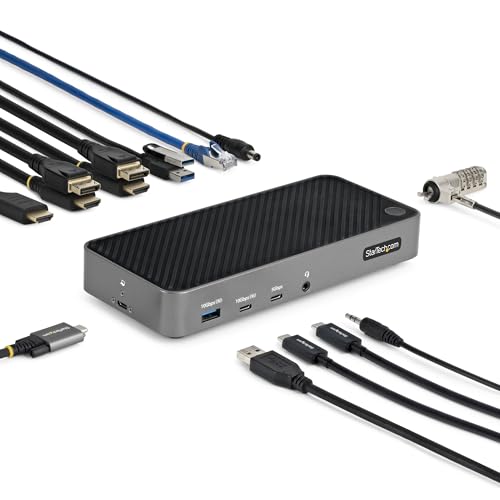
StarTech documents two DisplayLink DL-6950 output groups, each selectable as HDMI 2.0 or DisplayPort 1.2 and rated up to 4096 x 2160 at 60Hz. A third HDMI output uses the host’s native DP Alt Mode and is rated up to 4096 x 2160 at 30Hz. For an IT team, that layout is useful precisely because the software and native roles stay fixed even when monitor connector types vary across the fleet.
Full operation requires a USB-C host with DP Alt Mode and USB Power Delivery. StarTech lists Windows 7 through 11, including Windows 11 ARM, though deployment still needs the compatible DisplayLink software and whatever administrator approval the organization requires. The 100W charging path through the included adapter is subject to USB PD negotiation. StarTech’s GPU-agnostic wording does not remove the native output’s DP Alt Mode requirement.
Our Take
Pick the 116N-USBC-DOCK when a mixed Windows fleet needs an exact hybrid layout and the native third screen can live with its retained 30Hz ceiling. Where all three screens must use the same 4K60 mode, it is the wrong dock.
- Two selectable HDMI/DP DisplayLink groups
- Separate native HDMI route
- USB, Gigabit Ethernet, audio, and 100W PD role
- Native output tops out at the retained 4K30 ceiling
- DP Alt Mode is required for full function
3. Anker Prime DL7400 A83B3 — best high-power triple-output dock
Anker documents DisplayLink DL7400, one DisplayPort 1.4 output, two HDMI 2.1 outputs, three downstream USB-C ports, three USB-A ports, 2.5GbE, audio, SD, and TF, with Windows 10 and 11 in the exact manufacturer scope. What earns it third place on a power-hungry Windows desk is the up-to-140W host path.
Here is the gap to close before ordering. The captured manufacturer record confirms three display outputs and per-port maxima, and it does not preserve a complete simultaneous three-display matrix. Amazon’s triple-4K60 catalog wording cannot be promoted into manufacturer-verified scope, so confirm the exact Anker simultaneous table for the three screens. The 140W path also requires a USB PD 3.1 laptop and no more than one device connected to the front USB-C ports.
Our Take
Choose Anker for a triple-output DisplayLink desk with a qualified high-power laptop, and verify the simultaneous mode before buying. The catalog headline is not the matrix.
- One DP and two HDMI outputs
- 2.5GbE and broad USB expansion
- Conditional up-to-140W host path
- Complete simultaneous matrix is not frozen
- 140W requires Anker’s exact PD/front-port conditions
4. Plugable UD-3900PDZ — best mixed-resolution value setup
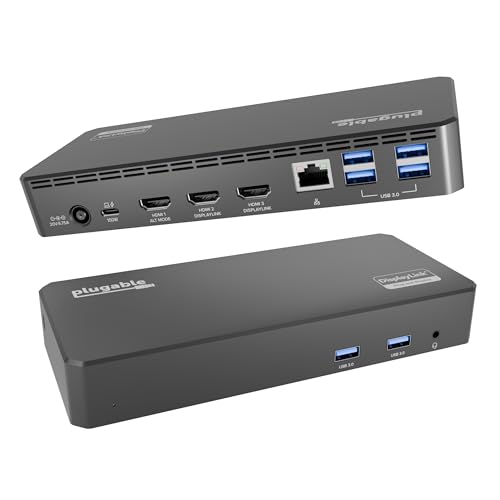
Plugable documents one native HDMI output through DP Alt Mode up to 3840 x 2160 at 30Hz, plus two DisplayLink DL-3900 HDMI outputs up to 1920 x 1200 at 60Hz. Picture a main 4K productivity screen with two secondary panels holding email, chat, dashboards, or documents, and the mixed layout starts to make sense.
Without DisplayLink software, only the native HDMI works. The USB-C host must provide video output and the correct data path, and managed Windows systems may need driver approval. The two DisplayLink outputs do not support HDCP. Plugable also retains office/web positioning and cautions against graphics-heavy, full-screen-video, editing, and gaming use. Host charging is up to 100W under USB PD negotiation.
Our Take
Buy the UD-3900PDZ when mixed monitor resolutions work for you and cost or simplicity outranks three matching 4K panels. Its limits are stated clearly enough to plan around.
- Explicit native plus two-DisplayLink layout
- Plugable includes six USB-A ports and Gigabit Ethernet
- Up to 100W negotiated charging
- Secondary displays use lower retained ceilings
- DisplayLink outputs do not support HDCP
5. Targus QV4K DOCK570USZ — best enterprise dock with fourth-screen headroom
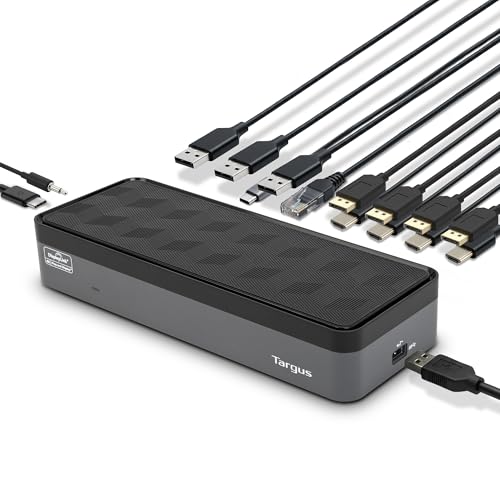
Targus uses two DisplayLink DL-6910 chips and supports four active outputs across four DisplayPort and four HDMI sockets. That lets a triple-monitor buyer run a qualified three-output subset today while keeping a manufacturer-documented fourth path in reserve. The dock also includes four USB-A ports, one USB-C port, Gigabit Ethernet, audio, and up to 100W PD 2.0 for compatible USB-C hosts.
Work from the exact Targus output matrix rather than inventing a three-screen mode out of its four-screen ceiling. Targus publishes four DisplayPort displays at 4K60 or four HDMI displays at a conservative 4K50; later marketing conflicts by saying HDMI 4K60. Keep 4K50 for the HDMI ceiling until Targus clarifies. USB-A hosts can use the included adapter but cannot receive USB-C laptop charging.
Our Take
Choose Targus when a managed Windows desk may grow from three screens to four. For a fixed three-screen requirement, it is larger and more complex than the job needs.
- Four manufacturer-documented active outputs
- HDMI and DisplayPort connector choices
- Enterprise I/O and up to 100W USB-C charging
- Exact three-output subset must be checked
- Conflicting HDMI wording requires conservative 4K50 use
Build the Windows display map first
Label each screen native or DisplayLink
UD-6950PDZ, 116N-USBC-DOCK, and UD-3900PDZ are hybrids: their native output depends on host video capability, while the other outputs depend on DisplayLink software. Anker and Targus have their own DisplayLink matrices. Before counting connectors, write the technology beside each screen on your plan.
Plan driver deployment
Treat DisplayLink software as part of the system, not an afterthought. Windows often installs Plugable’s driver automatically, though managed computers can require administrator approval, software packaging, or a security exception. Confirm corporate policy before buying hardware for many desks, because a dock that cannot receive its approved driver cannot deliver its DisplayLink screens.
Use exact simultaneous modes
An individual HDMI or DisplayPort maximum is never a triple-monitor result. All three screens have to appear together in one manufacturer table, with resolution, refresh, connector group, host mode, cable, and monitor input all accounted for. The dual-monitor docking guide explains the same socket-versus-stream distinction at a smaller scale.
Keep workload and protected-content limits path specific
Plugable explicitly limits the DisplayLink paths described above for HDCP and graphics-heavy uses. Do not stretch one product warning across every DisplayLink device, and do not bury it on the model it applies to. Where protected video, software color calibration, latency-sensitive graphics, or a validated capture chain is mandatory, a native path is the safer route.
Check charging and desk I/O separately
All five frozen products have retained USB-C host-charging paths, and every one of those ceilings is negotiated. USB-A host connections do not charge the laptop at all. Once the three-display path qualifies, compare USB count, Ethernet class, audio, cards, charger, cable, and dock budget. Our USB-C dock guide covers general I/O-first selection.
For monitor-side buying questions, see how to choose a computer monitor.
Final recommendation
The Plugable UD-6950PDZ is the best overall triple-monitor Windows dock because its one-native plus two-DisplayLink topology is explicit. After that, one requirement picks each alternative: StarTech for a similar hybrid IT role, Anker for conditional high-power charging, UD-3900PDZ for one 4K plus two lower-resolution screens, Targus for a future fourth display. Whichever you choose, driver policy, exact simultaneous modes, native host video, cables, monitors, workload, and power negotiation remain part of the purchase.