The Short Version
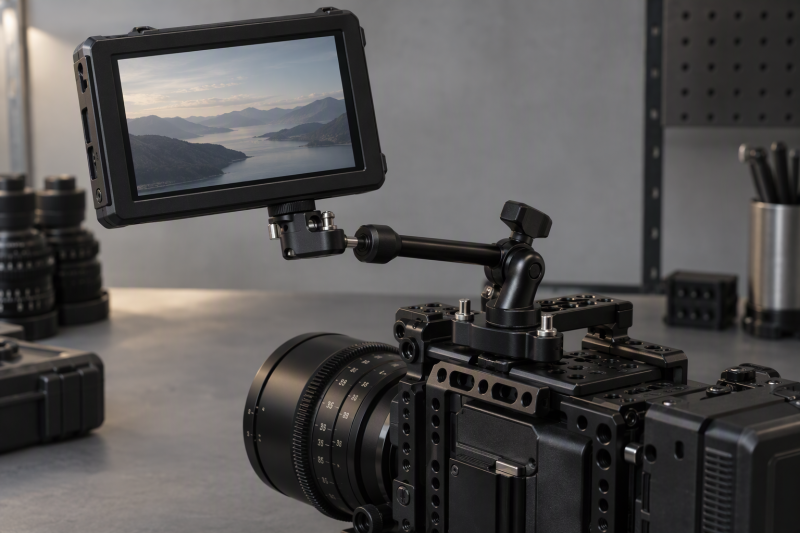
An ARRI locating-pin arm gives a monitor, light, or recorder a more positive connection than a plain friction arm that relies on one screw alone. The pins engage the matching holes around an ARRI-style locating point, reducing rotation at the accessory connection. Less rotation helps when a field monitor changes angle, a cable pulls lightly, or an accessory needs to stay level through a shoot.
Choose the SmallRig Articulating Magic Arm when the 12 lb / 5.5 kg stated load is the deciding figure. The NEEWER ST16C combines an 11-inch arm with a super clamp, while the SmallRig 4899 gives a compact 7-inch rosette design with a stated 3.5 kg load.
These are articulated accessory arms, not desktop monitor arms. They position field monitors, lights, microphones, cameras, and other cage-mounted equipment. The best fit depends on whether the rig already has a clamp, the required arm reach, the exact ARRI-compatible receiving hole, and the stated load for the equipment that will actually hang from it.
Quick Picks
- Best highest stated load: SmallRig Articulating Magic Arm for a stated 12 lb / 5.5 kg capacity.
- Best 11-inch arm with included clamp: NEEWER ST16C for a 28 cm rosette arm and super clamp.
- Best 7-inch rosette arm: SmallRig 4899 for a stated 3.5 kg capacity.
- Best 7-inch arm with included clamp: NEEWER ST07C for a 2 kg clamp-mounted rig.
- Best 11-inch SmallRig reach: SmallRig 4900 for a stated 3 kg load.
- Best clamp-ready 7-inch arm: NEEWER ST07 for a 2 kg arm when you already own the clamp.
How We Picked
Each retained product is an articulated arm with stated ARRI anti-twist locating hardware rather than a fixed adapter or a 1/4-inch-only arm. The six choices cover 7-inch and 11-inch reach, rosette or ball-head adjustment, and both included-clamp and clamp-ready options. Load figures range from 2 kg to 5.5 kg, so the list gives a placement decision rather than several duplicate arms.
An articulated monitor arm also connects to a larger camera rig. It may sit beside a camera monitor arm guide, external SSD, wireless lavalier system, USB microphone, phone tripod, or creator shoulder bag. Its arm length and clamp location should not interfere with those devices or their cables.
Comparison Table
| Image | Product | Details | Check Price |
|---|---|---|---|
 | SmallRig Articulating Magic Arm | Best fit: Highest stated load in a compact arm Length: Not stated ARRI hardware: 3/8-16 screw with retractable pins Stated load: 12 lb / 5.5 kg | Check Price on Amazon |
 | NEEWER ST16C | Best fit: 11-inch arm with included clamp Length: 11 inches / 28 cm ARRI hardware: 1/4-inch screws with locating pins Stated load: 4.4 lb / 2 kg | Check Price on Amazon |
 | SmallRig 4899 | Best fit: 7-inch rosette arm Length: 7 inches ARRI hardware: 3/8-16 locating screw Stated load: 3.5 kg | Check Price on Amazon |
 | NEEWER ST07C | Best fit: 7-inch arm with included clamp Length: 7 inches / 18 cm ARRI hardware: Retractable ARRI locating pins Stated load: 4.4 lb / 2 kg | Check Price on Amazon |
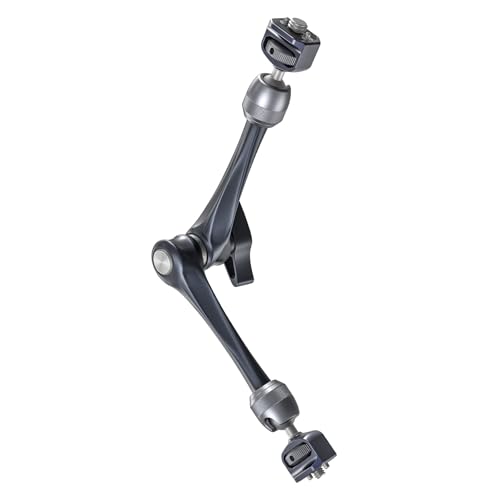 | SmallRig 4900 | Best fit: 11-inch rosette arm Length: 11 inches ARRI hardware: 3/8-16 locating screw Stated load: 3 kg | Check Price on Amazon |
 | NEEWER ST07 | Best fit: 7-inch clamp-ready arm Length: 7 inches / 18 cm ARRI hardware: Retractable locating pins Stated load: 4.4 lb / 2 kg | Check Price on Amazon |
1. SmallRig Articulating Magic Arm — Best Highest Stated Load
SmallRig’s articulating magic arm is the load-focused choice for a buyer who needs stated capacity before optimizing for a particular arm length. It uses dual ball heads with an ARRI 3/8-16 locating screw and a 1/4-20 screw, with retractable locating pins at each end. The listing gives a 12 lb / 5.5 kg capacity and a very low 90 g product weight, so the arm adds little weight to a monitor, light, recorder, or other accessory.
You adjust both ball-head positions with the thumb lever, and a small magnetic wrench sits at the base for tightening. Retractable pins are useful because the arm can use compatible ARRI locating holes when available, and the pins retract for threaded locations that do not accept them. Buyers should still treat the 12 lb figure as a limit for a static accessory setup, not a reason to add a heavy camera during aggressive movement.
Pros
- The stated 12 lb / 5.5 kg load is the highest figure among the six retained articulated arms.
- ARRI 3/8-16 hardware and retractable pins support anti-twist attachment to compatible cage accessories.
- At a stated 90 g, the arm adds little carry weight to a compact camera rig.
- Dual ball heads and one thumb lever provide broad angle adjustment without a multi-knob arm.
Cons
- No stated arm length makes it less direct to compare reach against the 7-inch and 11-inch models.
- A 12 lb rating still requires cautious use with an accessory’s own mounting points and cables.
2. NEEWER ST16C — Best 11-inch Arm With Included Clamp
The NEEWER ST16C is the convenient complete choice when the arm must grab a rod, table, pole, or cage without a separately purchased clamp. Its 11-inch / 28 cm rosette arm connects two arm sections through a 360-degree friction gear joint, while each joint includes a ball head with a U notch for 360-degree rotation and 90-degree tilt. The included super clamp expands the attachment choices beyond a camera cage.
The arm uses 1/4-inch screws with anti-twist locating pins for ARRI-standard positions and has a stated 4.4 lb / 2 kg maximum load. Silicone pads reduce slipping and surface contact. It is a good length for placing a field monitor clear of a cage, though that same reach can increase turning force when a heavy display sits far from the clamp.
Pros
- The included super clamp attaches the 11-inch / 28 cm arm to rods, tables, poles, or cage hardware.
- ARRI anti-twist locating pins and silicone pads help reduce accessory rotation and vibration at the connection.
- U-notch ball heads allow 360-degree rotation and 90-degree tilt for monitor or light placement.
- A stated 4.4 lb / 2 kg load gives a clear boundary for compatible field-monitor accessories.
Cons
- The 11-inch reach creates more turning force than a short arm when a monitor is placed at its far end.
- Its stated 2 kg limit is lower than the figures on the SmallRig 4899 and the other SmallRig arms on this page.
3. SmallRig 4899 — Best 7-inch Rosette Arm
SmallRig 4899 is the compact rosette-arm choice for a monitor, LED light, or microphone that should stay close to the cage. Its 7-inch body uses a 1/4-20 screw and a 3/8-16 locating screw for ARRI, with anti-twist pins and silicone pads on both ends. The rosette gear joint and ball-head arrangement provide adjustment while keeping the arm shorter than 11-inch alternatives.
SmallRig states a 3.5 kg maximum load and uses spiral ball-head surfaces for additional friction. Stainless-steel gear joints with springs are intended to give smoother angle changes, and the hand-screw knob locks the arm and ball head together. This arm is the better match when the rig needs stable close placement rather than the broad reach of the ST16C or SmallRig 4900.
Pros
- The compact 7-inch arm keeps a monitor or light closer to the cage for a less extended profile.
- A stated 3.5 kg load exceeds the 2 kg figures on the NEEWER arms.
- The 3/8-16 ARRI locating screw gives a direct anti-twist connection for compatible accessories.
- Silicone pads and anti-twist pins protect contact surfaces while helping resist rotation.
Cons
- The 7-inch length offers less clearance around a large lens, handle, or tall camera body.
- No super clamp is included, so the buyer needs a compatible cage, tripod, or separate mount point.
4. NEEWER ST07C — Best 7-inch Arm With Included Clamp
The NEEWER ST07C is the short complete-arm option for a buyer who needs a clamp in the box but does not need an 11-inch extension. Its 7-inch / 18 cm rosette arm has a 360-degree friction gear joint, dual ball heads, a U notch for 90-degree tilt, and a super clamp. The clamp can attach to rods, poles, tables, cages, tripods, or other compatible rig points.
The arm has 1/4-inch screws with retractable ARRI locating pins, non-slip silicone pads, and a stated 4.4 lb / 2 kg limit. The short length keeps a monitor close to the support, which can be helpful for compact handheld rigs. It is not the answer when the monitor must reach around a top handle or away from the lens area.
Pros
- The 7-inch / 18 cm arm and included super clamp create a compact ready-to-mount package.
- Retractable ARRI locating pins help prevent rotation on compatible accessory mounting points.
- Dual ball heads provide 360-degree rotation and 90-degree tilt for detailed monitor adjustment.
- The stated 4.4 lb / 2 kg limit suits many small monitors, lights, microphones, and phone holders.
Cons
- The 7-inch reach may not clear a large rig, lens-control motor, or tall top handle.
- Its stated 2 kg capacity is lower than the 3.5 kg SmallRig 4899 rating.
5. SmallRig 4900 — Best 11-inch Rosette Arm
SmallRig 4900 provides 11-inch rosette-arm reach for buyers who want a longer SmallRig design without a bundled clamp. It uses the same 1/4-20 and ARRI 3/8-16 locating-screw approach as the 4899, with anti-twist pins and silicone pads at both ends. Its stated capacity is 3 kg, which is more listed load than the 2 kg NEEWER models, and its reach is longer than the short arms on this page.
Stainless-steel gear joints, springs, and a hand-screw knob handle the adjustment and lock. The longer arm can carry a monitor farther from the cage, but you should position it deliberately to avoid adding turning force at the mount. Choose it when the existing cage has an appropriate mounting point and 11 inches solves a clearance problem.
Pros
- The 11-inch length creates more monitor and light placement clearance than the 7-inch arms.
- A stated 3 kg capacity exceeds the 2 kg figures on the NEEWER ST16C, ST07C, and ST07.
- ARRI 3/8-16 locating hardware and anti-twist pins support compatible cage accessories securely.
- Spring-equipped stainless-steel gear joints are intended to make angle changes smoother before locking.
Cons
- No super clamp is included, so the buyer must already have a secure compatible mounting position.
- The longer 11-inch arm needs careful positioning to avoid unnecessary turning force from a heavy monitor.
6. NEEWER ST07 — Best Clamp-Ready 7-inch Arm
The NEEWER ST07 is for a buyer who already owns the right super clamp, cage, or tripod connection and wants a compact arm only. Its 7-inch / 18 cm two-arm design uses a 360-degree friction gear joint and dual ball heads with U notches. The listed 4.4 lb / 2 kg load makes it appropriate for a controlled field-monitor, light, microphone, phone-holder, or action-camera accessory setup.
Its 1/4-inch mounting screws use retractable anti-twist locating pins for ARRI-standard positions and silicone pads to help reduce vibration. The clamp is explicitly not included, which avoids paying twice when a rig already has one. It is a poor choice for a buyer who needs a complete table or rod connection from the start.
Pros
- A 7-inch / 18 cm arm keeps an accessory close to the cage while retaining multi-angle adjustment.
- Retractable ARRI locating pins and silicone pads help resist rotation on compatible 1/4-inch mounting points.
- The stated 4.4 lb / 2 kg capacity matches the clamp-equipped NEEWER alternatives.
- Omitting the clamp can reduce redundant hardware when a suitable clamp is already on the rig.
Cons
- A super clamp is not included, so a first-time buyer must supply a secure attachment point.
- The 7-inch reach is less useful when a monitor needs to clear a large camera body or top handle.
Buying Guide: How to Choose an ARRI Locating-Pin Monitor Arm
Confirm the Receiving Hole Before Choosing the Arm
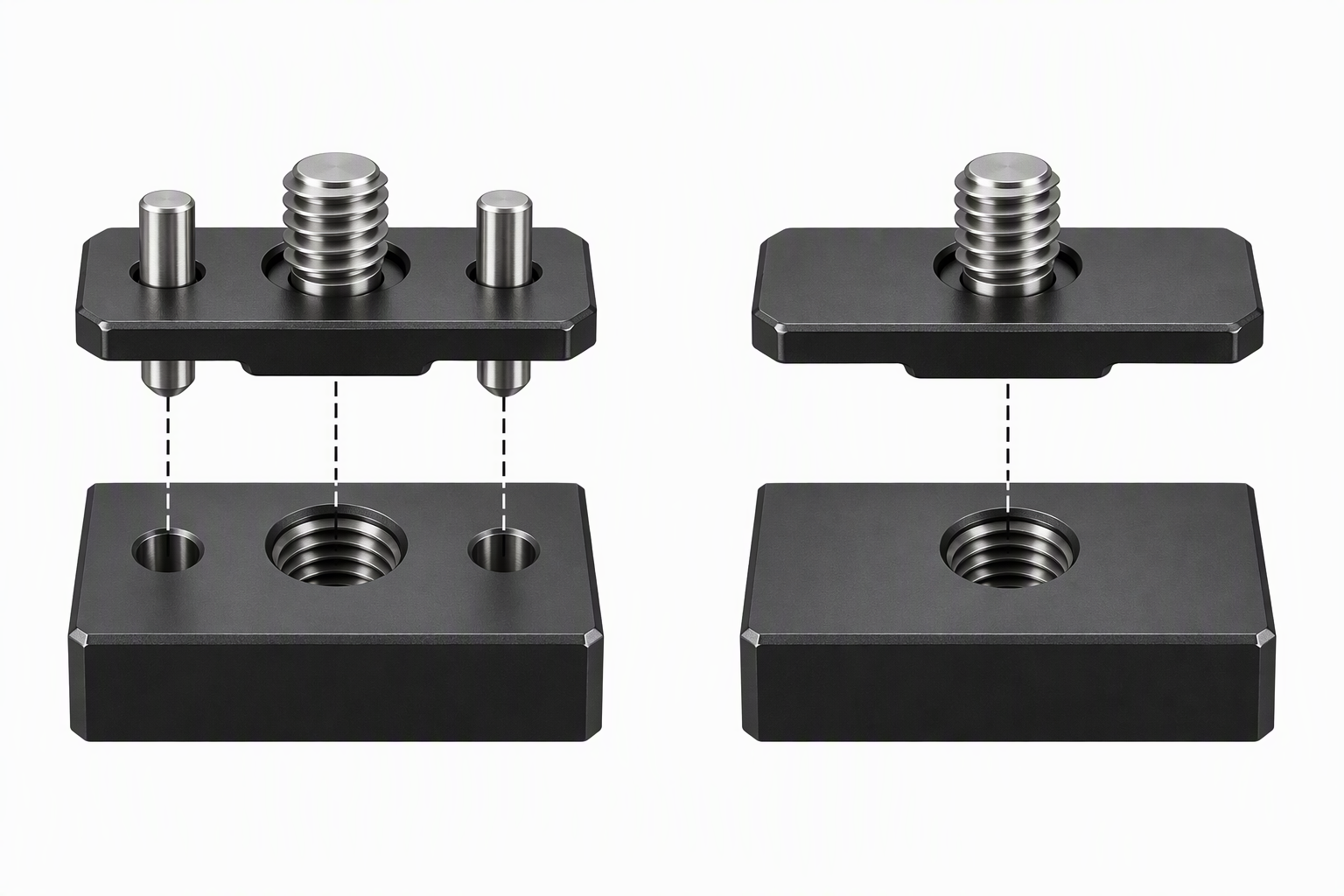
ARRI locating pins only help when the accessory or cage has a compatible locating-hole pattern. SmallRig 4899 and 4900 explicitly provide a 3/8-16 locating screw for ARRI, while the NEEWER arms use 1/4-inch screws with retractable locating pins. The SmallRig high-load arm includes both an ARRI 3/8-16 end and a 1/4-20 end with retractable pins.
Match the arm’s screw and pins to the receiving accessory, rather than assuming all camera threads are ARRI locating points. Retractable pins are useful because they can be moved out of the way for a plain threaded hole. A fixed adapter is not a replacement for an articulated arm when the monitor also needs angle and reach control.
Select Reach for the Rig’s Actual Clearance Problem
The 7-inch SmallRig 4899, NEEWER ST07C, and ST07 keep accessories close to the cage. A short arm usually reduces turning force and makes a compact handheld rig easier to pack. The 11-inch NEEWER ST16C and SmallRig 4900 create more space around a top handle, lens, or microphone, but their extra reach needs a stable support point.
Use the shortest arm that clears the camera and controls. An arm that extends farther than necessary places more turning force on the clamp and cage. A short arm is often better for a small monitor next to a camera, while an 11-inch model earns its place when it solves a specific viewing-angle or obstruction problem.
Read the Stated Load as a Complete System Limit
The listed loads vary materially. The SmallRig high-load arm states 5.5 kg, the SmallRig 4899 states 3.5 kg, the SmallRig 4900 states 3 kg, and the three NEEWER arms state 2 kg. A stated load applies to the arm’s intended support, not necessarily to the weakest cage thread, clamp, or monitor mounting point in the final system.
Size the arm for the monitor and everything attached to it. Add the monitor, battery plate, cable, and any receiver or accessory that hangs from the same point. A capacity figure is most useful when it leaves a comfortable margin and when the clamp, cage, and receiving screw are equally appropriate for the task.
Decide Whether an Included Clamp Saves a Separate Purchase
NEEWER ST16C and ST07C include a super clamp, which lets the arm attach to rods, poles, tables, cages, or tripods. An included clamp supplies a new attachment surface. The ST07 is the same general short-arm style without one, and SmallRig 4899 and 4900 need a separate compatible mount point.
Choose the included clamp when you need a new attachment surface. Choose the arm-only format when a rig already has a proven clamp or ARRI mounting point. Avoid stacking clamps unnecessarily, because every added joint makes the final monitor position more complex and can consume clearance around the camera.
Lock the Position Only After Cable Routing Is Set
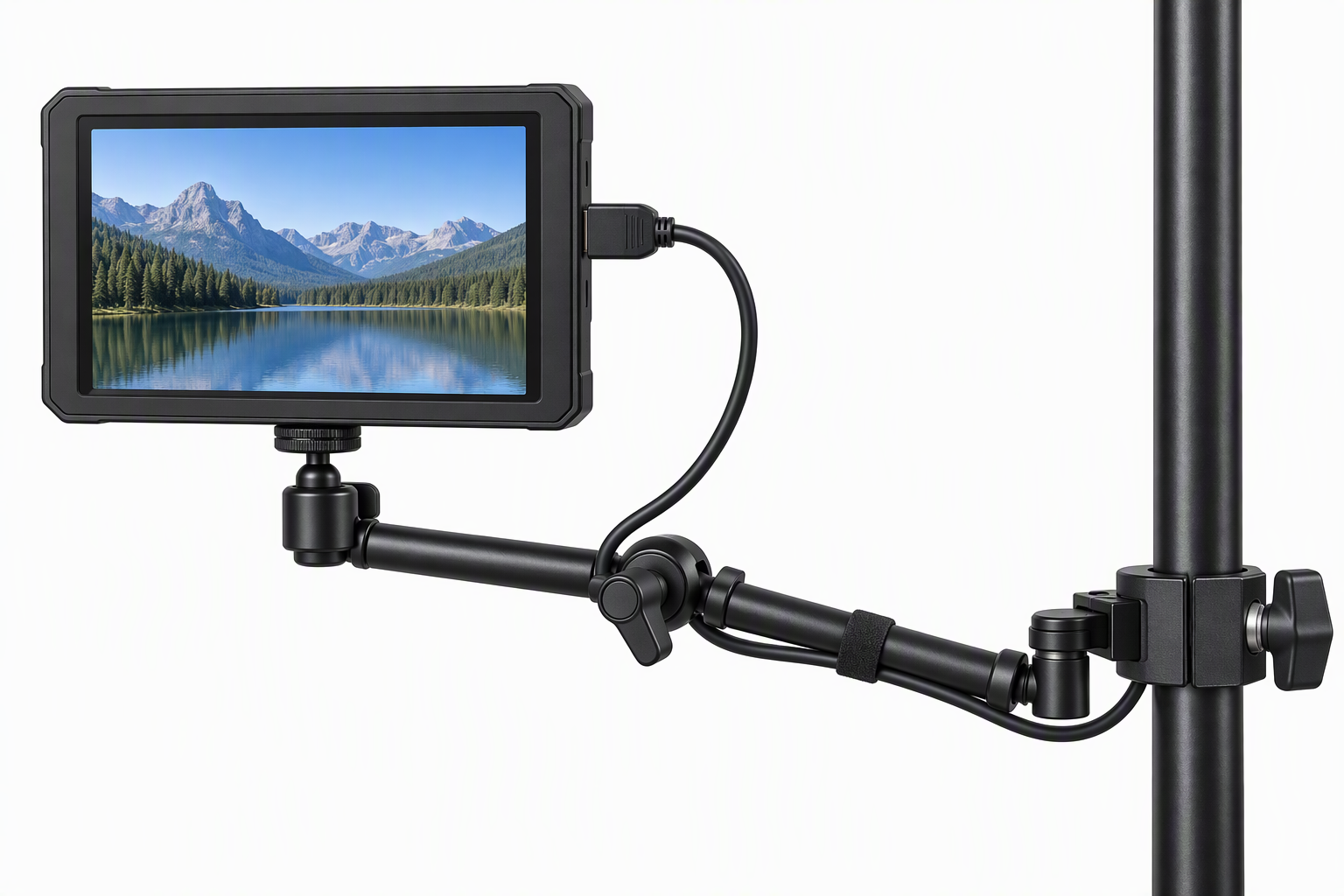
An anti-twist screw prevents rotation at the receiver, but the cable can still pull an arm out of its preferred angle. Pins do not manage cable routing. The NEEWER arms use silicone pads, while SmallRig lists pads and pins at both ends. Cables still need enough relaxed length for the arm’s final position.
Route monitor power and video cables before final tightening. Move the arm through its intended angle range, then lock the lever or knob after the cable has a path that does not rub a joint or pull a connector. Cable routing affects the result more than the choice of one adjustment mechanism over another.
Frequently Asked Questions
What do ARRI locating pins do on a monitor arm?
ARRI locating pins engage matching holes beside a mounting thread, helping stop an accessory from rotating around the screw. The SmallRig 4899 and 4900 use 3/8-16 ARRI locating-screw hardware, while NEEWER’s arms use retractable anti-twist pins on 1/4-inch screws. The exact benefit depends on the monitor, cage, or accessory having the receiving pattern.
They do not replace proper tightening or load selection. Pins resist rotation at the mount, but the arm, clamp, and camera cage must still support the accessory and the turning force created by its placement.
Is a 7-inch or 11-inch arm better for a field monitor?
A 7-inch arm is usually better when the monitor should sit close to the camera and the rig is compact. SmallRig 4899, NEEWER ST07C, and ST07 fit this role. An 11-inch model such as the ST16C or SmallRig 4900 is useful when the monitor needs to clear a handle, lens, or another accessory.
Choose reach based on clearance, not on a presumed upgrade path. The longer arm adds positioning options, but it also places the monitor farther from the support point. A short arm that gives the required viewing angle is often the simpler arrangement.
Can I attach these arms to a desk or pole?
The clamp-equipped NEEWER ST16C and ST07C can attach their super clamps to rods, poles, tables, desks, or compatible rig points according to the listings. The included clamp makes both arms useful beyond a camera cage when the stated 2 kg capacity suits the monitor or light. The other arms require a suitable clamp, tripod, cage, or mounting point supplied separately.
Check the support surface before clamping. A desk edge, pole, or rod must be stable enough for the arm and accessory, and the arm should not create a protruding hazard in a working area. The clamp is part of what supports the load, so it is not an optional accessory.
Do retractable pins work with plain threaded holes?
Retractable pins can be moved out of the way when the destination has a plain compatible thread rather than ARRI locating holes. The SmallRig high-load arm describes retractable pins on both ends, and NEEWER explicitly describes retractable anti-twist ARRI pins. One arm is therefore usable across a mix of locating and non-locating points.
Retract the pins only when the receiving hole requires it. Never force pins against a surface that lacks the pattern, because the screw thread still has to seat flat and securely.
How much monitor weight should I put on an articulating arm?
Use the stated figure for the exact model and include the weight of accessories attached to the monitor. The NEEWER arms list 4.4 lb / 2 kg, SmallRig 4899 lists 3.5 kg, SmallRig 4900 lists 3 kg, and the compact SmallRig high-load arm lists 5.5 kg. Those figures should be read alongside the clamp and cage limits.
Keep a margin rather than working at the maximum. A monitor placed at the end of an arm can put more turning force on the mount than a compact light held close to the cage. The safest setup is an appropriately rated arm, a secure receiver, and cable routing that does not add pulling force.
Bottom Line
Choose the SmallRig Articulating Magic Arm for the highest stated 5.5 kg capacity and ARRI 3/8-16 hardware. Pick the NEEWER ST16C when an 11-inch arm and included clamp solve the whole placement problem, or the SmallRig 4899 for a compact 7-inch rosette arm with a stated 3.5 kg capacity. First confirm the receiving hole, then choose the shortest reach and the load rating that suit the final monitor setup.