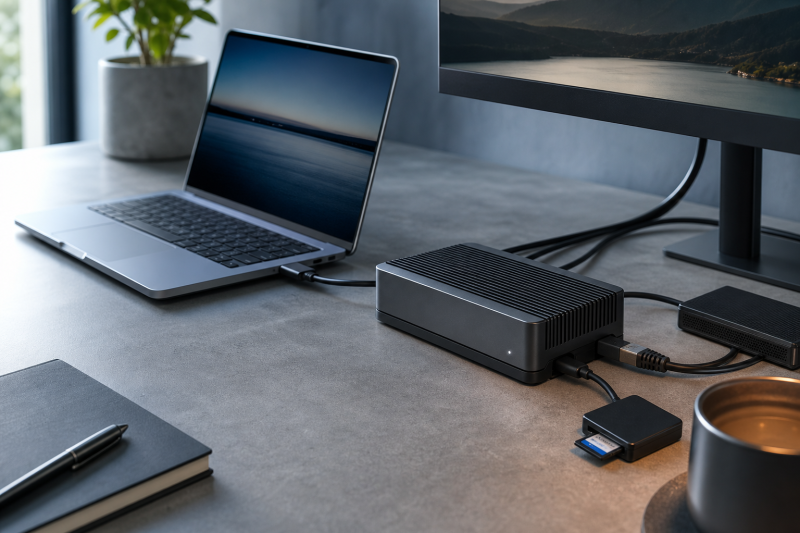
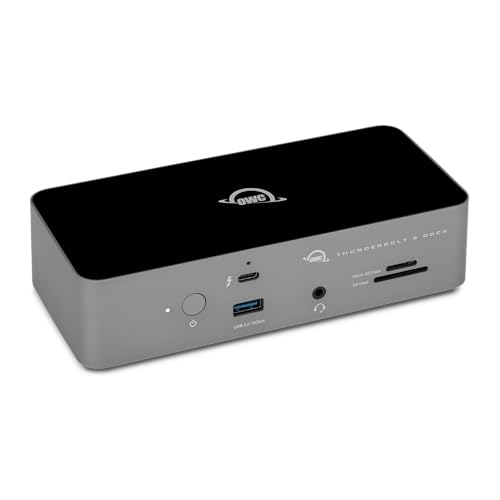
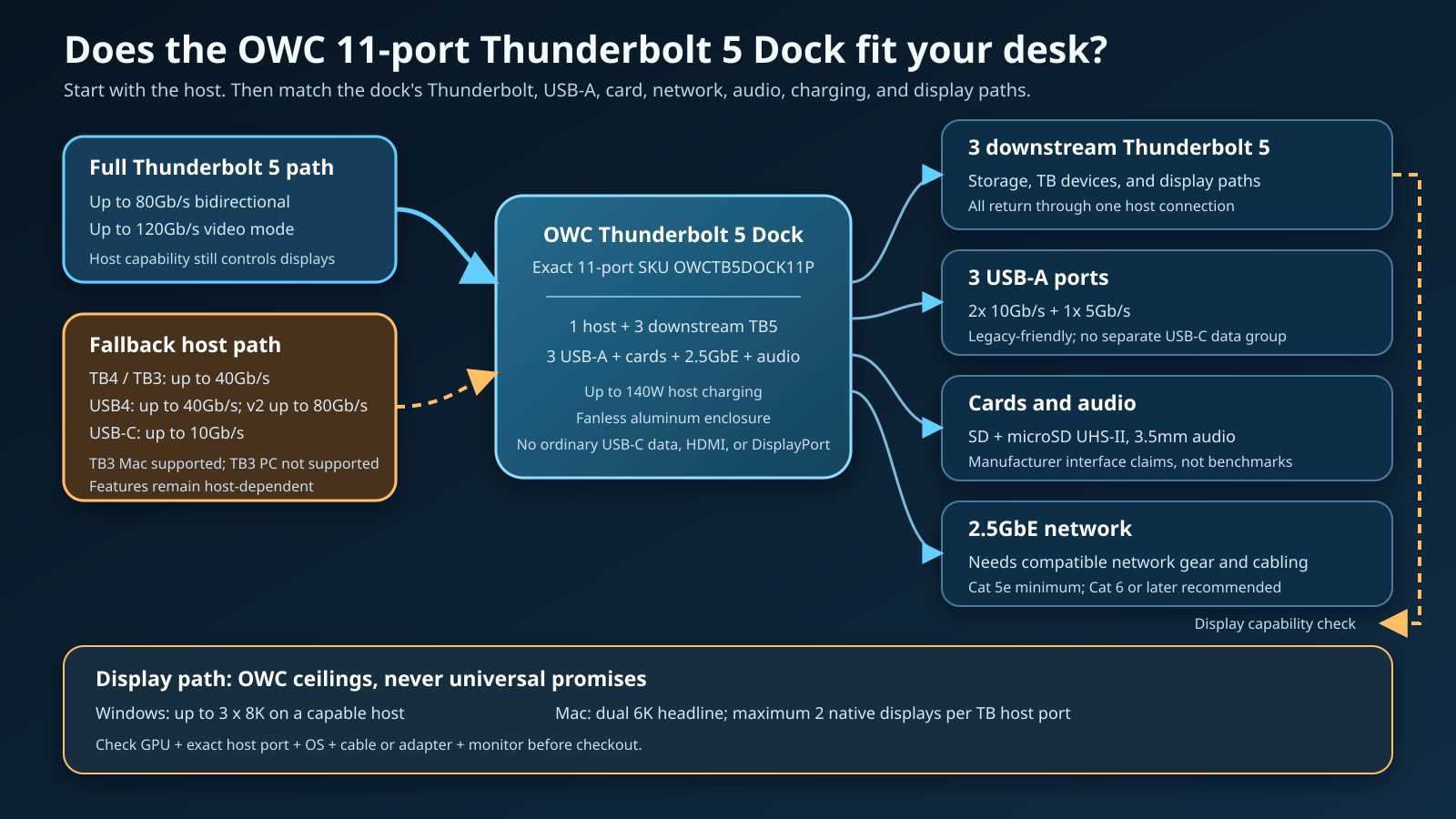
The OWC Thunderbolt 5 Dock is a balanced fit for a desk that needs three downstream Thunderbolt 5 ports, three USB-A ports, built-in card readers, 2.5GbE, 3.5mm audio, and up to 140W host charging. Its fanless aluminum enclosure adds no fan noise to an audio or editing workspace.
The exact model is easy to confuse. This review covers OWC’s 11-port dock, SKU OWCTB5DOCK11P and ASIN B0FC7L89C2. It does not cover the newer OWC Thunderbolt 5 Dual 10GbE Network Dock. Search results currently mix those products, even though their network and port priorities are different.
The 11-port model is strongest when the computer has Thunderbolt 5 and the desk still uses several USB-A accessories. It is less convincing for a Thunderbolt 4 computer with no near-term upgrade plan, a USB-C-heavy peripheral collection, or a monitor setup that needs HDMI or DisplayPort built into the dock.
This OWC Thunderbolt 5 Dock review uses OWC’s current product documentation and first-party buying guidance, plus a current exact marketplace identity and offer check. It makes no hands-on performance, thermal, or long-term reliability claim.
OWC Thunderbolt 5 Dock verdict
Buy the 11-port OWC Thunderbolt 5 Dock when three downstream Thunderbolt ports and three USB-A connections match the desk, and when the host can expose the required Thunderbolt 5 and display capabilities. Skip it when dedicated high-speed USB-C data ports, native HDMI or DisplayPort, or dual 10GbE are essential.
OWC’s port mix favors a practical transition between older and newer peripherals. The three downstream Thunderbolt ports can serve fast storage, Thunderbolt devices, or display paths. The three USB-A ports keep existing keyboards, interfaces, storage devices, and receivers connected without adapters. SD and microSD UHS-II readers, 2.5GbE, and 3.5mm audio cover common desktop needs.
The tradeoffs are equally specific. There is no ordinary USB-C data group beyond the Thunderbolt ports, and there is no dedicated HDMI or DisplayPort connector. OWC’s Windows and Mac display figures are host-qualified ceilings, not results that every laptop can deliver.
| Buyer question | OWC specification | Checkout meaning |
|---|---|---|
| Exact model | 11-port OWC Thunderbolt 5 Dock, SKU OWCTB5DOCK11P |
Do not confuse it with the Dual 10GbE Network Dock |
| Thunderbolt expansion | One host connection plus three downstream TB5 ports | Strong for Thunderbolt devices, storage, and display paths |
| USB expansion | Three USB-A ports: two 10Gb/s and one 5Gb/s | Good for USB-A gear; no separate ordinary USB-C data ports |
| Cards and audio | SD and microSD UHS-II readers plus 3.5mm audio | Useful creator and desk connections without extra readers |
| Network | 2.5GbE | Rest of the network and cabling must support the target speed |
| Host charging | Up to 140W | Laptop must accept negotiated USB Power Delivery |
| Displays | OWC advertises up to three 8K on Windows and dual 6K on Mac | Exact GPU, host, OS, cable or adapter, and monitor still decide |
| Cooling design | Fanless aluminum enclosure | No fan-noise source, but no independent thermal conclusion |
Who should buy the 11-port OWC Thunderbolt 5 Dock?
Buy it for a mixed Thunderbolt and USB-A desk
The OWC dock is a sensible bridge between current Thunderbolt hardware and USB-A equipment that still works. OWC lists three downstream Thunderbolt 5 ports and three USB-A ports. Two USB-A connections are rated at 10Gb/s and the third at 5Gb/s.
That arrangement suits a desk with a Thunderbolt display or drive, another fast Thunderbolt device, and several USB-A accessories. It avoids spending the downstream Thunderbolt group on adapters for a keyboard, interface, receiver, or existing USB-A storage.
The fit changes if most current peripherals already use USB-C. There are no separate ordinary USB-C data ports. A USB-C device can use a compatible downstream Thunderbolt port, but doing that consumes one of the dock’s most capable connections. Buyers with several USB-C SSDs, capture devices, or card readers should compare the layout against the CalDigit alternative later in this review.
The site’s Thunderbolt 5 dock comparison places the OWC model in the broader category, while this page focuses on the exact 11-port purchase decision.
Buy it when a fanless desktop dock is the goal
OWC describes the enclosure as fanless aluminum. A design with no fan cannot generate fan noise, which is useful beside microphones, studio monitors, or a quiet office. It also removes one moving part from the enclosure.
The fanless design does not prove surface temperature, sustained performance, or long-term reliability under every workload. The thermal result depends on connected devices, room temperature, placement, host activity, and the dock’s internal power load. The only safe conclusion is that OWC designed the dock without a cooling fan.
Buy it for built-in media and network connections
OWC lists SD and microSD UHS-II readers. Those slots reduce the need for external readers when a camera, recorder, or drone workflow uses both card formats. The evidence establishes the interface class, not a measured transfer speed with every card or a claim that both readers sustain their ceilings simultaneously.
The 2.5GbE connection also makes sense for a desk with compatible networking. OWC specifies Cat 5e as the minimum cabling and recommends Cat 6 or later. A matching router, switch, NAS, and storage path are still required before the network can exceed ordinary Gigabit Ethernet.
The 3.5mm audio connection covers a headset, speakers, or another analog audio path. Buyers using a dedicated Thunderbolt audio interface may value the downstream ports more than the built-in jack.
Buy it when one host cable must carry substantial power
OWC rates host charging at up to 140W. That ceiling can support compatible laptops that accept high-wattage USB Power Delivery, while the same host connection carries data and display streams.
The computer negotiates what it accepts. A laptop with proprietary charging, a lower USB-C input ceiling, or heavy CPU and GPU demands may still need its original adapter. Up to 140W is the dock’s stated host-power ceiling, not a promise that every computer draws 140W or can abandon its factory charger.
Who should skip it?
Skip it if the host will remain Thunderbolt 4
OWC’s current buying guide makes this boundary unusually clear. Many buyers staying on Thunderbolt 4 do not need a Thunderbolt 5 dock. The dock can fall back to a Thunderbolt 4 host, but OWC lists that path at up to 40Gb/s rather than the Thunderbolt 5 ceiling.
The purchase can still make sense when a Thunderbolt 5 computer upgrade is already planned and the 11-port layout is useful immediately. It is harder to justify when the existing Thunderbolt 4 computer will remain the main host for years and one or two ordinary 4K displays are the main workload.
The site’s Thunderbolt 4 and USB4 comparison helps separate required Thunderbolt behavior from optional USB4 features.
Skip it if dedicated USB-C data ports are essential
All four USB-C-shaped high-speed connections are Thunderbolt ports: one host and three downstream. The dock does not add a separate bank of ordinary 10Gb/s USB-C data ports.
That is not a problem when the downstream Thunderbolt ports are the desired expansion. It is inefficient when several ordinary USB-C accessories would occupy them. A USB-C-heavy desk should compare the exact cable and connector inventory before buying.
For a simpler or more USB-C-oriented category view, the site’s USB-C docking station guide provides alternatives outside the Thunderbolt 5 tier.
Skip it if native HDMI or DisplayPort is required
The 11-port list contains no HDMI or DisplayPort connector. Displays use downstream Thunderbolt ports, either directly through a compatible USB-C or Thunderbolt connection or through a suitable video adapter.
An adapter adds another qualification. It must support the requested resolution, refresh rate, color depth, and any required Display Stream Compression. The laptop GPU and operating system must also provide the display stream.
Buyers who want one conventional video cable from dock to monitor should consider the Anker alternative below. The site’s Thunderbolt monitor guide is useful when selecting a display that can connect directly.
Skip it if the goal is dual 10GbE
This model has one 2.5GbE connection. OWC sells a different Thunderbolt 5 Dual 10GbE Network Dock for multi-network and higher-bandwidth network workflows. Search results currently place that product above the 11-port model for broad OWC Thunderbolt 5 Dock queries.
Do not buy the 11-port dock expecting the newer model’s network interfaces. Confirm the exact product title, SKU, ASIN, and port image together.
Exact 11-port layout
OWC’s first-party guide gives enough detail to reconcile the 11-port count:
- One Thunderbolt 5 host connection
- Three downstream Thunderbolt 5 ports
- Two 10Gb/s USB-A ports
- One 5Gb/s USB-A port
- One SD UHS-II reader
- One microSD UHS-II reader
- One 2.5GbE connection
- One 3.5mm audio connection
The host connection is one of the 11 functional ports. The external power connector is not part of that list.
The layout is balanced rather than a maximum-port design. Three downstream Thunderbolt ports leave room for independent device chains. Three USB-A ports support existing equipment. Cards, network, and audio avoid common dongles. The compromise is the complete absence of dedicated ordinary USB-C data, HDMI, and DisplayPort connectors.
OWC includes a certified 1.0m Thunderbolt 5 USB-C cable. That establishes the supplied cable type and length, but not the performance of a different cable a buyer might substitute.
Host compatibility and fallback ceilings
The USB-C connector shape does not identify the host’s capability. OWC publishes different link ceilings for each connection class:
| Host path | OWC-stated ceiling | What remains qualified |
|---|---|---|
| Thunderbolt 5 | Up to 80Gb/s bidirectional data; up to 120Gb/s video-stream mode | Attached devices share the host link; displays still depend on GPU and host |
| Thunderbolt 4 | Up to 40Gb/s | No Thunderbolt 5 data ceiling |
| Thunderbolt 3 | Up to 40Gb/s | OWC supports Thunderbolt 3 Mac, not Thunderbolt 3 PC |
| USB4 | Up to 40Gb/s | Optional host capabilities can differ |
| USB4 v2 | Up to 80Gb/s | Exact computer implementation still controls features |
| USB-C | Up to 10Gb/s | Display, charging, network, and device behavior depend on the host |
These are interface ceilings, not measured results. A drive, enclosure, cable, operating system, host controller, and simultaneous workload can all reduce an observed transfer.
The Thunderbolt 3 difference is especially important. OWC states compatibility for Thunderbolt 3 Macs and excludes Thunderbolt 3 PCs. A buyer moving the dock between older Mac and Windows machines should not assume identical behavior.
The site’s Thunderbolt 3 vs 4 vs 5 guide explains the generation differences, and the USB4 explainer covers why two USB4 ports can expose different optional features.
The final check should use the exact computer specification. A broad list of Thunderbolt laptops can narrow candidates, but the laptop maker’s page must confirm the chosen port.
Windows and Mac display support
OWC advertises up to three 8K displays on Windows and dual 6K displays on Mac. Those headlines must stay beside OWC’s own footnotes.
OWC says Thunderbolt 5 can support up to three displays from one host port only when the host computer is capable. Its examples include up to three 6K or lower-resolution displays, three 8K displays at 60Hz, or two 8K displays at 120Hz. The product page also says Apple currently enables a maximum of two native displays per connected Mac Thunderbolt host port.
The safe interpretation is:
- A capable Windows Thunderbolt 5 host may reach OWC’s higher multi-display ceilings.
- A Mac is limited to the native display streams its exact chip and operating system expose, with a current maximum of two native displays from one connected Mac Thunderbolt host port in OWC’s guidance.
- A Thunderbolt 4, USB4, or basic USB-C host should not inherit the Thunderbolt 5 Windows headline.
- DisplayLink is a separate driver-based technology and should not be counted as an additional native display.
Every monitor path still depends on the laptop GPU, exact port, operating system, direct cable or adapter, monitor input, resolution, refresh rate, and compression support. The dock passes display streams supplied by the host; it does not create extra native GPU outputs.
The site’s Thunderbolt 5 specification guide explains Bandwidth Boost and the distinction between a signaling ceiling and the display streams a computer actually exposes.
Charging, USB, network, cards, audio, and enclosure
Host and peripheral power
OWC specifies up to 140W for the connected notebook or tablet. The rating is a ceiling negotiated through USB Power Delivery. Check the laptop’s accepted USB-C charging rate and whether the selected port accepts power input.
OWC does not provide enough evidence here to promise a specific peripheral-charging rate from every downstream port in every workload. The article therefore does not assign unverified wattage to attached devices.
USB-A rather than ordinary USB-C
Two 10Gb/s USB-A ports and one 5Gb/s USB-A port are an advantage for existing peripherals. The different speeds should shape placement. Put faster storage or capture hardware on the 10Gb/s ports and lower-demand devices on the 5Gb/s port.
Those interface ratings remain ceilings. They do not prove a measured transfer rate, and multiple active devices still return through the single host connection.
2.5GbE
The network port can remove a one-gigabit dock ceiling when the rest of the path is ready. OWC requires compatible hardware and at least Cat 5e cabling, with Cat 6 or later recommended.
A 2.5GbE label does not guarantee 2.5Gb/s internet, NAS, or file-copy performance. The router, switch, cable, server, storage, protocol overhead, and workload can each become the next limit.
Card readers and audio
OWC identifies both SD and microSD readers as UHS-II in its current guide. The readers make the dock useful for mixed camera and drone media, but they do not establish an independent card benchmark or simultaneous full-speed result.
The 3.5mm connection is convenient for an analog headset, speakers, or microphone path. No audio-quality measurement is available from the retained evidence.
Fanless aluminum enclosure
OWC describes a fanless aluminum body. The absence of a fan removes fan noise, which is useful around microphones. It does not prove a surface-temperature limit, sustained benchmark result, or reliability outcome.
What OWC’s specifications prove, and what they do not
OWC’s current product page and buying guide prove the exact model identity, 11-port composition, host fallback ceilings, charging rating, display headlines and qualifications, USB-A speeds, network class, card-reader class, audio connection, enclosure design, and included cable.
They do not provide independent measurements. OWC’s examples involving very fast storage and high-resolution displays show intended capability, not what every drive or computer will produce. This review does not turn those examples into benchmark results.
The documentation also does not create a universal compatibility promise. OWC describes broad USB-C compatibility while separately publishing lower speed ceilings and a Thunderbolt 3 PC exclusion. The precise limitations control the buying advice.
Finally, fanless construction is a design fact, not a reliability score. Up to 140W is a negotiated charging ceiling, not proof that every laptop can abandon its original adapter.
OWC Thunderbolt 5 Dock alternatives
The alternatives solve specific reasons to skip the OWC model. For the complete category, use the site’s best Thunderbolt docking station guide.
| Product | Choose it instead when… | Main tradeoff |
|---|---|---|
| OWC Thunderbolt 5 Dock | Three downstream TB5 ports plus three USB-A ports best fit the desk | No ordinary USB-C data group or native video connector |
| CalDigit TS5 | Several fast USB-C data ports and simultaneous UHS-II readers matter more | Only one fast USB-A port and no native video connector |
| Anker Prime TB5 Docking Station | A native HDMI or DisplayPort path is essential | Two downstream TB5 ports; HDMI and DisplayPort cannot work together |
| Plugable TBT-UDT3 | A narrower upright 11-in-1 body fits the desk better | Less expansive connection mix than larger docks |
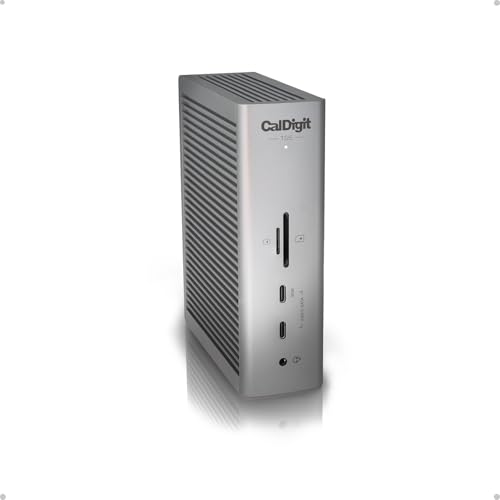
CalDigit TS5: better for USB-C-heavy expansion
CalDigit lists three downstream Thunderbolt 5 ports plus three 10Gb/s USB-C data ports. It also states that the SD and microSD UHS-II readers can work simultaneously. The CalDigit layout is more suitable for a desk that has already moved away from USB-A.
Choose OWC when three USB-A ports are immediately useful. Choose CalDigit when ordinary fast USB-C data ports and simultaneous card-reader use matter more. Both require a host-specific display check and neither provides native HDMI or DisplayPort.
Anker Prime TB5: better for native HDMI or DisplayPort
Anker’s 14-in-1 dock includes HDMI 2.1 and DisplayPort 2.1, although Anker says only one can operate at a time. That direct conventional video path removes an adapter from a single-monitor desk.
The frozen manufacturer evidence lists two downstream Thunderbolt 5 ports rather than OWC’s three. Anker also publishes stronger platform exclusions that must be checked against the intended computer. Choose Anker for native video output; choose OWC for another downstream Thunderbolt port and the USB-A-heavy balance.

Plugable TBT-UDT3: better for a narrow upright footprint
Plugable’s TBT-UDT3 is an upright 11-in-1 dock with three downstream Thunderbolt 5 ports, card readers, 2.5GbE, and up to 140W host charging. Its narrow stance can fit beside a monitor stand or on a smaller desk.
Choose Plugable when physical footprint decides the purchase. Choose OWC when the three-port USB-A group and fanless OWC layout are a closer match. Plugable’s display support also varies by system and Mac chip, so changing docks does not remove the host check.

Frequently asked questions
Is this the OWC Dual 10GbE Network Dock?
No. This review covers the 11-port OWC Thunderbolt 5 Dock, SKU OWCTB5DOCK11P and ASIN B0FC7L89C2. It has one 2.5GbE port.
The OWC Thunderbolt 5 Dual 10GbE Network Dock is a different product for higher-bandwidth and multi-network workflows. Current Bing results mix the two names, so verify the exact title, SKU, ASIN, and port layout before checkout.
Is the OWC Thunderbolt 5 Dock worth buying for a Thunderbolt 4 computer?
It can work, but OWC lists the Thunderbolt 4 path at up to 40Gb/s. The dock will not turn a Thunderbolt 4 host into Thunderbolt 5.
The purchase makes sense if the 11-port layout is valuable now and a Thunderbolt 5 computer upgrade is already planned. OWC’s own buying guide says many buyers staying on Thunderbolt 4 do not need a Thunderbolt 5 dock.
How many monitors can it support on Windows?
OWC advertises up to three 8K displays on Windows, but its footnote makes host capability controlling. The Windows computer must expose the required native display streams through its Thunderbolt 5 port, and the GPU, operating system, cables or adapters, and monitors must support the requested modes.
Do not apply the three-display headline to every Windows laptop or to a Thunderbolt 4 host.
How many monitors can it support on a Mac?
OWC advertises dual 6K displays on Mac and says Apple currently enables a maximum of two native displays per connected Mac Thunderbolt host port. The exact Mac chip and operating system still determine the result.
Driver-based DisplayLink output is separate from native display support. It should not be counted as another native stream.
Does the dock have USB-C, HDMI, or DisplayPort?
The host and three downstream Thunderbolt ports use the USB-C connector shape, but the dock has no separate ordinary USB-C data group. It also has no native HDMI or DisplayPort.
A compatible USB-C or Thunderbolt monitor can use a downstream port. HDMI or DisplayPort monitors require a suitable adapter that supports the intended mode.
Will it charge every laptop at 140W?
No. OWC rates host charging at up to 140W, while the laptop negotiates what it accepts. A lower-power system will draw less, and a laptop with proprietary or higher-power requirements may still need its original charger.
Confirm that the selected laptop port accepts USB Power Delivery and check the manufacturer’s maximum USB-C input rating.
Sources and Methodology
This review uses OWC’s live product page for the exact 11-port model and OWC’s July 7, 2026 first-party guide to deciding between Thunderbolt 4 and Thunderbolt 5 docks. Those sources establish the product identity, SKU, port layout, host ceilings, charging, USB-A speeds, network and cabling requirements, card and audio connections, fanless enclosure, included cable, and display qualifications.
Amazon’s Creators API was used separately to verify the exact identity and active US offer state for the primary dock and three alternatives. Marketplace data was not used for technical specifications, and no returned product price appears.
Fresh Bing CLI snapshots were used to assess standalone review intent and model-name confusion. Keywords Everywhere supplied US Google Ads/GKP demand and CPC proxies. Those values are not Bing volume and are not summed.
The related OWC Envoy Ultra Thunderbolt 5 SSD review covers one current Thunderbolt 5 storage example, but no result from that separate product is treated as a dock benchmark here.
No hands-on product test, measurement, benchmark, or long-term reliability score is part of this package. Specifications, compatibility guidance, display support, software behavior, and marketplace offer state can change, so confirm the current OWC sources and exact listing before purchase.