A USB-C dock can add display outputs, wired networking and ports to a laptop, but two products with similar connectors may support very different display arrangements. Check the laptop’s USB-C video capabilities and the dock’s driver requirements before counting the monitors you can connect.
The five j5create models range from a compact HDMI and Ethernet adapter to a USB4 dock that j5create lists for three displays on supported Windows hosts. The power-delivery figures j5create gives describe pass-through charging, which needs a separate USB-C power adapter plugged into the dock.
j5create Hubs and Docks Compared
| Image | Product | Best fit | Display outputs | Other connections | Power delivery | Watch-outs | Check Price |
|---|---|---|---|---|---|---|---|
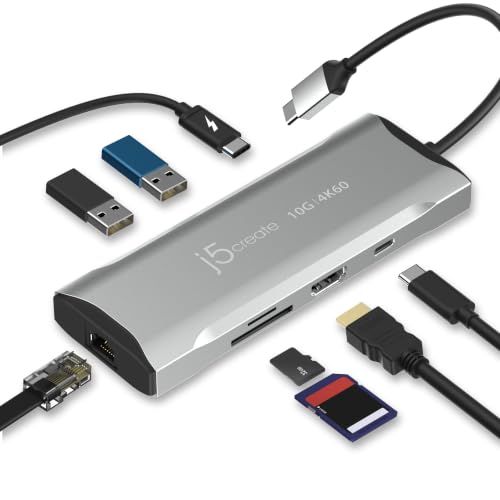 | j5create JCD393 | Compact 4K60 and 10Gbps hub | One HDMI up to 4K60 | 1 USB-C and 2 USB-A 10Gbps, Ethernet, SD/microSD | Up to 100W pass-through | Requires compatible USB-C video and external power for PD | Check Price on Amazon |
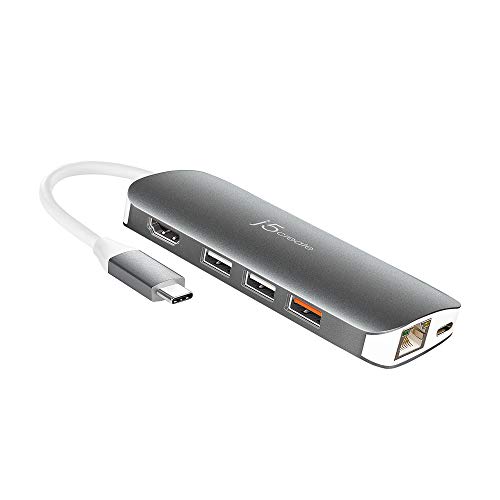 | j5create JCD384 | HDMI or VGA plus card reader | One display: HDMI 4K30 or VGA 1080p60 | 3 USB-A, USB-C, Ethernet, SD/microSD | Up to 60W pass-through | One display through HDMI or VGA, per j5create | Check Price on Amazon |
 | j5create JCA374 | HDMI and Ethernet with two USB-A ports | HDMI up to 4K30 | 2 USB-A, Ethernet, USB-C PD input | Up to 60W pass-through | Ethernet needs a driver; Amazon listing and j5create differ on macOS 11 | Check Price on Amazon |
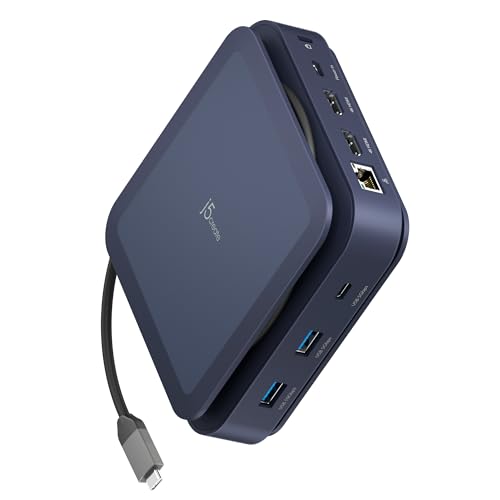 | j5create JCD3198 | Two HDMI screens and higher PD input | 4K60 + 4K30 HDMI | 2 USB-A, 2 USB-C, Ethernet, SD/microSD, audio | Up to 140W in, 130W host pass-through | 4K30 USB display output requires a driver | Check Price on Amazon |
 | j5create JCD554 | Three displays on supported Windows host | Up to triple 4K60 with TB4/USB4, MST and DSC | DP, 2 HDMI, USB-C video, USB, Ethernet, SD/microSD, audio | Up to 85W pass-through | Mac does not support MST; host limits apply | Check Price on Amazon |
1. j5create JCD393 — Best Compact 4K60 Dock
The JCD393 adds one HDMI display at up to 4K at 60Hz to a USB-C laptop. The Amazon listing describes one USB-C and two USB-A ports at 10Gbps, plus Gigabit Ethernet and an SD/microSD 4.0 reader, and j5create’s JCD393 page lists the same ports. j5create’s specification table gives one supported display and adds that the dock needs no driver. The same table lists 1440p at 120Hz for a high-refresh gaming monitor.
j5create states that the host must support DisplayPort 1.4 to reach 4K at 60Hz, and that a host with only DisplayPort 1.2 gets 4K at 30Hz. The USB-C power input is listed for up to 100W pass-through with a USB-C power adapter. j5create adds that a host USB-C port without Power Delivery will not receive pass-through power.
j5create’s own store marks the JCD393 as no longer available and points to a newer version, while the Amazon listing shows a New offer from j5create. j5create’s page gives the dock’s size as 5.4 by 1.96 by 0.62 inches and its weight as 3.77 ounces, and j5create gives the host cable length as 7.87 inches. A second independent HDMI screen needs the JCD3198 or JCD554 on this page.
Decision point: choose the JCD393 for one 4K60 HDMI display and three 10Gbps USB ports that j5create lists. Our TakeThe JCD393 is the compact one-screen dock on this page, with Ethernet and an SD/microSD 4.0 reader. j5create lists its 100W pass-through for use with a USB-C power adapter.
- j5create lists the JCD393 HDMI output for up to 4K at 60Hz on a host with DisplayPort 1.4.
- The JCD393 has one USB-C and two USB-A ports at 10Gbps, according to j5create.
- j5create says the JCD393 needs no driver, and its port list includes Gigabit Ethernet and an SD/microSD 4.0 reader.
- j5create specifies up to 100W Power Delivery pass-through with a USB-C power adapter.
- j5create lists one supported display for the JCD393, not two independent HDMI monitors.
- j5create’s own store marks the JCD393 as no longer available and points to a newer version.
2. j5create JCD384 — Best HDMI or VGA Adapter
The JCD384 combines HDMI and VGA outputs with Gigabit Ethernet, SD/microSD access and three USB-A ports. The Amazon listing describes two USB-A ports for peripherals and a third with BC 1.2 charging. The Amazon title says “Multi-Monitor”, but j5create’s specification table gives one display, through HDMI or VGA, with up to 4K at 30Hz over HDMI or 1080p at 60Hz over VGA.
The one-display limit is easy to miss because both connectors are present. The adapter can serve an HDMI monitor or a VGA display, but connector count alone does not make it a two-screen dock. j5create also lists a USB-C port for data and power delivery, with up to 60W PD when connected to a USB-C power adapter. j5create’s drivers page says the JCD384 needs no driver download.
j5create rates the two plain USB-A ports at 5Gbps and gives the adapter’s weight as 3.1 ounces. The JCD384 is the only model on this page with a VGA output, according to j5create’s product pages.
The JCD384 suits a desk that needs a VGA option as well as HDMI. j5create states one display, so plan the setup around a single screen.
- j5create gives the JCD384 both HDMI and VGA outputs, for one external display at a time.
- The Amazon listing counts three USB-A ports on the JCD384, one with BC 1.2 charging.
- j5create lists Gigabit Ethernet and SD/microSD access, and its drivers page says no driver is needed.
- j5create specifies one display through HDMI or VGA for the JCD384, not two independent outputs.
- j5create states 4K at 30Hz over HDMI for the JCD384, against the 4K at 60Hz it states for the JCD393.
- j5create lists the JCD384 for up to 60W pass-through, which needs a USB-C power adapter.
3. j5create JCA374 — Best Basic HDMI and Ethernet Adapter
The JCA374 is the smallest connection set here: two USB-A ports, Gigabit Ethernet, HDMI and a USB-C power-delivery input. The Amazon listing states up to 4K at 30Hz or 1080p at 60Hz over HDMI, and j5create’s page gives up to 60W of USB-C pass-through. j5create adds that the video output needs no driver and that the adapter has surge protection.
The Amazon listing says the Ethernet port needs a free driver download. It also carries a warning that the adapter is not compatible with macOS 11 Big Sur, and it advises Mac users to delay updating. j5create’s drivers page lists an Ethernet driver for macOS 11 or later, so the two sources disagree about macOS 11. The Amazon title names Power Delivery 2.0, while j5create’s product page says Power Delivery 3.0, so the 60W figure rests on j5create’s page. When the Amazon offer was checked, the New offer came from a third-party seller, LILIAS UNLIMITED, not from j5create.
Unlike the JCD384, j5create does not list a VGA output or a card reader for the JCA374. With no VGA output or card reader listed, the JCA374 is the simpler match for a desk with one HDMI monitor, Ethernet and two USB devices. A laptop that also needs camera-card access needs the JCD384 or a larger dock instead.
Decision point: consider the JCA374 for basic HDMI, Ethernet and two USB-A devices after checking the Ethernet driver for your operating system. Our TakeThe JCA374 covers a compact wired desktop setup with one HDMI display. Check the Ethernet driver for your operating system before relying on its network port.
- The JCA374 has HDMI, Gigabit Ethernet and two USB-A ports, per j5create’s page.
- The Amazon listing states up to 4K at 30Hz or 1080p at 60Hz over HDMI.
- j5create lists up to 60W USB-C power delivery for the JCA374 and says the video output needs no driver.
- j5create states that the JCA374 has surge protection.
- The Amazon listing says the JCA374 Ethernet port needs a driver download, and its macOS 11 warning conflicts with j5create’s driver page.
- j5create does not list the VGA output or card reader that the JCD384 has.
4. j5create JCD3198 — Best Dual HDMI Dock With PD 3.1
The JCD3198 adds two HDMI displays at 4K60 plus 4K30, according to the Amazon listing. j5create’s page assigns one HDMI output to DisplayPort Alt Mode at 4K and 60Hz and the other to a USB-display path at 4K and 30Hz. The listing says the 4K30 HDMI output needs a driver on Mac and Windows, and j5create’s note says driver installation is required for macOS and Windows. j5create adds that Windows can install the driver itself when the computer has network access and administrator rights.
For charging, j5create specifies up to 140W PD 3.1 input and up to 130W pass-through to the host. j5create also lists two USB-C and two USB-A data ports, two of them at 10Gbps and two at 5Gbps, plus Gigabit Ethernet, an SD/microSD 3.0 reader and a 3.5 mm audio jack. j5create says a USB-C power adapter must be connected and the laptop must support Power Delivery for the dock to charge it.
The package includes a dock holder for vertical placement, and the body has a cable storage compartment, according to j5create. The body weighs 14.7 ounces on j5create’s page. j5create also says the host must support DisplayPort 1.4 for 4K at 60Hz.
Decision point: choose the JCD3198 for two HDMI screens only when the laptop allows the display driver to be installed. Our TakeThe JCD3198 has two different HDMI paths and the highest PD input figure on this page, 140W as j5create states it. The 4K30 driver requirement is the first compatibility check.
- The Amazon listing describes two HDMI displays at 4K60 plus 4K30, with a driver for the 4K30 output.
- j5create specifies up to 140W PD input and 130W pass-through to the host for the JCD3198.
- j5create lists two USB-A, two USB-C, Ethernet, an SD/microSD 3.0 reader and audio on the JCD3198.
- j5create includes a dock holder for vertical placement and a cable storage compartment.
- j5create identifies separate DP Alt Mode and USB-display HDMI paths on the JCD3198.
- The Amazon listing says the JCD3198 4K30 output needs a driver on Mac and Windows.
- j5create says the 130W host figure needs a connected USB-C power adapter and a laptop that supports Power Delivery.
- j5create gives the two HDMI outputs different maximum refresh rates at 4K, 60Hz and 30Hz.
5. j5create JCD554 — Best for Supported Triple-Display Windows Setups
The JCD554 is a USB4 dock whose Amazon listing describes three 4K60 displays on Windows with a Thunderbolt 4 or USB4 host, MST and DSC. j5create lists DisplayPort, two HDMI outputs and USB-C video, alongside two 10Gbps USB-A ports, one 10Gbps USB-C port and a separate USB 2.0 port. Gigabit Ethernet, an SD/microSD 4.0 reader and a 3.5 mm audio jack are also on j5create’s list.
j5create’s setup guide separates the hosts. For a Thunderbolt 3 host, the guide’s display table lists lower triple-display resolutions than it lists for Thunderbolt 4, which it gives as 4K60 on all three screens. One example is 4K60 plus 4K30 plus 1080p. The guide and j5create’s product page both say Mac does not support MST and may only mirror on some external displays. j5create’s page recommends a Thunderbolt 4 or USB4 computer for the best performance and says other USB 3.2 hosts work at lower resolutions.
The Amazon listing and j5create’s page both state pass-through charging of up to 85W through the USB-C Power Delivery port, and the Amazon listing adds that the dock needs no driver. The dock is 13.54 inches wide and weighs about 16.33 ounces on j5create’s page.
The JCD554 is the only dock on this page that j5create lists for three displays, and only on a qualifying Windows laptop. Check the host and operating-system limits in j5create’s guide before planning three screens.
- The Amazon listing describes triple 4K60 on Windows with a Thunderbolt 4 or USB4 host, MST and DSC.
- j5create lists DisplayPort, two HDMI outputs and USB-C video as display connections.
- j5create lists three 10Gbps USB ports, Ethernet, an SD/microSD 4.0 reader and audio.
- j5create specifies up to 85W pass-through for the JCD554.
- j5create’s setup guide lists lower triple-display limits for a Thunderbolt 3 host.
- j5create’s guide says Mac does not support MST and may only mirror on some external displays.
- The Amazon listing ties triple 4K60 to Windows, a Thunderbolt 4 or USB4 host, MST and DSC.
Buying Guide: Choose the Right j5create Connection
Start with the number of external displays
j5create lists the JCD393 for one HDMI display at up to 4K60, and the JCD384 supports one display through HDMI or VGA. Two physical video connectors on the JCD384 do not mean two independent monitors, and j5create specifies one display for it.
The JCD3198 is listed for 4K60 plus 4K30 over two HDMI outputs, with a driver for the 4K30 USB-display path. The JCD554 is listed for three 4K60 displays on Windows with a Thunderbolt 4 or USB4 host, MST and DSC. Count the screens and check the host’s own display limits before choosing.
Check the laptop’s USB-C or USB4 capabilities
USB-C is a connector shape, so a matching port does not guarantee every video or charging function. j5create says the JCD393 needs a host with DisplayPort 1.4 for 4K60, and its JCD3198 page lists one HDMI output on DisplayPort Alt Mode. Check the laptop maker’s documentation for the port you intend to use.
The Amazon listing ties the JCD554’s triple 4K60 Windows arrangement to a Thunderbolt 4 or USB4 host, MST and DSC. j5create’s setup guide gives lower three-display figures for a Thunderbolt 3 host and says Mac does not support MST. A dock’s maximum does not replace the host’s own display limits.
Account for display and Ethernet drivers
The Amazon listing says the JCD3198’s 4K30 USB-display output needs a driver on Mac and Windows. j5create’s page says Windows can install it automatically when the computer has network access and administrator rights. If the laptop belongs to an employer or school, check that the software can be installed before building the desk around that second screen. The 4K60 HDMI output uses a separate DisplayPort Alt Mode path.
The Amazon listing says the JCA374’s Ethernet port needs a driver and carries a macOS 11 warning. j5create’s drivers page lists an Ethernet driver for macOS 11 or later and a Windows driver, and says the JCD384 needs no driver download. Check that a driver exists for the operating system you run.
Separate PD input from laptop charging output
Pass-through charging requires an appropriate external USB-C power adapter connected to the dock’s PD input. j5create lists the JCD3198 for up to 140W input and up to 130W to the host, and the JCD554 for up to 85W pass-through to the laptop and connected devices. For the JCD3198 the input figure and the host figure differ.
j5create lists the JCD393 for up to 100W pass-through, and its pages for the JCD384 and JCA374 list up to 60W PD. Match the laptop’s charging requirements, the external power adapter and the cable to the chosen dock. j5create says the JCD384 powers both its attached peripherals and the laptop from the connected adapter.
Count the ports you actually need
j5create lists the JCA374 with two USB-A ports, HDMI and Ethernet, whereas the JCD393 adds a card reader and a 10Gbps USB-C data port alongside two 10Gbps USB-A ports. The JCD384 adds VGA and SD/microSD but supports one external display through HDMI or VGA. Compare the port mix, not the function count in each product name.
For a larger desk, j5create lists the JCD3198 with audio, Ethernet, an SD/microSD reader and four USB data ports, while the JCD554 adds DisplayPort and a third video output. Our docks and hubs comparison explains the broader choice. The dual-monitor docking guide covers a separate multi-display decision.
Frequently Asked Questions
Can the JCD384 run HDMI and VGA as two displays?
j5create specifies one display through HDMI or VGA for the JCD384. Its two connector types give you a choice of display connection. j5create does not describe them as two independent external displays for this model.
If the desk needs two HDMI monitors, the JCD3198 listing describes 4K60 plus 4K30 with a driver required for the 4K30 path. Confirm the laptop’s compatibility and permission to install that software first.
Does a USB-C port guarantee an external display?
No. A laptop’s USB-C connector must support the video path required by the dock you choose. j5create lists DisplayPort 1.4 support for the JCD393’s 4K60 output, and the JCD3198 uses DisplayPort Alt Mode for one HDMI output.
The Amazon listing’s triple 4K60 Windows setup for the JCD554 adds Thunderbolt 4 or USB4, MST and DSC conditions. Read the laptop maker’s documentation for the port and external-display support.
Will the JCD554 show three independent 4K60 screens on a Mac?
Do not assume that it will. j5create’s JCD554 guide says Mac does not support MST and may only mirror on some external displays. The Amazon listing’s triple 4K60 setup is described for Windows with a Thunderbolt 4 or USB4 host, MST and DSC.
Even on Windows, the host changes the result. The guide lists lower triple-display figures for a Thunderbolt 3 host, for example 4K60 plus 4K30 plus 1080p. Check the laptop and operating system before buying displays for that arrangement.
Is a power adapter included for pass-through charging?
j5create describes pass-through charging as a USB-C power adapter connected to the dock. Its package contents for the five models list the dock and a quick installation guide, plus a holder for the JCD3198, and do not list a power adapter.
j5create lists the JCD3198 for up to 140W input and 130W host pass-through and the JCD554 for up to 85W pass-through to the laptop and connected devices. Check both the laptop’s needs and the power adapter’s rating.
Which adapter has a card reader?
j5create’s pages for the JCD393, JCD384, JCD3198 and JCD554 name SD and microSD access. Its JCA374 page does not list a card reader and gives HDMI, Ethernet and two USB-A ports.
j5create specifies an SD/microSD 4.0 reader for the JCD393 and JCD554, and an SD/microSD 3.0 reader for the JCD3198. Compare your cards and transfer needs as well as the slots before choosing.