A 65W USB-C charger can replace or supplement a laptop’s power adapter, but the number on the box is only the starting point. The laptop must accept USB-C charging at that wattage and the cable must carry it. A second device on the same charger can lower what the laptop receives.
Five chargers are compared here, with one, two or three output ports. Amazon’s listings give each one a 65W single-device maximum, and the Lenovo and INIU product pages confirm that figure for their own models. The chargers differ in what happens when a second port is used. The Amazon Basics listing gives 30W plus 30W, Lenovo’s page gives 45W plus 18W, and INIU’s page gives a different split for each port combination, so the port combination decides more than the headline wattage.
65W USB-C Chargers Compared
| Image | Product | Best fit | Ports | Single-device output | Shared output | Watch-outs | Check Price |
|---|---|---|---|---|---|---|---|
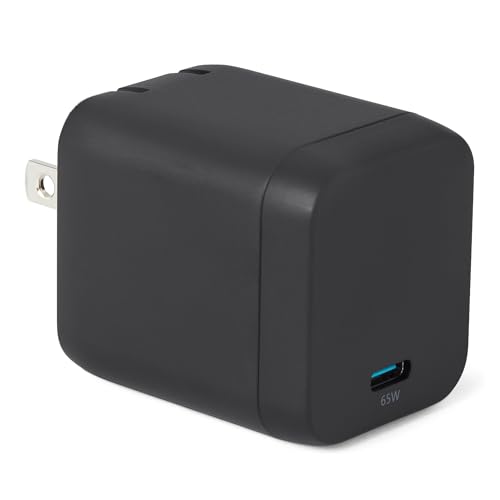 | Amazon Basics 65W Single-Port PD 3.1 | Single USB-C charger | 1 x USB-C | Up to 65W | Not applicable | Cable sold separately | Check Price on Amazon |
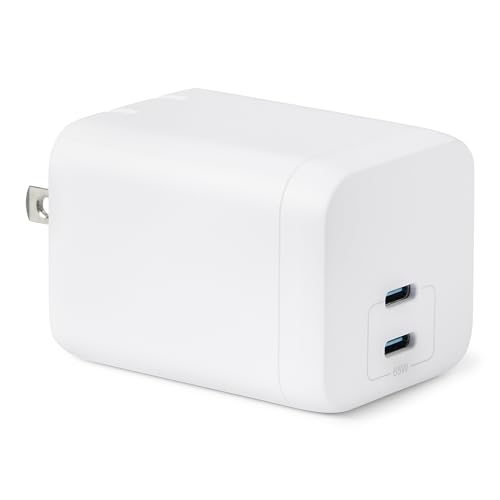 | Amazon Basics 65W Dual USB-C | Two USB-C devices | 2 x USB-C | Up to 65W on one port | 30W + 30W | Cable sold separately | Check Price on Amazon |
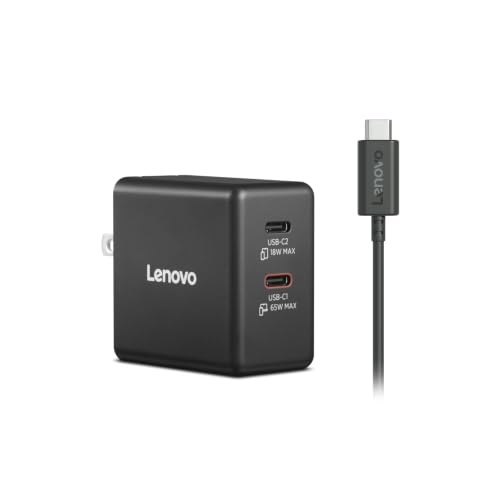 | Lenovo Dual USB-C 65W GaN | Two USB-C devices with included cable | 2 x USB-C | Up to 65W on one port | 45W + 18W | Laptop output drops when both ports are used | Check Price on Amazon |
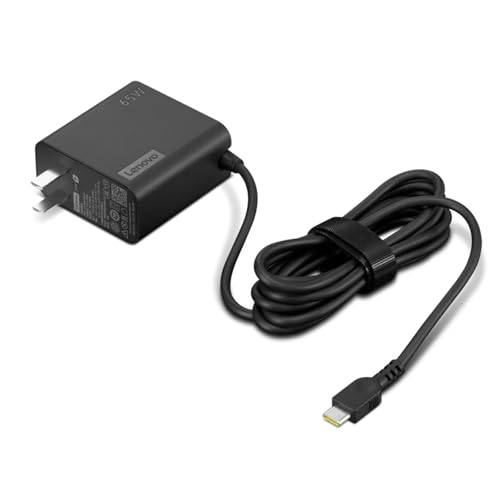 | Lenovo 65W USB-C Wall Adapter | One device and a long cable | 1 x USB-C | Up to 65W | Not applicable | One device at a time | Check Price on Amazon |
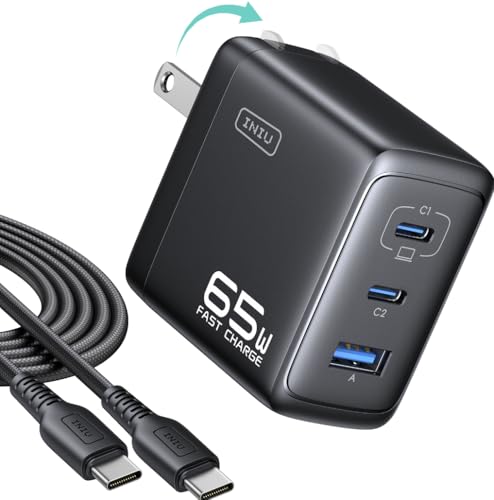 | INIU A21-E1 65W | Three devices and USB-A | 2 x USB-C, 1 x USB-A | USB-C1 up to 65W | C1+C2 45W + 20W; three ports 45W + 15W shared | Check exact port combination | Check Price on Amazon |
1. Amazon Basics 65W Single-Port PD 3.1 — Best Compact Single-Port Charger
The Amazon Basics L6LWC041-CS-R is a one-port USB-C GaN charger. Its Amazon listing gives 65W with PD 3.1, a 100-240V input and a foldable plug, and gives its size as 1.9 by 1.6 by 1.5 inches. The listing names phones, tablets and USB-C laptops as compatible, with iPhone, Samsung, iPad and MacBook Air as examples, and describes the charger as USB-IF certified.
The box holds the charger only, and the listing says the charging cable is sold separately. A USB-C cable rated for the laptop’s wattage is therefore a second purchase. With one output port there is no power split to work out, and the 65W figure is the whole output of the charger.
The listing describes heat-resistant, flame-retardant materials and gives the input as a voltage range. It does not name any outlet adapters, so a traveler visiting countries with different plug shapes should check the shape as well as the voltage.
Decision point: choose the single-port Amazon Basics when one device and a separately bought cable are enough. Our TakeThe single-port Amazon Basics is a plain 65W charger with a foldable plug, and according to its listing the cable is a separate purchase.
- The Amazon Basics listing gives 65W with PD 3.1 from its one output port, which leaves no power split to work out.
- Amazon Basics lists a foldable plug and a 100-240V input, and it does not name any outlet adapters.
- The Amazon Basics listing names phones, tablets and USB-C laptops as compatible, including the MacBook Air.
- The Amazon Basics listing says the charging cable is sold separately, and the laptop needs a USB-C cable rated for its wattage.
- This Amazon Basics charger has one USB-C port, and a second device needs another charger.
2. Amazon Basics 65W Dual USB-C — Best for Two Devices at 30W Each
The Amazon Basics L6LWC049-CS-R has two USB-C ports and a foldable plug. Its Amazon listing gives a 65W maximum from a single port and 30W plus 30W when both ports are in use, with the same 100-240V input as the single-port Amazon Basics. The listing gives its size as 2.2 by 1.7 by 1.6 inches and says the charger protects against overcharge, over-voltage, overcurrent and short circuit.
The split is the figure to check. By the listing’s numbers, a laptop on one of two occupied ports is held to 30W. Lenovo’s own page gives the larger port of the Lenovo dual-port charger 45W, a higher limit.
The box holds the charger only, and the listing says the charging cable is sold separately. With one device connected, the port is rated up to 65W. With a second device connected, the listing’s split applies.
The even 30W split is the number to set against the laptop’s requirement before a second device goes in. With one device connected, the listing’s 65W applies.
- The two USB-C ports on this Amazon Basics charger can charge two devices at once, according to its listing.
- The Amazon Basics listing gives 30W plus 30W for simultaneous use, an even split between the two devices.
- With one device connected, the Amazon Basics listing rates a single port at up to 65W.
- The Amazon Basics listing gives this charger a foldable plug and the same 100-240V input as the single-port model.
- With both ports in use, the Amazon Basics listing gives each port 30W, below the 65W it gives a single port.
- The Amazon Basics listing leaves the cable out of the box and sells it separately.
3. Lenovo Dual USB-C 65W GaN — Best Two-Port Charger With a Cable
The Lenovo G0A6065BUS is a dual USB-C GaN charger. Lenovo’s product page gives up to 65W for one device, or 45W and 18W when two devices are connected, and the Amazon listing gives the same figures. Lenovo gives its size as 50 by 50 by 30 millimeters and its weight as 0.11 kilograms. The Amazon title and part number call it CC65, while Amazon’s model field and Lenovo’s page give G0A6065BUS, so match the code before buying.
Lenovo’s page lists a 1.5 m USB-C cable in the box with the charger, and gives a 100-240V input. The Amazon listing calls the cable detachable and describes a foldable plug, and adds that the plug depends on the region.
The dual-port Amazon Basics listing gives 30W plus 30W. Lenovo’s split gives one port the larger 45W and the second port 18W, and Lenovo’s page describes the two ports as one for a PC and one for a mobile device. By Lenovo’s figures, 45W is below the 65W single-device maximum, so a laptop that needs 65W does not receive it while a phone is connected.
Decision point: choose the Lenovo dual-port model for a 45W plus 18W split and a cable in the box. Our TakeLenovo’s 45W and 18W split gives the laptop the larger share, and the box includes a USB-C cable. Check the laptop’s wattage against 45W before adding a phone.
- Lenovo states up to 65W for one device and 45W plus 18W for two, and the Amazon listing gives the same figures.
- Lenovo’s page lists a 1.5 m USB-C cable in the box with the dual-port charger.
- The Amazon listing describes a detachable cable and a foldable plug on the Lenovo dual-port charger.
- With two devices connected, Lenovo’s page gives the larger port 45W, below the 65W it gives a single device.
- The Amazon listing says the foldable plug on the Lenovo dual-port charger depends on the region.
4. Lenovo 65W USB-C Wall Adapter — Best Long-Cable Single-Port Option
The Lenovo GX21L58554 is a single-port 65W USB-C wall adapter. Lenovo’s product page gives PD 3.0, up to 65W, output voltages of 5V, 9V, 15V and 20V, a 1.7 m cable in the box and a 100-240V input. The Amazon listing gives the same PD 3.0 and 65W and says the adapter is made for compatible ThinkPad, Yoga, IdeaPad and ThinkBook laptops that charge over USB-C.
The Amazon listing adds that actual charging speed depends on the connected device and its supported charging profile, so 65W is the adapter’s ceiling. It has one USB-C output, so a phone needs its own charger. Lenovo’s page describes the adapter as compatible with a wider range of Lenovo systems and other USB-C standard products.
Lenovo gives the cable length as 170 cm, give or take 5 cm. The 1.7 m cable is longer than the 1.5 m Lenovo’s page gives for the dual-port Lenovo charger and the five-foot cable the Amazon listing gives for the INIU A21-E1, while the Amazon Basics listings put no cable in the box.
Decision point: choose the Lenovo GX21L58554 for one laptop and a 1.7 m cable in the box. Our TakeLenovo’s single-port adapter suits one laptop at a desk, with a 1.7 m cable in the box. A second device needs its own charger.
- Lenovo’s page gives the GX21L58554 PD 3.0 and up to 65W from its one USB-C output.
- Lenovo’s page lists a 1.7 m cable in the box, longer than the cable in the Lenovo dual-port or INIU box.
- The Amazon listing gives 5V, 9V, 15V and 20V output profiles and names ThinkPad, Yoga, IdeaPad and ThinkBook laptops.
- Lenovo gives the GX21L58554 one USB-C output, and a phone needs its own charger.
- The Amazon listing says actual charging speed depends on the connected device and its supported profile, so the adapter’s rating is a ceiling.
5. INIU A21-E1 65W — Best for USB-C and USB-A Devices
The INIU A21-E1 has two USB-C ports and one USB-A port. INIU’s product page gives up to 65W from C1, up to 20W from C2 and up to 18W from the USB-A port when each is used alone, with 65W as the total maximum. When ports are combined, C1 plus C2 gives 45W plus 20W and C1 plus USB-A gives 45W plus 18W. C2 plus USB-A shares up to 15W, and all three ports give 45W plus 15W. The Amazon listing states the same splits.
The Amazon listing says a five-foot USB-C cable rated at 100W is in the box, and INIU’s page names a 100W nylon-braided USB-C cable in its specifications. INIU’s page describes a wall charger with a foldable plug and marks it as the US version. Because INIU’s page gives the charger’s total output as 65W, the cable’s 100W rating does not raise that figure.
INIU’s page gives a size of 2.1 by 1.2 by 2.1 inches at 4.4 ounces, and lists PD 2.0 and 3.0, PPS, QC 2.0 and QC 3.0 among its supported protocols. The Amazon listing names only a USB-C cable in the box, so a device on the USB-A port needs a cable of its own.
INIU is the only charger of the five with a USB-A port, and its box includes a USB-C cable. C1 is the only port INIU rates at 65W, so the laptop belongs there.
- INIU’s page gives up to 65W from C1 when it is used alone, and C1 is the port where the laptop belongs.
- INIU’s page and the Amazon listing give a split for each port combination, including all three ports in use.
- The Amazon listing says the box includes a five-foot USB-C cable rated at 100W.
- The INIU A21-E1 is the only one of the five chargers with a USB-A port beside its two USB-C ports.
- INIU’s page holds C1 to 45W when another port is also in use, less than C1 gets when used alone.
- INIU’s page says C2 and USB-A share up to 15W when both are in use.
Buying Guide: Match a 65W Charger to Your Laptop
Check the laptop’s USB-C charging requirements
A USB-C port on a laptop does not by itself mean the laptop charges through it. Check the laptop maker’s documentation for USB-C Power Delivery support, the supported port and the required wattage. Lenovo’s page for the Lenovo GX21L58554 gives PD 3.0 and up to 65W, and the Amazon listing names ThinkPad, Yoga, IdeaPad and ThinkBook laptops that charge over USB-C, so the laptop’s own documentation settles compatibility.
A laptop that needs more than 65W may not receive the full power it needs for every workload, and the site’s 100W USB-C charger guide covers that decision. For one maker at a time, the site also has Lenovo ThinkPad, Dell, HP and ASUS 65W charger guides.
Compare one-port output with shared output
The single-port Amazon Basics listing and Lenovo’s page for the Lenovo wall adapter each give up to 65W for one device, and each charger has one output. Multiport chargers need a second check. The Amazon Basics listing for the dual USB-C model gives 30W plus 30W when both ports are in use, while Lenovo’s page for the dual-port charger gives 45W plus 18W.
For a laptop and a phone, the larger share is 30W on the Amazon Basics figures and 45W on Lenovo’s. A laptop that needs 65W does not receive it from either dual-port charger while the second port is in use. Compare the laptop’s required wattage with the share its port gets, and the phone’s with the share left, rather than treating each port as if it supplied 65W.
Read the port labels before connecting devices
The INIU A21-E1 is the only one of the five with a USB-A port beside two USB-C ports. INIU’s page gives C1 up to 65W alone, 45W plus 20W for C1 plus C2, 45W plus 18W for C1 plus USB-A, and up to 15W shared between C2 and USB-A.
With all three ports in use, INIU’s page gives 45W plus 15W. Read the labels to find where the laptop goes, because C1 is the only port INIU gives 65W. Plug the laptop into C1 and compare what is left for the phone or accessory with that device’s requirement.
Choose a cable for the required power
Both Amazon Basics listings, for the single-port and dual-port models, say the cable is sold separately. Lenovo’s page for the dual-port charger lists a 1.5 m USB-C cable in the box, Lenovo’s page for the wall adapter lists a 1.7 m cable, and the Amazon listing for the INIU A21-E1 gives a five-foot cable rated at 100W.
A 100W cable does not make a 65W charger deliver 100W, since INIU’s page gives its total output as 65W. Check the cable’s connectors and power rating against both the laptop and the charger, and consider the cable’s length alongside the outlet’s position.
Plan for travel and the number of devices
The Amazon listings for both Amazon Basics chargers describe a foldable plug. So does the Amazon listing for the Lenovo dual-port charger, and it adds that the plug depends on the region. INIU’s page describes a foldable plug for the US version of the INIU A21-E1. The Amazon Basics and Lenovo listings and pages give a 100-240V input, which covers voltage but not plug shape, so check the shape for the countries you will visit.
Count the devices you charge at the same time. A single-port adapter such as the Lenovo wall adapter keeps its full listed output for one laptop, while a multiport charger saves an outlet and divides power as its listing or maker page states. The site’s broader USB-C charger guide covers more configurations.
Frequently Asked Questions
Will a 65W USB-C charger work with every laptop?
No. The laptop must support USB-C charging through the chosen port and accept the charger’s power profile. The Amazon listing for the Lenovo wall adapter names ThinkPad, Yoga, IdeaPad and ThinkBook laptops that charge over USB-C, and Lenovo’s page describes it as compatible with a wider range of Lenovo systems and other USB-C standard products.
Check the laptop maker’s requirements before replacing its adapter. A laptop that requires more than 65W may charge differently under load or need a higher-output charger.
Does each port provide 65W at the same time?
No listing or maker page for these five chargers says so. The Amazon Basics listing for the dual USB-C model gives 30W plus 30W with both ports in use, and Lenovo’s page for the dual-port charger gives 45W plus 18W. Each of the five gives up to 65W for a single connected device.
INIU’s page gives different splits for the USB-C1, USB-C2 and USB-A combinations of the INIU A21-E1, with 65W as the total maximum. Check the printed port labels and the combination you plan to use.
Is a 100W cable too powerful for a 65W charger?
The Amazon listing for the INIU A21-E1 includes a 100W-rated USB-C cable with its 65W charger. The rating describes the cable, and INIU’s page gives the charger’s total output as 65W.
The cable does not raise INIU’s 65W C1 maximum or the lower splits INIU gives when other ports are in use. Check that the cable’s connectors and rating suit the device.
Which charger includes a cable?
Lenovo’s page for the dual-port charger lists a 1.5 m USB-C cable, Lenovo’s page for the wall adapter lists a 1.7 m cable, and the Amazon listing for the INIU A21-E1 gives a five-foot cable.
Both Amazon Basics listings, for the single-port and dual-port models, say the charging cable is sold separately. Budget for a USB-C cable rated for the laptop when choosing either one.
Can I charge a laptop and phone together?
Yes, on the two-port and three-port chargers, if the laptop and phone fit the stated shared output. Lenovo’s page gives 45W plus 18W for the Lenovo dual-port charger, and the Amazon Basics listing gives 30W plus 30W for the dual USB-C model.
The INIU A21-E1 adds a USB-A port, and INIU’s page gives different limits for each combination, so check the laptop’s wattage and the port it uses first.