Replacing a Dell charger starts with the connector and the wattage, then the exact laptop model or Dell part number. The six picks here are USB-C 65W adapters whose Amazon listings name Dell laptop models, series, or part numbers. They do not cover round barrel-tip adapters.
Two of the six come from Dell’s brand. Amazon names Dell Technologies as the manufacturer of the Dell 450-BFMC. The Dell HKA65NM200 is listed under the Dell brand as a genuine original in non-retail packaging, with Shenzhen Huntkey as the manufacturer. STJJNNWI, POWJDWZ, DECSZDY, and HHamoyzs are third-party brands.
The original adapter label and Dell’s support page are the final check. A USB-C plug that looks compatible is not enough when the laptop needs a different power rating or does not support charging through USB-C.
Match the USB-C connector, 65W requirement, and a named Dell model or part number before treating any replacement as suitable.Dell USB-C 65W Chargers Compared
| Image | Product | Details | Check Price |
|---|---|---|---|
 | Dell 65W USB-C AC Adapter (450-BFMC) | Best fit: Dell's own adapter, Dell Technologies as manufacturer Output: 65W maximum Connector: USB Type-C Cable: 3.28 ft cable length listed Buyer check: Match the laptop's Dell-specified adapter | Check Price on Amazon |
 | Dell HKA65NM200 65W USB-C Adapter | Best fit: Matching a listed Dell part number Output: 65W listed, current misprinted as 32.5A at 20V Connector: USB Type-C Cable: 3FT power cord listed Buyer check: Compare Dell and factory part numbers, and the amperage on the label | Check Price on Amazon |
 | STJJNNWI XH65W-2 PD 65W USB-C Adapter | Best fit: The longest stated cord, 10ft Output: 65W listed Connector: USB Type-C Cable: Cord Length 10ft listed Buyer check: Listing says it fits only 65W and 60W models | Check Price on Amazon |
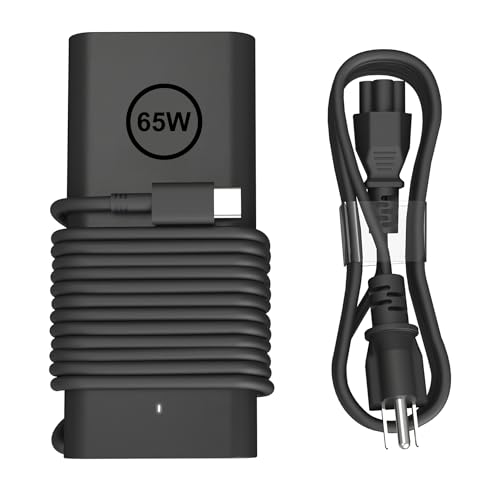 | POWJDWZ SM65CL-01 65W USB-C Adapter | Best fit: Checking a long Latitude, XPS and Inspiron model list Output: 65W maximum, 20V / 3.25A listed Connector: USB Type-C Cable: Length not listed Buyer check: Look for your exact model in the listing, not the brand name alone | Check Price on Amazon |
 | DECSZDY LX-65W 65W USB-C Adapter | Best fit: Latitude 3000-series model checks Output: 65W listed Connector: USB Type-C Cable: Power cord included, length not listed Buyer check: Confirm the named model or part number before ordering | Check Price on Amazon |
 | HHamoyzs DZ65200325 65W USB-C Adapter | Best fit: A backup charger Output: 65W listed Connector: USB Type-C Cable: Power cord included, length not listed Buyer check: Confirm its named model; its part list also holds 45W and 30W numbers | Check Price on Amazon |
1. Dell 65W USB-C AC Adapter (450-BFMC) — Best OEM Part-Number Match
The Dell 450-BFMC is the straightforward choice when the laptop’s approved adapter points to a Dell USB-C 65W unit. Its Amazon listing states a 65W maximum output and a USB Type-C interface, and its title names Inspiron, Latitude, Chromebook, Precision, Vostro, XPS, and Dell Pro series laptops. A series name is broader than a model number, so the laptop’s own documentation decides the fit.
The listing gives a 3.28-foot cable length. It suits a laptop used close to the outlet, but it may not reach a wall socket from a standing desk or a meeting-room table. Use the Dell part number and the laptop’s own power requirement as the decision, not a shared series name.
Our Take Choose the Dell 450-BFMC when you want Dell’s own USB-C 65W adapter and can match it to your Dell’s documented requirement.
- Amazon names Dell Technologies as the manufacturer of the 450-BFMC, the only adapter here with that manufacturer, for a buyer who wants Dell’s own unit.
- The title on the Dell adapter’s Amazon listing names Latitude, XPS, Precision, Dell Pro, Inspiron, Vostro, and Chromebook series, a broad starting point before checking the laptop’s own documentation.
- The Amazon listing for the Dell adapter states a 3.28-foot cable length and a 65W maximum output, both of which can be checked against the laptop’s own power requirement.
- The Dell adapter’s 3.28-foot cable length may fall short when the outlet is behind a desk or across a room.
- The Dell adapter’s Amazon listing names series, not individual models, so the approved adapter specification for the exact laptop needs checking.
2. Dell HKA65NM200 65W USB-C Adapter — Best for Matching a Listed Dell Part Number
The HKA65NM200 is listed under the Dell brand, and its listing calls it a genuine original Dell adapter in non-retail packaging. Amazon names Shenzhen Huntkey as the manufacturer, and both the model and part fields read HKA65NM200. The listing states a 65W output with a USB Type-C tip and a 3FT power cord. It prints the amperage as 32.5A at 20V, which does not match 65W (65W at 20V is 3.25A), so read the figure on the adapter’s own label.
The listing names Dell part numbers 0WMDHR, 0VT148, 0CJG9W, 0T3JDJ, and 723JG, and factory models LA65NM190, HA65NM190, and HKA65NM200. Its title names Latitude 3340 through 9440 2in1 models, while its compatible-model line names XPS 12 and XPS 13 models and other Latitude models, so a buyer should check both lines against the laptop. A listed model does not prove the laptop charges through USB-C at 65W. Match a printed adapter part number or the support manual before ordering.
Compare the five Dell part numbers and three factory models in the listing with the label on your old adapter before ordering.Our Take Choose HKA65NM200 when the old adapter or Dell support record shows one of its named Dell or factory part numbers.
- Amazon’s HKA65NM200 listing names five Dell part numbers and three factory models, which a buyer can compare with the label on an old adapter.
- The HKA65NM200 listing states a 65W output with a USB Type-C tip, the connector and wattage a USB-C Dell replacement needs to match.
- Amazon’s model and part fields for the HKA65NM200 both read HKA65NM200, a number to match against a printed adapter part number.
- The HKA65NM200 listing states a three-foot power cord, a length to measure against the distance from the outlet.
- The HKA65NM200 listing prints 32.5A at 20V, so the amperage needs checking against the adapter’s own label.
- The title and the compatible-model line on the HKA65NM200 listing name different Latitude models, so both need checking against the laptop.
- The HKA65NM200 listing says the genuine original Dell adapter comes in non-retail packaging.
3. STJJNNWI XH65W-2 PD 65W USB-C Adapter — Best with a 10-Foot Cable
The STJJNNWI XH65W-2 PD is the pick for a long cord. Its listing states Cord Length: 10ft, a USB Type-C connector, and 65W. It names Latitude, XPS, Chromebook, and Inspiron models and says it fits only 65W and 60W models. It is also the only listing here that names individual Dell Pro, Dell 14 Plus, and Dell 16 Plus model numbers, such as PC14250 and PB13250.
The listing does not say whether the 10ft is the wall cord or the lead to the laptop, and the Dell listings word their lengths differently, so compare them as stated lengths and not as matching cable runs. A 10-foot cord needs careful routing so it does not create a trip hazard or pull on the laptop port. It is a better fit than the 3.28-foot length on Dell’s 450-BFMC listing only when the outlet is distant.
Check which stretch the 10ft covers, then measure from the outlet to the laptop’s USB-C charging port before choosing it for a desk or classroom.Our Take Choose the STJJNNWI XH65W-2 PD when a compatible 60W or 65W Dell laptop needs a longer stated cord.
- STJJNNWI lists a 10ft cord length, the longest stated length among these six.
- STJJNNWI states a USB Type-C connector and 65W, the connector and wattage a USB-C Dell replacement needs to match.
- STJJNNWI names individual Dell Pro, Dell 14 Plus, and Dell 16 Plus model numbers, which no other listing here does.
- STJJNNWI’s 10-foot cord can add clutter or a trip risk when the wall outlet is already nearby.
- STJJNNWI’s listing says it fits only 65W and 60W models.
- STJJNNWI’s listing does not say which part of the cord the 10ft measures.
4. POWJDWZ SM65CL-01 65W USB-C Adapter — Best for a Long Compatibility List
POWJDWZ lists this adapter as SM65CL-01 with a 65W maximum, a USB Type-C connector, and output modes including 20V at 3.25A. It also lists 100-240V input at 50-60Hz. The listing names a long set of Latitude, XPS, Inspiron, and Chromebook models, plus a long run of Dell part numbers, which can help a buyer compare an exact laptop number.
The large list helps only if the buyer finds the precise model in it and checks the laptop’s own power requirement. A series mention is not a promise about the whole Dell range. The listed output modes are the adapter’s stated power steps, not the amount any one laptop will draw.
Our Take Choose SM65CL-01 when its listing names your exact Dell model and the original adapter requires USB-C charging at 65W.
- POWJDWZ states 65W maximum and USB Type-C, with 20V at 3.25A among its output modes.
- POWJDWZ lists 100-240V input at 50-60Hz.
- POWJDWZ names Latitude, XPS, Inspiron, and Chromebook models in its compatibility text.
- POWJDWZ’s model field and part field both read SM65CL-01.
- POWJDWZ’s long compatibility list takes more care to check than a Dell part-number match.
- POWJDWZ’s listed output modes do not show which of them a given laptop accepts.
- POWJDWZ’s listing does not state a cable length.
5. DECSZDY LX-65W 65W USB-C Adapter — Best for Latitude 3000-Series Model Checks
The DECSZDY LX-65W is listed as a 65W USB-C replacement for Dell laptops, with a power cord included. Its listing names Latitude 3310, 3320, 3330, 3420, 3430, 3520, and 3530, which none of the other five listings name. It also names XPS, Chromebook, and Inspiron models, and the Dell-compatible part numbers LA65NM170, HA65NM170, DA65NM170, HA65NM190, and HKA65NM200.
The title says it is compatible with all Dell computers, but the listing’s detailed lines name specific models and part numbers, and this guide relies on those. Match the named model or part number first, then compare the connector and the laptop’s original power requirement.
Our Take Choose LX-65W when one of its named Latitude 3000-series models or Dell part numbers matches the charger you are replacing.
- DECSZDY names Latitude 3310, 3320, 3330, 3420, 3430, 3520, and 3530, which no other listing here does.
- DECSZDY names the Dell-compatible part numbers HA65NM190 and HKA65NM200 among others.
- DECSZDY lists a 65W USB-C adapter with a power cord included.
- DECSZDY’s title says it is compatible with all Dell computers, which is broader than its model-specific lines.
- DECSZDY’s listing does not state a cable length.
- DECSZDY is a third-party adapter, not Dell’s own 450-BFMC.
6. HHamoyzs DZ65200325 65W USB-C Adapter — Best as a Backup Charger
HHamoyzs lists this 65W USB-C charger as DZ65200325 and calls it the best choice for a backup charger. The listing also calls it lighter, smaller, and more portable than the regular 65W USB-C laptop charger, and Amazon’s size field gives 4.4 by 2.0 by 1.1 inches. The listing names Latitude, XPS, Inspiron, and Chromebook models and the part numbers LA65NM190, DA65NM190, and LA65NM170, among others.
HHamoyzs does not say which charger it is smaller and lighter than, so the comparison is not a ranking claim here. Dell’s 450-BFMC listing gives a size of 4.4 by 2 by 1.1 inches, so the size does not set this adapter apart. The listing’s part-number list also includes 45W and 30W Dell numbers such as LA45NM171 and DA30NM150, so a buyer should match the 65W number for the laptop.
Use the 4.4 by 2.0 by 1.1 inch size to judge bag space, then confirm the laptop’s USB-C charging and 65W requirement separately.Our Take Choose DZ65200325 as a backup charger when its named Dell model or part number matches the adapter you need to replace.
- HHamoyzs calls DZ65200325 the best choice for a backup charger and lists 4.4 by 2.0 by 1.1 inches.
- HHamoyzs states a 65W USB-C charger and names Latitude, XPS, Inspiron, and Chromebook models.
- HHamoyzs lists the part numbers LA65NM190, DA65NM190, and LA65NM170, among others.
- HHamoyzs does not say which charger DZ65200325 is smaller and lighter than.
- HHamoyzs lists 45W and 30W Dell part numbers in the same list as its 65W ones.
Buying Guide
1. Confirm that the laptop charges through USB-C
A USB-C port is not automatically a charging port. Check the original Dell adapter label, the laptop manual, or Dell’s support record for a USB-C charging requirement before considering these models. The Dell 450-BFMC, Dell HKA65NM200, and the four third-party picks all state a USB Type-C connector, but the connector describes the charger, not the laptop’s ability to charge from it.
Do not use this page for a round-barrel Dell charger. A round barrel plug and a USB-C plug are different connectors, and the two are not interchangeable. A model number that resembles a Latitude or Inspiron number is not enough when the laptop needs another connector.
2. Match the original 65W requirement
These six picks state 65W, but the laptop’s approved wattage is the decision. Dell and POWJDWZ state a 65W maximum, and the other four state 65W. The HKA65NM200 listing prints its amperage as 32.5A at 20V, which does not match 65W, so read the figure on the adapter’s own label. A stated wattage helps only after you verify that the specific Dell is designed for a 65W USB-C adapter.
More watts in a title do not solve a connector or compatibility mismatch. If the original system documentation names another adapter or a different power class, follow it instead. The site’s USB-C charger guide helps with general charger choices, while this page keeps the focus on Dell-model and part-number matching.
3. Compare the model and part number before the series name
Part numbers are more useful than broad series names. HKA65NM200 names factory models LA65NM190 and HA65NM190, and DECSZDY lists both. HHamoyzs lists LA65NM190 and DA65NM190 but not HA65NM190. The Dell 450-BFMC gives a Dell part number to compare against a Dell support record or the original adapter.
Treat lists of Latitude, XPS, Inspiron, and Chromebook models as a second check. They can narrow a search, but a series can contain different configurations and generations. The POWJDWZ and STJJNNWI lists help when an exact laptop number appears, not when a nearby model looks similar.
4. Check the stated cord length and size against your desk
Cable length can decide day-to-day usefulness once compatibility is settled. Dell’s 450-BFMC lists a 3.28-foot cable length, HKA65NM200 lists a 3FT power cord, and STJJNNWI lists Cord Length 10ft. The listings do not say whether each length is the wall cord or the lead to the laptop, so measure the full run from the outlet to the charging port. POWJDWZ, DECSZDY, and HHamoyzs state no length.
A longer cord is not inherently better. STJJNNWI suits a distant outlet but can create clutter where a short lead works. Size does not separate the adapters much. Dell’s 450-BFMC lists a size of 4.4 by 2 by 1.1 inches, although its separate dimensions field reads 7.0 by 6.4 by 1.5. HHamoyzs lists 4.4 by 2.0 by 1.1, HKA65NM200 lists 4.3 by 2.0 by 1.1, and STJJNNWI lists 4.37 by 1.95 by 1.03, while POWJDWZ and DECSZDY list no dimensions.
5. Do not convert a seller’s compatibility wording into a safety guarantee
The third-party listings state compatibility, not an approval from Dell. DECSZDY’s title uses a broad all-Dell phrase, while its detailed lines name specific models and part numbers. Use the detail that matches the laptop, then confirm the connector and wattage from an original label or Dell support source.
A Dell part number is the simpler match when one is available. Dell’s 450-BFMC carries a Dell part number, but its series list needs to match the buyer’s computer. The 100W USB-C charger guide and 140W USB-C charger guide cover higher-power general options rather than authorizing one for a particular Dell.
FAQ
Can I use any 65W USB-C charger with a Dell laptop?
No. The charger needs a USB-C connector, an appropriate 65W requirement, and a match to the laptop’s supported charging configuration. A Dell laptop may have USB-C ports that serve data or video without accepting power.
Start with the original adapter label or Dell’s support documentation. Then compare the exact model or part number to the listing for 450-BFMC, HKA65NM200, or a third-party replacement.
How do I find the Dell part number for a replacement charger?
Look at the label on the original adapter first. HKA65NM200, LA65NM190, HA65NM190, and Dell part 450-BFMC are examples of references appearing in the listings on this page.
If the old adapter is unavailable, Dell’s own parts selector asks for a service tag or model number before it shows compatible accessories. A series name can help a search, but the part number and the required connector settle the replacement decision more reliably.
Is a 10-foot charger cable better than a three-foot cable?
No. A 10-foot cord is better only when the outlet-to-laptop distance needs it. STJJNNWI lists 10ft, while Dell’s 450-BFMC lists a 3.28-foot cable length and HKA65NM200 lists a 3FT power cord.
The listings word the lengths differently, so measure the whole run with enough slack for normal desk movement. Avoid excess cord that catches on chairs or creates a trip risk. Length should follow compatibility and never replace it.
Why does this guide exclude Dell barrel-tip chargers?
The page excludes them because it covers USB-C chargers only. A round barrel plug and a USB-C plug are different physical connections.
Do not try to make a round-barrel charger fit a USB-C charging port. Find a guide or exact replacement that matches the connector printed on the original adapter and specified for the laptop.
Should I prefer a Dell-made charger over a third-party replacement?
A Dell part can make the part-number match simpler, but it does not remove the need to confirm the laptop’s own requirement. Amazon names Dell Technologies as the manufacturer of the 450-BFMC only. The HKA65NM200 is listed under the Dell brand as a genuine original in non-retail packaging, with Shenzhen Huntkey as the manufacturer, and the other four are third-party brands.
For a third-party option, use the exact named Dell model, power class, connector, and part number as a checklist. Do not rely on a general statement that it works with a Dell series.
Bottom Line
Choose Dell 450-BFMC for Dell’s own adapter, HKA65NM200 when the existing label matches one of its listed Dell or factory part numbers, STJJNNWI XH65W-2 PD for the longest stated cord length, and HHamoyzs DZ65200325 as a backup charger. In every case, match the Dell’s USB-C charging support, required wattage, and exact model or part number first.