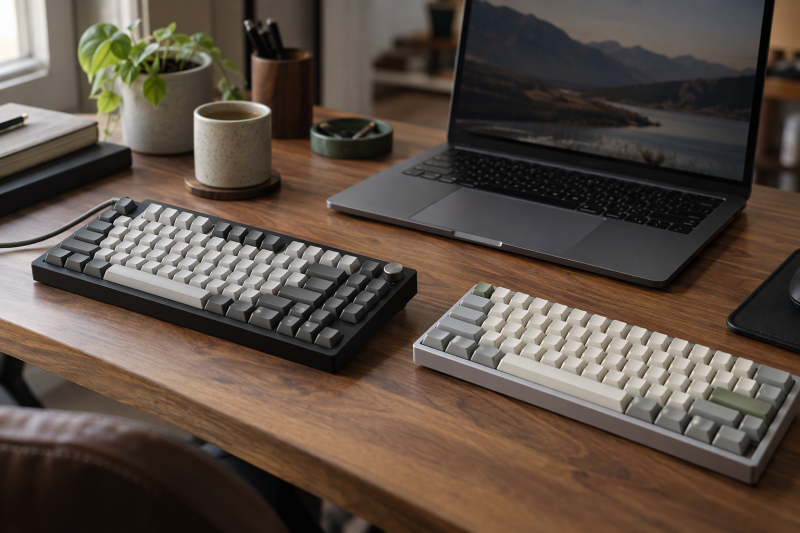
A 75% mechanical keyboard keeps the function row and arrows while taking less desk width than a full-size board. The useful differences are wired versus tri-mode connection, key count, battery size, switch sockets, knob and display, not the percentage label alone.
75% mechanical keyboards compared
| Image | Product | Details | Check Price |
|---|---|---|---|
 | EPOMAKER x AULA F75 MAX | Best fit: TFT screen and 80-key 75% Layout: 75%, 80 keys Connection: Bluetooth 5.0, 2.4 GHz, USB-C Switches: LEOBOG Reaper linear Customization: 3/5-pin hot-swap, knob, TFT | Check Price on Amazon |
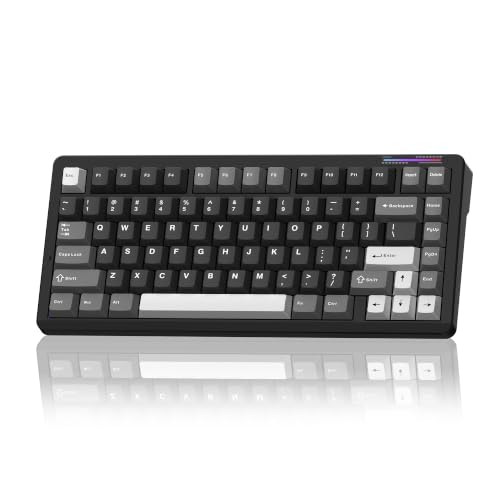 | LINGBAO K75 | Best fit: 10,000mAh five-device keyboard Layout: 75% with arrows Connection: Bluetooth, 2.4 GHz, wired Switches: Pre-lubed linear, 3/5-pin hot-swap Customization: Driver macros, RGB | Check Price on Amazon |
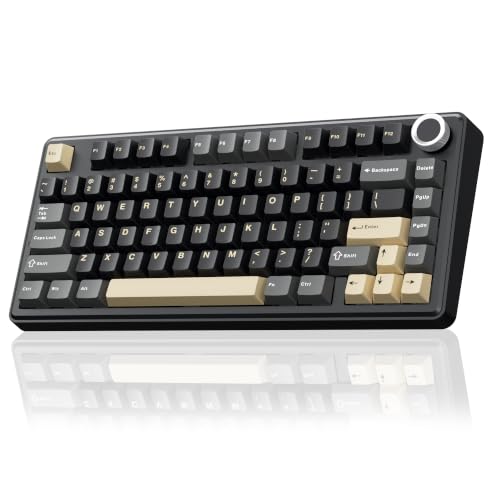 | SOLAKAKA A75 | Best fit: 81-key tri-mode knob Layout: 75%, 81 keys Connection: Bluetooth 5.0, 2.4 GHz, USB-C Switches: LEOBOG Grey Wood linear, 3/5-pin hot-swap Customization: Knob, RGB, driver | Check Price on Amazon |
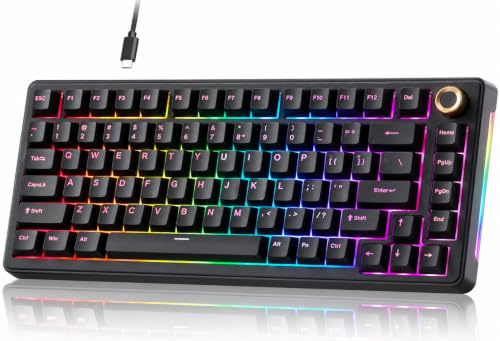 | TMKB T81E | Best fit: Wired gasket keyboard, 3/5-pin Layout: 75%, 81 or 82 keys listed Connection: Detachable USB-C wired Switches: 3/5-pin MX-style hot-swap Customization: Aluminum knob, RGB | Check Price on Amazon |
 | Newmen GM326 | Best fit: Wired red-switch 75% Layout: 75% Connection: Detachable USB-C wired Switches: Red linear, 3-pin hot-swap Customization: Knob, rainbow lighting | Check Price on Amazon |
1. EPOMAKER x AULA F75 MAX — Best for a TFT Screen and Knob
EPOMAKER’s page lists the F75 MAX as an 80-key 75% layout with a TFT screen and a metal knob, and the Amazon bullets give the same 80 keys. EPOMAKER lists Bluetooth 5.0, 2.4GHz and USB-C wired modes and a 4,000mAh battery. It also lists a gasket mount, five sound-dampening layers, 3/5-pin hot swap with no soldering needed and LEOBOG Reaper linear switches. EPOMAKER says the screen shows time, battery, connection and status, and the knob adjusts volume, RGB and backlight styles.
EPOMAKER lists 1,000Hz polling over USB and 2.4GHz, 125Hz over Bluetooth, NKRO, dimensions of 32.8 x 14.3 x 4.4cm and a 2cm front height. Its page also gives a one-year limited warranty covering manufacturing defects. EPOMAKER lists no device count for Bluetooth pairing, so a buyer who needs five stored devices should compare K75 or A75.
Limit: EPOMAKER lists Bluetooth at 125Hz, below the 1,000Hz it lists for USB and 2.4GHz.Our Take Choose F75 MAX for a screen that shows battery and connection status, plus a knob. Pick LINGBAO for the larger battery, or TMKB or Newmen for a wired-only board.
- A buyer gets battery and connection status on the keyboard itself, because EPOMAKER says the TFT screen shows time, battery, connection and status, and the knob adjusts volume, RGB and backlight styles.
- EPOMAKER lists Bluetooth 5.0 and 2.4GHz for wireless use and USB-C for wired use.
- Switches can be replaced without soldering, and EPOMAKER lists 3/5-pin hot swap.
- Over Bluetooth, EPOMAKER lists a 125Hz report rate, against 1,000Hz over USB and 2.4GHz.
- The F75 MAX battery is 4,000mAh in EPOMAKER’s listing, less than the 10,000mAh LINGBAO lists for the K75.
2. LINGBAO K75 — Best for a 10,000mAh Tri-mode Battery
LINGBAO’s K75 listing gives a 10,000mAh battery, Bluetooth, 2.4GHz and wired modes, and storage for up to five devices. It is a 75% mechanical keyboard with independent arrow keys, RGB, pre-lubricated linear switches, a five-layer gasket design and full-key 3/5-pin hot-swap sockets. Amazon’s brand field reads CORBOBO, while its title and manufacturer field read LINGBAO.
The listing states up to 40 hours with RGB lighting and up to 500 hours with lights off, and says to charge only through a computer USB port, not a phone fast charger. Full-key macro programming can be set only in the driver over a wired connection. The listing shows no screen or knob, and its dimensions field gives 14.37 x 7.48 x 2.36 inches and 2.74 pounds without saying whether that is keyboard or package size.
Limit: LINGBAO says macro programming works only in the driver over a wired connection, and tells buyers not to charge with a phone fast charger.Our Take Choose K75 for the largest battery of the five, 10,000mAh, and storage for five devices, the same count SOLAKAKA lists. Choose F75 MAX for the screen and mode-specific polling figures, or A75 for a knob on a tri-mode board.
- LINGBAO lists 10,000mAh, the largest battery among the five keyboards on this page, and states runtime hours with RGB on and with lights off.
- LINGBAO says the Bluetooth, 2.4GHz and wired connections can store up to five devices, the same count SOLAKAKA lists.
- Full-key hot-swap sockets take both 3-pin and 5-pin switches, according to the Amazon listing.
- The Amazon listing describes a five-layer gasket design and pre-lubricated linear switches.
- A buyer who wants full-key macros has to plug in, since the Amazon listing says macro programming can be set only in the driver over a wired connection.
- LINGBAO’s Amazon listing shows no screen or knob.
- LINGBAO tells buyers to charge only through a computer USB port, not with a phone fast charger.
3. SOLAKAKA A75 — Best for an 81-key Multi-function Knob
SOLAKAKA lists the A75 as an 81-key 75% keyboard with a multifunction metal knob, LEOBOG Grey Wood linear switches, a 4,000mAh battery and a gasket structure. In gaming mode, a short press of the knob selects lighting patterns and turning it adjusts brightness. In office mode, a short press mutes and turning changes volume.
The listing gives Bluetooth 5.0, 2.4GHz and USB-C, and support for up to five devices. It also gives 3/5-pin hot swap, PBT keycaps, south-facing LEDs, 17 RGB lighting modes and dimensions of 12.79 x 5.51 x 1.73 inches. SOLAKAKA says the driver supports Windows only and should be run in wired mode. The listing gives no polling rate and no screen.
Limit: SOLAKAKA says its driver supports Windows only and should be run in wired mode.Our Take Choose A75 for a tri-mode board whose knob switches between lighting control and volume. SOLAKAKA gives no polling rate, while EPOMAKER lists 1,000Hz and 125Hz depending on mode.
- SOLAKAKA lists an 81-key layout with a multifunction metal knob that selects lighting patterns in gaming mode and sets volume in office mode.
- SOLAKAKA lists support for up to five devices alongside Bluetooth 5.0, 2.4GHz and USB-C.
- SOLAKAKA lists 3/5-pin hot-swap sockets, LEOBOG Grey Wood linear switches and PBT keycaps.
- A buyer who customizes the A75 needs a Windows computer and a wired connection, because SOLAKAKA says the driver supports Windows only and should be run in wired mode.
- SOLAKAKA’s listing gives no screen and no polling rate to set beside the polling figures EPOMAKER lists.
- The A75 battery is 4,000mAh in SOLAKAKA’s listing, below the 10,000mAh LINGBAO lists for the K75.
4. TMKB T81E — Best for a Wired Gasket Keyboard with 3/5-pin Sockets
TMKB’s T81E is a wired 75% keyboard with a gasket mount, five-layer sound damping, a multifunction aluminum knob for volume, mute and media control, and a detachable braided USB-C cable. The Amazon listing says its hot-swap PCB supports most 3-pin and 5-pin MX-style switches. The Amazon title says 82 keys while Amazon’s size field says 81-Key, so the listing disagrees with itself on key count.
The listing gives 20 backlight presets and nine color themes, and says onboard memory keeps lighting settings after power-off. It also lists Windows and Mac system toggle shortcuts and an ABS housing, but no Bluetooth, 2.4GHz, battery or screen.
Our Take Choose TMKB for a wired gasket keyboard with 3/5-pin sockets. Newmen is the other wired board here, and its listing names red linear switches and 3-pin hot swap, and the tri-mode boards suit a desk that moves between devices.
- TMKB lists an aluminum knob for volume, mute and media control on a wired 75% layout.
- TMKB lists a gasket mount and five-layer sound damping in a wired board.
- The hot-swap PCB supports most 3-pin and 5-pin MX-style switches, according to TMKB.
- The Amazon listing says onboard memory keeps lighting settings after power-off.
- TMKB lists no Bluetooth, 2.4GHz or battery, so the keyboard works only with its detachable USB-C cable.
- A buyer cannot settle the key count from the listing, because Amazon’s size field says 81-Key while its title says 82 Keys.
5. Newmen GM326 — Best for a Simple Wired Red-switch 75%
Newmen’s GM326 is a wired 75% mechanical keyboard with a detachable USB-C cable, linear red switches, 3-pin hot-swap support and a multi-function knob in the upper right corner that adjusts volume. Newmen’s listing describes the red switches as linear with light sound and minimal resistance, and gives six backlight colors and 20 backlight modes.
The listing also gives full-key anti-ghosting and support for Windows 7 to 11 and macOS 10.10 or later. It gives three indicator lights for Caps Lock, Win lock and the Windows/Mac switch, plus ABS keycaps and two-stage tilt legs. It lists no Bluetooth, 2.4GHz, battery, gasket mounting or 5-pin switch support.
Our Take Pick GM326 for a no-battery 75% wired setup with linear red switches and a volume knob. Choose TMKB when 5-pin MX-style sockets and the five-layer damping TMKB’s listing describes are important.
- Newmen describes its linear red switches as light in sound with minimal resistance, and the GM326 also has a volume knob and a detachable USB-C cable.
- The Amazon listing gives three indicator lights for Caps Lock, Win lock and the Windows/Mac switch, plus full-key anti-ghosting and two-stage tilt legs.
- Newmen lists six backlight colors and 20 backlight modes for the GM326.
- Newmen names 3-pin hot swapping, while F75 MAX, K75, A75 and TMKB list 3/5-pin support.
- Newmen lists no Bluetooth, 2.4GHz, battery or gasket mount.
Buying Guide
1. Compare the actual key count
EPOMAKER lists 80 keys for F75 MAX and SOLAKAKA lists 81 for A75. TMKB’s Amazon title says 82 and Amazon’s size field says 81. Each is labelled 75%, so check the key map in the product images before relying on a shortcut position.
A 75% layout leaves out the number pad. Choose 75% for a function row and arrows in a smaller body, not when a dedicated numeric cluster is a daily work tool.
2. Choose connection before battery capacity
EPOMAKER, LINGBAO and SOLAKAKA list Bluetooth, 2.4GHz and USB-C or wired modes. TMKB and Newmen list wired USB-C only. Wired keyboards avoid battery and pairing, while tri-mode boards suit a desk that moves among devices.
LINGBAO lists 10,000mAh and EPOMAKER and SOLAKAKA list 4,000mAh. Among the five Amazon listings, LINGBAO’s is the only one that gives runtime hours, up to 40 with RGB and up to 500 with lights off.
3. Read hot-swap socket limits
EPOMAKER, LINGBAO, SOLAKAKA and TMKB list 3/5-pin support, and Newmen lists 3-pin. Follow each listing’s wording when planning a switch change.
None of the five listings mentions Hall Effect switches, so check that a replacement switch matches the socket type each listing names.
4. Decide whether a knob or screen changes the desk
EPOMAKER lists a TFT screen and a knob for F75 MAX. SOLAKAKA, TMKB and Newmen list knobs. LINGBAO lists neither a screen nor a knob. A screen can show connection and battery status, whereas the knobs listed here handle volume, mute, media or lighting.
Pick the extra control when it would replace an action you repeat each day. Otherwise, switch type, connection and key count decide more of the fit.
5. Treat gasket and damping as construction details
EPOMAKER, LINGBAO, SOLAKAKA and TMKB list a gasket mount or layered damping. EPOMAKER lists five damping layers for F75 MAX, TMKB lists five-layer damping and LINGBAO lists a five-layer gasket build.
A gasket description does not show that one board is quieter than another. Choose by the mounting and switch sockets each listing gives and the build you plan, and treat sound as a separate question.
FAQ
Which 75% keyboard here has a screen?
EPOMAKER’s page lists a TFT smart screen and a metal knob for F75 MAX, along with 80 keys, a 4,000mAh battery and three connection modes.
The other four listings give knobs or indicator lights, but no TFT screen. Choose F75 MAX when visible connection and battery information is part of the requirement.
Which one has the largest battery?
LINGBAO lists 10,000mAh for the K75, the largest of the five. EPOMAKER and SOLAKAKA list 4,000mAh.
LINGBAO states up to 40 hours with RGB and up to 500 hours with lights off. Compare LINGBAO’s hours with how you will use RGB and wireless, rather than treating capacity alone as battery life.
Are there any wired-only choices?
TMKB T81E and Newmen GM326 list detachable USB-C wired connections and no wireless mode. A wired board suits a fixed desk where a cable is preferred.
EPOMAKER, LINGBAO and SOLAKAKA list tri-mode connection. Wired-only removes pairing and charging from the setup, but it needs a cable running to the computer.
Which one supports five devices?
LINGBAO and SOLAKAKA each list support for up to five devices. EPOMAKER lists Bluetooth, 2.4GHz and wired modes with no device count.
Match the device count to the computers, tablets and phones you rotate between. Connection method and layout are separate decisions.
Can all of these use replacement switches?
All five list hot swapping, but the socket wording varies. EPOMAKER, LINGBAO, SOLAKAKA and TMKB list 3/5-pin support, and Newmen lists 3-pin only.
Check the switch pin format before buying. A hot-swap claim does not make every mechanical switch fit every keyboard socket.
Bottom Line
Choose EPOMAKER x AULA F75 MAX for the TFT screen and knob EPOMAKER lists, with its 1,000Hz USB and 2.4GHz and 125Hz Bluetooth polling figures. Choose LINGBAO K75 for the 10,000mAh battery and five stored devices LINGBAO lists. Choose SOLAKAKA A75 for the 81-key layout and multifunction knob SOLAKAKA lists. Choose TMKB T81E for a wired gasket keyboard with the 3/5-pin hot-swap PCB TMKB lists. Choose Newmen GM326 for a wired board with the red linear switches Newmen lists.
The rapid-trigger keyboard guide covers magnetic-switch controls, while the quiet mechanical keyboard guide covers a quieter desk decision. Choose a 75% board when its compact layout and control arrangement fit the desk.