A curved monitor is a decision about screen width, resolution, curvature, inputs, and refresh rate. A 27-inch QHD model, a 32-inch Full HD model, and a 34-inch ultrawide can each fit the same desk very differently. Decide on useful pixel space and physical width first, then use the curve number and gaming specifications to narrow the choice.
The six monitors below cover 1000R, 1500R, and 1800R screens from 27 to 34 inches, using the makers’ product pages and the Amazon listings. A deeper curve does not replace QHD resolution, a suitable dock connection, or enough desk depth. Check each monitor’s input list against the laptop or desktop before choosing a screen around a refresh-rate headline. Our USB-C docking-station guide covers the separate dock choice.
Choose the screen size and resolution for the work you do, then compare the curve and connection plan.Curved Monitors Compared
| Image | Product | Details | Check Price |
|---|---|---|---|
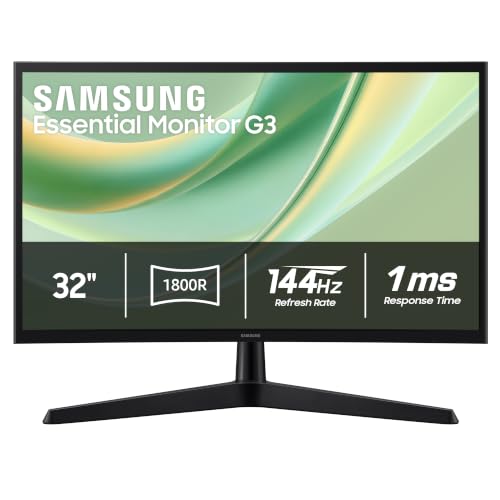 | Samsung Essential G3 32-inch G35H | Best fit: 32-inch 1800R desk gaming Size and curve: 32-inch, 1800R Resolution and speed: Full HD, 144Hz Ports: HDMI and DisplayPort Limit: Full HD resolution | Check Price on Amazon |
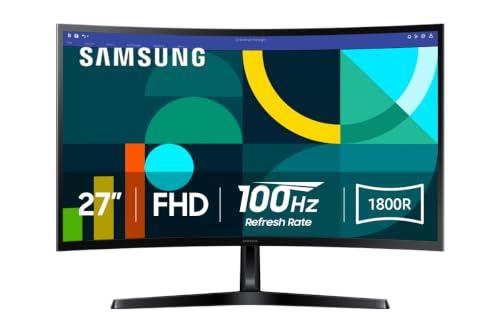 | Samsung Essential S3 27-inch S36GD | Best fit: Basic 27-inch 1800R work Size and curve: 27-inch, 1800R Resolution and speed: Full HD, 100Hz Ports: HDMI and D-sub Limit: No DisplayPort listed | Check Price on Amazon |
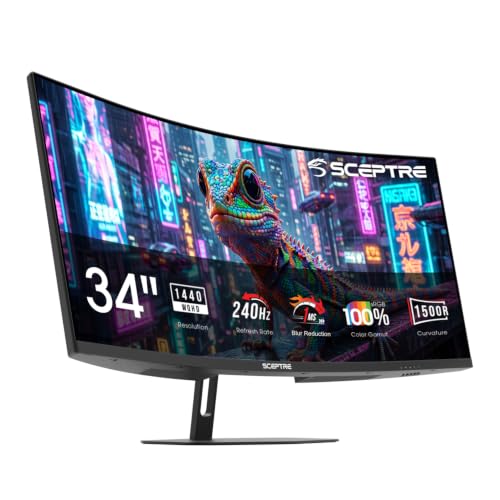 | Sceptre Prime C345B-QU240T | Best fit: 34-inch 1500R ultrawide Size and curve: 34-inch, 1500R Resolution and speed: 3440 by 1440, up to 240Hz Ports: 2 HDMI and 2 DisplayPort Limit: 31.8-inch width needs desk room | Check Price on Amazon |
 | LG UltraGear 32GS60QC-B | Best fit: 32-inch 1000R QHD gaming Size and curve: 32-inch, 1000R Resolution and speed: 2560 by 1440, 180Hz Ports: 2 HDMI and DisplayPort Limit: Tilt listed, no height range | Check Price on Amazon |
 | Acer Nitro EDA270U | Best fit: 27-inch 1500R QHD gaming Size and curve: 27-inch, 1500R Resolution and speed: 2560 by 1440, 170Hz per Acer Ports: 2 HDMI, DisplayPort, audio out Limit: Listing says 180Hz, Acer says 170Hz | Check Price on Amazon |
 | LG Smart Monitor 34SR60QC-W | Best fit: 34-inch 1800R smart screen Size and curve: 34-inch, 1800R Resolution and speed: 3440 by 1440, 100Hz Ports: 2 HDMI and 3 USB Limit: Magic Remote sold separately | Check Price on Amazon |
1. Samsung Essential G3 32-inch G35H — Best 32-Inch 1800R Desk Gaming Pick
Samsung’s Essential G3 (G35H) is a 32-inch 1800R curved Full HD monitor at 144Hz with a 1ms MPRT response-time figure. Samsung’s Canadian page for the same model code states the 1800R curve, the 144Hz refresh rate and the 1ms MPRT figure, and adds that the default refresh rate is 60Hz and can be changed to 144Hz in the monitor’s settings. The Amazon listing also names VRR, AMD FreeSync, Game Mode, Eye Saver Mode, HDMI and DisplayPort.
Full HD is the limit to weigh, because a 32-inch Full HD screen gives less pixel space than the 32-inch LG UltraGear in QHD. Amazon’s item dimensions list a width of about 28.3 inches, which sets the minimum desk width. The Amazon listing gives no height-adjustment range.
Our Take Choose the Samsung Essential G3 when a 32-inch 1800R screen and 144Hz count for more than QHD pixels. Set the refresh rate to 144Hz in the monitor menu on day one, since Samsung’s page gives 60Hz as the default.
- Samsung states an 1800R curve on a 32-inch screen, a larger panel than either 27-inch monitor here.
- Samsung’s page lists 144Hz with a 1ms MPRT figure, above the 100Hz that the Samsung S3 and LG Smart Monitor listings state.
- The Amazon listing for the Samsung G3 names both HDMI and DisplayPort inputs.
- Samsung’s Essential G3 is Full HD, which gives less workspace than the QHD and 3440 by 1440 monitors here.
- Samsung’s page says the G3 runs at a 60Hz default until the buyer changes it to 144Hz in the settings.
- The Amazon listing for the Samsung G3 gives no height-adjustment range.
2. Samsung Essential S3 27-inch S36GD — Best Basic 27-Inch 1800R Work Screen
Samsung’s Essential S3 (S36GD) is the simpler 1800R option. Samsung’s US page states an 1800R curved screen, 100Hz and Game Mode, and the Amazon listing gives a 27-inch Full HD curved screen with eye-comfort technology certified by TÜV. Amazon’s item dimensions list a width of about 24.5 inches, narrower than the 32-inch and 34-inch monitors here.
The Amazon title lists HDMI and D-sub ports and no DisplayPort. Buyers who want QHD, a refresh rate above 100Hz or a DisplayPort input should look at the Acer, LG UltraGear or Sceptre sections instead.
The Samsung S3 is a 27-inch 1800R Full HD screen with HDMI and 100Hz, a compact choice and not a high-resolution one.Our Take Choose the Samsung Essential S3 for a smaller 1800R screen at 100Hz with HDMI. It is a poorer fit for a QHD or DisplayPort plan.
- The Amazon listing for the Samsung S3 gives a 27-inch body, narrower than the 32-inch and 34-inch monitors here.
- Samsung’s page lists 100Hz and Game Mode on the 1800R screen.
- The Amazon title for the Samsung S3 lists an HDMI port.
- Samsung’s Essential S3 is Full HD, which gives less workspace than QHD or 3440 by 1440.
- The Amazon title for the Samsung S3 lists HDMI and D-sub but no DisplayPort, so a buyer who needs DisplayPort should look at the Acer, LG UltraGear or Sceptre.
- The Samsung S3’s 100Hz is the lowest refresh rate here, level with the LG Smart Monitor.
3. Sceptre Prime C345B-QU240T — Best 34-Inch 1500R Ultrawide
The Sceptre Prime C345B-QU240T is one of two 34-inch ultrawides here. Sceptre’s page states a 34-inch 1500R VA panel at 3440 by 1440 with up to 240Hz. Sceptre also lists a 1ms response time with blur reduction, 100 percent sRGB, two HDMI 2.0 inputs, two DisplayPort 1.4 inputs and two 3W speakers. The 21:9 shape gives more horizontal room than the 16:9 monitors here.
Sceptre states that both the HDMI and the DisplayPort inputs support up to 3440 by 1440 at 240Hz, so the laptop, dock or graphics card has to send that signal. Amazon’s item dimensions list a width of 31.8 inches. Sceptre lists a stand that tilts 15 degrees back and 5 degrees forward, a 75 by 75mm VESA pattern and a one-year limited parts and labor warranty.
A 34-inch 1500R ultrawide at 3440 by 1440 with four video inputs suits multi-window work.Our Take Choose the Sceptre Prime for a 34-inch curved workspace with the highest refresh rate here. Measure the desk against 31.8 inches first.
- Sceptre states 3440 by 1440 on a 34-inch screen, wider than the 16:9 panels here.
- Sceptre’s page lists 1500R, a tighter curve than the 1800R monitors here.
- Sceptre lists two HDMI and two DisplayPort inputs, the most video inputs in this guide.
- Sceptre states up to 240Hz, the highest refresh rate here.
- Amazon’s item dimensions give the Sceptre a width of 31.8 inches, wider than the Samsung S3 by Amazon’s item dimensions.
- Sceptre states up to 240Hz at 3440 by 1440, so the laptop, dock or graphics card has to send that signal to reach it.
4. LG UltraGear 32GS60QC-B — Best 32-Inch 1000R QHD Gaming Screen
LG’s UltraGear 32GS60QC-B has the deepest curve here. LG’s page lists a 32-inch QHD 1000R curved display at 180Hz with a 1ms GtG response time, HDR10, up to 99 percent sRGB and AMD FreeSync. The Amazon listing adds two HDMI ports and DisplayPort. A 1000R curve is sharper than the 1500R and 1800R monitors here, so viewing distance is part of the choice.
The Amazon listing describes a tilt-adjustable display and gives no height-adjustment range, so check how the screen lines up with a laptop stand or second display. At the same 32-inch size, QHD gives more pixels than the Samsung G3. Amazon’s item dimensions list a width of 27.6 inches, about 0.7 inch narrower than the G3.
Our Take Choose the LG UltraGear for a 32-inch QHD screen with the sharpest curve in this guide. Check the stand against the desk, since the listing gives tilt but no height range.
- LG’s page lists 1000R, the sharpest curve in this guide.
- LG lists QHD for the UltraGear, which gives more pixels than the Samsung G3 at the same size.
- LG lists 180Hz with a 1ms GtG figure, above the Samsung G3’s 144Hz.
- The Amazon listing for the LG UltraGear names tilt adjustment and gives no height-adjustment range, so a buyer has to check the fit with a laptop stand or second display.
- LG’s 32-inch 16:9 screen gives less horizontal room than a 34-inch ultrawide.
5. Acer Nitro EDA270U — Best 27-Inch 1500R QHD Gaming Pick
The Acer Nitro EDA270U brings QHD to the 27-inch size. Acer’s page lists a 27-inch 1500R QHD (2560 by 1440) VA panel with a 1ms VRB response time and AMD FreeSync Premium. Acer’s page for this part number (UM.HE0AA.P09) lists a refresh rate of 170Hz, while the Amazon listing says 180Hz, so confirm the rate in Acer’s product details if the top mode is the reason for buying.
Acer lists one DisplayPort 1.2 port and two HDMI 2.0 ports, and an HDMI cable and a DisplayPort cable in the box. Acer also lists a tilt range of minus 5 to 20 degrees, a 75 by 75mm VESA pattern and a width of 24.06 inches with the stand. A wall mount or arm has to match the 75 by 75mm pattern.
A 27-inch 1500R QHD panel with DisplayPort, two HDMI inputs and both cables in the box is the compact QHD option.Our Take Choose the Acer Nitro EDA270U for QHD at 27 inches with a 1500R curve and cables included. Treat 170Hz, the figure on Acer’s own page, as the safe number.
- Acer lists QHD on a 27-inch screen, more workspace than the Full HD the Amazon title lists for the 27-inch Samsung S3.
- Acer lists one DisplayPort 1.2 port and two HDMI 2.0 ports, and includes an HDMI cable and a DisplayPort cable.
- Acer lists a 75 by 75mm VESA pattern and a tilt range of minus 5 to 20 degrees.
- Acer’s page lists 170Hz while the Amazon listing says 180Hz, so the buyer has to confirm the rate in Acer’s product details.
- Acer’s 27-inch 16:9 screen gives less horizontal room than either 34-inch ultrawide.
6. LG Smart Monitor 34SR60QC-W — Best 34-Inch 1800R Smart Screen
The LG Smart Monitor 34SR60QC-W is a 34-inch ultrawide with smart features. The Amazon listing gives an 1800R, 3440 by 1440, 21:9 panel at 100Hz, with webOS, HDR10, 99 percent sRGB, a built-in speaker, AirPlay 2, Screen Share, Bluetooth, two HDMI ports and three USB ports. LG’s page confirms the 34-inch 21:9 curved WQHD display, 100Hz, webOS, AirPlay 2, Screen Share and Bluetooth. The 1800R figure comes from the Amazon listing, since LG’s page text does not give a curvature number.
The Amazon listing says streaming apps and cloud PC services such as Microsoft 365 and Google applications run through webOS without a PC, and it describes the screen as a 34 percent wider view than a 16:9 display. The listing describes LG’s Magic Remote as compatible and available separately. Amazon’s item dimensions list a width of 31.85 inches.
Choose this 34-inch 1800R panel for webOS, AirPlay 2 and USB ports, not for the highest refresh rate.Our Take Choose the LG Smart Monitor when a 34-inch ultrawide should also stream and cast. The Sceptre Prime is the faster ultrawide.
- LG lists a 21:9 WQHD (3440 by 1440) 34-inch display, with more horizontal room than the 16:9 screens here.
- LG lists webOS, AirPlay 2, Screen Share and Bluetooth.
- The Amazon listing for the LG Smart Monitor gives two HDMI ports and three USB ports.
- The LG Smart Monitor’s 100Hz is below the 144Hz, 170Hz, 180Hz and 240Hz figures of the gaming monitors here.
- The Amazon listing says the LG Magic Remote is compatible but sold separately.
Buying Guide
Decide on size and pixels before curvature
Screen size sets physical desk demand. The Amazon listings give 27 inches for the Samsung S3 and Acer, 32 inches for the Samsung G3 and LG UltraGear, and 34 inches for the Sceptre Prime and LG Smart Monitor. Amazon’s item dimensions list widths of about 24.5 inches for the Samsung S3, 27.6 for the LG UltraGear, 28.3 for the Samsung G3, 31.8 for the Sceptre and 31.85 for the LG Smart Monitor, and Acer lists 24.06 inches with its stand.
Resolution sets the useful desktop area. The Samsung G3 and S3 are Full HD, the Acer and LG UltraGear are QHD, and both 34-inch models are 3440 by 1440. A 32-inch Full HD screen and a 32-inch QHD screen give different workspace at the same diagonal.
Read 1000R, 1500R, and 1800R as different shapes
A lower R number is a tighter curve. LG lists 1000R for the UltraGear, Acer and Sceptre list 1500R, and Samsung lists 1800R for both Essential monitors. The Amazon listing gives 1800R for the LG Smart Monitor. Read the curvature figure together with the screen size.
Curvature does not set image quality. LG pairs 1000R with QHD and 180Hz on the UltraGear, while Samsung pairs 1800R with Full HD and 144Hz on the G3. Compare pixel count, ports, stand limits and the work you do rather than treating one curve number as an upgrade.
Plan the complete video connection
Port labels have to match the computer output. The Amazon listings name HDMI and DisplayPort for the Samsung G3, LG UltraGear and Acer, and Sceptre lists both too. The Amazon title lists HDMI and D-sub for the Samsung S3, and the Amazon listing names HDMI and USB ports for the LG Smart Monitor. The laptop or dock has to provide a matching output.
A refresh-rate ceiling depends on every part of the connection. Sceptre states that its HDMI and DisplayPort inputs both support 3440 by 1440 at 240Hz, and Acer lists DisplayPort 1.2 and HDMI 2.0 inputs with a 170Hz refresh rate. An adapter, dock or cable can lower the mode that reaches the screen, so check the output mode of the source.
Use refresh rate for the intended work
The listed ceilings span a wide range. Samsung lists 100Hz for the S3, and LG lists 100Hz for the Smart Monitor. Samsung lists 144Hz for the G3, Acer lists 170Hz (the Amazon listing says 180Hz), LG lists 180Hz for the UltraGear, and Sceptre lists up to 240Hz. Our 240Hz monitor guide covers that narrower refresh-rate decision.
QHD and ultrawide space can help documents more than speed does. Acer and LG UltraGear pair 2560 by 1440 with a high refresh rate, and both 34-inch screens use 3440 by 1440. A buyer who reads spreadsheets or keeps several applications open may gain more from those layouts than from the highest refresh-rate figure.
Check stand movement and mounting details
Tilt and VESA dimensions are setup specifications. Acer lists a tilt of minus 5 to 20 degrees and a 75 by 75mm VESA pattern, and Sceptre lists a tilt of 15 degrees back and 5 degrees forward and the same 75 by 75mm pattern. The Amazon listing for the LG UltraGear names a tilt-adjustable stand and no height range, a detail to check when a monitor has to sit above a laptop or next to another display.
A VESA pattern needs an exact arm match. An arm for the Acer or Sceptre has to support 75 by 75mm. It also needs enough clearance at the desk edge and room for the video and power cables. Curvature does not tell you whether an arm will fit, so confirm the pattern before buying one.
FAQ
Is 1000R better than 1500R or 1800R?
No. A lower number is a tighter curve, so LG’s 1000R UltraGear curves more than the 1500R Acer and Sceptre or the 1800R Samsung monitors and LG Smart Monitor. The right fit depends on desk depth, viewing distance, screen size and the task.
The other specifications decide the purchase. LG lists the UltraGear as a 32-inch QHD 180Hz monitor, while Samsung lists the G3 as a 32-inch Full HD 144Hz monitor. Curve radius alone cannot tell you which gives more desktop space or the input you need.
Is a 34-inch curved monitor always better for work?
No. The Sceptre and the LG Smart Monitor both list 3440 by 1440 ultrawide space, which can help with side-by-side windows. Sceptre lists up to 240Hz and four video inputs, while LG lists webOS, AirPlay 2, two HDMI ports and three USB ports. Both are over 31 inches wide by Amazon’s item dimensions.
A 27-inch QHD monitor can fit a smaller desk better. Acer lists QHD, 1500R, DisplayPort, two HDMI inputs and a 75 by 75mm VESA pattern at a width of 24.06 inches. Choose an ultrawide when the extra horizontal space solves a problem in your own workflow.
Can a laptop connect to every monitor here?
It depends on the laptop, dock and output type. The Amazon listings name HDMI and DisplayPort for the Samsung G3, LG UltraGear and Acer, and Sceptre lists both. The Samsung S3 title lists HDMI and D-sub, and the LG Smart Monitor listing names two HDMI ports. The computer needs a matching cable or adapter.
Check resolution and refresh rate as well as the connector. An adapter can carry video while limiting the top mode. The makers and listings describe each monitor’s inputs, not the output of every laptop, dock, cable or graphics card.
Do listed gaming features work the same with every computer?
No. Samsung lists VRR and AMD FreeSync for the G3, LG lists AMD FreeSync and HDR10 for the UltraGear, Acer lists AMD FreeSync Premium, and Sceptre lists a 1ms response time with blur reduction. Each is a maker or listing statement about the monitor, not a result for every graphics source or game.
Use the figures with the system you own. Graphics output, cable capability, operating-system settings and game settings can all change the available modes. Samsung’s page says the G3 has a 60Hz default that has to be changed in the monitor menu.
Does the LG smart monitor replace a regular computer screen?
The LG Smart Monitor can serve as a 34-inch computer screen, since LG lists 3440 by 1440 and 100Hz and the Amazon listing gives two HDMI ports. It also adds webOS, AirPlay 2, Screen Share, Bluetooth and, per the Amazon listing, three USB ports. The Sceptre ultrawide leads on refresh rate instead.
Smart features do not remove connection checks. The Amazon listing says the Magic Remote is compatible but sold separately, and a laptop needs an HDMI path for wired video. Buyers who want 170Hz or more should choose a gaming-oriented model.
Bottom Line
Choose the Samsung Essential G3 for Samsung’s 32-inch 1800R Full HD at 144Hz, the Acer Nitro for Acer’s 27-inch 1500R QHD with DisplayPort and VESA details, or the LG UltraGear for LG’s 32-inch 1000R QHD at 180Hz. Choose the Sceptre Prime for Sceptre’s 34-inch ultrawide width and four video inputs, and the LG Smart Monitor for webOS and wireless screen features.