Three ROG line names cover six very different laptops here. The Strix G16, Strix G18 and SCAR 18 are the Strix listings, the Zephyrus G14 and Zephyrus Duo are the Zephyrus listings, and the Flow Z13 is a 13.4-inch tablet with a keyboard. Five of the six name a GeForce RTX laptop GPU on Amazon, from an RTX 5060 to an RTX 5090, and the Flow Z13 names RDNA 3.5 graphics instead, so the line name alone does not tell you the screen, the graphics or the shape.
ROG Gaming Laptops Compared
| Image | Product | Details | Check Price |
|---|---|---|---|
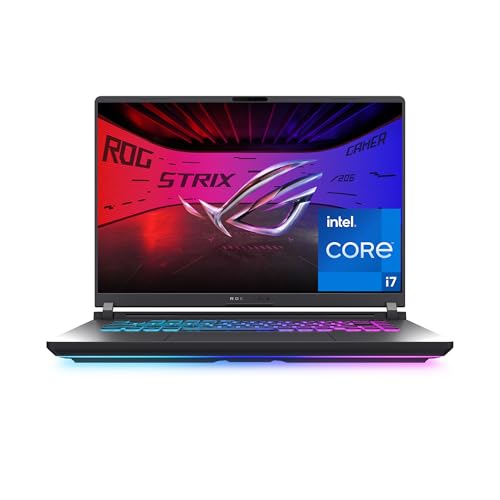 | ASUS ROG Strix G16 | Best fit: 16-inch RTX 5060 gaming Processor: Core i7-14650HX Screen: 16-inch FHD+ 165Hz Memory and storage: 16GB DDR5-5600 and 1TB PCIe Gen4 SSD Graphics: GeForce RTX 5060 Laptop GPU | Check Price on Amazon |
 | ASUS ROG Flow Z13 | Best fit: 13.4-inch gaming 2-in-1 tablet Processor: Ryzen AI MAX+ 395 Screen: 13.4-inch 2.5K 180Hz touchscreen Memory and storage: 32GB LPDDR5X and 1TB SSD Graphics: Integrated RDNA 3.5 graphics | Check Price on Amazon |
 | ASUS ROG Strix G18 | Best fit: 18-inch RTX 5070 screen Processor: Core i9-14900HX Screen: 18-inch FHD+ 144Hz Memory and storage: 32GB DDR5-5600 and 1TB PCIe Gen4 SSD Graphics: GeForce RTX 5070 Laptop GPU | Check Price on Amazon |
 | ASUS ROG Strix SCAR 18 | Best fit: 18-inch RTX 5090 with Mini LED Processor: Core Ultra 9 275HX Screen: 18-inch 2.5K 240Hz Mini LED Memory and storage: 32GB DDR5-5600 and 2TB PCIe Gen4 SSD Graphics: GeForce RTX 5090 Laptop GPU | Check Price on Amazon |
 | ASUS ROG Zephyrus G14 | Best fit: 14-inch OLED gaming Processor: Ryzen AI 9 HX 370 Screen: 14-inch 3K OLED 120Hz Memory and storage: 32GB LPDDR5X and 2TB PCIe 4.0 SSD Graphics: GeForce RTX 5080 Laptop GPU | Check Price on Amazon |
 | ASUS ROG Zephyrus Duo | Best fit: Two 16-inch OLED touchscreens Processor: Core Ultra 9 386H Screen: Two 16-inch 3K OLED 120Hz touchscreens Memory and storage: 32GB LPDDR5X and 1TB PCIe 4.0 SSD Graphics: GeForce RTX 5090 Laptop GPU | Check Price on Amazon |
1. ASUS ROG Strix G16 — Best for 16-Inch RTX 5060 Gaming
Amazon’s listing for the Strix G16 (model G615JMR-AS74) states a 16-inch FHD+ 16:10 display at 165Hz with a 3ms response time. It lists a Core i7-14650HX, a GeForce RTX 5060 Laptop GPU, 16GB of DDR5-5600 memory and a 1TB PCIe Gen 4 SSD. The bullets add a vapor chamber, tri-fan cooling and an ACR film that Amazon says enhances contrast and reduces glare. The 16GB is the lowest memory figure on this page, and the 1TB SSD ties for the lowest storage.
ASUS’s G615 page, which lists G615JMR-AS74, names one Thunderbolt 4 port, one USB 3.2 Gen 2 Type-C port, three USB-A ports and RJ45 Ethernet on its Core i7-14650HX and RTX 5060 configurations. The same page lists 5.84 lb.
Pick this one when: a 16-inch 165Hz screen, an RTX 5060 and a Thunderbolt 4 port come before OLED or an 18-inch panel.Our Take Choose the Strix G16 for an RTX 5060, a 165Hz 16-inch screen and a Thunderbolt 4 port, and accept 16GB of memory where the other five listings state 32GB.
- Amazon’s listing for the Strix G16 states a 16-inch FHD+ 16:10 screen at 165Hz and a GeForce RTX 5060 Laptop GPU.
- ASUS lists one Thunderbolt 4 port, a USB 3.2 Gen 2 Type-C port and RJ45 Ethernet for the Strix G16 on the Core i7-14650HX and RTX 5060 configurations.
- Amazon states a vapor chamber with tri-fan cooling for the Strix G16.
- Amazon lists 16GB of DDR5-5600 memory for the Strix G16, less than the 32GB the other five listings state.
- ASUS lists the Strix G16 at 5.84 lb, more than the 3.46 lb it lists for Zephyrus G14.
2. ASUS ROG Flow Z13 — Best for a 13.4-Inch Gaming 2-in-1
Amazon’s listing for the Flow Z13 (model GZ302EA-XS96) states a 13.4-inch 2.5K 16:10 touchscreen at 180Hz with a 3ms response time. It lists an AMD Ryzen AI MAX+ 395, 32GB of LPDDR5X memory and a 1TB SSD, and the bullets add RDNA 3.5 graphics, a 170-degree kickstand and a larger touchpad. No GeForce GPU is named, which makes it the one listing here without an RTX laptop GPU.
ASUS’s GZ302 page titles it a 2-in-1 gaming tablet, and its specification table lists a backlit keyboard and touchpad. Amazon’s title calls it a convertible 2-in-1. It is a tablet with a keyboard, not a standard clamshell laptop. The same page lists two USB4 Type-C ports with DisplayPort and power delivery at up to 40Gbps, one USB-A port at 10Gbps, a microSD reader, Radeon 8060S graphics on the Ryzen AI MAX+ 395 configurations, 1TB of PCIe 4.0 storage on every configuration and 2.65 lb. It does not state whether that weight includes the keyboard.
Our Take Choose the Flow Z13 for a 13.4-inch 180Hz touchscreen, RDNA 3.5 graphics and two USB4 ports in a tablet with a keyboard.
- Amazon’s listing for the Flow Z13 states a 13.4-inch 2.5K touchscreen at 180Hz and a 170-degree kickstand.
- ASUS lists two USB4 Type-C ports on the Flow Z13, with DisplayPort and power delivery at up to 40Gbps.
- ASUS lists the Flow Z13 at 2.65 lb, the lowest of the five ASUS weights on this page.
- Amazon names RDNA 3.5 graphics and no GeForce GPU for the Flow Z13, while the other five listings each name an RTX laptop GPU.
- ASUS lists USB4 for the Flow Z13’s Type-C ports and does not name Thunderbolt.
3. ASUS ROG Strix G18 — Best for an 18-Inch RTX 5070 Screen
Amazon’s listing for the Strix G18 states an 18-inch FHD+ 16:10 display at 144Hz with a 3ms response time. It lists a Core i9-14900HX, a GeForce RTX 5070 Laptop GPU, 32GB of DDR5-5600 memory and a 1TB PCIe Gen 4 SSD, with SSD throughput up to 7,000MB/s. The bullets add a vapor chamber and tri-fan cooling, and the title adds Wi-Fi 7. The title reads “32B DDR5-5600” while the bullet states 32GB, and this page uses the bullet’s figure.
Amazon names no ports for the G18, and its part-number field reads G815L without a configuration code. ASUS’s G815 page names Thunderbolt 4 on some configurations and Thunderbolt 5 on others, so read the port list on the page you order from. The same page lists 7.05 lb.
Our Take Choose the Strix G18 for an 18-inch screen, an RTX 5070 and 32GB of memory, and check the port list before ordering. Next to Strix G16, it adds two inches of screen, a Core i9 and 16GB more memory.
- Amazon’s listing for the Strix G18 states an 18-inch FHD+ screen at 144Hz and a GeForce RTX 5070 Laptop GPU.
- Amazon lists a Core i9-14900HX, 32GB of DDR5-5600 memory and a 1TB PCIe Gen 4 SSD for the Strix G18.
- Amazon states a vapor chamber with tri-fan cooling for the Strix G18.
- Amazon names no ports for the Strix G18, and ASUS’s G815 page lists Thunderbolt 4 on some configurations and Thunderbolt 5 on others.
- Amazon states 144Hz for the Strix G18, lower than the 165Hz it states for Strix G16.
- ASUS lists the Strix G18 at 7.05 lb, more than the 5.84 lb it lists for Strix G16.
4. ASUS ROG Strix SCAR 18 — Best for 2.5K Mini LED and RTX 5090
Amazon’s listing for the Strix SCAR 18 (model G835LX-XS97) states an 18-inch ROG Nebula HDR display at 2.5K and 240Hz with Mini LED, more than 2,000 dimming zones and 100% DCI-P3. It lists a Core Ultra 9 275HX, a GeForce RTX 5090 Laptop GPU at 175W, 32GB of DDR5-5600 memory and a 2TB PCIe Gen 4 SSD. The bullets add tool-free access to the RAM, SSD and fans.
ASUS’s G835 page, which lists G835LX-XS97, names two Thunderbolt 5 ports with DisplayPort and power delivery at up to 120Gbps on every configuration. The same page lists 7.28 lb.
Pick this one when: a 240Hz Mini LED screen, 2TB of storage, an RTX 5090 and two Thunderbolt 5 ports are needed in one 18-inch laptop.Our Take Choose the SCAR 18 for the 240Hz Mini LED screen, the RTX 5090 and two Thunderbolt 5 ports. Strix G18 has an 18-inch screen too, with 144Hz and an RTX 5070.
- Amazon’s listing for the Strix SCAR states an 18-inch Mini LED display with more than 2,000 dimming zones, 240Hz and 100% DCI-P3.
- Amazon lists a GeForce RTX 5090 Laptop GPU at 175W with a 2TB PCIe Gen 4 SSD for the Strix SCAR.
- ASUS lists two Thunderbolt 5 ports at up to 120Gbps for the Strix SCAR.
- ASUS lists the Strix SCAR at 7.28 lb, the highest of the five ASUS weights on this page.
5. ASUS ROG Zephyrus G14 — Best for a 14-Inch OLED Gaming Laptop
Amazon’s listing for the Zephyrus G14 states a 14-inch 3K OLED display at 120Hz with a 0.2ms response time and G-SYNC. It lists a Ryzen AI 9 HX 370, a GeForce RTX 5080 Laptop GPU, 32GB of LPDDR5X memory and a 2TB PCIe 4.0 SSD, in an aluminum CNC chassis. Amazon showed ProPrime, a third-party seller, on the New offer when this guide was written.
Amazon’s model field reads GA403W with no part number. ASUS’s GA403 page lists the same 14-inch 3K OLED panel at 120Hz and pairs the Ryzen AI 9 HX 370 with an RTX 5080 on its GA403WW configurations, but it cannot confirm this configuration. The page names one USB4 Type-C port at up to 40Gbps, one USB 3.2 Gen 2 Type-C port, two USB-A ports and a microSD reader, and it does not name Thunderbolt. It lists 3.46 lb.
Our Take Choose the Zephyrus G14 for a 14-inch OLED screen, an RTX 5080 and a USB4 port at 3.46 lb, as ASUS lists it.
- Amazon’s listing for the Zephyrus G14 states a 14-inch 3K OLED display at 120Hz with a 0.2ms response time and G-SYNC.
- Amazon lists a GeForce RTX 5080 Laptop GPU, 32GB of LPDDR5X memory and a 2TB PCIe 4.0 SSD for the Zephyrus G14.
- ASUS lists one USB4 Type-C port at up to 40Gbps for the Zephyrus G14, at a weight of 3.46 lb.
- ASUS lists USB4 for the Zephyrus G14’s Type-C port and does not name Thunderbolt.
- Amazon showed ProPrime, a third-party seller, on the Zephyrus G14’s New offer when this guide was written.
6. ASUS ROG Zephyrus Duo — Best for Two 16-Inch OLED Touchscreens
Amazon’s listing for the Zephyrus Duo (model GX651AX-DB96) states two 16-inch 3K OLED touchscreens with ROG Nebula HDR at 120Hz. It lists a Core Ultra 9 386H, a GeForce RTX 5090 Laptop GPU, 32GB of LPDDR5X memory and a 1TB PCIe 4.0 SSD. The bullets describe a detachable magnetic keyboard, a kickstand, laptop, dual-screen, book, sharing and tent modes, and dual Thunderbolt 4 ports.
Amazon is the only source here for this model’s specifications. Amazon showed Mobile Advance, a third-party seller, on the New offer when this guide was written.
Our Take Choose the Zephyrus Duo for two 16-inch OLED touchscreens, an RTX 5090 and two Thunderbolt 4 ports, knowing that Amazon is the only source for its specifications.
- Amazon’s listing for the Zephyrus Duo states two 16-inch 3K OLED touchscreens and a GeForce RTX 5090 Laptop GPU.
- Amazon’s bullets name dual Thunderbolt 4 ports for the Zephyrus Duo.
- Amazon’s bullets describe a detachable magnetic keyboard and a kickstand for the Zephyrus Duo.
- The Duo’s specifications come from its Amazon listing, because a matching ASUS page could not be located.
- Amazon showed Mobile Advance, a third-party seller, on the Zephyrus Duo’s New offer when this guide was written.
Buying Guide
Start with the shape of the laptop
Amazon titles the Strix G16, Strix G18, SCAR 18 and Zephyrus G14 gaming laptops. The Flow Z13 is a 13.4-inch tablet with a keyboard by ASUS’s description, and the Zephyrus Duo has two 16-inch touchscreens with a detachable keyboard in Amazon’s bullets. Screen sizes run 13.4, 14, 16 and 18 inches.
ASUS lists 2.65 lb for the Flow Z13, 3.46 lb for the Zephyrus G14, 5.84 lb for the Strix G16, 7.05 lb for the Strix G18 and 7.28 lb for the SCAR 18. No ASUS weight is available for the Zephyrus Duo here, and ASUS does not say whether the Flow Z13 figure includes the keyboard.
Match the graphics to the screen
Amazon names an RTX 5060 for the Strix G16, an RTX 5070 for the Strix G18, an RTX 5080 for the Zephyrus G14, and an RTX 5090 for the SCAR 18 and the Zephyrus Duo. The Flow Z13 names RDNA 3.5 graphics instead. Graphics tier and screen change together, so compare them as a pair.
Refresh rate and panel type differ across the six. Amazon states 180Hz for the Flow Z13, 165Hz for the Strix G16, 144Hz for the Strix G18, 240Hz for the SCAR 18, and 120Hz for the Zephyrus G14 and the Zephyrus Duo. Only the Zephyrus G14 and the Zephyrus Duo state OLED, the SCAR 18 states Mini LED, and the Strix G16 and Strix G18 listings give a resolution and refresh rate without a panel type.
Check ports and the configuration before ordering
ASUS names Thunderbolt 5 on the SCAR 18, Thunderbolt 4 on the Strix G16, and USB4 on the Flow Z13 and the Zephyrus G14. Amazon names dual Thunderbolt 4 ports for the Zephyrus Duo. Amazon names no ports for the Strix G18, and ASUS’s G815 page lists both Thunderbolt 4 and Thunderbolt 5 configurations, so confirm which one is for sale.
Memory and storage differ by listing. Amazon’s bullets state 16GB for the Strix G16 and 32GB for the other five. Storage is 1TB for the Strix G16, Flow Z13, Strix G18 and Zephyrus Duo, and 2TB for the SCAR 18 and Zephyrus G14. ASUS’s page lists 1TB on every Flow Z13 configuration. Third-party sellers hold the New offers for the Zephyrus G14 and the Zephyrus Duo, so match the configuration to the listing you order. The site’s Thunderbolt gaming laptop guide and Thunderbolt laptop list cover checking a dock, display or storage connection.
FAQ
Which ROG laptop has the smallest screen?
The Flow Z13 states a 13.4-inch 2.5K touchscreen. The Zephyrus G14 is next at 14 inches, then the Strix G16 and the Zephyrus Duo at 16 inches, and the Strix G18 and the SCAR 18 at 18 inches.
The Flow Z13 also has the lowest of the five weights ASUS lists here. ASUS lists 2.65 lb for it, against 3.46 lb for the Zephyrus G14.
Which of these ROG laptops have an OLED screen?
Amazon states OLED for the Zephyrus G14 and the Zephyrus Duo. The Zephyrus G14 is a 14-inch 3K panel at 120Hz, and the Zephyrus Duo has two 16-inch 3K panels at 120Hz.
The SCAR 18 states Mini LED instead. Amazon’s Flow Z13 listing gives a 2.5K touchscreen at 180Hz without naming a panel type, and ASUS’s page lists it as IPS-level.
Is the Flow Z13 a normal laptop?
No, it is a tablet with a keyboard. ASUS’s page titles it a 2-in-1 gaming tablet and lists a backlit keyboard and touchpad, and Amazon’s bullets describe a 170-degree kickstand.
It also has no GeForce GPU. Amazon names RDNA 3.5 graphics, and the other five listings each name an RTX laptop GPU.
Which listings have an RTX 5090?
Amazon names an RTX 5090 Laptop GPU for the SCAR 18 and the Zephyrus Duo. The SCAR 18 adds an 18-inch 2.5K 240Hz Mini LED screen, 2TB of storage and two Thunderbolt 5 ports by ASUS’s page.
The Zephyrus Duo adds two 16-inch OLED touchscreens and 1TB of storage. Amazon’s bullets name dual Thunderbolt 4 ports for it.
Which of these ROG laptops name Thunderbolt?
ASUS names two Thunderbolt 5 ports for the SCAR 18 and one Thunderbolt 4 port for the Strix G16. Amazon names dual Thunderbolt 4 ports for the Zephyrus Duo.
The Flow Z13 and the Zephyrus G14 are listed with USB4. ASUS does not name Thunderbolt on either page, and the Strix G18 listing names no ports at all.
Bottom Line
Choose the Strix G16 for a 16-inch RTX 5060 laptop with a Thunderbolt 4 port, the Flow Z13 for a 13.4-inch tablet with a keyboard, the Strix G18 for an 18-inch RTX 5070 screen, the SCAR 18 for 2.5K Mini LED, an RTX 5090 and Thunderbolt 5, the Zephyrus G14 for a 14-inch OLED laptop with an RTX 5080, or the Zephyrus Duo for two 16-inch OLED touchscreens.