A 1TB portable SSD is a useful capacity when a laptop needs a compact working drive, a travel backup, or a drive that can move between USB-C devices. The main differences are the host interface, the speed the listing ties to that interface, the protection rating, the cables in the box, and the physical size.
All six drives below are 1TB models, and each maker or Amazon listing states a USB-C connection, interface, or cable. A listed top speed applies only when the host supports the stated interface. A USB-C connector can carry USB 3.2, USB4, or Thunderbolt, so check the laptop, cable, and drive together before expecting a listed maximum.
Choose the connection class before comparing headline speed. USB4 and Thunderbolt listings can move more data with a suitable host, while an IP rating, included cables, or compact body may decide a travel or field-work drive.| Image | Product | Details | Check Price |
|---|---|---|---|
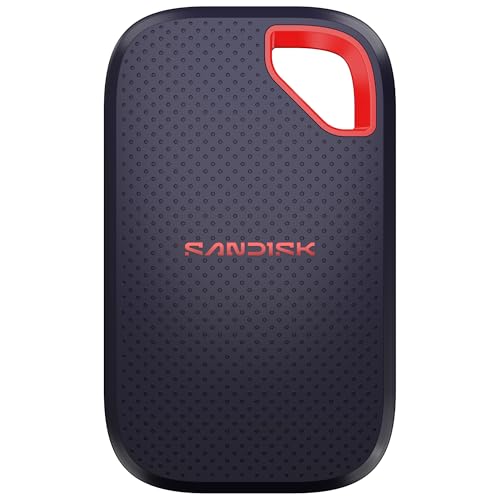 | SanDisk Extreme Portable SSD 1TB | Best fit: IP65 with 3m drop protection Capacity: 1TB Interface: USB-C 3.2 Gen 2 Listed speed: Up to 2000MB/s Protection: IP65, up to 3m drop protection | Check Price on Amazon |
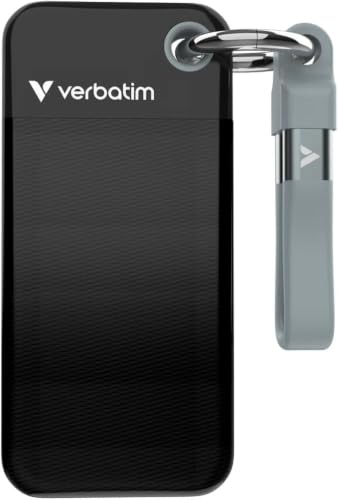 | Verbatim Pocket SSD 1TB | Best fit: Keyring and cable holder Capacity: 1TB Interface: USB-C 3.2 Gen 2 Listed speed: Up to 1000MB/s read and write Protection: No IP rating listed | Check Price on Amazon |
 | Sabrent Rocket Nano XTRM 1TB | Best fit: Thunderbolt 3 rugged workflow Capacity: 1TB Interface: Thunderbolt 3, USB 3.2 Gen 2 fallback Listed speed: 2700MB/s peak read on TB3, 900MB/s USB fallback Protection: IP67, shock-resistant | Check Price on Amazon |
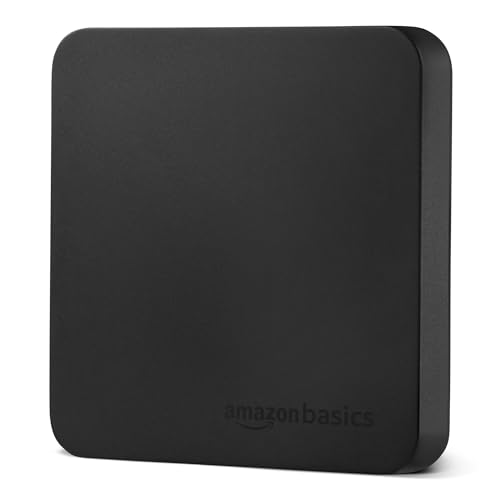 | Amazon Basics Portable SSD 1TB | Best fit: Two cables and storage case included Capacity: 1TB Interface: USB 3.2 Gen 2 Listed speed: Up to 2000MB/s read and write Protection: IP65, thermal protection | Check Price on Amazon |
 | Corsair EX400U 1TB | Best fit: USB4 speed with USB-C host support Capacity: 1TB Interface: USB4, USB-C, Thunderbolt 4+ Listed speed: Up to 4000MB/s read, 3500MB/s write Protection: No IP rating listed | Check Price on Amazon |
 | Oyen Digital U34 Bolt 1TB | Best fit: Mac-formatted USB4 and Thunderbolt Capacity: 1TB Interface: USB4, Thunderbolt 3/4/5 Listed speed: Up to 2800MB/s Protection: MIL-Standard 810 listed | Check Price on Amazon |
1. SanDisk Extreme Portable SSD 1TB — Best IP65 and 3m Drop Protection
SanDisk’s Extreme Portable SSD lists 1TB, USB-C 3.2 Gen 2, IP65, and up to 3m drop protection in one product. SanDisk states transfer speeds up to 2000MB/s and 256-bit AES encryption with password protection. Amazon’s product details give a 3.35 by 2.0 by 0.39 inch body and a 0.1 pound weight.
Pick it when the stated water and dust rating and drop figure count for more than a USB4 host path. The 2000MB/s figure is a listing maximum, so the connected laptop and cable determine the transfer result in use. USB 3.2 Gen 2 is normally a 10Gbps link, about half that figure, so confirm the speed with the seller if it will decide your purchase.Our Take Choose SanDisk when a compact 1TB drive with stated IP65 and up to 3m drop protection fits the way the drive will travel.
- SanDisk lists the SDSSDE70-1T00-G25 as a 1TB drive on USB-C 3.2 Gen 2, a stated connection class a buyer can match against the laptop’s port.
- SanDisk states IP65 water and dust resistance plus up to 3m drop protection for a drive that travels.
- SanDisk lists transfer speeds up to 2000MB/s and adds 256-bit AES encryption with password protection to the drive.
- Amazon’s product details give the SanDisk Extreme a 3.35 by 2.0 by 0.39 inch body and a 0.1 pound weight to check against how the drive will be carried.
- SanDisk’s 2000MB/s maximum is lower than the top figures that Sabrent, Oyen, and Corsair list.
- SanDisk does not state a USB4 or Thunderbolt host mode for the Extreme.
2. Verbatim Pocket SSD 1TB — Best Keyring and Cable Holder
Verbatim’s Pocket SSD is the choice for everyday backup. Verbatim states 1TB, USB 3.2 Gen 2, and up to 1000MB/s read and write, then adds a keyring and cable holder for keeping the drive and cable together. It says the drive connects to USB-C PCs, Macs, tablets, smartphones, and gaming consoles.
Amazon’s product details give a 3.78 by 1.78 by 0.39 inch body and a 0.13 pound weight. Verbatim lists Nero Backup Software for Windows OS only.
Our Take Pick Verbatim when cable organization, a small 1TB body, and a stated 1000MB/s class fit a portable backup role.
- Verbatim states 1TB of storage and read and write speeds up to 1000MB/s for a portable backup role.
- Verbatim lists a keyring and cable holder that keep the drive and cable together.
- Verbatim says the Pocket SSD connects to USB-C PCs, Macs, tablets, smartphones, and gaming consoles.
- Amazon’s product details give the Pocket SSD a 0.13 pound weight and a 0.39 inch thickness.
- Verbatim’s 1000MB/s figures are lower than the 2000MB/s figures SanDisk and Amazon Basics list.
- Verbatim lists its Nero Backup Software for Windows OS only.
- Verbatim gives the Pocket SSD no IP rating in its listing.
3. Sabrent Rocket Nano XTRM 1TB — Best Thunderbolt 3 Rugged Drive
Sabrent’s Rocket Nano XTRM is for a host that has Thunderbolt 3 and a drive that will face outdoor or travel conditions. Sabrent states 2700MB/s peak read speed over its 40Gbps Thunderbolt 3 interface, an automatic USB 3.2 Gen 2 fallback at 900MB/s to any USB-C device, IP67 protection, and shock-resistant housing.
It is the smallest drive here by listed footprint at 2.7 by 1.1 by 0.5 inches. Sabrent also lists a USB-C to USB-C cable and a USB-A to USB-C cable, plus a three-year warranty that can extend to five years with registration. The Thunderbolt figure depends on a Thunderbolt 3 host, while the fallback is the listed mode for an ordinary USB-C device.
Our Take Choose Sabrent when the laptop has Thunderbolt 3 and the listed IP67 rating, compact body, and two-cable bundle fit the use case.
- Sabrent lists 2700MB/s peak read speed over its 40Gbps Thunderbolt 3 interface for a laptop with that port.
- Sabrent says its USB 3.2 Gen 2 fallback delivers 900MB/s to any USB-C device, the listed mode for an ordinary USB-C port.
- Sabrent states IP67 water and dust protection plus shock-resistant housing for outdoor or travel conditions.
- Sabrent lists a USB-C to USB-C cable and a USB-A to USB-C cable as a two-cable bundle.
- Amazon lists the Rocket Nano XTRM at 2.7 by 1.1 by 0.5 inches, a compact body.
- Sabrent’s 2700MB/s figure applies to its 40Gbps Thunderbolt 3 interface and depends on a host that has it.
- Sabrent’s 900MB/s USB fallback is below the up to 2000MB/s figures SanDisk and Amazon Basics list.
4. Amazon Basics Portable SSD 1TB — Best Two-Cable Kit With Storage Case
Amazon Basics’ 1TB drive is the pick for its cable and case bundle. Amazon Basics states USB 3.2 Gen 2, read and write speeds up to 2000MB/s, and IP65, plus a thermal solution, and the box holds a USB-C to USB-C cable, a USB-C to USB-A cable, and a storage case. The two cables give a laptop owner both USB-C and USB-A connection paths.
Amazon’s product details give a 2.33 by 2.33 by 0.39 inch body and a 0.1142 pound weight. Amazon Basics notes that actual speed varies with devices, file size, and conditions, so 2000MB/s should be treated as a stated maximum rather than a promise for every computer.
USB 3.2 Gen 2 is normally a 10Gbps link, about half that figure, so confirm the speed with the seller if it will decide your purchase.Our Take Consider Amazon Basics when the included USB-C and USB-A cables plus a storage case count for more than USB4 or Thunderbolt speed.
- Amazon Basics states a 1TB drive on USB 3.2 Gen 2 with read and write speeds up to 2000MB/s.
- Amazon Basics lists a USB-C to USB-C cable and a USB-C to USB-A cable in the box for both USB-C and USB-A connection paths.
- Amazon Basics lists a storage case in the box beside the two cables.
- Amazon Basics lists IP65 and a thermal solution for the drive.
- Amazon Basics says actual transfer speed varies with devices, file size, and conditions, a caveat on its listed maximum.
- Amazon Basics does not state a USB4 or Thunderbolt mode.
5. Corsair EX400U 1TB — Best USB4 Speed Option
Corsair’s EX400U has the highest transfer figures of the six. Corsair states USB4, up to 4000MB/s sequential read, and up to 3500MB/s sequential write, with USB Type-C and Thunderbolt 4 and higher compatibility. Corsair says maximum performance requires a USB4 or higher connection and that performance varies by capacity.
Amazon’s product details give a 2.53 by 2.52 by 0.47 inch body and a 0.203 pound weight. Corsair describes a single connection for power and data on PC or Mac. Choose it when the laptop has a USB4 or higher port and the higher listed transfer range counts for more than an IP rating.
Our Take Pick Corsair when a USB4 host is available and the listed 4000MB/s read and 3500MB/s write figures suit the workflow.
- Corsair states USB4 with up to 4000MB/s sequential read and 3500MB/s sequential write.
- Corsair lists compatibility with USB Type-C and Thunderbolt 4 and higher.
- Corsair describes a single connection for power and data on PC or Mac.
- Amazon’s product details give the EX400U a 2.53 by 2.52 by 0.47 inch body and a 0.203 pound weight.
- Corsair says maximum performance requires a USB4 or higher connection.
- Corsair says performance varies by capacity.
- Corsair’s listing gives no IP water or dust rating.
6. Oyen Digital U34 Bolt 1TB — Best Mac-Formatted USB4 and Thunderbolt Drive
Oyen Digital’s U34 Bolt is the pick for a Mac OS drive with USB4 and Thunderbolt listed. The title states 1TB USB4 40Gbps and Thunderbolt 4 USB-C, and the bullets state up to 2800MB/s and compatibility with any USB or Thunderbolt 3, 4, or 5 host. Oyen says the drive is formatted for Mac OS.
Oyen also lists MIL-Standard 810 protection, a cooling aluminum core, and a three-year warranty. Amazon’s product details give a 4.5 by 2.7 by 0.75 inch body and a 0.8201 pound weight, larger and heavier than the SanDisk, Verbatim, Sabrent, Amazon Basics, and Corsair drives.
Our Take Choose Oyen Digital when Mac OS formatting, listed USB4 and Thunderbolt host support, and MIL-Standard 810 protection fit the workflow.
- Oyen’s title states 1TB USB4 40Gbps and Thunderbolt 4 USB-C connectivity.
- Oyen lists up to 2800MB/s and compatibility with any USB or Thunderbolt 3, 4, or 5 host.
- Oyen says the U34 Bolt is formatted for Mac OS and has a cooling aluminum core.
- Oyen lists MIL-Standard 810 protection and a three-year warranty.
- Amazon lists a 4.5 by 2.7 by 0.75 inch body for the U34 Bolt, the largest of the six.
- Amazon lists a 0.8201 pound weight for the U34 Bolt, higher than the other five drives.
Buying Guide
1. Match the host interface to the listed speed
A USB-C plug alone does not identify the transfer class. SanDisk and Amazon Basics state USB 3.2 Gen 2 with up to 2000MB/s figures. Sabrent states 2700MB/s on Thunderbolt 3 and a 900MB/s USB fallback. Corsair states USB4 with up to 4000MB/s read, while Oyen states USB4 and Thunderbolt host support with up to 2800MB/s.
Read the condition next to every maximum. Corsair says maximum performance requires USB4 or higher. Sabrent names a 40Gbps Thunderbolt 3 interface for its top figure. Amazon Basics says actual speed varies with device, file size, and conditions. Match the drive, cable, and laptop before using a number to plan a transfer.
2. Pick the protection level for where the drive goes
The stated IP rating separates field-oriented choices. SanDisk lists IP65 and up to 3m drop protection. Sabrent lists IP67 and shock-resistant housing. Amazon Basics lists IP65 and a thermal solution. The ratings help when comparing drives that travel in a bag or work around dust and water.
Protection language is not identical across listings. Oyen states MIL-Standard 810 protection, while Oyen, Verbatim, and Corsair list no IP rating. Choose the exact rating or feature needed rather than treating every rugged-looking portable SSD as equivalent.
3. Check what cables and accessories are stated
Included cables can decide how easily the drive moves between computers. Sabrent lists a USB-C to USB-C cable and a USB-A to USB-C cable. Amazon Basics lists a USB-C to USB-C cable and a USB-C to USB-A cable plus a storage case. Verbatim lists a cable holder, and Corsair’s title says a cable is included, but neither names a second cable type.
The host sets the usable connection. A USB-A cable can connect the drive to a computer with a USB-A port, but it does not convert that host into USB4 or Thunderbolt. Use the cable bundle for physical compatibility and the host-interface statement for the expected performance range.
4. Compare size and weight for daily carry
Amazon’s product details show clear differences in carry size. Sabrent is 2.7 by 1.1 by 0.5 inches, Amazon Basics is 2.33 by 2.33 by 0.39 inches, and SanDisk is 3.35 by 2.0 by 0.39 inches. Verbatim is 0.13 pound, while SanDisk lists 0.1 pound.
Oyen is larger than the other five. Its 4.5 by 2.7 by 0.75 inch body and 0.8201 pound weight are larger than the other entries. A fixed workflow can accept that size, but a pocket or keyring use case may not.
5. Decide the capacity first
Every drive here is 1TB. The page does not compare 2TB, 4TB, or 8TB models, because capacity changes the buying decision. A buyer who has settled on 1TB can compare USB 3.2, USB4, Thunderbolt, protection, and portability without mixing in a different storage need.
Settle capacity, then compare the host interface and protection details. The portable SSD guide is the broader portable-drive page, and USB4 external SSDs for photographers and USB4 external SSDs for PC gaming cover USB4 drives for those uses.
FAQ
Is USB-C enough to get USB4 or Thunderbolt speed?
No. USB-C describes the connector, while the listings state different transport classes. Corsair says maximum performance requires USB4 or higher, and Sabrent names Thunderbolt 3 for its top figure.
Where a listing states a fallback mode, a USB-C host can use it. Sabrent, for example, says USB 3.2 Gen 2 fallback delivers 900MB/s.
Which 1TB drive has the highest listed speed?
Corsair EX400U lists up to 4000MB/s read and up to 3500MB/s write. Corsair says maximum performance requires a USB4 or higher connection and that performance varies by capacity.
The number alone does not settle the choice. A laptop with a USB 3.2 Gen 2 connection can make SanDisk or Amazon Basics a closer interface match.
Which models list protection against water and dust?
SanDisk lists IP65, Sabrent lists IP67, and Amazon Basics lists IP65. Sabrent also states shock-resistant housing, and SanDisk lists up to 3m drop protection.
Read the exact rating rather than treating all portable SSDs as equally protected. Oyen lists MIL-Standard 810 protection, which is a different statement from an IP rating.
Which drive has both USB-C and USB-A cables in the box?
Sabrent lists a USB-C to USB-C cable and a USB-A to USB-C cable. Amazon Basics lists a USB-C to USB-C cable and a USB-C to USB-A cable, plus a storage case.
The second cable helps with different physical ports. It does not change the host interface or make a USB-A connection perform like USB4 or Thunderbolt.
Is the Oyen drive formatted for a Mac?
Oyen says the U34 Bolt is formatted for Mac OS and lists compatibility with any USB or Thunderbolt 3, 4, or 5 host. The title also states USB4 40Gbps.
Amazon lists a larger body and weight for it than for the other five drives. Compare Mac formatting, host interface, and physical size together before choosing it.
Bottom Line
Choose a 1TB portable SSD from the host interface and the conditions it will face. SanDisk Extreme is the IP65 and 3m-drop choice, Sabrent Rocket Nano XTRM pairs Thunderbolt 3 with IP67, and Corsair EX400U lists the highest transfer figures. A listed top speed applies only with the host connection the listing names.