The Short Version
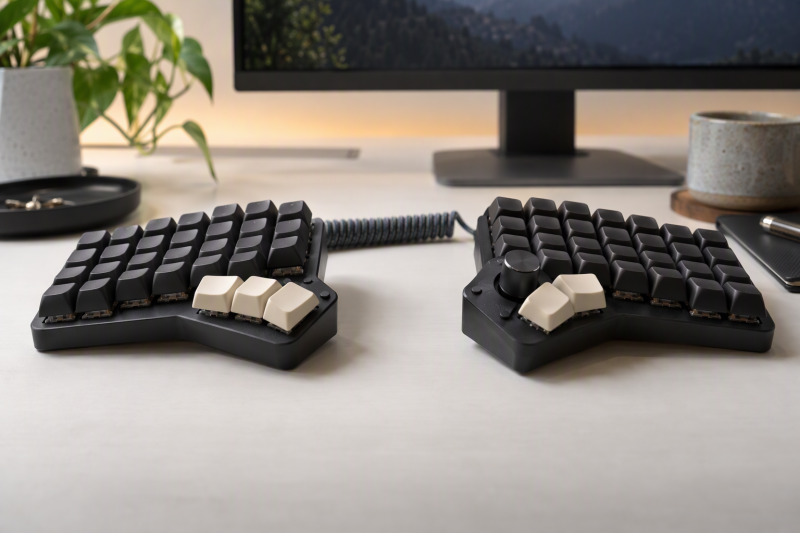
A programmable split mechanical keyboard lets you separate the halves, move frequently used commands onto layers, and choose where your thumbs and wrists sit at the desk. The useful differences are layout size, firmware, wireless connection, physical profile, encoder controls, and whether you need a number row or conventional navigation keys.
Choose the EPOMAKER Split70 when you want a 70% split with QMK/VIA, three connection modes, and five-device pairing. Choose the YIVU Sofle for its 1.72cm listed low profile, column-staggered layout, and thumb clusters. If a compact board is enough, the YIVU Corne gives you 46 keys and relies on programmed layers for the rest.
Each pick is a physically split mechanical keyboard with listing-supported programmable keys, layers, macros, or QMK, VIA, or Vial firmware. A split layout changes where the halves can sit, and programming changes what each available key does. Layout and programming are separate decisions, so plan both before moving familiar shortcuts.
Before changing a daily board, sketch the available desk width, the host connection, and the commands that must stay immediately reachable. A programmable split can put its two halves at a personal shoulder-width position, but its compact layouts also ask you to choose layer keys and decide what each thumb key does. Start with a small stable map, use the same configuration on the primary computer, and change only the shortcuts that solve a recurring reach or workflow problem.
Quick Picks
- Best flexible split: EPOMAKER Split70 for QMK/VIA, a programmable knob, and Bluetooth, 2.4GHz, or USB-C use.
- Best encoder setup: YIVU Borne 4×6 for two programmable rotary encoders and QMK/Vial.
- Best low-profile board: YIVU Sofle for a 1.72cm listed profile and hot-swappable Choc switches.
- Best full-size choice: Cloud Nine ErgoPRO for a full-size split layout, QMK, and hot-swappable switches.
How We Picked
The listings must explicitly describe a physical split mechanical keyboard and a programming route, meaning QMK, VIA, Vial, programmable controls, or programmable firmware. We compared layouts, available keys, low-profile versus standard switch formats, connection choices, hot-swap support, thumb clusters, encoders, and stated operating-system coverage.
This guide does not cover quiet conventional boards such as mechanical keyboards for shared editing desks or a broad multi-device Bluetooth keyboard. The buyer here needs both separable halves and a way to customize the key map.
Programmable Split Mechanical Keyboards Compared
| Image | Product | Details | Check Price |
|---|---|---|---|
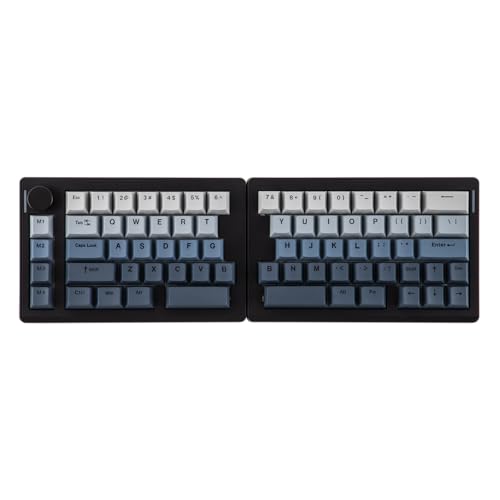 | EPOMAKER Split70 | Best fit: Versatile split desktop keyboard Layout: 70% split Firmware: QMK/VIA Connection: Bluetooth, 2.4GHz, USB-C Switch support: 3- and 5-pin hot-swap | Check Price on Amazon |
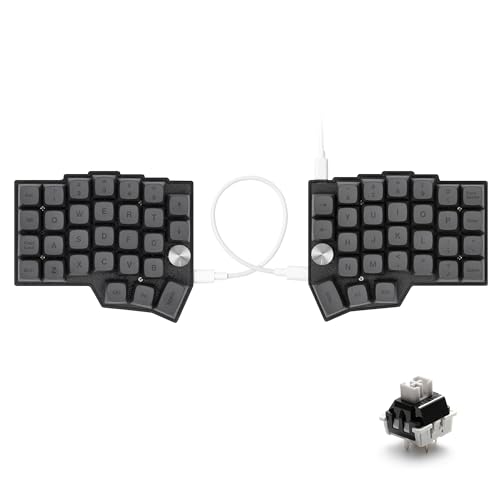 | YIVU Borne 4x6 | Best fit: Two programmable encoder controls Layout: 4x6 split Firmware: QMK/Vial Controls: Two rotary encoders Switch support: 3- and 5-pin hot-swap | Check Price on Amazon |
 | YIVU Sofle | Best fit: Low-profile columnar split Layout: Column-staggered split Firmware: QMK/VIA Profile: 1.72cm listed Connection: 2.4GHz wireless | Check Price on Amazon |
 | EPOMAKER Split65 | Best fit: Compact multi-device split Layout: 65% split Firmware: QMK/VIA Connection: Bluetooth, 2.4GHz, USB-C Feature: Programmable knob | Check Price on Amazon |
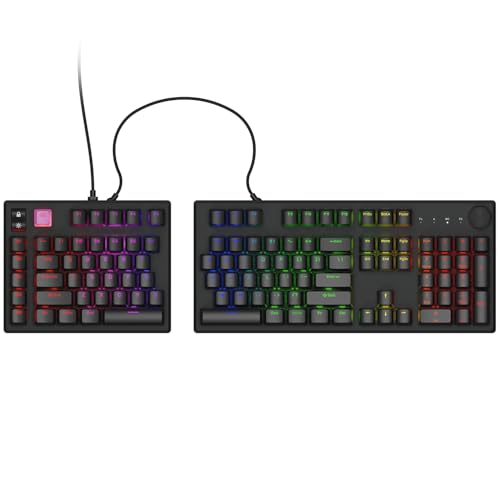 | Cloud Nine ErgoPRO | Best fit: Full-size Mac-focused split Layout: Full-size split Firmware: QMK Frame: Aluminum keyframe Switch support: Hot-swap | Check Price on Amazon |
 | YIVU Corne | Best fit: Minimal layer-driven typing Layout: 40%, 46 keys Firmware: QMK/VIA Profile: Low-profile Connection: 2.4GHz wireless | Check Price on Amazon |
1. EPOMAKER Split70 — Best for a Flexible Programmable Desktop
The EPOMAKER Split70 is the broadly equipped option for one programmed board that serves a desktop and a second computer. Its listing combines a detachable 70% split layout, QMK/VIA support, a programmable knob, and Bluetooth, 2.4GHz, and USB-C connections. It also states pairing with up to five devices.
The listing specifies 3- and 5-pin hot-swap support, so the switch choice is separate from the layout choice. The 70% format also retains more dedicated keys than the Corne and Borne layouts.
Pros
- The 70% split layout keeps more dedicated keys while allowing the halves to separate on a desktop.
- QMK/VIA provides a listed route for changing layers and shortcuts without accepting the default mapping.
- Bluetooth, 2.4GHz, and USB-C let one programmed board suit several connection situations.
- Five-device pairing reduces repeated reconnecting when a desk setup includes several computers.
- A programmable knob gives a distinct control that you map to an action such as volume.
Cons
- The 70% layout occupies more desk space than the 46-key Corne when minimal key count is the goal.
- More connection modes require choosing one workflow instead of treating every mode as identical.
2. YIVU Borne 4×6 — Best for Programmable Encoder Controls
The YIVU Borne 4×6 is for a buyer who wants two separate rotary controls beside the keys. It extends a Corne-style split with a 4×6 key arrangement and two programmable rotary encoders, and its listing names QMK/Vial, so the firmware is named too.
It also lists 3- and 5-pin hot-swap sockets and south-facing RGB. The programmable encoders are the reason to choose this model, so map each rotation and press deliberately instead of assuming a knob has one fixed purpose.
Pros
- Two programmable rotary encoders give you separate physical controls for selected layer or application actions.
- QMK/Vial is a listed firmware route for adapting the compact 4×6 arrangement to personal shortcuts.
- 3- and 5-pin hot-swap support lets switch selection remain adjustable after choosing the board.
- South-facing RGB is explicitly listed for buyers who want that lighting orientation with compatible keycaps.
Cons
- A 4×6 layout needs programmed layers for commands that larger 65% and 70% boards keep dedicated.
- Two encoders add controls to learn, which is unnecessary if ordinary key layers settle the workflow.
3. YIVU Sofle — Best for Low-Profile Columnar Typing
The YIVU Sofle is the low-profile option that states its height. Its listing describes a column-staggered split with thumb clusters, hot-swappable Choc switches, QMK/VIA, 2.4GHz wireless, and a 1.72cm profile. The arrangement differs from a straight-row office board, so it rewards a buyer prepared to map and practice the chosen layers.
The listing also names Windows, macOS, and Linux support. Choose it when a low profile and columnar key placement rank above keeping a conventional full-width layout.
Pros
- The stated 1.72cm profile keeps the board low on the desk.
- Column-staggered keys and thumb clusters give the split layout a different arrangement of finger and thumb keys to program around.
- QMK/VIA provides named configuration support for layers and remapped commands.
- 2.4GHz wireless avoids a required data cable in the stated connection setup.
- Hot-swappable Choc switches keep the low-profile switch choice changeable without replacing the board.
Cons
- Column-staggered rows change familiar finger movements and need an adjustment period compared with straight rows.
- Choc is a specific low-profile switch format, so the switch choices differ from standard-height sockets.
4. EPOMAKER Split65 — Best for a Compact Multi-Device Split
The EPOMAKER Split65 uses a 65% split layout for a buyer who needs a smaller board than the Split70 but wants more conventional dedicated keys than a 40% design. EPOMAKER states that the listing includes QMK/VIA, a programmable knob, NKRO, hot-swap support, and Bluetooth, 2.4GHz, or USB-C use with pairing for five devices.
The compact footprint is the main tradeoff. It keeps a useful number of keys and asks you to put some navigation or function commands on layers, so the firmware support is more relevant than it would be on a full-size keyboard.
Pros
- The 65% split reduces footprint while keeping a more familiar key set than a 46-key board.
- QMK/VIA and a programmable knob give the compact layout a listed way to reclaim missing commands.
- Bluetooth, 2.4GHz, and USB-C support different desk connection priorities without changing the key map.
- Five-device pairing suits a compact keyboard that moves among a desktop, laptop, and tablet workspace.
Cons
- A 65% layout still moves some navigation and function commands onto programmed layers.
- Its compact key count is less direct for buyers who want a numpad and full navigation cluster.
5. Cloud Nine ErgoPRO — Best for a Full-Size Mac-Focused Desktop
Cloud Nine’s ErgoPRO is the full-size alternative for a fixed desktop that needs familiar dedicated keys more than a small footprint. The listing names a full-size split arrangement, QMK, hot-swappable switches, an aluminum keyframe, Mac-focused legends, and stated Windows support.
Choose it when you want the physical split without giving up a broad conventional layout. Its listed platform coverage suits a desktop that may change between Mac and Windows, but the Mac-focused legends should still match the primary system you use.
Pros
- A full-size split retains a broad dedicated-key layout for buyers who do not want to reach a number pad through layers.
- QMK gives the familiar format a listed programming path rather than a fixed conventional layout.
- Hot-swappable switches make switch replacement or preference changes possible without replacing the keyboard.
- The aluminum keyframe is a named construction detail for a desktop keyboard intended to stay in place.
Cons
- Full-size halves need substantially more desk width than the 40%, 65%, and 70% options.
- Mac-focused legends may be less intuitive if the primary system uses Windows-first labeling.
6. YIVU Corne — Best for Minimal Layer-Driven Typing
The YIVU Corne is the smallest pick. YIVU lists this as a low-profile, column-staggered 40% split with 46 keys, QMK/VIA, 2.4GHz wireless, and hot-swappable switches. It suits a buyer who wants numbers, symbols, navigation, and commands on layers instead of on dedicated keys.
The Corne is a specialized choice, not a compact version of a standard keyboard. You get the most from it by designing a layer map that matches the commands you use most often.
Pros
- The 46-key 40% layout minimizes physical width and leaves substantial room between the two halves.
- QMK/VIA provides the listed programming route required to make a 40% layout useful for desktop work.
- Low-profile column-staggered keys and 2.4GHz wireless suit a compact, uncluttered desk setup.
- Hot-swappable switches allow changes to the listed low-profile mechanical switch setup over time.
Cons
- A 46-key board depends heavily on layers, so it is a poor fit for buyers wanting dedicated navigation.
- The specialized columnar layout takes more retraining than a compact straight-row 65% board.
Buying Guide: Choosing a Programmable Split Keyboard
Start with the number of physical keys you actually need
The Cloud Nine ErgoPRO keeps a full-size split layout, the Split70 and Split65 use 70% and 65% formats, and the Corne lists 46 keys. More physical keys keep more commands on familiar single keys. Fewer keys free up desk space but shift numbers, punctuation, navigation, and function commands onto layers.
Decide whether you need a dedicated number row, navigation cluster, or numpad before comparing firmware. Layout size changes how much you must program, whereas QMK/VIA or Vial is only the means of doing that programming.
Choose a programming route, then plan the layer map
The Split70, Sofle, Split65, and Corne list QMK/VIA. The Borne lists QMK/Vial, and the ErgoPRO lists QMK. Each named route lets you put commands that are no longer on dedicated keys in a place you choose.
Write down the commands you use every day before choosing a smaller board. Put frequent shortcuts near home position and reserve a layer for less-used symbols or navigation. A programmable layer is useful when it reduces reach, not when it hides a command you cannot remember.
Match the physical profile and row geometry to your desk habits
The Sofle lists a 1.72cm low profile and hot-swappable Choc switches, while the Corne is also low profile and column-staggered. The Split70 and Split65 retain more conventional compact layouts. Profile and row geometry change the height and finger paths independently of split width.
Treat column staggering as a decision about how much retraining you will accept. A buyer who wants minimal adaptation may prefer the 65% or 70% layouts, while someone choosing thumb clusters and vertical columns should expect to build muscle memory around them.
Choose a connection mode for the real host setup
The Split70 and Split65 list Bluetooth, 2.4GHz, and USB-C, each with pairing for up to five devices. The Sofle and Corne list 2.4GHz wireless. Several connection modes are useful only when they match the computers and ports you switch between.
Choose USB-C for a wired desk workflow, or use the listed wireless route when fewer cables is the goal. If you rotate among hosts, device pairing can simplify that routine, but map changes should remain intentional across every host. Keep a stable primary host while learning the layout, because switching host and connection behavior at the same time makes it harder to tell whether a missed command comes from a layer, a pairing, or a key-map change.
Treat knobs and hot-swap sockets as workflow tools, not defaults
The Borne lists two programmable rotary encoders, while the Split70 and Split65 each list a programmable knob. All six models name a form of hot-swap support, but the Sofle uses low-profile Choc switches and several others list 3- and 5-pin compatibility.
Assign a knob only when a repeating control benefits from rotation and press actions. Likewise, choose hot-swap support when you expect to change the switch feel or sound. Hot-swap support is not a reason to buy a layout that lacks the keys or programming workflow you need.
FAQ
What makes a split mechanical keyboard programmable?
A split mechanical keyboard is programmable when firmware lets you define what individual keys, layers, knobs, or encoders do, while the split only separates the two halves. The listings here name QMK, VIA, Vial, or programmable controls as the configuration routes that make a compact split layout practical.
The Split70 and Split65 add a programmable knob, the Borne lists two programmable encoders, and the Corne relies on QMK/VIA across 46 keys. Choose the board whose available controls fit the commands you want to place under your hands.
Is a 40% split keyboard enough for desktop work?
It can be, but the YIVU Corne’s 46-key layout requires layers for many functions that a full-size board leaves dedicated. The trade is less physical width and more space between halves in exchange for a larger mapping and memory commitment.
The better question is how often you use numbers, navigation keys, symbols, and function commands. If you want those available without layer changes, the full-size ErgoPRO or larger Split70 is the more direct starting point.
Do I need QMK, VIA, or Vial to use these keyboards?
You need the listed programming route when you want to change the mapping, but you do not need to change every key on day one. QMK/VIA appears on the Split70, Sofle, Split65, and Corne. The Borne lists QMK/Vial, and the ErgoPRO lists QMK.
Start with a small, useful set of changes such as a repeated shortcut or an easy-to-reach layer key. A programmed layout works best when your choices stay stable and remembered, instead of remapping controls just because the firmware allows it.
Which layout is easiest to move from a conventional keyboard?
A larger familiar arrangement generally removes fewer dedicated commands. The Split70’s 70% and Split65’s 65% formats preserve more physical keys than the Borne 4×6 and the 40% Corne, while the full-size ErgoPRO keeps the broadest named layout.
The Sofle and Corne also use column-staggered keys, which changes finger paths as well as key count. Choose a larger conventional compact layout when you would rather minimize retraining than maximize open desk space.
Can one split keyboard work with several computers?
The Split70 and Split65 list Bluetooth, 2.4GHz, USB-C, and pairing for up to five devices, so they are the clearest choices for a multi-host setup. The Sofle and Corne list 2.4GHz wireless, while the ErgoPRO listing names Mac-focused legends and Windows support.
Check the host ports and connection preference before selecting a mode. A multi-device option only helps when the chosen keyboard connection works cleanly with each computer in the workspace.
Bottom Line
Choose the EPOMAKER Split70 for a configurable 70% board with three connection modes, the YIVU Sofle for its 1.72cm listed low profile and thumb clusters, or the Cloud Nine ErgoPRO when a full-size split and QMK are the priority.