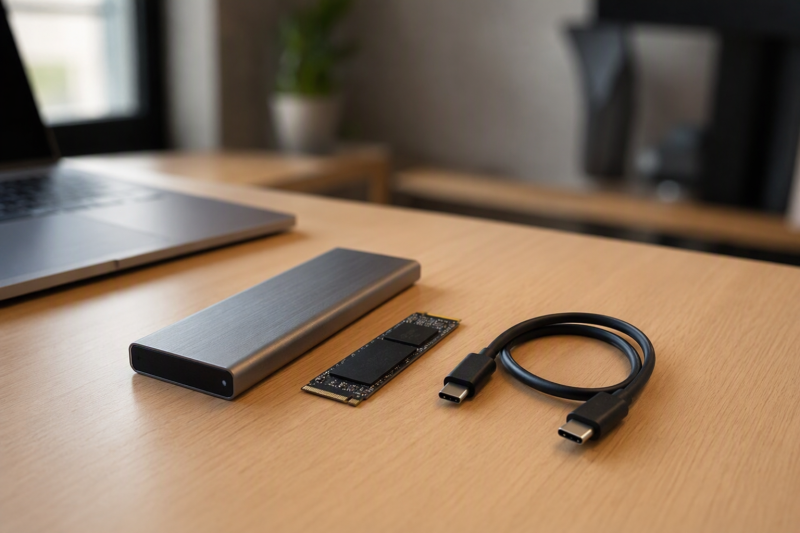
An M.2 SATA enclosure can turn a bare SSD from an older laptop into a bus-powered external drive for recovery, transfer, or reuse. M.2 describes a physical card family, not one storage protocol. An M.2 SATA drive can resemble an NVMe drive but need a different bridge, and connector keying or card length can still prevent installation even when the protocol is supported.
The eight products below all list M.2 SATA support and also accept NVMe drives, so they are useful beyond one recovery job. They differ in supported key types, card lengths from 2230 through 22110, tool-free access, USB-A and USB-C cables, automatic sleep, health-data features, cooling, and whether a 2.5-inch SATA device can also connect.
Identify the SSD before inserting it. M.2 SATA, mSATA, M.2 NVMe, M.2 PCIe AHCI, and 2.5-inch SATA are different formats or protocols. A physically similar edge connector does not prove compatibility.- Best overall: SSK HE-C371 supports M.2 SATA and NVMe, four common lengths, USB-A and USB-C cables, tool-free installation, aluminum cooling, UASP, TRIM, and stated S.M.A.R.T. access.
- Best simple tool-free pick: SABRENT EC-SNVE offers a fast no-screw mechanism, 2242/2260/2280 support, an aluminum shell, and broad Windows, macOS, and Linux compatibility.
- Best for unusual 22110 drives: YINNCEEN All-in-One Adapter accepts M.2 cards through 22110 plus 2.5-inch SATA drives, but reads only one drive at a time and does not support hot-swapping.
M.2 SATA Enclosure Comparison
| Image | Product | Details | Check Price |
|---|---|---|---|
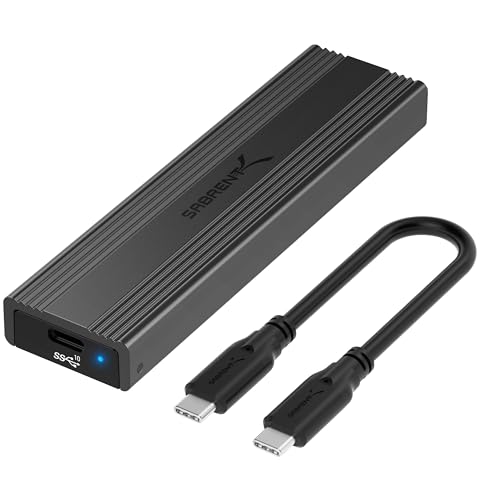 | SABRENT EC-SNVE M.2 SSD Enclosure | Protocols: M.2 SATA and NVMe Keys: M.2 compatible; verify drive Lengths: 2242 / 2260 / 2280 Host: USB-C 10Gbps; C-to-C cable Installation: Tool-free | Check Price on Amazon |
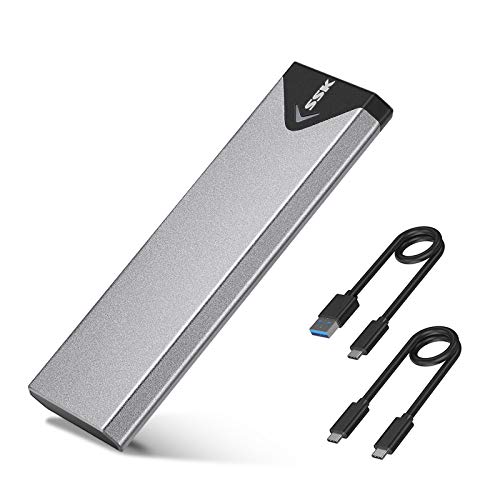 | SSK SHE-C325 PRO M.2 SSD Enclosure | Protocols: M.2 SATA and NVMe; no PCIe AHCI Keys: M-key / B+M-key Lengths: 2242 / 2260 / 2280 Host: USB-A and USB-C cables Features: RTL9210B, UASP, TRIM | Check Price on Amazon |
 | SSK HE-C371 Tool-Free M.2 SSD Enclosure | Protocols: M.2 SATA and NVMe Keys: M-key / B+M-key Lengths: 2230 / 2242 / 2260 / 2280 Host: USB-A and USB-C cables Features: Tool-free, S.M.A.R.T., TRIM, UASP | Check Price on Amazon |
 | VCOM M.2 NVMe SATA SSD Enclosure | Protocols: M.2 SATA and NVMe Keys: NVMe M/B+M; SATA B+M Lengths: 2230 / 2242 / 2260 / 2280 Host: USB-A and USB-C cables Sleep: 5 minutes | Check Price on Amazon |
 | ORICO PWDM2-BK Tool-Free M.2 Enclosure | Protocols: M.2 SATA and NVMe Keys: M/B+M; no B-key SATA Lengths: 2230 / 2242 / 2260 / 2280 Capacity: Up to 4TB Host: USB-C; C-to-C cable stated | Check Price on Amazon |
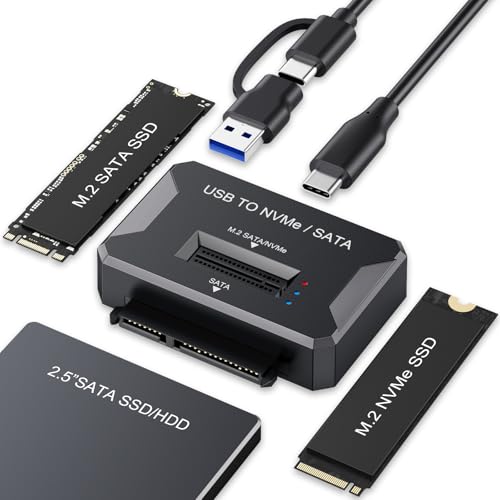 | YINNCEEN M.2 NVMe SATA SSD Adapter | Protocols: M.2 SATA, NVMe, 2.5 in SATA Keys: M-key / B+M-key Lengths: 2230 through 22110 Host: USB-A and USB-C cable Limit: One drive; no hot-plugging | Check Price on Amazon |
 | ORICO M2PVM M.2 NVMe SATA Enclosure | Protocols: M.2 SATA and NVMe Keys: M/B+M; no B-key SATA Lengths: 2230 / 2242 / 2260 / 2280 Host: USB-A and USB-C; cable package varies Capacity: Not stated | Check Price on Amazon |
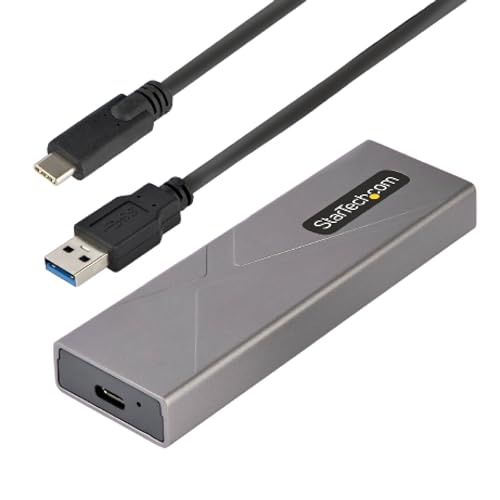 | StarTech M2-USB-C-NVME-SATA Enclosure | Protocols: M.2 SATA and NVMe Keys: SATA B+M; NVMe M-key Lengths: 2230 / 2242 / 2260 / 2280; no 22110 Host: Separate USB-A and USB-C cables Installation: Tool-free aluminum case | Check Price on Amazon |
1. SABRENT EC-SNVE — Best Simple Tool-Free Pick
The SABRENT EC-SNVE accepts M.2 SATA and PCIe NVMe drives in 2242, 2260, and 2280 lengths. It does not support 2230 or 22110 cards, 2.5-inch SATA drives, mSATA, or drives with a preinstalled heatsink. Those boundaries make it a strong fit for common older laptop SATA SSDs once protocol and length are confirmed.
Installation is fully tool-free. The case opens and secures the drive without screws. Cooling comes from a slim aluminum shell, an ABS frame, and an included thermal pad. The enclosure is bus-powered, so no external adapter is required. Only an enclosure is included. No SSD or storage capacity comes in the box.
The USB 3.2 Type-C interface is rated up to 10Gbps, and the box includes an 8-inch USB-C-to-C cable. SATA SSDs remain constrained by their SATA link and drive performance. The claim of up to 1,000 MB/s applies to a suitable NVMe path. Windows 7 or newer, macOS 10.5 or newer, and Linux are listed, with no driver required.
[accentbox]Choose SABRENT for a common 2242, 2260, or 2280 B+M-key SATA drive when a USB-C-only cable and tool-free case fit the desk.[/accentbox]- Fully tool-free case
- SATA and NVMe support
- Aluminum shell and thermal pad
- No 2230 or 22110 support
- USB-C host cable only
2. SSK SHE-C325 PRO — Best Cabled Dual-Host Pick
SSK specifies the SHE-C325 PRO uses an RTL9210B bridge for M.2 SATA B+M-key and NVMe M-key or B+M-key SSDs in 2242, 2260, and 2280 sizes. It explicitly excludes mSATA, PCIe AHCI SSDs, Wi-Fi or capture cards, and non-M.2 drives. The SATA drive and NVMe drive are not included.
The USB 3.2 Gen 2 interface is rated up to 10Gbps for a suitable NVMe path and runs at 5Gbps on older USB modes. M.2 SATA stays limited by SATA and does not reach 10Gbps. Both USB-C and USB-A host cables are included, so you don’t need to buy an adapter the way you do with USB-C-only kits.
The aluminum-alloy shell comes with two thermal pads and a screwdriver, so installing a drive takes longer than in a tool-free case. UASP and TRIM are listed, and a blue LED shows activity. It is bus-powered and supports Windows 7 through 10, Linux, and macOS. Windows 11 is not explicitly listed.
[accentbox]Pick this SSK when you want separate USB-A and USB-C cables and an RTL9210B dual-protocol bridge more than tool-free drive swaps.[/accentbox]- USB-A and USB-C cables included
- Two thermal pads
- UASP and TRIM stated
- Screwdriver required
- No 2230 or 22110 support
3. SSK HE-C371 — Best Overall
The HE-C371 supports M.2 SATA and NVMe SSDs with M-key or B+M-key connectors in 2230, 2242, 2260, and 2280 lengths. It also takes short 2230 cards, which some rivals here do not. The listing does not state support for B-key-only SATA drives, mSATA, or 22110 cards, so those should be treated as incompatible unless confirmed.
The tool-free shell lets you install a drive in two steps without screws. The USB 3.2 Gen 2 interface has a stated 10Gbps for NVMe and 6Gbps for SATA, though application throughput remains lower after drive and protocol limits. USB-C and USB-A cables are both included, and the enclosure draws power from the host.
The aluminum-alloy shell and two thermal pads handle cooling, and a blue LED shows transfers. UASP, TRIM, and S.M.A.R.T. monitoring support are all stated. That health-data access is useful when evaluating an older laptop SSD, though S.M.A.R.T. attributes are warnings rather than proof that the only data copy is safe.
[accentbox]The HE-C371 is the most balanced option for tool-free use, four card lengths, both host connectors, S.M.A.R.T., TRIM, and aluminum cooling.[/accentbox]- 2230 through 2280 support
- Tool-free with two host cables
- S.M.A.R.T., TRIM, and UASP stated
- No 22110 support
- B-key-only SATA not stated
4. VCOM Dual-Protocol Enclosure — Best Automatic-Sleep Pick
VCOM accepts M.2 NVMe M-key or B+M-key and M.2 SATA B+M-key drives. It lists 2230, 2242, 2260, and 2280 support, even though one headline line omits 2230. NVMe transfer is rated up to 10Gbps and SATA up to 6Gbps through its USB-C Gen 2 interface, with UASP and TRIM supported.
The enclosure includes a 25 cm USB-A-to-C cable and a 25 cm USB-C-to-C cable. Installation needs no additional tools. You open the lid, insert the drive, and secure it as the instructions describe. Windows 7 through 11, macOS, Linux, phones, and tablets are named, although mobile devices still need sufficient power and file-system support.
Cooling comes from a striped aluminum shell, a metal cooling vest, and a silicone thermal pad, all inside a 102 x 28 x 12 mm body. Automatic sleep is set at five minutes, the shortest stated timeout in this group. A short timer can conserve idle power, but it may add a delay when the drive wakes or conflict with monitoring and background-transfer behavior.
[accentbox]Choose VCOM when a five-minute sleep timer, both host cable types, and tool-free access fit drives you connect now and then.[/accentbox]- 2230 through 2280 support
- USB-A and USB-C cables
- Cooling vest, aluminum, and pad
- Five-minute automatic sleep
- B-key-only SATA not stated
5. ORICO PWDM2-BK — Best Compact 4TB Tool-Free Pick
The PWDM2-BK supports M.2 NVMe M-key or B+M-key and M.2 SATA B+M-key drives, explicitly excluding B-key-only SATA/NGFF SSDs. It accepts 2230, 2242, 2260, and 2280 lengths with a stated maximum capacity of 4TB. Check an older laptop drive’s notch arrangement before buying.
ORICO lists 10Gbps and up to 1,000 MB/s for NVMe, but 5Gbps and up to 450 MB/s for M.2 SATA. The lower SATA figure is the one that applies to an older laptop drive. Windows, macOS, Linux, and Android are named.
The case opens and locks without tools, and an internal rubber fastener holds the SSD. Cooling comes from aluminum construction, a cooling vest, and thermal silicone. The model label says a USB-C-to-C cable, and no USB-A cable is stated, so confirm the cable contents against your computer’s ports before buying.
[accentbox]Choose this ORICO when a compact B+M-key SATA drive up to 4TB needs tool-free access and a USB-C host connection.[/accentbox]- Tool-free locking case
- Clear 5Gbps SATA specification
- Heatsink, thermal silicone, and aluminum shell
- No B-key-only SATA support
- 4TB maximum
- USB-A cable not stated
6. YINNCEEN All-in-One Adapter — Best for 22110 and 2.5-Inch SATA
YINNCEEN reads M.2 NVMe, M.2 SATA, or 2.5-inch SATA HDD/SSD devices through one open vertical adapter. It accepts M-key and B+M-key M.2 cards in 2230, 2242, 2260, 2280, and 22110 lengths. It does not support 3.5-inch hard drives.
Only one drive can be read at a time. If M.2 and 2.5-inch SATA devices are connected together, the SATA interface takes priority according to the listing. NVMe is rated up to 10Gbps and SATA up to 6Gbps. The adapter uses a two-in-one USB-A and USB-C cable and works with Windows, macOS, and Linux without a driver.
The tool-free vertical design has no length restriction, a nonslip base, and side vents. It is an open adapter, not a closed travel enclosure, so the SSD sits exposed on a desk. Hot-plugging is not supported. Safely eject and disconnect the adapter before replacing any drive, to reduce the risk of corruption or damage.
[accentbox]YINNCEEN is the pick for 22110 M.2 or 2.5-inch SATA access, and it is not the safest way to carry an exposed SSD in a bag.[/accentbox]- Supports 2230 through 22110
- Also accepts 2.5-inch SATA
- USB-A and USB-C host cable
- Exposed vertical drive
- One drive at a time
- No hot-plugging
7. ORICO M2PVM — Best Dual-Cable Portable ORICO Pick
The M2PVM accepts NVMe M-key or M+B-key drives and M.2 SATA M+B-key SSDs, while excluding B-key-only SATA/NGFF. It covers 2230, 2242, 2260, and 2280 sizes. No maximum capacity is stated, so confirm high-capacity drive support separately.
The USB 3.1 Gen 2 Type-C interface and UASP are rated up to 10Gbps for suitable NVMe media, and the listing claims more than 900 MB/s under the right conditions. SATA stays limited by its own protocol. Windows, macOS, Linux, smartphones, and laptops are listed, with no driver required.
The enclosure has an aluminum top and plastic bottom, with ORICO listing dimensions of 4.25 x 1.16 x 0.53 inches and an integrated activity indicator. Cable packaging varies. You may receive two separate USB-C-to-C and USB-C-to-A cables or one two-in-one cable. New SSDs need partitioning and formatting, but existing data drives should not be reformatted merely because recognition fails.
[accentbox]Choose the M2PVM for broad host compatibility, but accept that the cable configuration may vary and B-key-only SATA drives are excluded.[/accentbox]- USB-A and USB-C host paths
- Windows, macOS, and Linux
- Aluminum top for heat spreading
- B-key-only SATA not supported
- Cable package varies
- Capacity ceiling not stated
8. StarTech M2-USB-C-NVME-SATA — Best Broad-OS Professional Pick
StarTech supports M.2 SATA B+M-key and M.2 NVMe M-key drives in 2230, 2242, 2260, and 2280 lengths. It explicitly excludes 22110 cards. PCIe 4.0 NVMe SSDs can work at reduced speed. The listing also uses the term “SATA M.2 AHCI,” which is not the same as the unsupported PCIe AHCI category that some other products exclude.
The USB 3.2 Gen 2 interface is rated for 10Gbps with UASP and works with USB-C, USB-A, and compatible Thunderbolt 3 or 4 hosts. Separate 12-inch USB-C and USB-A host cables are included. Listed operating systems include Windows, macOS, Chrome, Linux, Ubuntu, and iOS on the iPhone 15 series or newer devices.
Installation is tool-free and driverless. StarTech specifies a compact 105 x 35 x 14 mm aluminum case that works as a heatsink and protects the SSD during transport. Thermal-pad contents, a capacity ceiling, S.M.A.R.T. passthrough, TRIM, and sleep behavior are not stated.
[accentbox]Choose StarTech for broad OS coverage, two separate host cables, tool-free installation, and a closed aluminum travel case.[/accentbox]- Broad desktop and mobile OS list
- Separate USB-A and USB-C cables
- Tool-free aluminum enclosure
- No 22110 support
- S.M.A.R.T., TRIM, and capacity not stated
Buying Guide: Choosing an M.2 SATA Enclosure
Identify SATA versus NVMe before checking size
M.2 is a physical form factor with multiple protocols. An older laptop SSD may use SATA, PCIe NVMe, or in some cases PCIe AHCI. The enclosure must include a bridge for the actual protocol. All eight products here support SATA and NVMe, but SSK explicitly excludes M.2 PCIe AHCI.
Check the drive label or original laptop specification rather than guessing from age. Notch position helps narrow the possibilities but does not prove protocol alone. Also distinguish M.2 SATA from mSATA, a different card and connector that SABRENT and SSK explicitly reject.
Match M-key, B+M-key, and B-key restrictions
Most SATA M.2 laptop drives use B+M-key notches, and these enclosures commonly list that format. The ORICO PWDM2-BK and M2PVM explicitly reject B-key-only SATA/NGFF drives. A drive can use SATA electrically yet still fail the enclosure’s mechanical key support.
Inspect the card edge and compare it with the exact listing. Avoid forcing a key into the wrong socket or assuming a “dual-protocol” label accepts every M.2 shape. When the product says M-key/B+M-key, treat B-key-only support as absent unless confirmed.
Decode 2230, 2242, 2260, 2280, and 22110
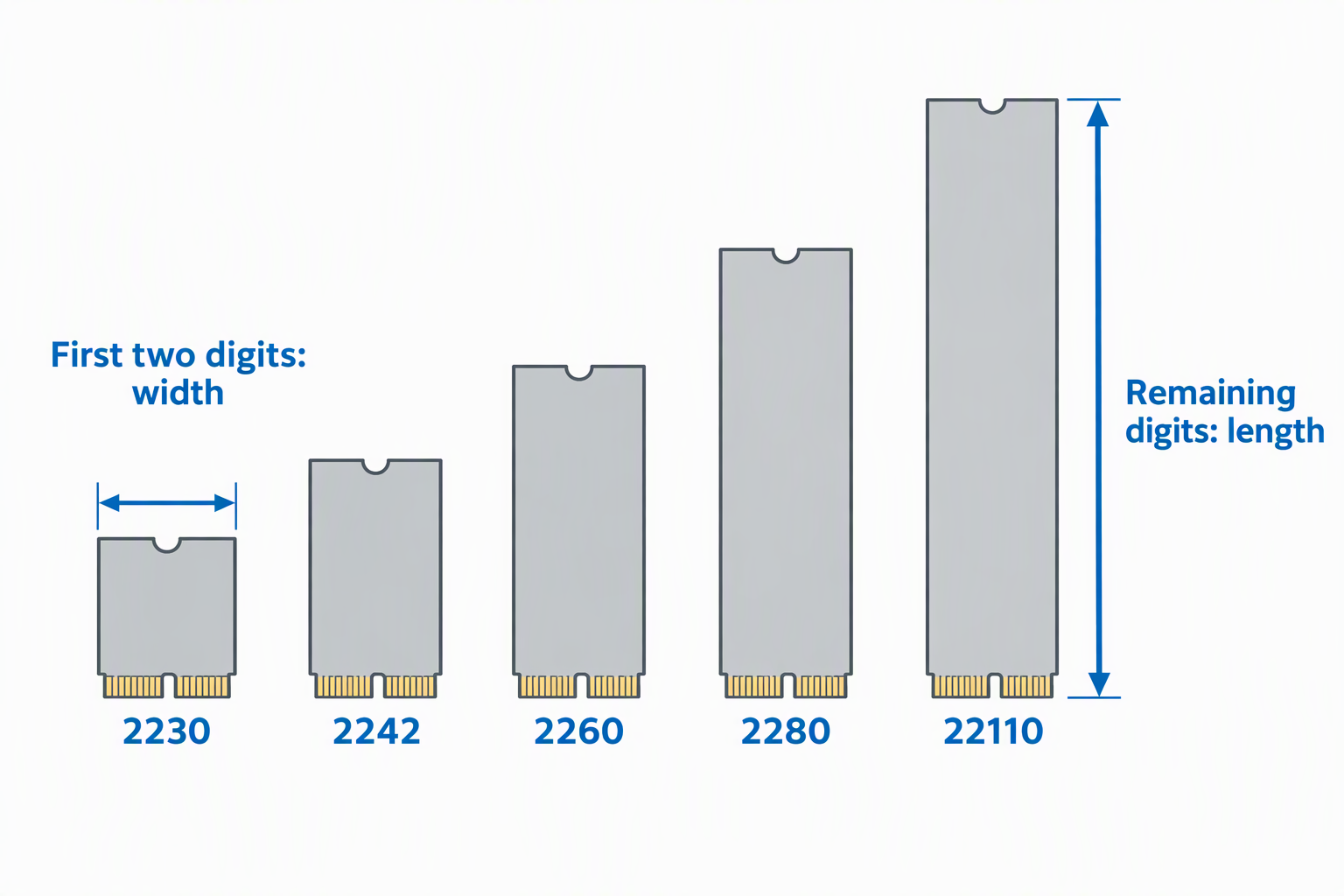
The first two digits give a nominal 22 mm width, and the remaining digits give the card length. Most products support 2230 through 2280, although SABRENT and SSK SHE-C325 PRO begin at 2242. Only the YINNCEEN adapter explicitly adds 22110.
Length affects the enclosure body and retention point. Confirm that the required rubber pin, latch, or screw position exists for the drive. A 22110 card cannot fit a closed 2280 case even when protocol and keying otherwise match.
Understand SATA speed inside a 10Gbps enclosure
A 10Gbps USB bridge does not make SATA a 10Gbps protocol. VCOM and SSK list up to 6Gbps for SATA, while ORICO PWDM2-BK lists 5Gbps and about 450 MB/s for its SATA path. Actual file transfer is lower after protocol overhead and drive limits.
The 10Gbps rating mainly helps NVMe media. For an older SATA SSD, host connector choice, bridge stability, cooling, and health access may count for more. Do not pay for a headline rate while overlooking an incompatible B-key or missing cable.
Choose USB-A, USB-C, or both
SSK, VCOM, YINNCEEN, ORICO M2PVM, and StarTech provide paths for both USB-A and USB-C hosts. SABRENT ships only an 8-inch USB-C-to-C cable, while the ORICO PWDM2-BK model information states a C-to-C cable. Connector shape still does not establish speed.
Check cable length and the ports on the computer used for recovery. A lower-speed hub, cable, or adapter can reduce throughput. Direct host connection is preferable while diagnosing an old disk because it removes another variable from power and recognition problems.
Decide between tool-free convenience and secure travel
SABRENT, SSK HE-C371, VCOM, ORICO PWDM2-BK, YINNCEEN, and StarTech advertise tool-free installation. Quick access is useful for one-time recovery or several drives. A closed shell protects the card better than YINNCEEN’s open vertical slot during travel.
Tool-free does not mean hot-swappable. YINNCEEN explicitly prohibits hot-plugging and requires ejection plus disconnection before drive replacement. Apply that cautious process to every enclosure: stop transfers, eject the volume, disconnect it, and only then open the case.
Use thermal pads and aluminum correctly
M.2 SSDs can heat during sustained copying. Heat moves from the controller and flash packages into the outer case through aluminum shells and thermal pads. SABRENT, both SSK models, VCOM, and ORICO PWDM2-BK name specific cooling components. StarTech uses the case as a large heatsink.
Position the thermal pad according to the instructions without preventing closure or bending the SSD. A warm outer shell can indicate that heat is being conducted outward. Keep the enclosure uncovered during a long recovery transfer and avoid holding it by a hot surface.
Protect data when a drive is not recognized
A new blank SSD may need partitioning and formatting, as SSK and ORICO note. An older laptop SSD with needed files should not be formatted as a troubleshooting step. First verify protocol, key, cable, port, power, file-system support, and whether the original machine used encryption.
If the drive appears, copy irreplaceable data before attempting repairs or performance tests. Use S.M.A.R.T. where supported, such as on the SSK HE-C371, as a warning source rather than a guarantee. Keep another independent copy after recovery.
Frequently Asked Questions
Is M.2 SATA the same as NVMe?
No. They can share the M.2 shape but use different storage protocols. An enclosure must explicitly support the protocol in the drive.
The products here support both, but each one has key and length limits. M.2 SATA is also different from mSATA despite the similar name.
How can I tell whether an old SSD is SATA?
Read the label and part number or check the laptop’s original storage specification. Connector notches can help, but a B+M-key shape alone does not prove the protocol.
Avoid trial insertion into an incompatible socket. Confirm protocol, key, and length before applying power.
Will a 10Gbps enclosure make an M.2 SATA SSD faster?
Not beyond the SATA limit. An enclosure like this keeps a slow USB bridge from becoming the first bottleneck, but SATA stays limited to its own rate. Several listings state 6Gbps for SATA even when USB reaches 10Gbps.
File speed in use also depends on the SSD, file sizes, host, cable, and overhead. A healthy older SATA SSD may transfer far below the enclosure’s headline USB rate.
Can I use these enclosures with a phone or tablet?
Yes, with some of them. VCOM, ORICO, and StarTech list mobile-device compatibility for selected devices. The device must supply enough bus power and read the drive’s file system.
Mobile support does not override protocol or key restrictions. Use the included or rated cable and safely eject before disconnecting.
Should I format an SSD that is not recognized?
Not if it contains needed data. Formatting can destroy file-system structures or make recovery harder. Recognition failures can come from the wrong enclosure protocol, unsupported key, bad cable, encryption, or an unsupported file system.
Only initialize or format a drive known to be blank or safely backed up. Confirm the selected disk identity before making any destructive change.
Related Storage and Workstation Guides
- 3.5-inch hard drive enclosures for desktop archives
- Managed 2.5GbE switches for editing networks
- SFP+ network cards for small 10GbE studios
- USB-C hubs for desktop connectivity
- Thunderbolt docks for workstation desks
- Rack shelves for non-rack studio gear
- Wi-Fi 7 PCIe cards for desktop workstations
- Ethernet cable toner kits for office runs
Bottom Line
The SSK HE-C371 is the strongest fit for most old laptop SATA SSDs because it covers four common lengths and has tool-free access, both host cables, cooling, S.M.A.R.T., and TRIM. The SABRENT EC-SNVE is the simpler USB-C tool-free case, while YINNCEEN handles unusual 22110 cards and 2.5-inch SATA devices.