Client files often move between laptops, studios, offices, and contractors long before they reach a permanent archive. A normal flash drive is convenient, but a lost one can expose contracts, source media, credentials, or unreleased work. A hardware-encrypted USB drive keeps encryption and authentication on the device, so it depends less on software installed on the receiving computer.
The right choice depends on more than an AES-256 label. Certification status, keypad design, admin recovery, connector type, capacity, transfer speed, read-only modes, and failed-PIN behavior all affect everyday use. Some drives are built around formal Level 3 validation, while others make broad encryption claims with no stated third-party validation. Match the security assurance to the value and sensitivity of the project.
[blueblock]Hardware encryption protects a locked drive, but it does not replace a separate backup. Several models erase or reset after repeated incorrect PIN attempts, so never carry the only copy of a client project on one encrypted USB drive.[/blueblock]Quick Picks
- Best overall for policy-controlled transfers: Kingston IronKey Keypad 200 offers OS-independent keypad access, admin and user PINs, read-only controls, and XTS-AES 256-bit encryption.
- Best software-authenticated value: Kingston IronKey Locker+ 50 G2 combines FIPS 197 certification, two-password access, and useful stated speeds.
- Best USB-C keypad drive: Kingston IronKey Keypad 200C connects directly to modern USB-C laptops and supports global or session read-only use.
- Best established Level 3 USB-A pick: Apricorn Aegis Secure Key 3 NX states FIPS 140-2 Level 3 validation, separate admin and user modes, and recovery PINs.
- Best speed-focused budget alternative: INNÔPLUS 32GB claims high read and write rates with keypad-based AES-XTS protection, but no formal certification is stated.
- Best simple 64GB keypad option: Dohaeris 64GB provides automatic relocking and a destructive ten-attempt reset in a key-ring design.
- Best rugged legacy-capacity pick: iStorage datAshur PRO combines FIPS 140-2 Level 3 certification with IP57 resistance and broad device support.
- Best premium rugged transfer drive: iStorage datAshur PRO+A pairs FIPS 140-3 Level 3 certification with 64GB capacity, faster stated transfer rates, and IP68 construction.
Encrypted USB Drive Comparison
| Image | Product | Details | Check Price |
|---|---|---|---|
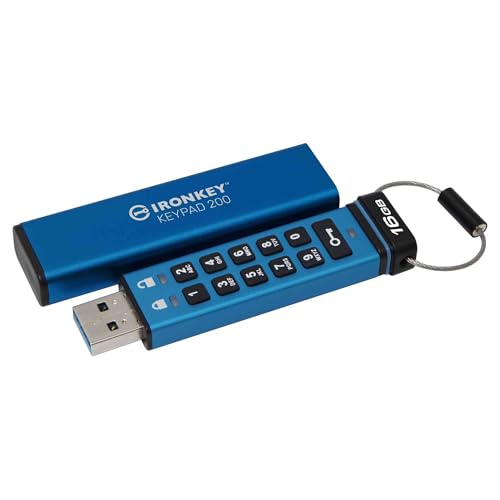 | Kingston IronKey Keypad 200 16GB | Encryption: XTS-AES 256-bit hardware encryption Authentication: Alphanumeric keypad; admin and user PINs Certification: FIPS 140-3 Level 3 described as pending Capacity: 16GB Connector: USB-A | Check Price on Amazon |
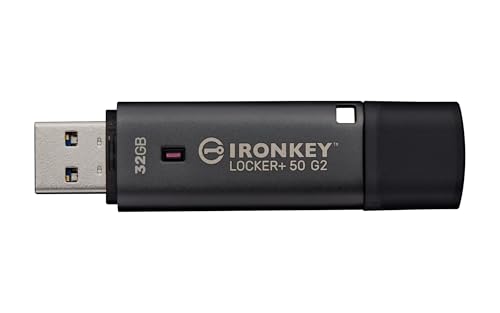 | Kingston IronKey Locker+ 50 G2 32GB | Encryption: XTS-AES 256-bit hardware encryption Authentication: Admin and user passwords Certification: FIPS 197 certified Capacity: 32GB Speed: Up to 145MB/s read and 115MB/s write | Check Price on Amazon |
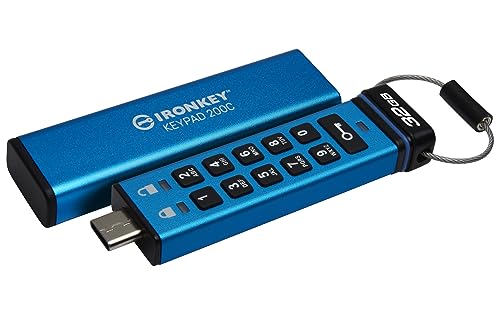 | Kingston IronKey Keypad 200C 32GB | Encryption: XTS-AES 256-bit hardware encryption Authentication: Keypad; admin and user PINs Certification: FIPS 140-3 Level 3 described as pending Capacity: 32GB Connector: USB-C | Check Price on Amazon |
 | Apricorn Aegis Secure Key 3 NX 8GB | Encryption: 256-bit hardware encryption Authentication: Keypad; admin, user, and recovery PINs Certification: FIPS 140-2 Level 3 validated Capacity: 8GB Connector: USB-A 3.0 | Check Price on Amazon |
 | INNÔPLUS 32GB Encrypted USB Drive | Encryption: AES-XTS 256-bit hardware encryption stated Authentication: Physical password controls Reset: Factory reset after 10 incorrect attempts Capacity: 32GB Speed: Up to 480MB/s read and 160MB/s write stated | Check Price on Amazon |
 | Dohaeris 64GB Encrypted USB Drive | Encryption: AES-256 hardware encryption stated Authentication: Independent keypad Reset: Automatic wipe after 10 incorrect attempts Capacity: 64GB File system: FAT32 stated | Check Price on Amazon |
 | iStorage datAshur PRO 4GB | Encryption: AES-XTS 256-bit hardware encryption Authentication: 7-to-15-digit keypad PIN Certification: FIPS 140-2 Level 3 certified Capacity: 4GB Ruggedness: IP57 | Check Price on Amazon |
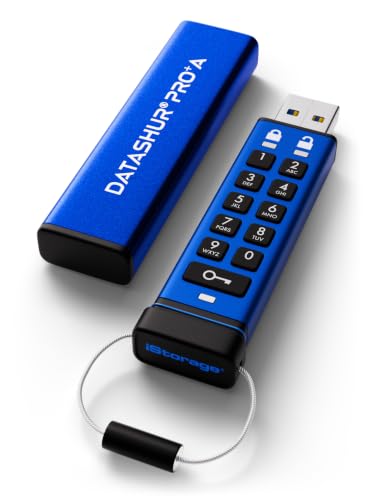 | iStorage datAshur PRO+A 64GB | Encryption: Hardware encryption Authentication: 8-to-15-digit alphanumeric keypad PIN Certification: FIPS 140-3 Level 3 certified Capacity: 64GB Ruggedness: IP68 | Check Price on Amazon |
1. Kingston IronKey Keypad 200 — Best Overall for Policy-Controlled Transfers
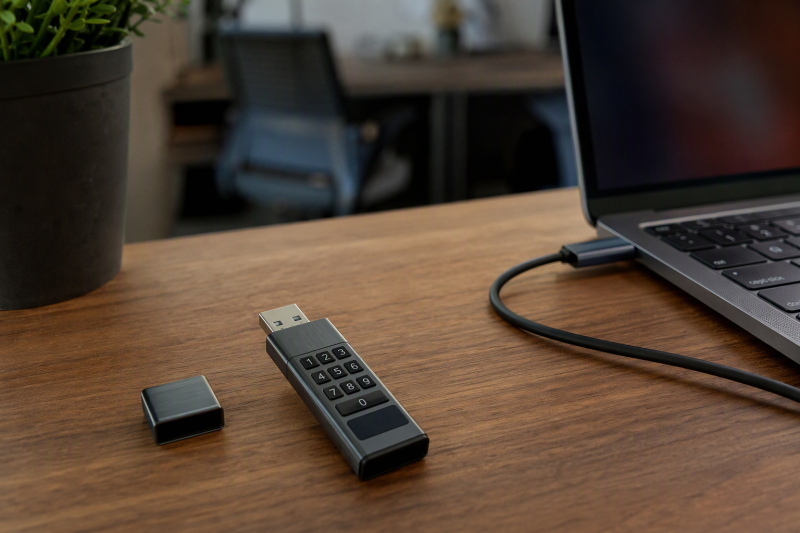
The 16GB IronKey Keypad 200 is built for controlled handoffs rather than maximum capacity. Its physical alphanumeric keypad unlocks the drive before connection, so authentication is independent of the computer’s operating system. The keypad helps when a project must move between managed Windows laptops, Macs, Linux systems, embedded devices, or locked-down client machines where software cannot be installed.
Kingston specifies XTS-AES 256-bit hardware encryption, enforced alphanumeric PINs, brute-force protection, and BadUSB defenses. Separate admin and user PINs let an organization issue a working credential while retaining administrative access. Two PINs suit client delivery better than one shared PIN, especially when drives are inventoried and reused across projects.
The certification status is easy to misread. The supplied product information describes FIPS 140-3 Level 3 as pending, even though the product title sounds stronger. Buyers whose contracts require a validated cryptographic module should confirm the current certificate and exact model before purchase. If your internal security policy does not mandate validation, you still get offline keypad access and managed credentials.
The 16GB capacity suits documents, audio stems, project files, and selected deliverables, but it is small for high-resolution camera originals. The drive has a conventional USB-A connector, so thin modern laptops may need an adapter. Document the admin PIN separately, test the receiving device, and make a verified backup before dispatch.
- OS-independent keypad unlocking
- Separate admin and user PINs
- Read-only and attack-protection features
- Compact 16GB handoff capacity
- FIPS 140-3 status described as pending
- USB-A connector may need an adapter
- 16GB is limited for large video files
2. Kingston IronKey Locker+ 50 G2 — Best Software-Authenticated Value
The Locker+ 50 G2 asks for the password on the host computer instead of on a keypad, and it provides XTS-AES 256-bit hardware encryption and FIPS 197 certification. A drive without a keypad can cost less and be simpler, but the receiving computer must support its access workflow. Confirm compatibility before sending it to a client with a restricted device.
Admin and user passwords both work in complex and passphrase modes. An administrator can preserve a recovery path without giving every recipient the management credential. Agencies that lend drives to staff gain a meaningful operational advantage from the multi-password design over a one-password device.
The 32GB capacity fits documents, design packages, compressed review videos, and modest project exports. Stated performance reaches 145 MB/s read and 115 MB/s write over USB 3.2 Gen 1. Those figures are sufficient for normal delivery work, though actual speed depends on file mix, host port, and the encryption controller.
Choose this model when formal FIPS 197 certification meets the project requirement and keypad independence is not necessary. It is less suitable for moving data among cameras, printers, embedded systems, or machines that block its unlock software. Keep the admin password in an approved password manager and test both admin and user paths before deployment.
- FIPS 197 certified
- Admin and user password modes
- Good stated transfer rates
- Practical 32GB capacity
- Not keypad authenticated
- Host workflow should be tested first
- Less device-independent than keypad models
3. Kingston IronKey Keypad 200C — Best USB-C Keypad Drive
The Keypad 200C puts the keypad design on a drive that plugs straight into USB-C laptops and tablets. You unlock the drive before connecting it, so the host needs no authentication software. The design suits transfers between companies, where neither party should have to install an application merely to open an approved delivery drive.
Kingston specifies XTS-AES 256-bit encryption, brute-force and BadUSB protection, and separate admin and user PINs. Global and session read-only modes help deliver a clean package, because a sender can reduce the chance that a recipient machine writes files back to the drive or alters the approved package during a single session.
Kingston lists a 32GB capacity, matching the USB-A Keypad 200 in this guide and fitting larger exports or several delivery versions. USB-C can also cause a compatibility problem, because older workstations with only USB-A require a suitable adapter. The recipient should verify that the adapter passes data correctly and does not put physical strain on the drive.
As with the USB-A Keypad 200, the supplied details describe FIPS 140-3 Level 3 as pending. When a client contract explicitly names that validation level, confirm the current certification for the exact IKKP200C model. Otherwise, the USB-C connector, keypad, read-only control, and dual-PIN design make it the most practical choice for a modern laptop.
- Direct USB-C connection
- Admin and user PINs
- Global and session read-only modes
- Brute-force and BadUSB protection stated
- Level 3 status described as pending
- Needs an adapter for USB-A-only hosts
4. Apricorn Aegis Secure Key 3 NX — Best Established Level 3 USB-A Pick
Apricorn’s Aegis Secure Key 3 NX is the clearest fit for an organization that wants an explicitly stated FIPS 140-2 Level 3 validated keypad drive. Its 8GB capacity is modest, but a small drive can suit controlled document sets, legal packages, final graphics, or client credentials, where extra storage is unnecessary.
Separate admin and user modes let an organization assign drives in a managed way. The drive also provides data-recovery PINs, so an administrator has a defined path when a user forgets a credential. Aegis Configurator compatibility can help standardize multiple drives, although buyers should confirm the configurator workflow and licensing that fit their deployment.
Two read-only modes protect approved delivery contents against modification, which helps when the drive moves through unknown computers or when a signed-off package must remain unchanged. Apricorn specifies USB 3.0 connectivity and a physical keypad, so the host does not need the unlocking application that software-authenticated drives use.
Capacity is the main constraint. The rated 8GB capacity is too small for most transfers of camera originals and can fill quickly with large intermediate video files. Treat it as a secure courier for compact, high-value files.
- FIPS 140-2 Level 3 validation stated
- Separate admin and user modes
- Recovery PIN support
- Two read-only modes
- Only 8GB
- USB-A rather than USB-C
5. INNÔPLUS 32GB — Best Speed-Focused Budget Alternative
The INNÔPLUS drive suits buyers who want password entry on the drive itself and higher claimed speeds without paying mainly for formal certification. INNÔPLUS states full-disk AES-XTS 256-bit hardware encryption, requires a password to expose data, and resets to factory state after ten incorrect attempts. A reset after failed attempts protects confidentiality but makes a separate backup mandatory.
Stated speeds reach 480 MB/s read and 160 MB/s write, unusually high figures for this group. Treat them as maximum claims rather than guaranteed project throughput. Large video files are the best case for those speeds, while folders with thousands of small assets will transfer more slowly.
The drive requires no software or drivers and lists compatibility with Windows, macOS, Linux, embedded systems, and other devices. Its 32GB capacity is practical for client review exports and compact project packages. A zinc-alloy housing adds scratch and impact resistance for everyday travel.
No FIPS certification or detailed admin/recovery scheme is stated, so it is a poor substitute where procurement rules demand validation, centralized controls, or documented cryptographic assurance. It is a lower-assurance option for ordinary commercial confidentiality, as long as the buyer tests its reset behavior, unlocking steps, and cross-platform use before trusting it with a deadline.
- High claimed read and write speeds
- Cross-platform, driver-free operation stated
- Ten-attempt destructive reset
- Durable zinc-alloy shell
- No formal certification stated
- No admin recovery mode described
- Performance claims need realistic expectations
6. Dohaeris 64GB — Best Simple 64GB Keypad Option
The Dohaeris offers 64GB capacity in a USB 3.0 drive with a keypad. Its independent encryption chip is described as using AES-256, with no password trace left on the host. It is appealing for larger document sets or compressed media that will not fit the 8GB, 16GB, or 32GB options.
Automatic locking is a useful operational detail. Dohaeris specifies that after unlocking, the drive locks if it is not connected within 30 seconds, and it locks again when unplugged. The manufacturer states that after ten incorrect password entries the drive resets and wipes itself automatically, which limits repeated guessing but also permanently destroys the carried copy.
Compatibility is narrower than several rivals. The stated systems are Windows, CentOS 7, Red Hat 7.5, and Windows Server 2012/2016. The specified FAT32 file system also limits video work, because a single FAT32 file cannot exceed 4GB. Confirm whether the drive can be reformatted without breaking its secure operation before planning to send large video exports.
No formal security certification, admin PIN, user PIN separation, read-only mode, or recovery credential is stated. The aluminum-alloy key-ring design is convenient, but this drive suits routine protected transport better than regulated client work. Run a complete unlock, copy, eject, relock, and restore test on every operating system used in the handoff.
- 64GB capacity
- Automatic 30-second relock behavior
- Ten-attempt reset and wipe
- Portable aluminum-alloy design
- No formal certification stated
- FAT32 creates a 4GB single-file limit
- No admin recovery controls described
7. iStorage datAshur PRO — Best Rugged Legacy-Capacity Pick
The datAshur PRO combines a physical keypad with explicitly stated FIPS 140-2 Level 3 certification. Additional NLNCSA DEP-V and NATO Restricted certifications are listed, which makes it the most extensively described certified drive among the older designs here. It encrypts data in real time with AES-XTS 256-bit after a 7-to-15-digit PIN unlock.
No software is required, and the drive supports Windows, macOS, Linux, Chrome, Android, thin and zero clients, embedded systems, Citrix, and VMware. The broad device list suits client organizations with unusual endpoints. When disconnected, the drive locks and all stored content remains encrypted.
The drive has an IP57 rating for dust and water resistance. Stated USB 3.2 speeds reach 169 MB/s read and 135 MB/s write, which is more than adequate for its capacity. The main limit is that this model holds only 4GB, so it suits documents and compact deliverables rather than modern video media.
The older 4GB capacity can work as a deliberate control. Only the approved package fits, so staff are less tempted to turn a transfer drive into a general archive. Still, verify the total delivery size, allow room for manifests or checksums, and never compress sensitive files with a weak shared password merely to make them fit.
- FIPS 140-2 Level 3 certification stated
- Broad platform compatibility
- IP57 dust and water resistance
- Driver-free keypad access
- Only 4GB
- USB-A connector
- Too small for most video deliverables
8. iStorage datAshur PRO+A — Best Premium Rugged Transfer Drive
The datAshur PRO+A is the strongest premium pick for sensitive client packages. It states FIPS 140-3 Level 3 certification rather than pending status, and its wear-resistant alphanumeric keypad takes an 8-to-15-digit PIN before connection. No software installation is required on Windows, macOS, Android, Linux, and other compatible hosts.
Capacity reaches 64GB, enough for large review exports, design archives, audio projects, and modest video packages. Stated USB 3.2 Gen 1 performance is also the best of the validated options, at up to 300 MB/s read and 239 MB/s write. Actual transfer speeds will still depend on the host and the files.
The extruded aluminum sleeve has an IP68 rating, which gives stronger dust and water protection than the older datAshur PRO. Crush resistance is also claimed. The protections help when a drive travels with couriers, in bags, or to field locations, although no rating makes a transfer device immune to loss or abuse.
The 64GB model is still too small for some raw video shoots. The team must also document the keypad workflow correctly. For contracts that explicitly require current Level 3 certification, confirm the exact model against the applicable certificate and record its serial number in the transfer log.
- FIPS 140-3 Level 3 certification stated
- 64GB capacity
- Up to 300/239 MB/s stated read/write
- IP68 rugged construction
- Capacity can still constrain raw video
- Exact certification should be documented for regulated work
Buying Guide: Choosing an Encrypted USB Drive for Client Transfers
Separate encryption strength from certification
An AES-256 or AES-XTS claim describes an algorithm and mode, not the full security of the product. Key storage, PIN handling, firmware, tamper response, random number generation, and implementation quality also affect security. A drive without stated validation may still encrypt data, but you get less independent assurance.
Formal FIPS 140-2 or 140-3 Level 3 validation is important when a contract, regulator, or procurement policy explicitly requires it. Confirm the exact model and certificate status because “pending” is not the same as validated. The Kingston Keypad 200 models are described as pending in their supplied details, while the Apricorn and iStorage models state completed Level 3 certification.
Choose keypad or host-based authentication

You unlock a keypad drive on its own keypad before it reaches the computer, so access is OS-independent and PIN entry stays away from the host keyboard. Keypad drives suit restricted laptops, embedded systems, and transfers between organizations that do not share software policies.
Host-based password drives can be smaller and less expensive, but the unlock application must work on the receiving system. Confirm supported operating systems and security controls before sending the package. A client laptop may block removable-drive executables even when ordinary storage is allowed.
Plan admin, user, and recovery access
Separate admin and user credentials let a company retain control while assigning day-to-day access to a staff member or client. Recovery PINs can stop a forgotten user credential from cutting off access, while read-only modes protect an approved package against changes.
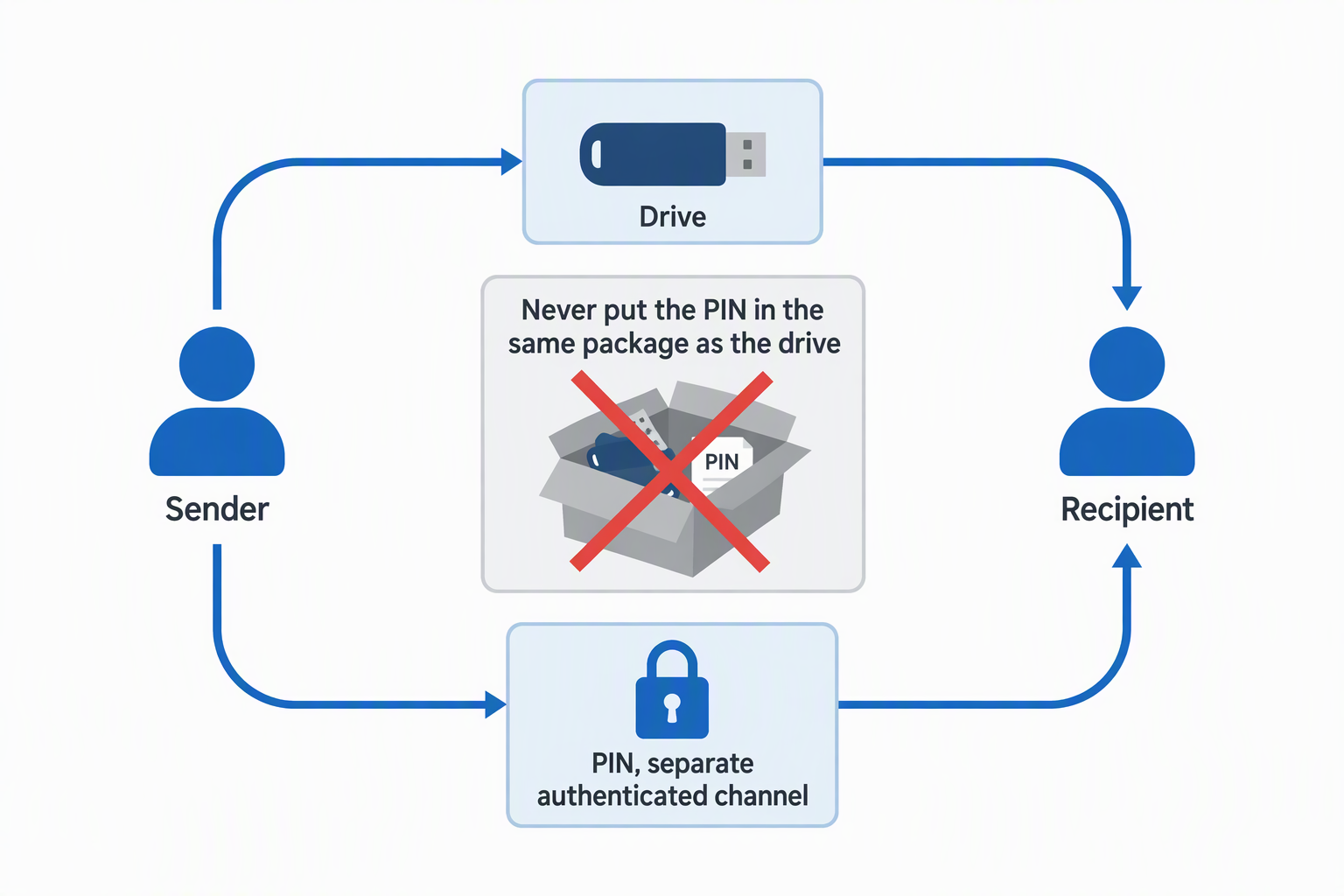
Recovery also creates responsibility. Store the admin credential in an approved password manager, restrict access, and record who can use it. Never put the PIN in the same package as the drive. Deliver it through a separate authenticated channel and rotate it when the device returns.
Understand failed-PIN wipe behavior
Several drives erase or reset after ten incorrect attempts. Erasing after failed attempts limits brute-force guessing if the drive is stolen, but a user error can also destroy the transported copy. Train recipients on the keypad sequence and tell them to stop before the final allowed attempt.
A destructive reset is safe only when the organization keeps a verified independent copy. Before shipping, copy the full package to the drive, reopen representative files, compare checksums where appropriate, eject cleanly, relock, and test the intended user credential.
Match capacity and file system to project files
Capacity should leave working room beyond the package. The selections range from 4GB to 64GB, which suits documents and curated deliverables better than full camera-card archives. Measure the actual folder instead of assuming a labeled capacity is fully usable after formatting.
File-system choice can be just as limiting. The Dohaeris specifies FAT32, which restricts a single file to 4GB. The limit can block long video exports even when the total free space is sufficient. Verify formatting support and cross-platform needs before altering any secure drive’s factory layout.
Check connector and transfer performance
USB-A remains common on workstations, while USB-C is increasingly standard on laptops and tablets. A direct connector is preferable, because an adapter adds another item that can fail or be forgotten. The Keypad 200C uses USB-C, while most other choices here target USB-A hosts.
Stated speeds are favorable maximums. Large sequential files usually transfer faster than folders of small assets, and encryption controllers add their own limit. For urgent deliveries, choose a drive with stated write speed, then time a realistic project copy before promising a handoff window.
Build a defensible client handoff process
Security depends on the process around the drive. Record its serial number, assigned custodian, project, departure date, return date, and sanitization status. Use a separate channel for the PIN, and confirm the recipient knows how to unlock and safely eject it.
After return, preserve needed records, then sanitize or reset the device according to policy before reuse. Hardware encryption does not prevent a recipient from copying unlocked files elsewhere, so pair the drive with clear access and retention terms when confidentiality extends beyond transport.
Frequently Asked Questions
Is a hardware-encrypted USB drive safer than a password-protected ZIP file?
Generally, yes. Encryption and authentication occur on the device, and keypad models do not expose PIN entry to the host. A ZIP file depends on software, password quality, recipient behavior, and the encryption method selected during creation.
Neither method controls a file after an authorized recipient opens and copies it. Use contractual controls, least-privilege packaging, and a secure delivery process alongside encryption.
Does FIPS 197 mean the same thing as FIPS 140-3 Level 3?
No. FIPS 197 specifies AES, while FIPS 140 validation evaluates a cryptographic module against broader security requirements. Level 3 adds physical security and identity-based authentication requirements beyond merely using AES.
Procurement language should name the actual requirement. If a client requires FIPS 140-3 Level 3, an AES product or FIPS 197-certified drive is not automatically equivalent.
Can an encrypted USB drive carry raw video footage?
Yes, if capacity, file system, and write speed fit the footage. The 64GB models can carry modest packages, but many camera cards or production folders exceed that size quickly.
Check the largest individual file as well as the total. A FAT32-formatted drive cannot hold a single file larger than 4GB, which rules out many long-form video exports.
What happens if the recipient forgets the PIN?
It depends on the model. Drives with admin or recovery credentials may allow controlled access or a new user credential. Simpler models may require a destructive reset, and repeated incorrect attempts can erase the stored data.
Keep a separate verified copy and define who holds the recovery credential before dispatch. Do not encourage repeated guesses when the drive is close to its attempt limit.
Should the PIN travel with the drive?
No. Sending the PIN in the same envelope, bag, or unencrypted message removes much of the protection if both are intercepted. Share it through a separate authenticated channel.
For high-value work, confirm the recipient’s identity before disclosing the PIN and rotate or reset credentials after the drive returns. Avoid predictable project names, dates, or phone numbers as PINs.
Related Security and Workstation Guides
- USB-C port locks for shared laptop fleets
- Laptop briefcases for daily office commutes
- 3.5-inch hard drive enclosures for desktop archives
- Five-bay DAS enclosures for video archives
- Managed 2.5GbE switches for editing networks
- Wi-Fi 7 PCIe cards for desktop workstations
- Ethernet cable toner kits for office runs
- Rack shelves for non-rack studio gear
Bottom Line
Choose the Kingston IronKey Keypad 200 for the best overall controls on ordinary managed transfers, or the Apricorn Aegis Secure Key 3 NX for a small-capacity drive when stated FIPS 140-2 Level 3 validation is a priority. For a larger, faster, rugged package with stated current-generation validation, choose the iStorage datAshur PRO+A.