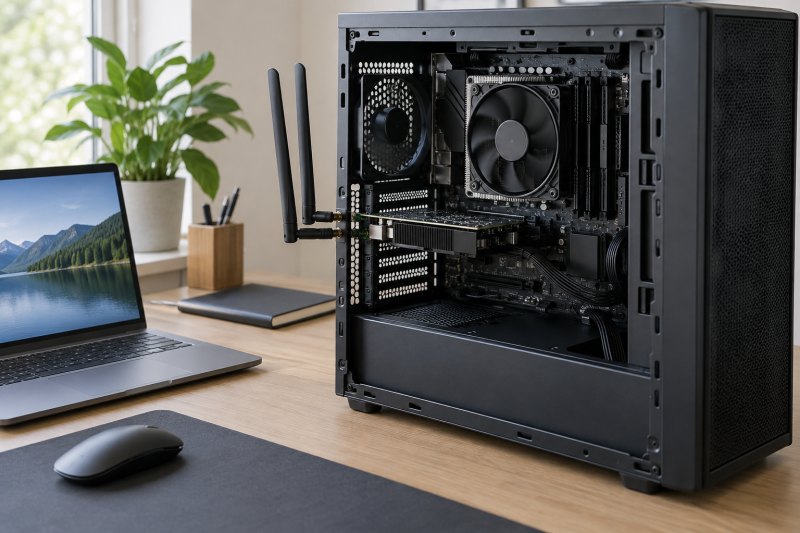
A Wi-Fi 7 PCIe card can add tri-band wireless and current Bluetooth support to a desktop without occupying an external USB port. The largest number printed on the box is only one of the differences. Operating-system support, Intel or AMD motherboard compatibility, antenna placement, channel width, and the exact speed allocation across 6 GHz, 5 GHz, and 2.4 GHz determine whether a card belongs in a particular workstation.
These eight options range from BE6500-class cards with 160 MHz 6 GHz channels to BE9300 and BE9400 designs advertising 320 MHz support. Maximum link rates are not internet-speed promises. They require compatible routers, suitable bands and channels, current drivers, and favorable radio conditions. Start with platform fit, then compare wireless capability.
Check the operating system and motherboard platform before buying. Several cards here support Windows 11 only, while the TP-Link Archer TBE553E and ASUS PCE-BE92BT are explicitly limited to Intel platforms.- Best overall for a Windows 11 workstation: TP-Link Archer TBE552E combines BE9300-class tri-band rates, 320 MHz 6 GHz support, Bluetooth 5.4, WPA3, and both bracket sizes.
- Best for a movable antenna base: MSI Herald WiFi 7 offers a magnetic external antenna base plus stated tri-band rates up to 5,764 + 2,882 + 688 Mbps.
- Best Windows 10 option for an Intel system: TP-Link Archer TBE553E lists Windows 10 and 11 support, but it is not compatible with AMD.
Wi-Fi 7 PCIe Card Comparison
| Image | Product | Details | Check Price |
|---|---|---|---|
 | TP-Link Archer TBE552E | Class: BE9300 Band rates: 5764 / 2882 / 688 Mbps Channel width: 320 MHz on 6 GHz Bluetooth: 5.4 Compatibility: Windows 11; AMD or Intel | Check Price on Amazon |
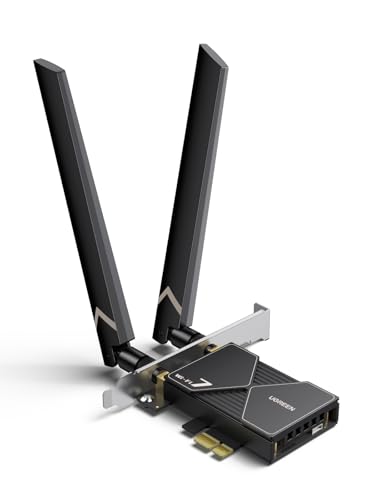 | UGREEN BE6500 PCIe WiFi Card | Class: BE6500 Band rates: 2882 / 2882 / 688 Mbps Channel width: 160 MHz on 6 GHz Bluetooth: 5.4 Compatibility: Windows 11 except 21H2 | Check Price on Amazon |
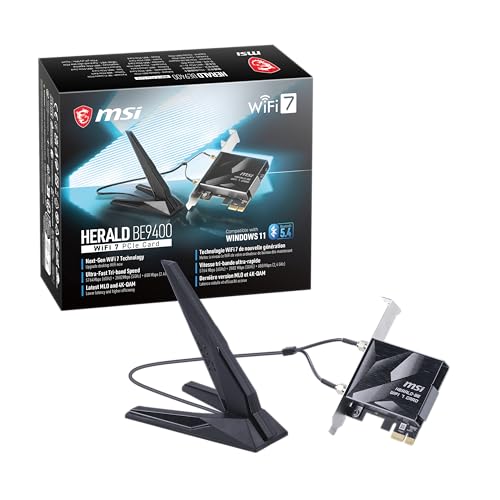 | MSI Herald WiFi 7 | Class: BE9400 Band rates: 5764 / 2882 / 688 Mbps Channel width: 320 MHz on 6 GHz Bluetooth: 5.4 Antenna: Magnetic external base | Check Price on Amazon |
 | GIGABYTE GC-WIFI7 | Maximum connection: Up to 5800 Mbps Channel width: Up to 320 MHz Bluetooth: 5.3 Wi-Fi features: MLO, 4K-QAM, MRU Compatibility: Verify OS and platform | Check Price on Amazon |
 | TP-Link Archer TBE400E | Class: BE6500 Band rates: 2882 / 2882 / 688 Mbps Bluetooth: 5.4 Brackets: Standard and low-profile Compatibility: Windows 11 64-bit; AMD or Intel | Check Price on Amazon |
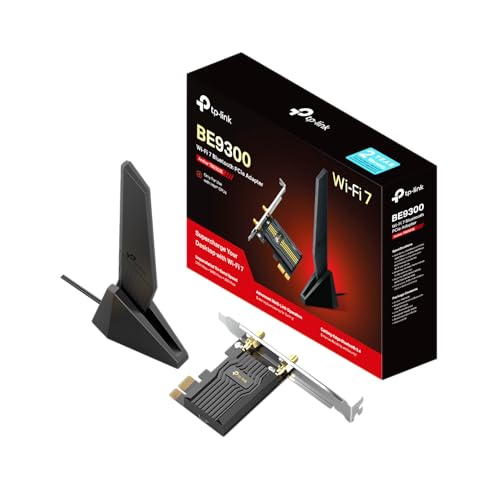 | TP-Link Archer TBE553E | Class: BE9300 Band rates: 5764 / 2882 / 688 Mbps Channel width: 320 MHz on 6 GHz Bluetooth: 5.4 Compatibility: Windows 10/11; Intel only | Check Price on Amazon |
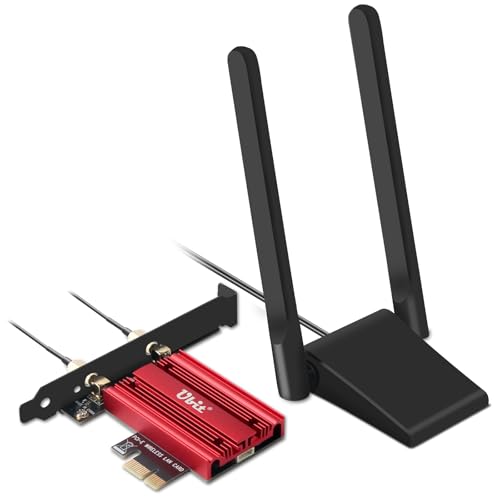 | Ubit BE7925S Wi-Fi 7 Card | Class: 6338 Mbps stated total Band rates: 2882 / 2882 / 574 Mbps Channel width: 160 MHz Bluetooth: 5.4 Compatibility: Windows 11 64-bit; AMD or Intel | Check Price on Amazon |
 | ASUS PCE-BE92BT | Band support: Tri-band including 6 GHz Channel width: 320 MHz Bluetooth: 5.4 Security: WPA3 Compatibility: Intel motherboards only | Check Price on Amazon |
1. TP-Link Archer TBE552E — Best Overall for Windows 11
If your workstation runs Windows 11, the Archer TBE552E is the strongest general recommendation here. It supports both AMD and Intel motherboards, includes standard and low-profile brackets, and pairs Wi-Fi 7 features with Bluetooth 5.4. The main limit is clear. It does not support Windows 10 or Linux, so it is appropriate only when the workstation already runs Windows 11 or will be upgraded.
TP-Link advertises tri-band maximums of 5,764 Mbps on 6 GHz, 2,882 Mbps on 5 GHz, and 688 Mbps on 2.4 GHz. A Wi-Fi 7 router is required to use features such as Multi-Link Operation, 4K-QAM, Multi-RU, and the 320 MHz channel on 6 GHz. Actual throughput will be lower and will depend on the router, distance, obstacles, interference, and network workload.
Two high-gain antennas are intended to extend coverage from a desktop chassis, while WPA3 provides the listed current security protocol. OFDMA and MU-MIMO are meant to improve efficiency when several devices share the network. This feature set makes sense for a workstation moving large local files or using latency-sensitive cloud tools, but a wired Ethernet connection can still be preferable for fixed high-volume transfers.
[accentbox]Choose the TBE552E when you have Windows 11, either an AMD or Intel motherboard, and a Wi-Fi 7 router capable of 320 MHz operation.[/accentbox]- BE9300-class tri-band rates
- AMD and Intel motherboard support
- Standard and low-profile brackets
- Windows 11 only
- Peak features require a matching Wi-Fi 7 router
2. UGREEN BE6500 PCIe WiFi Card — Best Flexible 6 dBi Antenna Pick
UGREEN’s BE6500 card focuses on antenna placement and balanced 6 GHz and 5 GHz rates. Its flexible dual antenna is rated at 6 dBi, so you can adjust the orientation instead of leaving the antennas trapped behind a metal tower. When the workstation sits under a desk or against a wall, antenna position can count for more than a higher theoretical class.
The stated maximums are 2,882 Mbps on 6 GHz, 2,882 Mbps on 5 GHz, and 688 Mbps on 2.4 GHz. Unlike the 320 MHz BE9300 options, the 6 GHz specification calls out 160 MHz bandwidth. MLO is included for link selection and improved connection stability, but realizing BE6500 performance still requires a Wi-Fi 7 router and a radio environment that supports the intended channel.
Bluetooth 5.4 supports common peripherals, and UGREEN advises disabling a PC’s existing Bluetooth before using the card’s Bluetooth function. Driver installation is supported by an included USB stick. Compatibility is narrow: the card supports Windows 11 except version 21H2, and the listing says other operating systems are not supported. Confirm the current Windows build before opening the case.
[accentbox]The decisive feature is the adjustable dual 6 dBi antenna. It suits a Windows 11 tower with difficult antenna positioning.[/accentbox]- Flexible dual 6 dBi antenna
- Bluetooth 5.4
- Driver USB stick included
- Windows 11 only, excluding 21H2
- 160 MHz rather than 320 MHz on 6 GHz
3. MSI Herald WiFi 7 — Best BE9400 Pick with Magnetic Antenna Base
For a tower that needs its antennas away from the case, MSI rates the Herald as a BE9400-class card with headline tri-band rates of 5,764 Mbps on 6 GHz, 2,882 Mbps on 5 GHz, and 688 Mbps on 2.4 GHz. It supports MLO and an ultra-wide 320 MHz channel on 6 GHz. Those capabilities target local-network transfers, high-resolution streaming, and latency-sensitive use when the router and client configuration can match them.
Its external antennas sit on a magnetized base, so the receiver can be moved away from the rear of the tower and placed higher on a desk or metal surface. That placement helps a workstation, because even an advanced radio can perform poorly when its antennas are shadowed by the case, desk frame, or wall. Test the position instead of choosing it for appearance alone.
MSI includes Bluetooth 5.4 support, but the listing does not state an operating-system list, bracket selection, or motherboard-platform restriction. Its model field also does not match the product title, so identify the card by the MSI Herald WiFi 7 BE9400 title and product identifier and verify current driver, OS, and chassis requirements before purchase.
[accentbox]MSI supplies one of the best antenna arrangements here, but the missing compatibility details make a pre-purchase driver check essential.[/accentbox]- 320 MHz 6 GHz support
- Magnetic external antenna base
- Bluetooth 5.4
- OS support not stated in supplied data
- Listing model metadata appears inconsistent
4. GIGABYTE GC-WIFI7 — Best Straightforward Gigabyte Expansion Card
The GC-WIFI7 is GIGABYTE’s tri-band PCIe expansion card, with stated wireless connections up to 5,800 Mbps. Its feature list includes Wi-Fi 7, 320 MHz bandwidth support, 4K-QAM, MLO, Multiple RU, and Bluetooth 5.3. Multiple RU and OFDMA efficiency are intended to improve use of available spectrum when interference or multiple active clients complicate the network.
MLO enables simultaneous connections across two bands, while 4K-QAM raises the potential data carried under suitable signal conditions. Both capabilities depend on the router, and the broad “up to 5,800 Mbps” claim should not be treated as a guaranteed file-transfer rate. Local storage, router ports, distance, channel availability, and competing traffic can all become the limiting factor.
Bluetooth is version 5.3, one revision behind the 5.4 specification listed for most other cards here. That distinction is unlikely to outweigh basic compatibility, yet the listing does not state supported operating systems, Intel or AMD platform coverage, antenna form, or included brackets. Verify those details for the current GC-WIFI7 revision before selecting it for a particular build.
[accentbox]Buy the GC-WIFI7 only after confirming OS, motherboard, antenna, and bracket compatibility, because the listing does not include those details.[/accentbox]- Up to 5,800 Mbps stated connection speed
- 320 MHz, MLO, and 4K-QAM support
- Bluetooth 5.3
- Platform support not stated
- Bracket and antenna details not stated
5. TP-Link Archer TBE400E — Best BE6500 Pick for AMD or Intel
Builders who want a BE6500 card with explicit AMD and Intel motherboard support should start with the Archer TBE400E. Its stated band rates are 2,882 Mbps on 6 GHz, 2,882 Mbps on 5 GHz, and 688 Mbps on 2.4 GHz. It supports MLO, Multi-RU, 4K-QAM, OFDMA, and MU-MIMO, which are meant to lower latency and make a shared network more efficient when the router is compatible.
Two high-gain antennas extend reception, WPA3 covers the listed wireless security standard, and Bluetooth 5.4 handles supported peripherals. Both standard and low-profile brackets are included, so it is one of the easier choices for compact desktop cases, where the bracket has to fit the slot.
The operating-system limit is firm. The TBE400E supports 64-bit Windows 11 and is not compatible with Windows 10 or earlier releases. Compared with the TBE552E, its top 6 GHz rate is lower, so the higher-tier card makes more sense when a 320 MHz router and demanding local network can use the added bandwidth. The TBE400E is the better fit when BE6500 rates are enough.
[accentbox]The TBE400E is the practical middle choice when AMD or Intel compatibility, Bluetooth 5.4, and both bracket sizes count for more than BE9300 peak rates.[/accentbox]- Supports AMD and Intel motherboards
- Both bracket sizes included
- Bluetooth 5.4 and WPA3
- Windows 11 64-bit only
- Lower 6 GHz maximum than BE9300 cards
6. TP-Link Archer TBE553E — Best Windows 10 Intel-Only Pick
The Archer TBE553E explicitly supports Windows 10 and Windows 11, which makes it the relevant TP-Link choice for a workstation that cannot yet move to Windows 11. The limit is just as firm. It is designed for an Intel Wi-Fi 7 platform and is not compatible with AMD. Confirm the motherboard platform before considering any other feature.
TP-Link rates the BE9300 tri-band allocation at up to 5,764 Mbps on 6 GHz, 2,882 Mbps on 5 GHz, and 688 Mbps on 2.4 GHz. According to the manufacturer, it unlocks a 320 MHz 6 GHz channel with a suitable Wi-Fi 7 router and supports MLO, OFDMA, MU-MIMO, and Multi-RU. TP-Link notes that walls, device distance, and other conditions change actual performance.
A single high-gain antenna on a magnetic base can be moved away from chassis interference. The card is specified to include Bluetooth 5.4, WPA3, and standard plus low-profile brackets. The listing emphasizes lower latency and multi-band reliability, but it is Intel-only, so don’t substitute it for the visually similar TBE552E or TBE400E in an AMD build.
[accentbox]The TBE553E is the list’s clearest Windows 10-compatible option, but only for an Intel system. AMD workstation owners should choose another card.[/accentbox]- Windows 10 and 11 support
- BE9300 rates and 320 MHz support
- Magnetic antenna base and two brackets
- Not compatible with AMD
- Single external antenna assembly
7. Ubit BE7925S — Best Value-Oriented Magnetic Antenna Option
Ubit’s BE7925S is a tri-band Windows 11 card rated at 2,882 Mbps on 6 GHz, 2,882 Mbps on 5 GHz, and 574 Mbps on 2.4 GHz. The product title says 6,338 Mbps and one bullet says 6,334 Mbps. The band-by-band figures total 6,338 Mbps, so compare the individual bands and treat the stated total with caution.
The card supports 160 MHz bandwidth, 4096-QAM, Multi-RU, MLO, MU-MIMO, and OFDMA. A magnetized antenna base carries two multidirectional antennas, so you can test reception above or beside the case. Bluetooth 5.4 is included for headphones, speakers, controllers, and similar devices.
Ubit states compatibility with both Intel and AMD motherboards as long as the system runs 64-bit Windows 11. The product is described as driver-free for supported systems, with manual driver retrieval by QR code or a supplied download location when needed. Because driver availability is essential to a network card, obtain or confirm the correct package before removing an existing connection method.
[accentbox]Compare cards by the 6,338 Mbps band total, and note that one bullet in the listing conflicts with it by four megabits. The card works on Windows 11 only.[/accentbox]- Intel and AMD motherboard support
- Magnetic dual-antenna base
- Bluetooth 5.4
- Windows 11 64-bit only
- Conflicting aggregate-speed statements
8. ASUS PCE-BE92BT — Best Intel-Only ASUS Pick
The ASUS PCE-BE92BT targets an Intel-based workstation and is explicitly compatible with Intel motherboards only. ASUS rates the card for the 6 GHz band, 320 MHz bandwidth, Wi-Fi 7, OFDMA, MU-MIMO, WPA3, and Bluetooth 5.4. It makes the most sense for an ASUS networking setup or an Intel builder who prefers a clearly positioned name-brand adapter.
Two external antennas sit on a freestanding transceiver connected by cable. That arrangement lets the antennas move away from the computer and toward a clearer line to the router, which reduces the dead-zone risk created by a metal tower under a desk. Test the placement, because a movable base cannot overcome every wall, floor, or interference source.
The listing does not provide per-band maximum rates, supported Windows versions, bracket sizes, or the cable length. It says the 6 GHz implementation is 2.4 times faster without providing the comparison conditions. Verify the current driver page and installation contents instead of inferring workstation fit from the Wi-Fi 7 label.
[accentbox]The ASUS card is an Intel-only option. Do not order it for an AMD workstation, even if the PCIe slot and physical bracket appear compatible.[/accentbox]- 320 MHz 6 GHz support
- Freestanding dual-antenna unit
- Bluetooth 5.4 and WPA3
- Intel motherboards only
- OS and per-band rates not stated
Buying Guide: Choosing a Wi-Fi 7 PCIe Card for a Workstation
Check the operating system before the speed class
Driver support comes first. The TBE552E, TBE400E, UGREEN, and Ubit listings specify Windows 11-only operation, and UGREEN also excludes Windows 11 21H2. Installing one in Windows 10 or Linux because the PCIe card physically fits does not create driver support.
The TBE553E explicitly lists Windows 10 and Windows 11, which makes it the choice for an older operating system, but only on Intel. MSI, GIGABYTE, and ASUS do not state a complete OS list in their listings. For those cards, confirm a current driver for the exact OS build before purchase and save it locally before replacing the workstation’s network connection.
Confirm Intel or AMD motherboard support
Platform restrictions vary even among cards from the same brand. The TBE552E and TBE400E state support for AMD and Intel motherboards, as does Ubit under Windows 11. The TBE553E and ASUS PCE-BE92BT explicitly exclude AMD or specify Intel-only compatibility.
Do not treat the PCIe connector as proof of full compatibility. The card’s wireless module, firmware, driver, and Bluetooth connection can impose other requirements. If the listing does not state a platform, as with MSI and GIGABYTE here, verify the exact motherboard, available slot, operating system, and required internal connections with the current seller or manufacturer information.
Match BE6500, BE9300, and BE9400 to the router
Speed-class labels combine theoretical rates across multiple bands. A client does not simply download at the combined number. The BE6500 options generally list around 2,882 Mbps on both 6 GHz and 5 GHz, while the TP-Link BE9300 cards list 5,764 Mbps on 6 GHz. The MSI BE9400 has the same stated three band maximums as those BE9300 cards.
The higher class becomes meaningful only with a compatible Wi-Fi 7 router, usable 6 GHz spectrum, suitable channel width, and strong signal. A 320 MHz channel can provide more theoretical bandwidth than 160 MHz, but congestion, range, storage, internet service, and router uplinks may limit actual results first. Avoid paying for a radio mode the current network cannot use. A BE6500 card such as the TBE400E or the UGREEN is the sensible match when the router cannot use the wider channel.
Understand what MLO can and cannot promise
Multi-Link Operation lets compatible Wi-Fi 7 equipment use or coordinate multiple links. The listed goals are higher throughput, lower latency, load balancing, and improved reliability. Every card here except the ASUS explicitly names MLO, but the router and software environment must support the feature too.
MLO does not guarantee a fixed latency or aggregate speed in every application. Performance remains conditional on signal quality, band availability, interference, router behavior, and drivers. For a production workstation, test the intended conferencing, file-transfer, remote-desktop, or streaming load instead of relying on a synthetic link-rate display.
Treat antenna placement as part of the upgrade
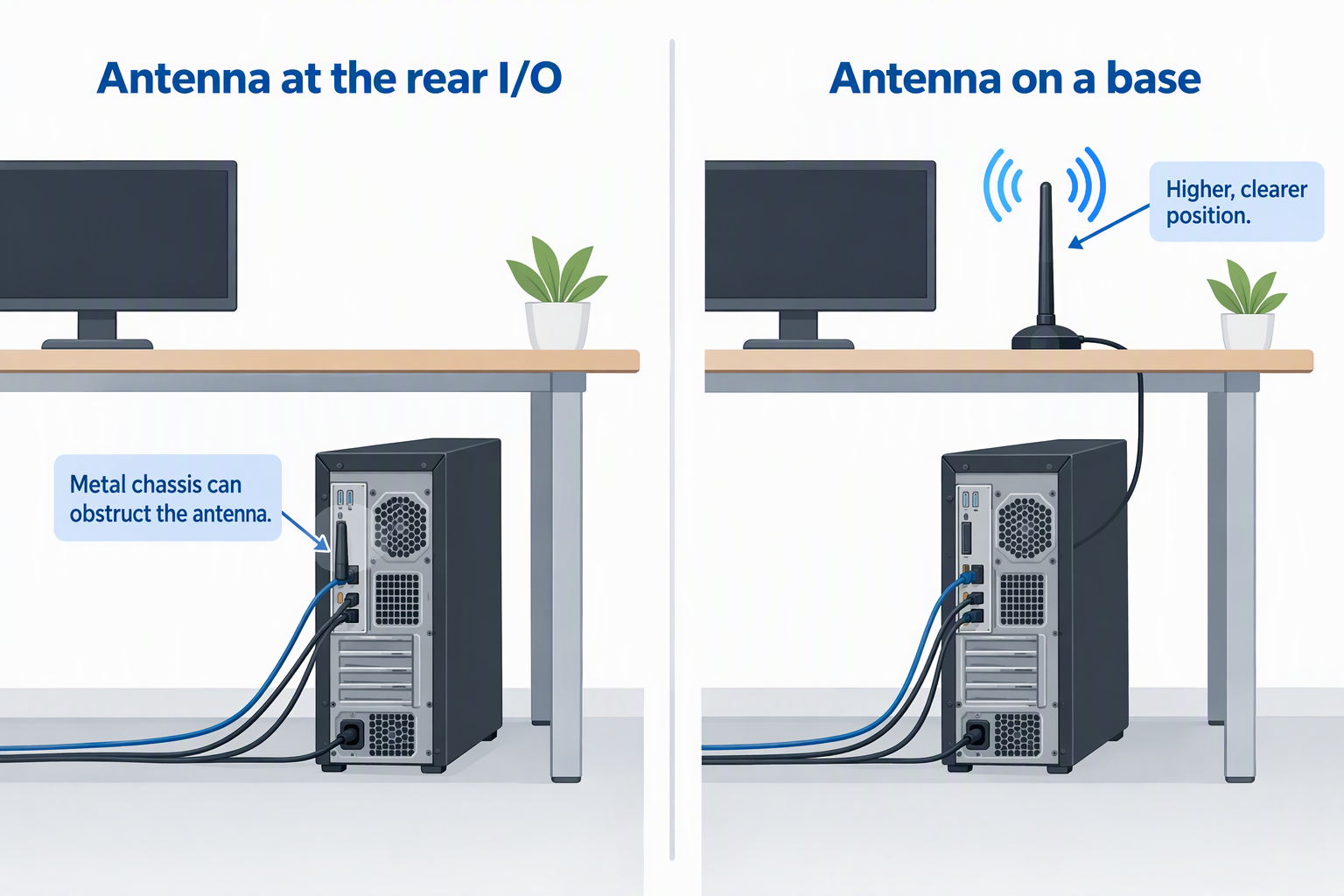
A desktop’s metal chassis can obstruct antennas mounted directly at the rear I/O area. Magnetic or freestanding bases on MSI, TBE553E, Ubit, and ASUS let the receiver move onto a desk or shelf. UGREEN specifies an adjustable dual 6 dBi antenna, while the other TP-Link cards list high-gain antennas without the same movable-base description.
Place antennas away from the chassis, large metal objects, and dense cable bundles, then compare signal and throughput. A higher, clearer position can outperform a technically faster card whose antenna is trapped under the desk. Magnetic bases need a stable surface and should not be placed where the cable will be pulled or crushed.
Verify case clearance and bracket format
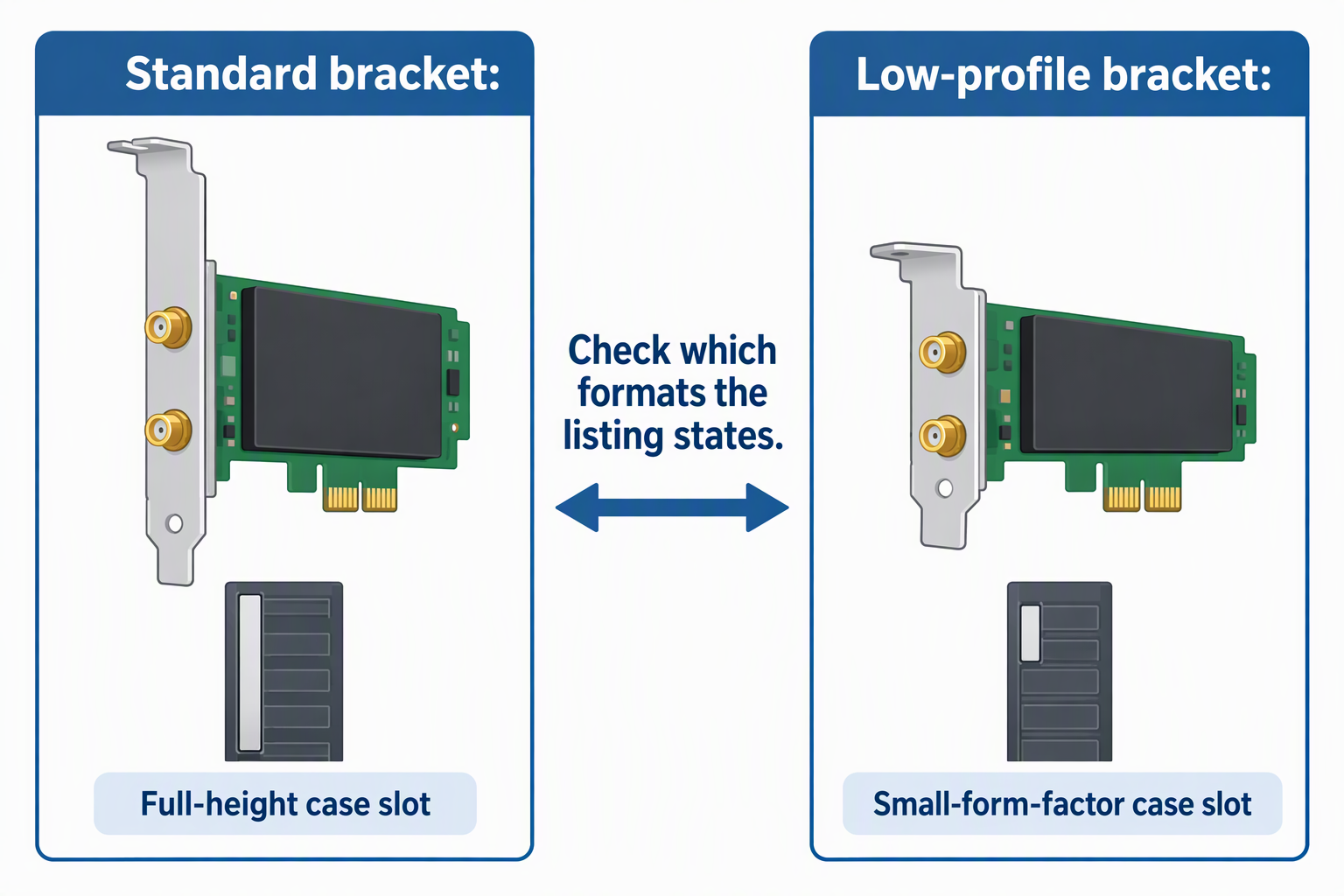
Small-form-factor workstations often require a low-profile bracket. The TBE552E, TBE400E, and TBE553E explicitly include standard and low-profile brackets, reducing physical-fit uncertainty. The listings for UGREEN, MSI, GIGABYTE, Ubit, and ASUS do not state both formats.
Also check that the selected PCIe slot is accessible and does not block GPU airflow or another expansion card. The antenna cable and any internal Bluetooth connection need routing space. Physical fit and internal connections should be confirmed before assuming a network card is a five-minute upgrade.
Plan Bluetooth installation separately from Wi-Fi
These cards list Bluetooth 5.3 or 5.4, but wireless LAN and Bluetooth may have different installation requirements. UGREEN specifically advises disabling existing Bluetooth before using its Bluetooth 5.4 function. Duplicate adapters can create confusing device entries and unpredictable peripheral pairing.
Before installation, identify how the card supplies Bluetooth and whether the workstation has the necessary connection available. The listings do not spell out every cable or header requirement, so verify the current package contents. Keep a wired keyboard or mouse available until Bluetooth pairing and drivers are confirmed.
Frequently Asked Questions
Will a Wi-Fi 7 PCIe card work with an older router?
Wi-Fi generations are generally designed for backward connectivity, but the listings only promise their headline Wi-Fi 7 functions when paired with a compatible router. Features such as 320 MHz channels, 4K-QAM, and MLO cannot be assumed on an older access point.
The card may connect using an older mode and band, but performance will reflect the common capabilities of both sides. Buy a Wi-Fi 7 card for future readiness or current router matching, not because the label alone will accelerate an older network.
Do the listed speeds equal internet download speed?
No. Figures such as 5,764 Mbps on 6 GHz are theoretical wireless link maximums under suitable conditions. Internet throughput can be limited by the service plan, modem, router ports, router processing, signal, protocol overhead, and remote server.
Local file transfers also depend on storage and the wired side of the network. Treat the rates as class and capability indicators, then test your own applications after installation. The combined tri-band number is not one simultaneous download-speed promise.
Is 6 GHz always better than 5 GHz?
No. The 6 GHz band can offer wider channels and less legacy congestion, including 320 MHz operation on compatible cards and routers. It can be attractive for a workstation near the access point with a clear radio path.
Higher-frequency coverage may be more sensitive to distance and obstacles. A well-positioned 5 GHz connection can outperform a weak 6 GHz link through walls. For this reason, movable antenna bases and MLO can count alongside the maximum 6 GHz specification.
Can an Intel-only card be used in an AMD desktop?
Not when the listing explicitly rules it out. The TBE553E says it is not compatible with AMD, and the ASUS PCE-BE92BT specifies Intel motherboards only. A physically compatible PCIe slot does not override those restrictions.
AMD builders can choose a card that explicitly lists both platforms, such as the TBE552E, TBE400E, or Ubit model in this guide. When the platform is unstated, confirm it before purchase rather than assuming.
Do I need Windows 11 for Wi-Fi 7?
Most options here explicitly require Windows 11, including the TBE552E, TBE400E, UGREEN, and Ubit. UGREEN excludes Windows 11 21H2 as well. Those restrictions make the exact OS build part of the hardware decision.
The TBE553E lists Windows 10 and 11 support but is limited to Intel systems. Other cards with unstated OS requirements need current driver verification. Linux support should never be inferred when the listing omits it or explicitly says otherwise.
Related Connectivity Guides
- USB-C port locks for shared laptop fleets
- DisplayPort cables for high-refresh monitors
- Laptop docking stations for desk setups
- Thunderbolt cables for workstation docks
- USB-C hubs for desktop connectivity
- Ethernet adapters for laptops
- Desktop rack stands for small audio interfaces
- Rack shelves for non-rack studio gear
Bottom Line
The TP-Link Archer TBE552E is the strongest general Windows 11 choice because it combines BE9300 rates, 320 MHz support, Bluetooth 5.4, both bracket sizes, and AMD or Intel compatibility. The MSI Herald is appealing when a magnetic antenna base leads the decision, while the Archer TBE553E fills the specific Windows 10 and Intel niche.