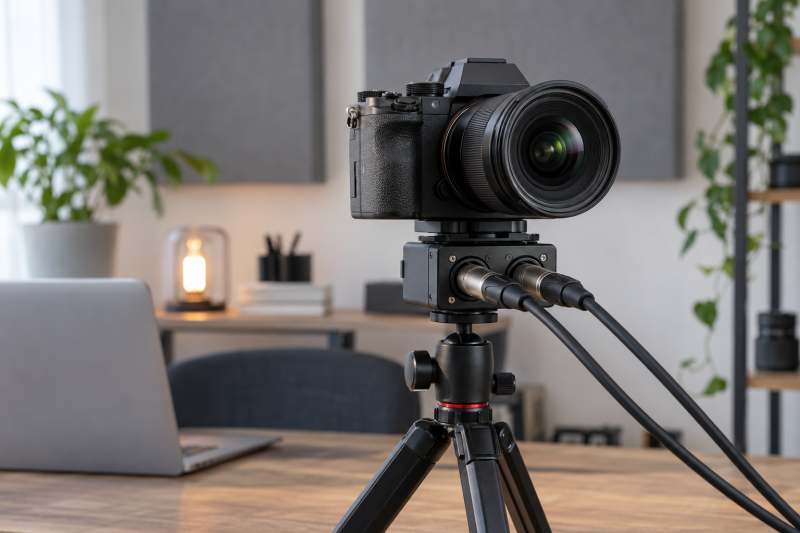
An XLR camera adapter lets professional microphones feed a compatible mirrorless camera while it records video. The camera connection is the first decision. Some adapters use a brand-specific digital shoe, while others mount beneath the camera and use its ordinary audio input.
The six adapters here separate camera-specific shoe kits from analog and passive two-channel options. Start with the exact camera body, then choose the input count, power arrangement, and physical mounting that suit the rest of the rig. Checking the camera first avoids finding out on a shoot day that a camera-specific connection does not fit.
An XLR socket alone does not establish camera compatibility. Confirm the camera body, shoe type, and audio input before selecting an adapter.XLR Camera Adapters Compared

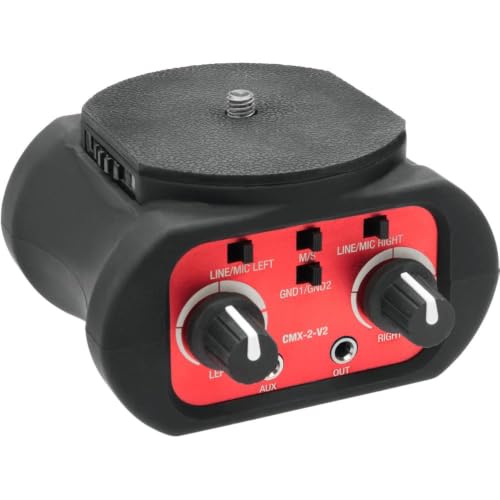

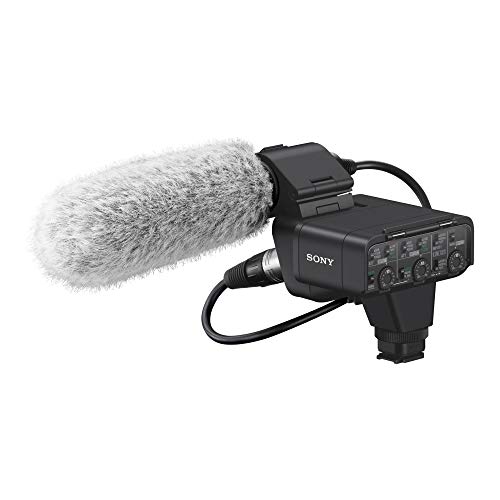

1. Tascam CA-XLR2d-C Canon Kit — Best for Canon or FUJIFILM Digital-Shoe Cameras
The Tascam CA-XLR2d-C is for a camera using the compatible Canon or FUJIFILM accessory shoe named on its listing. It has two XLR/TRS input terminals and sends digital audio through that shoe, so camera compatibility is the first decision rather than an added cable choice.
Tascam says a compatible camera body supplies power through the shoe. Its listing also names microphone and line-level switching plus 48V phantom-power compatibility, so the adapter suits a rig using professional microphones when the camera’s shoe supports this exact route.
Our Take Buy this Tascam kit when the camera is explicitly compatible with its Canon or FUJIFILM digital-shoe connection. Sony users should start with the XLR-K3M, while a conventional audio-input rig may favor Lectronify or VidPro.
- Two XLR/TRS terminals accept a pair of microphone or line-level sources on compatible cameras.
- Digital audio transfer through named Canon or FUJIFILM shoe systems keeps the camera connection direct.
- Camera-supplied power and listed 48V compatibility reduce separate power choices for compatible microphones.
- The digital-shoe path depends on the exact Canon or FUJIFILM camera compatibility named by Tascam.
- It is not the direct fit for Sony MI-shoe bodies or a generic passive camera setup.
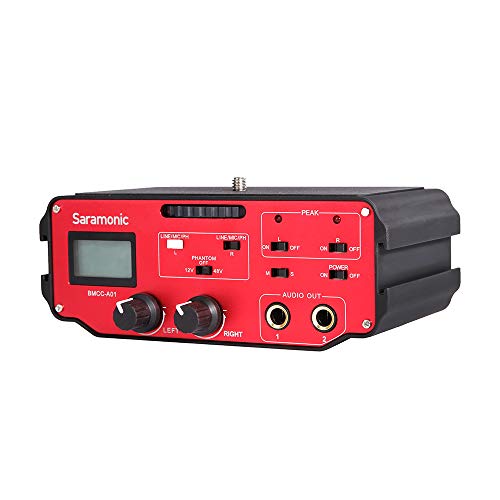
2. Saramonic BMCC-A01 — Best for Blackmagic Camera Audio
The Saramonic BMCC-A01 is the camera-specific option for a compatible Blackmagic Design setup that needs two XLR channels. Its listing names phantom-power controls and connections for microphones, wireless systems, digital recorders, external mixers, and sound boards.
The listing says audio can pass to the camera with or without a 9V battery, which gives the rig a stated power option. Exact camera compatibility remains the first check because the adapter is aimed at Blackmagic Design cameras and is not a universal digital-shoe solution.
Our Take Buy the BMCC-A01 for a compatible Blackmagic Design body that needs two-channel XLR audio and phantom-power controls. Tascam and Sony are better starting points for their separately named camera systems.
- Two XLR channels suit a camera rig using separate microphones or a microphone and mixer feed.
- Phantom-power controls are listed for compatible microphones and other professional audio sources.
- The listed 9V option gives the operator a stated power-plan choice for the rig.
- The Blackmagic Design focus makes exact camera-body compatibility essential before selecting this adapter.
- A 9V battery remains a separate rig consideration even with listed battery-free audio transfer.
3. Lectronify LEMX2V2 — Best Battery-Free Dual-Channel Recording
Lectronify is for a two-source camera rig where avoiding another battery is more useful than a proprietary shoe connection. Lectronify specifies that the LEMX2V2 has two balanced three-pin XLR inputs, microphone- or line-level support, and independent stepped trims for left and right channels.
Its listing provides mono mode to route one source to both channels and stereo mode to keep two sources separate. The passive design needs no battery or external power, while an integrated 1/4-20 post and threaded base keep the adapter inside a compatible tripod stack.
Our Take Buy Lectronify when two sources, independent trim, and a battery-free design fit the camera’s ordinary audio path. It is a practical alternative to a shoe kit when the body does not use the named Sony or Tascam systems.
- Two balanced XLR inputs accept microphone- or line-level sources for flexible dual-source camera recording.
- Independent stepped trims help balance the left and right channels from two connected sources.
- Mono and stereo modes let one source duplicate or two sources remain separate in camera.
- The passive design needs no battery or external power for a simpler mobile rig.
- A passive adapter does not replace a camera-specific digital-shoe route when the body requires one.
- The camera’s own input path must still suit the planned microphone or line-level source.
4. VidPro XM-AD2 — Best Independent Dual Trim Control
VidPro’s XM-AD2 is a two-channel adapter for a camera that accepts its mini audio connection and needs separate level adjustment. Its listing describes professional microphones, preamps, and mixers as sources, with dual trim controls for independently adjusting the two input channels.
VidPro also names high-quality transformers, plug-and-play operation, a built-in tripod screw, and an integrated 1/4-inch socket. The tripod screw and the socket make it useful when the adapter must mount cleanly within a supported camera and tripod rig.
Our Take Buy VidPro when the camera’s mini audio route and independent dual trims are the actual needs. Lectronify also gives two inputs and separate adjustment, while digital-shoe kits belong only to their named compatible camera systems.
- Dual trim controls adjust two input channels independently for a microphone-and-mixer or two-mic setup.
- The listing names microphones, preamps, and mixers as source types for the camera connection.
- Built-in tripod mounting and a 1/4-inch socket help place the adapter within a support rig.
- The XLR-to-mini route depends on the camera’s own audio input and its suitability for the source.
- It does not offer the digital shoe connection listed for the Tascam and Sony kits.
5. Sony XLR-K3M Kit — Best for Sony MI-Shoe Digital Audio
Sony’s XLR-K3M is the direct choice for a compatible Sony body using its Multi Interface shoe. The listing names digital audio support with the Alpha 7R IV through that shoe, two XLR/TRS connectors, and one 3.5mm stereo mini jack for microphone and line input.
Sony says the kit works without a separate power source or cable on compatible cameras. Not needing a separate power source or cable is useful for a compact on-camera rig, but the named MI-shoe and camera compatibility are the reasons to choose it rather than the general fact that it carries XLR connectors.
Our Take Buy the XLR-K3M when a compatible Sony MI-shoe camera is the center of the rig. Tascam’s CA-XLR2d-C is a different decision for separately named Canon or FUJIFILM digital-shoe systems.
- The Sony MI-shoe digital-audio path is explicitly named for compatible Sony camera bodies and connections.
- Two XLR/TRS connectors plus one 3.5mm input support several listed microphone or line-input arrangements.
- The listing says the kit works without separate power or cables on compatible camera bodies.
- The MI-shoe route is a Sony-specific compatibility requirement rather than a universal mirrorless-camera connection.
- The listing names Alpha 7R IV support, so other Sony bodies need their own compatibility check.
6. Tascam CA-XLR2d-AN Analog Kit — Best Analog Tascam Mirrorless Option
The CA-XLR2d-AN is the Tascam analog-kit alternative for a mirrorless camera rig whose connection calls for that version rather than the named digital Canon kit. The listing identifies an analog kit for XLR microphone expansion on mirrorless cameras, so the camera connection is the reason to consider it.
The CA-XLR2d-AN listing names fewer component details than the CA-XLR2d-C does, so a buyer should confirm the exact camera and connection before assuming the other Tascam kit’s shoe, power, inputs, or phantom-power details apply here.
Our Take Buy the CA-XLR2d-AN only when the camera’s required analog route matches this exact model. Do not pick it instead of the CA-XLR2d-C simply because their names are close.
- The listing identifies an analog route for XLR microphone expansion on a compatible mirrorless-camera rig.
- Its separate model identity avoids forcing a digital-shoe kit into a camera with another connection requirement.
- Tascam positions it as a mirrorless-camera adapter rather than a laptop or stand-alone interface accessory.
- The frozen listing details are limited, so the camera and analog connection need confirmation before purchase.
- Do not assume its inputs, power method, or phantom-power details match the CA-XLR2d-C digital kit.
Buying Guide: Choosing an XLR Adapter for a Mirrorless Camera
Start with the camera connection, not the XLR ports
Sony’s XLR-K3M uses the Sony Multi Interface shoe, while Tascam’s CA-XLR2d-C names compatible Canon and FUJIFILM accessory-shoe systems. Those digital routes depend on a particular camera connection, so an adapter with XLR ports is not automatically a fit for every mirrorless body.
Saramonic’s BMCC-A01 is directed at Blackmagic Design cameras, while Lectronify and VidPro use conventional camera audio paths. Check the exact camera body and its available shoe or input before choosing the adapter category. A camera-specific shoe kit belongs only to the camera system it names.
The two Tascam versions show why the model suffix has to be read. The CA-XLR2d-C listing names a digital Canon or FUJIFILM shoe route, while the CA-XLR2d-AN is identified as an analog kit. Choose the exact connection version before comparing the remaining features, because the wrong camera path cannot be fixed by an extra cable.
Decide whether two sources need separate control
Tascam, Saramonic, Lectronify, VidPro, and Sony each list two-input or two-channel arrangements. A second input helps when the camera has to record two microphones, or a microphone plus a wireless receiver or mixer feed. Two inputs help only when the recording plan actually has two sources to manage.
Lectronify provides mono and stereo modes, while its stepped trims balance left and right inputs. VidPro names dual trims for separately controlling two channels. Count the sources first, then choose whether they need independent levels or one source duplicated across both channels.
For a single presenter microphone, Lectronify’s listed mono mode can send that source to both channels. For an interview or a camera plus mixer arrangement, its stereo mode and VidPro’s dual trims keep the two input paths separate. The channel plan should follow the shoot, not the maximum number of connectors.
Match the adapter power plan to the microphone plan
The Tascam CA-XLR2d-C listing names power supplied by the camera and 48V phantom-power compatibility. Sony says its XLR-K3M works without a separate power source or cable on compatible cameras, while Lectronify’s passive design needs no battery or external power.
Saramonic describes phantom-power controls and audio transfer with or without a 9V battery. The power arrangements above differ by model. Match the chosen microphone and camera to the selected adapter’s own power details instead of borrowing a feature from another model.
The named 48V compatibility on Tascam, the phantom-power controls on Saramonic, and the battery-free design on Lectronify are three distinct ways to handle power. Keep the microphone’s power requirement beside the camera’s connection requirement when comparing them, so one useful feature is not mistaken for a fit.
Keep the adapter inside a stable camera stack
An XLR adapter adds cables and weight below or beside the camera, so mounting affects whether the video rig remains practical. Lectronify lists an integrated 1/4-20 post under the camera plus a threaded base, while VidPro lists a built-in tripod screw and an integrated 1/4-inch socket. Put the intended lens and cable direction into that plan, because the adapter’s position changes the balance of a compact camera body.
Keep the adapter mount, camera plate, and tripod screw path compatible before adding microphones and cables. If the microphone needs its own fixed desk position, our guide to desktop microphone boom arms covers the separate mounting choice.
Lectronify’s post under the camera and threaded base describe a direct stack from camera to tripod, while VidPro’s built-in screw and 1/4-inch socket provide another listed mounting arrangement. Plan the adapter under the camera before choosing cable lengths, because the physical stack controls where every XLR lead has to run.
Separate camera capture from laptop recording
XLR camera adapters feed a compatible camera while it records video. They are not USB interfaces for a laptop. Choose an XLR camera adapter for in-camera audio and a USB interface for computer audio, even when both products have XLR connectors and work with the same microphone.
For a desk-based show or stream, a USB-C audio interface for podcasting is the separate category that handles the computer connection. A workflow can include both products, but the camera adapter and laptop interface solve different connection paths.
Use the XLR adapter when the important file is the one recorded in the mirrorless camera, and use the computer interface when the important destination is the laptop. Keeping those destinations separate makes the product choice simpler, even if the same professional microphone appears in both setups.
Frequently Asked Questions
Will any XLR adapter work with any mirrorless camera?
No. Sony’s XLR-K3M names a Sony MI-shoe digital path and Alpha 7R IV support, while Tascam names Canon and FUJIFILM accessory-shoe compatibility for the CA-XLR2d-C. Saramonic directs the BMCC-A01 at Blackmagic Design cameras.
Lectronify and VidPro use camera audio paths instead of those named digital shoes. Check the exact body, available input, and the adapter’s stated route before purchasing. A shared XLR connector does not establish cross-brand compatibility.
Why use two XLR inputs on a camera?
Two inputs let a camera receive two separate sources, such as two microphones or a microphone plus a mixer or wireless receiver. Tascam, Saramonic, Lectronify, VidPro, and Sony all list a two-channel or two-input arrangement.
Lectronify gives a stated mono option for copying one source to both camera channels and a stereo option for keeping two sources separate. Decide whether the second source belongs in the plan before adding a larger adapter and more cables.
Do XLR camera adapters need their own battery?
Power depends on the adapter and compatible camera. Lectronify is passive and needs no battery or external power, Sony says the XLR-K3M can run without separate power on compatible cameras, and Tascam describes camera-supplied power for its compatible shoe kit.
Saramonic says the BMCC-A01 transfers audio with or without a 9V battery and includes phantom-power controls. Read the selected model’s power details for the actual camera and microphone combination rather than treating all adapters as the same.
Can I feed a mixer into a camera adapter?
Yes, some listings explicitly describe that use. Saramonic names external mixers and sound boards, VidPro names preamps and mixers, and Lectronify says its XLR inputs accept microphone- or line-level sources.
The adapter must still match the camera’s input path and source level. Keep the camera, adapter, and source arrangement within the connection details stated for the chosen product.
Is a camera XLR adapter the same as a USB interface?
No. A camera adapter feeds a compatible camera during video capture, while a USB interface connects audio equipment to a computer. The destination device and connection system distinguish the two products even when both carry XLR inputs.
A mirrorless video rig may need the camera adapter, and a laptop recording desk may need the USB-C interface. Use both only when the workflow records to both destinations.
Bottom Line
The correct XLR camera adapter starts with the camera. Sony MI-shoe bodies suit the XLR-K3M, compatible Blackmagic Design bodies suit Saramonic’s BMCC-A01, compatible Canon or FUJIFILM shoe systems suit Tascam’s CA-XLR2d-C, and conventional two-channel camera inputs can suit Lectronify or VidPro. Confirm the exact body, connection, source count, and mount before buying.