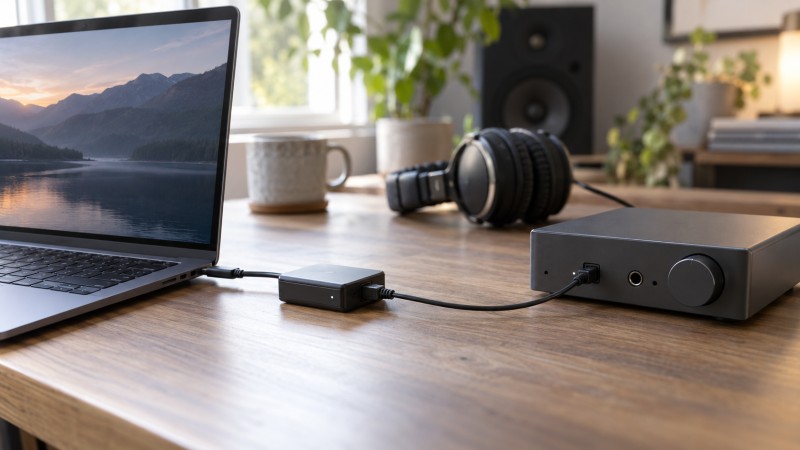
A laptop USB port and an optical audio port are not directly compatible. An adapter can connect them, but direction is the first buying decision. A USB-to-S/PDIF transmitter sends laptop playback to an optical or coaxial input, while an S/PDIF-to-USB receiver captures a digital source on the laptop. Most small adapters do only one of these jobs.
This guide compares six exact products with active New US listings, three for output and three for input. It covers the common USB-A and USB-C host plugs, TOSLINK optical versus coaxial digital connectors, and the limits of stereo capture. The listed rates and compatibility are maker or seller statements; we do not provide independent measurements of noise, latency, or bit-perfect transfer.
Before buying, trace the signal arrow from source to destination. A playback transmitter will not record an optical source, and an input receiver will not feed your soundbar.USB-to-S/PDIF Adapters Compared
| Image | Product | Details | Check Price |
|---|---|---|---|
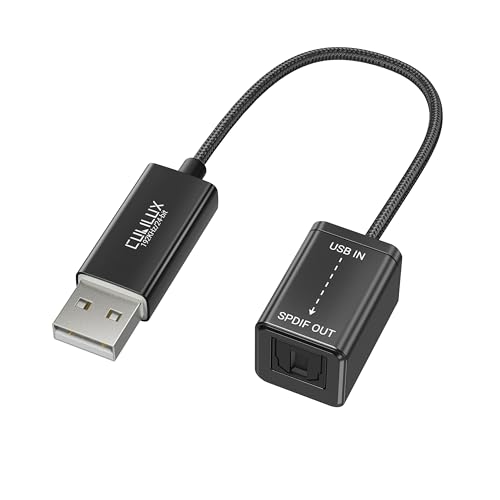 | Cubilux USB-A transmitter | Direction: USB-A laptop to optical output Digital connector: TOSLINK output Listed format: Up to 192 kHz/24-bit Best fit: Simple optical playback | Check Price on Amazon |
 | LiNKFOR USB converter | Direction: USB host to audio outputs Digital connectors: TOSLINK and coaxial outputs Other outputs: RCA L/R and 3.5 mm analog Listed format: Stereo PCM/LPCM 2.0 | Check Price on Amazon |
 | SMSL PO100 PRO | Direction: USB-C laptop to digital outputs Digital connectors: TOSLINK, coaxial, I2S outputs Analog output: None listed Best fit: Digital hi-fi chain | Check Price on Amazon |
 | Cubilux USB-C receiver | Direction: Optical source to USB-C input Digital connector: TOSLINK input Listed capture: Stereo 48 kHz/16-bit Best fit: USB-C laptop recording | Check Price on Amazon |
 | Cubilux USB-A receiver | Direction: Optical source to USB-A input Digital connector: TOSLINK input Listed capture: Stereo 48 kHz/16-bit Best fit: USB-A laptop recording | Check Price on Amazon |
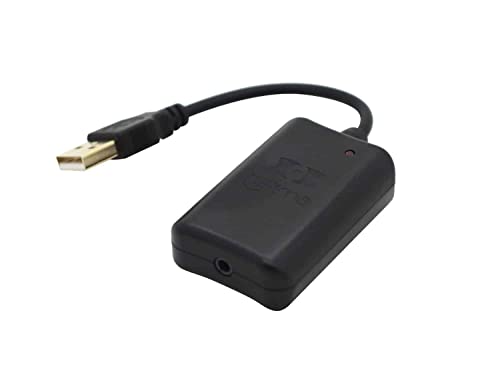 | Hifime UR23 | Direction: Optical source to USB input Digital connector: 3.5 mm mini-optical input Listed capture: 32–96 kHz, 16/24-bit Best fit: DAT and MiniDisc archiving | Check Price on Amazon |
1. Cubilux USB-A Transmitter — Best Simple Optical Output
The Cubilux adapter takes audio from a USB-A computer and provides a TOSLINK optical output for an external DAC, amplifier or soundbar with an optical input. The exact listing calls it a unidirectional transmitter and lists 48, 96 and 192 kHz at 24-bit. The maker’s product page repeats that it is output-only, so there is no optical recording input behind the same socket.
Choose it when the laptop has a free USB-A port and the receiving device already has TOSLINK. Check that the destination accepts the format you intend to send. A quoted sample-rate ceiling does not establish surround-format support on every system. The listing says Windows and macOS computers and specifically excludes using the adapter as a TV, Xbox or Switch audio output. A separate optical cable may be required for the distance to the receiving device.
USB-A goes into the laptop; the optical jack points out toward the DAC or soundbar.Our Take Buy this transmitter if your laptop needs one optical output and you want the least complicated pick. If the source instead has an optical output that you want to record, buy a receiver below.
- Clear USB-A-to-optical signal direction.
- Maker lists up to 192 kHz/24-bit output.
- No optical input or coaxial output.
- Listing excludes several non-computer USB hosts.
2. LiNKFOR USB Audio Converter — Best Mixed Output Connectors
LiNKFOR’s converter accepts USB audio from a computer and offers optical and coaxial digital outputs, plus stereo RCA and 3.5 mm analog outputs. The mixed outputs are useful when the destination’s input is not known until the equipment is in front of you, or when two desk setups use different connector types. The optical and coaxial jacks are digital. The RCA left/right pair and headphone jack are analog. A coaxial S/PDIF socket that looks like an RCA jack is not the same signal as either analog RCA channel.
The seller explicitly describes PCM/LPCM 2.0 use and says 5.1-channel playback is incompatible. Set the laptop or console output to stereo PCM rather than assuming a Dolby or DTS bitstream will work. It is an output device, not an optical or coaxial capture interface, despite the seller calling it a USB sound card. If you need a digital-only box and do not need analog jacks, the smaller SMSL below may fit the desk better.
Our Take Buy LiNKFOR if a laptop must feed several possible input types and stereo PCM is enough. Avoid it when you need surround bitstream support or digital capture.
- Optical, coaxial digital and analog outputs listed.
- Stereo PCM requirement is explicit.
- Useful when the destination connector varies.
- No digital input or recording route.
- Seller says 5.1-channel output is incompatible.
3. SMSL PO100 PRO — Best Digital Output Options
The PO100 PRO takes USB-C input and supplies TOSLINK optical, coaxial and I2S digital outputs. SMSL describes the device as a USB digital interface, not an analog-output DAC. The Amazon title includes the phrase “Digital to Analog Audio Converter,” yet the described physical outputs are digital. You still need a DAC, receiver or other component with a compatible digital input before ordinary analog speakers can play.
Its separate output choices make sense in a hi-fi or studio chain where the destination may accept optical or coaxial S/PDIF. The manufacturer listing also describes UAC and I2S mode switches. Do not take its 32-bit/768 kHz USB or I2S claim as the limit for the optical or coaxial port. The supported rate depends on the selected output and downstream equipment. I2S pinout compatibility is another device-specific check. For a plain optical-only laptop feed, the Cubilux USB-A transmitter is simpler.
Our Take Buy the PO100 PRO if a USB-C laptop feeds a digital-audio chain with different digital inputs. Skip it if you need analog line outputs or an optical recording input.
- USB-C host input with optical and coaxial outputs.
- Separate I2S option for compatible gear.
- No analog output or S/PDIF capture input.
- Mode and output-rate compatibility need checking.
4. Cubilux USB-C Receiver — Best USB-C Stereo Capture
The Cubilux USB-C receiver works in the opposite direction from the first product. It accepts a TOSLINK optical signal and presents that signal to a USB-C laptop as an audio input. Cubilux identifies it as a receiver for recording or monitoring, not as a playback transmitter. Its stated capture format is stereo, up to 48 kHz/16-bit. It does not support 5.1 or 7.1 surround capture.
Use it for a digital source that can output two-channel optical PCM. In the operating system or recording app, select the Cubilux as the input device, not the output device. Match the source format and rate to the adapter’s limits before recording. The listing mentions phones and tablets too, but this guide is about a USB-C laptop with an optical source. If you need more than 48 kHz/16-bit or have a USB-A-only host, compare the UR23 below.
Optical source into the dongle; USB-C into the laptop; select it as the recording input.Our Take Buy this receiver for straightforward stereo optical capture on a USB-C laptop. It is the wrong choice for sending laptop audio to an optical soundbar.
- Explicit optical-to-USB-C capture direction.
- Clear stereo 48 kHz/16-bit limit.
- No USB-to-optical playback.
- Cannot capture surround bitstreams.
5. Cubilux USB-A Receiver — Best USB-A Stereo Capture
If the laptop has USB-A rather than USB-C, Cubilux sells a separate optical-to-USB-A receiver. The listing calls it an S/PDIF input adapter and says it appears as a recording input, not a playback output. It lists stereo capture at 48 kHz/16-bit. The receiver moves audio in the opposite direction from the transmitter in the first section.
The seller’s copy is inconsistent in places, referring to a “USB C” receiver even though this listing’s title and model identify the USB-A version. Check the exact model and product photo, and verify the connector before ordering. The listing also says to set the source to 48 kHz if distorted and warns that surround input may produce noise. For an archive job where 96 kHz/24-bit is important, the Hifime is more explicitly specified.
Our Take Buy this receiver if a USB-A laptop needs simple optical capture. The uneven seller wording makes checking the exact connector and signal direction especially important.
- Optical capture for USB-A hosts.
- Stated stereo and sample-rate limits.
- Not for playback or surround capture.
- Listing mixes USB-A and USB-C wording.
6. Hifime UR23 — Best for DAT and MiniDisc Archives
Hifime designed the UR23 to receive an optical S/PDIF source and send its audio over USB to a computer for recording. The maker specifically names DAT and MiniDisc transfers. Unlike the Cubilux receivers above, Hifime specifies accepted rates from 32 through 96 kHz at 16 or 24 bits. It says the UR23 presents as a USB Audio Class 1 input device on Windows, macOS and Linux. The UR23 is still a capture interface, not a way to make a USB DAC play an optical source directly.
The UR23 has a 3.5 mm mini-optical input, not a full-size TOSLINK jack on its body. Hifime says a TOSLINK-to-mini-optical cable and adapter are included for standard optical sources. Check the recording deck’s actual output connector and rate, then select the UR23 as the computer’s input and make a short test capture before transferring a full tape. The maker notes a Raspberry Pi 5 compatibility issue, which does not change the recommendation for a laptop but applies if the setup later changes hosts.
The included optical adapter solves the connector-size difference; it does not turn an analog 3.5 mm output into optical audio.Our Take Buy the UR23 as the clearest fit for optical archive capture on a computer when the source rate may exceed 48 kHz. It is more specialized than a simple laptop playback transmitter.
- Maker documents 32–96 kHz, 16/24-bit input.
- Optical cable and TOSLINK adapter listed.
- Clear DAT and MiniDisc transfer use case.
- Input-only; will not feed a DAC from the laptop.
- Mini-optical body port needs the right cable or adapter.
Buying Guide
Match the signal direction before the connector
For laptop playback, the laptop is the source. Its USB port feeds a transmitter such as the Cubilux USB-A transmitter, LiNKFOR converter or SMSL PO100 PRO. The destination must have a matching optical or coaxial digital input. An adapter labeled “optical to USB” normally means the opposite path. Draw the arrow on paper if the listing title is ambiguous.
For recording, the optical source is first in the chain and a USB laptop is the destination. The Cubilux USB-C receiver, USB-A receiver and Hifime UR23 appear to the computer as inputs. A two-way switcher would need to explicitly document both transmit and receive modes. A USB-powered optical splitter is not a USB audio interface just because it has a USB power socket.
Distinguish optical, coaxial and analog RCA
TOSLINK optical carries digital audio as light through a cable. A coaxial S/PDIF connection also carries digital audio, usually through one connector that looks like an RCA jack. A pair of red and white RCA jacks carries left/right analog audio instead. LiNKFOR has both kinds, so matching by plug shape alone is not enough. Match the source’s output label to the destination’s input label and use the proper cable.
A 3.5 mm socket can also be ambiguous. Hifime’s UR23 uses a mini-optical 3.5 mm input, while LiNKFOR lists a 3.5 mm analog output. The two are not interchangeable. A passive plug adapter can change the physical connector size for an optical signal. It cannot convert analog voltage into a digital optical stream. If the device only has an analog headphone output, you need an appropriate analog-to-digital converter, not the receivers in this guide. For laptop listening through wired headphones instead, see our portable USB-C DAC guide.
Check channel format and sample rate
Many compact optical capture dongles accept two-channel PCM, not compressed 5.1 or 7.1 surround bitstreams. Cubilux states these receivers limit capture to stereo 48 kHz/16-bit. Set a source’s optical output to stereo PCM where available, and match its sampling rate to the input device. If the source is locked to a different format, choose an interface that explicitly supports it rather than relying on a generic “S/PDIF” label.
Hifime rates the UR23’s input at 96 kHz/24-bit, which can be useful for archival sources, but a higher number does not improve a 44.1 kHz/16-bit original. On the output side, do not assume a USB-interface headline rate applies to every digital jack. The PO100 PRO listing’s very high USB/I2S figure is not an optical/coaxial promise. Check the receiving DAC or recorder’s supported PCM rates too. For a full recording setup with mic preamps and monitoring, see our Thunderbolt 3 audio interface guide.
Frequently Asked Questions
Can one adapter both play optical audio and record it?
No, the six products here do not. Each has a defined signal direction. The first three send computer audio out, and the last three receive an optical signal for computer capture. Identical-looking TOSLINK ports can be input or output, and plugging a cable in the wrong direction will not create a signal.
Some other devices explicitly document transmit/receive switching, but check both operating modes, host compatibility and what rate each direction accepts before buying. If you want simultaneous playback and capture, check whether the device supports both at once rather than merely offering a mode switch.
Will optical S/PDIF carry 5.1 surround through these adapters?
Do not assume it. S/PDIF is a connection type, not a guarantee of codec support. LiNKFOR says its converter is for PCM/LPCM 2.0 and excludes 5.1. The Cubilux capture receivers explicitly exclude 5.1 and 7.1 input. A soundtrack encoded as a surround bitstream may need a different decoder or a compatible receiver before a laptop can record usable stereo audio.
Set the source to stereo PCM if that is the format the chosen product supports. Then play a short sample and confirm both left and right channels in the recording or output destination. Do not interpret a successful cable connection as proof that the source and adapter use the same format.
Does a USB-C or 3.5 mm plug tell me the audio direction?
No. USB-C and USB-A name the host connector, not whether the device is a transmitter or a receiver. Cubilux sells visually similar adapters for both directions. The listing must say optical input/receiver/capture or optical output/transmitter/playback. The exact product model is a better guide than a generic thumbnail.
Likewise, a 3.5 mm socket may be analog or mini-optical. The Hifime’s 3.5 mm socket is optical input. LiNKFOR’s 3.5 mm jack is analog output. Read the port label and device specification before connecting a source or ordering an adapter.
Bottom Line
For playback from a USB-A laptop to one optical input, choose Cubilux’s transmitter. LiNKFOR adds coaxial and analog outputs for varied destinations, while SMSL PO100 PRO serves a USB-C digital-output chain. To record from an optical source, use the Cubilux USB-C or USB-A receiver for stereo 48 kHz/16-bit capture, or Hifime UR23 when the source or archive needs its wider documented rate range.