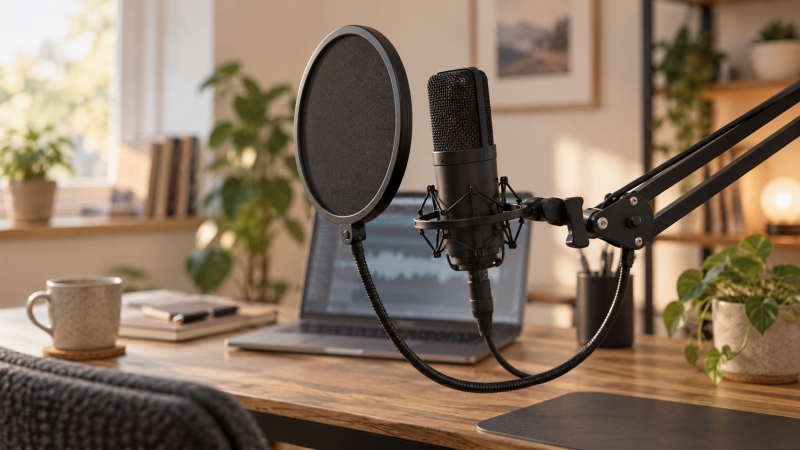
A close microphone makes speech more present, but bursts of air from a nearby mouth can strike its capsule. The result is a low, abrupt plosive on words beginning with “p” or “b.” A pop filter is a screen between speaker and mic that interrupts that direct airflow. It cannot rescue a badly clipped take, remove room echo, or cure every sharp “s” sound, despite broad seller claims.
These six active-New filters use fabric, metal or foam screens and clamp to a stand or boom. The buying decision is less about the word “professional” on a listing and more about screen placement, clamp fit and working space. A filter that droops into the mic or blocks your view of notes is no bargain. Confirm the stand diameter and where the gooseneck will sit before choosing a model.
Record the same phrase at your normal speaking distance, then repeat with the filter positioned between mouth and capsule. Keep gain and mic position fixed. The useful result is a smaller plosive without moving so far away that the room becomes louder than your voice.Pop Filters Compared
| Image | Product | Details | Check Price |
|---|---|---|---|
 | Aokeo Dual-Layer | Screen: Dual layer Neck: Flexible metal Clamp: Rotating tubular grip Best fit: Adjustable stand setup | Check Price on Amazon |
 | NEEWER Dual-Layer | Screen: Dual layer Neck: Flexible metal Clamp: Rotating tubular grip Best fit: Simple separate screen | Check Price on Amazon |
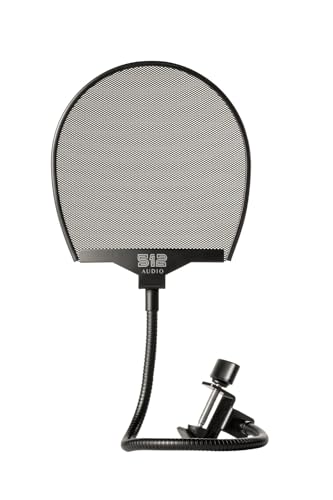 | 512 Audio 512-POP | Screen: Metal mesh Neck: Flexible Clamp: Swivel C-clamp Best fit: Metal-screen choice | Check Price on Amazon |
 | Rockville RockPop | Screen: Double screen Neck: 14 in Clamp: Up to 1.6 in Best fit: Longer reach | Check Price on Amazon |
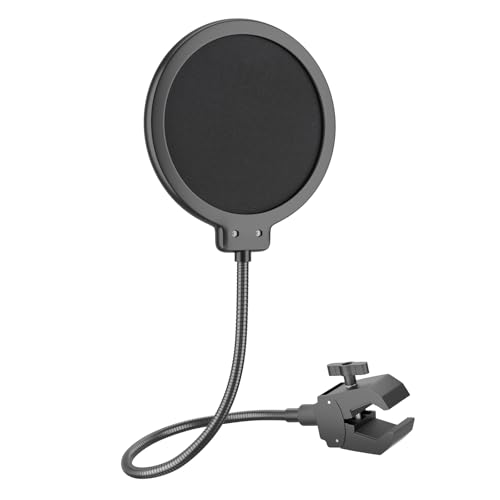 | LINCO PF1501 | Screen: Dual mesh Neck: 360° flexible Clamp: 0.55–1.77 in V-clamp Best fit: Known stand diameter | Check Price on Amazon |
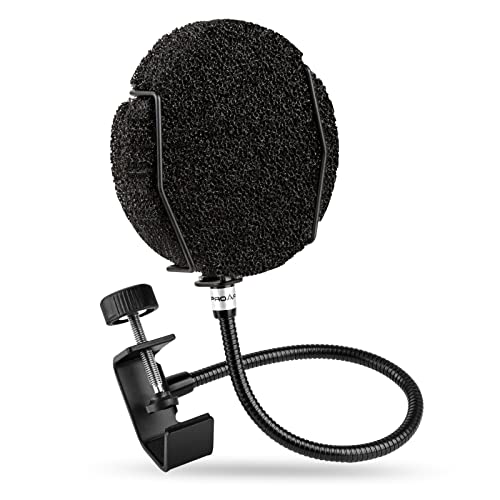 | PROAR Multi-Layer | Screen: Foam-containing Neck: Flexible metal Clamp: Up to 1.96 in Best fit: Alternate screen material | Check Price on Amazon |
1. Aokeo Dual-Layer — Best Flexible Clamp
Aokeo’s listing describes two screen layers separated by a gap, a flexible metal gooseneck and an adjustable rotating clamp. The clamp is meant to grip tubular boom arms or microphone stands, and a scratch-resistant gripper is described. That combination gives you a way to place the screen in front of the capsule while keeping the mouth a comfortable distance away, especially when the arm enters the frame from the side.
The same listing claims the filter can banish hissing and lisping. A screen placed in the airflow can help with plosives, but it does not establish a cure for vocal sibilance or microphone voicing. Check the clamp against your stand’s shape and make sure the gooseneck holds position after an adjustment. The seller’s broad compatibility wording should not be read as a guarantee for every boom or desk edge.
Our Take Pick this if you need an adjustable neck and a clamp for tubular stands. Buy for controllable placement, not for a promised fix to every vocal sound.
- Two-layer screen described.
- Flexible metal gooseneck.
- Rotating clamp with protective gripper.
- No exact stand-diameter range in returned bullets.
- Sibilance-cure claim is unsupported.
2. NEEWER Dual-Layer — Best Simple Screen
NEEWER’s screen uses a dual-layer layout with a gap between the layers. Its metal gooseneck is described as adjustable, and the rotating clamp is intended for tubular mic stands or booms. A separate screen is the conventional format. Unlike a foam sleeve that wraps a mic, it lets you set a clear gap in front of the capsule and move the filter without putting pressure on the microphone body.
The listing explicitly says the microphone is not included, even though promotional images may show one in use. It does not provide a clamp-diameter limit, so verify that the screw can grip your arm before ordering. Like Aokeo, the seller also makes sweeping claims about hissing and lisping. Treat those as marketing, not evidence that the filter alters sibilance in a controlled test.
Our Take Choose NEEWER if a standard two-layer screen is all you need and you can confirm the clamp fit. Its value depends on placement stability, not a broad sound-quality promise.
- Conventional two-layer filter.
- Adjustable metal gooseneck.
- Rotating stand clamp described.
- Clamp size not quantified in returned bullets.
- Microphone not included.
3. 512 Audio 512-POP — Best Metal Mesh
The 512-POP uses a metal-mesh filter rather than the fabric-style dual screens of several other choices. Its listing names a flexible gooseneck and an adjustable swivel C-clamp for a mic stand, boom or desk stand. A metal screen may suit a setup where you prefer that physical construction and a clamp you can reposition between sessions. The listing does not provide comparative measurements of plosive reduction.
The seller says the mesh disperses plosives better than ordinary nylon and advertises clean sound for podcasts and voice-over work. Both statements are seller assertions, not a head-to-head recording made at your mic. Put the screen where it intercepts the breath stream without touching the capsule, then listen for whether the filter introduces any unwanted change to your voice. If the arm is crowded, check that the swivel joint has room to tighten.
Our Take Pick this if you prefer a metal-mesh screen on a swivel C-clamp. Do not assume a measured performance lead over fabric.
- Metal mesh rather than fabric.
- Flexible gooseneck.
- Adjustable swivel C-clamp listed.
- No independent fabric-versus-metal comparison.
- Clamp dimensions not stated in returned bullets.
4. Rockville RockPop — Best Long Gooseneck
Rockville lists a 14-inch adjustable metal gooseneck, two screens and a clamp for stands or booms up to 1.6 inches. Those two dimensions make it easier to plan placement on a desk where the mic is not directly above the nearest clamp point. You can clamp farther down an arm and still bring the screen across the speaking path, provided the neck holds its position under its own weight.
The listing describes metal screens and quick installation, but a long flexible neck can be harder to keep stable if it is fully extended sideways. Try a shorter, supported bend first and keep it out of the keyboard and monitor sightline. Rockville calls the screen a noise-reduction tool, yet a pop filter is primarily an airflow barrier and cannot block a room fan or keyboard sound traveling through air.
Our Take Pick this if you need a 14-inch neck to reach a microphone that a shorter clamp cannot. Verify the 1.6-inch clamp limit and test whether the extended neck stays put.
- 14-inch neck listed.
- Clamp limit up to 1.6 inches stated.
- Two-screen construction described.
- Long reach still needs stable positioning.
- Does not remove airborne room noise.
5. LINCO PF1501 — Best Wide Clamp Range
LINCO’s PF1501 stands out for a stated 0.55-to-1.77-inch clamp range on a V-shaped grip. The range gives a more explicit fit boundary than the listings that simply say “most stands.” The features describe dual-layer mesh, a 360-degree flexible gooseneck and tool-free attachment. The title mentions Blue Yeti, but the clamp fits a support, not the microphone body, and it can be useful with other mics if the stand geometry works.
Check whether the V-clamp has a flat, stable contact on your arm or stand within that diameter span. An arm with a very thin rectangular strut may not behave like a round tube of the same width. The seller describes a firm hold and plosive reduction, but neither has been measured on your setup. Keep the filter centered in the mouth-to-mic path and leave the screen clear of the microphone grille.
Our Take Start with LINCO when stand diameter is the uncertainty. Its listed clamp span makes fit easier to screen, though arm shape and placement still affect fit.
- 0.55-to-1.77-inch clamp span listed.
- V-shaped clamp design.
- Dual-layer mesh and flexible neck.
- Stand shape can affect clamp grip.
- Blue Yeti wording is not an exclusive fit rule.
6. PROAR Multi-Layer — Best Foam-Layer Option
PROAR describes a thick filter-sponge layer in its multi-layer pop screen, a flexible carbon-steel gooseneck and an adjustable clamp. Its features say the clamp fits surfaces up to 1.96 inches. Unlike a plain two-screen mesh design, the foam construction is a distinct physical choice if you want to compare how different screens affect your own close-mic voice. There is no independent frequency or airflow test in the listing data.
The seller names several microphone brands and makes strong claims about immediately cleaner sound. The filter mounts to a boom or stand, so the clamp fit and position count for more than the microphone brand alone. Confirm the clamp contacts your actual support securely and that the screen leaves a clear view of notes or a camera lens. If the filter presses against the mic, move the neck instead of bending the microphone mount.
Our Take Pick this if you want a foam-containing screen with a stated clamp maximum. Choose it for screen construction and placement fit, not for an unmeasured promise of instant audio improvement.
- Foam layer distinguishes its screen.
- Clamp maximum of 1.96 inches listed.
- Flexible gooseneck described.
- No measured comparison with mesh alternatives.
- Broad microphone-brand claims do not prove clamp fit.
Buying Guide: Put the Screen in the Airflow
Place the filter without losing close-mic balance
The main job is to intercept breath bursts before they reach the capsule. Set the microphone at a comfortable speaking distance first, then place the filter between the mouth and grille. If the screen forces you to lean far back, you may gain less from the filter because the voice-to-room balance changes. Keep the mic’s gain and angle consistent when comparing test phrases.
Try speaking slightly across the microphone rather than directly into it. Off-axis placement can reduce the force of plosive air at the capsule even before adding a filter. A screen is still useful when the recording position varies during narration. A filter does not replace a good mic position, and an exaggerated distance can make laptop fans and room reflections more obvious.
Choose a clamp for the support you actually own
Measure the boom or stand diameter at the clamp point, not the microphone body. Rockville gives a 1.6-inch upper limit, LINCO lists 0.55–1.77 inches, and PROAR states up to 1.96 inches. The other three listings describe adjustable clamps without numeric spans. A narrow, flat arm may still need a different contact geometry from a round stand tube.
The gooseneck should carry its own filter weight without sagging onto the mic. If the arm already drifts under the microphone, see our desktop boom-arm guide before adding more mass near its end. For desk thumps transmitted through the arm, a shock mount tackles a different path, and a pop screen alone cannot isolate mechanical vibration.
Compare screen materials without accepting performance promises
Fabric-style dual layers, metal mesh and foam-containing screens create different physical barriers to airflow. The product data describes their construction but does not supply a controlled comparison of plosive reduction, voice tone or cleaning effort. A metal screen is not automatically superior to nylon, and a thicker foam layer is not automatically more transparent to sound. Pick a format you can position and maintain.
After setting a filter, record a fixed phrase with several p and b sounds at normal speaking level. Keep the take with lower low-frequency bursts if your voice remains natural. If the problem is sharp “s” sounds rather than air blasts, mic angle, distance and processing may be more relevant. Do not mistake a seller’s claim to banish lisping for evidence that a screen changes speech articulation.
Frequently Asked Questions
Is a pop filter the same as a microphone windscreen?
No. A typical pop filter is a separate screen between a speaker’s mouth and the mic. A foam windscreen usually fits over the microphone capsule. Both can interrupt moving air, but their mounting and effect on the recording position differ. These six products are separate clamp-on screens, even when a listing calls one a wind screen.
If a camera or desk arrangement has no place to clamp a separate screen, check the mic maker’s compatible windscreen instead. Do not assume a large pop-filter clamp will fit a tiny travel mic. Keep any chosen screen from touching the grille or pulling on a shock-mounted microphone.
Will a pop filter remove sibilance or background noise?
No reliable claim of that kind follows from these listings. A filter is aimed at plosive airflow. Sibilance is a different sharpness in the voice and mic response, while a fan or room echo reaches the capsule by other paths. Two sellers make broad claims about “s” sounds, but no controlled recordings or measurements were provided here.
Record a short sample and identify the defect before buying. A low thump on “p” may justify a filter. If the noise is constant or appears between words, work on microphone position, room sound and the source of the noise first. A filter cannot turn a loud desk into a quiet recording room.
Does the microphone brand determine which filter I need?
Usually the support and clamp geometry are more important. LINCO’s title mentions Blue Yeti, but the screen clamps to a stand or arm rather than enclosing a Blue microphone. Aokeo and PROAR also name popular microphones while their clamps attach to the support. Confirm the exact arm or stand shape instead of treating a brand mention as an exclusive compatibility list.
Also check the available space between mouth, filter and capsule. A large screen may block a laptop display, notes or camera when a microphone is close. Choose a placement that lets you speak consistently without brushing the gooseneck or bumping the stand.
Source boundary: Product identities, screen types, clamp descriptions and stated dimensions come from the six exact Amazon US listings checked for active New offers on 2026-10-01. We did not test sound, fit, cleaning or durability. Seller claims about eliminating sibilance or all noise are not treated as proven. The featured image is illustrative, not a listed model.