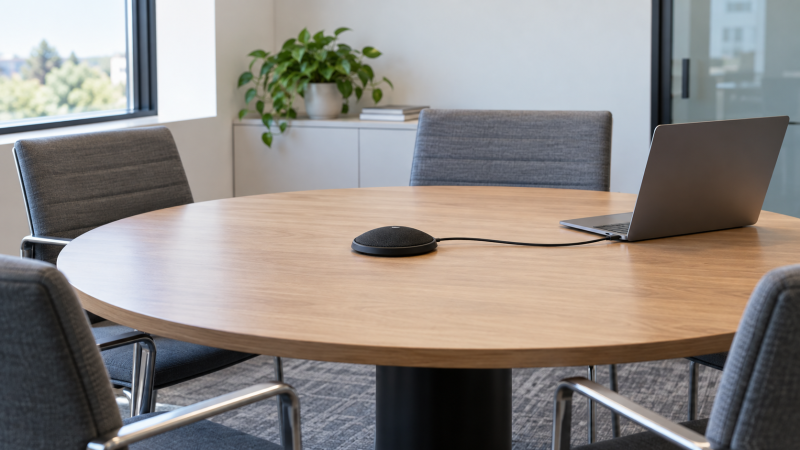
If several people speak around one laptop, a built-in microphone at one end of the room may make the far side hard to hear. A USB boundary microphone sits low on the table and sends its audio to the computer without an external audio interface. The flat shape keeps faces visible in a video call, but it does not guarantee that every seat sounds equally close or that room echo disappears.
These six New-offer picks are microphones, not speakerphones. They capture the room, and the laptop, headphones or another output still plays the remote participants. Their listings differ on USB connector, cable length, mute control, monitoring and claimed pickup reach. The reach figures are seller claims, not measured intelligibility limits for a particular conference room.
Place the mic near the center of the actual speakers, choose it as the meeting app’s input, and make a test call from the farthest chair. If the room is loud or people need private listening, a headset may still be the better tool.USB Boundary Microphones Compared
| Image | Product | Details | Check Price |
|---|---|---|---|
 | Audio-Technica ATR4697-USB | Pattern: Omni / 360° listed Cable: 4.9 ft USB-C Control: App mute Best fit: USB-C small table | Check Price on Amazon |
 | Movo MC1000 | Pattern: 180° arc listed Cable: 6.5 ft USB Control: Headphone monitor Best fit: Check audio live | Check Price on Amazon |
 | TONOR G11 | Pattern: Omni / 360° listed Cable: 6 ft USB Control: Mute button + LED Best fit: Reachable table mute | Check Price on Amazon |
 | Samson UB1 | Pattern: Omni / 360° listed Cable: 10 ft USB Control: App mute Best fit: Laptop farther from center | Check Price on Amazon |
 | CMTECK Conference Mic | Pattern: Omni / 360° listed Cable: 6 ft USB Control: Mute button + LEDs Best fit: Visible mute status | Check Price on Amazon |
 | Adesso Xtream M3 | Pattern: Omni / 360° listed Cable: 6.5 ft USB Control: App mute Best fit: Separate tabletop option | Check Price on Amazon |
1. Audio-Technica ATR4697-USB — Best USB-C Boundary Layout
Audio-Technica’s ATR4697-USB is expressly described as an omnidirectional condenser boundary mic for meetings and teleconferencing. It has a 1.5 m (4.9 ft) cable ending in USB-C and includes a USB-C-to-USB-A adapter, so it can connect to either common laptop port shape without a separate audio interface. The seller lists 360-degree pickup and compatibility with computers and some other devices. Both are connection and pattern claims, not a promise that people across a large room will be equally clear.
The short cable is the practical limit. A laptop on the edge of a wide table may not reach a central mic position without a cable route, and the returned bullets do not state a mute button or headphone jack. Plan to mute in the meeting application if you need a physical control. The listing’s language about rugged construction is not a measured durability result, but the low-profile format avoids blocking a webcam’s view of people seated across the table.
Our Take Buy the ATR4697-USB if you want a simple flat USB-C mic with an included USB-A adapter for a small table. Measure the distance from the laptop to the table center before treating the 4.9-foot cable as enough.
- USB-C with USB-A adapter included.
- Flat boundary form is explicit.
- 360-degree pattern listed.
- 4.9-foot cable may limit center placement.
- No physical mute or monitoring jack stated.
- Room coverage was not measured.
2. Movo MC1000 — Best Live Headphone Monitoring
Movo’s MC1000 offers a built-in headphone jack for live mic monitoring, which helps before a meeting starts. Its listing also names a 6.5-foot USB cable and standard USB-microphone behavior on Windows and Mac. The seller claims pickup up to 20 feet across a 180-degree arc. The arc is a different coverage description from a 360-degree omnidirectional claim, even though the listing also suggests a central table position. Do not assume the far side of a round table is covered identically.
The monitoring jack is useful for checking whether chairs, laptop fans or a room vent dominate the audio. It is not a substitute for testing the remote participants’ playback path or for preventing echo from loud speakers. The seller lists compatibility with common meeting apps, but selecting the MC1000 as an input in the actual app is still necessary. For a long table, move the mic and run a test from the farthest chair rather than buying from the 20-foot figure alone.
Our Take Buy the MC1000 if a local monitoring jack would make setup easier. Treat the stated 180-degree arc and 20-foot reach as limits to test, not guaranteed room coverage.
- Live headphone monitoring jack.
- 6.5-foot USB cable listed.
- Standard USB mic behavior claimed.
- 180-degree claim may not fit every seating layout.
- No speakerphone playback built in.
- 20-foot pickup is seller-stated, not measured.
3. TONOR G11 — Best Mute Button at the Table
TONOR explicitly says the G11 is a microphone, not a speaker or speakerphone. It lists omnidirectional pickup with an 11.5-foot reach claim, a metal body, non-slip base and a 1.8 m (about six-foot) USB cable. The cable length makes a center placement plausible for a small meeting. The included cable length may count for more than the reach claim if the laptop sits away from the table center.
A physical mute button and indicator light are the standout controls. The seller says the light helps show working state, but verify in the meeting app that the computer has actually muted the intended mic. The listing describes noise and interference reduction from its cable and design, but neither is proof that a reflective room will have no echo. If the computer does not react on connection, TONOR directs users to select it as the input device in system settings.
Our Take Buy the G11 if someone at the table needs a visible, reachable mute control. Verify both the hardware indication and the app’s selected input during a test call.
- Physical mute button and status light.
- Six-foot cable and non-slip base.
- Seller clearly states mic-only role.
- No playback speaker.
- 11.5-foot reach is unverified.
- Room echo can remain.
4. Samson UB1 — Best Long USB Cable
Samson describes the UB1 as a low-profile USB boundary mic with an omnidirectional 360-degree pattern. Its listing includes a ten-foot USB cable, the longest clearly stated lead in this comparison. The long cable can let the mic reach the center of a larger table while a laptop remains at one end. The seller says no driver is needed on Mac or PC and names common recording and meeting applications, but you still need to select the UB1 as the input in the app.
The returned bullets state 16-bit audio at 44.1 or 48 kHz. The audio format is a recording specification, not a measured ranking of voice clarity against the other models. More important is whether a distant participant can be understood over HVAC noise or a reverberant wall. The listing does not name a mute button or headphone monitoring jack, so plan around app controls and do a short test from the farthest seat in the actual meeting room.
Our Take Buy the UB1 if cable reach to the table center decides your choice. The ten-foot lead is a more direct fix for placement than a larger, untested pickup radius figure.
- Ten-foot USB cable listed.
- Flat boundary form and 360-degree pattern.
- 16-bit 44.1/48 kHz format stated.
- No hardware mute stated.
- No local monitoring jack stated.
- Long cable does not remove room echo.
5. CMTECK Conference Mic — Best Clear Mute Status
CMTECK’s listing describes a compact USB desktop microphone for Windows and macOS with a 1.8 m (six-foot) cable. It claims a 360-degree pickup radius of about three meters or ten feet, and it explicitly warns that the product is a microphone, not a speakerphone. The warning helps avoid a common purchase mistake, because the mic will send your room audio to the call, but it will not play the remote room through itself.
It also lists a mute button and separate LED states for connection, working mode and mute. A visible red mute indicator can be useful when several people share a table, though the app’s mute state should still be checked. CMTECK says the mic uses noise-cancellation technology, but a seller claim cannot promise silence from typing, side conversations or a hard-walled room. The listing excludes Raspberry Pi and Android use, so keep its intended route to a laptop or desktop.
Our Take Buy CMTECK for a small table where the mute state needs to be plainly visible. It is still a mic-only device, and its claimed ten-foot pickup should be checked from the least favorable seat.
- Mute button with status LEDs.
- Six-foot cable listed.
- Mic-only role clearly stated.
- No speakerphone playback.
- Android/Raspberry Pi excluded.
- Noise suppression claim is unmeasured.
6. Adesso Xtream M3 — Best Separate Tabletop Alternative
Adesso’s Xtream M3 is another omnidirectional tabletop USB mic, and it is a distinct active-New model rather than a color variation of another pick. Its listing states a 6.5-foot USB cable, no driver or battery requirement and Windows/Mac computer use. The low-profile placement suits a meeting table where a tall upright mic would block sightlines. The seller also markets it for interviews and dictation, but interviews and dictation are extra uses, not proof of group-call quality.
The returned bullets name 24-bit/192 kHz capability, 80 Hz to 20 kHz frequency range and an up-to-125 dB SPL figure. The figures are seller specifications, not a reason to assume this mic will make far-away speech clearer than another one. A table mic also hears the room, so placement, soft furnishings, air-conditioning and the remote audio playback level affect the result. The listing does not establish a physical mute or speaker, so use app controls and a separate output.
Our Take Buy the Xtream M3 as a flat tabletop alternative if its cable and USB layout fit. Its large audio-format numbers do not replace a call test from the far seat.
- Distinct low-profile tabletop option.
- 6.5-foot cable listed.
- No separate driver or battery listed.
- 24-bit/192 kHz claim does not establish speech quality.
- No physical mute stated.
- Needs a separate playback route.
Buying Guide: Fit the Mic to the Table, Not the Headline Radius
Put the microphone where the people actually speak
Cable length determines placement. Audio-Technica lists 4.9 feet, Movo and Adesso 6.5 feet, TONOR and CMTECK about six feet, and Samson ten feet. Measure the route from laptop to a stable center position, allowing slack that will not pull the mic off the table. A USB-C plug or adapter is a connector choice, not proof that the cable can reach the people who will be speaking.
The pickup angle deserves a test. Most of these listings say omnidirectional or 360 degrees, while Movo describes a 180-degree arc and a 20-foot range. Movo’s wording does not promise equal sound from every chair around a round table. Run a short call or local recording with each seat occupied. If the far seat is weak, change placement or use more than one properly managed microphone rather than chasing a larger distance printed on the box.
Decide how the room will hear the remote side
These products do not replace a speakerphone. TONOR and CMTECK expressly say they are mic-only, and the other listings are microphone products too. The laptop, headphones or a separate playback device must provide the incoming audio. Loud speakers near an omnidirectional tabletop mic can contribute to echo. Meeting software may suppress some of it, but suppression is not guaranteed. For a single person at a noisy desk, a USB-C headset may make more sense than a table mic.
Mute state needs one owner. TONOR and CMTECK list hardware mute buttons, while the meeting app has its own mute control. At the start of a call, confirm which control silences the actual selected USB mic, then agree who uses it. An LED is helpful, but it is not proof that the right app or input device is selected. If the mic disappears from a laptop’s input menu after connecting a dock, our USB-C microphone troubleshooting guide covers a related host-side diagnosis, though its monitor-specific steps may not all apply.
Separate listed audio formats from meeting intelligibility
Sample rate and bit depth are not a room test. Samson lists 16-bit 44.1/48 kHz and Adesso lists 24-bit/192 kHz. Neither number shows how people sound from across a reverberant table. A reasonably placed mic at a standard call format can be more useful than one with a larger file format. Use a recording from your actual meeting application as the comparison, because it may process or compress audio differently from a local recorder.
Choose controls that reduce mistakes. A clear mute light helps when the room has private side conversations. Movo’s monitoring jack helps check the source before the call. A longer cable makes a central position feasible. No single feature fixes the whole room. Test the far chair, the laptop fan and the incoming speaker level, then keep a repeatable placement for future meetings.
Frequently Asked Questions
Will a USB boundary microphone also play the call audio?
Not these mic-only products. A USB boundary mic is an input device, not a conference speakerphone. TONOR and CMTECK make that limit explicit. Choose the laptop speakers, headphones or another output for hearing the remote people. The meeting app may list input and output separately, so check both menus.
If the speakers are loud and close to the table mic, remote participants may hear echo. Try a lower playback level or headphones, then ask someone at the far end to confirm the result. The microphone’s advertised pickup pattern does not solve feedback by itself.
Is a 20-foot pickup claim enough for a large conference room?
No. Distance figures are seller claims, and Movo’s listing pairs its 20-foot figure with a 180-degree arc. Room echo, vents, chair position and speaking volume affect intelligibility. A person technically detectable at 20 feet may still sound thin or distant in the actual call.
Use the farthest chair as the acceptance test. Record a normal speaking voice in the intended app and play it back. If it is not clear, move the mic or consider a meeting system designed for multiple pickup points rather than assuming one small USB disc covers the room.
Does a physical mute button override the meeting app?
The listings say TONOR and CMTECK have mute buttons, but the exact relationship between the hardware mute and each meeting app was not independently tested. The app may also have its own mute state. Before discussing anything private, verify that the selected input becomes silent in a test call or recording.
For a shared meeting room, decide whether the person nearest the mic or the laptop operator manages muting. Agreeing on an owner avoids one person trusting an LED while another app or microphone remains active.
Bottom Line
Audio-Technica ATR4697-USB is a simple USB-C choice with an A adapter. Movo MC1000 adds live monitoring, TONOR G11 and CMTECK emphasize mute controls, and Samson UB1 offers the longest stated cable. Pick by placement and meeting controls, then test the farthest chair in the meeting app.