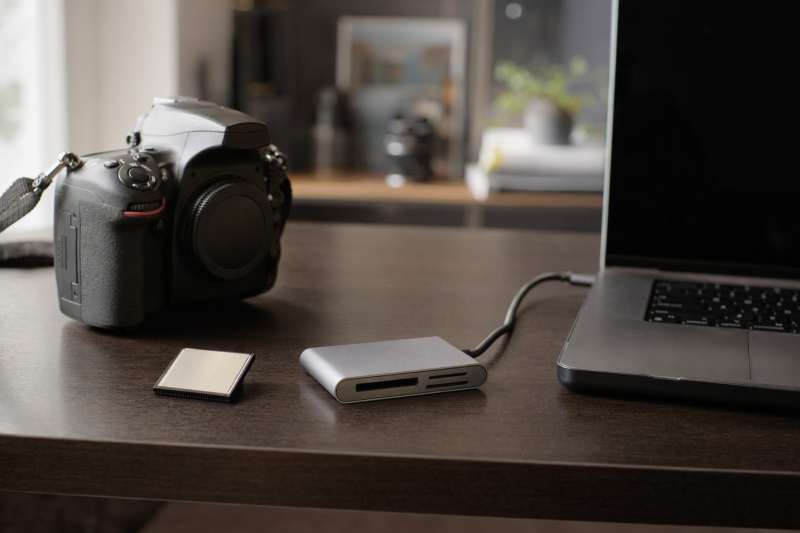
A box marked “CF” is easy to misread when old DSLR cards and new CFexpress media share part of a name. Legacy CompactFlash is a distinct card format. If your camera holds a classic CF card, buy a reader that lists CompactFlash support and plugs into your current computer’s USB-C port. A CFexpress Type B-only reader is the wrong tool.
This six-reader selection covers legacy CF and USB-C host connections with different slot mixes and connector layouts. Vintage-card fit, transfer speed, and every CF capacity or Type I/II combination were not independently tested for this guide. Check your camera’s card model and your computer’s port before buying.
Check the card label for CompactFlash, CFast, or CFexpress before buying. Then check the reader’s exact CF support and the computer’s USB-C connection. Do not push a card into a slot that resists.USB-C CompactFlash Readers Compared
Slot support and USB interface rates below are manufacturer or seller specifications, not independently measured transfer results.
| Image | Product | Details | Check Price |
|---|---|---|---|
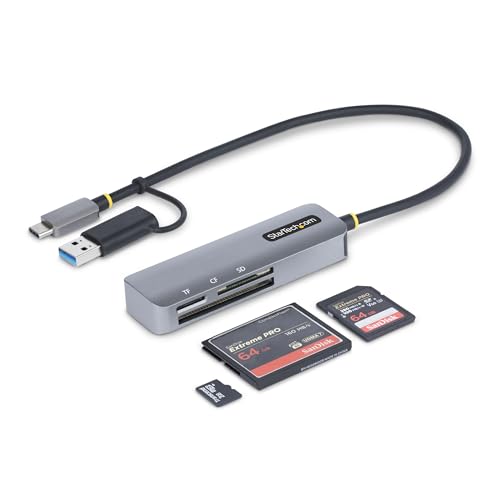 | StarTech FCREADMICRO3V2 | Card slots: CF, SD, microSD Host: USB-C + USB-A adapter CF detail: Type II listed Best fit: Documented mixed desk | Check Price on Amazon |
 | UGREEN 4-in-1 | Card slots: CF, SD, microSD, MS Host: USB-C CF detail: Generic CF listed Best fit: Four-card ingest | Check Price on Amazon |
 | ChiaoPio 3-in-1 | Card slots: CF, SD, microSD Host: USB-C cord CF detail: Generic CF listed Best fit: USB-C tablets | Check Price on Amazon |
 | BnmxTek CF Reader | Card slots: CF, SD, microSD Host: USB-C + USB-A port CF detail: Generic CF listed Best fit: Accessory port | Check Price on Amazon |
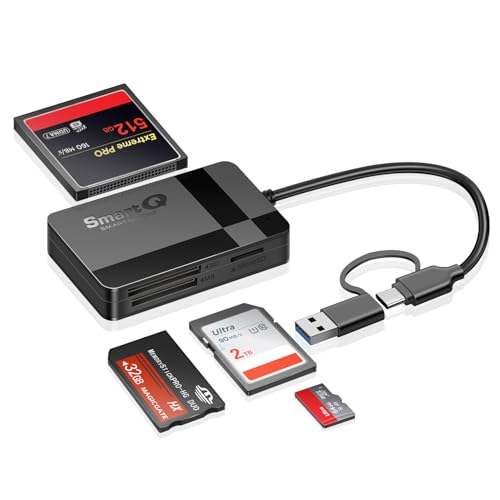 | SmartQ C368PRO | Card slots: CF, SD, microSD, MS Host: USB-C + USB-A CF detail: Generic CF listed Best fit: Two host plugs | Check Price on Amazon |
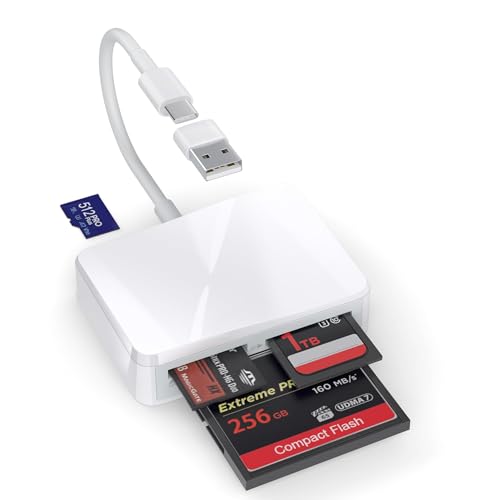 | RRSITIAU XC4M | Card slots: CF, SD, microSD, MS Host: USB-C + USB-A adapter CF detail: Generic CF listed Best fit: Backup reader | Check Price on Amazon |
1. StarTech FCREADMICRO3V2 — Best Documented Mixed-Card Desk
StarTech lists one CompactFlash, one SD and one microSD slot on its FCREADMICRO3V2, plus a USB-C cable with an integrated USB-A adapter. The manufacturer data sheet includes Compact Flash II among the supported memory-media types, which most of the checked seller copy does not. For a desk that processes old DSLR CF images and newer SD cards, that documentation is more useful than an unsupported claim of universal card compatibility.
The stated 5 Gbps is the USB host interface ceiling, not a measured copy rate from a particular older CF card. StarTech says all three slots can be accessed simultaneously. It also describes SD-slot write-switch handling, which does not imply the CF card itself is write-protected. The attached one-foot cable may keep the reader away from crowded laptop ports, but its length may need a place on the desk.
Our Take Buy StarTech if you ingest both CF and SD cards and want the clearest documentation. Verify the exact old card against the manufacturer sheet, then judge transfer speed from the whole path from card to drive.
- Manufacturer sheet explicitly lists Compact Flash II.
- USB-C with integrated USB-A adapter.
- CF, SD and microSD slots.
- No Memory Stick slot.
- 5 Gbps is not a CF transfer benchmark.
2. UGREEN 4-in-1 — Best Simultaneous Four-Card Workflow
UGREEN’s 4-in-1 offer lists CompactFlash, SD, microSD and Memory Stick. The Memory Stick slot is useful if a studio also archives images from older Sony equipment alongside a DSLR that takes CF cards. The seller says it can access four inserted cards at once, which may make ingest from mixed cards simpler than constantly swapping media. Keep the source and destination folders clearly named so you don’t copy to the wrong card when several are mounted.
The listing gives up to 5 Gbps for the USB connection. The USB maximum does not establish what a vintage CF card, a particular SD card, or a computer’s destination drive will achieve. It broadly lists several operating systems and USB-C devices, but no live host compatibility test was performed here. If your main concern is an unusually thick CF Type II card, confirm that specific fit rather than inferring it from the generic CF label.
Our Take Buy UGREEN if you need the Memory Stick slot and simultaneous card access. A desk for CF and SD cards alone may need fewer slots.
- Four listed card formats include legacy CF.
- Simultaneous access claimed.
- 5 Gbps is a host-interface maximum.
- Exact CF Type II support not established here.
3. ChiaoPio 3-in-1 — Best Short Cable for USB-C Tablets
ChiaoPio offers a focused CF, SD and microSD three-slot layout with a built-in USB-C cord. Its listing says the cord is intended not to block adjacent ports, which is helpful on a tablet or thin laptop where a wide reader that plugs straight in might cover the next socket. The seller positions it for iPads, iPhones with USB-C, MacBooks and Windows laptops. Check the actual device port rather than assuming every model in a broad family shares a connector.
The copy does not establish a verified UDMA mode, CF Type II fit, or transfer benchmark for the exact old camera card. For one-off archival jobs, the missing detail may be acceptable if the card and host match. For hundreds of large RAW files every day, seek a clear specification and test the complete path before relying on it. The built-in cable also means a damaged cord is not simply swapped out.
Our Take Buy ChiaoPio as a simple three-slot reader for travel or a tablet when the built-in cord solves a physical port problem. Keep your expectations for CF compatibility narrow.
- CF, SD and microSD explicitly listed.
- Short integrated USB-C cord.
- No extra power claimed.
- Specific CF speed and Type II details absent.
- Cord cannot be replaced independently.
4. BnmxTek CF Reader — Best with an Extra USB-A Port
BnmxTek lists CompactFlash, SD and microSD slots plus a USB-A female port on a USB-C-host reader. That extra port could keep a mouse, thumb drive or other small peripheral attached while the camera card is mounted. It should not be mistaken for a second USB-C computer connection or a guarantee that a bus-powered external drive will receive enough power. Use it only for a peripheral the laptop and reader can support.
The listing’s repeated format names do not clarify which CF thicknesses or UDMA generations have been tested. If the card is unusual, check the physical slot and exact reader support before an important archive session. For routine transfers from CF to a laptop, the extra USB-A port is convenience rather than a reason to ignore the simpler reader choices. A reader is also not a backup destination by itself.
Our Take Buy BnmxTek for its additional USB-A accessory port. A count of four ports does not prove broader CF support.
- Legacy CF, SD and microSD listed.
- Extra USB-A female port.
- CF Type/UDMA detail not stated.
- USB-A accessory power not quantified.
5. SmartQ C368PRO — Best Dual-Connector Pocket Reader
The SmartQ C368PRO listing describes a USB-C and USB-A dual-connector reader for CF, SD, microSD/TF and Memory Stick cards. For a photographer moving between a modern USB-C laptop and an older desktop USB-A port, the two connectors reduce the need for a separate adapter. The seller also says the card types can be read at the same time, which can be useful during a project that uses cameras with different card types.
The USB 3.0 description is not a measured CF copy rate. The checked bullets make broad platform claims but do not establish support for every phone, card capacity or thick CF card. Carry a test card into a new host workflow before a deadline. Because the unit is small, it may be easy to lose among loose cards, so label a case or keep the reader with the camera kit.
Our Take Buy SmartQ if you move between a USB-C laptop and a USB-A desktop and want a compact reader. Confirm the specific CF card and computer rather than accepting a generic “four-in-one” promise.
- USB-C and USB-A connection options.
- CF plus three other card families listed.
- Simultaneous reading claimed.
- Exact CF Type support not specified.
- Small reader needs organized storage.
6. RRSITIAU XC4M — Best Basic Four-Slot Backup
The RRSITIAU XC4M offer lists CF, SD, microSD/TF and Memory Stick slots and includes a detachable USB-A adapter for its USB-C connection. The four slots make it a plausible spare in a kit serving several older cameras. The seller says no extra driver or network service is required for ordinary file transfer. The seller’s statement is a convenience claim, not proof of interoperability with every phone or rare CF card.
The product copy does not give a defensible card-level throughput or exact CF Type II support. It discusses common photo and video file formats, but a reader mostly presents storage to the host. Opening a particular RAW file depends on the computer’s software. If this is a backup reader, test it with a representative card and use a known destination drive before depending on it in the field.
Our Take Buy RRSITIAU as a backup option that covers the common four-slot legacy mix with a USB-A adapter. Expect limited technical detail about CF.
- CF, SD, microSD and Memory Stick listed.
- USB-A adapter included.
- CF Type II and UDMA detail absent.
- File-format claims do not establish RAW support.
Buying Guide: Match the Old Card to the New Computer
Identify legacy CompactFlash before buying
CompactFlash, CFast and CFexpress are separate standards, even though their names overlap. The CompactFlash Association’s card-type guide identifies legacy CF as a Parallel ATA format, CFast as SATA-based, and CFexpress as PCIe/NVMe-based. A reader listing only CFexpress Type B is not a legacy CF reader. Read the camera manual and the label on the actual card before choosing a slot.
CF Type I and the thicker Type II need a physical-fit check. StarTech’s FCREADMICRO3V2 data sheet explicitly lists Compact Flash II. The other checked offers simply say CF or CompactFlash. If you own a Type II card or a format from the Microdrive era, do not infer fit from a generic CF icon. Never force an older card against the reader’s pins.
Decide how many other slots matter
SD, microSD and Memory Stick support vary. UGREEN, SmartQ and RRSITIAU list all four card families. StarTech and ChiaoPio omit Memory Stick. BnmxTek trades that slot for a USB-A peripheral port. The best layout is the one matching actual cameras and computers, not the largest headline slot count. With multiple cards mounted, name the source cards carefully during import.
USB-C identifies the plug, not the transfer speed. StarTech and UGREEN state a 5 Gbps host interface, but the card, reader controller, cable, host port and destination drive can each constrain copying. Our USB-C hub guide helps with laptop port planning, but a hub does not change an old CF card into a fast one. Use a direct port when diagnosing an inconsistent reader.
Make one verified archival copy before clearing cards
Copy first, verify second, format last. Give each card a source ID, transfer the images to a named folder, and check counts and representative RAW files before reusing it. Keep another independent copy for irreplaceable shoots. The reader can expose storage and may report a successful transfer, but a successful transfer does not establish that an editing application opens every file.
Protect the original until verification is done. An SD write-protect switch applies to SD media, not automatically to the CF slot beside it. Our USB-C docking station guide is relevant to a permanent ingest desk, but labeling cards and keeping backups do more to prevent erasing the wrong card. If an old CF card mounts unreliably, stop repeated writes and use a careful recovery workflow.
Frequently Asked Questions
Will a CFexpress Type B reader open an old CompactFlash card?
No. Legacy CompactFlash and CFexpress Type B are distinct electrical formats according to the CompactFlash Association. Sharing “CF” in the name does not mean the cards share a slot. CFast is another separate standard. Confirm the full name printed on the memory card rather than judging its appearance or choosing by camera age alone.
For a classic DSLR CF card, look for a reader explicitly listing CompactFlash or CF. If your card is Type II, check that thickness in the reader’s documentation. When the old camera and computer are available, test one representative card before processing an entire archive.
Do I need a reader that claims 5Gbps for older CF photos?
Not necessarily. 5 Gbps describes a USB link maximum, not the speed at which an old CF card can deliver photos. A slow card may transfer at roughly the same pace through several readers, while a failed or loose connection can affect the copy more than a headline interface rate. Transfer performance was not independently benchmarked for this guide.
Choose physical card compatibility and a stable host connection first. If a repeated production ingest takes too long, measure a complete copy to the destination drive you will actually use before deciding whether the reader or the older card is the limit. Include verification time in your estimate.
Can I use one multi-card reader to import CF and SD at the same time?
Some checked listings claim simultaneous access. StarTech documents all three of its slots, while UGREEN and SmartQ say their multiple formats can be mounted together. Host behavior, total bandwidth, and software on mobile devices can still differ. Do not assume simultaneous read and write will hit each card’s peak speed.
Mount one familiar card of each type and confirm that the host shows distinct volumes. Name target folders by card ID and camera, then check imported files before ejecting. Separate copies are especially important when two cards contain near-identical filenames.
Bottom Line
StarTech FCREADMICRO3V2 has the clearest manufacturer CF II documentation. UGREEN 4-in-1 adds a Memory Stick workflow. ChiaoPio 3-in-1 suits a USB-C tablet setup. Start with the old card’s actual format, then choose the slot layout and host connector that fit your ingest desk.