After a shoot, the easiest mistake is treating a card that has been copied once as if it is safely backed up. A memory-card case helps keep tiny media visible and separated, but the case cannot tell you which cards are ingested, verified, or safe to reuse. The useful purchase decision starts with card formats and slot counts, then a simple status convention that everyone at the editing desk follows.
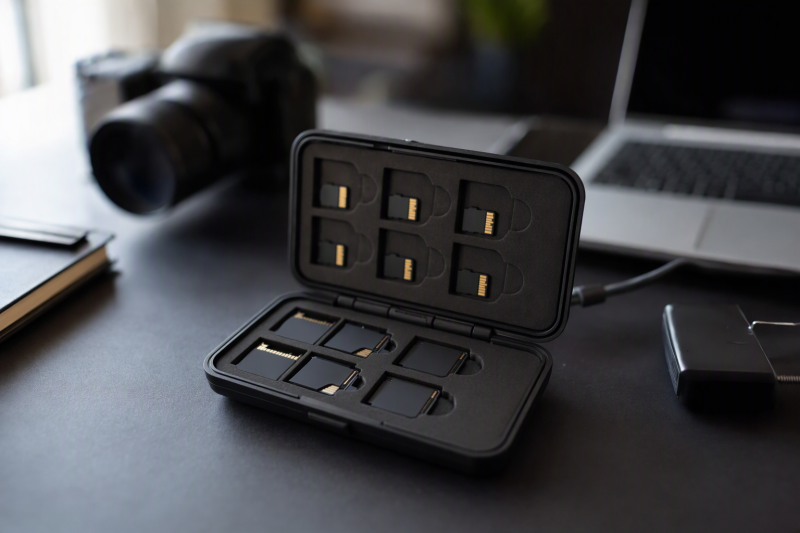
These six cases range from SD/microSD grids to a 40-slot SD-or-CFexpress Type A holder, an aluminum compact case, and a nylon wallet with larger CF pockets. None is a card reader. Seller descriptions do not establish impact resistance, sealing, card retention, or fit with every brand’s media. Decide how many card types you handle before buying the biggest box.
Count SD, microSD, CF, and CFexpress separately. Then assign a visible “unread / ingested / backed up” workflow before placing cards in any case.Memory-Card Cases Compared
| Image | Product | Details | Check Price |
|---|---|---|---|
 | Kiorafoto 40 Slot | Slots: 40 shared positions Formats: SD; Type A stated Style: Large hard grid Best fit: SD/Type A desk | Check Price on Amazon |
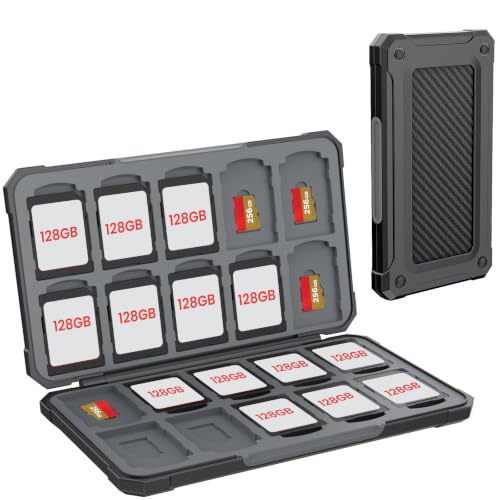 | HEIYING 40 Slot | Slots: 20 SD + 20 microSD Formats: SD/microSD Style: ABS clasp Best fit: Balanced media mix | Check Price on Amazon |
 | K&F Concept 36 Slot | Slots: 12 SD + 24 microSD Formats: SD/microSD Style: Tethered ABS Best fit: MicroSD-heavy desk | Check Price on Amazon |
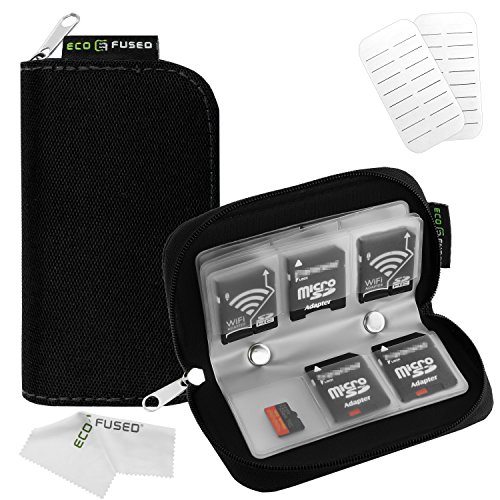 | Eco-Fused 22 Slot | Slots: 18 small + 4 large Formats: SD/microSD/CF Style: Nylon zip wallet Best fit: Older CompactFlash | Check Price on Amazon |
 | Qkenvo Aluminum | Slots: 8 SD + 8 microSD Formats: SD/microSD Style: Metal case Best fit: Small card kit | Check Price on Amazon |
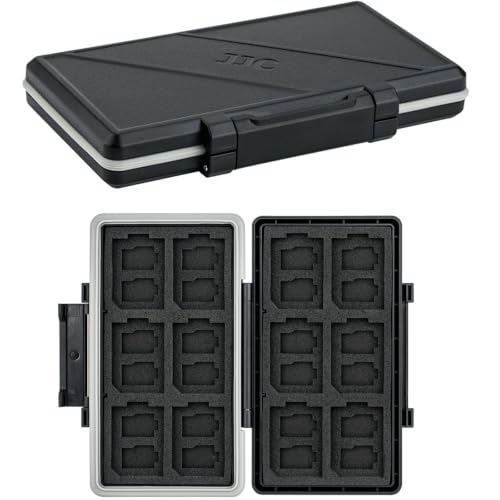 | JJC 36-Slot Case | Slots: 12 SD + 24 microSD Formats: SD/microSD Style: Foam-lined ABS Best fit: Compact drawer box | Check Price on Amazon |
1. Kiorafoto 40 Slot — Best SD and Type A Grid
Kiorafoto lists 40 positions for SD cards, microSD-to-SD adapters, CFexpress Type A, or similarly sized game cards. The grid is useful for a desk with many full-size SD cards or a camera workflow that uses Type A media. The checked offer includes two sheets of notepaper and a carabiner, which can support a simple card-ID inventory. Its 8 × 4.2 × 1.65-inch body is much larger than the pocket cases here. Plan a stable desk or bag location rather than expecting it to disappear into a small pouch.
CFexpress Type A is not Type B or old CompactFlash. The seller specifically says Type A, so do not buy for a Type B camera on the strength of the word “CFexpress” alone. The 40 slots are also alternatives, not 40 SD plus 40 Type A positions. Create a consistent row or label convention for empty versus exposed cards. The included paper can record IDs, but it does not automatically prove footage has been copied or verified.
Our Take Choose Kiorafoto if many full-size SD or CFexpress Type A cards land on your desk. Check the named formats and the shared 40-position total before the headline capacity.
- 40 stated card positions.
- CFexpress Type A named explicitly.
- Notepaper included for a desk inventory.
- Not a Type B or CompactFlash holder.
- Larger desk/bag footprint.
2. HEIYING 40 Slot — Best Balanced SD/microSD Layout
HEIYING specifies a 20 full-size SD plus 20 microSD layout inside an ABS case with a soft silicone lining and a clasp. That balanced split is useful when cameras use SD while audio recorders, drones, or small devices use microSD. It removes the guesswork of a generic “40 cards” description. Each format has a published allocation. The seller describes the case as pocketable, but it gives no exact slot measurements in the checked bullets, so check fit if your cards use unusual adapters or labels.
The listing makes impact-protection claims, but no independent drop or seal rating is supplied here. Cards are not included. Preventing a full card from going back into the camera before two verified copies exist is more important than the shell. Use separate rows or a clear status marker and maintain a card-ID log outside the case. A mixed pile in 40 slots can still be hard to track.
Our Take Choose HEIYING if your desk handles both SD and microSD cards and you want the split between them published. The 20/20 split is the buying reason.
- 20 SD and 20 microSD slots stated.
- Soft lining and clasp.
- No CFexpress or CompactFlash role stated.
- Protection claims untested here.
3. K&F Concept 36 Slot — Best Tethered SD/microSD Box
K&F Concept’s 36-slot case divides storage into 12 SD and 24 microSD positions. The layout is a better match than HEIYING’s 20/20 split when more small cards arrive from action cameras, drones, or recorders than from SD cameras. The checked listing describes an ABS shell, EVA lining, a snap closure, a silicone sealing ring, and an included keeper cord. The cord is convenient if the case moves between an editing desk and camera bag.
The seller calls the shell waterproof and shockproof, but we have not verified an ingress or impact rating. A seal is only useful when the case is closed cleanly, and it says nothing about the copy status of a card. The case holds cards. It does not read them or back up files. If your camera media is CFexpress or old CF, this stated SD/microSD layout is the wrong match even if the outside looks sturdy.
Our Take Choose the 36-slot K&F if more of your cards are microSD and you want a keeper cord on the case. Treat the seal as a handling feature, not an archive guarantee.
- 24 microSD and 12 SD positions.
- Keeper cord included.
- Snap closure and EVA lining stated.
- No CFexpress/CF slot claim.
- Waterproof and shockproof claims untested here.
4. Eco-Fused 22 Slot — Best CompactFlash Pocket Option
Eco-Fused’s nylon zip wallet has 18 smaller pockets for cards up to 24 mm wide and four larger pockets for cards up to 43 mm wide. The seller specifically says the large pockets can hold CompactFlash (CF). The CF pockets make it the pick here for an older camera archive that still includes CF alongside SD or microSD. The flexible wallet form may be easier to sort through on a desk than a deep molded box, though exact retention depends on how full each pocket is.
CompactFlash is not CFexpress Type A or Type B. The checked listing does not establish those newer formats, so verify dimensions before placing a valuable card in a loose pocket. The seller says all pockets can hold smaller card types, but a microSD card left unrestrained in an oversized pocket could be hard to account for. Use sleeves or clearly assigned positions, close the zipper, and confirm every media ID before leaving the desk.
Our Take Choose Eco-Fused if an older CF archive sits alongside SD or microSD cards. The pocket sizes are a better guide than the broad list of supported card names.
- Four larger CF-capable pockets stated.
- 18 smaller pockets for mixed media.
- Flexible zip wallet.
- CFexpress compatibility is not established.
- Tiny cards need a consistent assigned pocket.
5. Qkenvo Aluminum — Best Small Metal Case
Qkenvo describes a small aluminum case with eight SD and eight microSD slots. The capacity suits a photographer or small editing desk that cycles a modest, known set of cards rather than storing dozens. The metal shell and closure may be more satisfying than a fabric wallet, but the question to ask is whether each card stays in its own slot when the case is moved. Keep an inventory that records which cards are waiting for ingest and which have been verified.
The seller calls the case shock resistant and water resistant but explicitly says it cannot be immersed and should not be used in rain. Treat it as protection from minor drips, not a waterproof case for field use. Aluminum construction does not make the stored files immune to accidental erasure or a lost case. Its 8-plus-8 layout also excludes CF and CFexpress in the checked offer.
Our Take Choose Qkenvo if you want a compact 16-card case for a small, known set of cards. The listing names a water-use limit, and the case is a poorer fit for a large archive shared by a crew.
- Eight SD and eight microSD slots.
- Metal shell and small form.
- Seller states no immersion.
- Not a rain/immersion case.
- No CFexpress or CF role stated.
6. JJC 36-Slot Case — Best Compact 12/24 Backup Box
The JJC 36-slot ABS case is another 12 SD plus 24 microSD layout, with a foam-lined slot grid and a snap closure. Its listed outside measurement is 4.92 × 2.97 × 0.69 inches, a useful way to compare desk footprint with the larger Kiorafoto grid. The seller describes a silicone sealing ring and water-resistant construction. If the case will mostly live in a drawer, slot allocation and easy indexing count for more than the weather claim.
It overlaps the K&F case in capacity, so the reasons to choose this one are its published overall size and simple foam layout, not a unique card format. JJC lists SD and microSD slots, not CFexpress or CompactFlash support, and provides no verified IP rating. Do not infer other formats from the 36-slot count. Assign positions by camera or project and use a separate ingest log, because a foam grid alone does not distinguish exposed cards from reusable ones.
Our Take Choose the JJC 12/24 case if its published outside size matches your desk drawer. It does not add a new media format.
- 12 SD plus 24 microSD positions.
- 4.92 × 2.97 × 0.69-inch outside stated.
- Similar capacity to K&F; limited extra distinction.
- No verified IP rating or CFexpress claim.
Buying Guide: Organize Media by Format and Status
Match the card format before counting slots
SD, microSD, CompactFlash, and CFexpress are not interchangeable names. Kiorafoto explicitly names CFexpress Type A. Eco-Fused names older CompactFlash for its larger pockets. Neither statement establishes CFexpress Type B support. HEIYING, K&F, Qkenvo, and JJC are SD/microSD layouts in the listed offers. Sort your cards by physical format first, then choose a case whose slot count matches each group.
“40 slots” can mean 40 positions shared among multiple compatible card shapes, not 40 of each. Kiorafoto’s 40 positions are alternatives for different card shapes, while HEIYING has a precise 20 SD and 20 microSD split. A large case with the wrong pockets is less useful than a smaller case that fits your cards exactly. If different camera departments hand off media, a separate case or section per format can prevent confusing similar-looking cards.
Build a card-status rule around the case
Use a visible three-state system: unread, ingested, verified/backed up. One approach is separate rows or two cases, with a written card ID and project name. Do not call a card “safe to erase” merely because it has been removed from the reader. Make the second copy, verify representative files, and mark the ingest log before changing a card’s status. Kiorafoto’s included paper can help, but the workflow is more useful than the stationery.
Keep card identity stable across camera, reader, and editor handoff. Small reusable numbers on sleeves or an external inventory are easier to reconcile than a loose pile. Our USB-C hub guide can help when a laptop needs enough ports for card readers and backup drives, and the USB-C docking station guide covers a fixed editing desk. Neither device proves an ingest completed.
Treat protection claims as handling limits
An ABS shell, foam insert, or metal case can keep cards from rattling together, but water-resistant is not the same as waterproof. Qkenvo explicitly disallows rain and immersion. K&F and JJC describe seals without an independently verified ingress rating here. Close the case cleanly, keep it away from moisture and heat, and avoid stuffing a card into a slot of the wrong shape.
One case can be lost with every card inside. Make verified copies of important footage on separate storage before moving cards back into circulation. A case is an organizational aid, not a backup, encryption method, or proof of media health. If a card repeatedly errors in a reader, isolate and document it rather than putting it back in the “blank” section.
Frequently Asked Questions
Will a CFexpress Type A slot hold CFexpress Type B?
Do not assume so. Type A and Type B are different physical sizes, and the checked Kiorafoto listing explicitly names Type A only. Eco-Fused says CompactFlash (CF), which is another older format. The Eco-Fused listing does not establish CFexpress compatibility. Read the camera’s exact card specification and the case’s slot wording before ordering.
If a card fits loosely, it can slip out when the case is opened. If it needs force, the slot is wrong. Choose a case whose maker names your exact media type and compare physical dimensions when the wording is broad.
How do I keep copied and uncopied cards apart?
Use a status convention outside the product listing: distinct rows, colored card sleeves, or separate cases labeled “unread” and “verified.” Record the card ID, shoot, ingest destination, second-copy location, and verification result. Move the card only after the log says the required steps are complete.
Do not erase a card because it happens to be in the “done” half of a case without checking the log. Another editor may have returned it incorrectly. A physical organizer is most reliable when people also follow a written, repeatable handoff process.
Is a water-resistant card box enough for field work?
It may help with light incidental moisture, but the checked cases are not proven waterproof here. Qkenvo explicitly says not to immerse or expose its case to rain. Other sellers mention rings, ABS shells, or “waterproof” without independent verification in this article. A wet case should be dried and inspected before cards are handled.
The more important safeguard is a verified copy of footage in another location. A case cannot restore corrupted data or protect against a lost bag containing all the original cards.
Bottom Line
Choose HEIYING for a clear 20/20 SD/microSD split, Kiorafoto for a case that explicitly names CFexpress Type A, or Eco-Fused for older CF pockets. Decide the format first, then assign every card a tracked ingest status. A case can organize media, but only verified separate copies protect the footage.