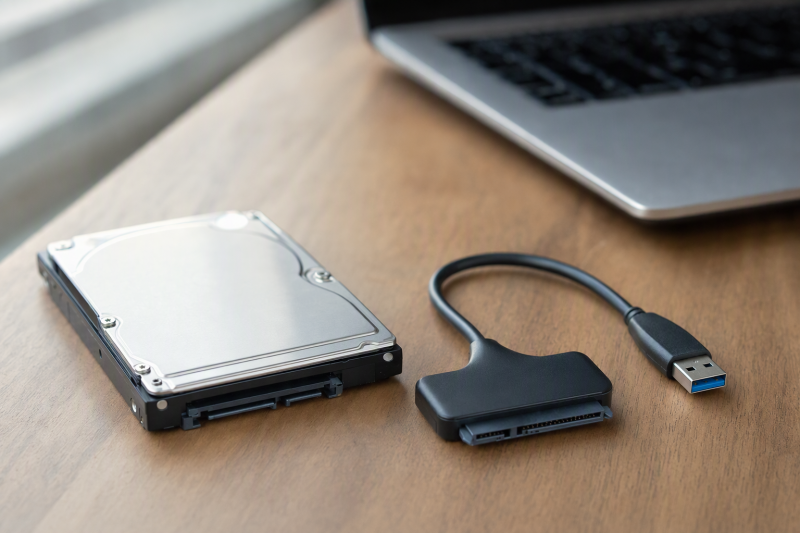
When a laptop fails but its internal drive still works, a SATA-to-USB adapter can expose the files to another computer without reinstalling the drive. First identify the connector on the removed drive. A 2.5-inch SATA HDD or SSD has a different edge from an M.2 SATA, M.2 NVMe, or older IDE drive. The word “laptop” alone does not establish which one you have.
These six adapters cover four compact bus-powered choices for 2.5-inch SATA drives, one with the external power needed for many 3.5-inch SATA drives, and one that also handles older IDE drives. An adapter does not repair a failing disk, bypass encryption, or make an obsolete filesystem readable. Interface specifications do not establish transfer speed, drive condition, or OS behavior for a particular recovery job.
Photograph the drive label and connector before ordering. If the drive clicks, disappears, or holds unique data, preserve it and consider specialist recovery rather than repeatedly powering it up.SATA-to-USB Adapters Compared
| Image | Product | Details | Check Price |
|---|---|---|---|
 | SABRENT EC-SSHD | Drive side: 2.5-inch SATA only Host: USB-A 5Gbps Power: USB bus Best fit: Simple laptop SATA access | Check Price on Amazon |
 | BENFEI 2-in-1 | Drive side: 2.5-inch SATA only Host: USB-A/C stated Power: USB bus Best fit: Mixed host ports | Check Price on Amazon |
 | StarTech USB3S2SAT3CB | Drive side: 2.5-inch SATA only Host: USB-A 5Gbps Power: USB bus Best fit: Documented 2.5-inch scope | Check Price on Amazon |
 | JSAUX SATA Cable | Drive side: 2.5-inch SATA only Host: USB-A 5Gbps Power: USB bus Best fit: Stowable lead | Check Price on Amazon |
 | UGREEN Powered | Drive side: 2.5/3.5-inch SATA Host: USB-A 5Gbps Power: 12V/2A included Best fit: Larger SATA HDDs | Check Price on Amazon |
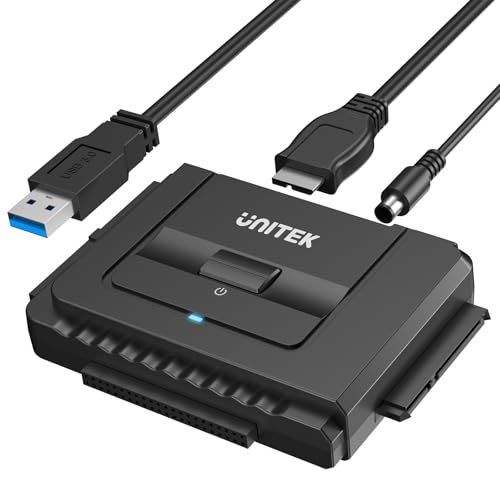 | Unitek IDE/SATA | Drive side: IDE and SATA Host: USB-A Power: 12V/2A included Best fit: Mixed legacy drives | Check Price on Amazon |
1. SABRENT EC-SSHD — Best Simple 2.5-Inch SATA Cable
SABRENT’s EC-SSHD is a USB-A, USB 5Gbps adapter for 2.5-inch SATA HDDs and SSDs. Its listing names SATA I/II/III and UASP, with bus power for most laptop-class drives. It is the straightforward match when you have removed a standard 2.5-inch SATA drive from a laptop and the receiving computer has a USB-A port. The adapter is small enough to connect one bare drive for file copying without assembling an enclosure.
Its exclusions are clear: no M.2 NVMe, M.2 SATA, 3.5-inch desktop HDD, or slim SATA optical drive. A USB-C-only computer needs a separate A-to-C path not included in this offer. SABRENT says some older or high-capacity 2.5-inch mechanical drives may need more power than one USB port supplies. A suitable powered hub or different port may help, but do not treat a failed spin-up as proof the drive itself is dead.
Our Take Choose the EC-SSHD if you know the drive is 2.5-inch SATA and the host has a USB-A port. Its explicit exclusions make it easier to avoid buying for the wrong connector.
- 2.5-inch SATA scope is explicit.
- Bus-powered and compact.
- UASP stated.
- No 3.5-inch or M.2 support.
- USB-C requires a separate adapter.
2. BENFEI 2-in-1 — Best USB-A and USB-C Choice
BENFEI’s checked title offers USB-C and USB-A host connection for a 2.5-inch SATA HDD or SSD. The seller lists USB 5Gbps and UASP support, but actual copy speed also depends on the disk and host. If you need to alternate between a newer USB-C laptop and an older USB-A desktop, its two-plug approach can avoid keeping a separate adapter in the recovery kit.
The listing limits the drive side to 2.5-inch SATA only and explicitly excludes 3.5-inch, 5.25-inch, and M.2 drives. The SATA III “6Gbps” line describes the drive interface. The USB 3.0 side is listed at up to 5Gbps. Neither figure promises a particular recovery speed or a healthy drive. Check the exact connector shown on the offer before ordering, because your choice depends on the physical plug, not the marketing speed.
Our Take Choose BENFEI if you switch between USB-C and USB-A computers and the drive is a standard 2.5-inch SATA model. It does not widen the supported drive families beyond that.
- USB-A and USB-C host choices in listing.
- UASP stated for compatible systems.
- Only 2.5-inch SATA drives.
- No external power path listed.
3. StarTech USB3S2SAT3CB — Best Documented USB-A Option
StarTech’s USB3S2SAT3CB is another bus-powered USB-A to 2.5-inch SATA adapter. The checked offer specifies a 5Gbps USB connection and UASP on compatible hosts, and the manufacturer’s copy on the offer directly says 3.5-inch drives are not supported. Its scope is narrow, so the fit is easy to state. It suits a removed laptop SATA SSD or 2.5-inch HDD connected to one USB-A computer port, when you do not plan to use the same adapter for a powered desktop drive.
Its listing describes plug-and-play, OS-independent operation, but USB detection does not unlock encrypted data or fix a damaged filesystem. You may see the physical disk but not usable files. StarTech points buyers with 3.5-inch drives to a different powered adapter rather than implying this cable can supply 12V. Check the drive’s connector and power needs first, and do not choose this adapter because the product title merely says “SATA.”
Our Take Choose StarTech if you want a 2.5-inch SATA adapter backed by direct compatibility guidance from the vendor. It adds little if you need USB-C or a 3.5-inch drive.
- Explicit 2.5-inch-only fit.
- USB-A and UASP details are stated.
- Cannot power a 3.5-inch drive.
- No USB-C plug in checked offer.
4. JSAUX SATA Cable — Best Stowable 2.5-Inch Lead
JSAUX’s adapter is a USB-A 5Gbps cable for 2.5-inch SATA HDDs and SSDs with an aluminum housing and nylon cord in the listing. The aluminum housing and nylon cord may suit a cable kept in a laptop bag for occasional access to removed drives. The seller names UASP, TRIM, and SMART, but host software and bridge behavior affect whether those features reach a particular disk. Do not count on diagnostics or SSD maintenance without checking them on your system.
JSAUX explicitly excludes 3.5-inch drives, ATA/IDE, mSATA, and M.2 and includes no external power adapter. The exclusions apply to laptop drives, because some older laptops used IDE and newer ones may use M.2. A 2.5-inch enclosure that looks like SATA can also conceal a different internal connector, so inspect the bare drive before choosing. This adapter is convenient for access, not a forensic recovery device.
Our Take Choose JSAUX if you want a tidy cable for a travel kit and already know the drive is 2.5-inch SATA. The exclusions on drive types are the facts to check first.
- Compact cable construction.
- Seller states UASP support.
- No M.2, IDE, or 3.5-inch support.
- Advanced feature pass-through needs host verification.
5. UGREEN Powered — Best for 3.5-Inch SATA Drives
This UGREEN adapter covers both 2.5-inch and 3.5-inch SATA HDDs and SSDs in its checked listing. It includes a 12V/2A power adapter for a 3.5-inch drive, which a simple bus-powered laptop cable usually cannot supply. The power adapter makes it useful if you also have a desktop-sized SATA disk to read or want one kit for more than one physical drive size.
The extra power supply means more setup and a wall outlet. Do not connect unknown power hardware to a fragile drive. Use the included supply as directed, check the SATA connector, and avoid repeated start-stop cycles on a disk that sounds unhealthy. UGREEN states USB 5Gbps and UASP. Its percentage speed claims are seller marketing, not measured results for these drives. The UGREEN is a SATA product, not a bridge for M.2 or IDE.
Our Take Choose UGREEN if a 3.5-inch drive may appear alongside the laptop drive. For only one healthy laptop SSD, its power brick is unnecessary bulk.
- 2.5-inch and 3.5-inch SATA stated.
- 12V/2A supply included.
- UASP listed.
- Requires more desk and outlet space.
- No IDE or M.2 support stated.
6. Unitek IDE/SATA — Best Older IDE Bridge
The Unitek kit is the outlier. Its checked listing names 40-pin and 44-pin IDE plus SATA, with simultaneous connection of one IDE and one SATA drive. Older laptop IDE disks often use a different connector from 2.5-inch SATA, so a plain SATA cable will not fit. With the included 12V/2A supply and 4-pin power cable, the kit also covers some desktop and optical-drive jobs as specified by the seller. The wider coverage makes sense if your pile contains mixed generations of hardware.
Unitek says to connect the included power supply, especially when two drives are attached, and states USB-A host connection only. Verify the IDE pin layout and drive power requirement before plugging anything in. Do not guess at an old disk’s orientation just because the bridge looks universal. The listing says it can connect two drives, but does not establish a safe offline clone or automatic recovery workflow. Copying files, imaging a disk, and diagnosing physical faults remain separate tasks.
Our Take Choose Unitek only if you have an older IDE drive or a mix of drive types to read. For one ordinary 2.5-inch SATA drive, a simpler cable is easier to use.
- IDE and SATA connectors in one kit.
- External power supply included.
- One IDE and one SATA simultaneously stated.
- More cables and power setup.
- USB-A host only.
- Requires careful legacy connector identification.
Buying Guide: Identify, Power, Then Copy
Confirm the drive connector before buying
A standard 2.5-inch SATA drive has separate 7-pin data and 15-pin power sections on one edge. Most of these adapters are built for exactly that connector. An M.2 stick, whether SATA or NVMe, will not mate with the 2.5-inch plug, and an older IDE laptop drive also needs a different connector. The StarTech 2.5-inch SATA adapter documentation is an example of a compatibility limit stated for one model. Match the actual drive, not just the old laptop’s age.
If the label is unclear, compare its maker model number and a clear photo of the connector with the product’s specification. Do not force a connector or buy from a generic “all hard drives” title. Unitek serves a mixed IDE/SATA job, while the basic SABRENT does not. Our USB-C hub guide is about host ports, not SATA or IDE conversion on the drive side.
Match the drive’s power to the adapter
Most ordinary 2.5-inch SATA SSDs and laptop HDDs can use a bus-powered adapter, but some mechanical drives draw more than a particular host port supplies. A drive that does not spin or repeatedly disconnects may indicate a power supply problem, a bad cable, or a failing disk. Try a suitable direct host port or a vendor-recommended powered setup with a known-good noncritical drive. Do not keep power-cycling a unique noisy disk.
A 3.5-inch desktop SATA HDD normally needs external 12V power, so choose a kit whose checked offer includes the supply. UGREEN and Unitek include 12V/2A adapters. The compact SABRENT, BENFEI, StarTech, and JSAUX cables are meant for 2.5-inch use. The USB-C docking station guide can help plan host connections at a desk, but a dock alone does not replace the drive’s required power supply.
Preserve the source and verify copied files
If the old disk appears, copy important files before making any changes. Do not accept an OS prompt to initialize, erase, or format the drive. Encryption may require the original recovery key, and an unfamiliar filesystem may need a compatible OS or software. Swapping to a faster USB cable will not fix either problem. Copy to a separate disk with enough free space and retain the original until the files have been checked.
For a failing drive, a careful image and specialist help may be safer than repeated file-by-file retries. A healthy drive can be copied normally, but clicking, disappearing, or unreadable media needs a different plan. After copying, open representative documents and make a second independent backup. The adapter provides access to sectors. It does not validate the contents or recover lost encryption keys.
Frequently Asked Questions
Can a SATA-to-USB adapter read an M.2 SSD?
No. The 2.5-inch SATA adapters here do not accept that drive type. M.2 is a different physical form factor, and M.2 SATA and M.2 NVMe also use different storage protocols. SABRENT, BENFEI, and JSAUX explicitly exclude M.2 in the checked listings. Inspect the removed module before ordering.
An M.2 drive needs an enclosure or adapter matched to its exact key and protocol. Do not assume an M.2 SATA stick works in an NVMe-only enclosure or vice versa. The same caution applies to an older IDE laptop disk, which requires the right IDE bridge such as the Unitek kit.
Why is the disk visible but the files are not?
Hardware detection is not file access. The partition may be encrypted, the filesystem may be unsupported, or the media may be damaged. A different USB adapter cannot bypass a recovery key or repair damaged sectors. Windows may also offer to initialize an unfamiliar drive. Decline the offer for an archival original.
Check the drive’s health and the original computer’s encryption setup before altering anything. If the data is valuable and the drive is making unusual sounds or disappearing, pause and consider specialist recovery. Do not repeatedly run repair utilities on the only copy of the data.
Does a 10Gbps cable recover files faster than these 5Gbps adapters?
It depends on the disk and host. A mechanical laptop HDD may be the bottleneck, while a fast SATA SSD can benefit from an efficient USB bridge. The listings here mostly state USB 5Gbps and UASP. Both are interface features, not measured copy rates for your drive. The old disk’s condition affects the result more than the headline speed during a recovery attempt.
Choose the correct drive connector, enough power, and a stable link first. A faster cable will not turn a failing drive into a healthy one. If you only need to retrieve a few documents once, a compatible 5Gbps adapter is usually enough rather than a performance upgrade.
Bottom Line
Choose SABRENT EC-SSHD for a known 2.5-inch SATA laptop drive on a USB-A host, BENFEI if you also need a USB-C host option, UGREEN for larger powered SATA drives, and Unitek for a mix of IDE and SATA drives. Identify the drive first, then copy and verify the files without altering the source.