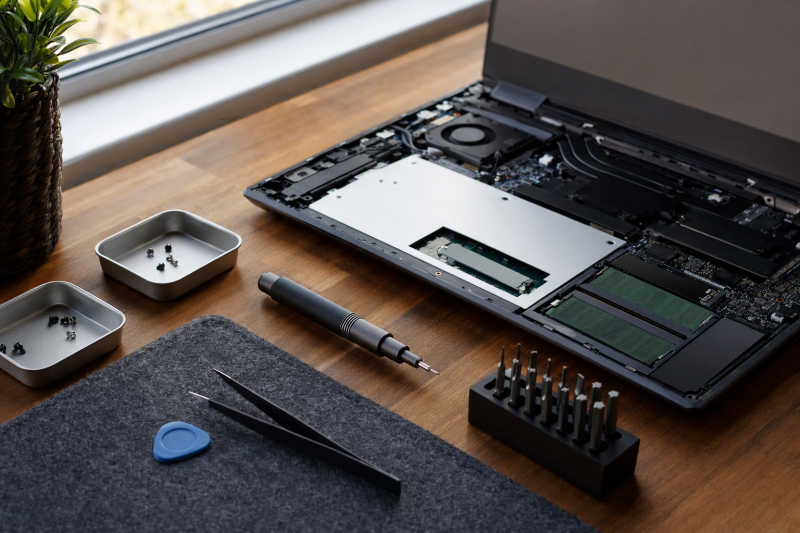
Opening a laptop for an SSD or memory upgrade often begins with a handful of tiny fasteners. A manual precision driver gives direct feedback when a screw starts to move or resist. The first buying decision is whether the kit includes the exact bit type and size for your laptop’s service guide, not whether it has 25 or 142 pieces.
This guide covers six manual kits with active New Amazon US offers. They differ in security-bit coverage, handle format, opening tools, and ways to keep screws in order. Listing data does not establish measured bit fit, steel hardness, torque, or long-term durability. A seller’s “for all laptops” phrase cannot replace the model-specific repair instructions. Powered drivers are excluded from this comparison because a small screw is easy to strip with too much force.
Read the service guide for your exact laptop model, list every fastener, and buy the bits that match that list. Do not start with a nearly fitting tip.Manual Precision Screwdriver Kits Compared
| Image | Product | Details | Check Price |
|---|---|---|---|
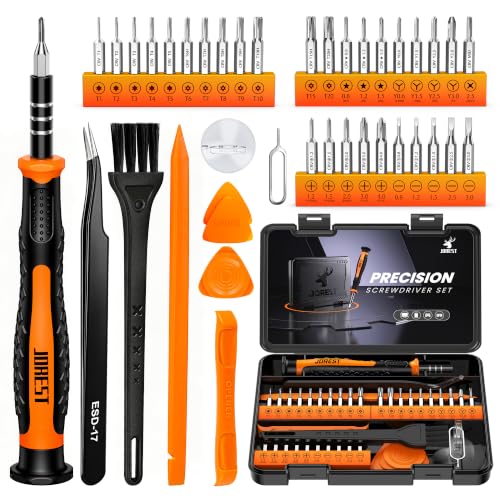 | JOREST 40-piece set | Bits: 30 CR-V; Phillips/Torx/Y/P listed Extras: Spudgers, tweezers, suction cup Storage: Compact kit claim Best fit: Mixed laptop and mobile screws | Check Price on Amazon |
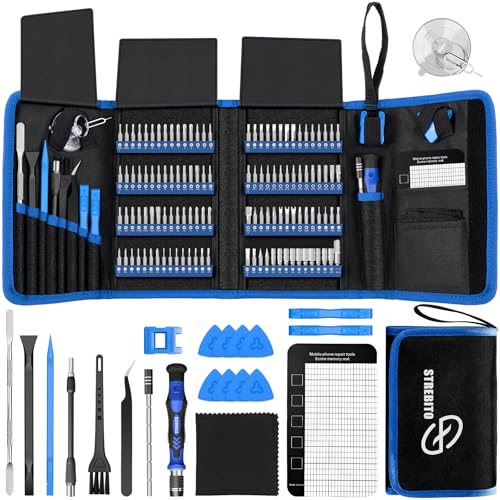 | STREBITO 142-piece set | Bits: 120 listed Extras: Magnetic mat, spudgers, tweezers Storage: Portable tool bag Best fit: Large mixed-device repair kit | Check Price on Amazon |
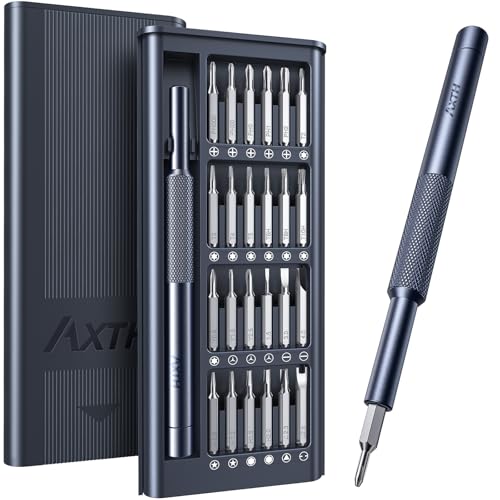 | AXTH 25-in-1 set | Bits: 24 listed, including P2/P5 Handle: Swivel cap Storage: Small latched case Best fit: Compact single-driver case | Check Price on Amazon |
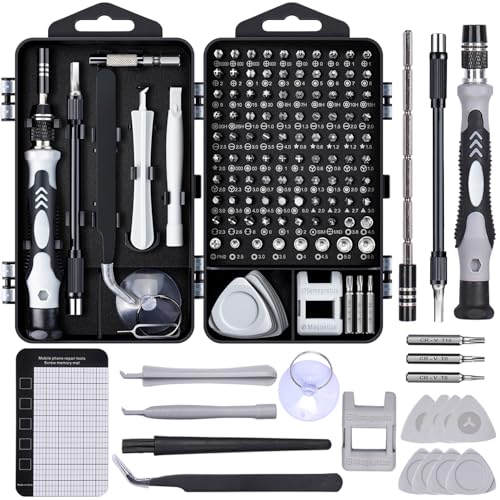 | SHOWPIN 122-piece kit | Bits: 101 listed Extras: Magnetic mat, flexible shaft, spudgers Storage: Labeled case Best fit: Deep fasteners and screw sorting | Check Price on Amazon |
 | iFixit Mako 64-bit | Bits: 64, including security types Handle: 4-mm aluminum magnetic socket Storage: Magnetic case and sorting lid Best fit: Documented bit variety | Check Price on Amazon |
 | Klein Tools 32327 | Bits: 26 sizes in handle Coverage: Phillips, slotted, hex, Torx Storage: In-handle; no separate case Best fit: Frequent mainstream laptop fasteners | Check Price on Amazon |
1. JOREST 40-Piece Set — Best Mixed Screw and Opening Kit
JOREST lists 30 CR-V bits within a 40-piece manual repair kit. The detailed bit list includes Phillips PH000 through PH1, Torx T1-T5 and several security Torx sizes, tri-point/Y sizes, and pentalobe P2, P5, and P6. It also includes a swivel-top magnetic handle, spudgers, tweezers, a cleaning brush, and a suction cup. That mix can suit a household with both laptops and smaller devices where opening a clipped cover is part of the job.
The seller maps bit sizes to many device families, but model and generation can change the actual screw. Check the specific guide rather than trusting broad brand coverage. The listing does not establish measured bit tolerance, magnet strength, or durability. Spudgers may help release clips, yet using them at the wrong seam can break a cover or puncture a battery. The kit is strongest when its exact bit list matches the planned upgrade and the opening tools are genuinely needed.
Our Take Choose JOREST if you repair laptops and smaller devices and want an explicit bit list plus basic opening tools. Verify each laptop’s screw types instead of assuming the included opening tools make every repair safe.
- Phillips, Torx, tri-point, and pentalobe listed.
- Spudgers and tweezers included.
- Device-family compatibility is not model proof.
- Bit fit and tool durability untested.
2. STREBITO 142-Piece Set — Best Large Mixed-Device Bag
STREBITO advertises 120 bits and 22 accessories in a portable tool bag. The accessory list includes a magnetic screw mat, magnetizer/demagnetizer, tweezers with claimed ESD safety, spudger, suction cup, brush, and flexible shaft. The bag is useful if you open many device types and want one kit to bring to a worksite. For a single SSD swap, most of the 120 bits may never leave the bag. Check the exact required bit types within the full list before treating the high count as value.
The seller claims 60 HRC chromium-vanadium steel and a lifetime warranty, neither independently verified here. A flexible shaft can reach a recessed fastener but reduces tactile feedback and may encourage an angled tip. Use it only when the straight driver cannot reach. The listed 5.7-by-3.3-inch magnetic mat can help preserve screw order, though it does not document which screw came from which hole unless you mark the layout. Keep magnets away from components where the device maker advises caution.
Our Take Choose STREBITO if you repair several kinds of devices and want one bag for all of them. For a single-laptop upgrade, its sorting mat and opening tools may count for more than the advertised 120-bit count.
- Broad tool and accessory bundle.
- Mat and labeled bit storage aid organization.
- Most bits may be unused for one laptop.
- Hardness, ESD, and warranty claims unverified.
3. AXTH 25-in-1 Set — Best Compact Bit Case
AXTH provides a single swivel-cap handle and 24 bits in a small latched case. Its checked list covers Phillips PH000 through PH2, Torx T2-T5, several security Torx sizes, tri-point Y000/Y00/Y0, and pentalobe P2/P5. The bit list gives more specialized coverage than a plain Phillips/Torx pocket driver while remaining easy to store. A small case is convenient in a laptop bag, but losing one specialized bit may interrupt the next repair.
The seller claims hardened bearing steel over HRC65, strong bit magnetism, and a lifetime warranty; those claims are not established by independent measurements in the checked evidence. The kit has few or no explicit opening and screw-sorting accessories in the checked bullets, so a laptop with a clipped bottom cover may need a separate plastic pick and a way to track screws. It is a driver kit first, not a complete disassembly system. Match its exact bit sizes to the service guide before starting.
Our Take Choose AXTH if you want a compact case with useful security shapes and already own tools for opening covers and sorting screws.
- Compact case and explicit P2/P5 coverage.
- Swivel-cap manual handle.
- Few opening or sorting tools stated.
- Material and warranty claims not verified.
4. SHOWPIN 122-Piece Kit — Best Deep-Fastener Extras
SHOWPIN lists 101 bits and 21 auxiliary tools, including a flexible shaft, 4.56-inch extension rod, magnetizer, magnetic mat, and spudgers. The long straight extension may help reach a recessed laptop screw while preserving better alignment than a bent shaft. A labeled case and spare common-size bits can help when you use a kit repeatedly across desktops and laptops. The seller explicitly mentions RAM and SSD upgrades, but the right bit still depends on the exact chassis.
The listing claims 60 HRC CR-V steel and a shaft that can flex 180 degrees. Neither was tested. Avoid twisting a tiny laptop screw from an angle simply because the shaft can reach it. Use the straightest access possible and stop when a fastener resists unexpectedly. The magnetic mat can preserve position order, but mark where screws came from because lengths may differ within one laptop cover. A large kit does not protect a device from a misplaced long screw.
A magnetic mat helps keep screws, but a simple hole-by-hole map protects against putting a long screw back in a short hole.Our Take Choose SHOWPIN if you make repeated repairs on varied devices and want a straight extension and a magnetic mat. They are more useful than the raw bit count, provided the needed bits are present.
- Straight extension, flexible shaft, and spudgers.
- Magnetic mat and labeled case.
- Bulkier than compact bit kits.
- Angled shaft use can reduce screw control.
5. iFixit Mako 64-Bit Kit — Best Documented Bit Variety
iFixit’s Mako kit lists 64 precision bits, a 4-mm aluminum magnetic driver, a swivel top, and a flexible extension. Its magnetic case lid also works as a small parts tray. The marketplace listing mentions Torx, tri-point, and pentalobe coverage, while iFixit maintains repair guides that identify the tools needed for a particular device. The combination makes it easier to check fit against an exact laptop model before buying, rather than trusting a generic compatibility promise.
The Mako is primarily a driver set. It does not replace the opening picks, ESD precautions, or battery-removal steps that some laptop repairs require. The checked evidence does not include independent bit-tolerance or hardness measurements. A 64-bit set is broader than many one-off upgrades need, but its organized case can be useful across future devices. Check the exact included bit list and the service guide. A family name for security bits alone does not guarantee the required size.
Our Take Choose Mako if you want an organized set with many bit types for varied laptop fasteners. Pair it with model-specific repair instructions and separate opening tools when required.
- 64 bits with several security families listed.
- Magnetic sorting lid and swivel driver.
- Opening tools not part of this core kit.
- Bit fit not independently measured here.
6. Klein Tools 32327 — Best In-Handle Portability
Klein’s 32327 stores 26 precision sizes inside the handle and also acts as a 3.5-mm nut driver. Its checked list includes Phillips #000 through #2, slotted, hex, Torx T3/T4, and security Torx T5H-T15H. The list covers many mainstream laptop screws in a portable form without a separate bit block. The seller describes a cushion-grip handle and a magnetic barrel that holds bits and fasteners. Check that the handle feels comfortable for your hand.
The main omission is that the checked list does not include pentalobe or tri-point bits. Do not choose this one for a MacBook or another device that requires those shapes unless you already own the exact missing driver. In-handle double-ended bits can be convenient on site but do not give you a parts tray, spudger, or screw map. The strong magnetic barrel is a seller feature, not a substitute for careful screw placement or ESD-aware repair practices.
Our Take Choose Klein if your laptop uses Phillips or Torx screws and you want a pocket driver. Its omitted security families make it a poor universal laptop kit.
- In-handle bit storage.
- Common Phillips, hex, and Torx sizes listed.
- No listed pentalobe or tri-point.
- No opening or sorting accessories.
Buying Guide: Match Bits and Protect the Laptop
Check the exact fasteners before opening the cover
Search the service or repair guide for the exact laptop model and generation. An SSD hatch, bottom cover, and internal bracket may use different heads. A kit that contains Torx does not necessarily include the needed Torx size, and a Phillips bit that almost fits can strip a shallow screw. iFixit recommends using its device-specific guides to identify tools before work. Record the required shapes and sizes, then compare that list with the kit’s actual bits.
Think about special security heads. JOREST and AXTH list pentalobe sizes. Mako lists pentalobe as a family. Klein’s checked list does not. Do not force a near-fit bit to compensate. If resistance feels wrong, stop and recheck the tip and screw head. To open the cover, a plastic pick or spudger may be needed after the screws are out, because a steel driver is not a prying tool. Our USB-C electric screwdriver guide covers the powered alternative, but manual feedback may be preferable for the smallest fasteners.
Decide how much kit and screw organization you need
A compact 24-bit case is easy to keep with one laptop, while a 120-bit bag serves many device types. More pieces do not improve a specific upgrade unless they add a required bit or useful tool. A swivel cap helps steady the handle. A flexible shaft reaches deep screws but can reduce tactile control. Consider the actual work sequence: cover removal, battery isolation where required, component change, and careful reassembly.
You need a screw plan because lengths can differ within one cover. A magnetic mat or tray can keep fasteners from rolling away, yet a map or photo preserves their original hole positions. STREBITO and SHOWPIN list mats. Mako’s case lid can sort small parts. Do not rely on memory after a repair pause. For choosing a dock after a laptop upgrade, our USB-C docking station guide addresses a separate decision about desk connectivity.
Use controlled hand pressure and safe opening tools
Hold a manual driver square to the screw head, apply steady downward pressure, and turn slowly. If the screw does not move, confirm direction and bit fit before adding force. Tiny laptop screws and threaded inserts are easy to damage. Magnetic tips can help lift loose fasteners, but they do not replace a nonmetallic opening tool where the service guide calls for one. The checked listings do not establish measured handle torque or bit hardness.
Follow device-specific power-disconnection and battery guidance before touching internal parts. Do not insert a spudger near a battery without knowing the correct seam and depth. A kit with ESD-labeled tweezers does not itself make the whole bench ESD-safe. If a laptop is under warranty or a difficult adhesive/sealed construction is involved, weigh that risk before opening it. Good repair technique protects more value than an extra hundred bits.
Frequently Asked Questions
Do I need pentalobe bits to open every laptop?
No. The required head depends on the specific model and fastener location. Some laptops use Phillips or Torx. Some devices use pentalobe or tri-point. A guess based on the brand is not enough, because generations and internal components can differ.
Read the service guide first. Klein’s checked bit list lacks pentalobe and tri-point, while other kits here list at least some of those shapes. Do not force a different bit into a security screw, because damage to the head can turn a routine upgrade into an extraction job.
Is a 120-bit kit better than a 24-bit kit?
Only if the extra bits or tools cover a need you have. For one known laptop, a smaller kit with the exact sizes can be easier to carry and manage. For varied devices, a larger set can save repeat purchases and offer spares. Piece counts also depend on how the seller counts accessories, not just driver bits.
Compare the actual bit list, handle, opening tools, and screw organization. A magnetic mat can be more useful than a rare bit during a bottom-cover removal. None of these kits was tested for bit tolerance or durability here.
Can I use a precision bit as a pry tool?
No. A driver bit is for turning a matching fastener. Prying with it can damage the bit, scratch the chassis, or puncture a nearby component. Use the plastic pick or spudger specified by the device repair guide, and stop if a cover resists at an unknown point.
Some kits bundle spudgers and suction cups, and others are driver-only. The presence of an opening tool does not identify the correct seam. Follow the exact service steps and disconnect power as required before reaching internal parts.
Bottom Line
iFixit Mako is the organized choice for a broad bit range, JOREST adds opening tools with explicit security shapes, and Klein 32327 is compact for Phillips/Torx jobs but lacks listed pentalobe. First identify your laptop’s exact screws. Then pick the smallest complete kit that lets you open, sort, and reassemble without improvisation.