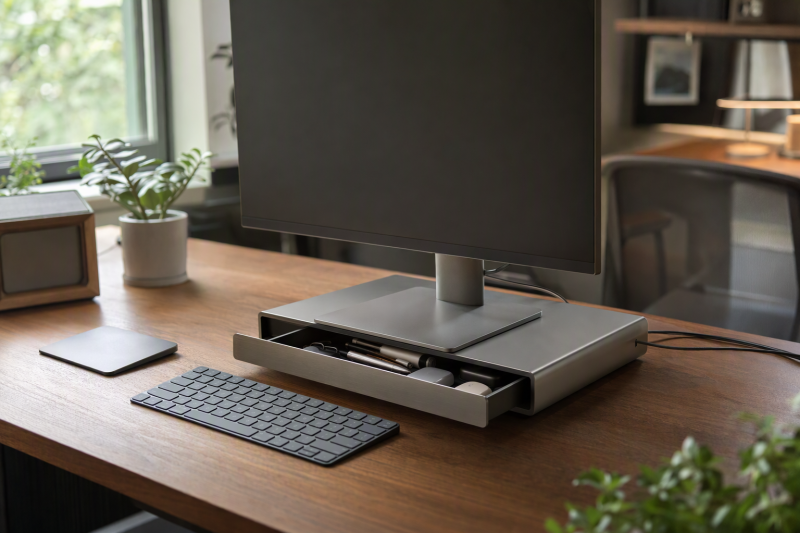
A monitor riser can raise a low screen and give small desk items a place to go. A built-in drawer is most useful when pens, notes, adapters, and cables otherwise occupy the surface in front of the keyboard. But the riser itself also occupies desk depth and height, so the wrong one can make a compact desk feel more cramped.
This guide covers six exact Amazon US risers with active New offers. The useful differences are platform width, adjustable height, actual drawer space, and the monitor weight each seller claims to support. Listing claims do not establish assembled stability, measured load capacity, or ergonomic fit at a particular desk. Before buying, measure your monitor’s base, your available desk depth, and how much screen lift you actually need. A riser is not automatically better than a monitor arm when free surface area is the main goal.
Measure the monitor base and the desk’s usable depth first. A drawer is helpful only if its stand still leaves room for your keyboard and hands.Monitor Risers With Drawers Compared
| Image | Product | Details | Check Price |
|---|---|---|---|
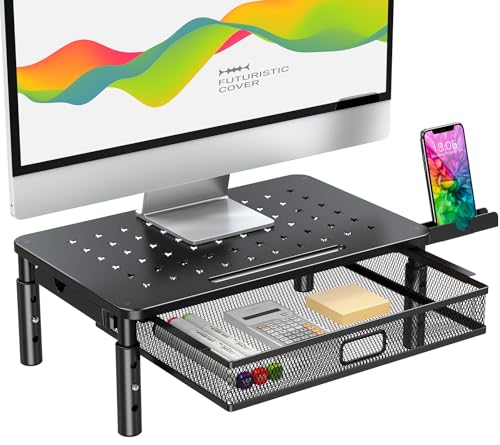 | Zimilar adjustable mesh riser | Height: 4.13, 4.92, 5.71 in Load: 44 lb listing claim Storage: Letter-size mesh drawer; phone holder Best fit: Adjustable height, paper storage | Check Price on Amazon |
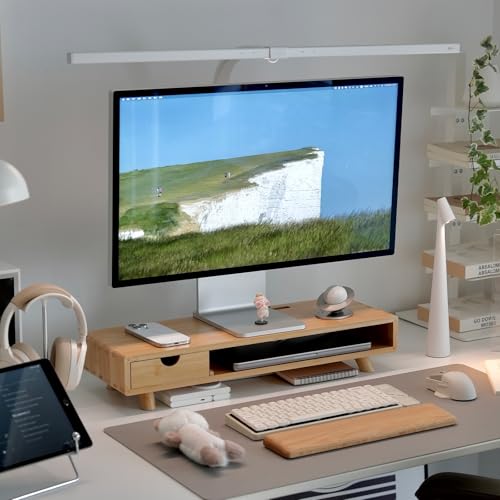 | ROCDEER bamboo riser | Height: 4.4 in listing claim Load: 100 lb listing claim Storage: Drawer, lower shelf, keyboard bay Best fit: Wood-look layered storage | Check Price on Amazon |
 | Klearlook foldable riser | Width: 16.5, 18.5, 20.5 in settings Load: 55 lb listing claim Storage: Drawer and phone/tablet holder Best fit: Variable-width small desk | Check Price on Amazon |
 | Simple Trending two-tier riser | Size: 20 x 10 x 5.8 in claimed Structure: Metal mesh, two tiers Storage: Drawer, pen holders, lower bay Best fit: Open shelf plus drawer | Check Price on Amazon |
 | Bostitch Konnect riser | Height: 2.125, 3.625, 5, 6.5 in Load: 25 lb listing claim Storage: Drawer, phone holder, cable slot Best fit: Precise screen-height choice | Check Price on Amazon |
 | OPNICE two-tier riser | Size: 14 x 9.1 x 5.6 in overall; foot range unstated Load: Not stated in checked bullets Storage: Drawer, two pen holders, lower tier Best fit: Small-item organization | Check Price on Amazon |
1. Zimilar Adjustable Mesh Riser — Best for Height and Paper Storage
Zimilar lists three platform heights: 4.13, 4.92, and 5.71 inches. That range is useful when the monitor’s stock stand already provides some height and you need to avoid pushing the top of the screen too high. A metal mesh drawer is described as fitting US letter-size paper, while foldable phone holders sit on the sides. The seller claims a 44-pound load rating. Check your monitor plus any objects you intend to put on top against that figure.
The mesh platform gives a laptop or other warm device more open airflow than a solid shelf, but the manufacturer does not provide specific thermal data or stability benchmarks for this mesh design. The legs are said to be padded and adjustable without tools. On a short desk, the sliding drawer still needs clear travel in front. Measure that space with your keyboard in its working position. Paper storage helps only when the drawer can actually open without moving your hands or peripherals.
Our Take Choose Zimilar if you keep paper on the desk and want an adjustable height. Confirm the screen height and drawer clearance at your own desk before treating the listed load as a guarantee.
- Three specific height settings listed.
- Letter-size paper drawer and side phone holders.
- Open mesh platform.
- Drawer needs front clearance.
- Load and stability figures are seller claims.
2. ROCDEER Bamboo Riser — Best Layered Wood Storage
ROCDEER lists a 4.4-inch screen lift with a drawer, lower shelf, and an open area said to fit a keyboard up to 18 inches wide. A rear T-shaped slot routes cables out of the way. The seller claims support for monitors up to 32 inches and a 100-pound load, but those are listing claims, not independent load tests. Check that the actual monitor foot stays fully on the top panel and that the entire riser fits the desk’s depth.
The bamboo finish is a warmer alternative to black metal. The listing describes FSC-certified wood and water-based varnish. We did not validate the certification or finish. The keyboard bay and drawer may reclaim some space under the screen, but layered storage can also make the riser taller and visually bulkier on a very narrow desk. Measure the usable opening, not only the seller’s maximum keyboard width, if your board has a thick frame or wrist rest.
Our Take Choose ROCDEER if you want a wood finish on a desk that can use a drawer and lower shelf. The storage layers are attractive only if their actual openings fit what you intend to put there.
- Drawer, lower tier, and cable exit are listed.
- Keyboard-bay width gives a fit clue.
- Fixed 4.4-inch lift may not suit every screen.
- Load and certification claims unverified.
3. Klearlook Foldable Riser — Best Variable-Width Stand
Klearlook describes three width settings: 16.5, 18.5, and 20.5 inches. It has a hidden drawer and a phone/tablet holder. The foldable design may be useful when a small desk changes between laptop-only and external-monitor use. Width adjustment is not the same as adjustable height, so do not assume it will put the screen at the ideal viewing level. Check the monitor base footprint at the narrowest setting you plan to use.
The seller lists a 55-pound capacity and says the stand arrives ready to use. Rubberized feet and an internal metal plate are described, but the listing does not establish measured wobble or stability at full width under a particular monitor. A claimed 18.09-inch leg span when unfolded is a concern if your desk is only slightly wider than the stand itself. Keep the drawer accessible and check that folding parts do not trap a cable or interfere with a nearby speaker.
Adjustable width solves footprint fit, not screen-height fit. Measure both before choosing this stand.Our Take Choose Klearlook for a desk where the stand width must change. It is a weaker choice if you need a measured change in screen height.
- Three width settings are stated.
- Drawer and phone/tablet holder.
- Amazon lists 7.9 in overall height, not an adjustable lift range.
- Full-width leg span may crowd a narrow desk.
4. Simple Trending Two-Tier Riser — Best Open Shelf Plus Drawer
Simple Trending lists a 20-by-10-by-5.8-inch footprint. A stand 10 inches deep still takes up much of a shallow work surface, even if the space under it can hold a keyboard or accessories. The stand has a two-tier metal mesh structure, a drawer, and side pen holders. For a desk with many small tools and a single monitor, the lower shelf may make daily items easier to find than a single closed drawer.
The listing says four suction cups keep the stand in place and that mesh improves cooling, but provides no measured suction strength across desk finishes, stability results, or device-temperature data. The 5.8-inch lift is relatively tall among these six. If your monitor already has a high stock stand, the screen may end up above a comfortable gaze. Confirm your seated view and monitor-base fit instead of assuming that raising the screen always improves posture.
Our Take Choose Simple Trending if you want the clearest stated footprint and both an open shelf and a closed drawer. The height and 10-inch depth can be too much for the smallest desks.
- 20-by-10-inch footprint stated.
- Drawer, open tier, and pen holders.
- 5.8-inch lift may raise some screens too far.
- Suction and cooling performance are undocumented.
5. Bostitch Konnect Riser — Best Four-Height Choice
Bostitch lists four lift heights: 2.125, 3.625, 5, and 6.5 inches. That wide range is useful when you want to find the lowest comfortable lift for a single monitor rather than settling for a fixed stand. It includes a small drawer, phone holder, and cable-management feature. The maker says it supports up to 25 pounds and suits a single monitor up to 30 inches. Compare both limits with your actual screen and its base.
The drawer is described for pens, notes, and earbuds, not full-size documents. Rubber feet are listed to limit sliding; the listing does not establish grip on every desk finish or long-term height-mechanism durability. At the top setting the monitor can be much higher than intended, so try the low end first. A riser should position the display for a comfortable viewing angle, not force your neck upward simply because more adjustment is available.
Four height choices are useful only if one fits your seated eye line and the monitor remains securely within the stated load.Our Take Choose Bostitch if you have a single screen and want the most stated lift heights plus a drawer for small items. Its 25-pound listed capacity is a limit to compare against your monitor, not a detail to ignore.
- Four specific lift heights.
- Drawer and phone holder for small items.
- 25-pound listed load is below some rivals.
- Drawer is for small accessories.
6. OPNICE Two-Tier Riser — Best Small-Item Organizer
The OPNICE stand is a metal two-tier design with one drawer and two hanging pen holders. That arrangement may suit a desk where stationery and adapters have nowhere to live, while leaving the lower tier open for a compact keyboard or notes. Amazon lists overall dimensions of 14 by 9.1 by 5.6 inches. The listing says its four non-slip pads can adjust height, but does not give the adjustment range or usable platform width. Check those details before deciding it fits a particular small desk.
The seller describes durable metal construction and non-shaking support but does not state a load rating in the checked bullets. Those performance claims are based on the seller’s description. Avoid assuming that a generic stand description written for printers and laptops covers a heavy monitor. Check the screen base, desk depth, and drawer pull space carefully, because many organizer stands look compact in isolated photos yet occupy more desk area than expected.
Our Take Choose OPNICE when storing small accessories is the main goal. Amazon gives a 14-inch overall length, but the usable platform width and load rating need confirmation before purchase.
- Drawer plus two separate pen holders.
- Open second tier offers another storage zone.
- No numeric width or load in checked bullets.
- Two-tier shape may crowd a very shallow desk.
Buying Guide: Fit the Riser to the Desk
Start with the monitor base and usable desk depth
Measure the monitor foot’s width and depth, then check the riser’s top platform rather than relying on a compatibility claim based on screen size. A 30-inch screen can have a small stand, while a smaller screen can have a deep, curved foot. Keep the complete base supported and leave room around the edges. Compare monitor weight with the seller’s stated load, including anything you might store on top.
Next measure from the wall to the front edge where your keyboard and hands need to sit. The stand’s total depth is as important as the drawer. Simple Trending lists a 10-inch depth, but other sellers here do not all give full dimensions in the checked bullets. If a freestanding shelf would crowd the surface, a monitor arm with laptop stand may solve the problem of limited desk space differently.
Choose the screen lift before the storage layout
The right screen height is personal and depends on chair height, eye position, and the monitor’s own stand. Zimilar states the riser has three height settings. Bostitch specifies four, starting at 2.125 inches. A fixed-height riser can work if you have measured the current screen position first. Do not assume that a taller riser always reduces strain. Oregon OSHA’s workstation guidance emphasizes comfortable screen placement, not maximum lift.
Storage should follow that fit decision. A deep paper drawer is valuable if you handle documents, and a small tray is enough for pens and adapters. Check drawer travel in front of the screen with the keyboard in its normal place. Side pen cups and phone stands can also interfere with speakers or a second screen. If your main issue is port clutter, our USB-C docking station guide addresses device connections rather than physical storage.
Verify stability and storage access
Look for a clear load rating, a top platform large enough for the foot, and feet that suit your desk finish. A seller’s non-slip, suction, or wobble-free claim is not a test on your own surface. Adjusting width or height may change how a stand feels with a heavy display. Avoid stacking extra weight to use up every claimed pound of capacity, especially when the rating was not independently validated.
Check whether the drawer can open while the keyboard, mouse, and wrists are in working position. A lower keyboard bay is useful only if its height and width fit your actual board, including a wrist rest or thick mechanical frame. Leave rear cable exits unpinched and keep power adapters where they can be inspected. The best small-desk riser gives space back during actual work, not just in an empty product photo.
Frequently Asked Questions
Will a monitor riser with a drawer fit a small desk?
It can, but compare the total footprint with the usable depth left for keyboard and mouse. A drawer does not make the stand itself disappear. The 20-by-10-inch footprint listed by Simple Trending is a helpful reference. Measure any other model’s complete outside dimensions before buying.
Also check drawer travel and side accessories. A product may sit on the desk yet block a keyboard when you pull its drawer or use its phone holder. If the surface is truly narrow, a clamp-on arm may free more space than any freestanding shelf.
How high should a monitor riser lift the screen?
There is no one-size-fits-all height. Start with the screen’s current position and your seated eye line, then choose the smallest lift that makes viewing comfortable. Bostitch specifies a 2.125-to-6.5-inch range and Zimilar lists 4.13-to-5.71-inch options. A monitor’s stock stand adds to those heights.
Avoid buying the tallest model solely for storage. If you must tilt your head upward or your eyes feel strained, a different setting or a monitor-arm adjustment may be better. The riser is furniture, not a medical correction.
Can I put a laptop or printer on one of these stands?
Yes, but only within the platform size and stated load limit for the exact product. Bostitch lists 25 pounds for a single monitor or laptop. Zimilar lists 44 pounds. ROCDEER and Klearlook claim more, while OPNICE’s checked bullets do not provide a numeric rating. Seller limits are not independently verified here.
For a laptop, consider airflow and whether an external keyboard and mouse are needed once its screen is raised. A printer may vibrate or occupy more depth than its weight suggests. Do not infer safe support from a broad title if the foot extends over the stand’s edge.
Bottom Line
Choose Zimilar if you need paper storage and a few height choices, Klearlook when width changes with your desk setup, or Bostitch for the broadest stated height selection here. The winning fit is the one that holds your actual monitor base and lets you use the drawer without crowding the keyboard.