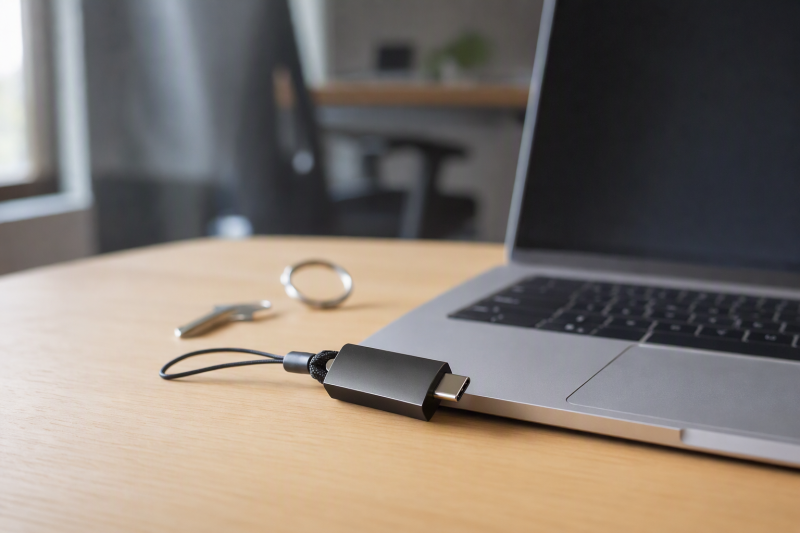
A hardware key is useful only if your accounts accept its protocol and you have a recovery plan. Start by checking each service’s security settings for whether it allows FIDO2/WebAuthn passkeys or security-key two-factor login, or whether work IT requires PIV smart cards or a particular OTP format. Then choose the USB connector your laptop has and decide whether you want NFC for your phone.
These six exact Amazon US keys had active New offers at the time of research. They were not enrolled or tested here. A compatible-looking USB-C plug does not guarantee laptop unlock, account login or enterprise approval. If ports are scarce, our USB-C hub guide can help with desk layout, but check whether your IT policy allows security keys through hubs.
Register a second approved key or recovery method before depending on the first. Never assume losing one key automatically leaves your accounts accessible.Hardware Security Keys Compared
| Image | Product | Details | Check Price |
|---|---|---|---|
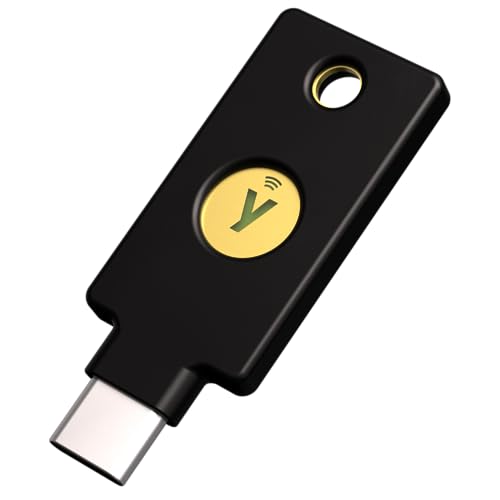 | YubiKey 5C NFC | Connector: USB-C + NFC FIDO: FIDO2/U2F Extra protocols: OTP, OATH, PIV, OpenPGP listed Best fit: Multiprotocol laptop accounts | Check Price on Amazon |
 | Security Key C NFC | Connector: USB-C + NFC FIDO: FIDO2/U2F Extra protocols: No OTP/PIV Best fit: FIDO-only accounts | Check Price on Amazon |
 | Thetis Nano-A | Connector: USB-A FIDO: FIDO2/U2F claimed Extra protocols: TOTP/HOTP claimed Best fit: Small legacy USB-A laptop port | Check Price on Amazon |
 | GoTrust Idem Key C | Connector: USB-C + NFC FIDO: FIDO2/U2F claimed Extra protocols: OTP/PIV claimed Best fit: Enterprise requirements to verify | Check Price on Amazon |
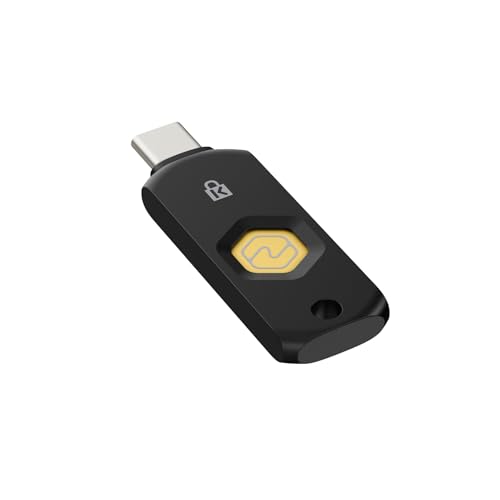 | Kensington VeriMark NFC+ | Connector: USB-C + NFC FIDO: FIDO2/WebAuthn claimed Extra protocols: Not listed here Best fit: USB-C FIDO laptop and phone | Check Price on Amazon |
 | Thetis Pro FIDO2 | Connector: USB-A + USB-C + NFC FIDO: FIDO2/U2F claimed Extra protocols: TOTP/HOTP/PIV claimed Best fit: Mixed-port devices with checked services | Check Price on Amazon |
1. YubiKey 5C NFC — Best Multiprotocol USB-C Choice
The 5C NFC combines USB-C and phone NFC with FIDO2/WebAuthn, FIDO U2F, Yubico OTP, OATH TOTP/HOTP, PIV smart card and OpenPGP support. Yubico’s own series documentation confirms the 5 Series is broader than the FIDO-only Security Key Series. The broader list helps when a work login calls for PIV or an older OTP integration alongside modern web-account protection.
Do not buy the broader protocol list just for status. If every account uses FIDO2, the simpler Security Key C NFC may cover the actual job. Verify your employer’s approved device list and exact login flow. The seller recommends a second key. Enroll that spare before making the first one the only route into important accounts. Our USB-C docking guide helps plan a laptop desk, though key enrollment may require a direct port under some policies.
Our Take Choose 5C NFC only when its extra protocols serve an account or work requirement you have. For FIDO-only laptop and phone login, the simpler Yubico key is easier to justify. Either choice needs a registered spare.
- USB-C and NFC cover common laptop and phone paths.
- Yubico documents FIDO, OTP, PIV and OpenPGP support.
- One device may address both modern and older approved systems.
- Extra protocols offer no benefit to FIDO-only accounts.
- Each enterprise and service flow still needs approval and setup.
2. Yubico Security Key C NFC — Best FIDO-Only Starting Point
This model uses USB-C, NFC, FIDO2/WebAuthn and FIDO U2F. Yubico’s documentation is clear that the Security Key Series is FIDO-only. It does not add the PIV, OATH or OTP functions of a 5 Series device. For accounts that already support a security-key passkey or second factor, the narrower feature set can make the purchase decision simpler.
The listing mentions Google, Microsoft and Apple, but support depends on the specific account, region, device and enrollment mode. Check each service directly rather than trusting a brand list. It also warns that Yubico Authenticator features associated with the extra protocols are unavailable here. If your workplace asks for smart-card login, do not substitute this key merely because both products carry a Yubico mark. Our MacBook Air monitor guide addresses the surrounding USB-C desk, not security-key approval.
FIDO-only is a feature boundary, not a weakness for accounts that need only FIDO2 or U2F.Our Take Security Key C NFC is a simple starting point for a person who has confirmed their important accounts accept FIDO security keys and does not need PIV or OTP. Buy and enroll a backup, and keep recovery instructions accessible offline.
- Clear FIDO2 and U2F purpose from official documentation.
- USB-C for laptops plus NFC for supported phones.
- No Yubico OTP, OATH, PIV or OpenPGP functions.
- Named-account compatibility requires verification in account settings.
- One key alone is an avoidable recovery risk.
3. Thetis Nano-A — Best Small USB-A Laptop Key
The Nano-A is a small USB-A FIDO2 key aimed at a laptop with a full-size USB port. Its listing describes FIDO2/WebAuthn and TOTP/HOTP, and the maker publishes a product page for this exact USB-A version. The size may suit a stationary port, but a laptop moved between bags may be better served by a key you remove and carry. There is no NFC or USB-C connector on this variant.
The seller quotes passkey and OATH storage figures. We did not verify usable capacity or application behavior. Before ordering, confirm that the service accepts a hardware FIDO key and that your laptop’s USB-A port is accessible. A USB-C-only laptop would need an adapter, and an adapter does not create NFC phone support. Our USB-C hub guide covers physical ports, but account enrollment remains a separate test.
Choose the Nano-A for an actual USB-A use case, not because a tiny body sounds universally convenient.Our Take Check Nano-A if your laptop has a known USB-A FIDO workflow. Confirm Thetis’s requirements and the account’s accepted method before considering its claimed storage limits.
- Compact native USB-A connection.
- FIDO2 and OATH modes are listed for this exact model.
- No USB-C or NFC path on this variant.
- Service-by-service capacity and support remain untested.
4. GoTrust Idem Key C — Best Enterprise Requirements to Verify
GoTrust’s listing describes USB-C and NFC with FIDO2/U2F plus OTP, PIV and smart-card modes. It also makes certification and ruggedness claims. The certification and ruggedness claims may appeal to an IT team replacing an approved enterprise key, but the purchase should start from the organization’s precise approved model, firmware and certificate requirements. A marketplace bullet is not evidence that an employer accepts it for Windows login or privileged accounts.
The seller names several cloud platforms and FIDO2 Level 2 certification. We did not independently inspect the certification record for this exact hardware/firmware or test any enrollment. Request the current maker specification and your administrator’s approval before a deployment. If this is for personal web accounts alone, the extra enterprise language may add no practical value. Our shared-desk docking guide helps with the laptop station, not identity-policy enrollment.
Our Take GoTrust is a candidate only after an enterprise team validates its exact specifications and approval path. For personal FIDO-only accounts, start with a simpler confirmed model.
- USB-C, NFC, FIDO and additional protocol support are claimed.
- Seller describes enterprise-oriented PIV and smart-card use.
- Certification and IT approval were not independently verified here.
- Extra functions may be irrelevant to personal accounts.
5. Kensington VeriMark NFC+ — Best FIDO-Centric USB-C Alternative
Kensington’s K64739WW listing positions this as a USB-C and NFC FIDO2/WebAuthn key, with CTAP 2.1 and passkey language. It names Windows, macOS, ChromeOS and mobile operating systems. The USB-C and NFC pairing and the named operating systems make it a possible FIDO-focused alternative for a laptop and phone, but the listing does not establish PIV or OTP support. Do not assume it is interchangeable with a fingerprint VeriMark model simply because they share the brand.
The seller says optional software can help with advanced management and claims FIDO2 L2 and IP68 ratings. The seller’s ratings are not hands-on durability or enrollment results from this guide. Check the exact K64739WW device against the account’s FIDO method and the maker’s current documentation. A managed laptop may block enrollment of unapproved authenticators even when the key is technically FIDO-compatible. Our USB-C docking guide covers the physical laptop setup only.
Our Take Consider VeriMark NFC+ for confirmed FIDO accounts when its exact model is accepted by your service or IT policy. Verify certification and management requirements at the vendor before an organization-wide purchase.
- USB-C and NFC paths are described.
- FIDO2/WebAuthn and CTAP 2.1 are claimed.
- Keychain-ready form is listed.
- No PIV or OTP support established in this listing.
- Exact service and enterprise acceptance require checks.
6. Thetis Pro FIDO2 — Best Dual USB Port Coverage
Thetis Pro combines USB-A, USB-C and NFC in one listed product. The three connectors address a practical hardware problem for someone moving between an older laptop, a newer USB-C machine and a supported phone. Its listing also claims FIDO2/U2F, TOTP/HOTP and PIV certificates. Treat those as separate functions to verify, not a blanket promise that every work account will accept the key.
The seller includes a caveat. Windows Hello login has an Enterprise/Entra requirement in the described path, and some named services are unsupported. Thetis publishes current system requirements and known limitations. Check those pages for your OS and service before enrolling. A dual connector still cannot override an account’s authenticator policy. Our USB-C hub guide can simplify desk wiring, but is not needed solely to attach this dual-port key.
The dual connector solves a physical port mismatch; it does not solve account or Windows-edition restrictions.Our Take Thetis Pro is the most flexible connector choice here on paper. It suits you when you use both USB-A and USB-C and have checked every intended service against Thetis’s limitations.
- USB-A, USB-C and NFC cover several devices.
- FIDO plus additional OTP/PIV modes are claimed.
- Seller calls out some service and Windows restrictions.
- Multi-protocol support requires separate compatibility checks.
- Dual ports do not guarantee laptop sign-in support.
Buying Guide
1. Check Account Protocols Before Buying Hardware
Open each important account’s security settings and record whether it accepts FIDO2/WebAuthn, FIDO U2F, OTP or PIV. The four methods are not interchangeable. Yubico’s official documentation distinguishes its FIDO-only Security Key Series from the 5 Series, which adds older and enterprise protocols. A buyer with only FIDO-capable web accounts may not need the extra functions. A PIV-required work account cannot use a FIDO-only substitute.
Also separate web-account protection from unlocking the laptop itself. Windows, macOS, browser, employer policy and account type may impose different enrollment rules. Thetis’s listing explicitly warns about a Windows Hello Enterprise/Entra path. Try the exact service and device flow during the return window. Do not rely on a generic platform logo in the listing.
2. Match USB Ports and Phone NFC
Most keys here use USB-C, while Thetis Nano-A is USB-A and Thetis Pro offers both. Confirm the port is physically accessible beside a case, dock or other cable. NFC can be convenient for supported phones, but phone operating systems and account apps still decide whether that path works. A USB-C key without NFC cannot gain it through an adapter.
For a travel laptop, consider whether the key is carried separately or left attached. A tiny key can still be lost, and a protruding one can be damaged in a bag. Test a normal sign-in on each device before making it part of the routine. Our USB-C hub guide covers port expansion, but some work policies may demand a direct key connection.
3. Enroll a Spare and Record Recovery
Before switching on a stronger login policy, add at least one backup method accepted by each service. For many accounts, that can be a second security key stored separately. Some services instead specify recovery codes or an administrator process. Follow the account’s current instructions, especially where a lost key could lock out an owner or business operator.
Then test both the daily and backup path without removing the working method prematurely. Recovery is account-specific, not a feature that ships inside a particular key. Keep records of which key is enrolled where without storing secret recovery codes in a public document. Revisit the plan when staff, laptops or services change.
FAQ
Will one hardware key unlock my laptop and every online account?
No. Each login system must support that key and enrollment method. A FIDO2 web account, a managed Windows workstation and a PIV smart-card system can have different requirements. A USB connector or vendor compatibility list cannot make them the same login flow.
List the exact accounts and work policies, then verify each one before purchase. YubiKey 5C NFC has more protocol breadth than Security Key C NFC, but even that does not guarantee approval in a managed organization or unlock every laptop edition.
Is the Yubico Security Key C NFC the same as a YubiKey 5C NFC?
No. Both have USB-C and NFC and support FIDO2/U2F, but Yubico’s Security Key Series is FIDO-only. The 5 Series adds functions such as OTP, OATH, PIV and OpenPGP. The extra protocols help only if your account or employer uses them.
If your use is a few FIDO-capable web services, start with the simpler series. If work IT specifies PIV or another protocol, ask for its approved model and firmware requirements before selecting either key.
What happens if I lose the only security key on an account?
The result depends on the service’s recovery policy and any second method already enrolled. You may have recovery codes or another trusted method, or need administrator assistance. Some accounts can be difficult to recover. Do not wait until a key is lost to learn the answer.
Enroll a spare or approved backup method, store it separately and test it. Keep current recovery instructions for each important account in a secure place. A seller’s recommendation to buy two keys is sensible only after both are actually registered where needed.
Bottom Line
Buy for the account protocol first, the laptop connector second, and the backup plan third. Security Key C NFC is the FIDO-only starting point. YubiKey 5C NFC serves confirmed OTP/PIV needs. Thetis Pro covers mixed physical ports when its service caveats are acceptable. None of the six is a universal login guarantee.