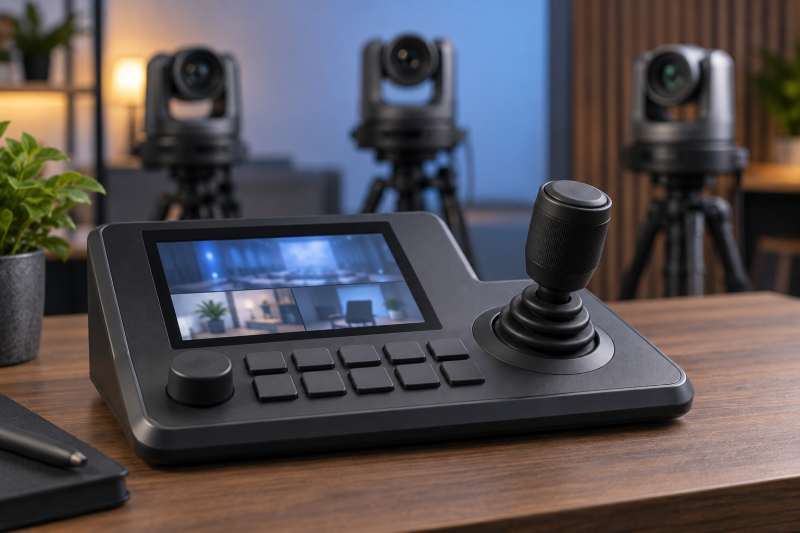
A joystick controller can turn several fixed PTZ cameras into a workable live studio. The hard part is making the console work with the exact control protocol and firmware of cameras already installed, not finding a console with enough buttons. Write down each camera model, network address, video format and required preset before buying a controller. A screen that shows video does not prove that focus, iris and tracking commands will work on every brand.
These five controllers were selected from Amazon US listings with active New offers; availability can change. They include mixed IP/serial control, consoles built around NDI and larger integrated previews. We did not independently test cross-brand commands, joystick feel or latency. Run a proof on one camera with the actual studio equipment before committing to an overhaul of the control desk.
Buy the controller that operates your existing cameras, not the one that lists the largest theoretical camera count.PTZ Joystick Controllers Compared
| Image | Product | Details | Check Price |
|---|---|---|---|
 | PTZOptics SuperJoy | Control: IP and serial listed Preview: LCD control screen Quick access: Basic, Plus, Matrix modes Buyer fit: Mixed PTZ control desk | Check Price on Amazon |
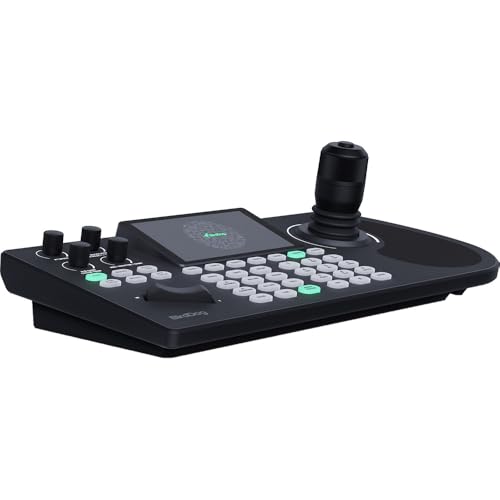 | BirdDog KBD | Control: Check exact camera protocol Preview: Integrated HD display Quick access: Multi-camera screen Buyer fit: BirdDog-led NDI desk | Check Price on Amazon |
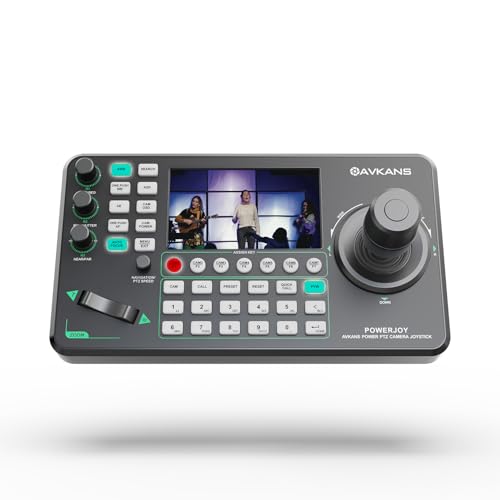 | AVKANS PowerJoy | Control: VISCA over IP, Pelco, serial Preview: 5-inch listing Quick access: Six camera shortcuts Buyer fit: IP/serial small studio | Check Price on Amazon |
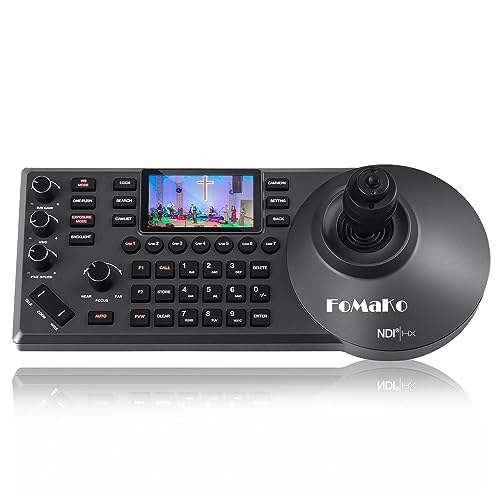 | FoMaKo KC608 Pro | Control: NDI HX2, VISCA, Pelco listed Preview: Built-in LCD Quick access: Seven camera shortcuts Buyer fit: NDI camera desk | Check Price on Amazon |
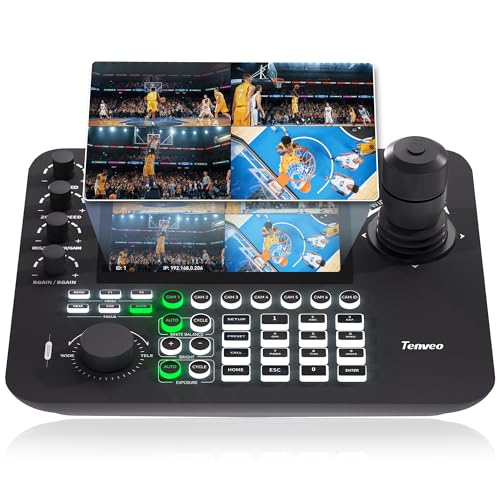 | Tenveo KB300PRO | Control: NDI, VISCA, Pelco listed Preview: 7-inch quad view to 720p30 Quick access: Seven camera shortcuts Buyer fit: On-console four-camera preview | Check Price on Amazon |
1. PTZOptics SuperJoy — Best for a Mixed Control Desk
The exact SuperJoy offer identifies an NDI, IP and serial PTZ joystick controller with an LCD and Basic, Plus and Matrix operating modes. PTZOptics describes it as a multi-brand control surface. It is the first place to look when a studio has cameras from more than one installation era, including network and serial-controlled units. The word multi-brand is not a promise that every camera parameter is supported.
Make a matrix of essential actions: select camera, pan, tilt, zoom, call preset, set speed and change focus. Test those functions on each model. Some cameras may respond to VISCA over IP yet ignore proprietary tracking commands, while others may need serial wiring. Note whether the controller can select the right camera quickly while a hardware encoder sends the program feed.
Do not confuse the console’s LCD with a full production multiview. Confirm whether the operator still needs a separate SDI multiviewer or camera monitor. Label saved presets by shot and camera, then rehearse the recovery path if a camera’s network address changes. A large control desk is helpful only when the operator can use it under live pressure.
Our Take SuperJoy fits a mixed studio when its actual camera commands have been tested one by one. Verify preset recall and focus on every installed model before replacing existing remotes.
- IP and serial control routes listed.
- Multiple operating modes.
- PTZOptics documents multi-brand intent.
- Cross-brand feature depth needs testing.
- LCD does not replace every monitoring surface.
2. BirdDog KBD — Best for an Integrated NDI Preview
BirdDog’s exact KBD offer identifies a PTZ controller with an integrated HD screen. BirdDog’s product page describes a multi-camera display and direct camera functions. It is a good fit when an operator wants to select and frame cameras that use NDI from one surface instead of switching among a keyboard, software window and separate preview monitor. The integrated screen improves awareness but is not itself a production switcher.
Check which of your existing cameras can both display a preview and accept the desired PTZ commands. NDI video discovery and camera control are related but separate capabilities. A controller may show a feed while one advanced camera setting remains unavailable. Test a full camera change, preset recall and manual adjustment with the actual firmware before retiring the old control method.
Plan the network as carefully as the console. Several camera previews add traffic and may need the right switch and IP segmentation. A managed PoE switch can help organize the ports, but it does not prove the controller and cameras share a working discovery path. Keep a separate program monitor for the feed viewers will receive.
An integrated display shows available camera views, but it does not guarantee every cross-brand control or replace a program monitor.Our Take KBD is a strong candidate for an NDI desk built around BirdDog products, where the operator wants a preview on the console. Confirm actual camera control and network behavior before adding mixed-brand PTZ cameras to the plan.
- Integrated HD preview display.
- Multi-camera view described.
- Physical joystick and camera controls.
- Mixed-brand command support needs proof.
- Program feed still needs separate monitoring.
3. AVKANS PowerJoy — Best for Six Quick-Select Cameras
PowerJoy’s exact offer lists a 4D joystick, a 5-inch preview and six camera shortcut keys. Its bullets name VISCA over IP, Pelco control, serial ports and PoE. The controls listed are a practical set for an existing studio with a handful of PTZ cameras and a single operator who must jump among them. A seller-stated maximum of 100 network cameras is less relevant than whether the first six can be selected without hunting through menus.
Test your camera’s version of VISCA or Pelco before assuming compatibility. Pan and tilt may work while exposure, tracking or custom presets do not. AVKANS mentions assignable keys, which could help map common shots, but record the command configuration in a durable studio handoff document. A console is hard to operate if only the person who programmed it knows what each key does.
The 5-inch preview is useful for checking a camera while adjusting it, not for judging several full-resolution feeds at once. Decide whether the operator also needs a multiview monitor. Verify PoE power at the desk and whether the network allows the required camera IP access. A live test on the first camera is cheaper than wiring a whole control position incorrectly.
Our Take PowerJoy makes sense for a small studio that needs fast camera selection and a compact preview. Prove the exact VISCA/Pelco commands on each existing PTZ before relying on the advertised camera maximum.
- Six camera quick-select keys.
- 5-inch preview and 4D joystick listed.
- IP, serial and PoE paths described.
- Advanced commands may vary by camera.
- Single preview is not full multiview.
4. FoMaKo KC608 Pro — Best for an NDI Camera Desk
The KC608 Pro exact offer describes a PoE-powered 4D joystick controller with an LCD preview and seven camera shortcut keys. Its seller lists NDI|HX2 support alongside VISCA, Pelco, serial and IP control. The KC608 Pro can fit a studio built around optical-zoom PTZ cameras whose operator needs to move between shots quickly. Check the precise camera generation and protocol rather than treating an NDI logo as a universal pass.
The seller says the console can control NDI HX, HX2 and HX3 cameras. The seller’s statement does not independently prove every advanced command or preview mode across those camera families. Pair one existing camera, recall a preset, change speed and focus, then test a second brand. FoMaKo also names F1/F2 custom commands. Keep a written key map so a substitute operator can work the desk.
PoE can eliminate a wall adapter if the switch provides the correct power. It also puts console access on the production network, where IP addressing and login policy both apply. Check what the built-in LCD actually shows for the cameras you own. A seller-stated maximum of 255 cameras is not meaningful if the daily operator uses seven direct-selection keys and one preview screen.
The NDI label is a starting point. Test the exact camera’s preset, focus and preview behavior on this console.Our Take KC608 Pro suits a PTZ desk that runs mostly on NDI and needs seven direct camera selections. Its mixed-brand compatibility is a live test, not a fact established by the protocol list alone.
- Seven camera shortcut keys.
- NDI HX2, PoE and serial paths listed.
- Built-in preview and 4D joystick.
- HX-family control claims need a camera test.
- Maximum camera count overstates everyday access.
5. Tenveo KB300PRO — Best for Four-Camera Quad Preview
Tenveo’s KB300PRO offer is distinguished by a 7-inch LCD showing up to four camera previews at once. Its own feature bullets limit the main view to 1080p30 and quad view to 720p30. Those preview limits are enough for framing and shot awareness but are not a statement about the camera’s recorded output. The 4D joystick, seven camera quick selections and seller-listed NDI, VISCA and Pelco protocols make it a candidate for one operator covering several PTZ feeds.
Confirm that all four of your cameras can provide the preview stream this controller needs. The quad display can make it easier to see an idle camera before moving it, but it cannot replace the program output of a switcher. Test switching from quad to a selected camera and back during a rehearsal. Watch for lag, dropped previews and accidental control of the wrong camera.
The listing names PoE and serial as well as IP connectivity. Build a wiring map for the actual studio and check software/firmware support for features such as auto-tracking commands. Tenveo says some tracking control needs a firmware upgrade. Do not treat the upgrade as installed until it is verified on the delivered unit. A wireless video link can add more latency to an operator’s preview path. Test the full chain.
Our Take KB300PRO is the useful choice when the operator needs a four-camera glance on the controller itself. Verify the previews and selected-camera commands under the actual studio network load.
- 7-inch four-camera preview.
- Seven quick camera selections.
- PoE, IP and serial control listed.
- Quad view is limited to 720p30 by seller.
- Tracking control may need updated firmware.
Buying Guide
1. Audit the cameras you already own
Write down exact model and firmware for every PTZ camera. Record whether it accepts VISCA over IP, NDI control, Pelco or serial commands. A product page’s broad protocol list is not proof that every feature works. Test pan, tilt, zoom, speed, preset store/recall and focus on each camera. Add iris and tracking only if the actual camera exposes them.
Separate preview from control. A controller may receive an NDI preview while a specific command fails, or it may control a serial camera without showing its video. Make a two-column checklist for each camera: visible preview and working commands. Keep an independent program monitor for the feed the audience sees. Do not replace the existing control path until the new console passes a full production rehearsal.
2. Plan network, power and serial wiring
IP PTZ control depends on predictable addressing and access. Assign stable camera and controller addresses, document approved credentials and confirm that the control network permits the required discovery and ports. Check PoE budget for both the controller and cameras. A managed PoE switch can help isolate production traffic, but it cannot repair a mismatched command protocol.
Serial control needs a physical map. Check connector type, pinout, termination and the camera’s chosen serial mode before buying cables. RS-232, RS-422 and RS-485 are not interchangeable merely because the controller lists all three. Label each run and test one camera before adding the rest. Keep a safe fallback remote or app if the console or network loses power during an event.
3. Rehearse the operator’s real sequence
Direct-selection keys count for more than a theoretical camera maximum. Ask the operator to switch among the cameras used during a typical scene, call a safe wide preset and make one slow manual correction. Count accidental selections and the time spent looking at menus. A display is useful only if its size and layout help this sequence rather than distracting from the program feed.
Save a recovery routine. Document preset names, control speed, camera IPs and a way to restore a disconnected unit. Have a second person follow the instructions without the installer present. A working PTZ desk is repeatable across operators, not dependent on one person’s memory.
FAQ
Will an NDI joystick controller work with any NDI camera?
Not necessarily. NDI can describe a video transport while camera control depends on model, firmware and supported commands. A console may discover the video and still lack a particular focus or tracking function. Seller claims about NDI HX variants need confirmation with your exact camera.
Pair one camera and test preview, pan/tilt/zoom, presets and focus. Then repeat for every distinct model in the studio. Record what works and keep a fallback control path for what does not.
Does a built-in preview screen replace a multiviewer?
Usually not. The screen can help frame and select cameras, but it may show limited resolution or only one view. Tenveo explicitly lists a 720p30 quad-preview limit. The controller screen may not display the final switched program or its audio.
Keep the required production monitor or SDI multiviewer for its own job. Check how the operator watches program, preview and camera controls at the same time during an actual cue sequence.
How many cameras should a small studio controller support?
A controller should support the cameras currently in use plus a realistic expansion. A seller may advertise control of dozens or hundreds, but an operator still needs direct access to the cameras used on each show. Six or seven shortcut keys can be more useful than a larger menu-based maximum.
Map the show rundown to camera buttons and presets. If expansion is planned, test how the next camera will be added and labeled. Do not pay for an unneeded number while leaving protocol compatibility unproved.
Bottom Line
PTZOptics SuperJoy is the place to start a mixed IP/serial shortlist. Go with BirdDog KBD for an integrated preview and AVKANS PowerJoy for six direct selections. FoMaKo KC608 Pro is the pick for an NDI desk with seven shortcuts, and Tenveo KB300PRO is the pick when you want four previews on a larger screen. Choose the console that proves the commands your cameras need.