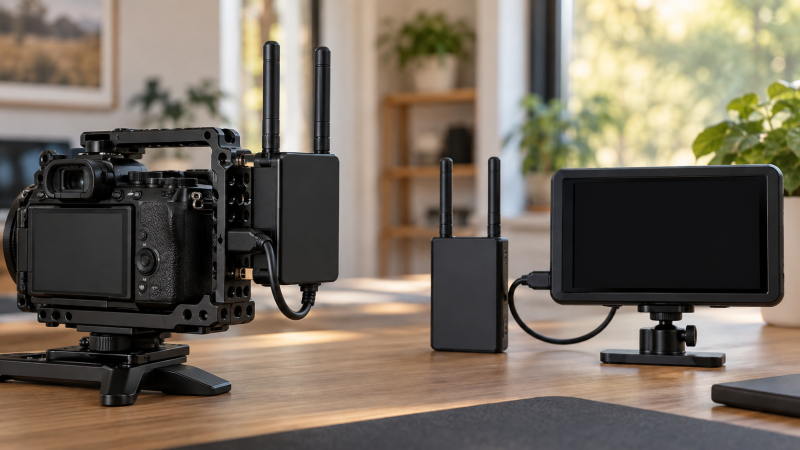
A wireless video kit sends a camera feed to a separate monitor without dragging a long HDMI or SDI cable across the set. Buy the transmitter and receiver as one exact kit, then match its camera input, receiver output and frame-rate limit to your signal. A long advertised range means little if the camera format is unsupported or the receiver cannot feed the monitor.
These five transmitter/receiver kits were selected from Amazon US listings with active New offers; availability can change. They cover 1080p computer streaming, 4K30 monitoring, 4K60 HDMI and established monitor ecosystems. Listed distances and delays are test-condition claims, not promises in a crowded room. First confirm your camera’s clean output format, the monitor’s input and a practical power source at both ends.
Choose a complete transmitter/receiver link around the camera’s output format and the monitor’s input before comparing advertised range.Wireless Video Transmitter Kits Compared
| Image | Product | Details | Check Price |
|---|---|---|---|
 | Hollyland Pyro S TX/RX | Listed signal: Up to 4K30 HDMI; 1080p60 SDI Inputs/outputs: HDMI and SDI Monitor route: Receiver plus compatible extras Buyer fit: Multi-view on-set monitoring | Check Price on Amazon |
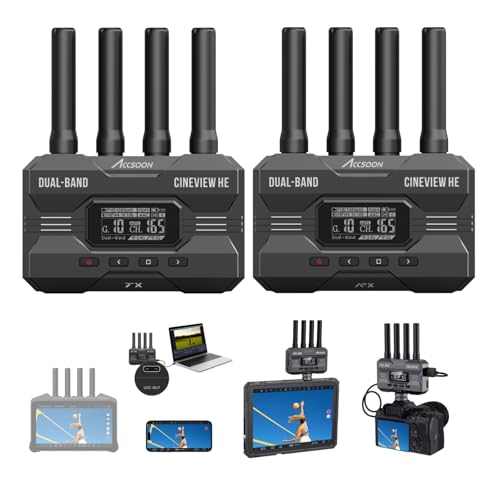 | Accsoon CineView HE TX/RX | Listed signal: Up to 1080p60 Inputs/outputs: HDMI; USB-C UVC on receiver Monitor route: Receiver, app or computer Buyer fit: Laptop live-stream feed | Check Price on Amazon |
 | Hollyland Mars 4K TX/RX | Listed signal: Up to 4K30 HDMI Inputs/outputs: HDMI and SDI Monitor route: Receiver and app devices Buyer fit: Shorter-range hybrid camera link | Check Price on Amazon |
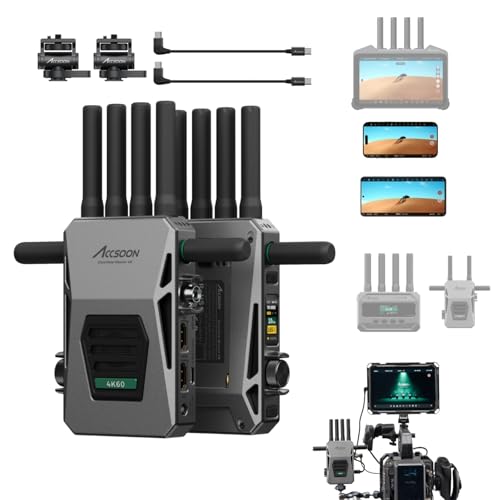 | Accsoon CineView Master 4K TX/RX | Listed signal: Up to 4K60 HDMI Inputs/outputs: HDMI and SDI Monitor route: Receiver and compatible app devices Buyer fit: 4K60 camera output | Check Price on Amazon |
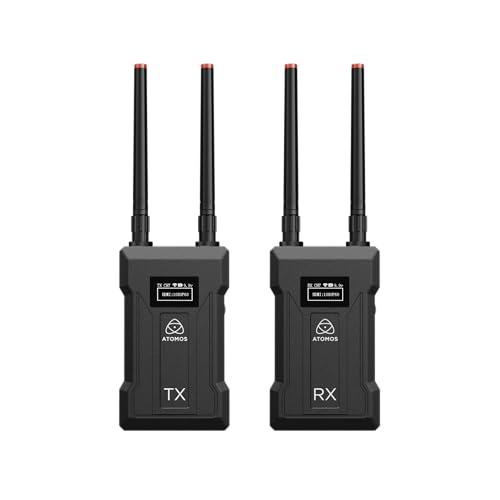 | Atomos TX 4K/HD TX/RX | Listed signal: Up to UHD 4K30 Inputs/outputs: HDMI/SDI; HDMI loop on TX Monitor route: Atomos receiver or compatible monitor Buyer fit: Atomos monitoring system | Check Price on Amazon |
1. Hollyland Pyro S — Best Flexible On-Set Link
This exact Pyro S offer contains one transmitter and one receiver with HDMI and SDI connections. The listing describes 4K30 by HDMI and 1080p60 SDI operation, automatic hopping between 2.4GHz and 5GHz, and a route to more compatible receivers or app viewers. That combination is useful when a camera operator, director and client need separate views of the same shot.
Check the signal path port by port. A 4K30 HDMI claim is not a blanket 4K SDI claim, and a camera sending a format the receiver cannot output may fall back or show no picture. The listing’s 1,300-foot line-of-sight range and 50ms delay are claimed under favorable conditions. Walls, people, other radios and the chosen mode can change both. Do a range and latency rehearsal at the location rather than building a focus-pulling plan from a product title.
The Pyro family has different transmitters, receivers and monitors. Confirm the exact unit in this 1TX+1RX offer before adding a second receiver. A mirrorless camera rig may offer battery power through a suitable cable, but check both units’ input voltage and current rather than assuming a generic D-Tap lead fits.
Our Take Choose Pyro S when a small crew needs a flexible camera-to-monitor link with mixed connectors. Validate your exact frame rate, paired receiver and expected room conditions before relying on range figures.
- Exact 1TX+1RX kit.
- HDMI and SDI interfaces listed.
- Compatible multi-view options described.
- 4K30 HDMI and 1080p60 SDI limits differ.
- Claimed range needs location testing.
2. Accsoon CineView HE — Best Computer Streaming Output
The CineView HE exact offer names one transmitter and one receiver with a USB-C UVC output on the receiver. That output is the key reason to choose it. A compatible computer can receive a video feed over a suitable USB-C cable for streaming or capture software. The listing specifies video up to 1080p60 and a dual-band 2.4GHz/5GHz wireless link. It also describes a mix of receiver and phone viewers.
UVC is a computer-input feature, not a claim that every USB-C monitor can display the feed directly. Check whether your laptop and chosen software detect the receiver at the requested resolution and frame rate. A USB-C dock may carry the signal to a host, but adding a dock does not fix an unsupported UVC mode. Test the full route before a live stream.
Accsoon lists a long ideal line-of-sight range and low latency. Those claims are not field results for this article. Signal reliability can change with nearby Wi-Fi, body blocking, battery condition and antenna placement. If the receiver is far from the operator, plan an independent return audio path. A wireless video picture alone does not establish synchronized two-way talkback.
Use CineView HE’s receiver UVC output when the destination is a computer, not as a substitute for checking the monitor’s physical video input.Our Take Pick CineView HE when the job is getting a wireless camera feed into a laptop over UVC. It is less appropriate if your camera and monitor workflow specifically requires 4K or an SDI connection.
- Receiver-side UVC output listed.
- 1080p60 and dual-band link specified.
- TX/RX pair included in exact offer.
- No 4K output established for this kit.
- USB-C UVC needs a compatible host and cable.
3. Hollyland Mars 4K — Best Shorter-Range 4K Kit
The Mars 4K exact offer is another one-transmitter, one-receiver kit with HDMI and SDI paths. Its listing specifies up to 4K30 through HDMI and 1080p formats through SDI. It describes a 450-foot line-of-sight test range, shorter than Pyro S’s headline number, and options for app viewers. A team working within one room or a nearby interview area may not need the longer theoretical reach of another system.
Frame-rate support depends on the connector. The listing names decimal-point SDI rates such as 23.98 and 59.94 fps, a useful detail for production gear that expects those standards. Confirm that the camera output, wireless link and monitor input agree on a specific rate. Do not treat the 4K in the product name as proof that its SDI route carries 4K. A teleprompter may also need a separate HDMI output. Check the camera’s available outputs before assigning one to the transmitter.
The listing gives several power methods, including NP-F-type battery and DC. It explicitly warns that its USB-C power route does not support QC/PD negotiation and gives a fixed 5V requirement. The requirement is relevant if the rig otherwise uses a V-mount pack. Match the required voltage and cable, and do not assume a high-watt USB-C PD port will automatically supply a valid mode.
Our Take Choose Mars 4K for a known HDMI/SDI production path in a modest working area. The exact connector and power limits are more important than the 4K label or a lab range number.
- Exact 1TX+1RX HDMI/SDI kit.
- 4K30 HDMI and decimal-point SDI rates described.
- Several power methods listed.
- 450-foot line-of-sight range is a listing claim.
- USB-C power does not use QC/PD according to the offer.
4. Accsoon CineView Master 4K — Best Listed 4K60 HDMI Link
The Master 4K TX/RX offer lists HDMI transmission up to 4K60 and a tri-band 2.4GHz, 5GHz and 6GHz system. Its seller also describes SDI/HDMI connection options and additional compatible app viewers. If a camera sends 4K60 and the destination monitor accepts it, the CineView Master is the only selected kit with that specific listed HDMI ceiling. Check the exact receiver output and mode rather than assuming all ports deliver 4K60.
The title advertises a very long distance and very short delay, but the feature text ties its distance figure to unobstructed 1080p at a low bitrate. The distance figure is not evidence for 4K60 over the same range. Radio rules and allowed 6GHz use can vary by location, so confirm the product’s regional configuration before relying on tri-band operation. For a small recording session, a simpler short-range system may be easier to manage.
This kit also advertises a wired iOS monitoring route through a USB output. Check device and app compatibility by model. A USB-C plug does not prove support for every phone or tablet. Bring the exact camera and monitor to a rehearsal, record the link mode and power source, and use a wired HDMI/SDI fallback for any shot that cannot tolerate a lost feed.
Do not read a long-distance 1080p test claim as a guaranteed 4K60 range. Verify the selected format and local radio conditions.Our Take Buy CineView Master 4K if 4K60 HDMI and a configurable multi-view path are requirements for the job. Test the output mode and the distance on your own set before depending on it.
- 4K60 HDMI listed on the exact kit.
- Tri-band design and extra monitoring routes advertised.
- Headline distance was specified under different test settings.
- 6GHz and app-device fit need region and model checks.
- More controls to configure than a simple one-screen link.
5. Atomos TX 4K/HD TX/RX — Best Atomos Monitoring Route
The exact Atomos offer says transmitter and receiver set, rather than a transmitter alone. Its listing names UHD 4K30, HDMI and SDI inputs, an HDMI loop output on the transmitter, and HDMI/SDI outputs on the receiver. Atomos also describes pairing its TX with its RX unit or a compatible Shinobi RX monitor. The included receiver in this offer is the important purchase boundary. Confirm the box contents at checkout.
The HDMI loop can feed a camera-side screen while the wireless receiver feeds a separate client monitor, subject to the exact format both displays accept. It does not automatically solve a camera with only one HDMI output if the camera’s own menu disables that output while recording. Test the camera’s clean-feed behavior, the loop output and the monitor’s accepted signal together. A portable monitor usually has different inputs from a video field monitor, so confirm the destination’s HDMI/SDI connection before ordering.
The Atomos listing mentions L-series batteries, DC and USB-C power choices. It gives a stated ideal range, not a measured set result here. This system makes the most sense for a team already using a compatible Atomos monitoring path. If the only need is a 1080p feed to a laptop, CineView HE is the more direct choice for that job.
Our Take Choose Atomos TX 4K/HD as a paired kit when its receiver and your monitor fit an existing Atomos workflow. Verify box contents and power accessories before assuming a separately described Atomos device is included.
- Exact listing says transmitter and receiver set.
- HDMI loop on TX and HDMI/SDI on RX listed.
- UHD 4K30 route identified.
- Compatible Atomos monitor is not the same as an included monitor.
- Ideal range and latency need real-set verification.
Buying Guide
1. Trace the exact camera-to-screen signal
Write down the camera’s clean HDMI or SDI output format. Include the resolution, frame rate, color mode and connector. A unit advertised for 4K30 HDMI may carry only 1080p by SDI. Check what the receiver can output at the monitor end, not merely what the transmitter accepts. If a monitor displays black or a fallback resolution, change only one format setting at a time and record the working path.
Confirm the kit includes both radios. Search results mix transmitter-only units, receiver-only units, combined monitors and full pairs. This selection uses exact TX/RX offers. Verify included power adapters, antennas, mounting hardware and cables before ordering. A camera cage can hold the transmitter, but avoid pulling on the HDMI connector and check clearance through the camera’s movement.
2. Treat range and delay as setup variables
Line-of-sight numbers describe controlled conditions. People, walls, metal stands, neighboring Wi-Fi and antenna orientation can reduce distance. A long advertised range often uses a different bitrate or resolution than the maximum video mode. Place the receiver where the operator stands, test the full route, and keep a wired backup if a missed feed would stop a paid shoot.
Acceptable latency depends on the job. A client preview can tolerate more delay than focus pulling or live switching. The camera, transmitter, receiver, monitor and any app each add processing time. A seller’s single millisecond figure is not the end-to-end delay for your setup. Practice the intended pan or action against the viewed image before using the wireless screen for timing decisions.
3. Power both ends without surprises
The camera-side transmitter and monitor-side receiver need separate power plans. Check allowed voltage, connector and current for each unit. An NP-F battery, USB-C supply and DC cable are not interchangeable merely because a kit lists all three. Mars 4K’s exact listing warns against assuming QC/PD negotiation from its USB-C socket. Match the supplied cable and its fixed 5V requirement.
Test operating time with the chosen signal mode. A compact V-mount pack can help power the camera side if the correct regulated output exists. At the receiving desk, a UPS for an editing workstation does not keep a battery-powered field monitor alive unless its own power supply is also connected. Label both power routes before packing.
FAQ
Can a wireless transmitter send 4K to any monitor?
No. The camera output, transmitter input, wireless mode, receiver output and monitor input must support the same format. Some selected kits list 4K by HDMI but only 1080p by SDI. A monitor that accepts only 1080p may display a converted signal if the kit supports it, but that behavior must be verified on the exact units.
Set one known camera format and check the entire link before changing frame rate or color settings. Do not infer that a product name containing 4K means every output connector and every paired receiver supports that mode.
Is the advertised wireless range realistic inside a building?
It is a best-case claim, not a guarantee for a building. Test conditions often assume clear line of sight and little interference. A wall, moving crew member or crowded radio channel can change reliability well before the printed maximum distance.
Walk the receiver through the actual operating area and watch for dropouts while the camera records at the intended format. Keep antennas clear of metal or bodies and plan a cable fallback for a critical monitor feed.
Can I stream directly to a laptop from these kits?
Only through a supported computer-input route. CineView HE’s exact offer lists a receiver-side USB-C UVC output. Other kits may need a compatible capture device or a specific phone/app workflow. An HDMI output alone cannot usually be plugged into a laptop’s HDMI port, because that port is commonly an output.
Check the computer’s operating system, UVC detection and streaming software before a live event. Use a short local test with the exact cable, resolution and audio path. A visible preview does not by itself prove that recorded sound and picture remain synchronized.
Bottom Line
Hollyland Pyro S is the flexible HDMI/SDI crew option. CineView HE serves a laptop UVC workflow. Mars 4K fits a shorter-range hybrid setup, CineView Master 4K is the listed 4K60 HDMI choice, and Atomos TX 4K/HD fits a matching Atomos receiver/monitor system. Test the exact camera-to-screen format and power path before relying on any range claim.