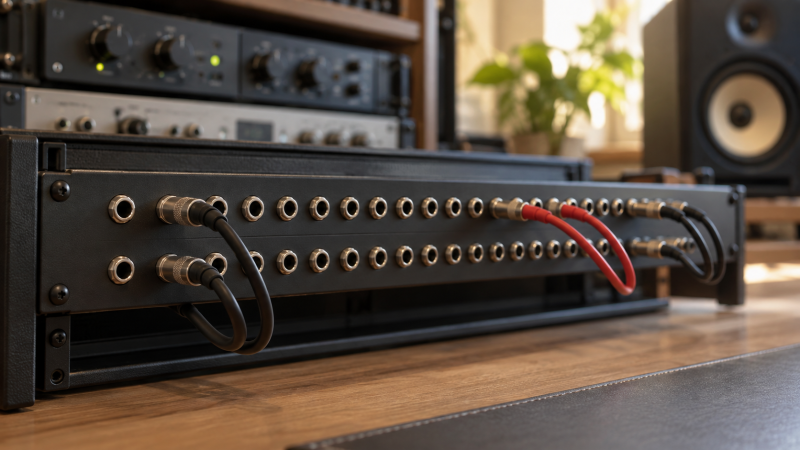
A patchbay can put the inputs and outputs of compressors, effects and audio interfaces at the front of a rack. It does not process or boost the signal. Its job is to let you change a line-level route without crawling behind the desk. Plan the default signal path before choosing a normalization switch. With the right bay, the gear you use most is already connected when nothing is patched.
These five balanced quarter-inch TRS patchbays use different configuration methods: front switches, rear buttons, rear three-way switches or modular cards. Their manufacturer layouts show 48 front jacks arranged in 24 vertical pairs; check each manual for how its pairs route. Check rack depth, cables and the level of every connected device before ordering.
Wire equipment outputs to the rear top row and destination inputs to the rear bottom row only after documenting the intended default route.Balanced TRS Patchbays Compared
| Image | Product | Details | Check Price |
|---|---|---|---|
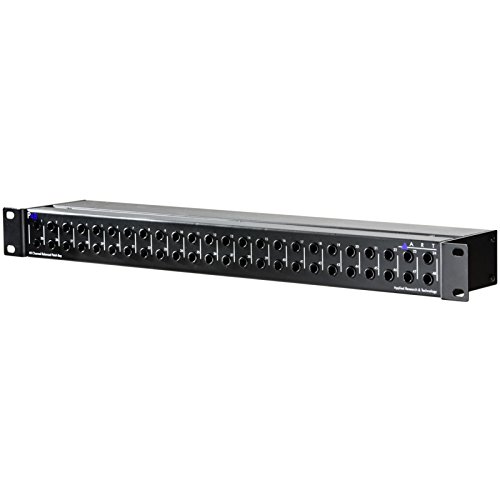 | ART P48 | Format: 48 balanced TRS front points Routing: Normal / half-normal button Control access: Rear per pair Buyer fit: Straightforward two-mode bay | Check Price on Amazon |
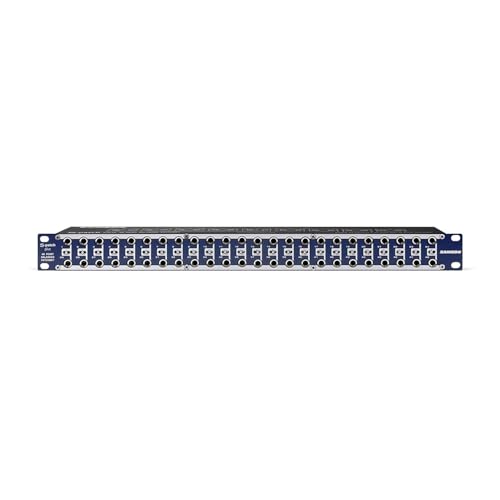 | Samson S-Patch Plus | Format: 48 balanced TRS front points Routing: Normal / half-normal / thru Control access: Front switches Buyer fit: Frequent per-pair changes | Check Price on Amazon |
 | Black Lion Audio PBR TRS | Format: 48 balanced TRS front points Routing: Normal / half-normal buttons Control access: Rear buttons Buyer fit: Two-mode gold-plated layout | Check Price on Amazon |
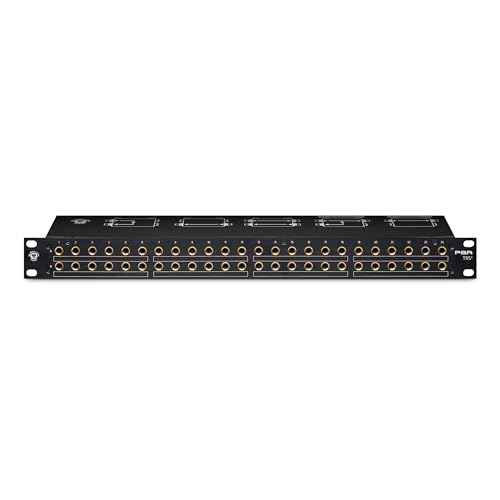 | Black Lion Audio PBR TRS3 | Format: 48 balanced TRS front points Routing: Normal / half-normal / thru Control access: Rear three-way switches Buyer fit: Three-mode rear-set layout | Check Price on Amazon |
 | Neutrik NYS-SPP-L1 bundle | Format: 48 balanced TRS front points Routing: Ships half-normal; flip PC cards Control access: Internal modular cards Buyer fit: Modular setup with DB25 snake | Check Price on Amazon |
1. ART P48 — Best Simple Two-Mode Bay
ART lists the P48 as a 48-point balanced quarter-inch patchbay. The manufacturer’s page says a button on each channel changes between normal and half-normal operation without flipping a circuit board. Normal and half-normal are enough for a common hardware desk. A default output-to-input route can remain connected when no front patch cord is inserted, and a half-normal connection can also offer a non-interrupting tap where appropriate.
The limitation is mode choice. ART documents normal and half-normal for this unit, not the full three-mode set offered by the Samson S-Patch Plus. If several channels must behave as pure independent thru pairs, make that requirement explicit before buying. A front cord can still create a patch, but the default rear-to-rear behavior will be governed by the selected normalization.
Use this bay for balanced line-level connections between an audio interface and outboard processors. Do not put a microphone that needs phantom power through an unspecified TRS route simply because the jack fits. Plan cable length to the back of the rack and label each top/bottom pair. The patchbay itself will not identify a miswired compressor return.
Our Take Pick ART P48 when your line-level desk needs stable default paths and occasional non-interrupting taps. Check whether two routing modes cover every planned hardware insert before wiring the rack.
- 48 balanced TRS front points.
- Per-channel normal/half-normal choice.
- No circuit-card flipping for those two modes.
- No dedicated thru mode stated.
- Routing plan still needs careful labels.
2. Samson S-Patch Plus — Best Front-Access Routing Changes
Samson specifies the S-Patch Plus as a 48-point balanced TRS patchbay with a three-position switch for each vertical pair. You set each pair to normal, half-normal or thru with the switch. The notable convenience is location. Samson puts those miniature switches on the front, so a user can change a pair’s default connection without removing the bay from the rack or reaching around it.
Front access is valuable when the desk changes often. A compressor loop that normally sits between an interface output and input can be set to normal, while a separate processor can remain thru until patched. Half-normal is useful when you want to take a signal from a front jack without breaking its default path. Mark the switch settings in a diagram so a casual change does not silently alter tomorrow’s session.
Front switches are also a control someone can bump. If the rack is in a shared room, label the switch positions and review them during soundcheck. The Black Lion PBR TRS3 offers the same three routing categories at the rear instead. Neither bay substitutes for a monitor controller when the job is changing speaker pairs at a desk.
Use front-access routing only with a written default map, because otherwise the most convenient switch is also the easiest to set wrong.Our Take Choose S-Patch Plus when routing modes change between sessions and front access saves repeated rack work. If your topology rarely changes, rear-set controls may stay out of the way.
- Normal, half-normal and thru per pair.
- Switches reachable from the front.
- Balanced quarter-inch TRS layout.
- Front controls can be changed accidentally.
- 48 points still represent only 24 vertical pairs.
3. Black Lion Audio PBR TRS — Best Rear-Set Two-Mode Layout
Black Lion describes the PBR TRS as a 48-point quarter-inch TRS patchbay with rear mode-switching buttons. Its documentation covers normal and half-normal settings. The maker lists gold-plated contacts and included labeling material. The contacts and labeling material are construction and package claims, and no contact-noise or longevity tests were performed for this guide.
Rear settings make sense in a room whose default route is decided once, then left alone. Place the bay where the back remains reachable during initial wiring, and photograph the button state before pushing the rack into place. A two-mode bay is enough when every pair is either a breaking normal or a half-normalled tap. If a group of channels needs an explicit thru state, consider the PBR TRS3 rather than assuming the simpler PBR TRS has that third choice.
The PBR TRS overlaps the ART P48 on core routing modes. The buyer decision is rear hardware, contact/material preference and what labeling method suits the rack, not a proven sound-quality ranking. Cable quality and sound level are also factors, but neither bay makes an unbalanced TS device balanced just because the patch jack accepts a TRS plug. Keep the connected recording interface in the wiring map.
Our Take Pick PBR TRS for a mostly fixed line-level rack that wants rear-set normal/half-normal operation. Its gold-plated connectors are a published construction detail, not proof of an audible improvement here.
- 48 balanced TRS front points listed.
- Rear buttons keep mode setup out of the front patch area.
- Custom labeling material listed.
- No third thru setting documented for this model.
- Rear access is awkward after rack installation.
4. Black Lion Audio PBR TRS3 — Best Rear Three-Mode Control
The PBR TRS3 keeps the 48-point balanced TRS format but adds rear-mounted three-way mode switches. Black Lion lists normal, half-normal and thru for each vertical module. Thru is the direct answer to the most important limitation of the simpler PBR TRS. A channel can be a straight front-to-back route with no default top-to-bottom link.
Thru mode is useful for outboard gear whose input and output should be available at the front without a permanent insert into the main recording chain. Normal mode keeps a regular interface-to-processor route connected until a front patch changes it. Half-normal permits a tap without interrupting the default. Test each example with low-level audio before relying on the diagram. Knowing how the top and bottom jacks behave is more useful than memorizing mode names.
Rear control is a tradeoff. It protects a stable rack layout from casual front-panel changes, but a major reconfiguration requires access behind the equipment. Black Lion publishes a 96-connector total when counting both sides, which is consistent with 48 front points plus corresponding rear sockets. The total is not 96 independent audio channels. For someone who adjusts modes every week, S-Patch Plus gives easier access.
Count a vertical top/bottom pair as one configurable routing module, then write down what each three-way switch does in your rack.Our Take Choose PBR TRS3 for a fixed rack that needs all three normalling states but rarely changes them. Its rear switches are a sensible match for planned, stable hardware chains.
- Normal, half-normal and thru settings.
- Rear switches protect a stable configuration.
- 48 front points for line-level TRS routing.
- Mode changes need rear rack access.
- More configuration choice than a simple two-mode desk needs.
5. Neutrik NYS-SPP-L1 Bundle — Best Modular Grounding Plan
The exact Amazon offer pairs the Neutrik NYS-SPP-L1 48-point TRS patch panel with a DB25-to-TRS snake. Neutrik describes a modular panel that is one rack unit tall whose jack PC cards can be flipped to change a channel’s default normalling. Its standard delivered arrangement is half-normalled at the bottom row. The maker also documents per-channel grounding-clip configurations.
The Neutrik bundle is the hands-on choice for someone wiring a rack once and wanting the cards and grounding scheme explicit. Flipping a card is more involved than moving a Samson front switch. The extra effort also reduces the chance that a casual front-panel touch changes the default path. Photograph each module before the rack is closed and keep spare labels where a future repairer can find them.
The bundled DB25-to-TRS snake is useful only if your interface or outboard gear has the matching DB25 pinout. Do not assume all DB25 audio ports use the same wiring convention, and verify the exact cable specification in the current listing. An audio interface with multiple outputs may benefit from such a harness, but a small two-channel desk may simply accumulate unused cable.
Our Take Buy this Neutrik bundle if modular routing and the included snake match a known rack plan. Verify DB25 pinout and the current offer before treating the cable as a ready-to-use connection.
- 48-point modular balanced patch panel.
- Documented channel grounding choices.
- Exact offer includes a DB25-to-TRS snake.
- Card flips take more setup work than switches.
- Bundle cable is useful only with compatible pinout.
Buying Guide
1. Draw the default signal path before buying
Start with the gear that should connect when no patch cable is in front. Put each processor output, interface return and monitor feed on paper. A normalled pair can maintain that default route until a front plug interrupts it. Mark the top and bottom row destinations explicitly.
The manufacturer layouts shown here pair 48 front jacks into 24 vertical routes. Stereo hardware often consumes two pairs, one for left and one for right. A 48-point bay therefore does not have room for 48 stereo devices. Leave enough pairs for the insert loops and spare routes you use.
2. Choose normal, half-normal or thru intentionally
Normal connects a default top-to-bottom path that a front patch can replace. Half-normal leaves the default path available when the appropriate front jack is tapped. Thru removes that default relationship so top and bottom act as separate front-to-rear access points.
Read the model’s own jack diagram. A label like “half-normal” is not a substitute for confirming which front jack interrupts which rear connection. The Samson S-Patch Plus and PBR TRS3 both offer three states, but their switches are on different sides of the rack.
3. Keep the electrical job within the patchbay’s scope
These manufacturers describe passive, balanced TRS line-level patchbays. They will not create gain, repair a weak source or turn an unbalanced TS device into a balanced output. Keep the electrical specs of each connected processor and audio interface in the wiring sheet.
Do not route phantom-powered microphones through an unverified plan. The mechanical presence of TRS jacks does not establish safety for every microphone/preamp arrangement. Follow the hardware manuals for any special signal, and test an ordinary line-level pair first. Keep a monitor controller on its own documented speaker path.
4. Budget cables, labels and rack access
Every rear connection still needs a cable. A patchbay can make front changes fast but can double the number of short rack interconnects you have to buy and label. Measure rack depth and cable bend room, especially when choosing a rear-switch model.
A label map is as useful as another feature. Number the front pair, name the rear source and destination, mark normalling state and keep a photo of the rear panel. For a larger MIDI synth desk, keep MIDI routes on a separate map. A TRS audio bay is not a MIDI router.
FAQ
Does a 48-point patchbay handle 48 stereo devices?
No. Forty-eight front points generally form 24 top/bottom routing pairs. A stereo left/right circuit often uses two such pairs, so the usable device count depends on how many input and output paths each piece of hardware needs.
Count the jacks and planned rear cables, not the marketing point total. If you use a compressor with separate input and output access, include both paths in the diagram before ordering a second rack unit.
What is the difference between normal and half-normal?
Both create a default connection between a pair’s rear top and bottom sockets. With half-normal, an appropriate front tap can take the source signal while the default connection continues. A fully normalled path is designed to break or replace that default when patched at the designated point.
The exact jack behavior depends on the bay and which front socket you use. Follow its diagram and test with a quiet line signal. Do not assume a copied rack template has the right mode for your interface return.
Can I connect a microphone or guitar directly to one of these bays?
Do not assume it is appropriate. These selected products are balanced TRS patchbays for the planned line-level processing desk. Microphones with phantom power and high-impedance instruments have different electrical requirements, and the bay does not add a preamp or DI circuit.
Check the source, destination and manual before wiring those signals. A guitar recording interface handles instrument input in a different part of the signal path. Keep unsafe or untested routes off the patchbay map.
Bottom Line
Start with ART P48 if two normalling modes cover a steady rack. S-Patch Plus suits frequent mode changes. PBR TRS keeps two-mode setup at the rear, while PBR TRS3 adds thru. Choose the Neutrik bundle for modular wiring when its DB25 snake fits your equipment.