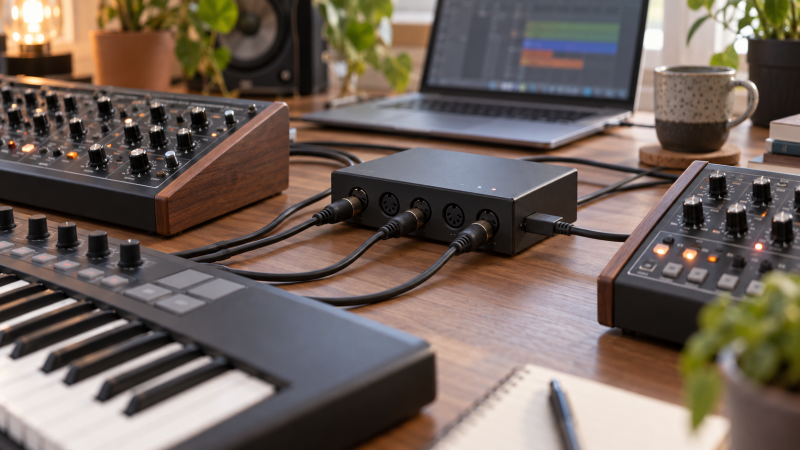
A growing synth desk runs out of MIDI routes before it runs out of sounds. One keyboard may need to drive several sound modules. Another device must send clock back to the DAW. A USB-only controller may have no five-pin DIN socket at all. Count actual input and output directions before counting the word “ports.” An eight-socket interface whose sockets can switch direction is not the same as one with eight inputs and eight outputs ready at once.
These five interfaces were selected from Amazon US listings with active New offers; availability can change. They cover compact USB-host bridging, a network-capable four-by-four interface, two direction-flexible DIN routers and a larger network hub. MIDI carries control messages, not the audio coming out of your synth. For recording sound, you still need an audio interface and the right audio cables.
Sketch every DIN OUT-to-IN cable and every USB-only controller first. Then you can tell whether you need fixed directions, flexible sockets or a USB-MIDI host.Multiport USB MIDI Interfaces Compared
| Image | Product | Details | Check Price |
|---|---|---|---|
 | CME H4MIDI WC | DIN MIDI: 2 in / 2 out USB role: USB-A class-compliant host; USB-C client Routing: Standalone and computer; optional hub Buyer fit: USB-to-DIN bridge | Check Price on Amazon |
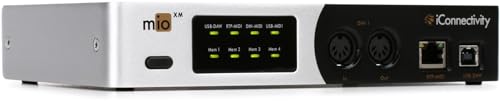 | iConnectivity mioXM | DIN MIDI: 4 in / 4 out USB role: 4 USB-MIDI host reservations Routing: Ethernet RTP-MIDI; presets Buyer fit: Small hybrid synth desk | Check Price on Amazon |
 | ESI M4U eX | DIN MIDI: 8 auto-direction sockets USB role: USB computer link; 3-port data hub Routing: Standalone thru/merge modes Buyer fit: Flexible DIN-only desk | Check Price on Amazon |
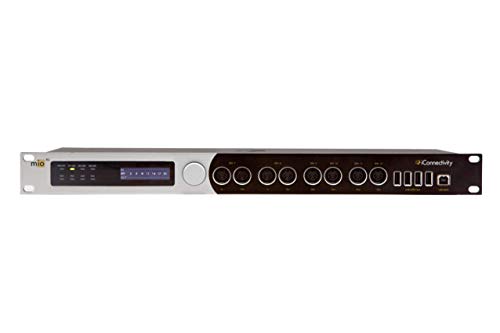 | iConnectivity mioXL | DIN MIDI: 8 in / 12 out USB role: 10 USB-MIDI host reservations Routing: Ethernet RTP-MIDI; presets Buyer fit: Large networked synth room | Check Price on Amazon |
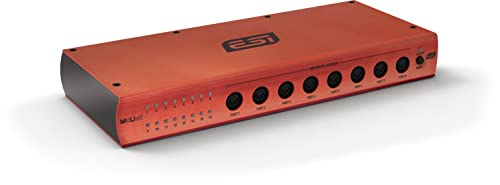 | ESI M8U eX | DIN MIDI: 16 auto-direction sockets USB role: USB computer link; 3-port data hub Routing: Standalone thru/merge modes Buyer fit: Many DIN instruments | Check Price on Amazon |
1. CME H4MIDI WC — Best USB Controller-to-DIN Bridge
CME’s H4MIDI WC is the smallest DIN route here. The manufacturer lists two physical five-pin MIDI inputs and two outputs, one USB-A host and one USB-C computer connection. A compatible USB-MIDI keyboard can talk directly to older DIN-equipped hardware without keeping a DAW open. The USB-A host can address more class-compliant devices through an optional USB hub, subject to the maker’s stated limit and power requirements.
Host and client are different roles. A USB-only controller usually expects to meet a host, while the USB-C client link connects this box to a computer. The company lists four virtual input/output ports over that computer connection. The virtual ports are not four extra physical DIN sockets. Check the controller’s USB-MIDI class compliance, because a device needing a proprietary driver may not work as a standalone host client.
The H4MIDI WC is a good bridge for a compact desk with a controller, one or two synths and pedals that accept MIDI. It is not the right shortcut when you have six DIN sound modules waiting for separate outputs. Compare your cabling plan with the ESI M4U eX before paying for host features you will not use. CME’s optional wireless expansion is separate, and the exact retail package should not be assumed to include it.
Our Take Pick H4MIDI WC when USB-only controllers must reach a couple of DIN instruments without a running computer. Count its two physical DIN inputs and two outputs, because virtual computer ports do not replace them.
- Two DIN inputs and two DIN outputs.
- Real USB-A host for class-compliant MIDI devices.
- Standalone and computer-connected routing paths.
- Limited physical DIN count for a growing rack.
- Extra host devices may need a suitable hub and power.
2. iConnectivity mioXM — Best Compact Network MIDI Hub
iConnectivity lists four DIN MIDI inputs and four DIN outputs for mioXM. It also offers USB-MIDI host reservations and Ethernet RTP-MIDI routing, with on-device presets for different setups. The mioXM is a more capable small hub than a plain fixed-direction USB-DIN box when some controllers are USB-only or when MIDI must reach another computer across a local network.
Read the host figure carefully. The maker’s “four USB-MIDI host ports” describes supported host routing slots or reservations, not four separate USB-A sockets on the chassis. You may need a powered hub to connect several USB devices physically. The connected controllers must be class compliant, and you still need to check the available power budget. Ethernet RTP-MIDI likewise requires compatible network setup. An Ethernet socket does not make ordinary DIN devices discover each other.
Plan a default route before the session. Decide which keyboard reaches which synth, which clock source leads, and what preset restores a known state. iConnectivity’s Auracle software configures deeper routing and filtering. If you want a simpler direction-flexible DIN-only desk, the ESI M4U eX needs no network setup. A studio monitor controller is for the audio listening side, not these MIDI routes.
Host reservations, virtual RTP sessions and physical DIN sockets are three different counts. Put each on a separate line in your port plan.Our Take Choose mioXM for a small synth desk that mixes DIN instruments, class-compliant USB controllers and networked MIDI. Its strength is routing flexibility, so budget time to configure and label it.
- Four fixed DIN inputs and four outputs.
- USB-MIDI host and RTP-MIDI routes.
- On-device routing presets.
- Network setup adds another configuration layer.
- USB-host slot count is not a physical socket count.
3. ESI M4U eX — Best Flexible Eight-Port DIN Desk
ESI describes the M4U eX as an eight-port DIN MIDI interface with automatic input/output detection. Each of its eight DIN sockets can be used as an input or output, rather than being permanently locked to a four-in/four-out split. A desk with six sound modules and two controllers can use a different direction mix from one with four of each. LEDs show the detected role, so confirm them after moving cables.
The unit also has standalone thru and merge modes selected from the front panel. Those modes make a simple computer-free keyboard-to-module route possible when the mode fits your wiring. ESI says the included DC supply is required for standalone operation. Its integrated three-port USB 3.0 hub is for passing USB equipment to a computer. ESI specifically says the hub is unavailable in standalone mode. Do not mistake this data hub for a USB-MIDI host that can independently translate a USB-only keyboard to DIN.
For a mostly five-pin desk, flexible directions are the point. If you need USB-only controllers without a computer, choose a true host such as the CME H4MIDI WC or mioXM. If your instruments’ audio is also going into a laptop, a separate recording interface still has to capture it.
Our Take Pick M4U eX for a DIN-heavy desk whose input/output balance may change. It is flexible without network routing, provided you do not need standalone USB-controller hosting.
- Eight DIN sockets can auto-select direction.
- Standalone DIN thru and merge modes.
- Port LEDs help trace cable changes.
- USB hub is not a standalone MIDI host.
- Standalone mode needs its DC supply.
4. iConnectivity mioXL — Best Large Networked MIDI Hub
The mioXL is the largest mixed-protocol router here. iConnectivity lists eight DIN inputs, twelve DIN outputs, ten USB-MIDI host reservations and Ethernet RTP-MIDI. Fixed DIN direction counts make it a different proposition from the 16 auto-direction sockets on the ESI M8U eX. It suits a room with many sound modules, a set of USB controllers and perhaps MIDI traffic to another computer.
Extra capacity helps only when the room’s connection map calls for it. A keyboard connected to DIN IN 1 will not reach every output by virtue of the box size, so configure destinations, filters and clock behavior deliberately. The front display and saved presets help recall different layouts. The maker’s network and USB-host figures refer to routable endpoints, not an equal number of physical ports you can see on one panel.
Draw the physical and virtual paths separately, then label both ends of every cable. For a small desk with only a few DIN devices, mioXM has the more proportionate set of connections. A network MIDI route does not carry synth audio. Use an audio interface for recorded sound, and desktop speakers only for the eventual listening chain.
Large port numbers do not excuse a missing route map. Test clock and note messages on every destination before a recording pass.Our Take Buy mioXL when a large desk needs fixed DIN directions, class-compliant USB-host devices and network MIDI in one router. For five DIN boxes, its scale and setup may be unnecessary.
- Eight fixed DIN inputs and twelve outputs listed.
- USB-MIDI host and Ethernet RTP-MIDI routing.
- Display and presets for repeatable layouts.
- Overbuilt for a compact DIN-only desk.
- Advanced routing requires deliberate configuration.
5. ESI M8U eX — Best Sixteen-Socket DIN Expansion
ESI lists sixteen DIN sockets with automatic input/output detection on the M8U eX. The sockets can be divided to fit the desk’s direction needs, such as four sources feeding twelve destinations. Sixteen sockets are not the same as sixteen inputs and sixteen outputs simultaneously. The fixed 8-in/12-out layout of mioXL is a better comparison than its headline total alone.
Like the smaller M4U eX, this unit offers standalone DIN thru and merge modes, and ESI requires the supplied DC adapter when there is no computer. Its three-port USB 3.0 hub serves computer-connected USB equipment. The maker says the hub cannot be used in standalone mode, so do not buy this model to host a USB-only controller in a computer-free setup.
Sixteen physical DIN sockets give a larger hardware rack room to grow without adding several little interfaces. That advantage comes with more cabling and more chances to confuse MIDI IN with OUT. Mark clock source, keyboard transmit channels and destination receive channels before blaming a silent device on the interface. Timing performance was not measured. ESI’s published socket and mode information is the basis for this buyer fit.
Our Take Choose M8U eX when physical DIN count, not networking or USB hosting, is the limit. It offers plenty of sockets, but you still need a planned I/O map to know whether they are enough.
- Sixteen direction-flexible DIN sockets.
- Standalone DIN thru and merge modes.
- Computer connection and integrated USB data hub.
- No standalone USB-MIDI host function stated.
- Large cable count needs careful labels.
Buying Guide
1. Count physical MIDI inputs and outputs separately
MIDI OUT sends, and MIDI IN receives. Make a device list and draw an arrow for each intended conversation. A keyboard output connected to an interface input consumes one incoming route. A separate cable from the interface to a synth consumes one output. Devices that both send and receive may need two cables.
Auto-direction sockets are a shared pool. ESI’s eight- and sixteen-socket boxes can divide that pool differently as the desk changes. Fixed-direction boxes give you a published number of inputs and outputs. Neither virtual computer ports nor network sessions should be counted as extra five-pin sockets.
2. Decide whether USB devices need a real host
A USB-MIDI controller may need a host even if it needs no DAW. A computer can be that host, or a dedicated unit such as the CME H4MIDI WC. Confirm that the controller is USB-MIDI class compliant before assuming it will work without a vendor driver.
A USB data hub is different. The ESI hubs pass USB equipment to a computer and do not provide the standalone bridging described for the CME and iConnectivity devices. A hub may also need its own power supply for multiple devices. If your setup includes long cables, review USB cable testing for connection faults, but MIDI routing still has to be configured separately.
3. Plan clock, filtering and standalone behavior
Choose one clock leader. Two sequencers both sending timing messages can cause a confusing session even when every cable is seated. Mark which interface route forwards clock, which synths receive it and whether a preset changes those paths.
Test the computer-off case if you will use it. ESI states its fixed standalone thru and merge modes require DC power and leave its USB hub unavailable. iConnectivity and CME offer broader route configuration, but saved presets and external power are part of the plan. Try the exact keyboard-to-synth path before relying on it in a live take.
4. Keep MIDI and audio workflows distinct
MIDI is instruction data, not the synth’s sound. A DIN or USB-MIDI connection can tell an instrument which note to play, but recording that instrument’s output needs audio inputs. Compare the number of audio sources with the interface’s routing options separately.
A tidy desk has two maps. One shows MIDI controllers, clock and destinations. The other shows audio from synths to the recording interface and monitor-controller or speakers. Keeping them separate makes a silent instrument easier to diagnose.
FAQ
Does an eight-port MIDI interface mean eight inputs and eight outputs?
No. On the ESI M4U eX, eight means eight physical DIN sockets total, each of which can detect an input or output role. A four-in/four-out interface has eight fixed-direction sockets, but cannot reassign all of them to outputs.
Read the manufacturer’s exact direction wording before comparing totals. Virtual USB computer ports and RTP-MIDI sessions are another category again. They do not increase the number of cables you can plug into the five-pin DIN panel.
Can a USB hub replace a USB-MIDI host?
No. A conventional USB data hub adds sockets for a host computer. It does not itself become the host that a USB-only MIDI controller expects. ESI states the integrated hubs on its eX interfaces are unavailable in standalone mode.
A product with an explicit USB-MIDI host role, such as CME H4MIDI WC or iConnectivity mioXM, is the relevant category. Confirm class compliance and power before adding a passive hub to a host port.
Do I need network MIDI on a single desk?
Usually not. One computer and a handful of DIN synths can often use a straightforward USB-DIN interface. Network MIDI becomes useful when another computer, remote room or routable endpoint is part of the workflow.
Network capability adds setup too. You address the connection, assign routes, save a known preset and test after changes. If none of those jobs is on your desk, choose by physical DIN count and USB-host need first.
Bottom Line
For USB-only controllers talking to a couple of DIN synths, start with CME H4MIDI WC. A mixed small desk can justify mioXM. Choose M4U eX or M8U eX when flexible DIN direction counts are your main concern. mioXL is for a room that will use its fixed DIN, USB-host and network reach.