A monitor controller sits between your audio source and powered speakers, giving you a physical way to set level and switch what you hear. Count the speaker pairs and sources before choosing the knob. A simple passive two-pair switch is enough for one main pair and one reference pair. A three-pair room with cue headphones, talkback and a sub needs a different desk.
These five exact Amazon US controllers had active New offers on September 29, 2026. They cover two compact passive choices and three more elaborate stations. No audio transparency, channel matching, noise or headphone quality was measured by us. Check the actual input/output connectors and levels on your interface and speakers before ordering cables.
A good controller makes reference changes fast without changing the signal path by accident. Draw the sources, speaker pairs and cue feeds first.Studio Monitor Controllers Compared
| Image | Product | Details | Check Price |
|---|---|---|---|
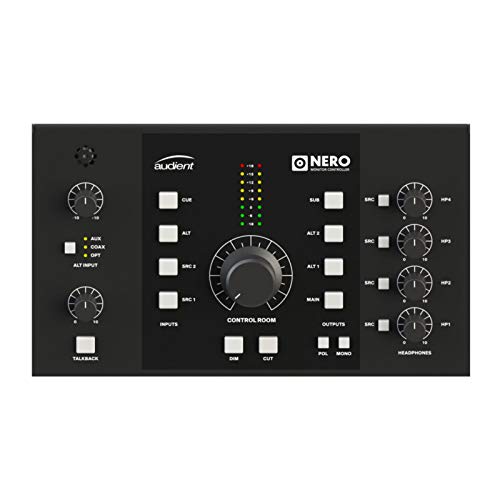 | Audient Nero | Speaker pairs: 3 stereo; sub assignable Sources: 4 stereo analog listed Extras: 4 headphone paths, talkback input Buyer fit: Three-pair matching hub | Check Price on Amazon |
 | PreSonus Monitor Station V2 | Speaker pairs: 3 stereo with level controls Sources: Main/cue selection; S/PDIF listed Extras: 4 headphone amps, dim/mono Buyer fit: Three-pair cue desk | Check Price on Amazon |
 | Mackie Big Knob Passive | Speaker pairs: 2 Sources: 2 Extras: Passive; large level knob Buyer fit: Simple two-pair switch | Check Price on Amazon |
 | ESI MoCo | Speaker pairs: 2 stereo outputs listed Sources: 2 stereo inputs listed Extras: Passive; mono/mute/L-R flip Buyer fit: Compact connector variety | Check Price on Amazon |
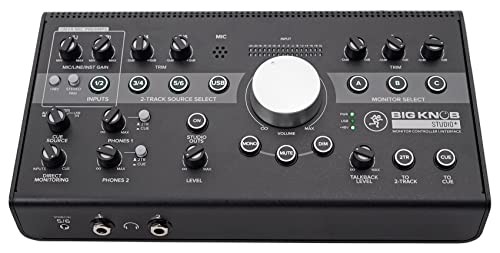 | Mackie Big Knob Studio Plus | Speaker pairs: 3 with trims Sources: 4 stereo listed Extras: USB recording interface, talkback Buyer fit: Three-pair plus interface | Check Price on Amazon |
1. Audient Nero — Best Detailed Three-Pair Control
Audient’s Nero is a desktop control center for a room with more than two reference speakers. Audient’s page and the exact listing describe three stereo speaker outputs, an assignable sub output, four headphone paths and multiple analogue sources. Independent speaker-level matching helps when you compare mixes. If one pair is louder, it can sound better just because of level. Nero also lists mono, dim, cut and polarity controls.
This much routing adds setup work. Label every source, decide how the sub should follow the speaker pairs and level-match the speakers at your listening position. The listing mentions an external talkback input, but a talkback microphone and its cabling may be another purchase. Do not assume four headphone sockets mean four fully independent cue mixes. Check the routing you need before a recording session.
Nero fits a room that genuinely uses its third pair and cue options. If you only compare two powered pairs, Mackie Big Knob Passive keeps the path simpler. A desktop-speaker guide can help choose the speakers. The controller’s job is to switch and set level, not correct a poor speaker placement.
Our Take Choose Nero when three speaker pairs and several listening paths are already part of your room. Set and verify the trims carefully. Extra buttons are not a substitute for level matching.
- Three speaker pairs with independent matching route.
- Four headphone outputs and cue options listed.
- Assignable sub and monitor checks.
- More setup than a two-pair passive switch.
- External talkback hardware may be separate.
2. PreSonus Monitor Station V2 — Best Three-Pair Cue Desk
Monitor Station V2 is another three-speaker-pair desktop controller, with individual output levels, main and cue source selection, and four headphone amplifiers. PreSonus’s page and the exact listing also describe mute, mono and dim controls. That layout suits a small recording room where the person at the desk must switch references and send performers a cue path from the same controller.
Check what each knob actually controls. PreSonus says the large main knob adjusts the speaker outputs but not every main line-level output. A cue output is not automatically a separate musician mix created inside the unit. It carries the source path you select. If you need several independently tailored headphone mixes, the audio interface or a dedicated distributor must supply them.
The Monitor Station V2 earns its desk space when those cue controls are useful. Compared with Audient Nero, choose by exact source and headphone routing, connector fit and how the sub is handled. Neither device automatically calibrates your listening room. A closed-back tracking headphone addresses performer isolation, not speaker switching.
Our Take Choose Monitor Station V2 for a three-pair desk that also handles cue listening. Map main and cue paths before wiring it, especially if performers need separate mixes.
- Three speaker pairs with individual levels.
- Main/cue controls and four headphone amplifiers.
- Mono, mute and variable dim listed.
- Routing takes a deliberate setup pass.
- Main knob does not control every line-level output.
3. Mackie Big Knob Passive — Best Simple Two-Pair Switch
Big Knob Passive does one job clearly. It lets you choose between two stereo sources and two monitor pairs, then set speaker level with a large knob. Mackie’s Big Knob family page and the exact listing identify the passive 2×2 model. It is useful when an existing interface already handles recording and headphones, but you want an easy way to compare your main speakers with a second reference pair.
Passive does not mean every setup behaves identically. Confirm output level, balanced cable needs and the input impedance of your powered speakers. The device cannot add a third pair, USB recording or cue mixes. Also do not confuse this model with Big Knob Studio Plus, which is a different powered controller/interface. If you only need two pairs, that larger unit may be unnecessary.
A simple switching path can make comparisons more frequent, but keep both pairs at a sensible matched loudness. Otherwise a louder speaker may win every A/B test. For a small studio headphone, remember that headphone monitoring bypasses the room. It is a separate reference, not another speaker output on this passive box.
Two sources and two speaker pairs are the key limit. Big Knob Passive is not the three-pair Studio Plus or a USB interface.Our Take Pick Big Knob Passive for a straightforward two-pair desktop system with an interface you already like. It keeps routing easy to see and avoids paying for cue functions you will not use.
- Simple two-source, two-pair switching.
- Passive path needs no recording interface replacement.
- Large physical level control.
- No third speaker pair.
- No built-in USB interface or complex cue routing.
4. ESI MoCo — Best Compact Connector Mix
ESI MoCo is a compact passive controller with two stereo inputs and two stereo outputs, plus mono, mute and left/right reversal controls in its exact listing. The connector mix is the main reason to consider it. The seller names TRS and RCA or mini-jack input options and XLR, TRS or mini-jack output options. The connector options can suit a desk that must switch between an audio interface and another everyday source without a larger hub.
Connector shapes alone do not guarantee a balanced end-to-end signal. Check which actual sockets and cable wiring you will use, especially when mixing consumer unbalanced outputs with studio monitor inputs. The passive unit does not become a headphone amplifier or talkback box. Verify that both outputs suit the powered speakers you own and that switching does not create an unexpected level jump.
MoCo differs from Mackie Big Knob Passive mainly in its listed connector and control options, not a proven sound-quality advantage. If your desk already uses matching TRS cables, Mackie’s simple layout may be enough. If you often compare a laptop playback source with an interface, the extra connector forms can be practical.
Our Take Choose MoCo when its exact sockets solve a small two-pair desk. Draw the cable path first so you do not buy it for a connector shape that still needs another adapter or level change.
- Compact passive two-input, two-output design.
- Several listed connector forms.
- Mono, mute and channel-flip controls.
- Two-pair ceiling remains.
- Mixed connectors require careful level and cable matching.
5. Mackie Big Knob Studio Plus — Best Controller-and-Interface Combination
Big Knob Studio Plus combines four stereo sources, three monitor pairs and a USB recording interface in the exact listing. Mackie also describes independent trims on monitor outputs, mic preamps and a talkback path in this family. The Studio Plus is a different purchase from the passive 2×2 Big Knob. It can replace part of a small recording interface setup while switching between several speaker pairs.
That integration is useful only if its audio-interface features fit your recording workflow. If you already have an interface whose drivers and routing work well, adding a second USB interface can create more complexity than value. Check the exact computer connection, input needs, headphone routing and speaker trims. Do not assume a 192kHz maximum figure tells you anything about audible improvement in your room.
For a new desk with several sources, the combined device can reduce boxes. For a mature setup, Audient Nero or PreSonus Monitor Station V2 may keep your current interface in place. A USB-C microphone does not need these mic preamps. Choose the interface function only when it actually serves your signal chain.
Do not confuse Big Knob Studio Plus with Big Knob Passive. The Studio Plus has a USB interface and three monitor pairs. The passive unit is a two-pair switch.Our Take Studio Plus fits someone building a desk from scratch who wants speaker switching and a USB interface in one unit. If your existing interface is settled, check whether its extra recording functions would simply duplicate gear.
- Three monitor pairs with trim controls.
- USB recording interface and talkback path.
- Four stereo source route in the exact listing.
- Duplicates an existing interface for some buyers.
- More routing and software setup than a passive switch.
Buying Guide
1. Count speaker pairs and source paths
Two and three speaker pairs are different purchase classes. A main nearfield pair plus a small reference pair fits Mackie Big Knob Passive or ESI MoCo. A third pair, or separately assignable sub monitoring, points toward a bigger controller. Write every source and destination on paper before comparing models. Include a laptop source, audio interface and any hardware playback machine you use.
Do not count a headphone socket as another speaker pair. Headphone cue paths have different routing and level needs. Nero and Monitor Station V2 offer several headphone outputs, but the upstream interface and controller routing decide what those listeners hear. Check the exact mix plan, especially if you record two performers with different cue requests.
2. Match levels before comparing speakers
A louder reference can fool a comparison. Use the controller’s trims where provided, or adjust speaker input levels, to bring pairs close at your listening position. PreSonus, Audient and Mackie Studio Plus offer more individual output control than the smallest passive switchers. Do not turn a level match into an unmeasured claim of calibration. Use a repeatable test signal and document the setting.
Keep a safe master level. A large knob is useful because it is immediate, not because it changes speaker quality. Start with a low level after changing sources. Dim and mute controls help when taking a call or checking a mix quietly. A measurement microphone can later help with room work, but it does not replace correct wiring or level matching.
3. Check connectors and passive versus powered design
Verify each actual socket at both ends. TRS, XLR, RCA and mini-jack routes have different wiring and nominal levels. ESI MoCo offers several formats. Mackie Big Knob Passive is simpler. Choose proper cables rather than building an unstable tower of adapters. An active controller may need its own power and can add features that a passive box cannot.
Passive is not automatically better or worse. It avoids an additional power supply for a simple switch, but it cannot create headphone amplification, talkback or an interface. Powered stations add those functions with more routing and setup. Make the choice by speaker count, cue needs and connector fit. We have not measured noise or transparency for these models.
4. Decide whether to replace the audio interface
Big Knob Studio Plus includes USB recording functions. The USB recording functions can be useful for a new workstation, but may duplicate an existing interface with stable drivers and established I/O. Nero and Monitor Station V2 are monitor-control routes that can sit after an interface. Keep your current signal path in mind before swapping multiple parts at once.
Test the complete listening workflow. Play a familiar mix through each source and speaker pair, check mono, dim and mute, then confirm what headphones receive. A standalone-routing audio interface can supply a signal even when the computer is not managing every route. The monitor controller still needs to be wired to that output.
FAQ
Do I need a monitor controller if my interface has a volume knob?
Not necessarily. If you use one speaker pair and one source, the interface knob may be enough. A controller earns its place when you need quick speaker-pair or source switching, mono/dim checks, talkback or a separate cue path.
List the actual tasks that interrupt your work today. If changing between two pairs means reconnecting cables or opening software every time, a passive two-pair controller may be a useful small upgrade without replacing the interface.
Can one controller feed two pairs of powered speakers at once?
The chosen models can route to two or three pairs, but whether outputs are selectable or can play simultaneously depends on the controller and how it is set. Do not infer that every speaker button behaves the same way or that playing all pairs is a good mixing reference.
Check the manual for the exact model, wire the monitors at low level and match pair volumes before switching. If you also use a subwoofer, confirm how it follows the selected pair rather than assuming a dedicated sub output is present.
Is Big Knob Passive the same as Big Knob Studio Plus?
No. Big Knob Passive is the simpler 2×2 source and monitor switch. The Studio Plus listing names four stereo sources, three speaker pairs and USB recording features. They belong to the same product family but solve different desk sizes.
Buy by the exact model name and listing. A similar-looking large knob does not imply the same connectors, speaker count, headphone path or computer driver needs.
Bottom Line
Choose Mackie Big Knob Passive for a straightforward two-pair desk, PreSonus Monitor Station V2 when you need three pairs and cue control, or Audient Nero for a more detailed multi-output hub. ESI MoCo suits mixed connectors in a small passive setup. Big Knob Studio Plus is the interface-and-controller route. Start with the signal map, then pick the knob.